suspension LINCOLN MKZ 2016 Owners Manual
[x] Cancel search | Manufacturer: LINCOLN, Model Year: 2016, Model line: MKZ, Model: LINCOLN MKZ 2016Pages: 544, PDF Size: 5.77 MB
Page 188 of 544
Driving on Snow and Ice
WARNING
If you are driving in slippery conditions
that require tire chains or cables, then
it is critical that you drive cautiously. Keep
speeds down, allow for longer stopping
distances and avoid aggressive steering to
reduce the chances of a loss of vehicle
control which can lead to serious injury or
death. If the rear end of the vehicle slides
while cornering, steer in the direction of the
slide until you regain control of the vehicle.
Note: Excessive tire slippage can cause
driveline damage.
AWD vehicles have advantages over 2WD
vehicles in snow and ice but can skid like
any other vehicle.
Should you start to slide while driving on
snowy or icy roads, turn the steering wheel
in the direction of the slide until you regain
control. Avoid sudden applications of power and
quick changes of direction on snow and ice.
Apply the accelerator slowly and steadily
when starting from a full stop.
Avoid sudden braking as well. Although an
AWD vehicle may accelerate better than a
two-wheel drive vehicle in snow and ice, it
won’t stop any faster, because as in other
vehicles, braking occurs at all four wheels.
Do not become overconfident as to road
conditions.
Make sure you allow sufficient distance
between you and other vehicles for stopping.
Drive slower than usual and consider using
one of the lower gears. In emergency
stopping situations, apply the brake steadily.
Since your vehicle is equipped with a four
wheel (ABS), do not “pump” the brakes. See
Hints on Driving With Anti-Lock Brakes
(page 187). for more information on the
operation of the anti-lock brake system
(ABS).
Maintenance and Modifications
The suspension and steering systems on
your vehicle are designed and tested to
provide predictable performance whether
loaded or empty and durable load carrying
capability. For this reason, Lincoln Motor
Company strongly recommends that you do
not make modifications such as adding or
removing parts (such as lowering kits or
stabilizer bars) or by using replacement parts
not equivalent to the original factory
equipment.
Any modifications to a vehicle that raise the
center of gravity can make it more likely the
vehicle will rollover as a result of a loss of
control. Lincoln Motor Company
recommends that you use caution with any
vehicle equipped with a high load or device
(such as ladder or luggage racks).
185
All-Wheel Drive (If Equipped)
Page 197 of 544
PRINCIPLE OF OPERATION
WARNINGS
Vehicle modifications involving braking
system, aftermarket roof racks,
suspension, steering system, tire
construction and wheel and tire size may
change the handling characteristics of the
vehicle and may adversely affect the
performance of the AdvanceTrac system. In
addition, installing any stereo loudspeakers
may interfere with and adversely affect the
AdvanceTrac system. Install any aftermarket
stereo loudspeaker as far as possible from
the front center console, the tunnel, and the
front seats in order to minimize the risk of
interfering with the AdvanceTrac sensors.
Reducing the effectiveness of the
AdvanceTrac system could lead to an
increased risk of loss of vehicle control,
vehicle rollover, personal injury and death.
Remember that even advanced
technology cannot defy the laws of
physics. It’s always possible to lose control
of a vehicle due to inappropriate driver input
for the conditions. Aggressive driving on any
road condition can cause you to lose control
WARNINGS
of your vehicle increasing the risk of personal
injury or property damage. Activation of the
AdvanceTrac system is an indication that at
least some of the tires have exceeded their
ability to grip the road; this could reduce the
operator’s ability to control the vehicle
potentially resulting in a loss of vehicle
control, vehicle rollover, personal injury and
death. If your AdvanceTrac system activates,
SLOW DOWN.
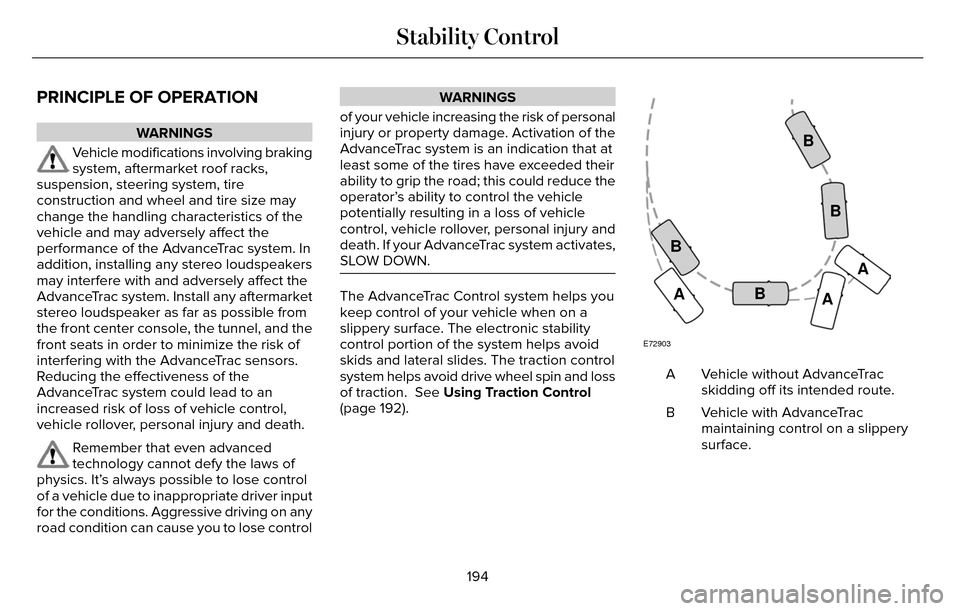
The AdvanceTrac Control system helps you
keep control of your vehicle when on a
slippery surface. The electronic stability
control portion of the system helps avoid
skids and lateral slides. The traction control
system helps avoid drive wheel spin and loss
of traction. See Using Traction Control
(page 192).
E72903
A AA
B
BB
B
Vehicle without AdvanceTrac
skidding off its intended route.
A
Vehicle with AdvanceTrac
maintaining control on a slippery
surface.
B
194
Stability Control
Page 222 of 544
 when I can s\
ee the lane markings on the road?
Camera blockage due to dirt, grime, fog, frost or water on the windshield
Driving too close to")
Why is the feature not available (line markings are gray) when I can s\
ee the lane markings on the road?
Camera blockage due to dirt, grime, fog, frost or water on the windshield
Driving too close to the vehicle in front of you
Transitioning between no lane markings to lane markings or vice versa
Standing water on the road
Faint lane markings (partial yellow lane markings on concrete roads)
Lane width too narrow or too wide
Camera not calibrated after a windshield replacement
Driving on tight roads or on uneven roads
Why does the vehicle not come back toward the middle of the lane, as exp\
ected, in the Aid or Aid + Alert mode?
High cross winds
Large road crown
Rough roads, grooves, shoulder drop-offs
Heavy uneven loading of the vehicle or improper tire inflation pressure
If the tires have been exchanged (including snow tires), or the suspension has been modified219
Driving Aids
Page 229 of 544
Extreme continuous steering may increase
the effort required for you to steer your
vehicle. This increased effort prevents
overheating and permanent damage to the
steering system. You do not lose the ability
to steer your vehicle manually. Typical
steering and driving maneuvers allow the
system to cool and return to normal
operation.
Steering Tips
If the steering wanders or pulls, check for:
• Correct tire pressures.
• Uneven tire wear.
• Loose or worn suspension components.
• Loose or worn steering components.
• Improper vehicle alignment.
Note:A high crown in the road or high
crosswinds may also make the steering
seem to wander or pull. Adaptive Learning
The electronic power steering system
adaptive learning helps correct road
irregularities and improves overall handling
and steering feel. It communicates with the
brake system to help operate advanced
stability control and accident avoidance
systems. Additionally, whenever the battery
is disconnected or a new battery installed,
you must drive your vehicle a short distance
before the system relearns the strategy and
reactivates all systems.
PRE-COLLISION ASSIST
WARNINGS
This system is an extra driving aid. It
does not replace your attention and
judgment, or the need to apply the brakes.
This system does NOT automatically brake
your vehicle. If you fail to press the brake
pedal when necessary, you may collide with
another vehicle.
WARNINGS
The Pre-Collision Assist system with
brake support cannot help prevent all
collisions. Do not rely on this system to
replace your judgment and the need to
maintain correct distance and speed.
Note: The system does not detect, warn or
respond to potential collisions with vehicles
to the rear or sides of your vehicle.
Note: The Pre-Collision Assist system is
active at speeds above approximately
5.0 mph (8 km/h).
E156130
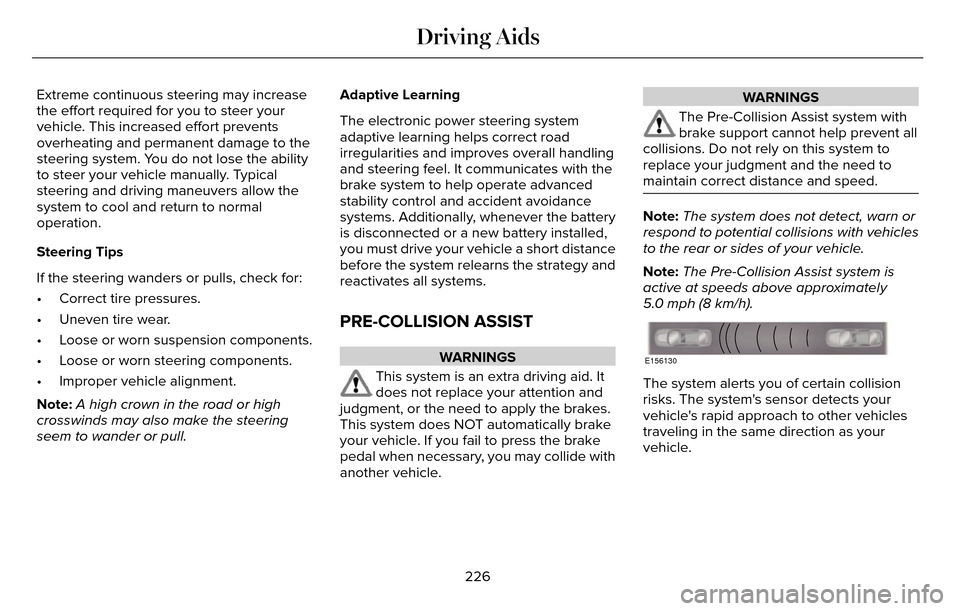
The system alerts you of certain collision
risks. The system's sensor detects your
vehicle's rapid approach to other vehicles
traveling in the same direction as your
vehicle.
226
Driving Aids
Page 232 of 544
DRIVE CONTROL
LINCOLN DRIVE CONTROL
Lincoln Drive Control delivers the Lincoln
driving experience through a suite of
sophisticated electronic vehicle systems.
These systems continuously monitor your
driving inputs and the road conditions to
optimize ride comfort, steering, handling,
powertrain response and sound. You can
preset your preferences for these systems
within the information display. Lincoln Drive
Control will respond to your preferences
based on what gear position you select. This
provides a single location to control multiple
systems performance settings.Lincoln Drive Control consists of the
following systems:
• Continuously controlled damping
dynamically adjusts the shock absorbers
stiffness in real time to match the road
surface and driver inputs. This system
continuously monitors your vehicle’s
motion (roll, pitch, bounce), suspension
position, load, speed, road conditions,
and steering to adjust the suspension
damping for optimal vehicle control.
• Electronically power-assisted steering adjusts steering effort and feel based on
your vehicle speed and your inputs.
• Active noise control utilizes your vehicle electronics to enhance the acoustic
experience.
• Electronic stability control and traction control maintain your vehicle control in
adverse conditions or high performance
driving.
• Electronic throttle control enhances the powertrain response to your inputs. Using Lincoln Drive Control
You can configure which of the Drive Control
modes are active when your vehicle is in
drive (D) or in Sport (S). The configuration
remains active until modified from the main
menu on the information display.
229
Driving Aids
Page 233 of 544
These systems have a range of modes which
you can choose from in order to customize
your ideal driving experience:
• Comfort – Provides a more relaxeddriving experience, maximizing comfort.
Your steering effort decreases and the
suspension movement is more fluid.
Comfort mode is ideal when you desire
enhanced traveling comfort.
• Normal – Delivers a balanced combination of comfortable, controlled
ride and confident handling. This mode
provides an engaging drive experience
and a direct connection to the road
without sacrificing any of the composure
demanded from a luxury vehicle.
• Sport – Provides a sportier driving experience. The suspension stiffens, with
an emphasis on handling and control.
The engine responds more directly to
your inputs and takes on a more powerful
tone. Sport mode is ideal for use during
more spirited driving. You can change your vehicle’s Drive
Control settings from the main menu on
the information display:
Settings
Drive Control
Vehicle
Note: Not all settings may be available.
Note: Lincoln Drive Control has diagnostic
checks that continuously monitor the system
to ensure proper operation. Certain types of
system errors will gray out the mode
selections within the information display,
preventing you from changing states when
the gear position is changed. Other types of
errors will produce a temporary message
that states Drive Control Malfunction. If either
condition persists for multiple key cycles,
have your vehicle checked by an authorized
dealer.
230
Driving Aids
Page 243 of 544
TOWING A TRAILER
WARNINGS
Do not exceed the GVWR or the
GAWR specified on the certification
label.
Towing trailers beyond the
maximum recommended gross
trailer weight exceeds the limit of your
vehicle and could result in engine
damage, transmission damage,
structural damage, loss of vehicle
control, vehicle rollover and personal
injury.
Note: There may be electrical items
such as fuses or relays that can affect
trailer towing operation. See Fuses
(page 263). The load capacity of your vehicle is
designated by weight not volume. You
may not necessarily be able to use all
available space when loading your
vehicle or trailer.
Towing a trailer places extra load on the
engine, transmission, axle, brakes, tires,
and suspension. Inspect these
components before, during and after
towing.
Load Placement
To help minimize how trailer movement
affects the vehicle when driving:
• Load the heaviest items closest to
the trailer floor.
• Load the heaviest items in the center of the left and right side trailer tires. • Load the heaviest items above the
trailer axles or just slightly forward
toward the trailer tongue. Do not
allow the final trailer tongue weight
to go above or below 10-15% of the
loaded trailer weight.
• Select a tow bar with the correct rise or drop. When both the loaded
vehicle and trailer are connected, the
trailer frame should be level, or
slightly angled down toward the
vehicle, when viewed from the side.
When driving with a trailer or payload, a
slight takeoff vibration or shudder may
be present due to the increased payload
weight. Additional information regarding
proper trailer loading and setting your
vehicle up for towing is located in the
Load Carrying chapter. See Load Limit
(page 231).
You can also find information in the RV
& Trailer Towing Guide available at your
authorized dealer, or online.
240
Towing
Page 282 of 544
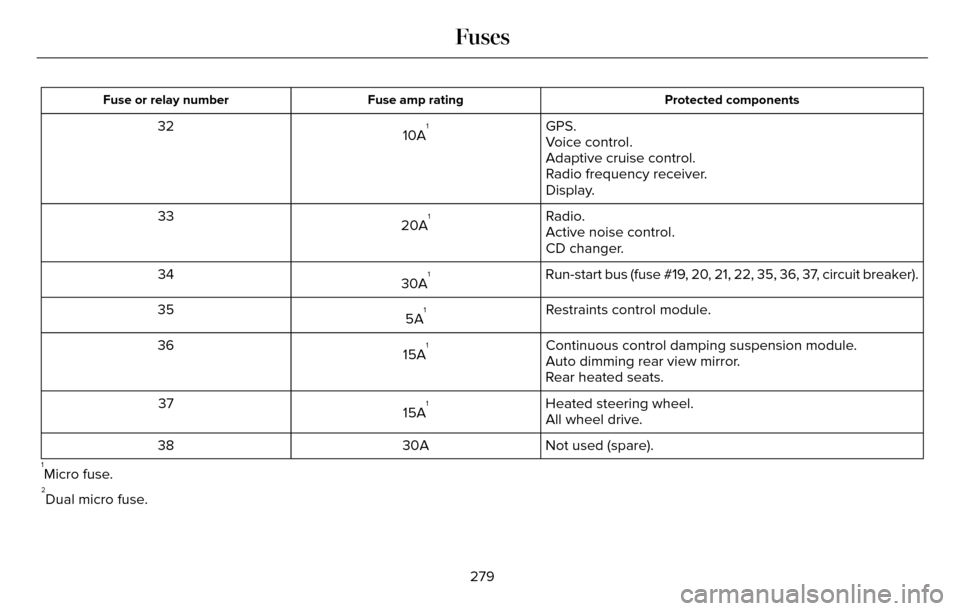
Protected components
Fuse amp rating
Fuse or relay number
GPS.
10A132
Voice control.
Adaptive cruise control.
Radio frequency receiver.
Display.
Radio.
20A
133
Active noise control.
CD changer.
Run-start bus (fuse #19, 20, 21, 22, 35, 36, 37, circuit breaker).
30A
134
Restraints control module.
5A
135
Continuous control damping suspension module.
15A
136
Auto dimming rear view mirror.
Rear heated seats.
Heated steering wheel.
15A
137
All wheel drive.
Not used (spare).
30A
38
1Micro fuse.2Dual micro fuse.
279
Fuses
Page 341 of 544
U.S. DOT Tire Identification Number
Both U.S. and Canada Federal
regulations require tire manufacturers
to place standardized information on the
sidewall of all tires. This information
identifies and describes the fundamental
characteristics of the tire and also
provides a U.S. DOT Tire Identification
Number for safety standard certification
and in case of a recall.
This begins with the letters DOT and
indicates that the tire meets all federal
standards. The next two numbers or
letters are the plant code designating
where it was manufactured, the next two
are the tire size code and the last four
numbers represent the week and year
the tire was built. For example, the
numbers 317 mean the 31st week of
1997. After 2000 the numbers go to four
digits. For example, 2501 means the
25th week of 2001. The numbers in
between are identification codes used
for traceability. This information is used
to contact customers if a tire defect
requires a recall.Tire Replacement Requirements
Your vehicle is equipped with tires
designed to provide a safe ride and
handling capability.
WARNINGS
Only use replacement tires and
wheels that are the same size, load
index, speed rating and type (such as
P-metric versus LT-metric or all-season
versus all-terrain) as those originally
provided by Ford. The recommended
tire and wheel size may be found on
either the Safety Compliance
Certification Label (affixed to either the
door hinge pillar, door-latch post, or the
door edge that meets the door-latch
post, next to the driver's seating
position), or the Tire Label which is
located on the B-Pillar or edge of the
driver’s door. If this information is not
found on these labels then you should
contact your authorized dealer as soon
as possible. Use of any tire or wheel not
recommended by Ford can affect the
safety and performance of your vehicle,
which could result in an increased risk
WARNINGS
of loss of vehicle control, vehicle
rollover, personal injury and death.
Additionally the use of
non-recommended tires and wheels
could cause steering, suspension, axle,
transfer case or power transfer unit
failure. If you have questions regarding
tire replacement, contact your
authorized dealer as soon as possible.
To reduce the risk of serious injury,
when mounting replacement tires
and wheels, you should not exceed the
maximum pressure indicated on the
sidewall of the tire to set the beads
without additional precautions listed
below. If the beads do not seat at the
maximum pressure indicated,
re-lubricate and try again
When inflating the tire for mounting
pressures up to 20 psi (1.38 bar) greater
than the maximum pressure on the tire
sidewall, the following precautions must
be taken to protect the person mounting
the tire:
338
Wheels and Tires
Page 343 of 544
Highway Hazards
No matter how carefully you drive there
is always the possibility that you may
eventually have a flat tire on the
highway. Drive slowly to the closest safe
area out of traffic. This may further
damage the flat tire, but your safety is
more important.
If you feel a sudden vibration or ride
disturbance while driving, or you suspect
your tire or vehicle has been damaged,
immediately reduce your speed. Drive
with caution until you can safely pull off
the road. Stop and inspect the tires for
damage. If a tire is under-inflated or
damaged, deflate it, remove the wheel
and replace it with your spare tire and
wheel (if provided). If you cannot detect
a cause, have the vehicle towed to the
nearest repair facility or tire dealer to
have the vehicle inspected.Tire and Wheel Alignment
A bad jolt from hitting a curb or pothole
can cause the front end of your vehicle
to become misaligned or cause damage
to your tires. If your vehicle seems to
pull to one side when you’re driving, the
wheels may be out of alignment. Have
an authorized dealer check the wheel
alignment periodically.
Wheel misalignment in the front or the
rear can cause uneven and rapid
treadwear of your tires and should be
corrected by an authorized dealer.
Front-wheel drive vehicles and those
with an independent rear suspension (if
equipped) may require alignment of all
four wheels.
The tires should also be balanced
periodically. An unbalanced tire and
wheel assembly may result in irregular
tire wear.Tire Rotation
Note:
If your tires show uneven wear
ask an authorized dealer to check for
and correct any wheel misalignment,
tire imbalance or mechanical problem
involved before tire rotation.
Note: Your vehicle may be equipped
with a dissimilar spare wheel and tire
assembly. A dissimilar spare wheel and
tire assembly is defined as a spare
wheel and tire assembly that is different
in brand, size or appearance from the
road tires and wheels. If you have a
dissimilar spare wheel and tire assembly
it is intended for temporary use only and
should not be used in a tire rotation.
Note: After having your tires rotated,
inflation pressure must be checked and
adjusted to the vehicle requirements.
Rotating your tires at the recommended
interval (as indicated in the Scheduled
Maintenance chapter) will help your tires
wear more evenly, providing better tire
performance and longer tire life.
340
Wheels and Tires