brake LINCOLN MKZ 2017 User Guide
[x] Cancel search | Manufacturer: LINCOLN, Model Year: 2017, Model line: MKZ, Model: LINCOLN MKZ 2017Pages: 564, PDF Size: 5.54 MB
Page 106 of 564
Variations:
Note:
The low fuel reminder can appear at
different fuel gauge positions depending on
fuel economy conditions. This variation is
normal.
Engine Coolant Temperature Gauge
Indicates engine coolant temperature. At
normal operating temperature, the level
indicator will be in the normal range. If the
engine coolant temperature exceeds the
normal range, stop the vehicle as soon as
safely possible, switch off the engine and let
the engine cool. WARNING
Never remove the coolant reservoir
cap while the engine is running or hot. WARNING LAMPS AND
INDICATORS
The following warning lamps and indicators
will alert you to a vehicle condition that may
become serious. Some lamps will illuminate
when you start your vehicle to make sure
they work. If any lamps remain on after
starting your vehicle, refer to the respective
system warning lamp for further information.
Note:
Some warning indicators appear in
the information display and function the
same as a warning lamp, but do not display
when you start your vehicle.
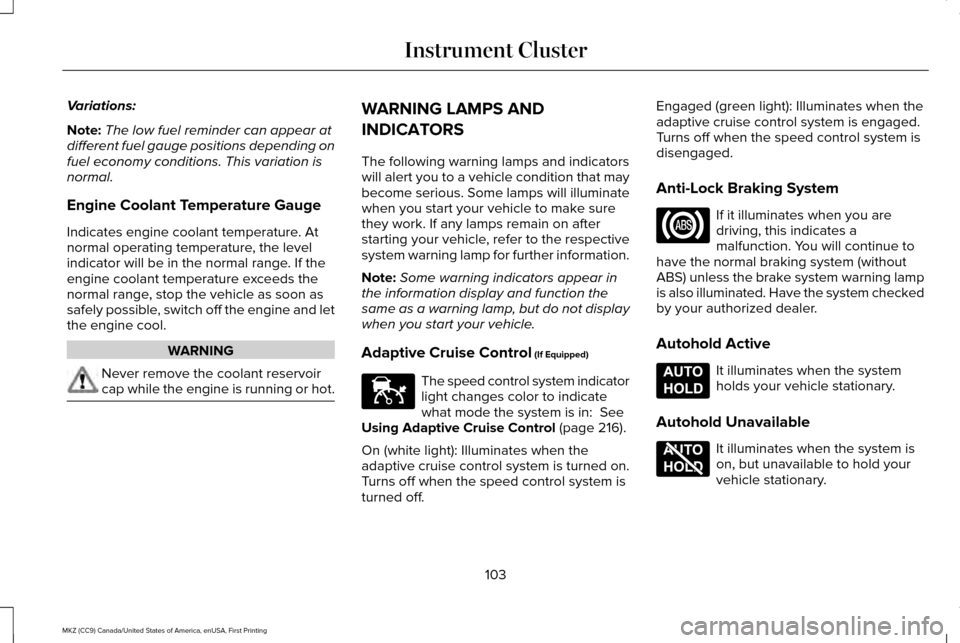
Adaptive Cruise Control (If Equipped) The speed control system indicator
light changes color to indicate
what mode the system is in:
See
Using Adaptive Cruise Control (page 216).
On (white light): Illuminates when the
adaptive cruise control system is turned on.
Turns off when the speed control system is
turned off. Engaged (green light): Illuminates when the
adaptive cruise control system is engaged.
Turns off when the speed control system is
disengaged.
Anti-Lock Braking System
If it illuminates when you are
driving, this indicates a
malfunction. You will continue to
have the normal braking system (without
ABS) unless the brake system warning lamp
is also illuminated. Have the system checked
by your authorized dealer.
Autohold Active It illuminates when the system
holds your vehicle stationary.
Autohold Unavailable It illuminates when the system is
on, but unavailable to hold your
vehicle stationary.
103
MKZ (CC9) Canada/United States of America, enUSA, First Printing Instrument ClusterE144524 E197933 E197934
Page 107 of 564
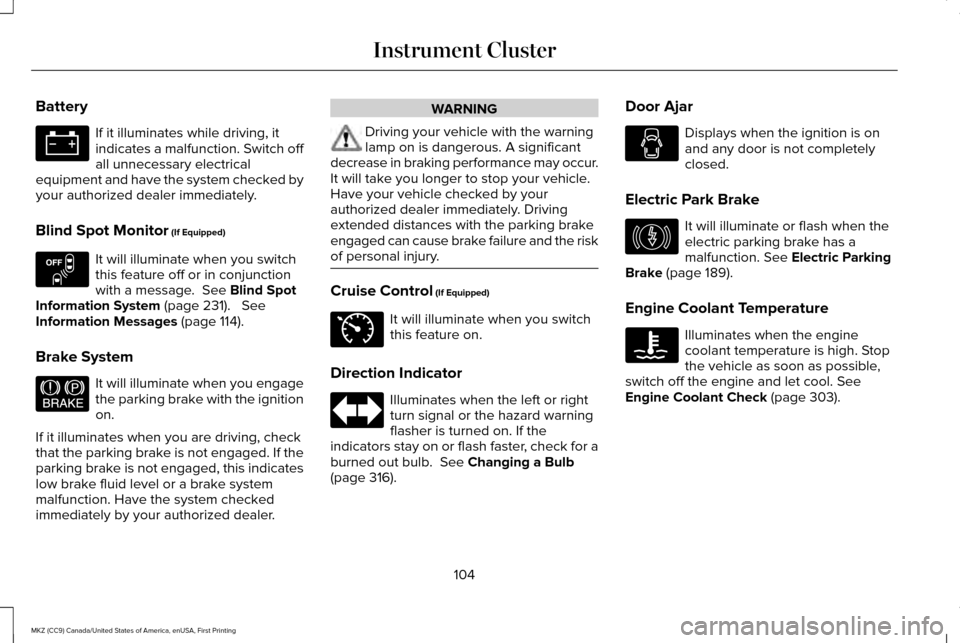
Battery
If it illuminates while driving, it
indicates a malfunction. Switch off
all unnecessary electrical
equipment and have the system checked by
your authorized dealer immediately.
Blind Spot Monitor (If Equipped) It will illuminate when you switch
this feature off or in conjunction
with a message.
See Blind Spot
Information System (page 231). See
Information Messages (page 114).
Brake System It will illuminate when you engage
the parking brake with the ignition
on.
If it illuminates when you are driving, check
that the parking brake is not engaged. If the
parking brake is not engaged, this indicates
low brake fluid level or a brake system
malfunction. Have the system checked
immediately by your authorized dealer. WARNING
Driving your vehicle with the warning
lamp on is dangerous. A significant
decrease in braking performance may occur.
It will take you longer to stop your vehicle.
Have your vehicle checked by your
authorized dealer immediately. Driving
extended distances with the parking brake
engaged can cause brake failure and the risk
of personal injury. Cruise Control
(If Equipped)
It will illuminate when you switch
this feature on.
Direction Indicator Illuminates when the left or right
turn signal or the hazard warning
flasher is turned on. If the
indicators stay on or flash faster, check for a
burned out bulb.
See Changing a Bulb
(page 316). Door Ajar Displays when the ignition is on
and any door is not completely
closed.
Electric Park Brake It will illuminate or flash when the
electric parking brake has a
malfunction.
See Electric Parking
Brake (page 189).
Engine Coolant Temperature Illuminates when the engine
coolant temperature is high. Stop
the vehicle as soon as possible,
switch off the engine and let cool.
See
Engine Coolant Check (page 303).
104
MKZ (CC9) Canada/United States of America, enUSA, First Printing Instrument Cluster E151262 E144522 E71340 E146190
Page 110 of 564
AUDIBLE WARNINGS AND
INDICATORS
Key in Ignition Warning Chime
Sounds when you open the driver's door and
you have left the key in the ignition.
Keyless Warning Alert (If Equipped)
Sounds the horn twice when you exit your
vehicle with the intelligent access key, after
the last door is closed and your keyless
vehicle is in RUN, indicating your vehicle is
still on.
Headlamps On Warning Chime
Sounds when you remove the key from the
ignition and open the driver's door and you
have left the headlamps or parking lamps
on. Parking Brake On Warning Chime
Sounds when you have left the parking brake
on and drive your vehicle. If the warning
chime remains on after you have released
the parking brake, have the system checked
by an authorized dealer immediately.
107
MKZ (CC9) Canada/United States of America, enUSA, First Printing Instrument Cluster
Page 125 of 564
Hill Start Assist
Action
Message
Displays when hill start assist is not available. Contact your authorized dealer. See Auto Hold
(page 191).
Hill Start Assist Not Available
Keys and Intelligent Access Action
Message
Displayed as a reminder to press the brake while starting the vehicle.
To START Press Brake
Displayed if the key is not detected by the system.
See Keyless Starting (page 159).
No Key Detected
Displayed when the start/stop button is pressed to shut off the engine a\
nd an Intelligent Accesskey is not detected inside the vehicle.
Restart Now or Key is Needed
Displayed when the vehicle is in the run ignition state.
Run Power Active
This message is displayed when there is a problem with your vehicle ’s starting system. See your
authorized dealer for service.
Starting System Fault
Displayed during spare key programming, when an intelligent access key is programmed to the system.
Key Program Successful
Displayed during spare key programming, when an intelligent access key has failed to be programmed.
Key Program Failure
122
MKZ (CC9) Canada/United States of America, enUSA, First Printing Information Displays
Page 127 of 564
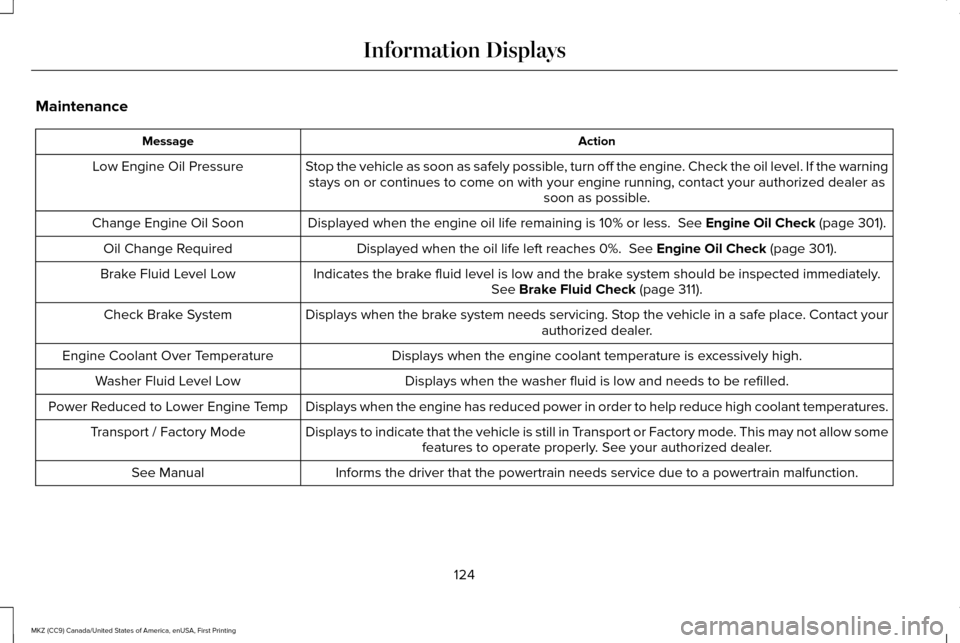
Maintenance
Action
Message
Stop the vehicle as soon as safely possible, turn off the engine. Check the oil level. If the warningstays on or continues to come on with your engine running, contact your \
authorized dealer as soon as possible.
Low Engine Oil Pressure
Displayed when the engine oil life remaining is 10% or less. See Engine Oil Check (page 301).
Change Engine Oil Soon
Displayed when the oil life left reaches 0%.
See Engine Oil Check (page 301).
Oil Change Required
Indicates the brake fluid level is low and the brake system should be inspected immediately.See
Brake Fluid Check (page 311).
Brake Fluid Level Low
Displays when the brake system needs servicing. Stop the vehicle in a safe place. Contact your authorized dealer.
Check Brake System
Displays when the engine coolant temperature is excessively high.
Engine Coolant Over Temperature
Displays when the washer fluid is low and needs to be refilled.
Washer Fluid Level Low
Displays when the engine has reduced power in order to help reduce high \
coolant temperatures.
Power Reduced to Lower Engine Temp
Displays to indicate that the vehicle is still in Transport or Factory mode. This may not allow somefeatures to operate properly. See your authorized dealer.
Transport / Factory Mode
Informs the driver that the powertrain needs service due to a powertrain\
malfunction.
See Manual
124
MKZ (CC9) Canada/United States of America, enUSA, First Printing Information Displays
Page 129 of 564
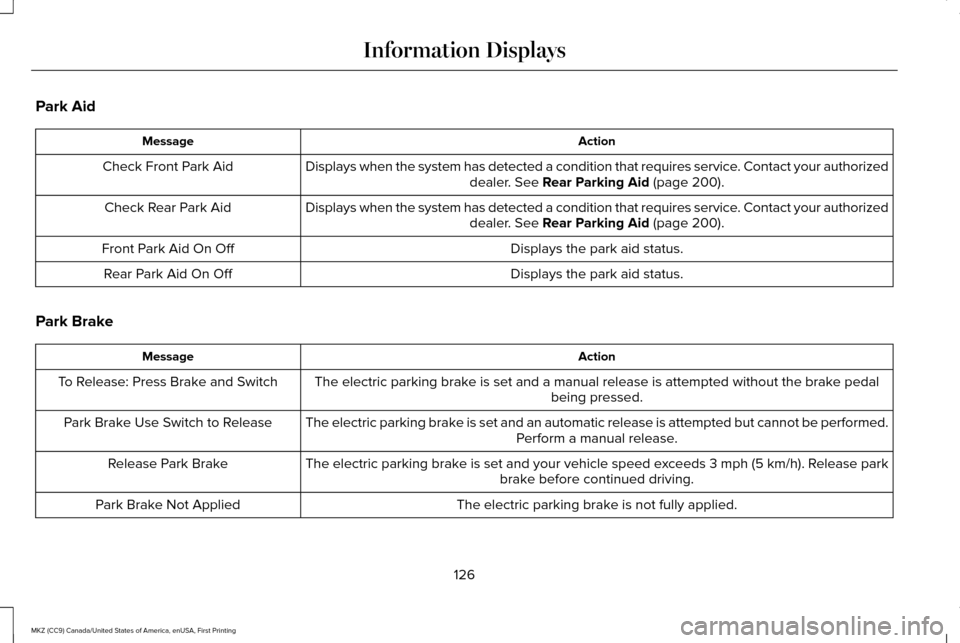
Park Aid
Action
Message
Displays when the system has detected a condition that requires service. Contact your authorized dealer. See Rear Parking Aid (page 200).
Check Front Park Aid
Displays when the system has detected a condition that requires service. Contact your authorizeddealer.
See Rear Parking Aid (page 200).
Check Rear Park Aid
Displays the park aid status.
Front Park Aid On Off
Displays the park aid status.
Rear Park Aid On Off
Park Brake Action
Message
The electric parking brake is set and a manual release is attempted without the brake pedal being pressed.
To Release: Press Brake and Switch
The electric parking brake is set and an automatic release is attempted but cannot be performed.Perform a manual release.
Park Brake Use Switch to Release
The electric parking brake is set and your vehicle speed exceeds 3 mph (5 km/h)
. Release park
brake before continued driving.
Release Park Brake
The electric parking brake is not fully applied.
Park Brake Not Applied
126
MKZ (CC9) Canada/United States of America, enUSA, First Printing Information Displays
Page 130 of 564
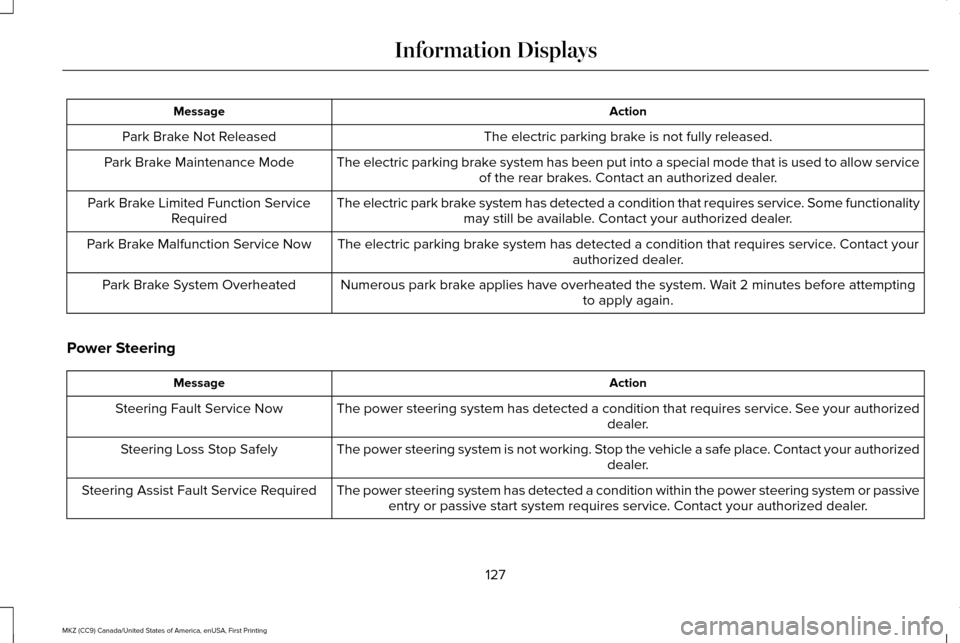
Action
Message
The electric parking brake is not fully released.
Park Brake Not Released
The electric parking brake system has been put into a special mode that is used to allow serviceof the rear brakes. Contact an authorized dealer.
Park Brake Maintenance Mode
The electric park brake system has detected a condition that requires service. Some functionalitymay still be available. Contact your authorized dealer.
Park Brake Limited Function Service
Required
The electric parking brake system has detected a condition that requires service. Contact your authorized dealer.
Park Brake Malfunction Service Now
Numerous park brake applies have overheated the system. Wait 2 minutes before attemptingto apply again.
Park Brake System Overheated
Power Steering Action
Message
The power steering system has detected a condition that requires service\
. See your authorized dealer.
Steering Fault Service Now
The power steering system is not working. Stop the vehicle a safe place. Contact your authorized dealer.
Steering Loss Stop Safely
The power steering system has detected a condition within the power stee\
ring system or passiveentry or passive start system requires service. Contact your authorized dealer.
Steering Assist Fault Service Required
127
MKZ (CC9) Canada/United States of America, enUSA, First Printing Information Displays
Page 131 of 564

Pre-Collision Assist
Action
Message
Displayed when there is a system malfunction with the collision warning \
system. The system willbe disabled. Contact an authorized dealer as soon as possible.
Pre-Collision Assist Malfunction
Displayed when the collision warning system radar is blocked because of poor radar visibility
due to bad weather, ice, mud or water in front of the radar. Driver can typically clean the sensor to resolve. Contact an authorized dealer as soon as possible.
Pre-Collision Assist Not Available Sensor
Blocked
Displayed when there is a system malfunction with the collision warning \
system. The system willbe disabled. Contact an authorized dealer as soon as possible.
Pre-Collision Assist Not Available
Remote Start Action
Message
Displays as a reminder to apply the brake and push the gear shift button to drive the vehicle after a remote start.
To Drive: Press Brake and Gear Shift
Button
128
MKZ (CC9) Canada/United States of America, enUSA, First Printing Information Displays
Page 132 of 564

Seats
Action
Message
Displays as a reminder that memory seats are not available while driving\
.
Memory Recall Not Permitted While Driving
Displays to show where your memory setting has been saved.
Memory {0} Saved
Starting System Action
Message
Displays when starting the vehicle as a reminder to apply the brake.
To START Press Brake
Displays when the starter has exceeded its cranking time in attempting to start the vehicle.
Cranking Time Exceeded
Displays when the starter is attempting to start the vehicle.
Engine Start Pending Please Wait
Displays when the pending start has been cancelled.
Pending Start Cancelled
129
MKZ (CC9) Canada/United States of America, enUSA, First Printing Information Displays
Page 134 of 564
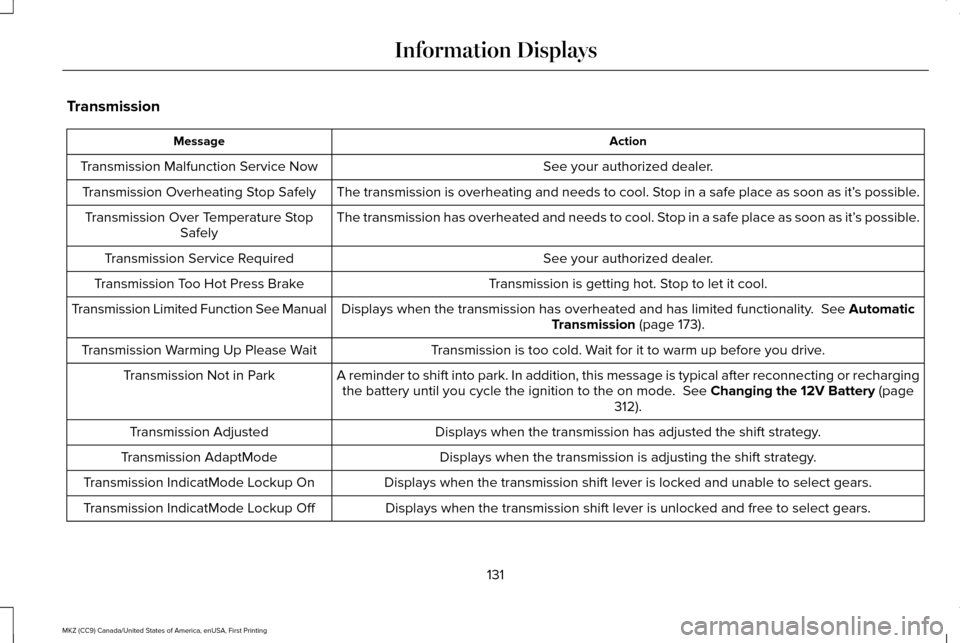
Transmission
Action
Message
See your authorized dealer.
Transmission Malfunction Service Now
The transmission is overheating and needs to cool. Stop in a safe place as soon as it’ s possible.
Transmission Overheating Stop Safely
The transmission has overheated and needs to cool. Stop in a safe place as soon as it’ s possible.
Transmission Over Temperature Stop
Safely
See your authorized dealer.
Transmission Service Required
Transmission is getting hot. Stop to let it cool.
Transmission Too Hot Press Brake
Displays when the transmission has overheated and has limited functional\
ity. See Automatic
Transmission (page 173).
Transmission Limited Function See Manual
Transmission is too cold. Wait for it to warm up before you drive.
Transmission Warming Up Please Wait
A reminder to shift into park. In addition, this message is typical afte\
r reconnecting or rechargingthe battery until you cycle the ignition to the on mode.
See Changing the 12V Battery (page
312).
Transmission Not in Park
Displays when the transmission has adjusted the shift strategy.
Transmission Adjusted
Displays when the transmission is adjusting the shift strategy.
Transmission AdaptMode
Displays when the transmission shift lever is locked and unable to select gears.
Transmission IndicatMode Lockup On
Displays when the transmission shift lever is unlocked and free to select gears.
Transmission IndicatMode Lockup Off
131
MKZ (CC9) Canada/United States of America, enUSA, First Printing Information Displays