park assist LINCOLN MKZ 2017 User Guide
[x] Cancel search | Manufacturer: LINCOLN, Model Year: 2017, Model line: MKZ, Model: LINCOLN MKZ 2017Pages: 564, PDF Size: 5.54 MB
Page 208 of 564
Note:
You can also activate the Active Park
Assist system after you have already driven
partially or completely past a parking space.
To do so, press the Active Park button and
the system will inform you if you have
recently passed a suitable parking space.
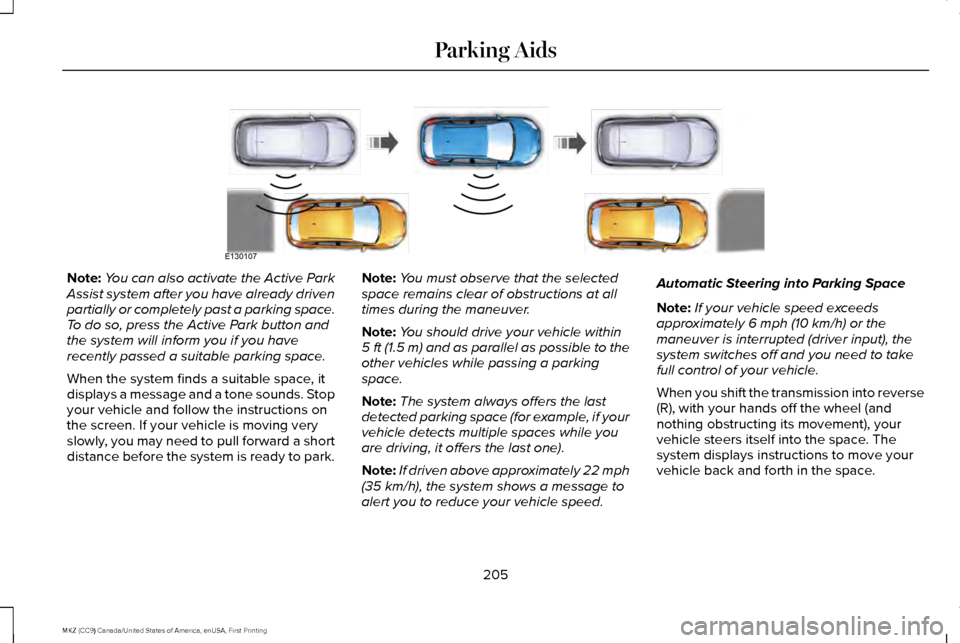
When the system finds a suitable space, it
displays a message and a tone sounds. Stop
your vehicle and follow the instructions on
the screen. If your vehicle is moving very
slowly, you may need to pull forward a short
distance before the system is ready to park. Note:
You must observe that the selected
space remains clear of obstructions at all
times during the maneuver.
Note: You should drive your vehicle within
5 ft (1.5 m) and as parallel as possible to the
other vehicles while passing a parking
space.
Note: The system always offers the last
detected parking space (for example, if your
vehicle detects multiple spaces while you
are driving, it offers the last one).
Note: If driven above approximately 22 mph
(35 km/h), the system shows a message to
alert you to reduce your vehicle speed. Automatic Steering into Parking Space
Note:
If your vehicle speed exceeds
approximately
6 mph (10 km/h) or the
maneuver is interrupted (driver input), the
system switches off and you need to take
full control of your vehicle.
When you shift the transmission into reverse
(R), with your hands off the wheel (and
nothing obstructing its movement), your
vehicle steers itself into the space. The
system displays instructions to move your
vehicle back and forth in the space.
205
MKZ (CC9) Canada/United States of America, enUSA, First Printing Parking AidsE130107
Page 209 of 564
When you think your vehicle is properly
parked, or you hear a solid tone from the
parking aid (accompanied by a display
message and a chime), bring your vehicle to
a complete stop.
When automatic steering is complete, the
system displays a message and a tone
sounds, indicating that the active park assist
process is finished. You are responsible for
checking the parking job and making any
necessary corrections before leaving your
vehicle.
Using Active Park Assist - Perpendicular
Parking Press the button located on the
center console near the gearshift
lever or the right side of the center
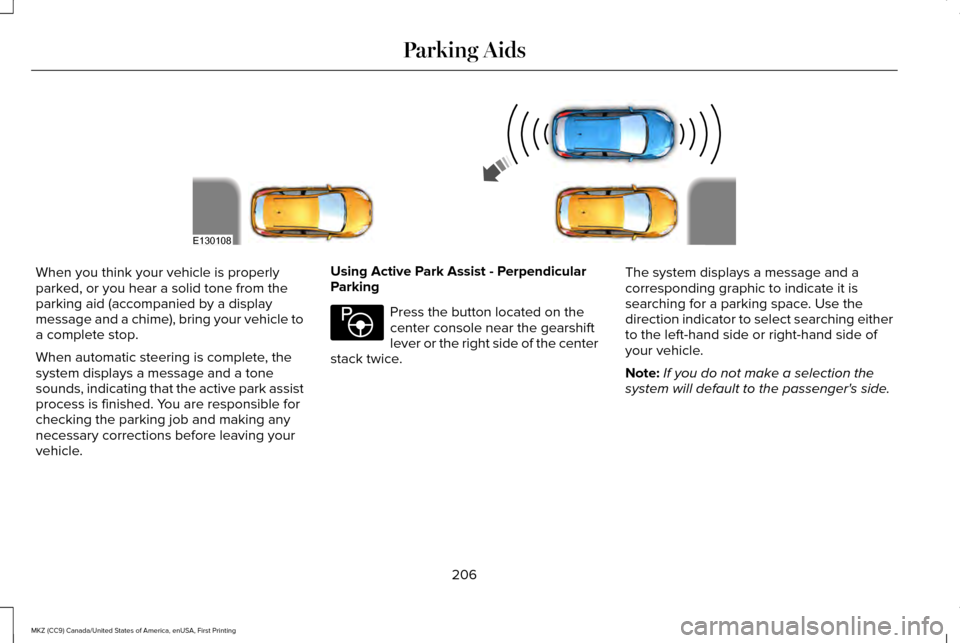
stack twice. The system displays a message and a
corresponding graphic to indicate it is
searching for a parking space. Use the
direction indicator to select searching either
to the left-hand side or right-hand side of
your vehicle.
Note:
If you do not make a selection the
system will default to the passenger's side.
206
MKZ (CC9) Canada/United States of America, enUSA, First Printing Parking AidsE130108 E146186
Page 211 of 564
When you shift the transmission into reverse
(R), with your hands off the wheel (and
nothing obstructing its movement), your
vehicle steers itself into the space. The
system displays instructions to move your
vehicle back and forth in the space.
When you think your vehicle is properly
parked, or you hear a solid tone from the
parking aid (accompanied by a display
message and a chime), bring your vehicle to
a complete stop.
When automatic steering is complete, the
system displays a message and a tone
sounds, indicating that the active park assist
process is finished. You are responsible for
checking the parking job and making any
necessary corrections before leaving your
vehicle.
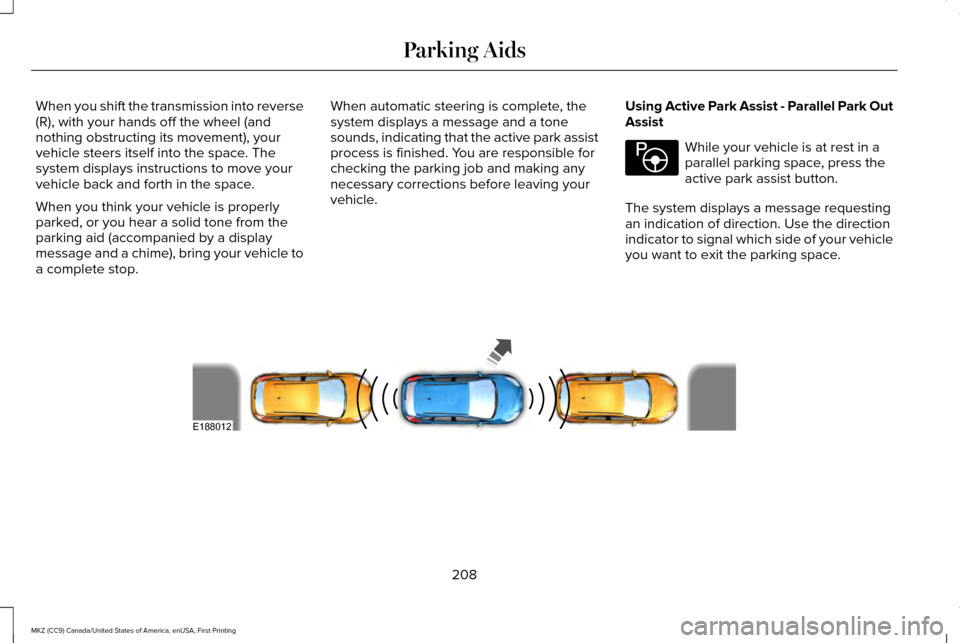
Using Active Park Assist - Parallel Park Out
Assist While your vehicle is at rest in a
parallel parking space, press the
active park assist button.
The system displays a message requesting
an indication of direction. Use the direction
indicator to signal which side of your vehicle
you want to exit the parking space. 208
MKZ (CC9) Canada/United States of America, enUSA, First Printing Parking AidsE146186 E188012
Page 212 of 564
The system determines the clearance to the
front and rear of your vehicle and
automatically steers your vehicle out of a
parallel parking space (hands-free) while you
control the accelerator, gearshift and brakes.
The system visually and audibly guides you
to enter traffic.
After the system has directed your vehicle
past the adjacent vehicle or object, it guides
you to take control of the steering to
complete the exit from the parking spot.
Note:
If the clearance in front of your vehicle
allows easy departure, the Parallel Park Out
Assist feature might not be available.
Note: You are responsible for controlling
your vehicle and making sure the path is
clear prior to pulling into traffic. Note:
This system is not intended to assist
in exiting perpendicular parking spaces,
damages to your vehicle may occur.
Note: If your vehicle speed exceeds 3 mph
(5 km/h) or the maneuver is interrupted
(driver input), the system switches off and
you need to take full control of your vehicle.
Deactivating the Active Park Assist
Feature
Manually deactivate the system by:
• Pressing the active park assist button
during an active maneuver.
• Grabbing the steering wheel during an
active maneuver. •
Driving above approximately
22 mph
(35 km/h) for 30 seconds during an active
park search.
• Driving above approximately
6 mph
(10 km/h) during automatic steering.
• Switching off the traction control system.
Certain vehicle conditions can also
deactivate the system, such as:
• Traction control has activated.
• There is an anti-lock brake system
activation or failure.
If a problem occurs with the system, a
warning message displays accompanied by
a tone. Occasional system messages may
occur in normal operation. For recurring or
frequent system faults, contact an authorized
dealer to have your vehicle serviced.
Troubleshooting the System The system does not look for a space
The traction control system may be off.
The transmission is in reverse (R). Your vehicle must be moving forward to be able to detect a parking space.
209
MKZ (CC9) Canada/United States of America, enUSA, First Printing Parking Aids
Page 256 of 564
Trailer lamps are required on most towed
vehicles. Make sure all running lights, brake
lights, turn signals and hazard lights are
working.
Before Towing a Trailer
Practice turning, stopping and backing up to
get the feel of your vehicle-trailer
combination before starting on a trip. When
turning, make wider turns so the trailer
wheels clear curbs and other obstacles.
When Towing a Trailer
•
Do not drive faster than 70 mph (113
km/h) during the first 500 miles (800
kilometers).
• Do not make full-throttle starts.
• Check your hitch, electrical connections
and trailer wheel lug nuts thoroughly after
you have traveled 50 miles (80
kilometers).
• When stopped in congested or heavy
traffic during hot weather, place the
gearshift in position P to aid engine and
transmission cooling and to help A/C
performance. •
Turn off the speed control with heavy
loads or in hilly terrain. The speed control
may turn off automatically when you are
towing on long, steep grades.
• Shift to a lower gear when driving down
a long or steep hill. Do not apply the
brakes continuously, as they may
overheat and become less effective.
• If your transmission is equipped with a
Grade Assist or Tow/Haul feature, use
this feature when towing. This provides
engine braking and helps eliminate
excessive transmission shifting for
optimum fuel economy and transmission
cooling.
• Allow more distance for stopping with a
trailer attached. Anticipate stops and
brake gradually.
• Avoid parking on a grade. However, if
you must park on a grade:
1. Turn the steering wheel to point your vehicle tires away from traffic flow.
2. Set your vehicle parking brake.
3. Place the automatic transmission in position
P. 4. Place wheel chocks in front and back of
the trailer wheels. (Chocks not included
with vehicle.)
Launching or Retrieving a Boat or
Personal Watercraft (PWC)
Note: Disconnect the wiring to the trailer
before
backing the trailer into the water.
Note: Reconnect the wiring to the trailer
after
removing the trailer from the water.
When backing down a ramp during boat
launching or retrieval:
• Do not allow the static water level to rise
above the bottom edge of the rear
bumper.
• Do not allow waves to break higher than
6 inches (15 centimeters) above the
bottom edge of the rear bumper.
Exceeding these limits may allow water to
enter vehicle components:
• Causing internal damage to the
components.
• Affecting driveability, emissions, and
reliability.
253
MKZ (CC9) Canada/United States of America, enUSA, First Printing Towing
Page 274 of 564
In the CAMVAP program, impartial third-party
arbitrators conduct hearings at mutually
convenient times and places in an informal
environment. These impartial arbitrators
review the positions of the parties, make
decisions and, when appropriate, render
awards to resolve disputes. CAMVAP
decisions are fast, fair, and final as the
arbitrator’
s award is binding on both you and
Ford of Canada.
CAMVAP services are available in all
Canadian territories and provinces. For more
information, without charge or obligation, call
your CAMVAP Provincial Administrator
directly at 1-800-207-0685 or visit
www.camvap.ca.
GETTING ASSISTANCE OUTSIDE
THE U.S. AND CANADA
Before exporting your vehicle to a foreign
country, contact the appropriate foreign
embassy or consulate. These officials can
inform you of local vehicle registration
regulations and where to find unleaded fuel. If you cannot find unleaded fuel or can only
get fuel with an anti-knock index lower than
is recommended for your vehicle, contact
our Customer Relationship Center.
The use of leaded fuel in your vehicle without
proper conversion may damage the
effectiveness of your emission control system
and may cause engine knocking or serious
engine damage. Ford Motor Company or
Ford of Canada is not responsible for any
damage caused by use of improper fuel.
Using leaded fuel may also result in difficulty
importing your vehicle back into the United
States.
If your vehicle must be serviced while you
are traveling or living in Asia-Pacific Region,
Sub-Saharan Africa, U.S. Virgin Islands,
Central America, the Caribbean, and Israel,
contact the nearest authorized dealer. If the
authorized dealer cannot help you, contact:
FORD MOTOR COMPANY
Customer Relationship Center
1555 Fairlane Drive
Fairlane Business Park #3
Allen Park, Michigan 48101
U.S.A.
Telephone: (313) 594-4857
Fax: (313) 390-0804
Email: [email protected]
For customers in Guam, the Commonwealth
of the Northern Mariana Islands (CNMI),
America Samoa, and the U.S. Virgin Islands,
please feel free to call our Toll-Free Number:
(800) 841-FORD (3673).
If your vehicle must be serviced while you
are traveling or living in Puerto Rico, contact
the nearest authorized dealer. If the
authorized dealer cannot help you, contact:
271
MKZ (CC9) Canada/United States of America, enUSA, First Printing Customer Assistance
Page 275 of 564
FORD MOTOR COMPANY
Customer Relationship Center
1555 Fairlane Drive
Fairlane Business Park #3
Allen Park, Michigan 48101
U.S.A.
Telephone: (800) 841-FORD (3673)
FAX: (313) 390-0804
Email: [email protected]
www.ford.com.pr
If your vehicle must be serviced while you
are traveling or living in the Middle East,
contact the nearest authorized dealer. If the
authorized dealer cannot help you, contact:
FORD MOTOR COMPANY
Customer Relationship Center
1555 Fairlane Drive
Fairlane Business Park #3
Allen Park, Michigan 48101
U.S.A.
Ford: 80004443673
Lincoln: 80004441067
If calling from the UAE: 80004441066
If calling from the Kingdom of Saudi Arabia:
8008443673
If calling from Kuwait:
22280384 FAX: +971 4 3327266
Email: [email protected]
www.me.ford.com
If you buy your vehicle in North America and
then relocate to any of the above locations,
register your vehicle identification number
(VIN) and new address with Ford Motor
Company by emailing
[email protected].
If you are in another foreign country, contact
the nearest authorized dealer. In the event
your inquiry is unresolved, communicate your
concern with the dealership ’s Sales Manager,
Service Manager or Customer Relations
Manager. If you require additional assistance
or clarification, please contact the respective
Customer Relationship Center as previously
listed.
Customers in the U.S. should call
1-800-392-3673.
ORDERING ADDITIONAL OWNER'S
LITERATURE
To order the publications in this portfolio,
contact Helm, Incorporated at: HELM, INCORPORATED
47911 Halyard Drive
Plymouth, Michigan 48170
Attention: Customer Service
Or to order a free publication catalog, call
toll free: 1-800-782-4356
Monday-Friday 8:00 a.m. - 6:00 p.m. EST
Helm, Incorporated can also be reached by
their website:
www.helminc.com
(Items in this catalog may be purchased by
credit card, check or money order.)
Obtaining a French Owner’
s Manual
French Owner’ s Manual can be obtained
from your authorized dealer or by contacting
Helm, Incorporated using the contact
information listed previously in this section.
272
MKZ (CC9) Canada/United States of America, enUSA, First Printing Customer Assistance
Page 335 of 564
What to do when a Tire Is Punctured
A tire puncture within the tire's tread area
can be repaired in two stages with the kit:
•
In the first stage, the tire will be reinflated
with a sealing compound and air. After
the tire has been inflated, you will need
to drive the vehicle about 3.7 mi (6 km)
to distribute the sealant in the tire.
• In the second stage, you will need to
check the tire pressure and adjust, if
necessary, to the vehicle's specified tire
inflation pressure.
First Stage: Reinflating the Tire with
Sealing Compound and Air WARNING
Do not stand directly beside the tire
while the compressor is operating. This
could cause personal injury if the tire bursts. Note:
If the tire does not inflate to the
recommended tire pressure within 15
minutes, stop and call roadside assistance. WARNINGS
Watch the sidewall of the tire when
inflating. If any cracks, bumps or similar
damage appears, switch the compressor off
and let the air out by means of the pressure
relief valve. Do not continue driving with this
tire. This could cause loss of vehicle control. Do not run the engine when operating
the air compressor unless the vehicle
is outdoors or in a well-ventilated area. Preparation: Park the vehicle in a safe, level
and secure area, away from moving traffic.
Turn the hazard lights on. Apply the parking
brake and turn the engine off. Inspect the
flat tire for visible damage.
Sealant compound contains latex. Use
appropriate precautions to avoid any allergic
reactions.
Do not remove any foreign object that has
pierced the tire. If a puncture is located in
the tire sidewall, stop and call roadside
assistance.
1.
Remove the valve cap from the tire valve. 2. Unwrap the dual purpose hose (black
tube) from the back of the compressor
housing.
3. Fasten the hose to the tire valve by turning the connector clockwise. Tighten
the connection securely.
332
MKZ (CC9) Canada/United States of America, enUSA, First Printing Wheels and Tires
Page 406 of 564
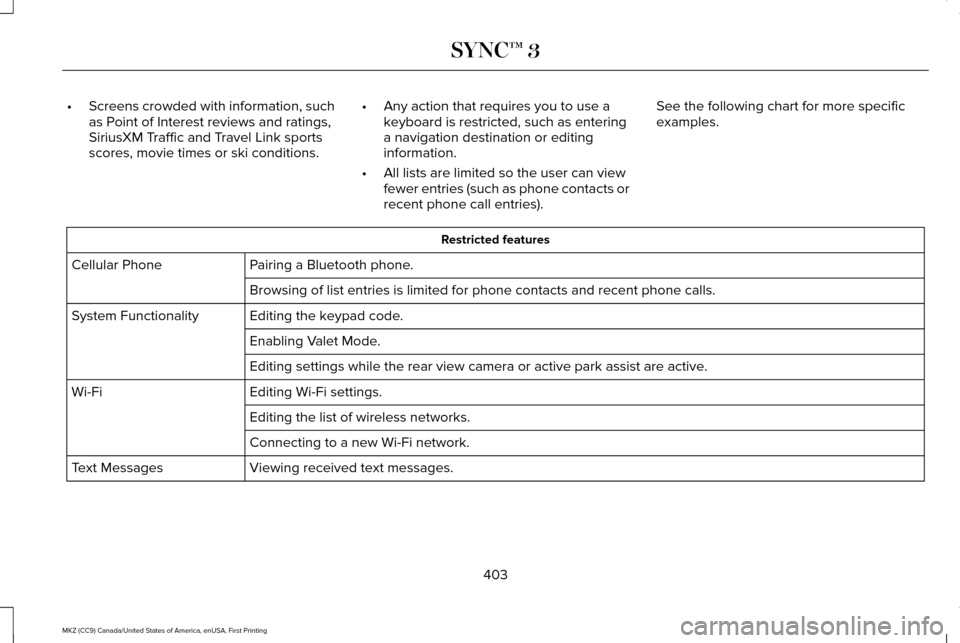
•
Screens crowded with information, such
as Point of Interest reviews and ratings,
SiriusXM Traffic and Travel Link sports
scores, movie times or ski conditions. •
Any action that requires you to use a
keyboard is restricted, such as entering
a navigation destination or editing
information.
• All lists are limited so the user can view
fewer entries (such as phone contacts or
recent phone call entries). See the following chart for more specific
examples. Restricted features
Pairing a Bluetooth phone.
Cellular Phone
Browsing of list entries is limited for phone contacts and recent phone \
calls.
Editing the keypad code.
System Functionality
Enabling Valet Mode.
Editing settings while the rear view camera or active park assist are ac\
tive.
Editing Wi-Fi settings.
Wi-Fi
Editing the list of wireless networks.
Connecting to a new Wi-Fi network.
Viewing received text messages.
Text Messages
403
MKZ (CC9) Canada/United States of America, enUSA, First Printing SYNC™ 3
Page 497 of 564
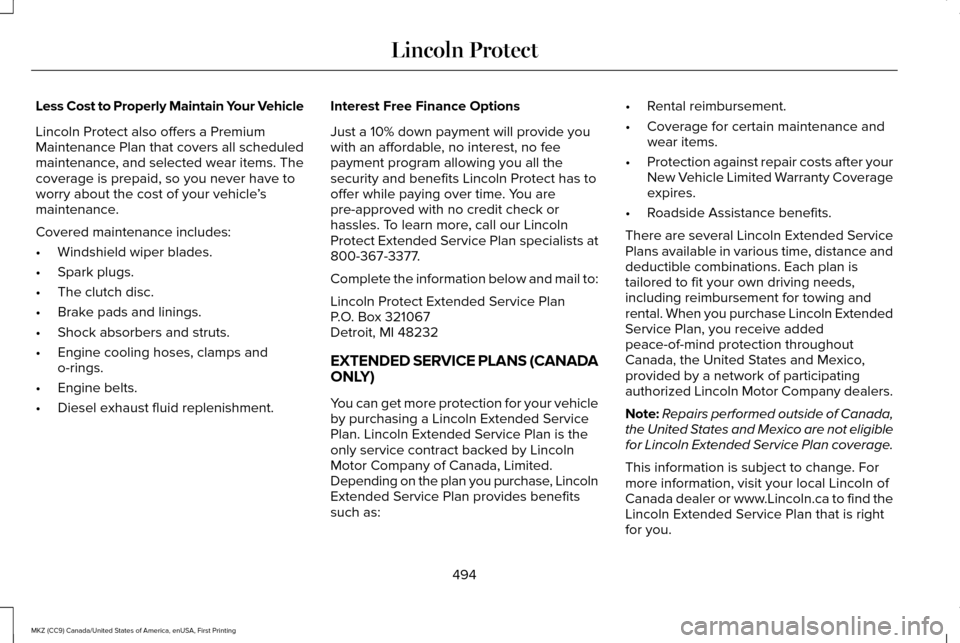
Less Cost to Properly Maintain Your Vehicle
Lincoln Protect also offers a Premium
Maintenance Plan that covers all scheduled
maintenance, and selected wear items. The
coverage is prepaid, so you never have to
worry about the cost of your vehicle
’s
maintenance.
Covered maintenance includes:
• Windshield wiper blades.
• Spark plugs.
• The clutch disc.
• Brake pads and linings.
• Shock absorbers and struts.
• Engine cooling hoses, clamps and
o-rings.
• Engine belts.
• Diesel exhaust fluid replenishment. Interest Free Finance Options
Just a 10% down payment will provide you
with an affordable, no interest, no fee
payment program allowing you all the
security and benefits Lincoln Protect has to
offer while paying over time. You are
pre-approved with no credit check or
hassles. To learn more, call our Lincoln
Protect Extended Service Plan specialists at
800-367-3377.
Complete the information below and mail to:
Lincoln Protect Extended Service Plan
P.O. Box 321067
Detroit, MI 48232
EXTENDED SERVICE PLANS (CANADA
ONLY)
You can get more protection for your vehicle
by purchasing a Lincoln Extended Service
Plan. Lincoln Extended Service Plan is the
only service contract backed by Lincoln
Motor Company of Canada, Limited.
Depending on the plan you purchase, Lincoln
Extended Service Plan provides benefits
such as: •
Rental reimbursement.
• Coverage for certain maintenance and
wear items.
• Protection against repair costs after your
New Vehicle Limited Warranty Coverage
expires.
• Roadside Assistance benefits.
There are several Lincoln Extended Service
Plans available in various time, distance and
deductible combinations. Each plan is
tailored to fit your own driving needs,
including reimbursement for towing and
rental. When you purchase Lincoln Extended
Service Plan, you receive added
peace-of-mind protection throughout
Canada, the United States and Mexico,
provided by a network of participating
authorized Lincoln Motor Company dealers.
Note: Repairs performed outside of Canada,
the United States and Mexico are not eligible
for Lincoln Extended Service Plan coverage.
This information is subject to change. For
more information, visit your local Lincoln of
Canada dealer or www.Lincoln.ca to find the
Lincoln Extended Service Plan that is right
for you.
494
MKZ (CC9) Canada/United States of America, enUSA, First Printing Lincoln Protect