phone LINCOLN MKZ 2017 User Guide
[x] Cancel search | Manufacturer: LINCOLN, Model Year: 2017, Model line: MKZ, Model: LINCOLN MKZ 2017Pages: 564, PDF Size: 5.54 MB
Page 274 of 564
In the CAMVAP program, impartial third-party
arbitrators conduct hearings at mutually
convenient times and places in an informal
environment. These impartial arbitrators
review the positions of the parties, make
decisions and, when appropriate, render
awards to resolve disputes. CAMVAP
decisions are fast, fair, and final as the
arbitrator’
s award is binding on both you and
Ford of Canada.
CAMVAP services are available in all
Canadian territories and provinces. For more
information, without charge or obligation, call
your CAMVAP Provincial Administrator
directly at 1-800-207-0685 or visit
www.camvap.ca.
GETTING ASSISTANCE OUTSIDE
THE U.S. AND CANADA
Before exporting your vehicle to a foreign
country, contact the appropriate foreign
embassy or consulate. These officials can
inform you of local vehicle registration
regulations and where to find unleaded fuel. If you cannot find unleaded fuel or can only
get fuel with an anti-knock index lower than
is recommended for your vehicle, contact
our Customer Relationship Center.
The use of leaded fuel in your vehicle without
proper conversion may damage the
effectiveness of your emission control system
and may cause engine knocking or serious
engine damage. Ford Motor Company or
Ford of Canada is not responsible for any
damage caused by use of improper fuel.
Using leaded fuel may also result in difficulty
importing your vehicle back into the United
States.
If your vehicle must be serviced while you
are traveling or living in Asia-Pacific Region,
Sub-Saharan Africa, U.S. Virgin Islands,
Central America, the Caribbean, and Israel,
contact the nearest authorized dealer. If the
authorized dealer cannot help you, contact:
FORD MOTOR COMPANY
Customer Relationship Center
1555 Fairlane Drive
Fairlane Business Park #3
Allen Park, Michigan 48101
U.S.A.
Telephone: (313) 594-4857
Fax: (313) 390-0804
Email: [email protected]
For customers in Guam, the Commonwealth
of the Northern Mariana Islands (CNMI),
America Samoa, and the U.S. Virgin Islands,
please feel free to call our Toll-Free Number:
(800) 841-FORD (3673).
If your vehicle must be serviced while you
are traveling or living in Puerto Rico, contact
the nearest authorized dealer. If the
authorized dealer cannot help you, contact:
271
MKZ (CC9) Canada/United States of America, enUSA, First Printing Customer Assistance
Page 275 of 564
FORD MOTOR COMPANY
Customer Relationship Center
1555 Fairlane Drive
Fairlane Business Park #3
Allen Park, Michigan 48101
U.S.A.
Telephone: (800) 841-FORD (3673)
FAX: (313) 390-0804
Email: [email protected]
www.ford.com.pr
If your vehicle must be serviced while you
are traveling or living in the Middle East,
contact the nearest authorized dealer. If the
authorized dealer cannot help you, contact:
FORD MOTOR COMPANY
Customer Relationship Center
1555 Fairlane Drive
Fairlane Business Park #3
Allen Park, Michigan 48101
U.S.A.
Ford: 80004443673
Lincoln: 80004441067
If calling from the UAE: 80004441066
If calling from the Kingdom of Saudi Arabia:
8008443673
If calling from Kuwait:
22280384 FAX: +971 4 3327266
Email: [email protected]
www.me.ford.com
If you buy your vehicle in North America and
then relocate to any of the above locations,
register your vehicle identification number
(VIN) and new address with Ford Motor
Company by emailing
[email protected].
If you are in another foreign country, contact
the nearest authorized dealer. In the event
your inquiry is unresolved, communicate your
concern with the dealership ’s Sales Manager,
Service Manager or Customer Relations
Manager. If you require additional assistance
or clarification, please contact the respective
Customer Relationship Center as previously
listed.
Customers in the U.S. should call
1-800-392-3673.
ORDERING ADDITIONAL OWNER'S
LITERATURE
To order the publications in this portfolio,
contact Helm, Incorporated at: HELM, INCORPORATED
47911 Halyard Drive
Plymouth, Michigan 48170
Attention: Customer Service
Or to order a free publication catalog, call
toll free: 1-800-782-4356
Monday-Friday 8:00 a.m. - 6:00 p.m. EST
Helm, Incorporated can also be reached by
their website:
www.helminc.com
(Items in this catalog may be purchased by
credit card, check or money order.)
Obtaining a French Owner’
s Manual
French Owner’ s Manual can be obtained
from your authorized dealer or by contacting
Helm, Incorporated using the contact
information listed previously in this section.
272
MKZ (CC9) Canada/United States of America, enUSA, First Printing Customer Assistance
Page 276 of 564
REPORTING SAFETY DEFECTS
(U.S. ONLY)
If you believe that your vehicle has a
defect which could cause a crash or
could cause injury or death, you should
immediately inform the National
Highway Traffic Safety Administration
(NHTSA) in addition to notifying Ford
Motor Company.
If NHTSA receives similar complaints, it
may open an investigation, and if it finds
that a safety defect exists in a group of
vehicles, it may order a recall and
remedy campaign. However, NHTSA
cannot become involved in individual
problems between you, your dealer, or
Ford Motor Company.
To contact NHTSA, you may call the
Vehicle Safety Hotline toll-free at
1-888-327-4236 (TTY: 1-800-424-9153);
go to http://www.safercar.gov; or write
to:
Administrator
1200 New Jersey Avenue, Southeast
Washington, D.C. 20590
You can also obtain other information
about motor vehicle safety from
http://www.safercar.gov.
REPORTING SAFETY DEFECTS
(CANADA ONLY)
If you believe that your vehicle has a defect
which could cause a crash or could cause
injury or death, you should immediately
inform Transport Canada and Ford of
Canada. Transport Canada Contact Information
www.tc.gc.ca/eng/motorvehiclesafety/safevehicles-defectinvestigations-index-76.htm\
(English)
Website
www.tc.gc.ca/fra/securiteautomobile/VehiculesSecuritaires-Enquetes-index-76.htm (French)
Website
1–800–333–0510
Phone
273
MKZ (CC9) Canada/United States of America, enUSA, First Printing Customer AssistanceE142557
Page 277 of 564
Ford of Canada Contact Information
www.ford.ca
Website
1–800–565-3673
Phone
274
MKZ (CC9) Canada/United States of America, enUSA, First Printing Customer Assistance
Page 291 of 564
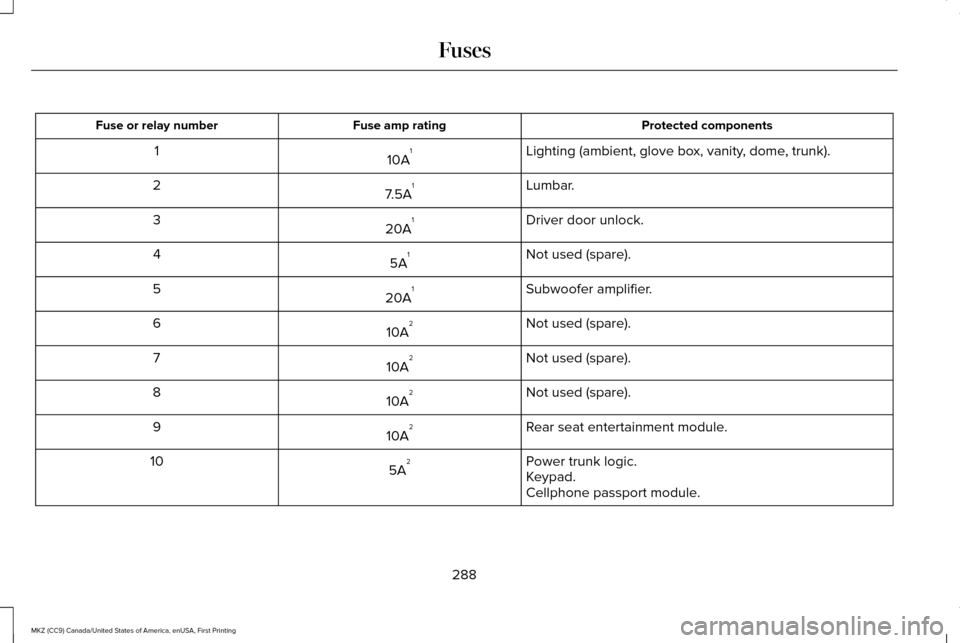
Protected components
Fuse amp rating
Fuse or relay number
Lighting (ambient, glove box, vanity, dome, trunk).
10A 1
1
Lumbar.
7.5A 1
2
Driver door unlock.
20A 1
3
Not used (spare).
5A 1
4
Subwoofer amplifier.
20A 1
5
Not used (spare).
10A 2
6
Not used (spare).
10A 2
7
Not used (spare).
10A 2
8
Rear seat entertainment module.
10A 2
9
Power trunk logic.
5A 2
10
Keypad.
Cellphone passport module.
288
MKZ (CC9) Canada/United States of America, enUSA, First Printing Fuses
Page 393 of 564
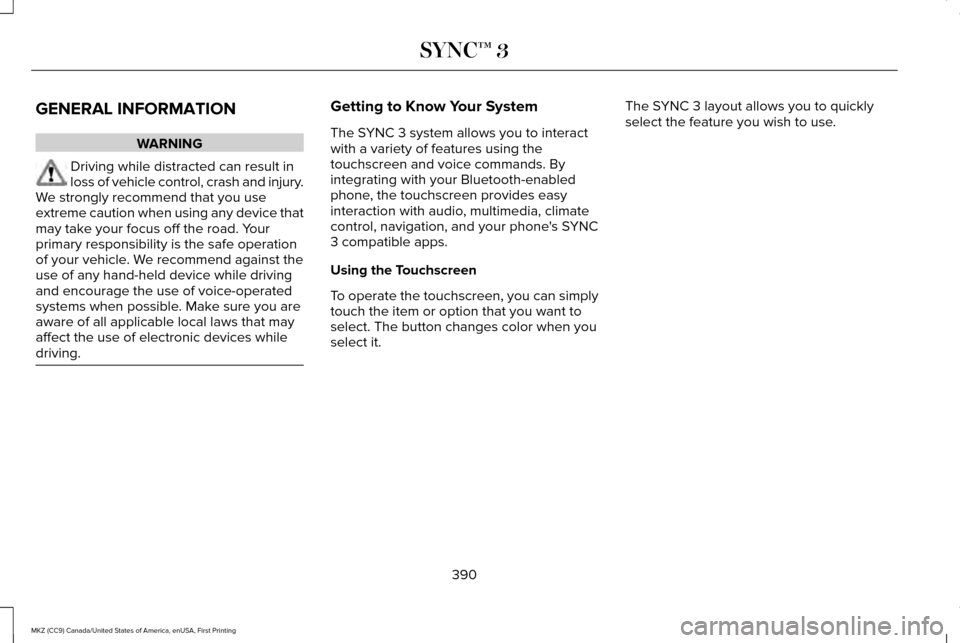
GENERAL INFORMATION
WARNING
Driving while distracted can result in
loss of vehicle control, crash and injury.
We strongly recommend that you use
extreme caution when using any device that
may take your focus off the road. Your
primary responsibility is the safe operation
of your vehicle. We recommend against the
use of any hand-held device while driving
and encourage the use of voice-operated
systems when possible. Make sure you are
aware of all applicable local laws that may
affect the use of electronic devices while
driving. Getting to Know Your System
The SYNC 3 system allows you to interact
with a variety of features using the
touchscreen and voice commands. By
integrating with your Bluetooth-enabled
phone, the touchscreen provides easy
interaction with audio, multimedia, climate
control, navigation, and your phone's SYNC
3 compatible apps.
Using the Touchscreen
To operate the touchscreen, you can simply
touch the item or option that you want to
select. The button changes color when you
select it.
The SYNC 3 layout allows you to quickly
select the feature you wish to use.
390
MKZ (CC9) Canada/United States of America, enUSA, First Printing SYNC™ 3
Page 395 of 564

Action and Description
Menu Item
Item
This bar displays icons and messages pertaining to current system activi\
ties including climate
settings, voice commands and phone functions such as text messages.
Status Bar
A
This button is available on the main screens. Pressing it takes you to the home screen view.
Home
B
This shows the current time. You can set the clock manually or have it controlled by the vehicle's
GPS location. See Settings (page 457).
Clock
C
This displays the current outside temperature.
Outside Temperature
D
You can touch any of the buttons on this bar to select a feature.
Feature Bar
E
The touchscreen allows you quick access to
all of your comfort, navigation,
communication and entertainment options.
Using the status and feature bar you can
quickly select the feature you want to use. Note:
Your system is equipped with a feature
that allows you to access and control audio
features for 10 minutes after you switch the
ignition off (and no doors open). The Status Bar
Additional icons also display in the status bar
depending on market, vehicle options and
current operation. If a feature is not active,
the icon does not display. Certain icons may
move to the left or right depending on what
options are active.
392
MKZ (CC9) Canada/United States of America, enUSA, First Printing SYNC™ 3
Page 397 of 564

Description
Item
Callout
This shows the temperature the driver selects through the climate contro\
l system.
Driver Temperature
A
When the passenger's temperature has been adjusted and is no longer linked to the
driver's temperature, it displays here. If Dual is turned off and the temperatures are
linked, the passenger's temperature does not display.
Passenger Temperature
B
This icon displays when your phone's microphone is muted. A caller cannot hear you.
Microphone Mute
C
This icon displays when the audio system is muted.
Mute
D
This icon appears when SYNC 3 receives a software update. Pressing the icon shows
more details about the new software.
Download
E
This icon appears if a Wi-Fi network is connected.
Wi-Fi
F
An available Wi-Fi network is within range.
Wi-Fi in Range
G
This icon displays when your cell phone is roaming.
Roaming
H
This icon displays when you receive a text message on your phone.
Text Message
I
This icon displays when 911 Assist is set to off and your phone is conne\
cted to SYNC.
911 Assist Off
J
The Bluetooth alert icon displays when there is an active Bluetooth aler\
t.
Bluetooth Alert
K
This icon displays to show an active Bluetooth connection.
Bluetooth
L
394
MKZ (CC9) Canada/United States of America, enUSA, First Printing SYNC™ 3
Page 398 of 564
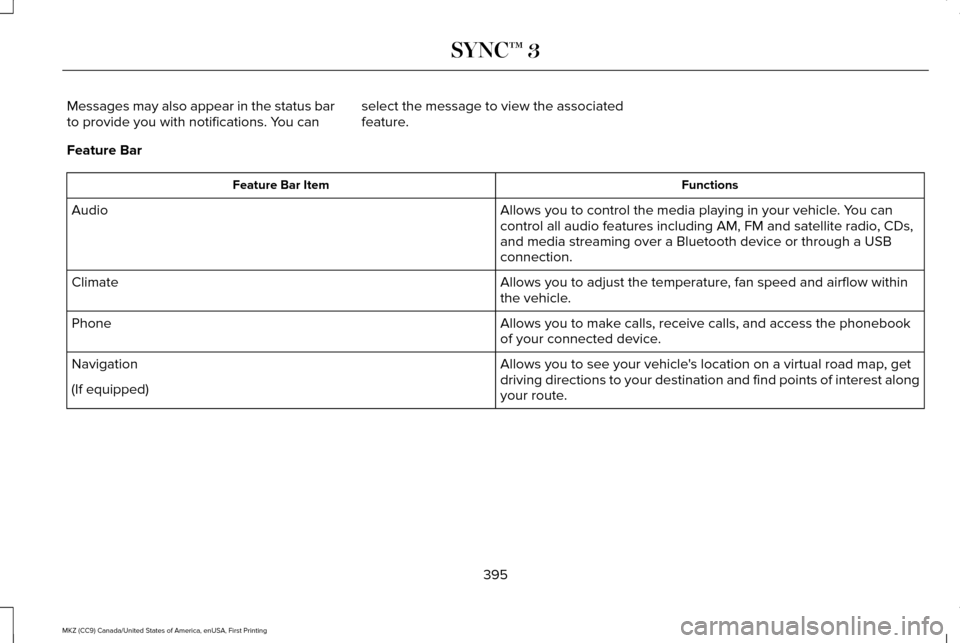
Messages may also appear in the status bar
to provide you with notifications. You can
select the message to view the associated
feature.
Feature Bar Functions
Feature Bar Item
Allows you to control the media playing in your vehicle. You can
control all audio features including AM, FM and satellite radio, CDs,
and media streaming over a Bluetooth device or through a USB
connection.
Audio
Allows you to adjust the temperature, fan speed and airflow within
the vehicle.
Climate
Allows you to make calls, receive calls, and access the phonebook
of your connected device.
Phone
Allows you to see your vehicle's location on a virtual road map, get
driving directions to your destination and find points of interest along\
your route.
Navigation
(If equipped)
395
MKZ (CC9) Canada/United States of America, enUSA, First Printing SYNC™ 3
Page 399 of 564
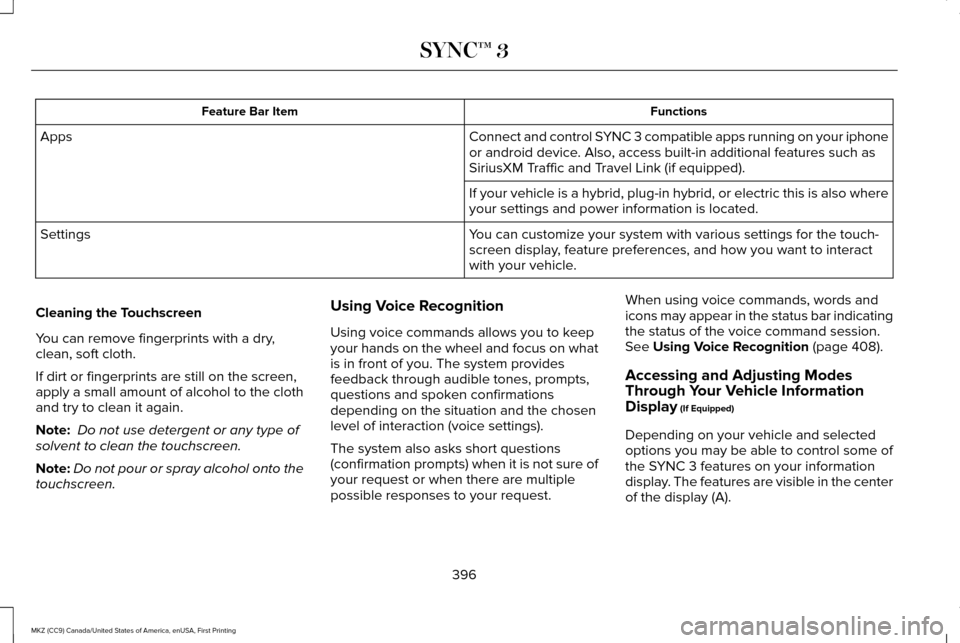
Functions
Feature Bar Item
Connect and control SYNC 3 compatible apps running on your iphone
or android device. Also, access built-in additional features such as
SiriusXM Traffic and Travel Link (if equipped).
Apps
If your vehicle is a hybrid, plug-in hybrid, or electric this is also wh\
ere
your settings and power information is located.
You can customize your system with various settings for the touch-
screen display, feature preferences, and how you want to interact
with your vehicle.
Settings
Cleaning the Touchscreen
You can remove fingerprints with a dry,
clean, soft cloth.
If dirt or fingerprints are still on the screen,
apply a small amount of alcohol to the cloth
and try to clean it again.
Note: Do not use detergent or any type of
solvent to clean the touchscreen.
Note: Do not pour or spray alcohol onto the
touchscreen. Using Voice Recognition
Using voice commands allows you to keep
your hands on the wheel and focus on what
is in front of you. The system provides
feedback through audible tones, prompts,
questions and spoken confirmations
depending on the situation and the chosen
level of interaction (voice settings).
The system also asks short questions
(confirmation prompts) when it is not sure of
your request or when there are multiple
possible responses to your request.When using voice commands, words and
icons may appear in the status bar indicating
the status of the voice command session.
See Using Voice Recognition (page 408).
Accessing and Adjusting Modes
Through Your Vehicle Information
Display
(If Equipped)
Depending on your vehicle and selected
options you may be able to control some of
the SYNC 3 features on your information
display. The features are visible in the center
of the display (A).
396
MKZ (CC9) Canada/United States of America, enUSA, First Printing SYNC™ 3