ECO mode LINCOLN MKZ 2017 Owner's Guide
[x] Cancel search | Manufacturer: LINCOLN, Model Year: 2017, Model line: MKZ, Model: LINCOLN MKZ 2017Pages: 564, PDF Size: 5.54 MB
Page 399 of 564
Functions
Feature Bar Item
Connect and control SYNC 3 compatible apps running on your iphone
or android device. Also, access built-in additional features such as
SiriusXM Traffic and Travel Link (if equipped).
Apps
If your vehicle is a hybrid, plug-in hybrid, or electric this is also wh\
ere
your settings and power information is located.
You can customize your system with various settings for the touch-
screen display, feature preferences, and how you want to interact
with your vehicle.
Settings
Cleaning the Touchscreen
You can remove fingerprints with a dry,
clean, soft cloth.
If dirt or fingerprints are still on the screen,
apply a small amount of alcohol to the cloth
and try to clean it again.
Note: Do not use detergent or any type of
solvent to clean the touchscreen.
Note: Do not pour or spray alcohol onto the
touchscreen. Using Voice Recognition
Using voice commands allows you to keep
your hands on the wheel and focus on what
is in front of you. The system provides
feedback through audible tones, prompts,
questions and spoken confirmations
depending on the situation and the chosen
level of interaction (voice settings).
The system also asks short questions
(confirmation prompts) when it is not sure of
your request or when there are multiple
possible responses to your request.When using voice commands, words and
icons may appear in the status bar indicating
the status of the voice command session.
See Using Voice Recognition (page 408).
Accessing and Adjusting Modes
Through Your Vehicle Information
Display
(If Equipped)
Depending on your vehicle and selected
options you may be able to control some of
the SYNC 3 features on your information
display. The features are visible in the center
of the display (A).
396
MKZ (CC9) Canada/United States of America, enUSA, First Printing SYNC™ 3
Page 433 of 564
Bluetooth Stereo or USB
Bluetooth Stereo and USB allow you to
access media that you store on your
Bluetooth device or USB device such as
music, audio books or podcasts.
The following buttons are available for Bluetooth and USB: Function
Button
Pressing the repeat button toggles the repeat setting through three mode\
s: repeat off (button not
highlighted), repeat all (button highlighted) and repeat track (butt\
on highlighted with a small number
one).
Repeat
Play the tracks in random order.
Shuffle
You can use the forward, reverse, pause or
play buttons to control the audio playback.
To get more information about the currently
playing track, press the cover art or Info
button. For some devices, SYNC 3 is able to provide
30-second skip buttons when you listen to
audio books or podcasts. These buttons
allow you to skip forward or backward within
a track.
While playing audio from a USB device you
can look for certain music by selecting the
following: Function
Button
If available, displays the list of tracks in the Now Playing playlist.
Browse
This option, which is available under browse, allows you to play all
tracks or to filter the available media into one of the below categories\
.
New Search
Play All
430
MKZ (CC9) Canada/United States of America, enUSA, First Printing SYNC™ 3
Page 439 of 564
PHONE
WARNING
Driving while distracted can result in
loss of vehicle control, crash and injury.
We strongly recommend that you use
extreme caution when using any device that
may take your focus off the road. Your
primary responsibility is the safe operation
of your vehicle. We recommend against the
use of any hand-held device while driving
and encourage the use of voice-operated
systems when possible. Make sure you are
aware of all applicable local laws that may
affect the use of electronic devices while
driving. Hands-free calling is one of the main features
of the system. Once you pair your cell phone,
you can access many options using the
touchscreen or voice commands. While the
system supports a variety of features, many
are dependent on your cell phone
’s
functionality. Pairing Your Cell Phone for the First
Time
Pair your Bluetooth-enabled phone with the
system before using the functions in
hands-free mode.
Switch on Bluetooth on your device to begin
pairing. See your phone
’s manual if
necessary.
To add a phone, select: Menu Item
Add Phone
1. Follow the on-screen instructions.
2. A prompt alerts you to search for the system on your phone.
3. Select your vehicle's make and model as
it displays on your phone.
4. Confirm that the six-digit number appearing on your phone matches the
six-digit number on the touchscreen.
5. The touchscreen indicates when the pairing is successful. 6. Your phone may prompt you to give the
system permission to access information.
To check your phone ’s compatibility, see
your phone ’s manual or visit the website.
Alternatively, to add a phone, select: Menu Item
Add Phone
Then select:
Discover Other Bluetooth Devices
1. Follow the on-screen instructions.
2. A prompt alerts you to search for the system on your phone.
3. Select your phone's name when it appears on the touchscreen.
4. Confirm that the six-digit number appearing on your phone matches the
six-digit number on the touchscreen.
5. The touchscreen indicates when the pairing is successful.
436
MKZ (CC9) Canada/United States of America, enUSA, First Printing SYNC™ 3
Page 447 of 564
NAVIGATION
Your navigation system is comprised of two
main features, destination mode and map
mode.
Map Mode
Map mode shows advanced viewing
comprised of 2D city maps, 3D landmarks
and 3D city models (when available). 2D city
maps show detailed outlines of buildings,
visible land use, landscape features, and
detailed railroad infrastructure for the most
essential cities around the globe.
3D landmarks appear as clear, visible objects
that are typically recognizable and have a
certain tourism value.
3D city models are complete 3D models of
entire city areas including navigable roads,
parks, rivers and rendered buildings. 3D
landmarks and city models appear in 3D map
mode only. Coverage of these varies and
improves with updated map releases. Select the zoom in icon to see a
closer view of the map.
Select the zoom out icon to see a
farther away view of the map.
You can adjust the view in preset increments.
You can also pinch to zoom in or out of the
map.
The information bar tells you the names of
streets, cities or landmarks as you hover over
them with the crosshair curser.
You can change your view of the map by
tapping on the location indicator icon on the
right hand side of the screen. You can
choose from the following options: Heading up (2D map) This always
shows the direction of forward
travel to be upward on the screen.
This view is available for map
scales up to
3 mi (5 km). North up (2D map)
always shows
the northern direction to be
upward on the screen. 3D map mode
provides an
elevated perspective of the map.
Adjust this viewing angle and
rotate the map 180 degrees by
touching the map twice, and then dragging
your finger along the shaded bar with arrows
at the bottom of the map. Re-center the map by pressing this
icon whenever you scroll the map
away from your vehicle
’s current
location. Points of Interest (POI) grouping
icon:
You can choose up to three
POI icons to display on the map. If
the chosen POIs are located close
together or are at the same location a box is
used to display a single category icon
444
MKZ (CC9) Canada/United States of America, enUSA, First Printing SYNC™ 3E207752 E207753 E207750 E207749 E207748 E207751 E207754
Page 452 of 564
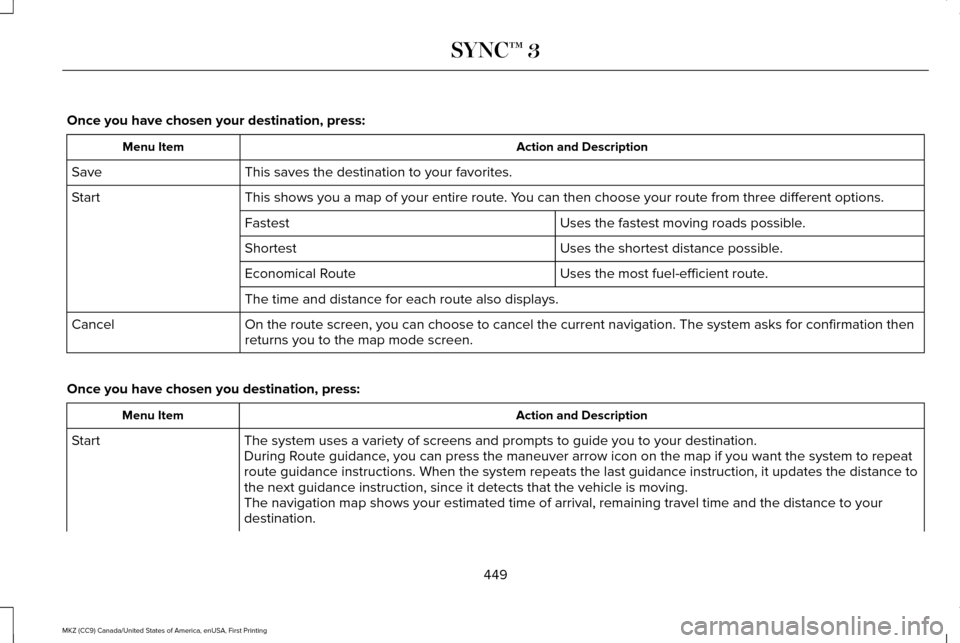
Once you have chosen your destination, press:
Action and Description
Menu Item
This saves the destination to your favorites.
Save
This shows you a map of your entire route. You can then choose your route from three different options.
Start
Uses the fastest moving roads possible.
Fastest
Uses the shortest distance possible.
Shortest
Uses the most fuel-efficient route.
Economical Route
The time and distance for each route also displays.
On the route screen, you can choose to cancel the current navigation. Th\
e system asks for confirmation then
returns you to the map mode screen.
Cancel
Once you have chosen you destination, press: Action and Description
Menu Item
The system uses a variety of screens and prompts to guide you to your de\
stination.
Start
During Route guidance, you can press the maneuver arrow icon on the map if you want the syste\
m to repeat
route guidance instructions. When the system repeats the last guidance i\
nstruction, it updates the distance to
the next guidance instruction, since it detects that the vehicle is movi\
ng.
The navigation map shows your estimated time of arrival, remaining trave\
l time and the distance to your
destination.
449
MKZ (CC9) Canada/United States of America, enUSA, First Printing SYNC™ 3
Page 457 of 564
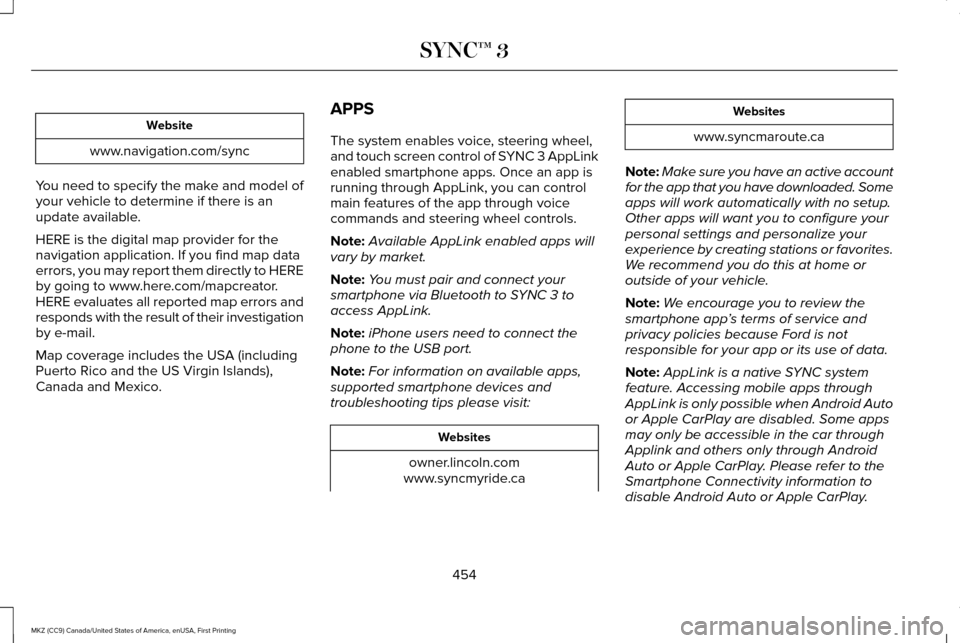
Website
www.navigation.com/sync
You need to specify the make and model of
your vehicle to determine if there is an
update available.
HERE is the digital map provider for the
navigation application. If you find map data
errors, you may report them directly to HERE
by going to www.here.com/mapcreator.
HERE evaluates all reported map errors and
responds with the result of their investigation
by e-mail.
Map coverage includes the USA (including
Puerto Rico and the US Virgin Islands),
Canada and Mexico. APPS
The system enables voice, steering wheel,
and touch screen control of SYNC 3 AppLink
enabled smartphone apps. Once an app is
running through AppLink, you can control
main features of the app through voice
commands and steering wheel controls.
Note:
Available AppLink enabled apps will
vary by market.
Note: You must pair and connect your
smartphone via Bluetooth to SYNC 3 to
access AppLink.
Note: iPhone users need to connect the
phone to the USB port.
Note: For information on available apps,
supported smartphone devices and
troubleshooting tips please visit: Websites
owner.lincoln.com
www.syncmyride.ca Websites
www.syncmaroute.ca
Note: Make sure you have an active account
for the app that you have downloaded. Some
apps will work automatically with no setup.
Other apps will want you to configure your
personal settings and personalize your
experience by creating stations or favorites.
We recommend you do this at home or
outside of your vehicle.
Note: We encourage you to review the
smartphone app ’s terms of service and
privacy policies because Ford is not
responsible for your app or its use of data.
Note: AppLink is a native SYNC system
feature. Accessing mobile apps through
AppLink is only possible when Android Auto
or Apple CarPlay are disabled. Some apps
may only be accessible in the car through
Applink and others only through Android
Auto or Apple CarPlay. Please refer to the
Smartphone Connectivity information to
disable Android Auto or Apple CarPlay.
454
MKZ (CC9) Canada/United States of America, enUSA, First Printing SYNC™ 3
Page 477 of 564

Menu Item
Enable this option to remove additional voice prompts and confirmations.\
Advanced Mode
Enable this option to have the system confirm a contacts name with you b\
efore
making a call.
Phone Confirmation
Enable this option to have the system display a list of available voice \
commands
when the voice button is pressed.
Voice Command List
Valet Mode
Valet mode allows you to lock the system.
No information is accessible until the system
is unlocked with the correct PIN.
When you select valet mode a pop up
appears informing you that a four digit code
must be entered to enable and disable valet
mode. You can use any PIN you chose but
you must use the same PIN to disable valet
mode. The system asks you to input the
code. Note:
If the system is locked and you cannot
remember the PIN, please contact the
Customer Relationship Center.
For Lincoln
United States: 1-800-521-4140
Canada: 1-800-387-9333
To enable valet mode, enter your chosen
PIN. The system then asks to confirm your
PIN by reentering it. The system then locks.
To unlock the system, enter the same pin
number. The system reconnects to your
phone and all of your options are available
again. SYNC™ 3 TROUBLESHOOTING
Your SYNC 3 system is easy to use.
However, should questions arise, please
refer to the tables below.
To check your cell phone's compatibility, visit
the Ford or Lincoln website.
Website
owner.lincoln.com
www.syncmyride.ca
www.syncmaroute.ca
474
MKZ (CC9) Canada/United States of America, enUSA, First Printing SYNC™ 3
Page 480 of 564
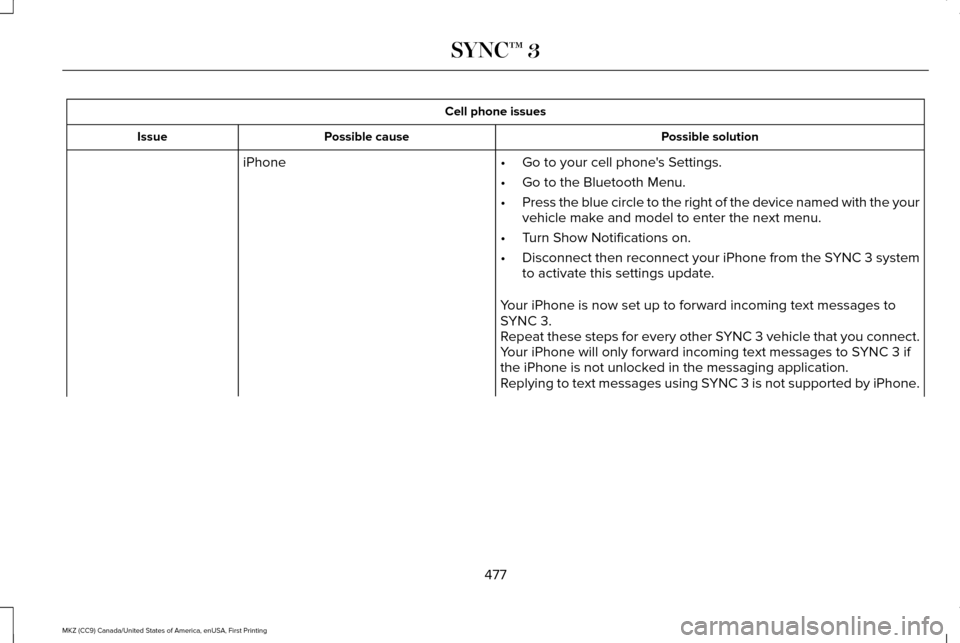
Cell phone issues
Possible solution
Possible cause
Issue
iPhone •Go to your cell phone's Settings.
• Go to the Bluetooth Menu.
• Press the blue circle to the right of the device named with the your
vehicle make and model to enter the next menu.
• Turn Show Notifications on.
• Disconnect then reconnect your iPhone from the SYNC 3 system
to activate this settings update.
Your iPhone is now set up to forward incoming text messages to
SYNC 3.
Repeat these steps for every other SYNC 3 vehicle that you connect.
Your iPhone will only forward incoming text messages to SYNC 3 if
the iPhone is not unlocked in the messaging application.
Replying to text messages using SYNC 3 is not supported by iPhone.
477
MKZ (CC9) Canada/United States of America, enUSA, First Printing SYNC™ 3
Page 481 of 564
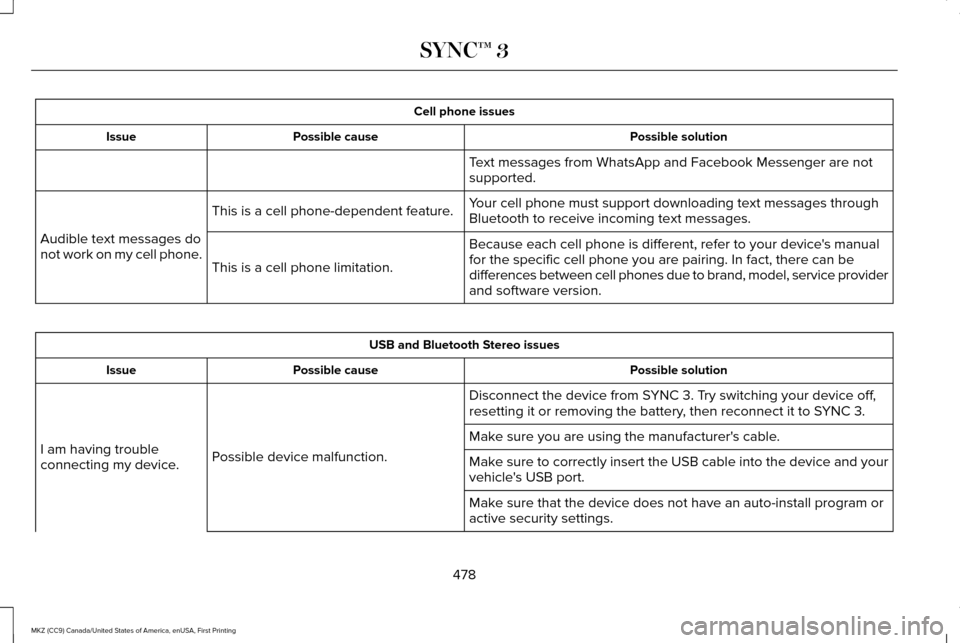
Cell phone issues
Possible solution
Possible cause
Issue
Text messages from WhatsApp and Facebook Messenger are not
supported.
Your cell phone must support downloading text messages through
Bluetooth to receive incoming text messages.
This is a cell phone-dependent feature.
Audible text messages do
not work on my cell phone. Because each cell phone is different, refer to your device's manual
for the specific cell phone you are pairing. In fact, there can be
differences between cell phones due to brand, model, service provider
and software version.
This is a cell phone limitation. USB and Bluetooth Stereo issues
Possible solution
Possible cause
Issue
Disconnect the device from SYNC 3. Try switching your device off,
resetting it or removing the battery, then reconnect it to SYNC 3.
Possible device malfunction.
I am having trouble
connecting my device. Make sure you are using the manufacturer's cable.
Make sure to correctly insert the USB cable into the device and your
vehicle's USB port.
Make sure that the device does not have an auto-install program or
active security settings.
478
MKZ (CC9) Canada/United States of America, enUSA, First Printing SYNC™ 3
Page 557 of 564
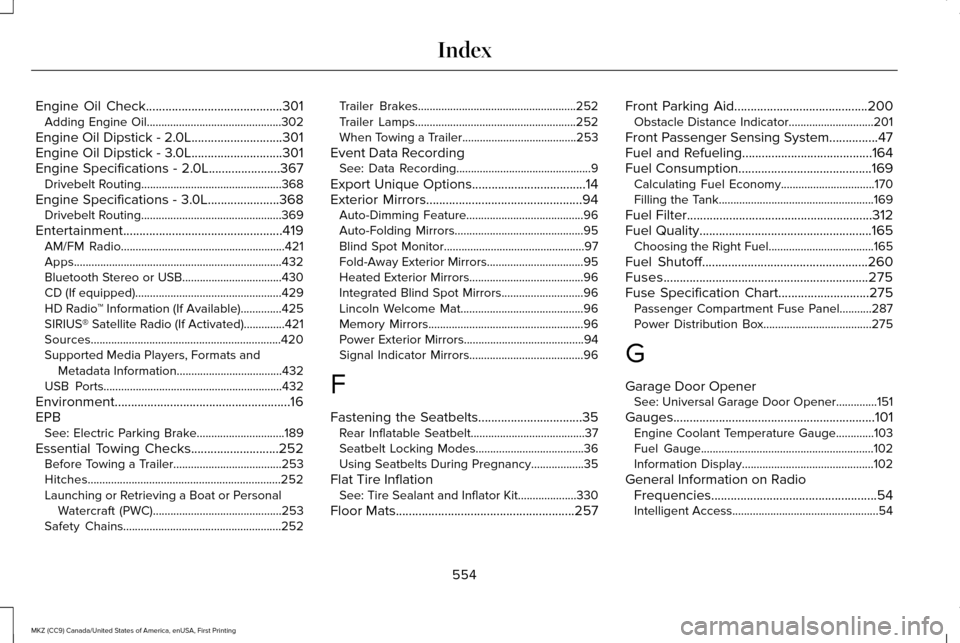
Engine Oil Check..........................................301
Adding Engine Oil..............................................302
Engine Oil Dipstick - 2.0L............................301
Engine Oil Dipstick - 3.0L............................301
Engine Specifications - 2.0L......................367 Drivebelt Routing................................................368
Engine Specifications - 3.0L......................368 Drivebelt Routing................................................369
Entertainment.................................................419 AM/FM Radio........................................................421
Apps.......................................................................432
Bluetooth Stereo or USB..................................430
CD (If equipped)..................................................429
HD Radio ™ Information (If Available)..............425
SIRIUS® Satellite Radio (If Activated)..............421
Sources.................................................................420
Supported Media Players, Formats and Metadata Information....................................432
USB Ports.............................................................432
Environment......................................................16
EPB See: Electric Parking Brake..............................189
Essential Towing Checks...........................252 Before Towing a Trailer.....................................253
Hitches..................................................................252
Launching or Retrieving a Boat or Personal
Watercraft (PWC)............................................253
Safety Chains......................................................252 Trailer Brakes......................................................252
Trailer Lamps.......................................................252
When Towing a Trailer.......................................253
Event Data Recording See: Data Recording..............................................9
Export Unique Options...................................14
Exterior Mirrors
................................................94
Auto-Dimming Feature........................................96
Auto-Folding Mirrors............................................95
Blind Spot Monitor................................................97
Fold-Away Exterior Mirrors.................................
95
Heated Exterior Mirrors.......................................96
Integrated Blind Spot Mirrors............................96
Lincoln Welcome Mat..........................................96
Memory Mirrors.....................................................96
Power Exterior Mirrors.........................................94
Signal Indicator Mirrors.......................................
96
F
Fastening the Seatbelts................................35 Rear Inflatable Seatbelt.......................................37
Seatbelt Locking Modes.....................................36
Using Seatbelts During Pregnancy..................35
Flat Tire Inflation See: Tire Sealant and Inflator Kit....................330
Floor Mats
.......................................................257 Front Parking Aid
.........................................200
Obstacle Distance Indicator.............................201
Front Passenger Sensing System...............47
Fuel and Refueling
........................................164
Fuel Consumption.........................................169
Calculating Fuel Economy................................170
Filling the Tank.....................................................169
Fuel Filter
.........................................................312
Fuel Quality.....................................................165
Choosing the Right Fuel....................................165
Fuel Shutoff...................................................260
Fuses...............................................................275
Fuse Specification Chart
............................275
Passenger Compartment Fuse Panel...........287
Power Distribution Box.....................................275
G
Garage Door Opener See: Universal Garage Door Opener..............151
Gauges..............................................................101 Engine Coolant Temperature Gauge.............103
Fuel Gauge...........................................................102
Information Display.............................................102
General Information on Radio Frequencies...................................................54
Intelligent Access..................................................54
554
MKZ (CC9) Canada/United States of America, enUSA, First Printing Index