radio LINCOLN MKZ 2017 Owner's Guide
[x] Cancel search | Manufacturer: LINCOLN, Model Year: 2017, Model line: MKZ, Model: LINCOLN MKZ 2017Pages: 564, PDF Size: 5.54 MB
Page 435 of 564
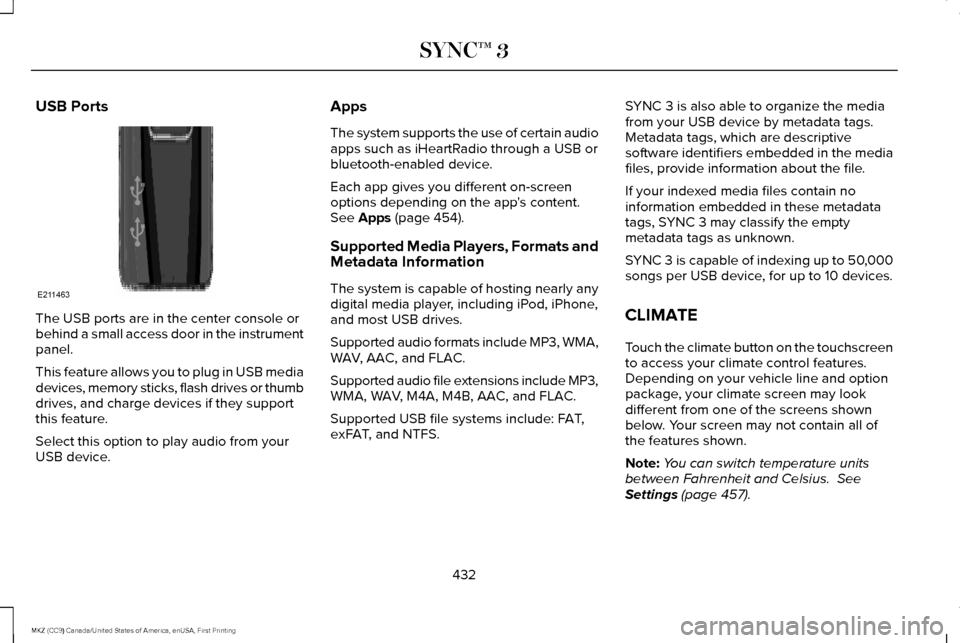
USB Ports
The USB ports are in the center console or
behind a small access door in the instrument
panel.
This feature allows you to plug in USB media
devices, memory sticks, flash drives or thumb
drives, and charge devices if they support
this feature.
Select this option to play audio from your
USB device. Apps
The system supports the use of certain audio
apps such as iHeartRadio through a USB or
bluetooth-enabled device.
Each app gives you different on-screen
options depending on the app's content.
See Apps (page 454).
Supported Media Players, Formats and
Metadata Information
The system is capable of hosting nearly any
digital media player, including iPod, iPhone,
and most USB drives.
Supported audio formats include MP3, WMA,
WAV, AAC, and FLAC.
Supported audio file extensions include MP3,
WMA, WAV, M4A, M4B, AAC, and FLAC.
Supported USB file systems include: FAT,
exFAT, and NTFS. SYNC 3 is also able to organize the media
from your USB device by metadata tags.
Metadata tags, which are descriptive
software identifiers embedded in the media
files, provide information about the file.
If your indexed media files contain no
information embedded in these metadata
tags, SYNC 3 may classify the empty
metadata tags as unknown.
SYNC 3 is capable of indexing up to 50,000
songs per USB device, for up to 10 devices.
CLIMATE
Touch the climate button on the touchscreen
to access your climate control features.
Depending on your vehicle line and option
package, your climate screen may look
different from one of the screens shown
below. Your screen may not contain all of
the features shown.
Note:
You can switch temperature units
between Fahrenheit and Celsius.
See
Settings (page 457).
432
MKZ (CC9) Canada/United States of America, enUSA, First Printing SYNC™ 3E211463
Page 467 of 564
Action and Description
Menu Item
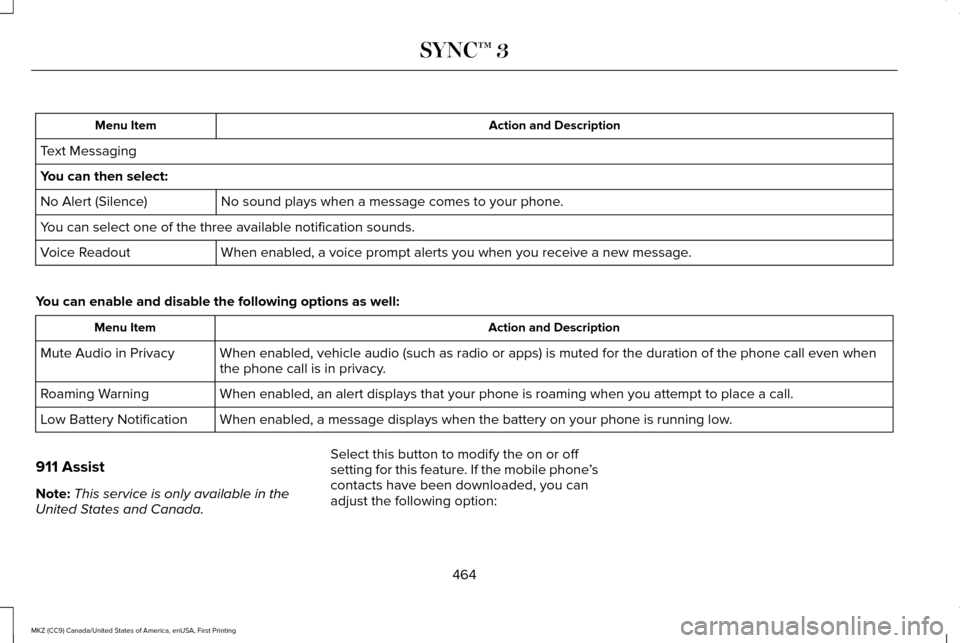
Text Messaging
You can then select: No sound plays when a message comes to your phone.
No Alert (Silence)
You can select one of the three available notification sounds.
When enabled, a voice prompt alerts you when you receive a new message.
Voice Readout
You can enable and disable the following options as well: Action and Description
Menu Item
When enabled, vehicle audio (such as radio or apps) is muted for the d\
uration of the phone call even when
the phone call is in privacy.
Mute Audio in Privacy
When enabled, an alert displays that your phone is roaming when you atte\
mpt to place a call.
Roaming Warning
When enabled, a message displays when the battery on your phone is runni\
ng low.
Low Battery Notification
911 Assist
Note: This service is only available in the
United States and Canada. Select this button to modify the on or off
setting for this feature. If the mobile phone
’s
contacts have been downloaded, you can
adjust the following option:
464
MKZ (CC9) Canada/United States of America, enUSA, First Printing SYNC™ 3
Page 468 of 564
Action and Description
Menu Item
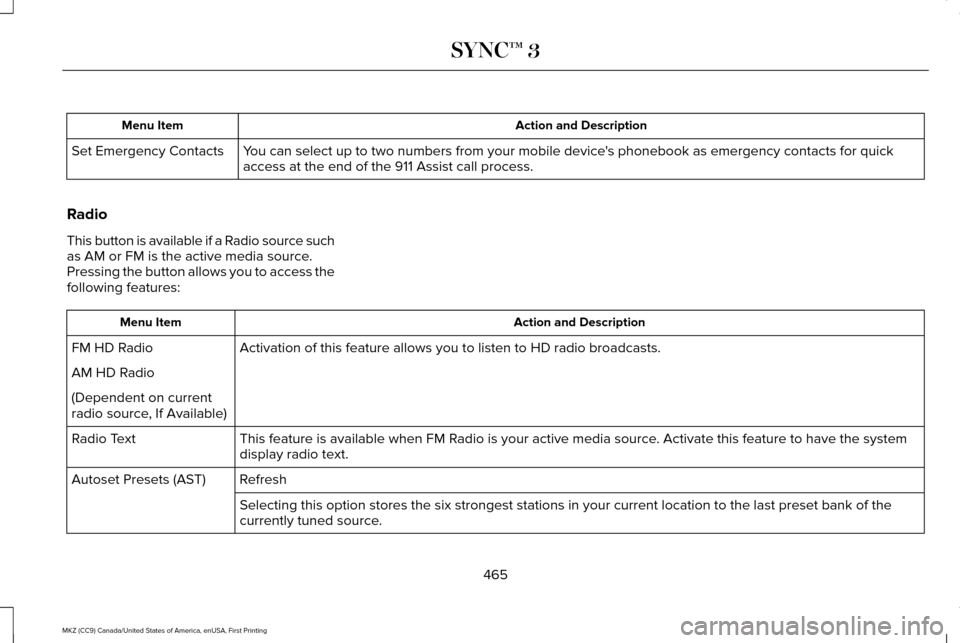
You can select up to two numbers from your mobile device's phonebook as emergency contacts for quick
access at the end of the 911 Assist call process.
Set Emergency Contacts
Radio
This button is available if a Radio source such
as AM or FM is the active media source.
Pressing the button allows you to access the
following features: Action and Description
Menu Item
Activation of this feature allows you to listen to HD radio broadcasts.
FM HD Radio
AM HD Radio
(Dependent on current
radio source, If Available)
This feature is available when FM Radio is your active media source. Activate this feature to have the system
display radio text.
Radio Text
Refresh
Autoset Presets (AST)
Selecting this option stores the six strongest stations in your current \
location to the last preset bank of the
currently tuned source.
465
MKZ (CC9) Canada/United States of America, enUSA, First Printing SYNC™ 3
Page 476 of 564
Onboard Modem Serial Number (ESN)
Selecting this button on the settings menu
shows you the ESN number for your system.
You need this number for certain
registrations such as Satellite Radio.
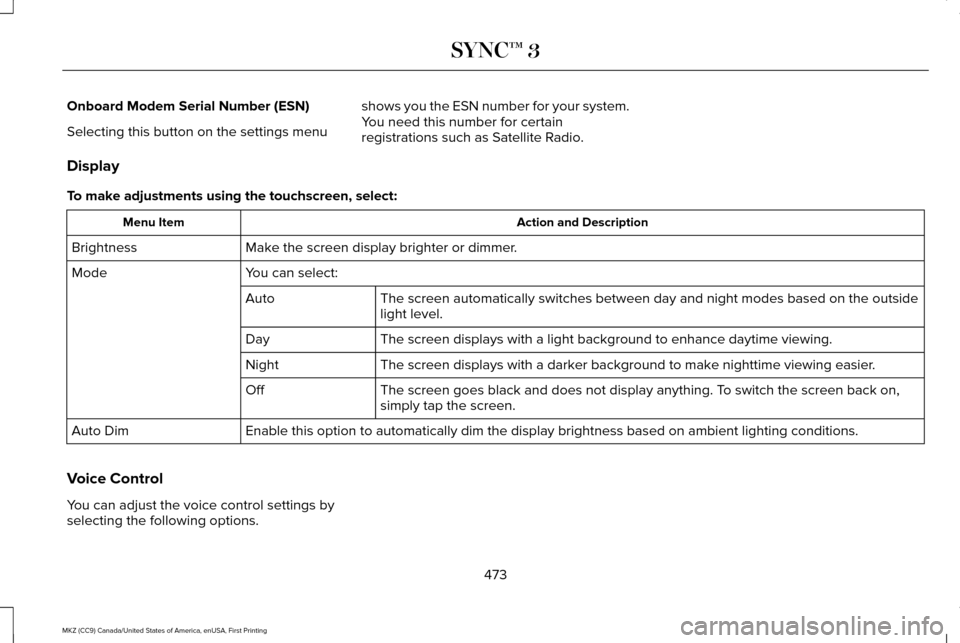
Display
To make adjustments using the touchscreen, select: Action and Description
Menu Item
Make the screen display brighter or dimmer.
Brightness
You can select:
Mode
The screen automatically switches between day and night modes based on t\
he outside
light level.
Auto
The screen displays with a light background to enhance daytime viewing.
Day
The screen displays with a darker background to make nighttime viewing easier.
Night
The screen goes black and does not display anything. To switch the screen back on,
simply tap the screen.
Off
Enable this option to automatically dim the display brightness based on \
ambient lighting conditions.
Auto Dim
Voice Control
You can adjust the voice control settings by
selecting the following options.
473
MKZ (CC9) Canada/United States of America, enUSA, First Printing SYNC™ 3
Page 492 of 564
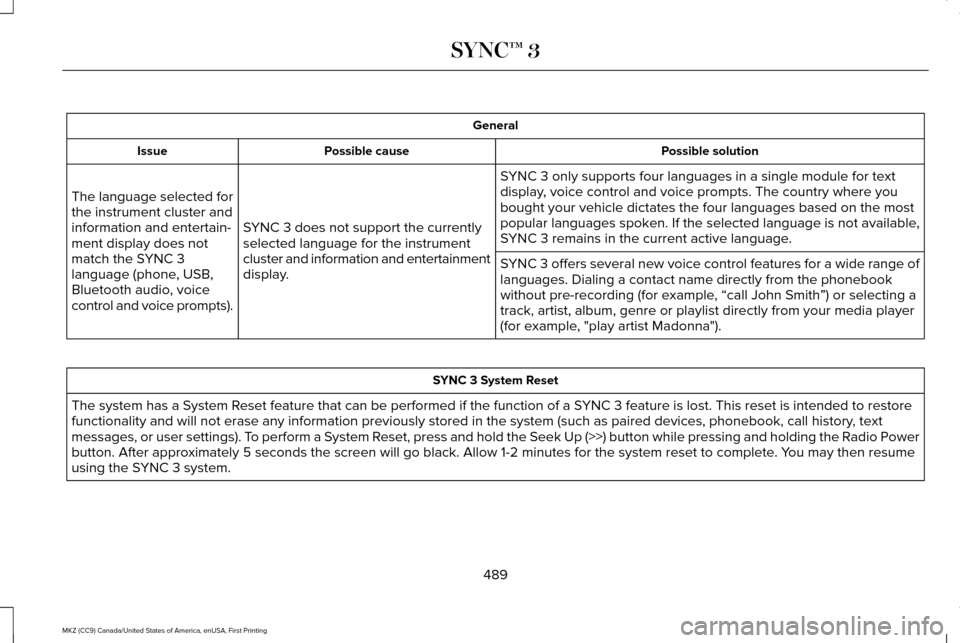
General
Possible solution
Possible cause
Issue
SYNC 3 only supports four languages in a single module for text
display, voice control and voice prompts. The country where you
bought your vehicle dictates the four languages based on the most
popular languages spoken. If the selected language is not available,
SYNC 3 remains in the current active language.
SYNC 3 does not support the currently
selected language for the instrument
cluster and information and entertainment
display.
The language selected for
the instrument cluster and
information and entertain-
ment display does not
match the SYNC 3
language (phone, USB,
Bluetooth audio, voice
control and voice prompts).
SYNC 3 offers several new voice control features for a wide range of
languages. Dialing a contact name directly from the phonebook
without pre-recording (for example, “call John Smith
”) or selecting a
track, artist, album, genre or playlist directly from your media player
(for example, "play artist Madonna"). SYNC 3 System Reset
The system has a System Reset feature that can be performed if the function of a SYNC 3 feature is lost. This reset is intended to restore
functionality and will not erase any information previously stored in th\
e system (such as paired devices, phonebook, call history , text
messages, or user settings). To perform a System Reset, press and hold the Seek Up (>>) button while pressing and holdin\
g the Radio Power
button. After approximately 5 seconds the screen will go black. Allow 1-2 minutes for the s\
ystem reset to complete. You may then resume
using the SYNC 3 system.
489
MKZ (CC9) Canada/United States of America, enUSA, First Printing SYNC™ 3
Page 495 of 564
For maximum vehicle performance, keep the
following information in mind when adding
accessories or equipment to your vehicle:
•
When adding accessories, equipment,
passengers and luggage to your vehicle,
do not exceed the total weight capacity
of the vehicle or of the front or rear axle
(GVWR or GAWR as indicated on the
Safety Compliance Certification label).
Consult an authorized dealer for specific
weight information.
• The Federal Communications
Commission (FCC) and Canadian Radio
Telecommunications Commission (CRTC)
regulate the use of mobile
communications systems that are
equipped with radio transmitters, for
example, two-way radios, telephones and
theft alarms. Any such equipment
installed in your vehicle should comply
with the Federal Communications
Commission (FCC) and Canadian Radio
Telecommunications Commission (CRTC)
regulations and should be installed only
by an authorized dealer. •
Mobile communications systems may
harm the operation of your vehicle,
particularly if their manufacturer did not
design them specifically for automotive
use.
• If you or an authorized Lincoln dealer add
any non-Lincoln electrical or electronic
accessories or components to your
vehicle, you may adversely affect battery
performance and durability. In addition,
you may also adversely affect the
performance of other electrical systems
in the vehicle.
492
MKZ (CC9) Canada/United States of America, enUSA, First Printing Accessories
Page 549 of 564
ERROR-FREE OR THAT THE FUNCTIONING
OF THE GRACENOTE SOFTWARE OR
GRACENOTE SERVERS WILL BE
UNINTERRUPTED. GRACENOTE IS NOT
OBLIGATED TO PROVIDE YOU WITH ANY
ENHANCED OR ADDITIONAL DATA TYPES
THAT GRACENOTE MAY CHOOSE TO
PROVIDE IN THE FUTURE AND IS FREE TO
DISCONTINUE ITS ONLINE SERVICES AT
ANY TIME. GRACENOTE DISCLAIM ALL
WARRANTIES EXPRESS OR IMPLIED,
INCLUDING, BUT NOT LIMITED TO, IMPLIED
WARRANTIES OF MERCHANTABILITY,
FITNESS FOR A PARTICULAR PURPOSE,
TITLE, AND NON-INFRINGEMENT. NEITHER
GRACENOTE WARRANTS THE RESULTS
THAT WILL BE OBTAINED BY YOUR USE
OF THE GRACENOTE SOFTWARE OR ANY
GRACENOTE SERVER. IN NO CASE WILL
GRACENOTE BE LIABLE FOR ANY
CONSEQUENTIAL OR INCIDENTAL
DAMAGES OR FOR ANY LOST PROFITS OR
LOST REVENUES FOR ANY REASON
WHATSOEVER. © Gracenote 2007.
FCC ID: ACJ-SYNCG3-L
IC: 216B-SYNCG3-L
This device complies with Part 15 of the FCC
Rules and with RSS-210 of Industry Canada.
Operation is subject to the following two
conditions:
(1) This device may not cause harmful
interference, and
(2)
this device must accept any interference
received, including interference that may
cause undesired operation. WARNING
Changes or modifications not
expressively approved by the party
responsible for compliance could void the
user's authority to operate the equipment.
The term "IC" before the radio certification
number only signifies that Industry Canada
technical specifications were met. The antenna used for this transmitter must
not be co-located or operating in conjunction
with any other antenna or transmitter.TYPE APPROVALS
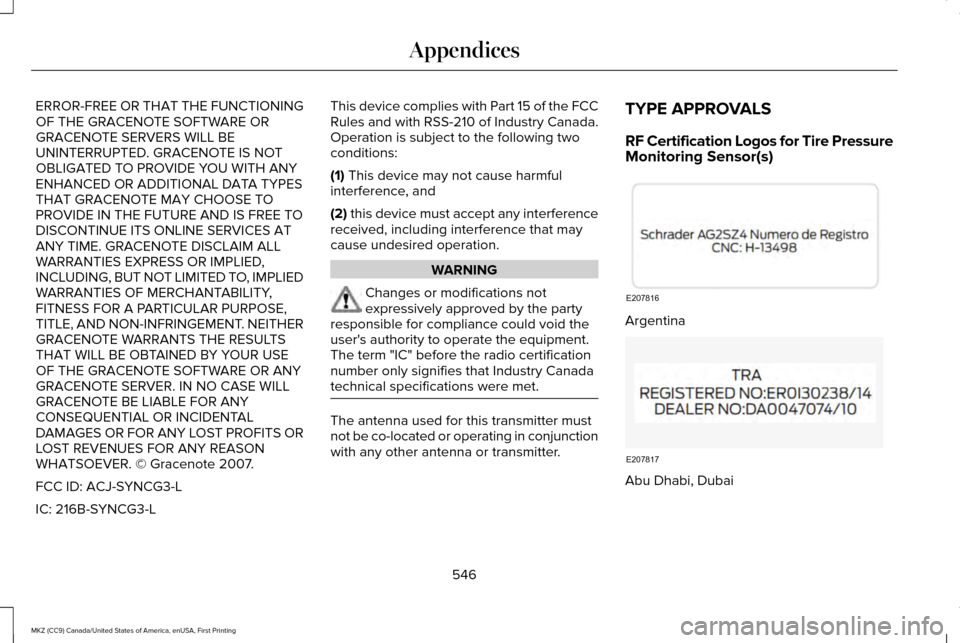
RF Certification Logos for Tire Pressure
Monitoring Sensor(s)
Argentina
Abu Dhabi, Dubai
546
MKZ (CC9) Canada/United States of America, enUSA, First Printing AppendicesE207816 E207817
Page 557 of 564
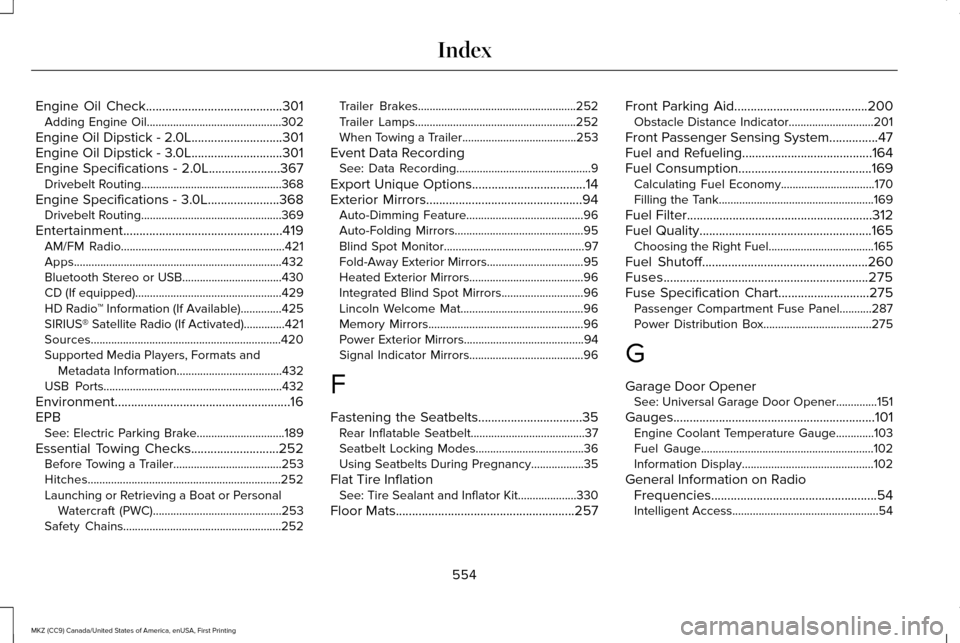
Engine Oil Check..........................................301
Adding Engine Oil..............................................302
Engine Oil Dipstick - 2.0L............................301
Engine Oil Dipstick - 3.0L............................301
Engine Specifications - 2.0L......................367 Drivebelt Routing................................................368
Engine Specifications - 3.0L......................368 Drivebelt Routing................................................369
Entertainment.................................................419 AM/FM Radio........................................................421
Apps.......................................................................432
Bluetooth Stereo or USB..................................430
CD (If equipped)..................................................429
HD Radio ™ Information (If Available)..............425
SIRIUS® Satellite Radio (If Activated)..............421
Sources.................................................................420
Supported Media Players, Formats and Metadata Information....................................432
USB Ports.............................................................432
Environment......................................................16
EPB See: Electric Parking Brake..............................189
Essential Towing Checks...........................252 Before Towing a Trailer.....................................253
Hitches..................................................................252
Launching or Retrieving a Boat or Personal
Watercraft (PWC)............................................253
Safety Chains......................................................252 Trailer Brakes......................................................252
Trailer Lamps.......................................................252
When Towing a Trailer.......................................253
Event Data Recording See: Data Recording..............................................9
Export Unique Options...................................14
Exterior Mirrors
................................................94
Auto-Dimming Feature........................................96
Auto-Folding Mirrors............................................95
Blind Spot Monitor................................................97
Fold-Away Exterior Mirrors.................................
95
Heated Exterior Mirrors.......................................96
Integrated Blind Spot Mirrors............................96
Lincoln Welcome Mat..........................................96
Memory Mirrors.....................................................96
Power Exterior Mirrors.........................................94
Signal Indicator Mirrors.......................................
96
F
Fastening the Seatbelts................................35 Rear Inflatable Seatbelt.......................................37
Seatbelt Locking Modes.....................................36
Using Seatbelts During Pregnancy..................35
Flat Tire Inflation See: Tire Sealant and Inflator Kit....................330
Floor Mats
.......................................................257 Front Parking Aid
.........................................200
Obstacle Distance Indicator.............................201
Front Passenger Sensing System...............47
Fuel and Refueling
........................................164
Fuel Consumption.........................................169
Calculating Fuel Economy................................170
Filling the Tank.....................................................169
Fuel Filter
.........................................................312
Fuel Quality.....................................................165
Choosing the Right Fuel....................................165
Fuel Shutoff...................................................260
Fuses...............................................................275
Fuse Specification Chart
............................275
Passenger Compartment Fuse Panel...........287
Power Distribution Box.....................................275
G
Garage Door Opener See: Universal Garage Door Opener..............151
Gauges..............................................................101 Engine Coolant Temperature Gauge.............103
Fuel Gauge...........................................................102
Information Display.............................................102
General Information on Radio Frequencies...................................................54
Intelligent Access..................................................54
554
MKZ (CC9) Canada/United States of America, enUSA, First Printing Index
Page 561 of 564
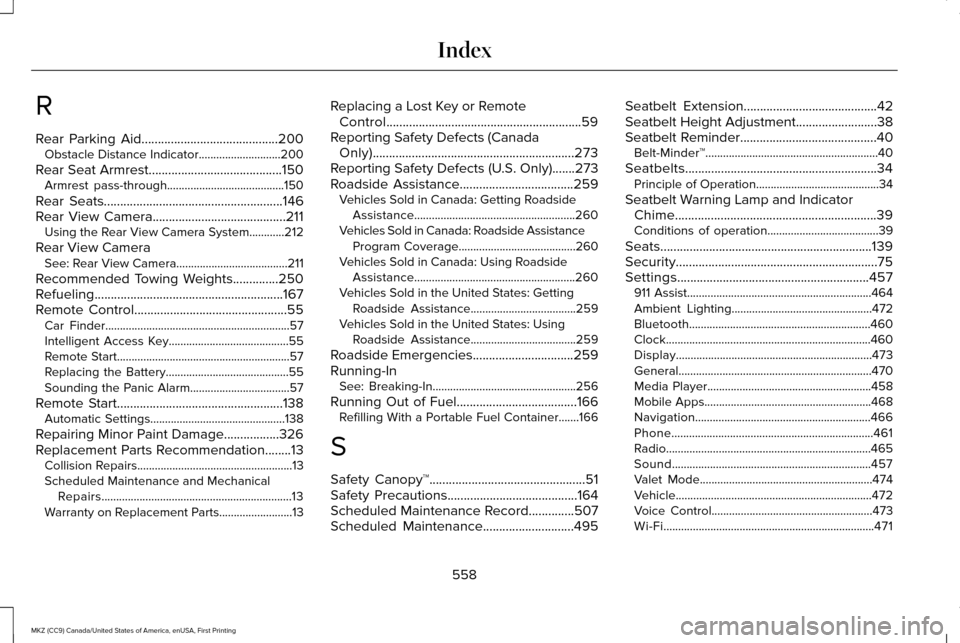
R
Rear Parking Aid..........................................200
Obstacle Distance Indicator............................200
Rear Seat Armrest.........................................150
Armrest pass-through........................................150
Rear Seats.......................................................146
Rear View Camera.........................................211 Using the Rear View Camera System............212
Rear View Camera See: Rear View Camera......................................211
Recommended Towing Weights
..............250
Refueling..........................................................167
Remote Control...............................................55 Car Finder...............................................................57
Intelligent Access Key.........................................55
Remote Start...........................................................57
Replacing the Battery..........................................55
Sounding the Panic Alarm..................................57
Remote Start...................................................138 Automatic Settings..............................................138
Repairing Minor Paint Damage.................326
Replacement Parts Recommendation........13 Collision Repairs.....................................................13
Scheduled Maintenance and Mechanical
Repairs.................................................................13
Warranty on Replacement Parts.........................
13 Replacing a Lost Key or Remote
Control............................................................59
Reporting Safety Defects (Canada Only)..............................................................273
Reporting Safety Defects (U.S. Only).......273
Roadside Assistance
...................................259
Vehicles Sold in Canada: Getting Roadside
Assistance.......................................................260
Vehicles Sold in Canada: Roadside Assistance Program Coverage........................................260
Vehicles Sold in Canada: Using Roadside Assistance.......................................................260
Vehicles Sold in the United States: Getting Roadside Assistance....................................259
Vehicles Sold in the United States: Using Roadside Assistance....................................259
Roadside Emergencies...............................259
Running-In See: Breaking-In.................................................256
Running Out of Fuel
.....................................166
Refilling With a Portable Fuel Container.......166
S
Safety Canopy™................................................51
Safety Precautions
........................................164
Scheduled Maintenance Record..............507
Scheduled Maintenance............................495 Seatbelt Extension
.........................................42
Seatbelt Height Adjustment.........................38
Seatbelt Reminder..........................................40 Belt-Minder™...........................................................40
Seatbelts...........................................................34 Principle of Operation..........................................34
Seatbelt Warning Lamp and Indicator Chime..............................................................39
Conditions of operation......................................39
Seats.................................................................139
Security..............................................................75
Settings...........................................................457 911 Assist...............................................................464
Ambient Lighting................................................472
Bluetooth..............................................................460
Clock......................................................................460
Display...................................................................473
General..................................................................470
Media Player........................................................458
Mobile Apps.........................................................468
Navigation............................................................466
Phone.....................................................................461
Radio......................................................................465
Sound....................................................................457
Valet Mode...........................................................474
Vehicle...................................................................472
Voice Control.......................................................473
Wi-Fi........................................................................\
471
558
MKZ (CC9) Canada/United States of America, enUSA, First Printing Index