automatic transmission LINCOLN MKZ 2018 User Guide
[x] Cancel search | Manufacturer: LINCOLN, Model Year: 2018, Model line: MKZ, Model: LINCOLN MKZ 2018Pages: 595, PDF Size: 5.06 MB
Page 152 of 595
MEMORY FUNCTION
WARNINGS
Before activating the memory seat,make sure that the area immediatelysurrounding the seat is clear of obstructionsand that all occupants are clear of movingparts.
Do not use the memory function whenyour vehicle is moving.
This feature automatically recalls the positionof the following features:
•Driver seat.
•Power mirrors.
•Power steering column.
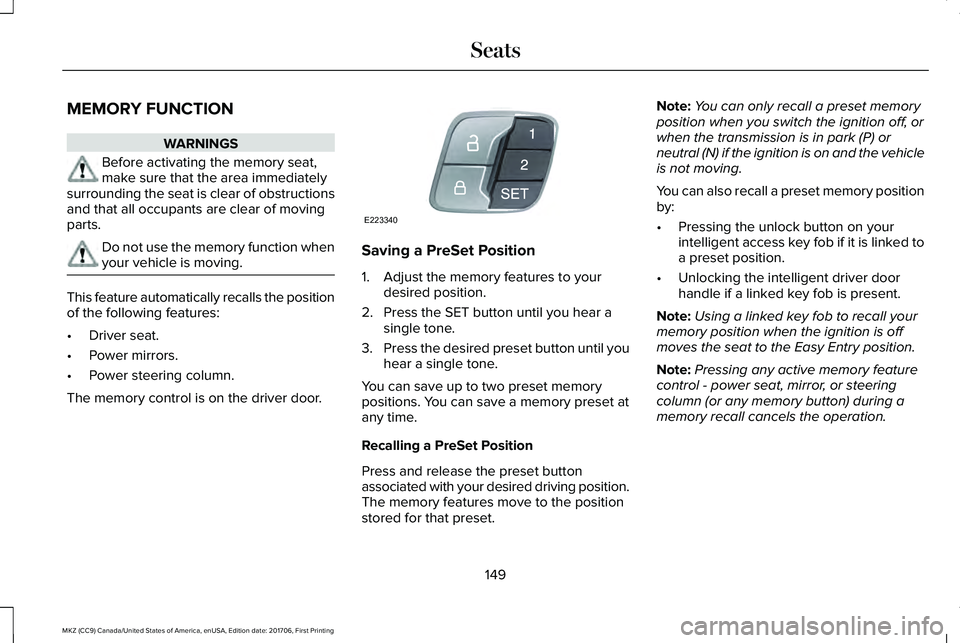
The memory control is on the driver door.
Saving a PreSet Position
1. Adjust the memory features to yourdesired position.
2. Press the SET button until you hear asingle tone.
3.Press the desired preset button until youhear a single tone.
You can save up to two preset memorypositions. You can save a memory preset atany time.
Recalling a PreSet Position
Press and release the preset buttonassociated with your desired driving position.The memory features move to the positionstored for that preset.
Note:You can only recall a preset memoryposition when you switch the ignition off, orwhen the transmission is in park (P) orneutral (N) if the ignition is on and the vehicleis not moving.
You can also recall a preset memory positionby:
•Pressing the unlock button on yourintelligent access key fob if it is linked toa preset position.
•Unlocking the intelligent driver doorhandle if a linked key fob is present.
Note:Using a linked key fob to recall yourmemory position when the ignition is offmoves the seat to the Easy Entry position.
Note:Pressing any active memory featurecontrol - power seat, mirror, or steeringcolumn (or any memory button) during amemory recall cancels the operation.
149
MKZ (CC9) Canada/United States of America, enUSA, Edition date: 201706, First Printing
SeatsE223340
Page 167 of 595
The keyless starting system has threemodes:
•Off: Turns the ignition off.
•Without applying the brake pedal,press and release the button oncewhen the ignition is in the on mode,or when the vehicle is running but isnot moving.
•On: All electrical circuits are operationaland the warning lamps and indicatorsilluminate.
•Without applying the brake pedal,press and release the button once.
•Start: Starts the vehicle. The engine maynot start when the vehicle starts.
•Press the brake pedal, and then pressthe button until the vehicle starts. Anindicator light on the buttonilluminates when the ignition is onand when the vehicle starts.
STARTING A GASOLINE ENGINE
When you start the engine, the idle speedincreases, this helps to warm up the engine.If the engine idle speed does not slow downautomatically, have your vehicle checked byan authorized dealer.
Before starting the engine, check thefollowing:
•Make sure all occupants have fastenedtheir safety belts.
•Make sure the headlamps and electricalaccessories are off.
•Make sure the parking brake is on.
•Put the transmission in P.
Note:Do not touch the accelerator pedal.
1. Fully press the brake pedal.
2. Press the button.
The system does not function if:
•The key frequencies are jammed.
•The key battery has no charge.
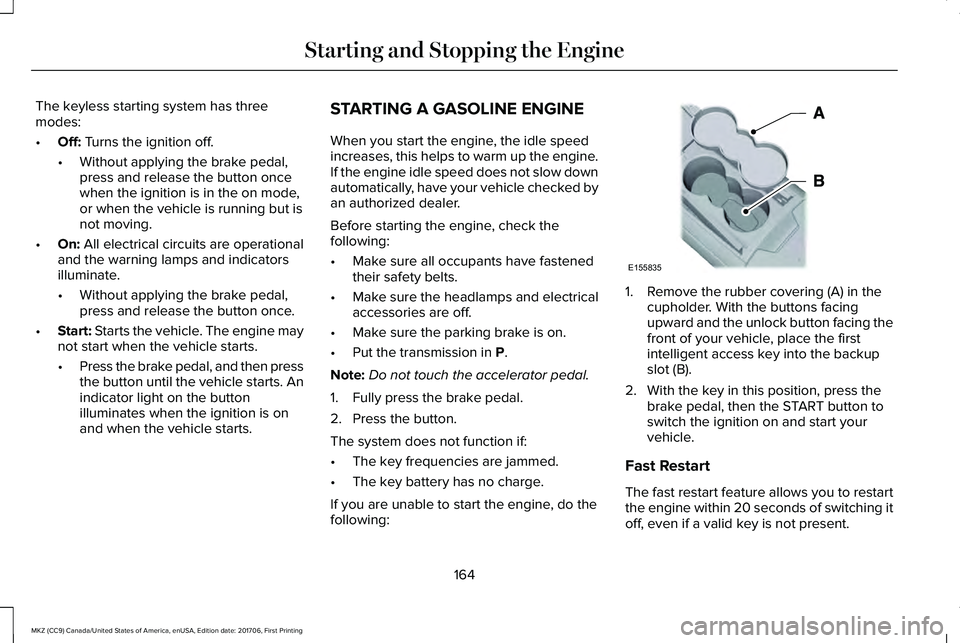
If you are unable to start the engine, do thefollowing:
1. Remove the rubber covering (A) in thecupholder. With the buttons facingupward and the unlock button facing thefront of your vehicle, place the firstintelligent access key into the backupslot (B).
2. With the key in this position, press thebrake pedal, then the START button toswitch the ignition on and start yourvehicle.
Fast Restart
The fast restart feature allows you to restartthe engine within 20 seconds of switching itoff, even if a valid key is not present.
164
MKZ (CC9) Canada/United States of America, enUSA, Edition date: 201706, First Printing
Starting and Stopping the EngineE155835
Page 169 of 595
•You can reset the timer by interactingwith your vehicle (such as pressing thebrake pedal or accelerator pedal).
•You can temporarily switch off theshutdown feature any time the ignition ison (for the current ignition cycle only).Use the information display to do so. SeeInformation Displays (page 111).
•During the countdown before engineshutdown, you are prompted to press OKor RESET (depending on your type ofinformation display) to temporarily switchthe feature off (for the current ignitioncycle only).
Stopping the Engine When YourVehicle is Stationary
1. Put the transmission in position P.
2. Press the button once.
3. Apply the parking brake.
Note:This switches off the ignition, allelectrical circuits, warning lamps andindicators.
Note:If the engine is idling for 30 minutes,the ignition and engine automatically shutdown.
Stopping the Engine When YourVehicle is Moving
WARNING
Switching off the engine when thevehicle is still moving will result in aloss of brake and steering assistance. Thesteering will not lock, but higher effort willbe required. When the ignition is switchedoff, some electrical circuits, including airbags, warning lamps and indicators may alsobe off. If the ignition was turned offaccidentally, you can shift into neutral (N) andre-start the engine.
1. Put the transmission in position N anduse the brakes to bring your vehicle to asafe stop.
2. When your vehicle has stopped, put thetransmission in position P.
3. Press and hold the button for onesecond, or press it three times within twoseconds.
4. Apply the parking brake.
Guarding Against Exhaust Fumes
WARNING
Exhaust leaks may result in entry ofharmful and potentially lethal fumesinto the passenger compartment. If you smellexhaust fumes inside your vehicle, have yourvehicle inspected immediately. Do not driveif you smell exhaust fumes.
Important Ventilating Information
If you stop your vehicle and then leave theengine idling for long periods, werecommend that you do one of the following:
•Open the windows at least 1 in (2.5 cm).
•Set your climate control to outside air.
ENGINE BLOCK HEATER (If Equipped)
WARNINGS
Failure to follow engine block heaterinstructions could result in propertydamage or serious personal injury.
166
MKZ (CC9) Canada/United States of America, enUSA, Edition date: 201706, First Printing
Starting and Stopping the Engine
Page 183 of 595
AUTOMATIC TRANSMISSION
WARNINGS
Always fully apply the parking brakeand make sure you shift into park (P).Failure to follow this instruction could resultin personal injury or death.
Do not apply the brake pedal andaccelerator pedal simultaneously.Applying both pedals simultaneously formore than a few seconds will limit engineperformance, which may result in difficultymaintaining speed in traffic and could leadto serious injury.
Note:You may not be able to shift out ofpark (P) unless the intelligent access key isinside your vehicle.
Push Button Shift Transmission
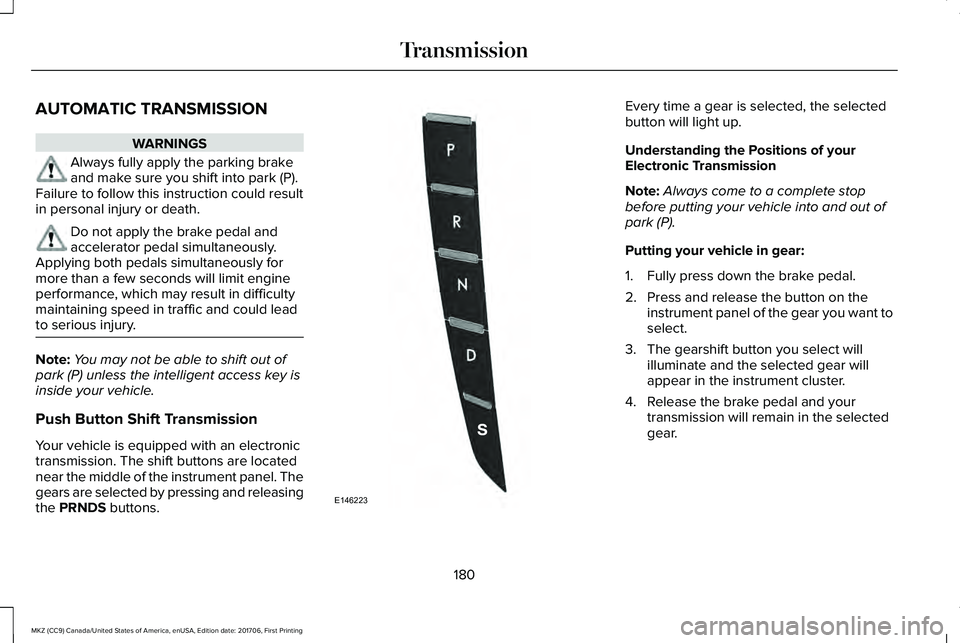
Your vehicle is equipped with an electronictransmission. The shift buttons are locatednear the middle of the instrument panel. Thegears are selected by pressing and releasingthe PRNDS buttons.
Every time a gear is selected, the selectedbutton will light up.
Understanding the Positions of yourElectronic Transmission
Note:Always come to a complete stopbefore putting your vehicle into and out ofpark (P).
Putting your vehicle in gear:
1. Fully press down the brake pedal.
2. Press and release the button on theinstrument panel of the gear you want toselect.
3. The gearshift button you select willilluminate and the selected gear willappear in the instrument cluster.
4. Release the brake pedal and yourtransmission will remain in the selectedgear.
180
MKZ (CC9) Canada/United States of America, enUSA, Edition date: 201706, First Printing
TransmissionE146223
Page 184 of 595
Note:If you attempt to leave your vehiclewhile it is in gear, the vehicle willautomatically shift into park (P). Safety beltand door monitors determine your intent andmake the shift for you. During this time, amessage will appear in the informationdisplay screen prompting you to make theshift. See Information Messages (page 117).
Note:To put your vehicle in gear with thedoor open, perform steps 1-4. See theAutomatic Return to Park section in thischapter for more information on this feature.
Park (P)
With the transmission in park (P), your vehiclelocks the transmission and prevents the frontwheels from turning. Always come to acomplete stop before putting your vehicleinto and out of park (P). An audible chimesounds once you select park (P).
When the ignition is turned off, the vehiclewill automatically shift into park (P). If theignition is turned off while the vehicle ismoving, it will first shift into neutral (N) untila slow enough speed is reached. The vehiclewill then shift into park (P) automatically.
Automatic Return to Park
Note:This feature will not operate when yourvehicle is in Stay in Neutral mode or neutraltow.
Your vehicle has a safety feature that willautomatically shift your vehicle into park (P)when any of the following conditions occur:
•You turn the ignition off
•You open the driver's door with yoursafety belt unlatched
•Your safety belt is unlatched while thedriver's door is open
If you turn the ignition off while your vehicleis moving, your vehicle will first shift intoneutral (N) until it slows down enough to shiftinto park (P) automatically.
Note:If you have waited an extended periodof time, (2-15 minutes) before starting yourvehicle, unlatching your safety belt will causethis feature to activate, even with the driver'sdoor closed.
Note:This feature may not work properly ifthe door ajar switch is malfunctioning. If yourdoor ajar indicator does not illuminate whenyou open the driver’s door or the indicatorilluminates with the driver’s door closed. Seeyour authorized dealer.
Reverse (R)
With the transmission in reverse (R), yourvehicle will move backward. Always cometo a complete stop before shifting into andout of reverse (R).
Neutral (N)
With the transmission in neutral (N), you canstart your vehicle and it is free to roll. Holdthe brake pedal down while in this position.
Stay in Neutral mode
Stay in Neutral mode allows your vehicle tostay in neutral (N) when you exit the vehicle.Your vehicle must be stationary to enter thismode.
To enter Stay in Neutral mode:
1. Press the neutral (N) button on yourshifter assembly.
181
MKZ (CC9) Canada/United States of America, enUSA, Edition date: 201706, First Printing
Transmission
Page 185 of 595
2. A message will appear in yourinformation display screen prompting youto press the neutral (N) button.
3. Press the neutral (N) button again toenter Stay in Neutral mode.
A message will appear in your informationdisplay screen when your vehicle hasentered Stay in Neutral mode.
Note:During this mode the neutral (N) buttonwill flash continuously and your instrumentcluster will display N as the selected gear.
Exiting Stay in Neutral mode
To disable Stay in Neutral mode selectanother gear. See the Putting the Vehiclein Gear for instructions on how to do this.
Entering a Carwash
Note:Always put your vehicle in Stay inNeutral mode when entering an automaticcar wash. Failure to do this could result invehicle damage not covered by warranty.
Drive (D)
The normal driving position for the best fueleconomy.
Sport (S)
Putting the vehicle in sport (S):
•Provides additional engine braking andextends lower gear operation to enhanceperformance for uphill climbs, hilly terrainor mountainous areas. This will increaseengine RPM during engine braking
•Provides additional lower gear operationthrough the automatic transmission shiftstrategy
•Provides gear selection more quickly andat higher engine speeds
SelectShift Automatic™ Transmission
Your SelectShift Automatic transmissiongives you the ability to change gearsmanually.
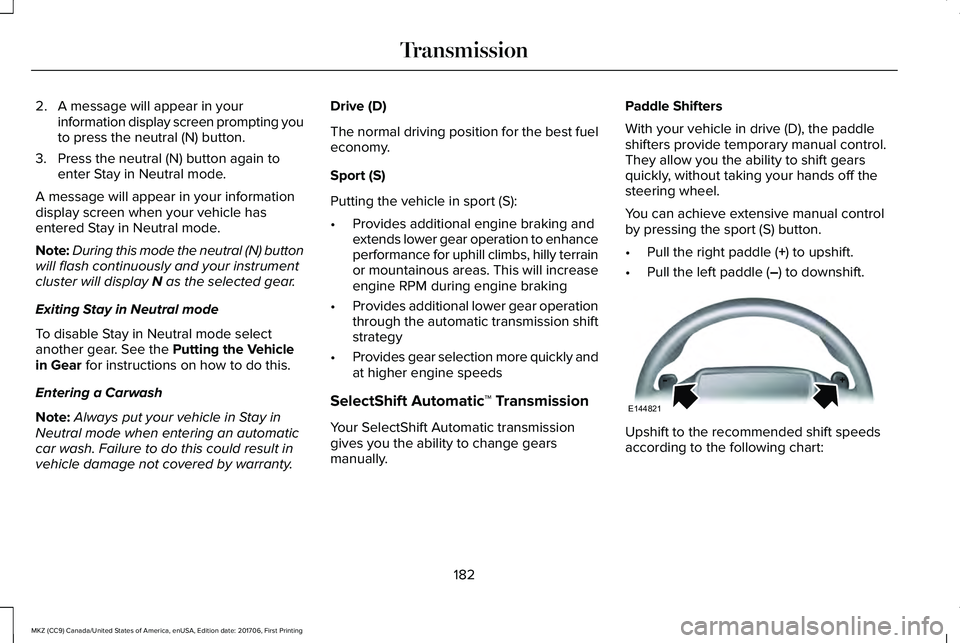
Paddle Shifters
With your vehicle in drive (D), the paddleshifters provide temporary manual control.They allow you the ability to shift gearsquickly, without taking your hands off thesteering wheel.
You can achieve extensive manual controlby pressing the sport (S) button.
•Pull the right paddle (+) to upshift.
•Pull the left paddle (–) to downshift.
Upshift to the recommended shift speedsaccording to the following chart:
182
MKZ (CC9) Canada/United States of America, enUSA, Edition date: 201706, First Printing
TransmissionE144821
Page 186 of 595
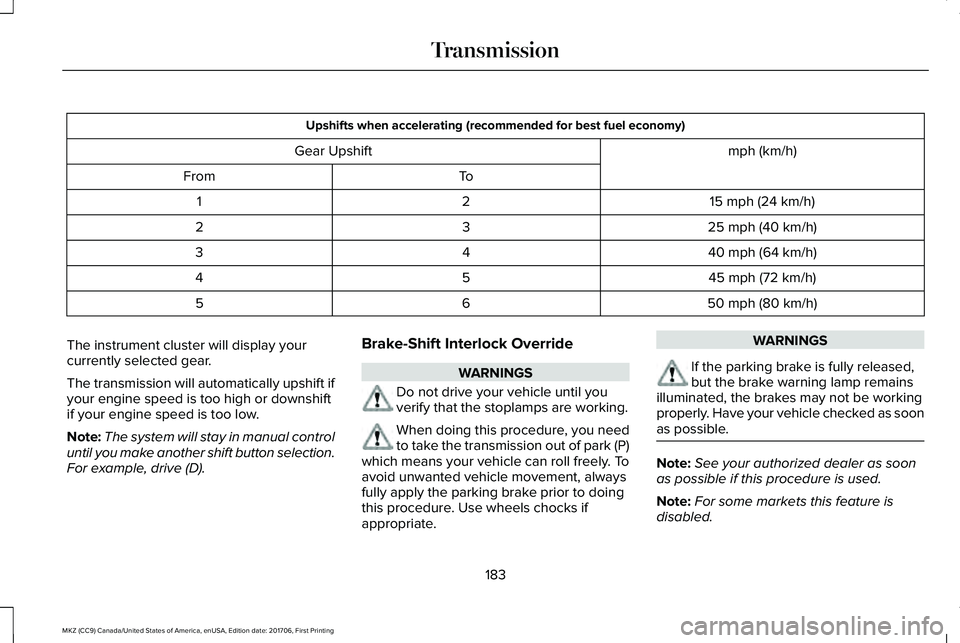
Upshifts when accelerating (recommended for best fuel economy)
mph (km/h)Gear Upshift
ToFrom
15 mph (24 km/h)21
25 mph (40 km/h)32
40 mph (64 km/h)43
45 mph (72 km/h)54
50 mph (80 km/h)65
The instrument cluster will display yourcurrently selected gear.
The transmission will automatically upshift ifyour engine speed is too high or downshiftif your engine speed is too low.
Note:The system will stay in manual controluntil you make another shift button selection.For example, drive (D).
Brake-Shift Interlock Override
WARNINGS
Do not drive your vehicle until youverify that the stoplamps are working.
When doing this procedure, you needto take the transmission out of park (P)which means your vehicle can roll freely. Toavoid unwanted vehicle movement, alwaysfully apply the parking brake prior to doingthis procedure. Use wheels chocks ifappropriate.
WARNINGS
If the parking brake is fully released,but the brake warning lamp remainsilluminated, the brakes may not be workingproperly. Have your vehicle checked as soonas possible.
Note:See your authorized dealer as soonas possible if this procedure is used.
Note:For some markets this feature isdisabled.
183
MKZ (CC9) Canada/United States of America, enUSA, Edition date: 201706, First Printing
Transmission
Page 187 of 595
Note:This feature will only function if your12-volt battery has power. If vehicle batteryvoltage is not sufficient, an external 12-voltpower source (for example, jumper cables,battery charger or jump pack) may berequired to function the interlock overrideswitch.
Use the brake-shift interlock override tomove your transmission from the parkposition in the event of an electricalmalfunction. If your vehicle has a deadbattery, an external power source will berequired.
1. Apply the parking brake and turn yourignition off before performing thisprocedure.
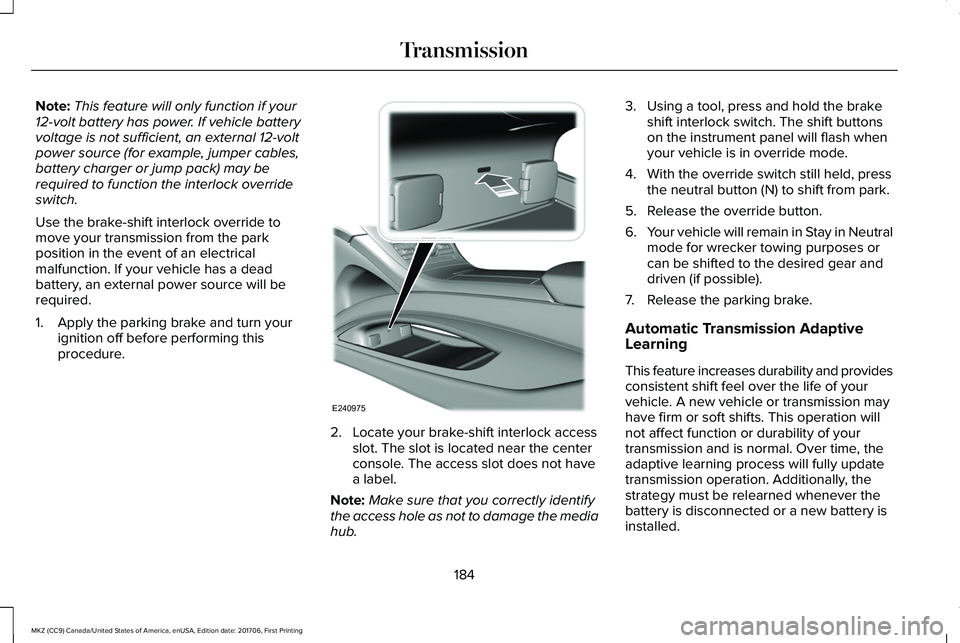
2. Locate your brake-shift interlock accessslot. The slot is located near the centerconsole. The access slot does not havea label.
Note:Make sure that you correctly identifythe access hole as not to damage the mediahub.
3. Using a tool, press and hold the brakeshift interlock switch. The shift buttonson the instrument panel will flash whenyour vehicle is in override mode.
4. With the override switch still held, pressthe neutral button (N) to shift from park.
5. Release the override button.
6.Your vehicle will remain in Stay in Neutralmode for wrecker towing purposes orcan be shifted to the desired gear anddriven (if possible).
7. Release the parking brake.
Automatic Transmission AdaptiveLearning
This feature increases durability and providesconsistent shift feel over the life of yourvehicle. A new vehicle or transmission mayhave firm or soft shifts. This operation willnot affect function or durability of yourtransmission and is normal. Over time, theadaptive learning process will fully updatetransmission operation. Additionally, thestrategy must be relearned whenever thebattery is disconnected or a new battery isinstalled.
184
MKZ (CC9) Canada/United States of America, enUSA, Edition date: 201706, First Printing
TransmissionE240975
Page 191 of 595
Operating AWD Vehicles With Spareor Mismatched Tires
WARNING
Only use replacement tires and wheelsthat are the same size, load index,speed rating and type (such as P-metricversus LT-metric or all-season versusall-terrain) as those originally provided byFord. The recommended tire and wheel sizemay be found on either the SafetyCompliance Certification Label (affixed toeither the door hinge pillar, door-latch post,or the door edge that meets the door-latchpost, next to the driver’s seating position), orthe Tire Label which is located on the B-Pillaror edge of the driver’s door. If thisinformation is not found on these labels, thenyou should contact your authorized dealeras soon as possible. Use of any tire or wheelnot recommended by Ford can affect thesafety and performance of your vehicle,which could result in an increased risk of lossof vehicle control, vehicle rollover, personalinjury and death.
A spare tire of a different size other than thetire provided should never be used. TheAWD system may disable automatically andenter front-wheel drive only mode to protectdriveline components if a non-full sized tireis installed. This condition may display anAWD OFF message in the informationdisplay. If there is an AWD OFF message inthe information display from using a non-fullsized spare tire, this indicator should turn offafter reinstalling the repaired or replacednormal road tire and cycling the ignition offand on. It is recommended to reinstall therepaired or replaced road tire as soon aspossible.
Major dissimilar tire sizes between the frontand rear axles (for example, 17 inch lowprofile tires on the front axle and 22 inch highprofile tires on the rear axle) could cause theAWD system to stop functioning and defaultto front-wheel drive or damage the AWDsystem. However, the AWD system iscapable of tolerating any combination of newand worn tires of the same original tire size.For example, using 3 worn tread tires and 1new tread tire all of the same original tiresize, can be tolerated by the AWD system.
Driving In Special Conditions With All-Wheel Drive (AWD)
AWD vehicles are equipped for driving onsand, snow, mud and rough roads and haveoperating characteristics that are somewhatdifferent from conventional vehicles, both onand off the highway.
When driving at slow speeds in deep sandunder high outside temperatures, use a lowgear when possible. Lower gear operationwill maximize the engine and transmissioncooling capability.
Under severe operating conditions, the A/Cmay cycle on and off to protect overheatingof the engine.
Basic operating principles in specialconditions
•Drive slower in strong crosswinds whichcan affect the normal steeringcharacteristics of your vehicle.
•Be extremely careful when driving onpavement made slippery by loose sand,water, gravel, snow or ice.
188
MKZ (CC9) Canada/United States of America, enUSA, Edition date: 201706, First Printing
All-Wheel Drive (If Equipped)
Page 199 of 595
HINTS ON DRIVING WITH ANTI-
LOCK BRAKES
The anti-lock braking system does noteliminate the risks when:
•You drive too closely to the vehicle infront of you.
•Your vehicle is hydroplaning.
•You take corners too fast.
•The road surface is poor.
Note: If the system activates, the brakepedal may pulse and may travel further. Maintain pressure on the brake pedal. Youmay also hear a noise from the system. Thisis normal.
ELECTRIC PARKING BRAKE
WARNING
Always set the parking brake and leaveyour vehicle with the transmission inpark (P).
Note:When you apply the electric parkingbrake in certain conditions, for example ona steep hill, the electric parking brake mayreapply the brakes within three to tenminutes. As a result, you may notice variousnoises when you apply and release theelectric parking brake. This is normal and nocause for concern.
The electric parking brake replaces theconventional handbrake. The operatingswitch is on the instrument panel to the leftof the steering wheel.
Applying the electric parking brake
WARNING
The brake system warning lamp willflash when applying the electricparking brake. If the brake system warninglamp continues to flash there could be aproblem with your electric parking brake.Have your vehicle checked as soon aspossible.
Note:The brake system warning lampilluminates for 10 seconds if you switch theignition off after you apply the electricparking brake, or you apply the electricparking brake after you switch the ignitionoff.
Note:The electric parking brake will notautomatically apply. You must apply theelectric parking brake using the electricparking brake switch.
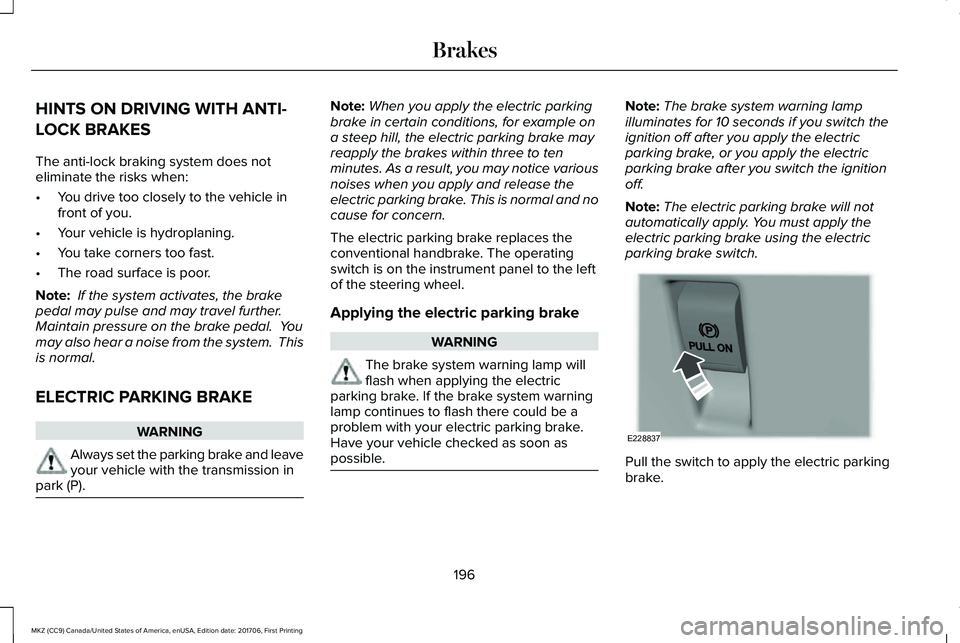
Pull the switch to apply the electric parkingbrake.
196
MKZ (CC9) Canada/United States of America, enUSA, Edition date: 201706, First Printing
BrakesE228837