battery LINCOLN MKZ 2018 User Guide
[x] Cancel search | Manufacturer: LINCOLN, Model Year: 2018, Model line: MKZ, Model: LINCOLN MKZ 2018Pages: 595, PDF Size: 5.06 MB
Page 93 of 595
Windshield Wiper Activated Headlamps
When you switch the autolamps on, theheadlamps turn on within 10 seconds ofswitching the wipers on. They turn offapproximately 60 seconds after you switchthe windshield wipers off.
The headlamps do not turn on with thewipers:
•During a single wipe.
•When using the windshield washers.
•If the wipers are in intermittent mode.
Note:If you switch the autolamps and theautowipers on, the headlamps turn on whenthe windshield wipers continuously operate.
INSTRUMENT LIGHTING DIMMER
Note:If you disconnect and connect thebattery, or fully discharge and charge thebattery, the illuminated components switchto the maximum setting.
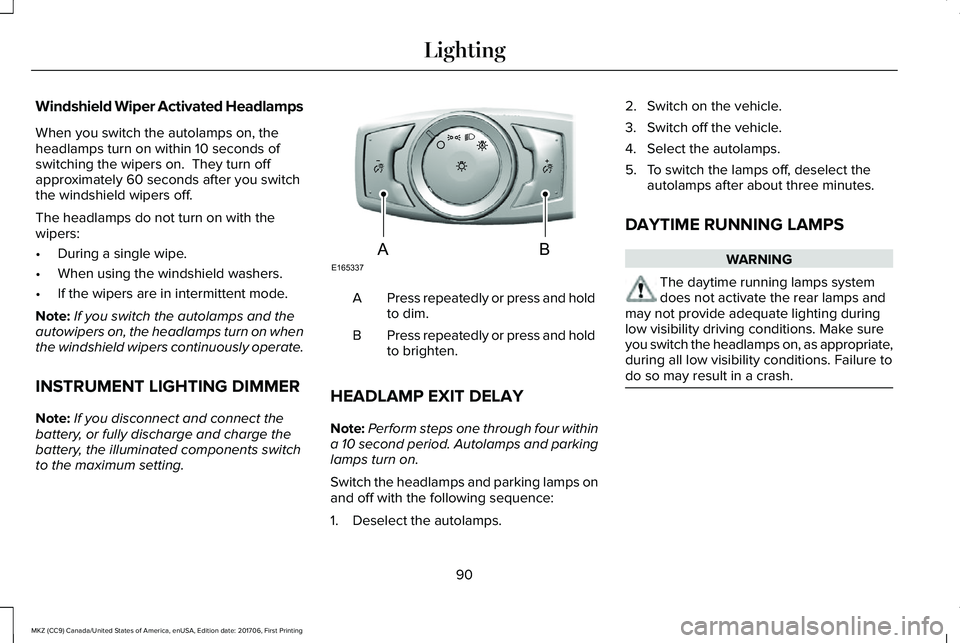
Press repeatedly or press and holdto dim.A
Press repeatedly or press and holdto brighten.B
HEADLAMP EXIT DELAY
Note:Perform steps one through four withina 10 second period. Autolamps and parkinglamps turn on.
Switch the headlamps and parking lamps onand off with the following sequence:
1. Deselect the autolamps.
2. Switch on the vehicle.
3. Switch off the vehicle.
4. Select the autolamps.
5. To switch the lamps off, deselect theautolamps after about three minutes.
DAYTIME RUNNING LAMPS
WARNING
The daytime running lamps systemdoes not activate the rear lamps andmay not provide adequate lighting duringlow visibility driving conditions. Make sureyou switch the headlamps on, as appropriate,during all low visibility conditions. Failure todo so may result in a crash.
90
MKZ (CC9) Canada/United States of America, enUSA, Edition date: 201706, First Printing
LightingE165337AB
Page 110 of 595
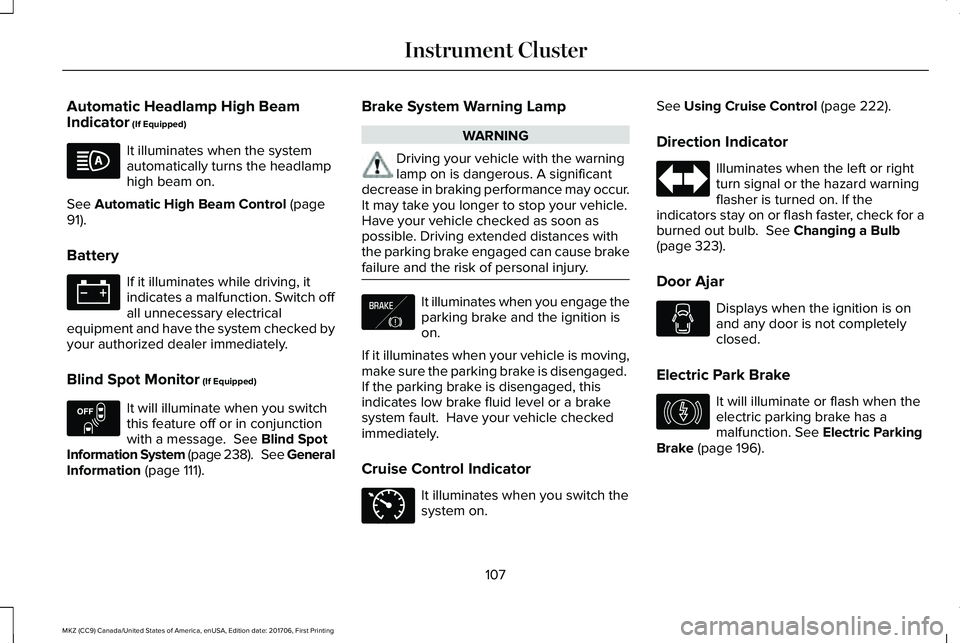
Automatic Headlamp High BeamIndicator (If Equipped)
It illuminates when the systemautomatically turns the headlamphigh beam on.
See Automatic High Beam Control (page91).
Battery
If it illuminates while driving, itindicates a malfunction. Switch offall unnecessary electricalequipment and have the system checked byyour authorized dealer immediately.
Blind Spot Monitor (If Equipped)
It will illuminate when you switchthis feature off or in conjunctionwith a message. See Blind SpotInformation System (page 238). See GeneralInformation (page 111).
Brake System Warning Lamp
WARNING
Driving your vehicle with the warninglamp on is dangerous. A significantdecrease in braking performance may occur.It may take you longer to stop your vehicle.Have your vehicle checked as soon aspossible. Driving extended distances withthe parking brake engaged can cause brakefailure and the risk of personal injury.
It illuminates when you engage theparking brake and the ignition ison.
If it illuminates when your vehicle is moving,make sure the parking brake is disengaged. If the parking brake is disengaged, thisindicates low brake fluid level or a brakesystem fault. Have your vehicle checkedimmediately.
Cruise Control Indicator
It illuminates when you switch thesystem on.
See Using Cruise Control (page 222).
Direction Indicator
Illuminates when the left or rightturn signal or the hazard warningflasher is turned on. If theindicators stay on or flash faster, check for aburned out bulb. See Changing a Bulb(page 323).
Door Ajar
Displays when the ignition is onand any door is not completelyclosed.
Electric Park Brake
It will illuminate or flash when theelectric parking brake has amalfunction. See Electric ParkingBrake (page 196).
107
MKZ (CC9) Canada/United States of America, enUSA, Edition date: 201706, First Printing
Instrument Cluster E151262 E138644 E71340 E146190
Page 125 of 595
Battery and Charging System
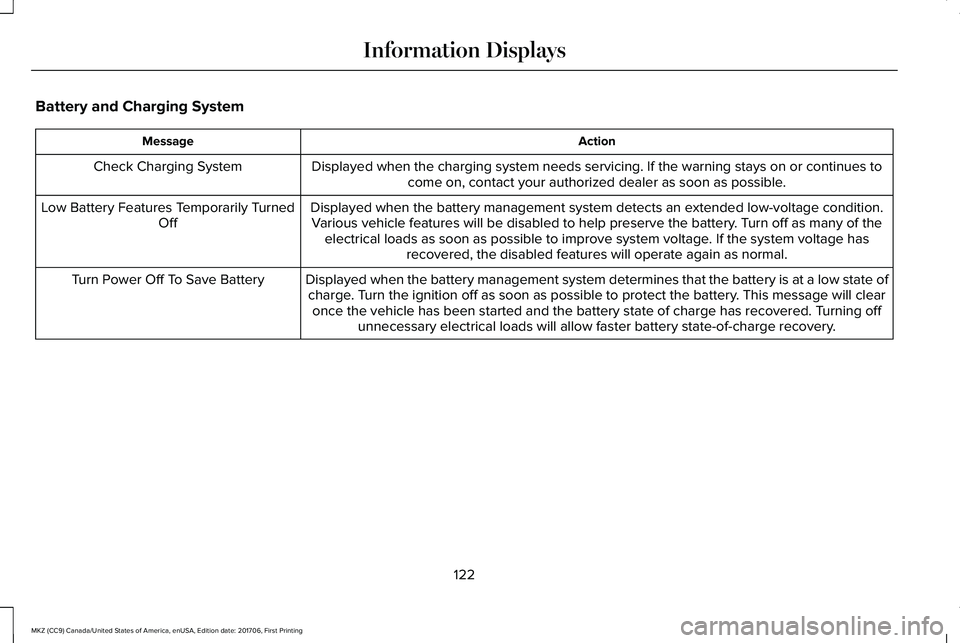
ActionMessage
Displayed when the charging system needs servicing. If the warning stays on or continues tocome on, contact your authorized dealer as soon as possible.Check Charging System
Displayed when the battery management system detects an extended low-voltage condition.Various vehicle features will be disabled to help preserve the battery. Turn off as many of theelectrical loads as soon as possible to improve system voltage. If the system voltage hasrecovered, the disabled features will operate again as normal.
Low Battery Features Temporarily TurnedOff
Displayed when the battery management system determines that the battery is at a low state ofcharge. Turn the ignition off as soon as possible to protect the battery. This message will clearonce the vehicle has been started and the battery state of charge has recovered. Turning offunnecessary electrical loads will allow faster battery state-of-charge recovery.
Turn Power Off To Save Battery
122
MKZ (CC9) Canada/United States of America, enUSA, Edition date: 201706, First Printing
Information Displays
Page 129 of 595
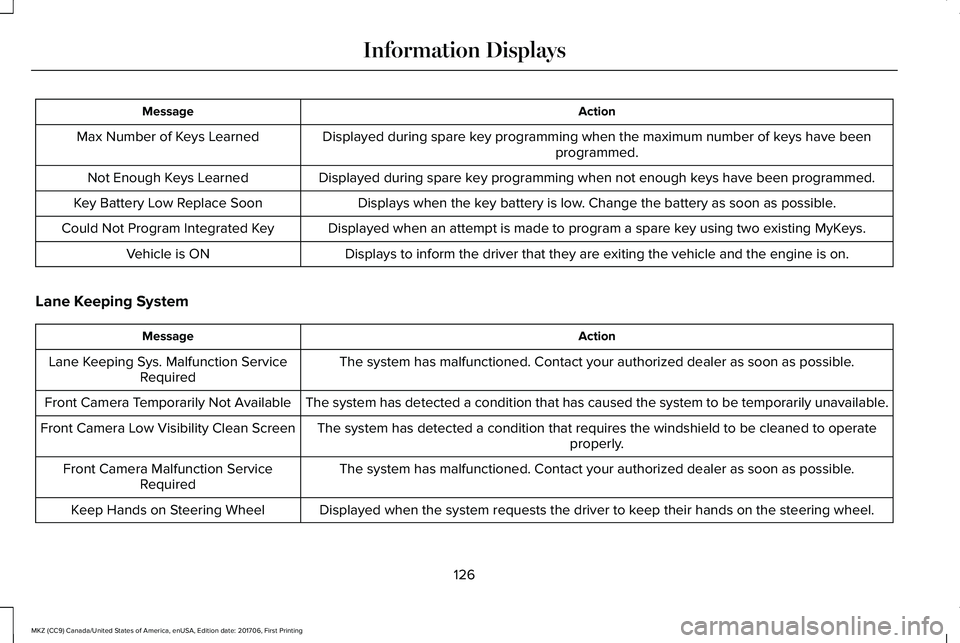
ActionMessage
Displayed during spare key programming when the maximum number of keys have beenprogrammed.Max Number of Keys Learned
Displayed during spare key programming when not enough keys have been programmed.Not Enough Keys Learned
Displays when the key battery is low. Change the battery as soon as possible.Key Battery Low Replace Soon
Displayed when an attempt is made to program a spare key using two existing MyKeys.Could Not Program Integrated Key
Displays to inform the driver that they are exiting the vehicle and the engine is on.Vehicle is ON
Lane Keeping System
ActionMessage
The system has malfunctioned. Contact your authorized dealer as soon as possible.Lane Keeping Sys. Malfunction ServiceRequired
The system has detected a condition that has caused the system to be temporarily unavailable.Front Camera Temporarily Not Available
The system has detected a condition that requires the windshield to be cleaned to operateproperly.Front Camera Low Visibility Clean Screen
The system has malfunctioned. Contact your authorized dealer as soon as possible.Front Camera Malfunction ServiceRequired
Displayed when the system requests the driver to keep their hands on the steering wheel.Keep Hands on Steering Wheel
126
MKZ (CC9) Canada/United States of America, enUSA, Edition date: 201706, First Printing
Information Displays
Page 137 of 595
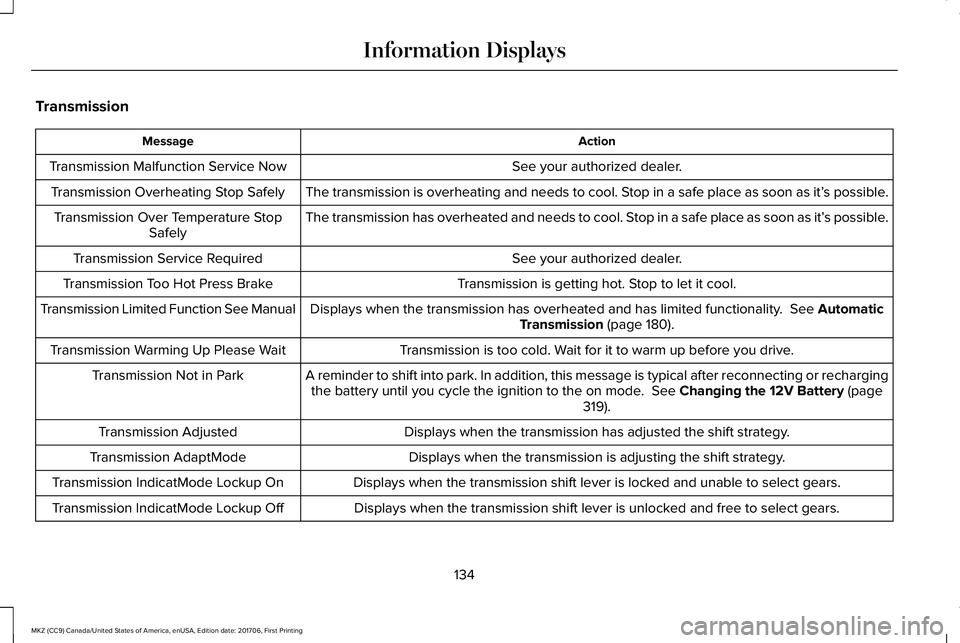
Transmission
ActionMessage
See your authorized dealer.Transmission Malfunction Service Now
The transmission is overheating and needs to cool. Stop in a safe place as soon as it’s possible.Transmission Overheating Stop Safely
The transmission has overheated and needs to cool. Stop in a safe place as soon as it’s possible.Transmission Over Temperature StopSafely
See your authorized dealer.Transmission Service Required
Transmission is getting hot. Stop to let it cool.Transmission Too Hot Press Brake
Displays when the transmission has overheated and has limited functionality. See AutomaticTransmission (page 180).Transmission Limited Function See Manual
Transmission is too cold. Wait for it to warm up before you drive.Transmission Warming Up Please Wait
A reminder to shift into park. In addition, this message is typical after reconnecting or rechargingthe battery until you cycle the ignition to the on mode. See Changing the 12V Battery (page319).
Transmission Not in Park
Displays when the transmission has adjusted the shift strategy.Transmission Adjusted
Displays when the transmission is adjusting the shift strategy.Transmission AdaptMode
Displays when the transmission shift lever is locked and unable to select gears.Transmission IndicatMode Lockup On
Displays when the transmission shift lever is unlocked and free to select gears.Transmission IndicatMode Lockup Off
134
MKZ (CC9) Canada/United States of America, enUSA, Edition date: 201706, First Printing
Information Displays
Page 154 of 595
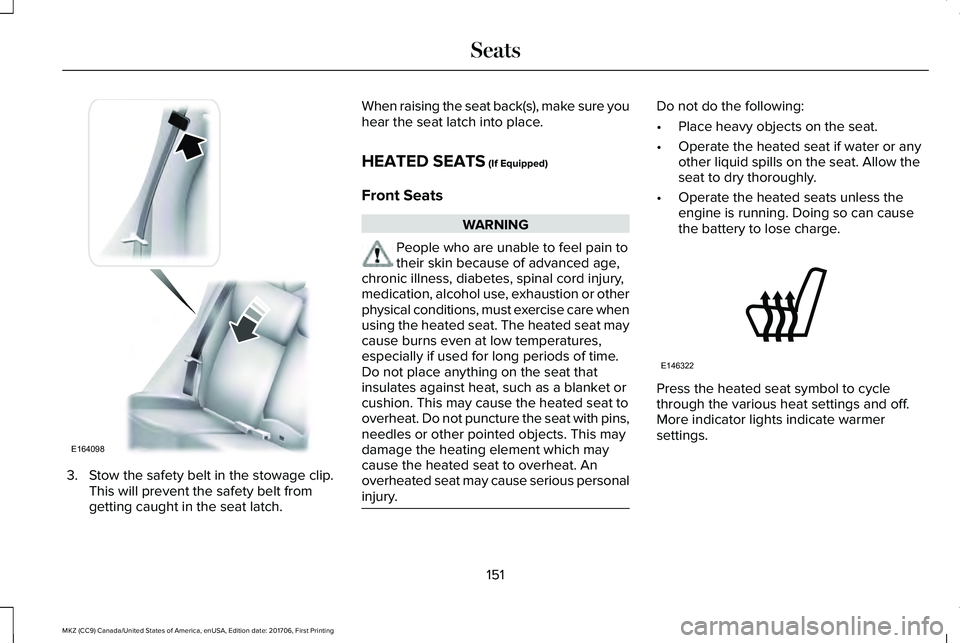
3. Stow the safety belt in the stowage clip.This will prevent the safety belt fromgetting caught in the seat latch.
When raising the seat back(s), make sure youhear the seat latch into place.
HEATED SEATS (If Equipped)
Front Seats
WARNING
People who are unable to feel pain totheir skin because of advanced age,chronic illness, diabetes, spinal cord injury,medication, alcohol use, exhaustion or otherphysical conditions, must exercise care whenusing the heated seat. The heated seat maycause burns even at low temperatures,especially if used for long periods of time.Do not place anything on the seat thatinsulates against heat, such as a blanket orcushion. This may cause the heated seat tooverheat. Do not puncture the seat with pins,needles or other pointed objects. This maydamage the heating element which maycause the heated seat to overheat. Anoverheated seat may cause serious personalinjury.
Do not do the following:
•Place heavy objects on the seat.
•Operate the heated seat if water or anyother liquid spills on the seat. Allow theseat to dry thoroughly.
•Operate the heated seats unless theengine is running. Doing so can causethe battery to lose charge.
Press the heated seat symbol to cyclethrough the various heat settings and off.More indicator lights indicate warmersettings.
151
MKZ (CC9) Canada/United States of America, enUSA, Edition date: 201706, First Printing
SeatsE164098 E146322
Page 155 of 595
Rear Seats
WARNING
Persons who are unable to feel pain tothe skin because of advanced age,chronic illness, diabetes, spinal cord injury,medication, alcohol use, exhaustion, or otherphysical conditions, must exercise care whenusing the seat heater. The seat heater maycause burns even at low temperatures,especially if used for long periods of time.Do not place anything on the seat thatinsulates against heat, such as a blanket orcushion, because this may cause the seatheater to overheat. Do not puncture the seatwith pins, needles, or other pointed objectsbecause this may damage the heatingelement which may cause the seat heater tooverheat. An overheated seat may causeserious personal injury.
Do not do the following:
•Place heavy objects on the seat.
•Operate the seat heater if water or anyother liquid is spilled on the seat. Allowthe seat to dry thoroughly.
•Operate the heated seats unless theengine is running. Doing so can causethe battery to lose charge.
The rear seat heat controls are located onthe rear of the center console.
Press the heated seat symbol to cyclethrough the various heat settings and off.More indicator lights indicate warmersettings.
The heated seat module resets at everyignition run cycle. While the ignition is on,press the high or low heated seat switch toenable heating mode. When activated, theywill turn off automatically when you turn theengine off.
CLIMATE CONTROLLED SEATS (If
Equipped)
Heated Seats
152
MKZ (CC9) Canada/United States of America, enUSA, Edition date: 201706, First Printing
SeatsE146322
Page 156 of 595
WARNING
People who are unable to feel pain totheir skin because of advanced age,chronic illness, diabetes, spinal cord injury,medication, alcohol use, exhaustion or otherphysical conditions, must exercise care whenusing the heated seat. The heated seat maycause burns even at low temperatures,especially if used for long periods of time.Do not place anything on the seat thatinsulates against heat, such as a blanket orcushion. This may cause the heated seat tooverheat. Do not puncture the seat with pins,needles or other pointed objects. This maydamage the heating element which maycause the heated seat to overheat. Anoverheated seat may cause serious personalinjury.
Do not do the following:
•Place heavy objects on the seat.
•Operate the heated seat if water or anyother liquid spills on the seat. Allow theseat to dry thoroughly.
•Operate the heated seats unless theengine is running. Doing so can causethe battery to lose charge.
Touch the heated seat symbol to cyclethrough the various heat settings and off.More indicator lights indicate warmersettings.
Cooled Seats
The cooled seats will only function when theengine is running.
To operate the cooled seats:
Press the cooled seat symbol to cyclethrough the various cooling settings and off.More indicator lights indicate cooler settings.
If the engine falls below 350 RPM while thecooled seats are on, the feature will turn itselfoff. You will need to reactivate it.
Climate controlled seat air filterreplacement
Your vehicle is equipped with lifetime airfilters that are integrated with the seats.Regular maintenance or replacement is notneeded.
153
MKZ (CC9) Canada/United States of America, enUSA, Edition date: 201706, First Printing
SeatsE146322 E146309
Page 158 of 595
HomeLink Wireless Control System
WARNINGS
Make sure that the garage door andsecurity device are free fromobstruction when you are programming. Donot program the system with the vehicle inthe garage.
Do not use the system with any garagedoor opener that does not have thesafety stop and reverse feature as requiredby U.S. Federal Safety Standards (thisincludes any garage door openermanufactured before April 1, 1982). A garagedoor opener which cannot detect an object,signaling the door to stop and reverse, doesnot meet current federal safety standards.Using a garage door opener without thesefeatures increases the risk of serious injuryor death.
Note:Make sure you keep the originalremote control transmitter for use in othervehicles as well as for future systemprogramming.
Note:We recommend that upon the sale orlease termination of your vehicle, you erasethe programmed function buttons for securityreasons. See Erasing the Function ButtonCodes.
Note:You can program a maximum of threedevices. To change or replace any of thethree devices after it has been initiallyprogrammed, you must first erase the currentsettings. See Erasing the Function ButtonCodes.
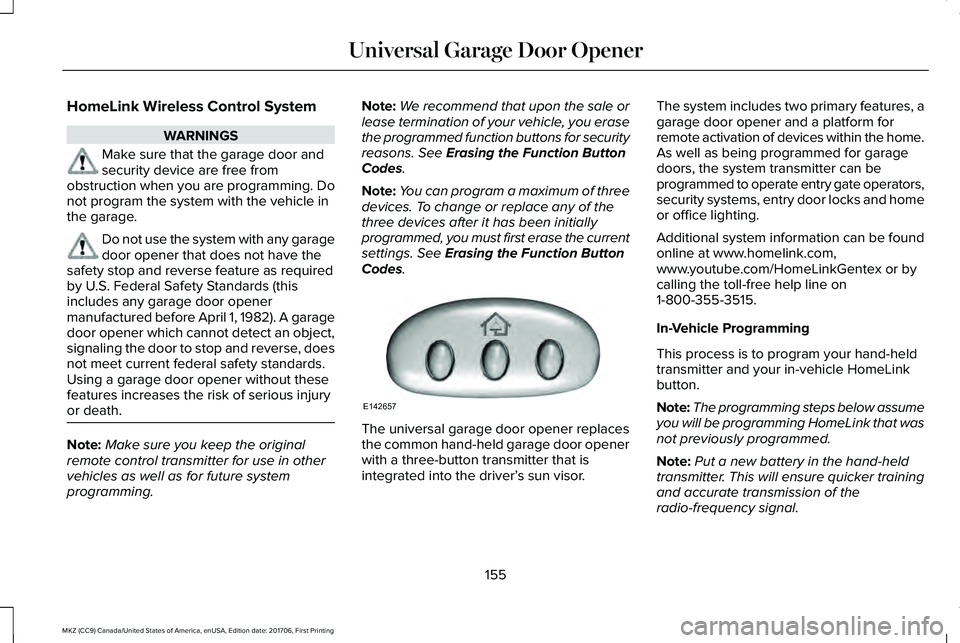
The universal garage door opener replacesthe common hand-held garage door openerwith a three-button transmitter that isintegrated into the driver’s sun visor.
The system includes two primary features, agarage door opener and a platform forremote activation of devices within the home.As well as being programmed for garagedoors, the system transmitter can beprogrammed to operate entry gate operators,security systems, entry door locks and homeor office lighting.
Additional system information can be foundonline at www.homelink.com,www.youtube.com/HomeLinkGentex or bycalling the toll-free help line on1-800-355-3515.
In-Vehicle Programming
This process is to program your hand-heldtransmitter and your in-vehicle HomeLinkbutton.
Note:The programming steps below assumeyou will be programming HomeLink that wasnot previously programmed.
Note:Put a new battery in the hand-heldtransmitter. This will ensure quicker trainingand accurate transmission of theradio-frequency signal.
155
MKZ (CC9) Canada/United States of America, enUSA, Edition date: 201706, First Printing
Universal Garage Door OpenerE142657
Page 163 of 595
12 Volt DC Power Point
WARNING
Do not plug optional electricalaccessories into the cigar lightersocket. Incorrect use of the cigar lighter cancause damage not covered by the vehiclewarranty, and can result in fire or seriousinjury.
Note:When you switch the ignition on, youcan use the socket to power 12 voltappliances with a maximum current ratingof 15 amps.
If the power supply does not work after youswitch the ignition off, switch the ignition on.Note:Do not hang any accessory from theaccessory plug.
Note:Do not use the power point over thevehicle capacity of 12 volt DC 180 watts ora fuse may blow.
Note:Always keep the power point capsclosed when not in use.
Do not insert objects other than an accessoryplug into the power point. This damages thepower point and may blow the fuse.
Run the vehicle for full capacity use of thepower point.
To prevent the battery from running out ofcharge:
•Do not use the power point longer thannecessary when the vehicle is notrunning.
•Do not leave devices plugged inovernight or when you park your vehiclefor extended periods.
Locations
Power points may be in the followinglocations:
•On the front of the center console.
•Inside the center console.
•On the rear of the center console.
110 Volt AC Power Point
WARNING
Do not keep electrical devices pluggedin the power point whenever thedevice is not in use. Do not use anyextension cord with the 110 volt AC powerpoint, since it will defeat the safety protectiondesign. Doing so may cause the power pointto overload due to powering multiple devicesthat can reach beyond the 150 watt load limitand could result in fire or serious injury.
Note:The power point turns off when youswitch the ignition off, or when the batteryvoltage drops below 11 volts.
You can use the power point for electricdevices that require up to 150 watts. It is onthe rear of the center console.
160
MKZ (CC9) Canada/United States of America, enUSA, Edition date: 201706, First Printing
Auxiliary Power Points