phone LINCOLN MKZ 2018 User Guide
[x] Cancel search | Manufacturer: LINCOLN, Model Year: 2018, Model line: MKZ, Model: LINCOLN MKZ 2018Pages: 595, PDF Size: 5.06 MB
Page 277 of 595
GETTING THE SERVICES YOU
NEED
Warranty repairs to your vehicle must beperformed by an authorized dealer. Whileany authorized dealer handling your vehicleline provides warranty service, werecommend you return to your sellingauthorized dealer who wants to ensure yourcontinued satisfaction.
Please note that certain warranty repairsrequire special training and equipment, sonot all authorized dealers are authorized toperform all warranty repairs. This means that,depending on the warranty repair needed,you may have to take your vehicle to anotherauthorized dealer.
A reasonable time must be allowed toperform a repair after taking your vehicle tothe authorized dealer. Repairs are madeusing Lincoln or Motorcraft parts, orremanufactured or other parts that areauthorized by Lincoln.
Away From Home
If you are away from home when your vehicleneeds service, contact the Lincoln ClientRelationship Center or use the onlineresources listed below to find the nearestauthorized dealer.
In the United States:
Mailing address
Lincoln Motor CompanyClient Relationship CenterP.O. Box 6248Dearborn, MI 48126
Telephone
1-800-521-4140TDD for the hearing impaired:1-800-232-5952
Web Address
www.LincolnOwner.com
These are some of the items that can befound online:
•United States dealer locator by DealerName, City, State or ZIP Code.
•Owner Manuals.
•Maintenance Schedules.
•Recalls.
•Lincoln Extended Service Plans.
•Lincoln Original Accessories.
•Service specials and promotions.
In Canada:
Mailing address
Lincoln Client Relationship CentreLincoln Motor Company of Canada, LimitedP.O. Box 2000Oakville, Ontario L6K 1C8
Telephone
1-800-387-9333
274
MKZ (CC9) Canada/United States of America, enUSA, Edition date: 201706, First Printing
Customer Assistance
Page 278 of 595
Web Address
www.LincolnCanada.com
Online Resources
Twitter English
@LincolnMotorCA
Twitter French
@LincolnQC
Instagram
@LincolnMotorCA
Facebook
/LincolnMotorCA
Additional Assistance
If you have questions or concerns, or areunsatisfied with the service you are receiving,follow these steps:
1. Contact your Sales Representative orService Advisor at your selling orservicing authorized dealer.
2. If your inquiry or concern remainsunresolved, contact the Sales Manager,Service Manager or Customer RelationsManager.
3. If you require assistance or clarificationon Lincoln Motor Company policies,please contact the Lincoln ClientRelationship Center.
In order to help us serve you better, pleasehave the following information availablewhen contacting a Client RelationshipCenter:
•Vehicle Identification Number.
•Your telephone number (home andbusiness).
•The name of the authorized dealer andcity where located.
•The vehicle’s current odometer reading.
In some states, you must directly notifyLincoln in writing before pursuing remediesunder your state’s warranty laws. Lincoln isalso allowed a final repair attempt in somestates.
In the United States, a warranty dispute mustbe submitted to the BBB AUTO LINE beforetaking action under the Magnuson-MossWarranty Act, or to the extent allowed bystate law, before pursuing replacement orrepurchase remedies provided by certainstate laws. This dispute handling procedureis not required prior to enforcing statecreated rights or other rights which areindependent of the Magnuson-MossWarranty Act or state replacement orrepurchase laws.
IN CALIFORNIA (U.S. ONLY)
California Civil Code Section 1793.2(d)requires that, if a manufacturer or itsrepresentative is unable to repair a motorvehicle to conform to the vehicle’s applicableexpress warranty after a reasonable numberof attempts, the manufacturer shall berequired to either replace the vehicle withone substantially identical or repurchase the
275
MKZ (CC9) Canada/United States of America, enUSA, Edition date: 201706, First Printing
Customer Assistance
Page 282 of 595
E-mailFaxPhoneCustomer Relationship Center
[email protected]/AN/AAsia Pacific
[email protected]+1 313 594 4857Caribbean and Central America
[email protected] 4 3327 266
Ford
Middle East
80004443673
Lincoln80004441067
UAE80004441066
Saudi Arabia8008443673
Mobily and Zain cell phone usersin Saudi800850078
[email protected]/A+1-800-841-3673Puerto Rico and U.S. Virgin Islands
[email protected]/A+1-313-594-4857Sub-Saharan Africa
[email protected] [email protected]/A+63-2-717-6410South Korea
279
MKZ (CC9) Canada/United States of America, enUSA, Edition date: 201706, First Printing
Customer Assistance
Page 284 of 595
To contact NHTSA, you may call theVehicle Safety Hotline toll-free at1-888-327-4236 (TTY: 1-800-424-9153);go to http://www.safercar.gov; or writeto:
Administrator
1200 New Jersey Avenue, Southeast
Washington, D.C. 20590
You can also obtain other informationabout motor vehicle safety fromhttp://www.safercar.gov.
REPORTING SAFETY DEFECTS
(CANADA ONLY)
If you believe that your vehicle has a defectwhich could cause a crash or could causeinjury or death, you should immediatelyinform Transport Canada and Ford ofCanada.
Transport Canada Contact Information
http://www.tc.gc.ca/eng/motorvehiclesafety/reporting-defects-motor-vehicles.html (English)Website
http://www.tc.gc.ca/fra/securiteautomobile/signaler-defauts-vehicules-automobiles.html (French)Website
1–800–333–0510Phone
Ford of Canada Contact Information
www.ford.caWebsite
1–800–565-3673Phone
281
MKZ (CC9) Canada/United States of America, enUSA, Edition date: 201706, First Printing
Customer Assistance
Page 298 of 595
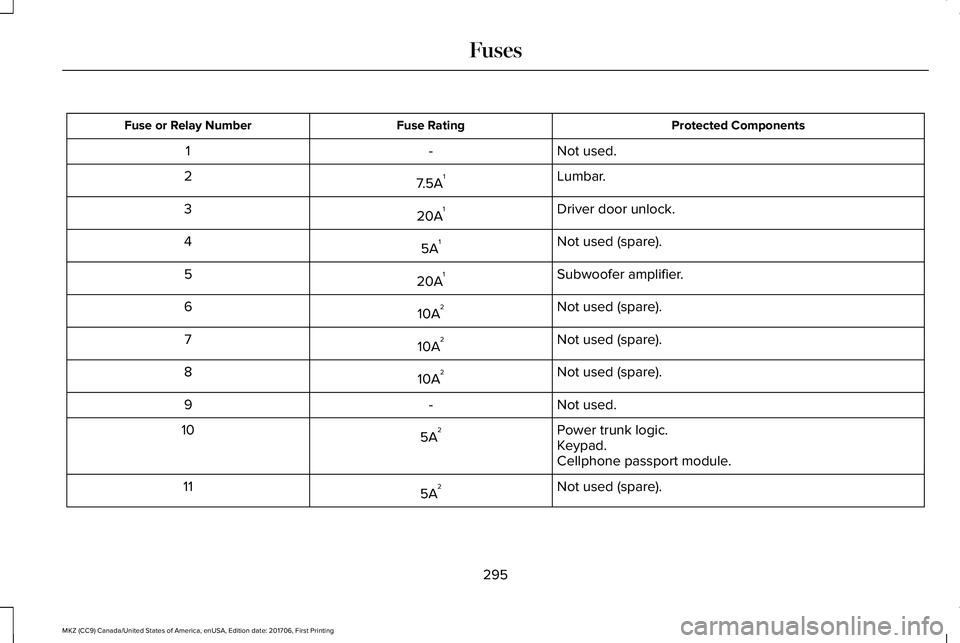
Protected ComponentsFuse RatingFuse or Relay Number
Not used.-1
Lumbar.7.5A12
Driver door unlock.20A13
Not used (spare).5A14
Subwoofer amplifier.20A15
Not used (spare).10A26
Not used (spare).10A27
Not used (spare).10A28
Not used.-9
Power trunk logic.5A210Keypad.Cellphone passport module.
Not used (spare).5A211
295
MKZ (CC9) Canada/United States of America, enUSA, Edition date: 201706, First Printing
Fuses
Page 401 of 595
GENERAL INFORMATION
WARNING
Driving while distracted can result inloss of vehicle control, crash and injury.We strongly recommend that you useextreme caution when using any device thatmay take your focus off the road. Yourprimary responsibility is the safe operationof your vehicle. We recommend against theuse of any hand-held device while drivingand encourage the use of voice-operatedsystems when possible. Make sure you areaware of all applicable local laws that mayaffect the use of electronic devices whiledriving.
Getting to Know Your System
The SYNC 3 system allows you to interactwith a variety of features using thetouchscreen and voice commands. Byintegrating with your Bluetooth-enabledphone, the touchscreen provides easyinteraction with audio, multimedia, climatecontrol, navigation, and your phone's SYNC3 compatible apps.
Using the Touchscreen
To operate the touchscreen, you can simplytouch the item or option that you want toselect. The button changes color when youselect it.
The SYNC 3 layout allows you to quicklyselect the feature you wish to use.
398
MKZ (CC9) Canada/United States of America, enUSA, Edition date: 201706, First Printing
SYNC™ 3
Page 403 of 595
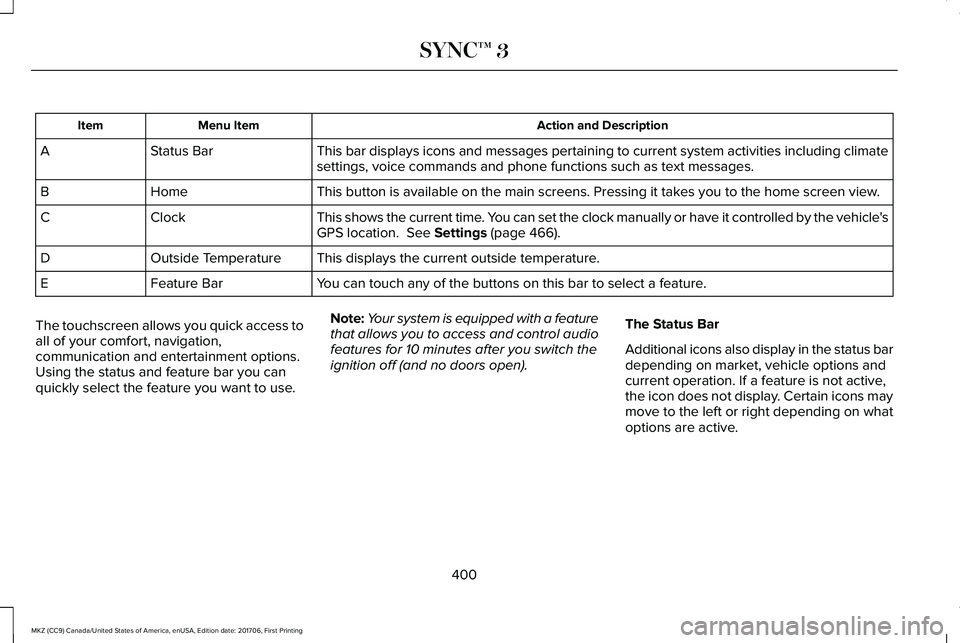
Action and DescriptionMenu ItemItem
This bar displays icons and messages pertaining to current system activities including climatesettings, voice commands and phone functions such as text messages.Status BarA
This button is available on the main screens. Pressing it takes you to the home screen view.HomeB
This shows the current time. You can set the clock manually or have it controlled by the vehicle'sGPS location. See Settings (page 466).ClockC
This displays the current outside temperature.Outside TemperatureD
You can touch any of the buttons on this bar to select a feature.Feature BarE
The touchscreen allows you quick access toall of your comfort, navigation,communication and entertainment options.Using the status and feature bar you canquickly select the feature you want to use.
Note:Your system is equipped with a featurethat allows you to access and control audiofeatures for 10 minutes after you switch theignition off (and no doors open).
The Status Bar
Additional icons also display in the status bardepending on market, vehicle options andcurrent operation. If a feature is not active,the icon does not display. Certain icons maymove to the left or right depending on whatoptions are active.
400
MKZ (CC9) Canada/United States of America, enUSA, Edition date: 201706, First Printing
SYNC™ 3
Page 405 of 595
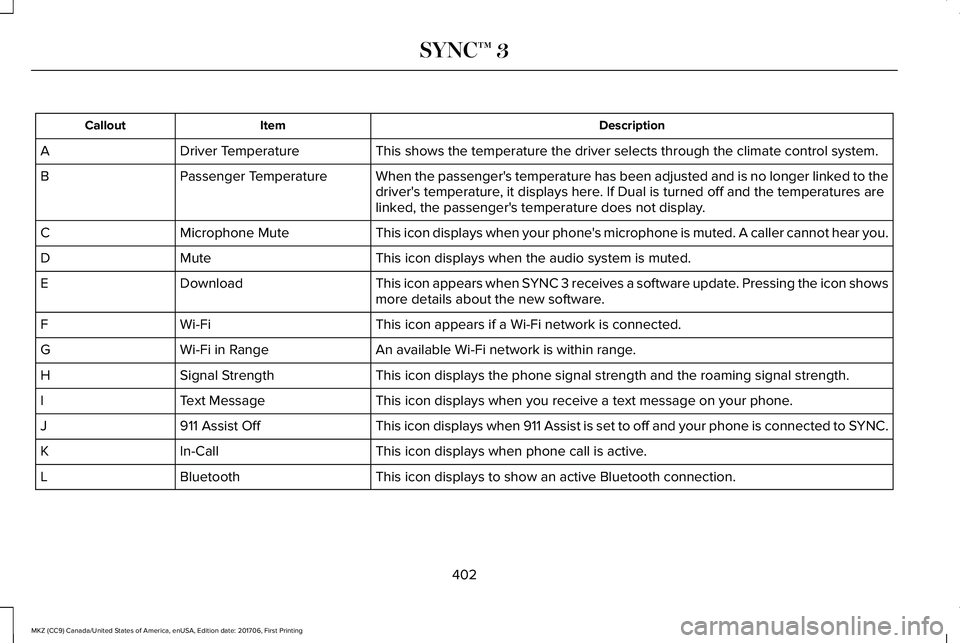
DescriptionItemCallout
This shows the temperature the driver selects through the climate control system.Driver TemperatureA
When the passenger's temperature has been adjusted and is no longer linked to thedriver's temperature, it displays here. If Dual is turned off and the temperatures arelinked, the passenger's temperature does not display.
Passenger TemperatureB
This icon displays when your phone's microphone is muted. A caller cannot hear you.Microphone MuteC
This icon displays when the audio system is muted.MuteD
This icon appears when SYNC 3 receives a software update. Pressing the icon showsmore details about the new software.DownloadE
This icon appears if a Wi-Fi network is connected.Wi-FiF
An available Wi-Fi network is within range.Wi-Fi in RangeG
This icon displays the phone signal strength and the roaming signal strength.Signal StrengthH
This icon displays when you receive a text message on your phone.Text MessageI
This icon displays when 911 Assist is set to off and your phone is connected to SYNC.911 Assist OffJ
This icon displays when phone call is active.In-CallK
This icon displays to show an active Bluetooth connection.BluetoothL
402
MKZ (CC9) Canada/United States of America, enUSA, Edition date: 201706, First Printing
SYNC™ 3
Page 406 of 595
Messages may also appear in the status barto provide you with notifications. You canselect the message to view the associatedfeature.
Feature Bar
FunctionsFeature Bar Item
Allows you to control the media playing in your vehicle. You cancontrol all audio features including AM, FM and satellite radio, CDs,and media streaming over a Bluetooth device or through a USBconnection.
Audio
Allows you to adjust the temperature, fan speed and airflow withinthe vehicle.Climate
Allows you to make calls, receive calls, and access the phonebookof your connected device.Phone
Allows you to see your vehicle's location on a virtual road map, getdriving directions to your destination and find points of interest alongyour route.
Navigation
(If equipped)
403
MKZ (CC9) Canada/United States of America, enUSA, Edition date: 201706, First Printing
SYNC™ 3
Page 407 of 595
FunctionsFeature Bar Item
Connect and control SYNC 3 compatible apps running on your iphoneor android device. Also, access built-in additional features such asSiriusXM Traffic and Travel Link (if equipped).
Apps
If your vehicle is a hybrid, plug-in hybrid, or electric this is also whereyour settings and power information is located.
You can customize your system with various settings for the touch-screen display, feature preferences, and how you want to interactwith your vehicle.
Settings
Cleaning the Touchscreen
You can remove fingerprints with a dry,clean, soft cloth.
If dirt or fingerprints are still on the screen,apply a small amount of alcohol to the clothand try to clean it again.
Note: Do not use detergent or any type ofsolvent to clean the touchscreen.
Note:Do not pour or spray alcohol onto thetouchscreen.
Using Voice Recognition
Using voice commands allows you to keepyour hands on the wheel and focus on whatis in front of you. The system providesfeedback through audible tones, prompts,questions and spoken confirmationsdepending on the situation and the chosenlevel of interaction (voice settings).
The system also asks short questions(confirmation prompts) when it is not sure ofyour request or when there are multiplepossible responses to your request.
When using voice commands, words andicons may appear in the status bar indicatingthe status of the voice command session.See Using Voice Recognition (page 416).
Accessing and Adjusting ModesThrough Your Vehicle InformationDisplay (If Equipped)
Depending on your vehicle and selectedoptions you may be able to control some ofthe SYNC 3 features on your informationdisplay. The features are visible in the centerof the display (A).
404
MKZ (CC9) Canada/United States of America, enUSA, Edition date: 201706, First Printing
SYNC™ 3