radio LINCOLN MKZ 2018 User Guide
[x] Cancel search | Manufacturer: LINCOLN, Model Year: 2018, Model line: MKZ, Model: LINCOLN MKZ 2018Pages: 595, PDF Size: 5.06 MB
Page 224 of 595
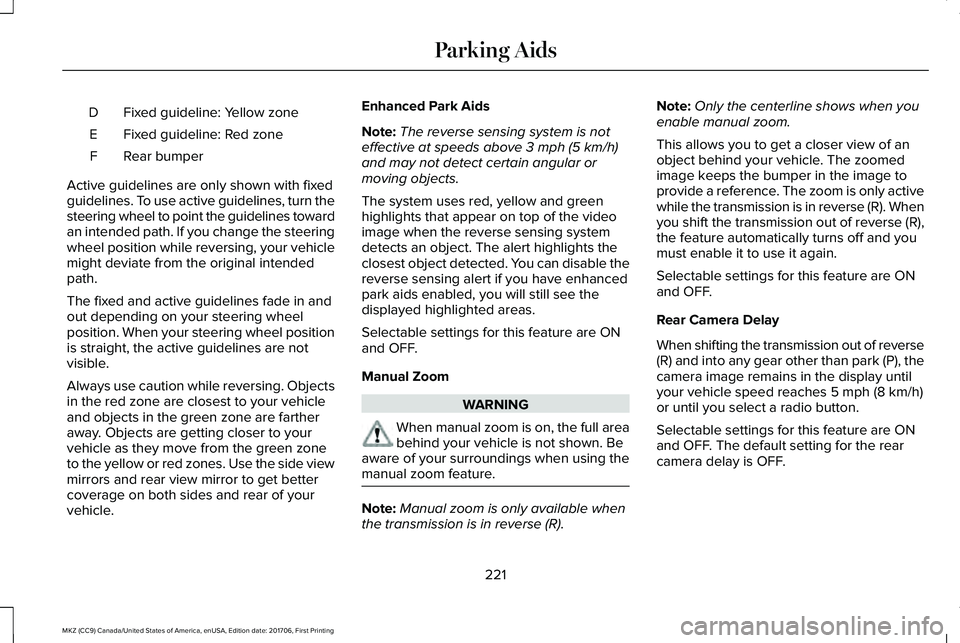
Fixed guideline: Yellow zoneD
Fixed guideline: Red zoneE
Rear bumperF
Active guidelines are only shown with fixedguidelines. To use active guidelines, turn thesteering wheel to point the guidelines towardan intended path. If you change the steeringwheel position while reversing, your vehiclemight deviate from the original intendedpath.
The fixed and active guidelines fade in andout depending on your steering wheelposition. When your steering wheel positionis straight, the active guidelines are notvisible.
Always use caution while reversing. Objectsin the red zone are closest to your vehicleand objects in the green zone are fartheraway. Objects are getting closer to yourvehicle as they move from the green zoneto the yellow or red zones. Use the side viewmirrors and rear view mirror to get bettercoverage on both sides and rear of yourvehicle.
Enhanced Park Aids
Note:The reverse sensing system is noteffective at speeds above 3 mph (5 km/h)and may not detect certain angular ormoving objects.
The system uses red, yellow and greenhighlights that appear on top of the videoimage when the reverse sensing systemdetects an object. The alert highlights theclosest object detected. You can disable thereverse sensing alert if you have enhancedpark aids enabled, you will still see thedisplayed highlighted areas.
Selectable settings for this feature are ONand OFF.
Manual Zoom
WARNING
When manual zoom is on, the full areabehind your vehicle is not shown. Beaware of your surroundings when using themanual zoom feature.
Note:Manual zoom is only available whenthe transmission is in reverse (R).
Note:Only the centerline shows when youenable manual zoom.
This allows you to get a closer view of anobject behind your vehicle. The zoomedimage keeps the bumper in the image toprovide a reference. The zoom is only activewhile the transmission is in reverse (R). Whenyou shift the transmission out of reverse (R),the feature automatically turns off and youmust enable it to use it again.
Selectable settings for this feature are ONand OFF.
Rear Camera Delay
When shifting the transmission out of reverse(R) and into any gear other than park (P), thecamera image remains in the display untilyour vehicle speed reaches 5 mph (8 km/h)or until you select a radio button.
Selectable settings for this feature are ONand OFF. The default setting for the rearcamera delay is OFF.
221
MKZ (CC9) Canada/United States of America, enUSA, Edition date: 201706, First Printing
Parking Aids
Page 300 of 595
Protected ComponentsFuse RatingFuse or Relay Number
Delayed accessory (power inverter logic all smart windowlogic, driver window switch).10A123
Rear sunshade.Moonroof.Panoramic roof.
Central lock-unlock.20A124
Driver door (window, mirror).30A125
Front passenger door (window, mirror).30A126
Moonroof.30A127
Amplifier.20A128
Rear driver side door (window).30A129
Rear passenger side door (window).30A130
Not used (spare).15A131
Voice control.10A132Radio frequency receiver.Display.
297
MKZ (CC9) Canada/United States of America, enUSA, Edition date: 201706, First Printing
Fuses
Page 301 of 595
Protected ComponentsFuse RatingFuse or Relay Number
Radio.20A133Active noise control.CD changer.
Run-start bus (fuse #19, 20, 21, 22, 35, 36, 37, circuit breaker).30A134
Not used (spare).5A135
Continuous control damping suspension module.15A136Auto dimming rear view mirror.Rear heated seats.
Heated steering wheel.20A137
Not used.-38
1 Micro 2 fuse.2 Micro 3 fuse.
298
MKZ (CC9) Canada/United States of America, enUSA, Edition date: 201706, First Printing
Fuses
Page 323 of 595
WARNINGS
Keep batteries out of reach of children.Batteries contain sulfuric acid. Avoidcontact with skin, eyes or clothing. Shieldyour eyes when working near the battery toprotect against possible splashing of acidsolution. In case of acid contact with skin oreyes, flush immediately with water for aminimum of 15 minutes and get promptmedical attention. If acid is swallowed, call aphysician immediately.
Battery posts, terminals and relatedaccessories contain lead and leadcompounds. Wash hands after handling.
For vehicles with Auto-Start-Stop thebattery requirement is different. Youmust replace the battery with one of exactlythe same specification.
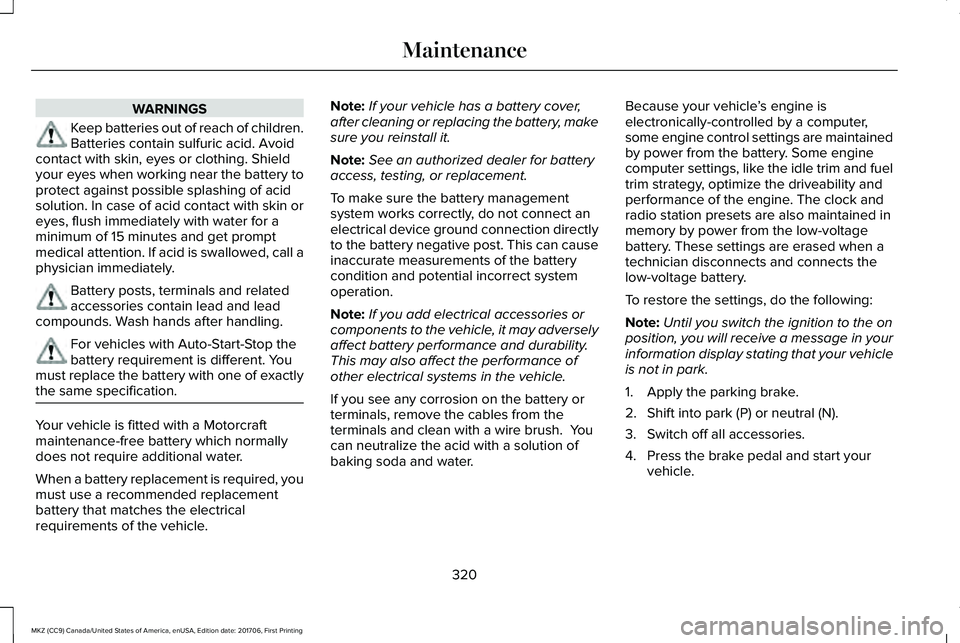
Your vehicle is fitted with a Motorcraftmaintenance-free battery which normallydoes not require additional water.
When a battery replacement is required, youmust use a recommended replacementbattery that matches the electricalrequirements of the vehicle.
Note:If your vehicle has a battery cover,after cleaning or replacing the battery, makesure you reinstall it.
Note:See an authorized dealer for batteryaccess, testing, or replacement.
To make sure the battery managementsystem works correctly, do not connect anelectrical device ground connection directlyto the battery negative post. This can causeinaccurate measurements of the batterycondition and potential incorrect systemoperation.
Note:If you add electrical accessories orcomponents to the vehicle, it may adverselyaffect battery performance and durability.This may also affect the performance ofother electrical systems in the vehicle.
If you see any corrosion on the battery orterminals, remove the cables from theterminals and clean with a wire brush. Youcan neutralize the acid with a solution ofbaking soda and water.
Because your vehicle’s engine iselectronically-controlled by a computer,some engine control settings are maintainedby power from the battery. Some enginecomputer settings, like the idle trim and fueltrim strategy, optimize the driveability andperformance of the engine. The clock andradio station presets are also maintained inmemory by power from the low-voltagebattery. These settings are erased when atechnician disconnects and connects thelow-voltage battery.
To restore the settings, do the following:
Note:Until you switch the ignition to the onposition, you will receive a message in yourinformation display stating that your vehicleis not in park.
1. Apply the parking brake.
2. Shift into park (P) or neutral (N).
3. Switch off all accessories.
4. Press the brake pedal and start yourvehicle.
320
MKZ (CC9) Canada/United States of America, enUSA, Edition date: 201706, First Printing
Maintenance
Page 324 of 595
5. Run the engine until it reaches normaloperating temperature. While the engineis warming up, complete the following:Reset the clock. See Audio Unit (page395). Reset the power windowsbounce-back feature. See PowerWindows (page 96). Reset the radiostation presets. See Audio Unit (page395).
6. Allow the engine to idle for at least oneminute.
7.Drive the vehicle at least 10 mi (16 km) tocompletely relearn the idle trim and fueltrim strategy.
Note:If you do not allow the engine torelearn the idle and fuel trim strategy, theidle quality of your vehicle may be adverselyaffected until the engine computereventually relearns the idle trim and fuel trimstrategy.
Note:Certain features may not operate ifthe battery monitor system is not reset witha scan tool following a jump start or batteryreplacement. Normal electrical accessoryoperation should resume after your vehicleis left undisturbed for 8 hours.
Make sure that you dispose of old batteriesin an environmentally friendly way. Seekadvice from your local authority aboutrecycling old batteries.
If storing your vehicle for more than 30 dayswithout recharging the battery, werecommend that you disconnect the batterycables to maintain battery charge for quickstarting.
CHECKING THE WIPER BLADES
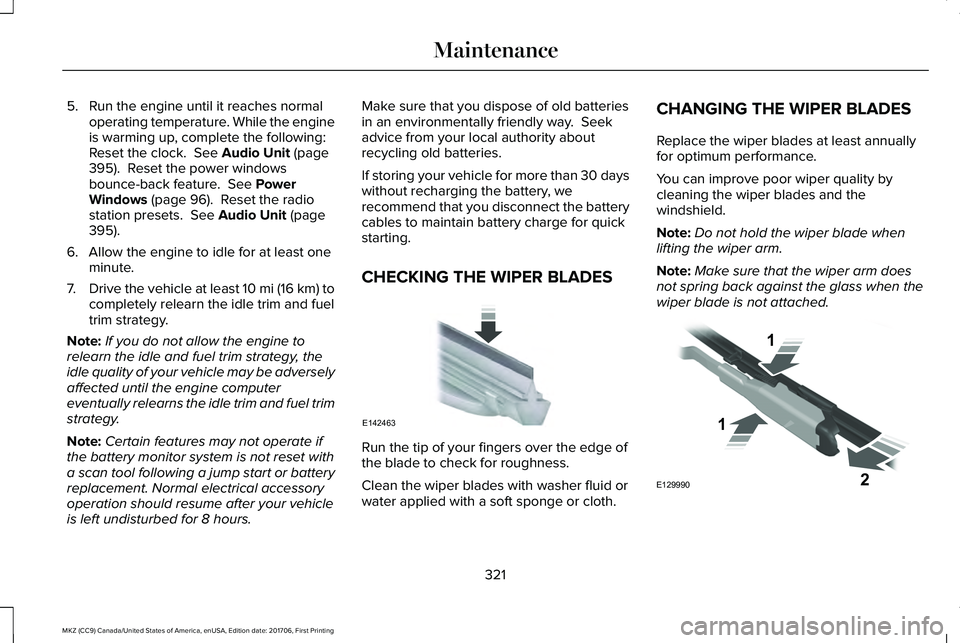
Run the tip of your fingers over the edge ofthe blade to check for roughness.
Clean the wiper blades with washer fluid orwater applied with a soft sponge or cloth.
CHANGING THE WIPER BLADES
Replace the wiper blades at least annuallyfor optimum performance.
You can improve poor wiper quality bycleaning the wiper blades and thewindshield.
Note:Do not hold the wiper blade whenlifting the wiper arm.
Note:Make sure that the wiper arm doesnot spring back against the glass when thewiper blade is not attached.
321
MKZ (CC9) Canada/United States of America, enUSA, Edition date: 201706, First Printing
MaintenanceE142463 E129990
1
1 2
Page 340 of 595
Loss of air pressure may adversely affect tireperformance. For this reason:
Note:Do not drive the vehicle above 50 mph(80 km/h).
Note:Do not drive further than 120 mi(200 km). Drive only to the closest authorizedLincoln dealer or tire repair shop to haveyour tire inspected.
•Drive carefully and avoid abrupt steeringmaneuvers.
•Periodically monitor tire inflation pressurein the affected tire; if the tire is losingpressure, have the vehicle towed.
•Read the information in the Tips for Useof the Kit section to make sure safeoperation of the kit and your vehicle.
Tips for Use of the Kit
To ensure safe operation of the kit:
•Read all instructions and cautions fully.
•Before operating the kit, make sure yourvehicle is safely off the road and awayfrom moving traffic. Turn on the hazardlights.
•Always set the parking brake to ensurethe vehicle doesn't move unexpectedly.
•Do not remove any foreign objects, suchas nails or screws, from the tire.
•When using the kit, leave the enginerunning (only if the vehicle is outdoors orin a well-ventilated area) so thecompressor does not drain the vehicle'sbattery.
•Do not allow the compressor to operatecontinuously for more than 15 minutes.This will help prevent the compressorfrom overheating.
•Never leave the kit unattended duringoperation.
•Sealant compound contains latex. Thosewith latex sensitivities should useappropriate precautions to avoid anallergic reaction.
•Keep the kit away from children.
•Only use the kit when the ambienttemperature is between -22°F (-30°C) and158°F (70°C).
•Only use the sealing compound beforethe use-by date. The use-by date is on alabel on the sealant canister and can beseen through the rectangular viewingwindow on the bottom of the compressor.Check the use-by date regularly andreplace the canister after four years ofnon-use.
•Do not store the kit unsecured inside thepassenger compartment of the vehicleas it may cause injury during a suddenstop or crash. Always store the kit in itsoriginal location.
•After sealant use, the tire pressuremonitoring system sensor and valve stemon the wheel must be replaced by anauthorized Lincoln dealer.
•Operating the kit could cause anelectrical disturbance in radio, CD, andDVD player operation.
* When inflation only is required fora tire or other objects, the selectormust be in the Air position.
337
MKZ (CC9) Canada/United States of America, enUSA, Edition date: 201706, First Printing
Wheels and TiresE175978
Page 363 of 595
functioning properly. Always check the TPMSmalfunction telltale after replacing one ormore tires or wheels on your vehicle toensure that the replacement or alternate tiresand wheels allow the TPMS to continue tofunction properly.
This device complies with Part 15 of the FCCRules and with License exempt RSSStandards of Industry Canada. Operation issubject to the following two conditions:
1. This device may not cause harmfulinterference, and
2.This device must accept any interferencereceived, including interference that maycause undesired operation.
Note:Changes or modifications notexpressively approved by the partyresponsible for compliance could void theuser's authority to operate the equipment.The term "IC:" before the radio certificationnumber only signifies that Industry Canadatechnical specifications were met.
Changing Tires With a Tire PressureMonitoring System
Note:Each road tire is equipped with a tirepressure sensor located inside the wheeland tire assembly cavity. The pressuresensor is attached to the valve stem. Thepressure sensor is covered by the tire andis not visible unless the tire is removed. Takecare when changing the tire to avoiddamaging the sensor.
You should always have your tires servicedby an authorized dealer.
Check the tire pressure periodically (at leastmonthly) using an accurate tire gauge. SeeWhen Inflating Your Tires in this chapter.
Understanding Your Tire PressureMonitoring System
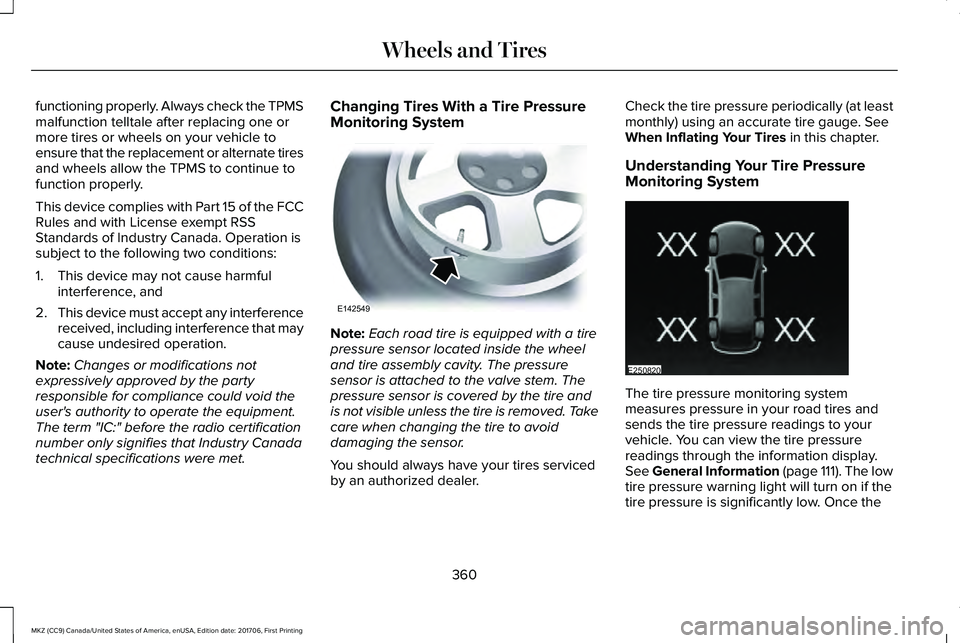
The tire pressure monitoring systemmeasures pressure in your road tires andsends the tire pressure readings to yourvehicle. You can view the tire pressurereadings through the information display.See General Information (page 111). The lowtire pressure warning light will turn on if thetire pressure is significantly low. Once the
360
MKZ (CC9) Canada/United States of America, enUSA, Edition date: 201706, First Printing
Wheels and TiresE142549 E250820
Page 397 of 595
GENERAL INFORMATION
Radio Frequencies and ReceptionFactors
AM and FM frequencies are established bythe Federal Communications Commission(FCC) and the Canadian Radio andTelecommunications Commission (CRTC).Those frequencies are:
•AM: 530, 540-1700, 1710 kHz
•FM: 87.9-107.7, 107.9 MHz
Radio Reception Factors
The further you travel from an AM or FM station, the weaker the signal and the weaker the reception.Distance and strength
Hills, mountains, tall buildings, bridges, tunnels, freeway overpasses, parking garages, dense tree foliage andthunderstorms can interfere with the reception.Terrain
When you pass a ground-based broadcast repeating tower, a stronger signal may overtake a weaker one andresult in the audio system muting.Station overload
CD and CD Player Information
Note:CD units play commercially pressed4.7 in (12 cm) audio compact discs only. Dueto technical incompatibility, certainrecordable and re-recordable compact discsmay not function correctly when used in FordCD players.
Note:Do not insert CDs with homemadepaper (adhesive) labels into the CD playeras the label may peel and cause the CD tobecome jammed. You should use apermanent felt tip marker rather thanadhesive labels on your homemade CDs.Ballpoint pens may damage CDs. Pleasecontact an authorized dealer for furtherinformation.
Note:Do not use any irregularly shapeddiscs or discs with a scratch protection filmattached.
Always handle discs by their edges only.Clean the disc with an approved CD cleaneronly. Wipe it from the center of the disctoward the edge. Do not clean in a circularmotion.
394
MKZ (CC9) Canada/United States of America, enUSA, Edition date: 201706, First Printing
Audio System
Page 398 of 595
Do not expose discs to direct sunlight or heatsources for extended periods.
MP3 and WMA Track and FolderStructure
Audio systems capable of recognizing andplaying MP3 and WMA individual tracks andfolder structures work as follows:
•There are two different modes for MP3and WMA disc playback: MP3 and WMAtrack mode (system default) and MP3 andWMA folder mode.
•MP3 and WMA track mode ignores anyfolder structure on the MP3 and WMAdisc. The player numbers each MP3 andWMA track on the disc (noted by the MP3or WMA file extension) from T001 to amaximum of T255. The maximum numberof playable MP3 and WMA files may beless depending on the structure of theCD and exact model of radio present.
•MP3 and WMA folder mode representsa folder structure consisting of one levelof folders. The CD player numbers allMP3 and WMA tracks on the disc (notedby the MP3 or WMA file extension) andall folders containing MP3 and WMA files,from F001 (folder) T001 (track) to F253T255.
•Creating discs with only one level offolders helps with navigation through thedisc files.
If you are burning your own MP3 and WMAdiscs, it is important to understand how thesystem reads the structures you create. Whilevarious files may be present (files withextensions other than MP3 and WMA), onlyfiles with the MP3 and WMA extension areplayed; other files are ignored by the system.This enables you to use the same MP3 andWMA disc for a variety of tasks on your workcomputer, home computer and yourin-vehicle system.
In track mode, the system displays and playsthe structure as if it were only one level deep(all MP3 and WMA files play, regardless ofbeing in a specific folder). In folder mode,the system only plays the MP3 and WMA filesin the current folder.
AUDIO UNIT
WARNING
Driving while distracted can result inloss of vehicle control, crash and injury.We strongly recommend that you useextreme caution when using any device thatmay take your focus off the road. Yourprimary responsibility is the safe operationof your vehicle. We recommend against theuse of any hand-held device while drivingand encourage the use of voice-operatedsystems when possible. Make sure you areaware of all applicable local laws that mayaffect the use of electronic devices whiledriving.
395
MKZ (CC9) Canada/United States of America, enUSA, Edition date: 201706, First Printing
Audio System
Page 399 of 595
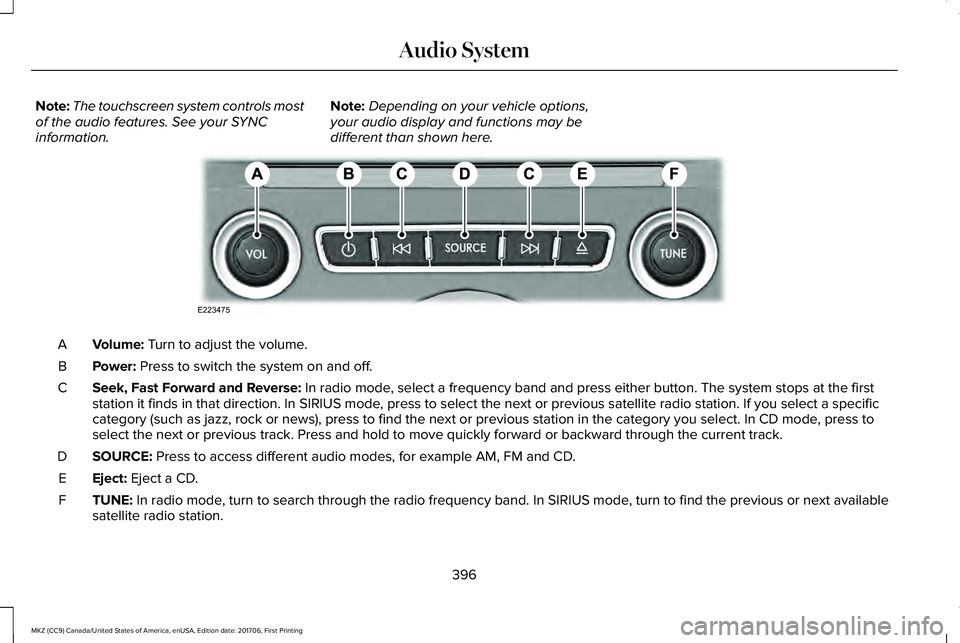
Note:The touchscreen system controls mostof the audio features. See your SYNCinformation.
Note:Depending on your vehicle options,your audio display and functions may bedifferent than shown here.
Volume: Turn to adjust the volume.A
Power: Press to switch the system on and off.B
Seek, Fast Forward and Reverse: In radio mode, select a frequency band and press either button. The system stops at the firststation it finds in that direction. In SIRIUS mode, press to select the next or previous satellite radio station. If you select a specificcategory (such as jazz, rock or news), press to find the next or previous station in the category you select. In CD mode, press toselect the next or previous track. Press and hold to move quickly forward or backward through the current track.
C
SOURCE: Press to access different audio modes, for example AM, FM and CD.D
Eject: Eject a CD.E
TUNE: In radio mode, turn to search through the radio frequency band. In SIRIUS mode, turn to find the previous or next availablesatellite radio station.F
396
MKZ (CC9) Canada/United States of America, enUSA, Edition date: 201706, First Printing
Audio SystemE223475