mirror LINCOLN MKZ 2018 Owner's Manual
[x] Cancel search | Manufacturer: LINCOLN, Model Year: 2018, Model line: MKZ, Model: LINCOLN MKZ 2018Pages: 595, PDF Size: 5.06 MB
Page 236 of 595
LANE KEEPING SYSTEM (If Equipped)
WARNINGS
The system is designed to aid thedriver. It is not intended to replace yourattention and judgment. You are stillresponsible to drive with due care andattention.
Always drive with due care andattention when using and operating thecontrols and features on your vehicle.
At all times, you are responsible forcontrolling your vehicle, supervisingthe system and intervening, if required.Failure to take care may result in the loss ofcontrol of your vehicle, serious personalinjury or death.
In cold and severe weather conditionsthe system may not function. Rain,snow and spray can all limit sensorperformance.
The system will not operate if thesensor cannot track the road lanemarkings.
WARNINGS
The sensor may incorrectly track lanemarkings as other structures or objects.This can result in a false or missed warning.
Large contrasts in outside lighting canlimit sensor performance.
The system may not operate properlyif the sensor is blocked. Keep thewindshield free from obstruction.
If damage occurs in the immediate areasurrounding the sensor, have yourvehicle checked as soon as possible.
Note:The system works above 40 mph(64 km/h).
Note:The system works as long as thecamera can detect one lane marking.
Note:The system may not function if thecamera is blocked or there is damage to thewindshield.
Note:When Aid mode is on and the systemdetects no steering activity for a short period,the system will alert you to put your handson the steering wheel. The system maydetect a light grip or touch on the steeringwheel as hands off driving.
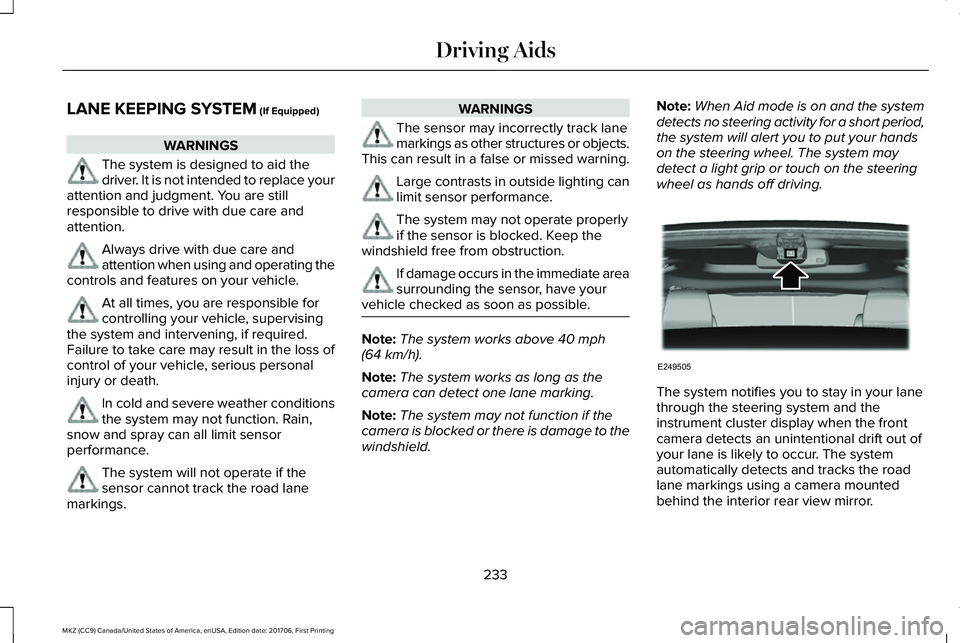
The system notifies you to stay in your lanethrough the steering system and theinstrument cluster display when the frontcamera detects an unintentional drift out ofyour lane is likely to occur. The systemautomatically detects and tracks the roadlane markings using a camera mountedbehind the interior rear view mirror.
233
MKZ (CC9) Canada/United States of America, enUSA, Edition date: 201706, First Printing
Driving AidsE249505
Page 241 of 595
BLIND SPOT INFORMATION
SYSTEM (If Equipped)
WARNINGS
Do not use the blind spot informationsystem as a replacement for using theinterior and exterior mirrors or looking overyour shoulder before changing lanes. Theblind spot information system is not areplacement for careful driving.
The system may not operate properlyduring severe weather conditions, forexample snow, ice, heavy rain and spray.Always drive with due care and attention.Failure to take care may result in a crash.
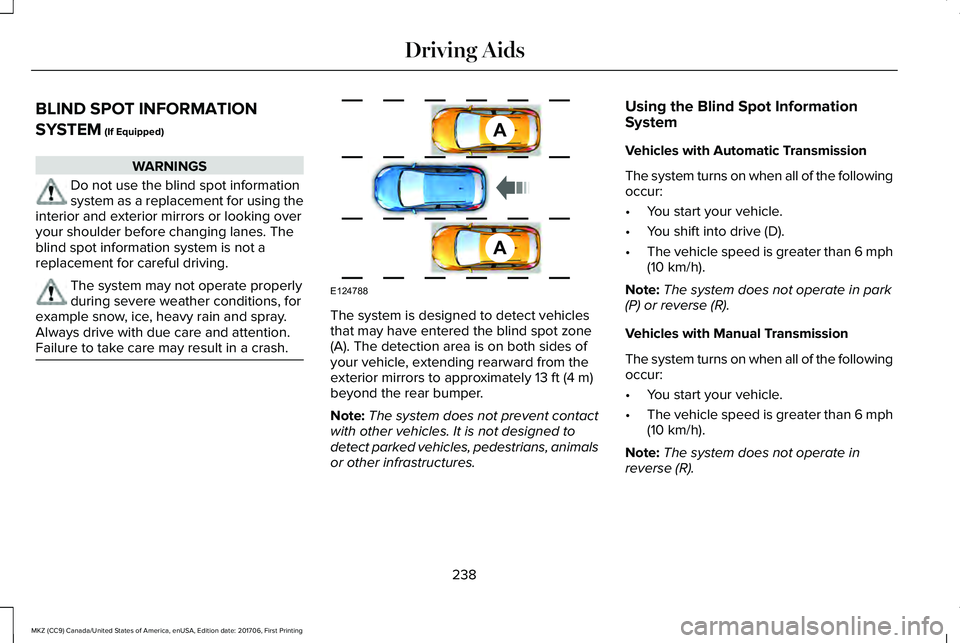
The system is designed to detect vehiclesthat may have entered the blind spot zone(A). The detection area is on both sides ofyour vehicle, extending rearward from theexterior mirrors to approximately 13 ft (4 m)beyond the rear bumper.
Note:The system does not prevent contactwith other vehicles. It is not designed todetect parked vehicles, pedestrians, animalsor other infrastructures.
Using the Blind Spot InformationSystem
Vehicles with Automatic Transmission
The system turns on when all of the followingoccur:
•You start your vehicle.
•You shift into drive (D).
•The vehicle speed is greater than 6 mph(10 km/h).
Note:The system does not operate in park(P) or reverse (R).
Vehicles with Manual Transmission
The system turns on when all of the followingoccur:
•You start your vehicle.
•The vehicle speed is greater than 6 mph(10 km/h).
Note:The system does not operate inreverse (R).
238
MKZ (CC9) Canada/United States of America, enUSA, Edition date: 201706, First Printing
Driving AidsA
A
E124788
Page 242 of 595
System Lights and Messages
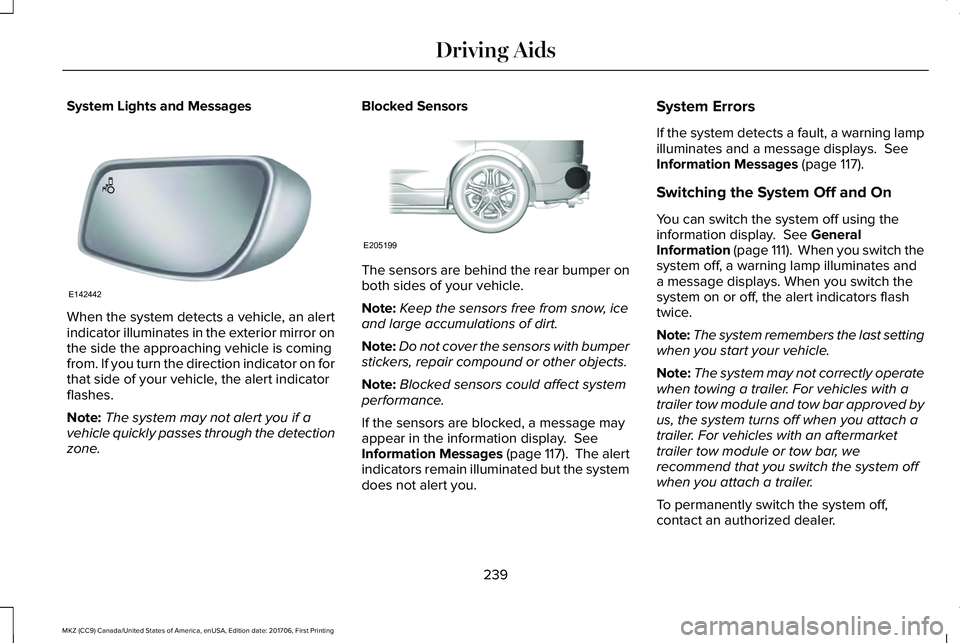
When the system detects a vehicle, an alertindicator illuminates in the exterior mirror onthe side the approaching vehicle is comingfrom. If you turn the direction indicator on forthat side of your vehicle, the alert indicatorflashes.
Note:The system may not alert you if avehicle quickly passes through the detectionzone.
Blocked Sensors
The sensors are behind the rear bumper onboth sides of your vehicle.
Note:Keep the sensors free from snow, iceand large accumulations of dirt.
Note:Do not cover the sensors with bumperstickers, repair compound or other objects.
Note:Blocked sensors could affect systemperformance.
If the sensors are blocked, a message mayappear in the information display. SeeInformation Messages (page 117). The alertindicators remain illuminated but the systemdoes not alert you.
System Errors
If the system detects a fault, a warning lampilluminates and a message displays. SeeInformation Messages (page 117).
Switching the System Off and On
You can switch the system off using theinformation display. See GeneralInformation (page 111). When you switch thesystem off, a warning lamp illuminates anda message displays. When you switch thesystem on or off, the alert indicators flashtwice.
Note:The system remembers the last settingwhen you start your vehicle.
Note:The system may not correctly operatewhen towing a trailer. For vehicles with atrailer tow module and tow bar approved byus, the system turns off when you attach atrailer. For vehicles with an aftermarkettrailer tow module or tow bar, werecommend that you switch the system offwhen you attach a trailer.
To permanently switch the system off,contact an authorized dealer.
239
MKZ (CC9) Canada/United States of America, enUSA, Edition date: 201706, First Printing
Driving AidsE142442 E205199
Page 243 of 595
CROSS TRAFFIC ALERT (If Equipped)
WARNINGS
Do not use the cross traffic alert systemas a replacement for using the interiorand exterior mirrors or looking over yourshoulder before reversing out of a parkingspace. The cross traffic alert system is not areplacement for careful driving.
WARNINGS
The system may not operate properlyduring severe weather conditions, forexample snow, ice, heavy rain and spray.Always drive with due care and attention.Failure to take care may result in a crash.
The system is designed to alert you ofvehicles approaching from the sides whenyou shift into reverse (R).
Using the Cross Traffic Alert System
The system is designed to detect vehiclesthat approach with a speed up to 37 mph(60 km/h). Coverage decreases when thesensors are partially, mostly or fullyobstructed. Slowly reversing helps increasethe coverage area and effectiveness.
The system turns on when you start theengine and you shift into reverse (R). Thesystem turns off when you shift out of reverse(R).
240
MKZ (CC9) Canada/United States of America, enUSA, Edition date: 201706, First Printing
Driving Aids
Page 246 of 595
System Lights, Messages and AudibleAlerts
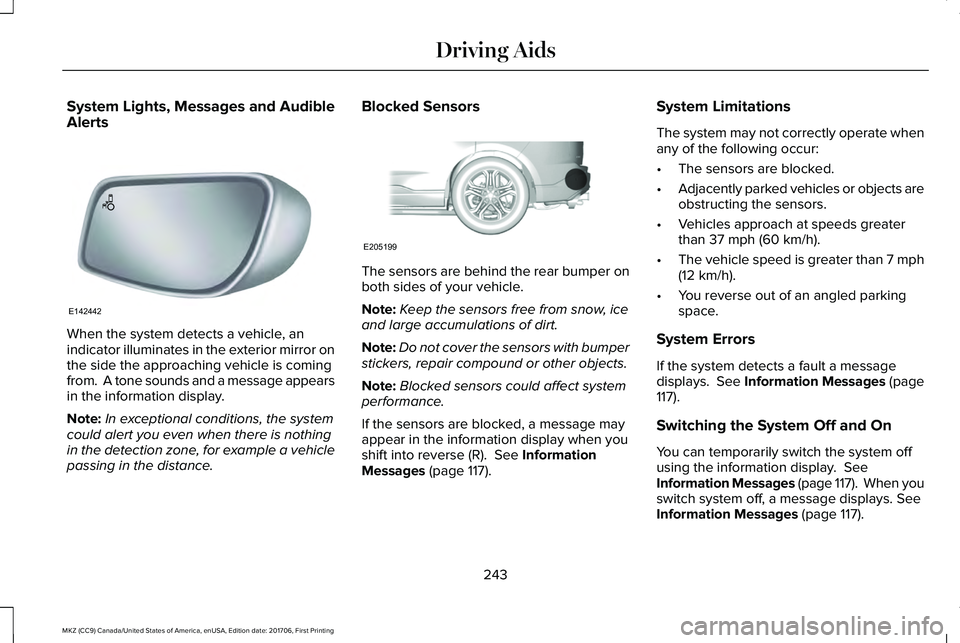
When the system detects a vehicle, anindicator illuminates in the exterior mirror onthe side the approaching vehicle is comingfrom. A tone sounds and a message appearsin the information display.
Note:In exceptional conditions, the systemcould alert you even when there is nothingin the detection zone, for example a vehiclepassing in the distance.
Blocked Sensors
The sensors are behind the rear bumper onboth sides of your vehicle.
Note:Keep the sensors free from snow, iceand large accumulations of dirt.
Note:Do not cover the sensors with bumperstickers, repair compound or other objects.
Note:Blocked sensors could affect systemperformance.
If the sensors are blocked, a message mayappear in the information display when youshift into reverse (R). See InformationMessages (page 117).
System Limitations
The system may not correctly operate whenany of the following occur:
•The sensors are blocked.
•Adjacently parked vehicles or objects areobstructing the sensors.
•Vehicles approach at speeds greaterthan 37 mph (60 km/h).
•The vehicle speed is greater than 7 mph(12 km/h).
•You reverse out of an angled parkingspace.
System Errors
If the system detects a fault a messagedisplays. See Information Messages (page117).
Switching the System Off and On
You can temporarily switch the system offusing the information display. SeeInformation Messages (page 117). When youswitch system off, a message displays. SeeInformation Messages (page 117).
243
MKZ (CC9) Canada/United States of America, enUSA, Edition date: 201706, First Printing
Driving AidsE142442 E205199
Page 300 of 595
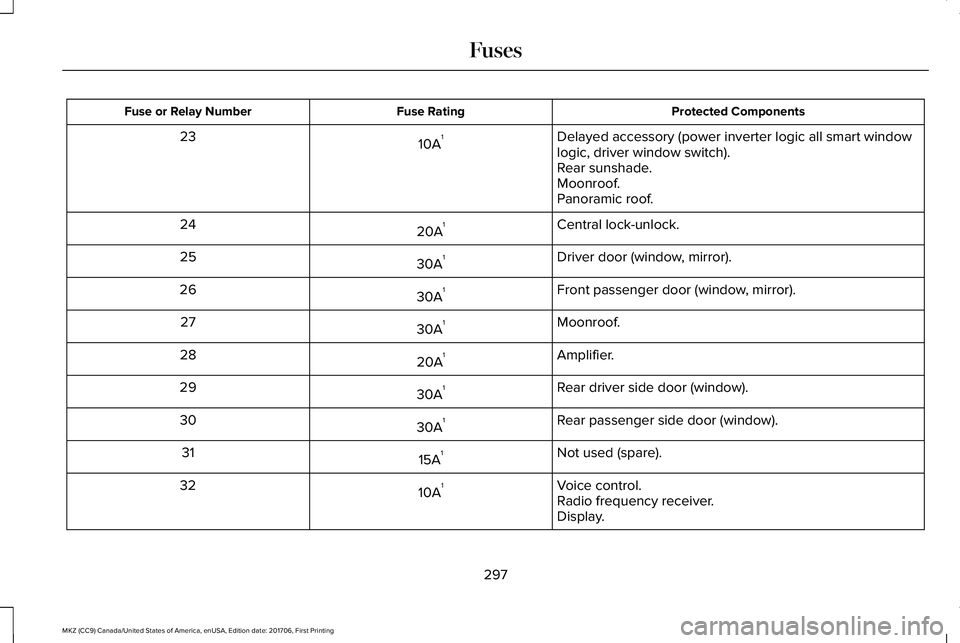
Protected ComponentsFuse RatingFuse or Relay Number
Delayed accessory (power inverter logic all smart windowlogic, driver window switch).10A123
Rear sunshade.Moonroof.Panoramic roof.
Central lock-unlock.20A124
Driver door (window, mirror).30A125
Front passenger door (window, mirror).30A126
Moonroof.30A127
Amplifier.20A128
Rear driver side door (window).30A129
Rear passenger side door (window).30A130
Not used (spare).15A131
Voice control.10A132Radio frequency receiver.Display.
297
MKZ (CC9) Canada/United States of America, enUSA, Edition date: 201706, First Printing
Fuses
Page 301 of 595
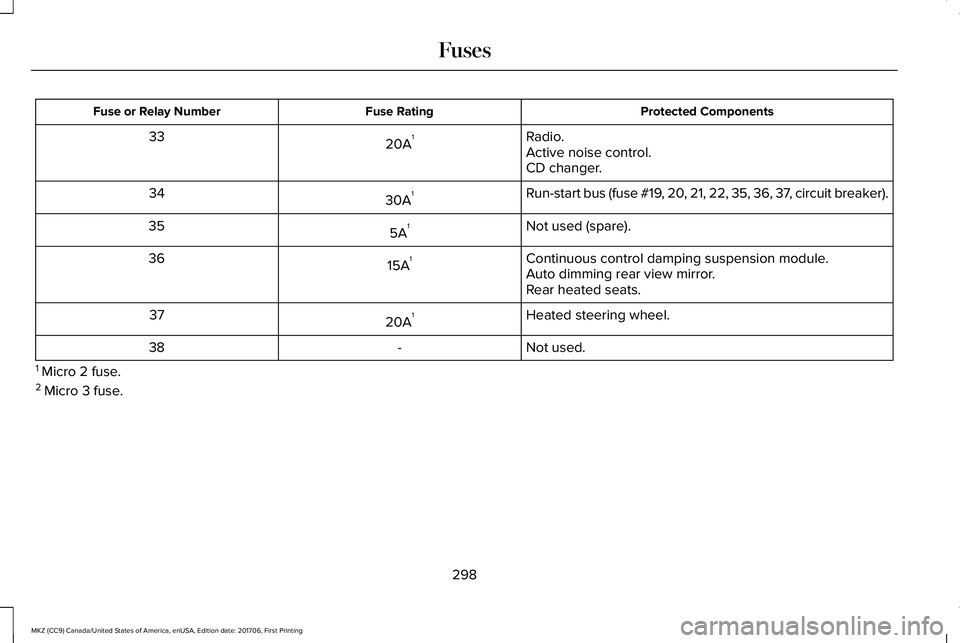
Protected ComponentsFuse RatingFuse or Relay Number
Radio.20A133Active noise control.CD changer.
Run-start bus (fuse #19, 20, 21, 22, 35, 36, 37, circuit breaker).30A134
Not used (spare).5A135
Continuous control damping suspension module.15A136Auto dimming rear view mirror.Rear heated seats.
Heated steering wheel.20A137
Not used.-38
1 Micro 2 fuse.2 Micro 3 fuse.
298
MKZ (CC9) Canada/United States of America, enUSA, Edition date: 201706, First Printing
Fuses
Page 331 of 595
Note:Do not use chrome cleaner, metalcleaner or polish on wheels or wheel covers.
Exterior Plastic Parts
For routine cleaning we recommendMotorcraft Detail Wash. If tar or grease spotsare present, we recommend Motorcraft Bugand Tar Remover.
Stripes or Graphics (If Equipped)
Hand washing your vehicle is preferredhowever, pressure washing may be usedunder the following conditions:
•Do not use water pressure higher than2,000 psi (14,000 kPa).
•Do not use water hotter than 179°F (82°C).
•Use a spray with a 40° wide spray anglepattern.
•Keep the nozzle at a 12 in (305 mm)distance and 90° angle to your vehicle'ssurface.
Note:Holding the pressure washer nozzleat an angle to the vehicle's surface maydamage graphics and cause the edges topeel away from the vehicle's surface.
Underbody
Regularly clean the underside of your vehicleusing water. Keep body and door drain holesfree of debris or foreign material.
Under Hood
For removing black rubber marks from underthe hood we recommend Motorcraft Wheeland Tire Cleaner or Motorcraft Bug and TarRemover.
WAXING
Regular waxing is necessary to protect yourcar's paint from the elements. Werecommend that you wash and wax thepainted surface once or twice a year.
When washing and waxing, park your vehiclein a shaded area out of direct sunlight.Always wash your vehicle before applyingwax.
•Use a quality wax that does not containabrasives.
•Follow the manufacturer’s instructions toapply and remove the wax.
•Apply a small amount of wax in aback-and-forth motion, not in circles.
•Do not allow wax to come in contact withany non-body (low-gloss black) coloredtrim. The wax will discolor or stain theparts over time.
•Roof racks.
•Bumpers.
•Grained door handles.
•Side moldings.
•Mirror housings.
•Windshield cowl area.
•Do not apply wax to glass areas.
•After waxing, your car's paint should feelsmooth, and be free of streaks andsmudges.
CLEANING THE ENGINE
Engines are more efficient when they areclean because grease and dirt buildup keepthe engine warmer than normal.
328
MKZ (CC9) Canada/United States of America, enUSA, Edition date: 201706, First Printing
Vehicle Care
Page 445 of 595
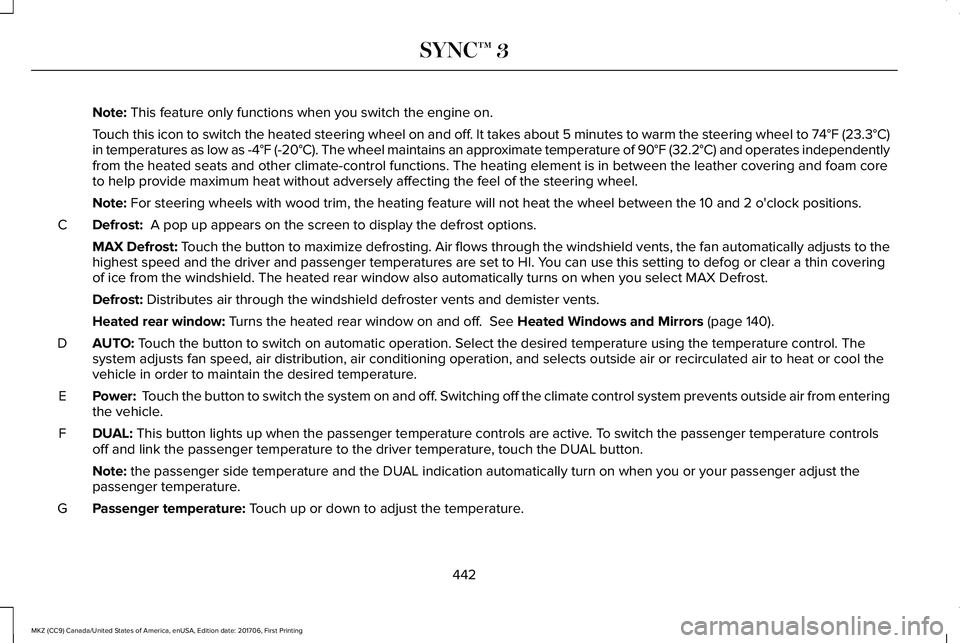
Note: This feature only functions when you switch the engine on.
Touch this icon to switch the heated steering wheel on and off. It takes about 5 minutes to warm the steering wheel to 74°F (23.3°C)in temperatures as low as -4°F (-20°C). The wheel maintains an approximate temperature of 90°F (32.2°C) and operates independentlyfrom the heated seats and other climate-control functions. The heating element is in between the leather covering and foam coreto help provide maximum heat without adversely affecting the feel of the steering wheel.
Note: For steering wheels with wood trim, the heating feature will not heat the wheel between the 10 and 2 o'clock positions.
Defrost: A pop up appears on the screen to display the defrost options.C
MAX Defrost: Touch the button to maximize defrosting. Air flows through the windshield vents, the fan automatically adjusts to thehighest speed and the driver and passenger temperatures are set to HI. You can use this setting to defog or clear a thin coveringof ice from the windshield. The heated rear window also automatically turns on when you select MAX Defrost.
Defrost: Distributes air through the windshield defroster vents and demister vents.
Heated rear window: Turns the heated rear window on and off. See Heated Windows and Mirrors (page 140).
AUTO: Touch the button to switch on automatic operation. Select the desired temperature using the temperature control. Thesystem adjusts fan speed, air distribution, air conditioning operation, and selects outside air or recirculated air to heat or cool thevehicle in order to maintain the desired temperature.
D
Power: Touch the button to switch the system on and off. Switching off the climate control system prevents outside air from enteringthe vehicle.E
DUAL: This button lights up when the passenger temperature controls are active. To switch the passenger temperature controlsoff and link the passenger temperature to the driver temperature, touch the DUAL button.F
Note: the passenger side temperature and the DUAL indication automatically turn on when you or your passenger adjust thepassenger temperature.
Passenger temperature: Touch up or down to adjust the temperature.G
442
MKZ (CC9) Canada/United States of America, enUSA, Edition date: 201706, First Printing
SYNC™ 3
Page 587 of 595
Electromagnetic Compatibility...................541Emission Law..................................................176Noise Emissions Warranty, ProhibitedTampering Acts and Maintenance..............177Tampering With a Noise Control System......176
End User License Agreement...................546VEHICLE SOFTWARE END USER LICENSEAGREEMENT (EULA) ....................................546
Engine Block Heater....................................166Using the Engine Block Heater.......................167
Engine Coolant Check.................................310Adding Coolant.....................................................311Engine Coolant TemperatureManagement....................................................313Fail-Safe Cooling.................................................312Recycled Coolant................................................312Severe Climates...................................................312
Engine Emission Control.............................176Engine ImmobilizerSee: Passive Anti-Theft System.........................78
Engine Oil Check.........................................308Adding Engine Oil..............................................309
Engine Oil Dipstick - 2.0L...........................308Engine Oil Dipstick - 3.0L...........................308Engine Specifications - 2.0L......................373Drivebelt Routing................................................374
Engine Specifications - 3.0L......................374Drivebelt Routing................................................375
Entertainment................................................427AM/FM Radio.......................................................429Apps.......................................................................440Bluetooth Stereo or USB..................................438CD (If equipped)..................................................437HD Radio™ Information (If Available)..............433SiriusXM® Satellite Radio (If Activated).........429Sources.................................................................428Supported Media Players, Formats andMetadata Information...................................440USB Ports.............................................................440
Environment......................................................16EPBSee: Electric Parking Brake..............................196
Essential Towing Checks...........................259Before Towing a Trailer.....................................260Hitches..................................................................259Launching or Retrieving a Boat or PersonalWatercraft (PWC)............................................260Safety Chains......................................................259Trailer Brakes......................................................259Trailer Lamps.......................................................259When Towing a Trailer......................................260
Event Data RecordingSee: Data Recording..............................................9
Export Unique Options...................................14Exterior Mirrors................................................97Auto-Dimming Feature........................................99
Auto-Folding Mirrors............................................98Blind Spot Monitor..............................................100Fold-Away Exterior Mirrors.................................98Heated Exterior Mirrors.......................................99Integrated Blind Spot Mirrors............................99Lincoln Welcome Mat..........................................99Memory Mirrors.....................................................99Power Exterior Mirrors.........................................97Signal Indicator Mirrors.......................................99
F
Fastening the Seatbelts................................37Rear Inflatable Seatbelt.......................................40Seatbelt Locking Modes.....................................38Using Seatbelts During Pregnancy..................37
Flat Tire InflationSee: Tire Sealant and Inflator Kit....................336
Floor Mats......................................................264Front Parking Aid..........................................207Obstacle Distance Indicator............................208
Front Passenger Sensing System..............50Fuel and Refueling........................................168Fuel Consumption.........................................174Calculating Fuel Economy.................................174Filling the Fuel Tank............................................174
Fuel Filler Funnel Location.........................169
584
MKZ (CC9) Canada/United States of America, enUSA, Edition date: 201706, First Printing
Index