parking LINCOLN MKZ 2018 Repair Manual
[x] Cancel search | Manufacturer: LINCOLN, Model Year: 2018, Model line: MKZ, Model: LINCOLN MKZ 2018Pages: 595, PDF Size: 5.06 MB
Page 397 of 595
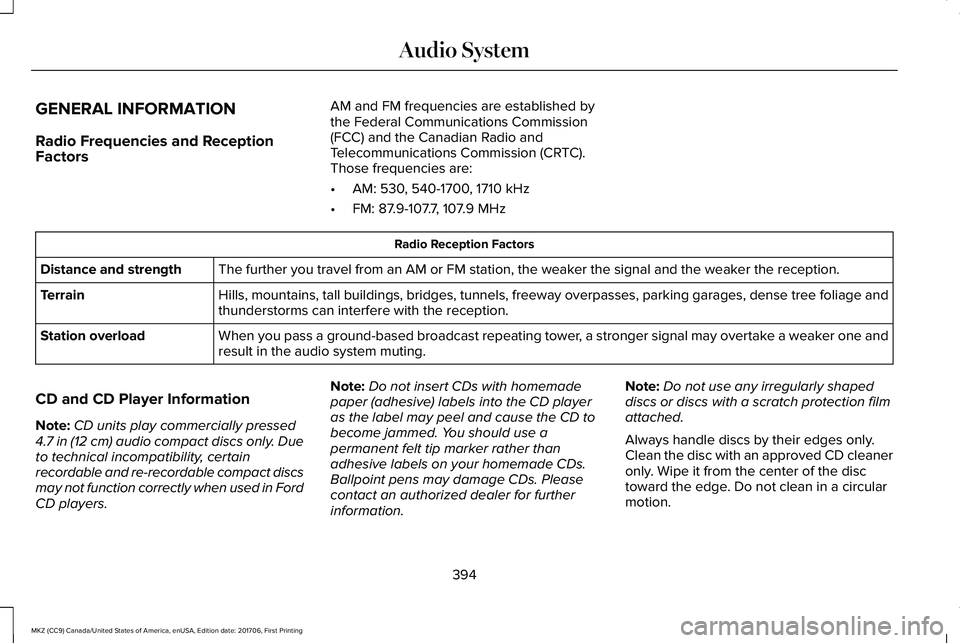
GENERAL INFORMATION
Radio Frequencies and ReceptionFactors
AM and FM frequencies are established bythe Federal Communications Commission(FCC) and the Canadian Radio andTelecommunications Commission (CRTC).Those frequencies are:
•AM: 530, 540-1700, 1710 kHz
•FM: 87.9-107.7, 107.9 MHz
Radio Reception Factors
The further you travel from an AM or FM station, the weaker the signal and the weaker the reception.Distance and strength
Hills, mountains, tall buildings, bridges, tunnels, freeway overpasses, parking garages, dense tree foliage andthunderstorms can interfere with the reception.Terrain
When you pass a ground-based broadcast repeating tower, a stronger signal may overtake a weaker one andresult in the audio system muting.Station overload
CD and CD Player Information
Note:CD units play commercially pressed4.7 in (12 cm) audio compact discs only. Dueto technical incompatibility, certainrecordable and re-recordable compact discsmay not function correctly when used in FordCD players.
Note:Do not insert CDs with homemadepaper (adhesive) labels into the CD playeras the label may peel and cause the CD tobecome jammed. You should use apermanent felt tip marker rather thanadhesive labels on your homemade CDs.Ballpoint pens may damage CDs. Pleasecontact an authorized dealer for furtherinformation.
Note:Do not use any irregularly shapeddiscs or discs with a scratch protection filmattached.
Always handle discs by their edges only.Clean the disc with an approved CD cleaneronly. Wipe it from the center of the disctoward the edge. Do not clean in a circularmotion.
394
MKZ (CC9) Canada/United States of America, enUSA, Edition date: 201706, First Printing
Audio System
Page 415 of 595
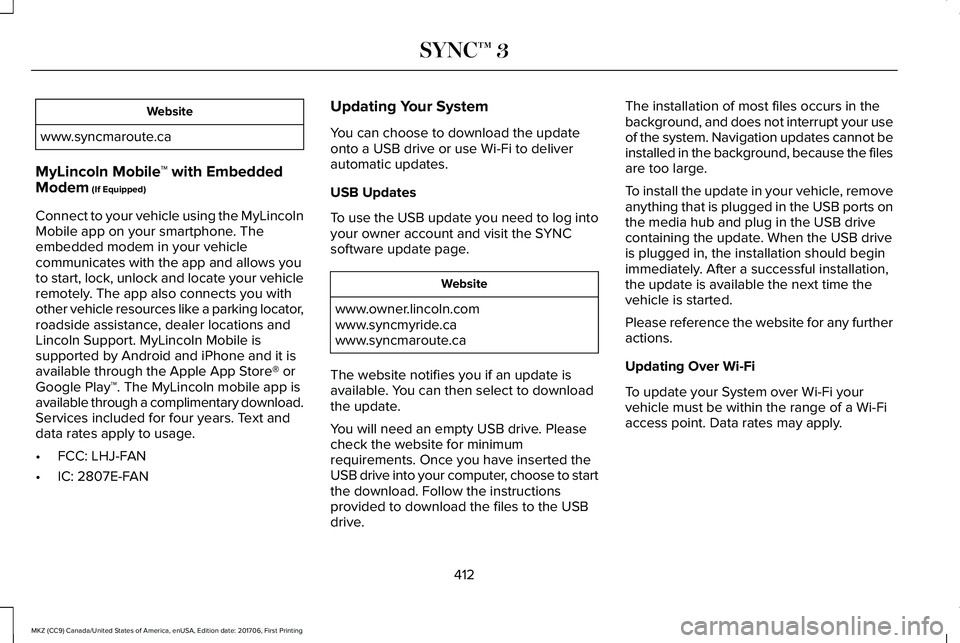
Website
www.syncmaroute.ca
MyLincoln Mobile™ with EmbeddedModem (If Equipped)
Connect to your vehicle using the MyLincolnMobile app on your smartphone. Theembedded modem in your vehiclecommunicates with the app and allows youto start, lock, unlock and locate your vehicleremotely. The app also connects you withother vehicle resources like a parking locator,roadside assistance, dealer locations andLincoln Support. MyLincoln Mobile issupported by Android and iPhone and it isavailable through the Apple App Store® orGoogle Play™. The MyLincoln mobile app isavailable through a complimentary download.Services included for four years. Text anddata rates apply to usage.
•FCC: LHJ-FAN
•IC: 2807E-FAN
Updating Your System
You can choose to download the updateonto a USB drive or use Wi-Fi to deliverautomatic updates.
USB Updates
To use the USB update you need to log intoyour owner account and visit the SYNCsoftware update page.
Website
www.owner.lincoln.comwww.syncmyride.cawww.syncmaroute.ca
The website notifies you if an update isavailable. You can then select to downloadthe update.
You will need an empty USB drive. Pleasecheck the website for minimumrequirements. Once you have inserted theUSB drive into your computer, choose to startthe download. Follow the instructionsprovided to download the files to the USBdrive.
The installation of most files occurs in thebackground, and does not interrupt your useof the system. Navigation updates cannot beinstalled in the background, because the filesare too large.
To install the update in your vehicle, removeanything that is plugged in the USB ports onthe media hub and plug in the USB drivecontaining the update. When the USB driveis plugged in, the installation should beginimmediately. After a successful installation,the update is available the next time thevehicle is started.
Please reference the website for any furtheractions.
Updating Over Wi-Fi
To update your System over Wi-Fi yourvehicle must be within the range of a Wi-Fiaccess point. Data rates may apply.
412
MKZ (CC9) Canada/United States of America, enUSA, Edition date: 201706, First Printing
SYNC™ 3
Page 435 of 595
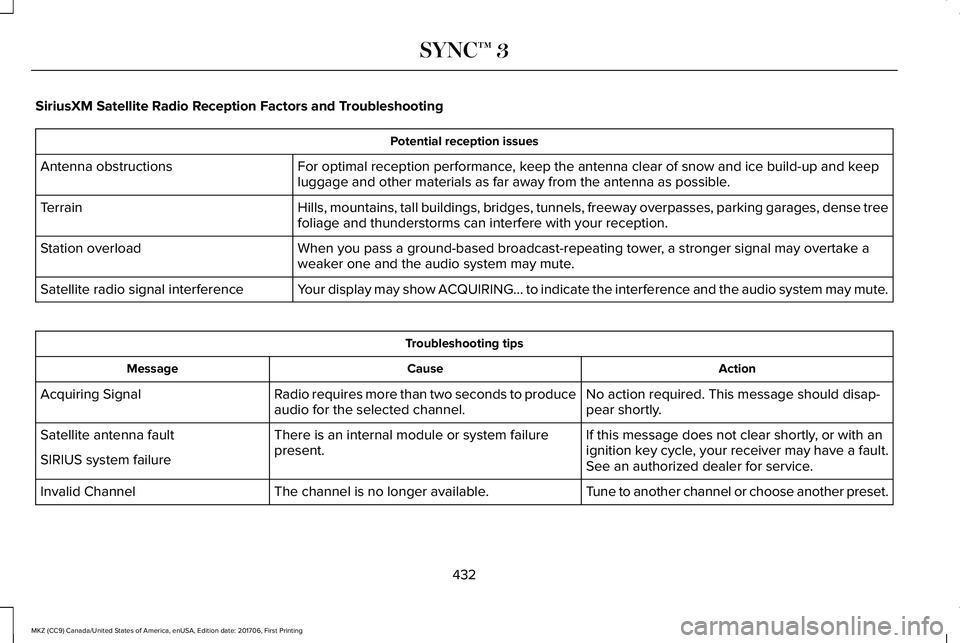
SiriusXM Satellite Radio Reception Factors and Troubleshooting
Potential reception issues
For optimal reception performance, keep the antenna clear of snow and ice build-up and keepluggage and other materials as far away from the antenna as possible.Antenna obstructions
Hills, mountains, tall buildings, bridges, tunnels, freeway overpasses, parking garages, dense treefoliage and thunderstorms can interfere with your reception.Terrain
When you pass a ground-based broadcast-repeating tower, a stronger signal may overtake aweaker one and the audio system may mute.Station overload
Your display may show ACQUIRING... to indicate the interference and the audio system may mute.Satellite radio signal interference
Troubleshooting tips
ActionCauseMessage
No action required. This message should disap-pear shortly.Radio requires more than two seconds to produceaudio for the selected channel.Acquiring Signal
If this message does not clear shortly, or with anignition key cycle, your receiver may have a fault.See an authorized dealer for service.
There is an internal module or system failurepresent.Satellite antenna fault
SIRIUS system failure
Tune to another channel or choose another preset.The channel is no longer available.Invalid Channel
432
MKZ (CC9) Canada/United States of America, enUSA, Edition date: 201706, First Printing
SYNC™ 3
Page 481 of 595
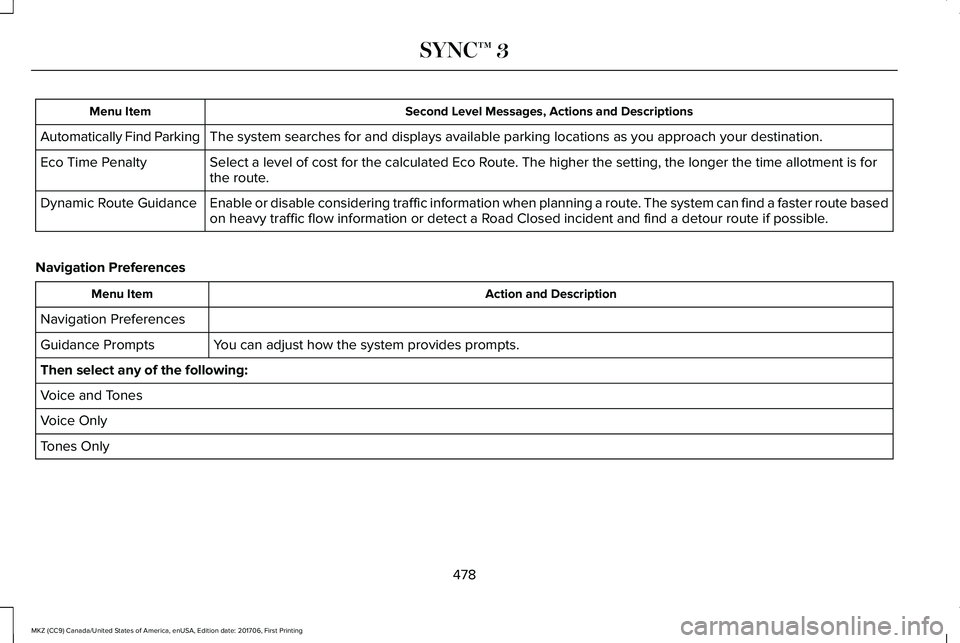
Second Level Messages, Actions and DescriptionsMenu Item
The system searches for and displays available parking locations as you approach your destination.Automatically Find Parking
Select a level of cost for the calculated Eco Route. The higher the setting, the longer the time allotment is forthe route.Eco Time Penalty
Enable or disable considering traffic information when planning a route. The system can find a faster route basedon heavy traffic flow information or detect a Road Closed incident and find a detour route if possible.Dynamic Route Guidance
Navigation Preferences
Action and DescriptionMenu Item
Navigation Preferences
You can adjust how the system provides prompts.Guidance Prompts
Then select any of the following:
Voice and Tones
Voice Only
Tones Only
478
MKZ (CC9) Canada/United States of America, enUSA, Edition date: 201706, First Printing
SYNC™ 3
Page 487 of 595
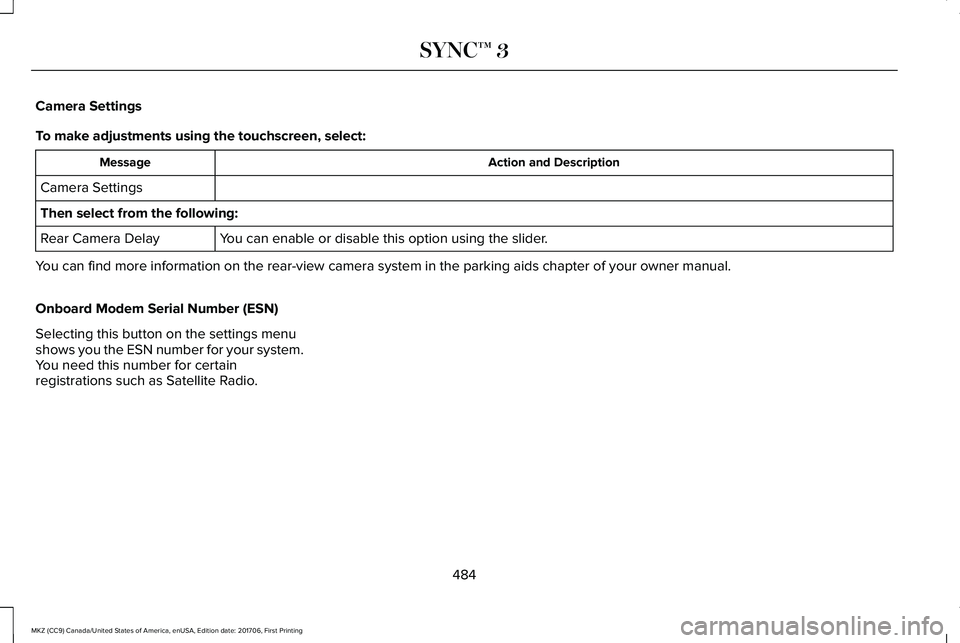
Camera Settings
To make adjustments using the touchscreen, select:
Action and DescriptionMessage
Camera Settings
Then select from the following:
You can enable or disable this option using the slider.Rear Camera Delay
You can find more information on the rear-view camera system in the parking aids chapter of your owner manual.
Onboard Modem Serial Number (ESN)
Selecting this button on the settings menushows you the ESN number for your system.You need this number for certainregistrations such as Satellite Radio.
484
MKZ (CC9) Canada/United States of America, enUSA, Edition date: 201706, First Printing
SYNC™ 3
Page 514 of 595
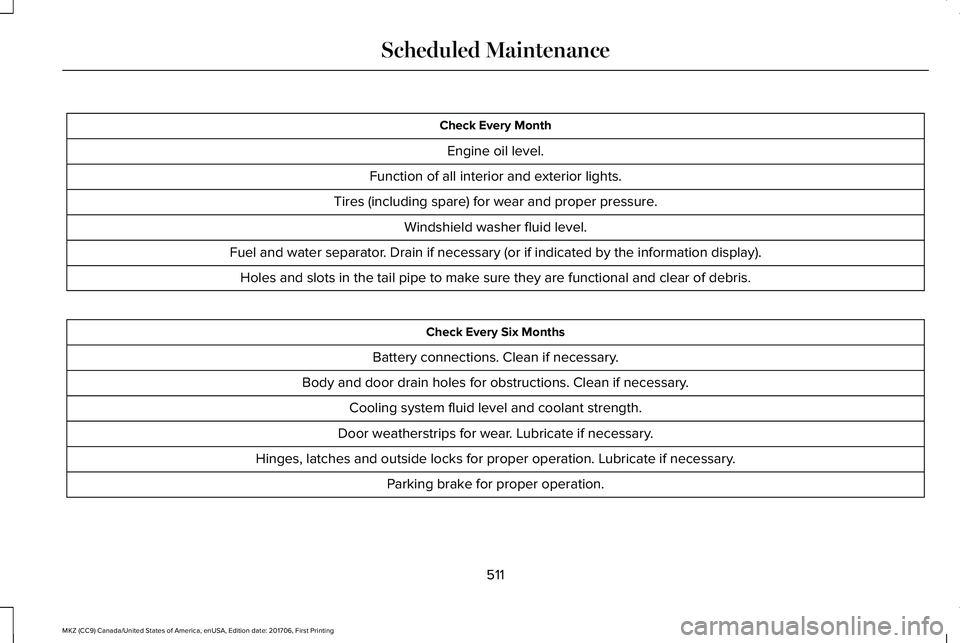
Check Every Month
Engine oil level.
Function of all interior and exterior lights.
Tires (including spare) for wear and proper pressure.
Windshield washer fluid level.
Fuel and water separator. Drain if necessary (or if indicated by the information display).
Holes and slots in the tail pipe to make sure they are functional and clear of debris.
Check Every Six Months
Battery connections. Clean if necessary.
Body and door drain holes for obstructions. Clean if necessary.
Cooling system fluid level and coolant strength.
Door weatherstrips for wear. Lubricate if necessary.
Hinges, latches and outside locks for proper operation. Lubricate if necessary.
Parking brake for proper operation.
511
MKZ (CC9) Canada/United States of America, enUSA, Edition date: 201706, First Printing
Scheduled Maintenance
Page 518 of 595
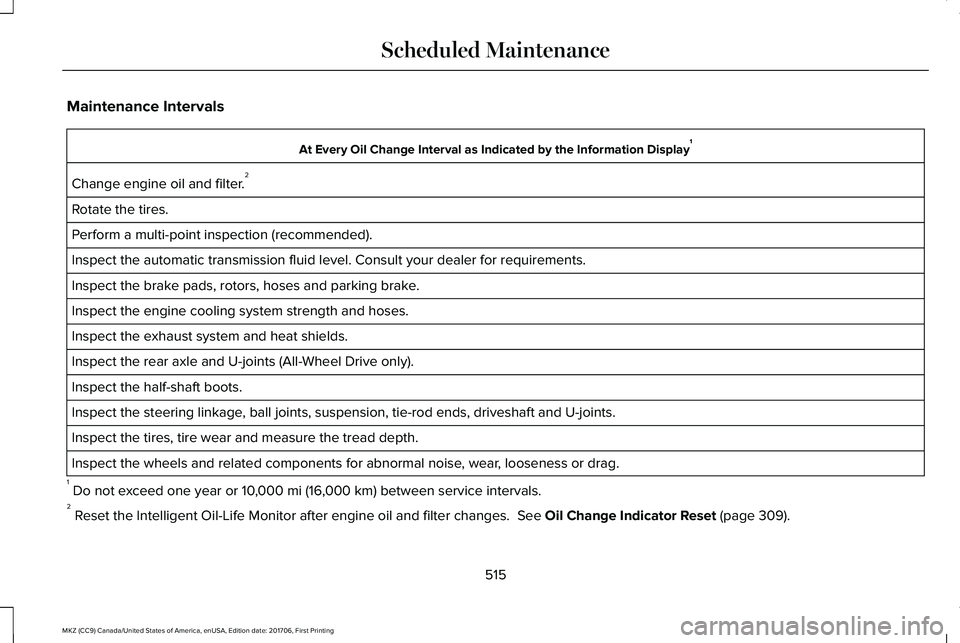
Maintenance Intervals
At Every Oil Change Interval as Indicated by the Information Display1
Change engine oil and filter.2
Rotate the tires.
Perform a multi-point inspection (recommended).
Inspect the automatic transmission fluid level. Consult your dealer for requirements.
Inspect the brake pads, rotors, hoses and parking brake.
Inspect the engine cooling system strength and hoses.
Inspect the exhaust system and heat shields.
Inspect the rear axle and U-joints (All-Wheel Drive only).
Inspect the half-shaft boots.
Inspect the steering linkage, ball joints, suspension, tie-rod ends, driveshaft and U-joints.
Inspect the tires, tire wear and measure the tread depth.
Inspect the wheels and related components for abnormal noise, wear, looseness or drag.
1 Do not exceed one year or 10,000 mi (16,000 km) between service intervals.2 Reset the Intelligent Oil-Life Monitor after engine oil and filter changes. See Oil Change Indicator Reset (page 309).
515
MKZ (CC9) Canada/United States of America, enUSA, Edition date: 201706, First Printing
Scheduled Maintenance
Page 584 of 595
A
A/CSee: Climate Control...........................................137
About This Manual............................................7ABSSee: Brakes...........................................................195
ABS driving hintsSee: Hints on Driving With Anti-LockBrakes................................................................196
Accessories...................................................504Exterior Style.......................................................504Interior Style........................................................504Lifestyle.................................................................504Peace of Mind.....................................................504
AccessoriesSee: Replacement Parts Recommendation.....13
ACCSee: Using Adaptive Cruise Control.............223
Active Park Assist..........................................210Deactivating the Active Park AssistFeature..............................................................216Parallel Parking, Perpendicular Parking,Parallel Park Out Assist.................................210Troubleshooting the System.............................217
Adaptive Headlamps.....................................92Adjusting the Headlamps..........................322Horizontal Aim Adjustment..............................323
Vertical Aim Adjustment...................................322
Adjusting the Steering Wheel - VehiclesWith: Manual Adjustable SteeringColumn............................................................81Adjusting the Steering Wheel - VehiclesWith: Power Adjustable SteeringColumn............................................................81End of Travel Position..........................................82
AFSSee: Adaptive Headlamps..................................92
Airbag Disposal...............................................56Air ConditioningSee: Climate Control...........................................137
Air FilterSee: Changing the Engine Air Filter..............325
AlarmSee: Anti-Theft Alarm...........................................79
All-Wheel Drive..............................................186Ambient Lighting............................................95Anti-Theft Alarm..............................................79Arming the Alarm..................................................80Disarming the Alarm............................................80
Appendices.....................................................541Apps.................................................................463.................................................................................463SiriusXM Traffic and Travel Link.....................465
At a Glance........................................................17
Audible Warnings and Indicators...............110Headlamps On Warning Chime........................110Key in Ignition Warning Chime..........................110Keyless Warning Alert.........................................110Parking Brake On Warning Chime...................110
Audio Control..................................................82Seek, Next or Previous........................................83
Audio System................................................394General Information...........................................394
Audio Unit......................................................395Auto Hold........................................................198Using Auto Hold.................................................200
Autolamps.........................................................89Windshield Wiper Activated Headlamps........90
Automatic Climate Control..........................137Automatic Fan Settings......................................139
Automatic High Beam Control.....................91Automatic High Beam Indicator........................92Switching the System On and Off....................92
Automatic Transmission..............................180Automatic Transmission AdaptiveLearning............................................................184Brake-Shift Interlock Override.........................183If Your Vehicle Gets Stuck In Mud orSnow..................................................................185Push Button Shift Transmission.......................180SelectShift Automatic™ Transmission.............182
581
MKZ (CC9) Canada/United States of America, enUSA, Edition date: 201706, First Printing
Index
Page 586 of 595
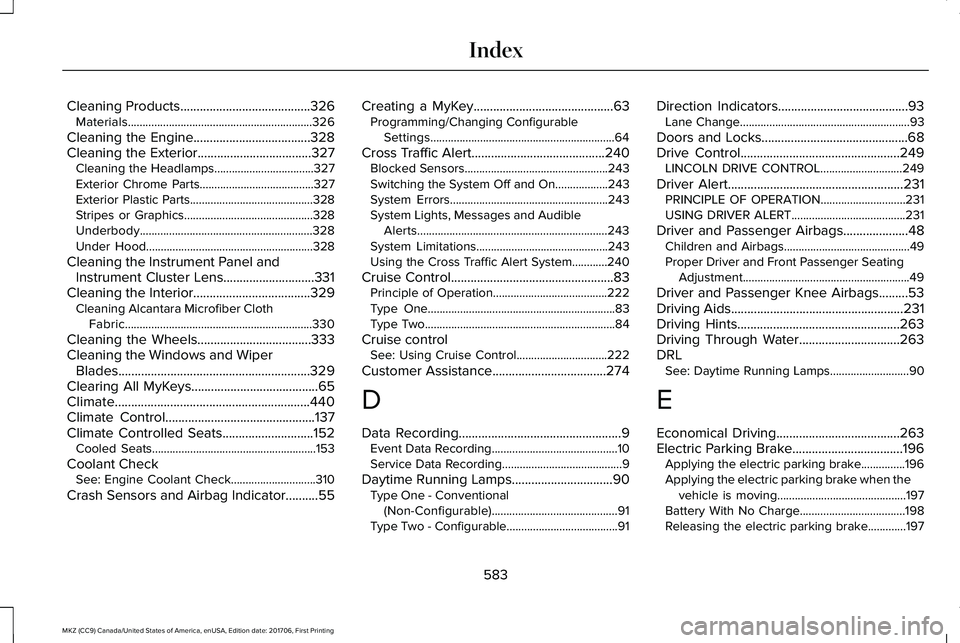
Cleaning Products........................................326Materials...............................................................326
Cleaning the Engine....................................328Cleaning the Exterior...................................327Cleaning the Headlamps..................................327Exterior Chrome Parts.......................................327Exterior Plastic Parts..........................................328Stripes or Graphics............................................328Underbody...........................................................328Under Hood.........................................................328
Cleaning the Instrument Panel andInstrument Cluster Lens............................331Cleaning the Interior....................................329Cleaning Alcantara Microfiber ClothFabric................................................................330
Cleaning the Wheels...................................333Cleaning the Windows and WiperBlades...........................................................329Clearing All MyKeys.......................................65Climate............................................................440Climate Control..............................................137Climate Controlled Seats............................152Cooled Seats........................................................153
Coolant CheckSee: Engine Coolant Check.............................310
Crash Sensors and Airbag Indicator..........55
Creating a MyKey...........................................63Programming/Changing ConfigurableSettings...............................................................64
Cross Traffic Alert.........................................240Blocked Sensors.................................................243Switching the System Off and On..................243System Errors......................................................243System Lights, Messages and AudibleAlerts.................................................................243System Limitations.............................................243Using the Cross Traffic Alert System............240
Cruise Control..................................................83Principle of Operation.......................................222Type One................................................................83Type Two.................................................................84
Cruise controlSee: Using Cruise Control...............................222
Customer Assistance...................................274
D
Data Recording..................................................9Event Data Recording...........................................10Service Data Recording.........................................9
Daytime Running Lamps...............................90Type One - Conventional(Non-Configurable)...........................................91Type Two - Configurable......................................91
Direction Indicators........................................93Lane Change..........................................................93
Doors and Locks.............................................68Drive Control.................................................249LINCOLN DRIVE CONTROL............................249
Driver Alert......................................................231PRINCIPLE OF OPERATION.............................231USING DRIVER ALERT.......................................231
Driver and Passenger Airbags....................48Children and Airbags...........................................49Proper Driver and Front Passenger SeatingAdjustment.........................................................49
Driver and Passenger Knee Airbags.........53Driving Aids.....................................................231Driving Hints..................................................263Driving Through Water...............................263DRLSee: Daytime Running Lamps...........................90
E
Economical Driving......................................263Electric Parking Brake..................................196Applying the electric parking brake...............196Applying the electric parking brake when thevehicle is moving............................................197Battery With No Charge....................................198Releasing the electric parking brake.............197
583
MKZ (CC9) Canada/United States of America, enUSA, Edition date: 201706, First Printing
Index
Page 587 of 595
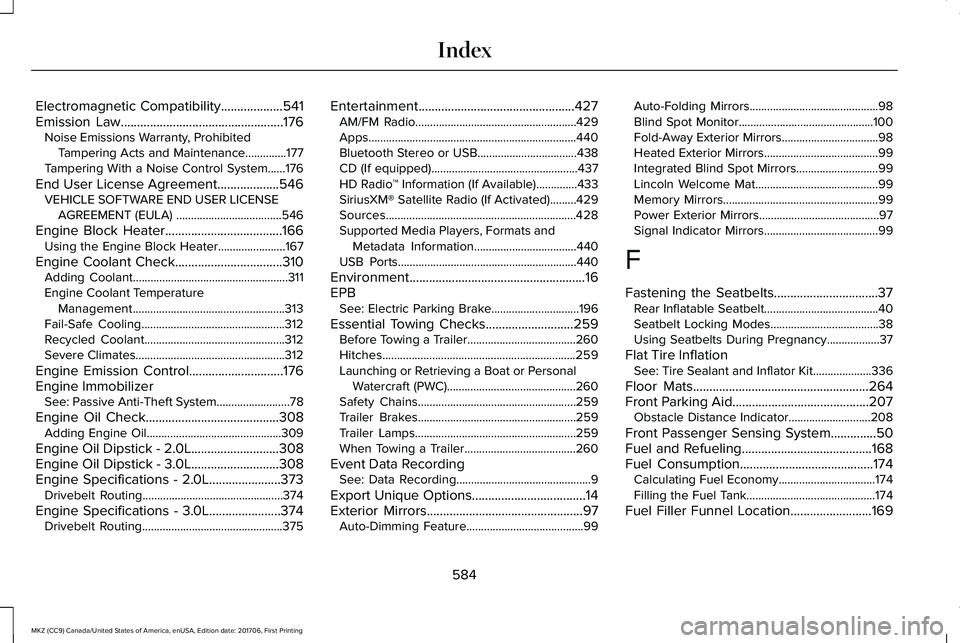
Electromagnetic Compatibility...................541Emission Law..................................................176Noise Emissions Warranty, ProhibitedTampering Acts and Maintenance..............177Tampering With a Noise Control System......176
End User License Agreement...................546VEHICLE SOFTWARE END USER LICENSEAGREEMENT (EULA) ....................................546
Engine Block Heater....................................166Using the Engine Block Heater.......................167
Engine Coolant Check.................................310Adding Coolant.....................................................311Engine Coolant TemperatureManagement....................................................313Fail-Safe Cooling.................................................312Recycled Coolant................................................312Severe Climates...................................................312
Engine Emission Control.............................176Engine ImmobilizerSee: Passive Anti-Theft System.........................78
Engine Oil Check.........................................308Adding Engine Oil..............................................309
Engine Oil Dipstick - 2.0L...........................308Engine Oil Dipstick - 3.0L...........................308Engine Specifications - 2.0L......................373Drivebelt Routing................................................374
Engine Specifications - 3.0L......................374Drivebelt Routing................................................375
Entertainment................................................427AM/FM Radio.......................................................429Apps.......................................................................440Bluetooth Stereo or USB..................................438CD (If equipped)..................................................437HD Radio™ Information (If Available)..............433SiriusXM® Satellite Radio (If Activated).........429Sources.................................................................428Supported Media Players, Formats andMetadata Information...................................440USB Ports.............................................................440
Environment......................................................16EPBSee: Electric Parking Brake..............................196
Essential Towing Checks...........................259Before Towing a Trailer.....................................260Hitches..................................................................259Launching or Retrieving a Boat or PersonalWatercraft (PWC)............................................260Safety Chains......................................................259Trailer Brakes......................................................259Trailer Lamps.......................................................259When Towing a Trailer......................................260
Event Data RecordingSee: Data Recording..............................................9
Export Unique Options...................................14Exterior Mirrors................................................97Auto-Dimming Feature........................................99
Auto-Folding Mirrors............................................98Blind Spot Monitor..............................................100Fold-Away Exterior Mirrors.................................98Heated Exterior Mirrors.......................................99Integrated Blind Spot Mirrors............................99Lincoln Welcome Mat..........................................99Memory Mirrors.....................................................99Power Exterior Mirrors.........................................97Signal Indicator Mirrors.......................................99
F
Fastening the Seatbelts................................37Rear Inflatable Seatbelt.......................................40Seatbelt Locking Modes.....................................38Using Seatbelts During Pregnancy..................37
Flat Tire InflationSee: Tire Sealant and Inflator Kit....................336
Floor Mats......................................................264Front Parking Aid..........................................207Obstacle Distance Indicator............................208
Front Passenger Sensing System..............50Fuel and Refueling........................................168Fuel Consumption.........................................174Calculating Fuel Economy.................................174Filling the Fuel Tank............................................174
Fuel Filler Funnel Location.........................169
584
MKZ (CC9) Canada/United States of America, enUSA, Edition date: 201706, First Printing
Index