audio LINCOLN MKZ 2018 Owners Manual
[x] Cancel search | Manufacturer: LINCOLN, Model Year: 2018, Model line: MKZ, Model: LINCOLN MKZ 2018Pages: 595, PDF Size: 5.06 MB
Page 5 of 595
Keyless Entry....................................................74
Interior Luggage CompartmentRelease..........................................................76
Security
Passive Anti-Theft System............................78
Anti-Theft Alarm..............................................79
Steering Wheel
Adjusting the Steering Wheel - VehiclesWith: Manual Adjustable SteeringColumn...........................................................81
Adjusting the Steering Wheel - VehiclesWith: Power Adjustable SteeringColumn...........................................................81
Audio Control..................................................82
Voice Control...................................................83
Cruise Control..................................................83
Information Display Control.........................84
Wipers and Washers
Windshield Wipers.........................................85
Autowipers.......................................................85
Windshield Washers......................................86
Lighting
General Information.......................................88
Lighting Control...............................................88
Autolamps.........................................................89
Instrument Lighting Dimmer........................90
Headlamp Exit Delay.....................................90
Daytime Running Lamps...............................90
Automatic High Beam Control.....................91
Adaptive Headlamps.....................................92
Direction Indicators........................................93
Welcome Lighting...........................................93
Interior Lamps..................................................94
Ambient Lighting............................................95
Windows and Mirrors
Power Windows..............................................96
Global Opening and Closing.......................97
Exterior Mirrors................................................97
Interior Mirror.................................................100
Sun Visors........................................................101
Sun Shades......................................................101
Moonroof..........................................................101
Instrument Cluster
Gauges.............................................................104
Warning Lamps and Indicators..................106
Audible Warnings and Indicators...............110
Information Displays
General Information........................................111
Information Messages...................................117
Climate Control
Automatic Climate Control..........................137
Hints on Controlling the InteriorClimate.........................................................139
Heated Windows and Mirrors....................140
Cabin Air Filter................................................141
Remote Start....................................................141
Seats
Sitting in the Correct Position....................143
Head Restraints.............................................143
Power Seats....................................................145
Memory Function..........................................149
Rear Seats.......................................................150
2
MKZ (CC9) Canada/United States of America, enUSA, Edition date: 201706, First Printing
Table of Contents
Page 8 of 595
Bulb Specification Chart.............................323
Changing the Engine Air Filter.................325
Vehicle Care
General Information.....................................326
Cleaning Products........................................326
Cleaning the Exterior...................................327
Waxing............................................................328
Cleaning the Engine....................................328
Cleaning the Windows and WiperBlades.........................................................329
Cleaning the Interior....................................329
Cleaning the Instrument Panel andInstrument Cluster Lens..........................331
Cleaning Leather Seats..............................332
Repairing Minor Paint Damage.................332
Cleaning the Wheels...................................333
Vehicle Storage.............................................333
Body Styling Kits...........................................335
Wheels and Tires
Tire Sealant and Inflator Kit.......................336
Tire Care.........................................................343
Using Summer Tires....................................357
Using Snow Chains......................................358
Tire Pressure Monitoring System.............359
Changing a Road Wheel.............................363
Technical Specifications..............................371
Capacities and Specifications
Engine Specifications - 2.0L......................373
Engine Specifications - 3.0L......................374
Motorcraft Parts - 2.0L.................................375
Motorcraft Parts - 3.0L.................................377
Vehicle Identification Number...................378
Vehicle Certification Label.........................378
Transmission Code Designation...............379
Capacities and Specifications - 2.0L.......380
Capacities and Specifications - 3.0L.......387
Audio System
General Information.....................................394
Audio Unit......................................................395
USB Port..........................................................397
SYNC™ 3
General Information.....................................398
Home Screen.................................................415
Using Voice Recognition.............................416
Entertainment................................................427
Climate............................................................440
Phone..............................................................444
Navigation......................................................452
Apps.................................................................463
Settings...........................................................466
SYNC™ 3 Troubleshooting..........................486
Accessories
Accessories...................................................504
Lincoln Protect
Lincoln Protect..............................................506
Scheduled Maintenance
General Maintenance Information...........509
Normal Scheduled Maintenance..............513
Special Operating Conditions ScheduledMaintenance...............................................517
5
MKZ (CC9) Canada/United States of America, enUSA, Edition date: 201706, First Printing
Table of Contents
Page 21 of 595
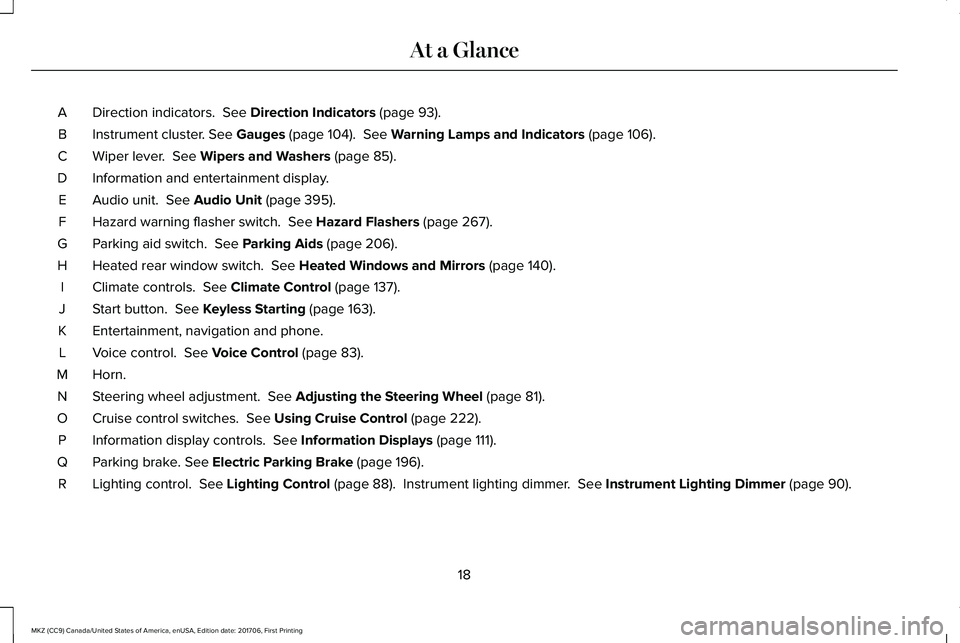
Direction indicators. See Direction Indicators (page 93).A
Instrument cluster. See Gauges (page 104). See Warning Lamps and Indicators (page 106).B
Wiper lever. See Wipers and Washers (page 85).C
Information and entertainment display.D
Audio unit. See Audio Unit (page 395).E
Hazard warning flasher switch. See Hazard Flashers (page 267).F
Parking aid switch. See Parking Aids (page 206).G
Heated rear window switch. See Heated Windows and Mirrors (page 140).H
Climate controls. See Climate Control (page 137).I
Start button. See Keyless Starting (page 163).J
Entertainment, navigation and phone.K
Voice control. See Voice Control (page 83).L
Horn.M
Steering wheel adjustment. See Adjusting the Steering Wheel (page 81).N
Cruise control switches. See Using Cruise Control (page 222).O
Information display controls. See Information Displays (page 111).P
Parking brake. See Electric Parking Brake (page 196).Q
Lighting control. See Lighting Control (page 88). Instrument lighting dimmer. See Instrument Lighting Dimmer (page 90).R
18
MKZ (CC9) Canada/United States of America, enUSA, Edition date: 201706, First Printing
At a Glance
Page 65 of 595
PRINCIPLE OF OPERATION
MyKey allows you to program keys withrestricted driving modes to promote gooddriving habits. You can program therestrictions to all keys but one. Any keys thatyou did not program are administrator keysor admin keys.
You can use admin keys to:
•Create a MyKey with certain vehiclerestrictions.
•Program certain MyKey settings.
•Clear all MyKey restrictions.
After you program a MyKey, you can viewthe following information through theinformation display:
•The total number of admin keys andMyKeys for your vehicle.
•The total distance a MyKey drivertraveled with your vehicle.
Note:Every MyKey receives the samerestrictions and settings. You cannotprogram them individually.
Note:For vehicles equipped with apush-button start switch: When both a MyKeyand an admin key are present when youstart your vehicle, the system recognizes theadmin key only.
Standard Settings
Not every vehicle includes the features listedbelow. If your vehicle has this equipment,then you cannot change the followingsettings when using a MyKey:
•Seatbelt reminder or Belt-Minder™. MyKeymutes the audio system until drivers, andin some instances, passengers, fastentheir seatbelts. Note: If your vehicleincludes an AM/FM radio or a very basicaudio system, then the radio may notmute.
•Earlier low-fuel warning. The low-fuelwarning activates earlier for MyKeydrivers, giving them more time to refuel.
•Certain driver alerts, stability systems orparking aids turn on automatically whenyou use the MyKey system. For example,Blind Spot Information System (BLIS),cross traffic alert, lane departure warningor forward collision warning. Note: MyKeydrivers may be able to turn the lanedeparture warning feature off, but thisfeature turns back on automatically withevery new key cycle.
•Restricted touchscreen operation in somemarkets. For example, MyKey mayprevent manual navigation destinationinput while the vehicle is in any gearother than park (P) or when the vehiclereaches a certain rate of speed.
•Satellite radio adult content restrictions,if this feature is available in your market.
Optional Settings
You can configure certain vehicle featuresettings when you first create a MyKey. Youcan also change the settings afterward withan admin key.
62
MKZ (CC9) Canada/United States of America, enUSA, Edition date: 201706, First Printing
MyKey™
Page 66 of 595

Note:Not every feature applies to everyvehicle in every market. When they areavailable for your vehicle, then they appearin your information display, providing choicesto switch them on or off, or to select a morespecific setting.
•Various vehicle speed limits so theMyKey driver cannot exceed certainspeeds. The information display showswarnings followed by an audible tonewhen the MyKey driver reaches the setspeed. You cannot override the setspeed by fully depressing the acceleratorpedal.
WARNING
Do not set MyKey maximum speed limitto a limit that will prevent the driverfrom maintaining a safe speed consideringposted speed limits and prevailing roadconditions. The driver is always responsibleto drive in accordance with local laws andprevailing conditions. Failure to do so couldresult in accident or injury.
•Various vehicle speed reminders soMyKey drivers know when their vehiclespeed approaches the limits. Warningsappear in your information display and atone sounds when the MyKey driversexceed the set vehicle speed.
•The audio system's maximum volumelimits to 45% so MyKey drivers canconcentrate on the road. A messageappears in the information display whenMyKey drivers attempt to exceed thelimited volume. MyKey also disables theautomatic volume control. Note: If yourvehicle includes an AM/FM radio or avery basic audio system, then the radiomay not limit.
•Always on setting. This setting forcescertain features to remain on and activefor MyKey drivers. For example, E911 oremergency assistance and the do notdisturb features stay on even if a MyKeydriver uses the feature's control to switchit off. When you select, you will not beable to turn off Advance Trac or tractioncontrol (if your vehicle has this feature).
CREATING A MYKEY
Use the information display to create aMyKey:
1. Insert the key you want to program intothe ignition. See Starting a GasolineEngine (page 164). If your vehicle isequipped with a push-button start, placethe remote control into the backupposition. See Passive Anti-Theft System(page 78).
2. Switch the ignition on.
3.Access the main menu on the informationdisplay controls. Use the arrow keys toget to the following menu selections:
63
MKZ (CC9) Canada/United States of America, enUSA, Edition date: 201706, First Printing
MyKey™
Page 85 of 595
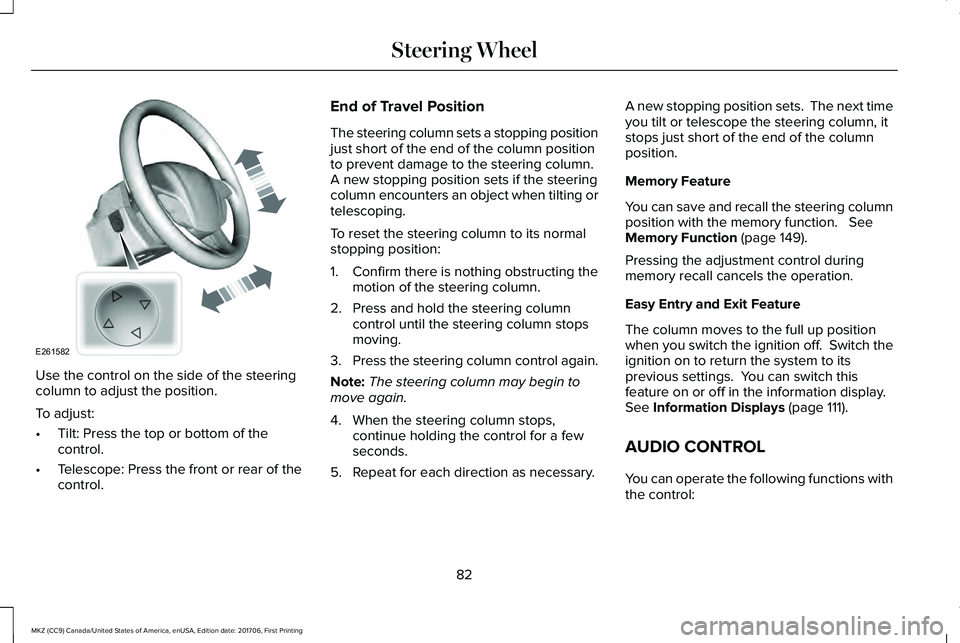
Use the control on the side of the steeringcolumn to adjust the position.
To adjust:
•Tilt: Press the top or bottom of thecontrol.
•Telescope: Press the front or rear of thecontrol.
End of Travel Position
The steering column sets a stopping positionjust short of the end of the column positionto prevent damage to the steering column. A new stopping position sets if the steeringcolumn encounters an object when tilting ortelescoping.
To reset the steering column to its normalstopping position:
1. Confirm there is nothing obstructing themotion of the steering column.
2. Press and hold the steering columncontrol until the steering column stopsmoving.
3.Press the steering column control again.
Note:The steering column may begin tomove again.
4. When the steering column stops,continue holding the control for a fewseconds.
5. Repeat for each direction as necessary.
A new stopping position sets. The next timeyou tilt or telescope the steering column, itstops just short of the end of the columnposition.
Memory Feature
You can save and recall the steering columnposition with the memory function. SeeMemory Function (page 149).
Pressing the adjustment control duringmemory recall cancels the operation.
Easy Entry and Exit Feature
The column moves to the full up positionwhen you switch the ignition off. Switch theignition on to return the system to itsprevious settings. You can switch thisfeature on or off in the information display. See Information Displays (page 111).
AUDIO CONTROL
You can operate the following functions withthe control:
82
MKZ (CC9) Canada/United States of America, enUSA, Edition date: 201706, First Printing
Steering WheelE261582
Page 131 of 595
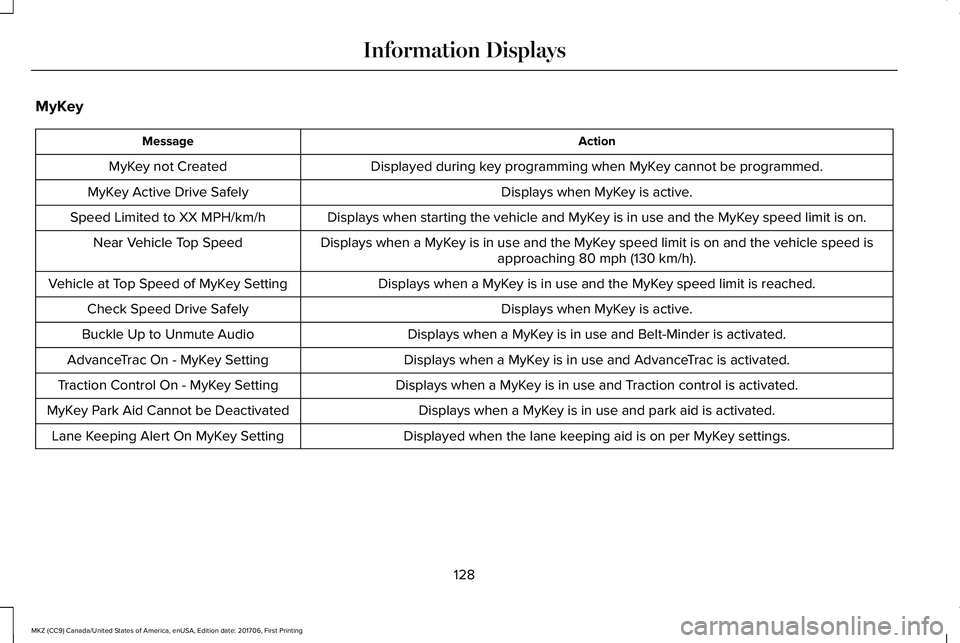
MyKey
ActionMessage
Displayed during key programming when MyKey cannot be programmed.MyKey not Created
Displays when MyKey is active.MyKey Active Drive Safely
Displays when starting the vehicle and MyKey is in use and the MyKey speed limit is on.Speed Limited to XX MPH/km/h
Displays when a MyKey is in use and the MyKey speed limit is on and the vehicle speed isapproaching 80 mph (130 km/h).Near Vehicle Top Speed
Displays when a MyKey is in use and the MyKey speed limit is reached.Vehicle at Top Speed of MyKey Setting
Displays when MyKey is active.Check Speed Drive Safely
Displays when a MyKey is in use and Belt-Minder is activated.Buckle Up to Unmute Audio
Displays when a MyKey is in use and AdvanceTrac is activated.AdvanceTrac On - MyKey Setting
Displays when a MyKey is in use and Traction control is activated.Traction Control On - MyKey Setting
Displays when a MyKey is in use and park aid is activated.MyKey Park Aid Cannot be Deactivated
Displayed when the lane keeping aid is on per MyKey settings.Lane Keeping Alert On MyKey Setting
128
MKZ (CC9) Canada/United States of America, enUSA, Edition date: 201706, First Printing
Information Displays
Page 210 of 595
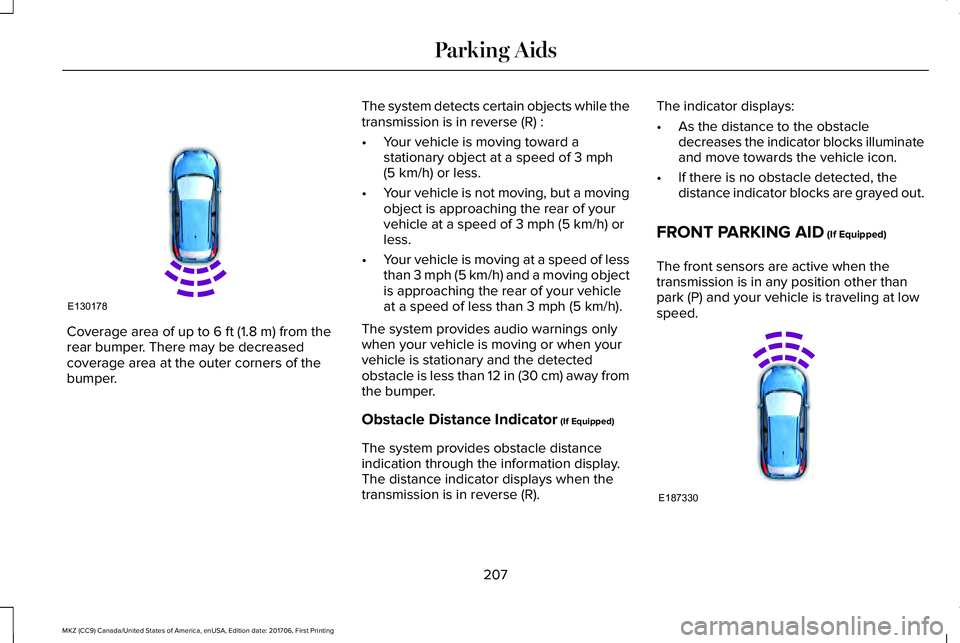
Coverage area of up to 6 ft (1.8 m) from therear bumper. There may be decreasedcoverage area at the outer corners of thebumper.
The system detects certain objects while thetransmission is in reverse (R) :
•Your vehicle is moving toward astationary object at a speed of 3 mph(5 km/h) or less.
•Your vehicle is not moving, but a movingobject is approaching the rear of yourvehicle at a speed of 3 mph (5 km/h) orless.
•Your vehicle is moving at a speed of lessthan 3 mph (5 km/h) and a moving objectis approaching the rear of your vehicleat a speed of less than 3 mph (5 km/h).
The system provides audio warnings onlywhen your vehicle is moving or when yourvehicle is stationary and the detectedobstacle is less than 12 in (30 cm) away fromthe bumper.
Obstacle Distance Indicator (If Equipped)
The system provides obstacle distanceindication through the information display.The distance indicator displays when thetransmission is in reverse (R).
The indicator displays:
•As the distance to the obstacledecreases the indicator blocks illuminateand move towards the vehicle icon.
•If there is no obstacle detected, thedistance indicator blocks are grayed out.
FRONT PARKING AID (If Equipped)
The front sensors are active when thetransmission is in any position other thanpark (P) and your vehicle is traveling at lowspeed.
207
MKZ (CC9) Canada/United States of America, enUSA, Edition date: 201706, First Printing
Parking AidsE130178 E187330
Page 211 of 595
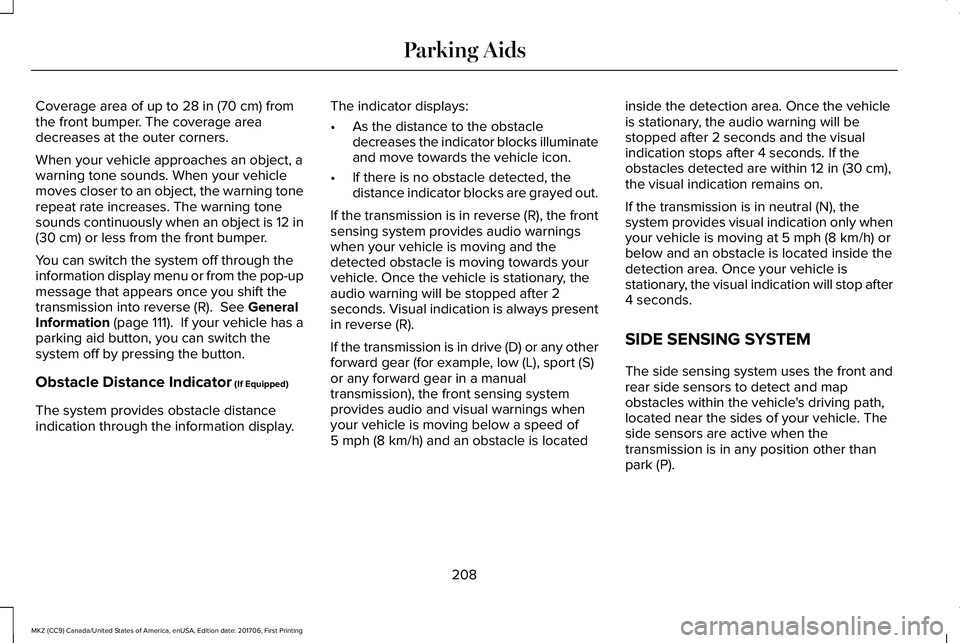
Coverage area of up to 28 in (70 cm) fromthe front bumper. The coverage areadecreases at the outer corners.
When your vehicle approaches an object, awarning tone sounds. When your vehiclemoves closer to an object, the warning tonerepeat rate increases. The warning tonesounds continuously when an object is 12 in(30 cm) or less from the front bumper.
You can switch the system off through theinformation display menu or from the pop-upmessage that appears once you shift thetransmission into reverse (R). See GeneralInformation (page 111). If your vehicle has aparking aid button, you can switch thesystem off by pressing the button.
Obstacle Distance Indicator (If Equipped)
The system provides obstacle distanceindication through the information display.
The indicator displays:
•As the distance to the obstacledecreases the indicator blocks illuminateand move towards the vehicle icon.
•If there is no obstacle detected, thedistance indicator blocks are grayed out.
If the transmission is in reverse (R), the frontsensing system provides audio warningswhen your vehicle is moving and thedetected obstacle is moving towards yourvehicle. Once the vehicle is stationary, theaudio warning will be stopped after 2seconds. Visual indication is always presentin reverse (R).
If the transmission is in drive (D) or any otherforward gear (for example, low (L), sport (S)or any forward gear in a manualtransmission), the front sensing systemprovides audio and visual warnings whenyour vehicle is moving below a speed of5 mph (8 km/h) and an obstacle is located
inside the detection area. Once the vehicleis stationary, the audio warning will bestopped after 2 seconds and the visualindication stops after 4 seconds. If theobstacles detected are within 12 in (30 cm),the visual indication remains on.
If the transmission is in neutral (N), thesystem provides visual indication only whenyour vehicle is moving at 5 mph (8 km/h) orbelow and an obstacle is located inside thedetection area. Once your vehicle isstationary, the visual indication will stop after4 seconds.
SIDE SENSING SYSTEM
The side sensing system uses the front andrear side sensors to detect and mapobstacles within the vehicle's driving path,located near the sides of your vehicle. Theside sensors are active when thetransmission is in any position other thanpark (P).
208
MKZ (CC9) Canada/United States of America, enUSA, Edition date: 201706, First Printing
Parking Aids
Page 324 of 595
5. Run the engine until it reaches normaloperating temperature. While the engineis warming up, complete the following:Reset the clock. See Audio Unit (page395). Reset the power windowsbounce-back feature. See PowerWindows (page 96). Reset the radiostation presets. See Audio Unit (page395).
6. Allow the engine to idle for at least oneminute.
7.Drive the vehicle at least 10 mi (16 km) tocompletely relearn the idle trim and fueltrim strategy.
Note:If you do not allow the engine torelearn the idle and fuel trim strategy, theidle quality of your vehicle may be adverselyaffected until the engine computereventually relearns the idle trim and fuel trimstrategy.
Note:Certain features may not operate ifthe battery monitor system is not reset witha scan tool following a jump start or batteryreplacement. Normal electrical accessoryoperation should resume after your vehicleis left undisturbed for 8 hours.
Make sure that you dispose of old batteriesin an environmentally friendly way. Seekadvice from your local authority aboutrecycling old batteries.
If storing your vehicle for more than 30 dayswithout recharging the battery, werecommend that you disconnect the batterycables to maintain battery charge for quickstarting.
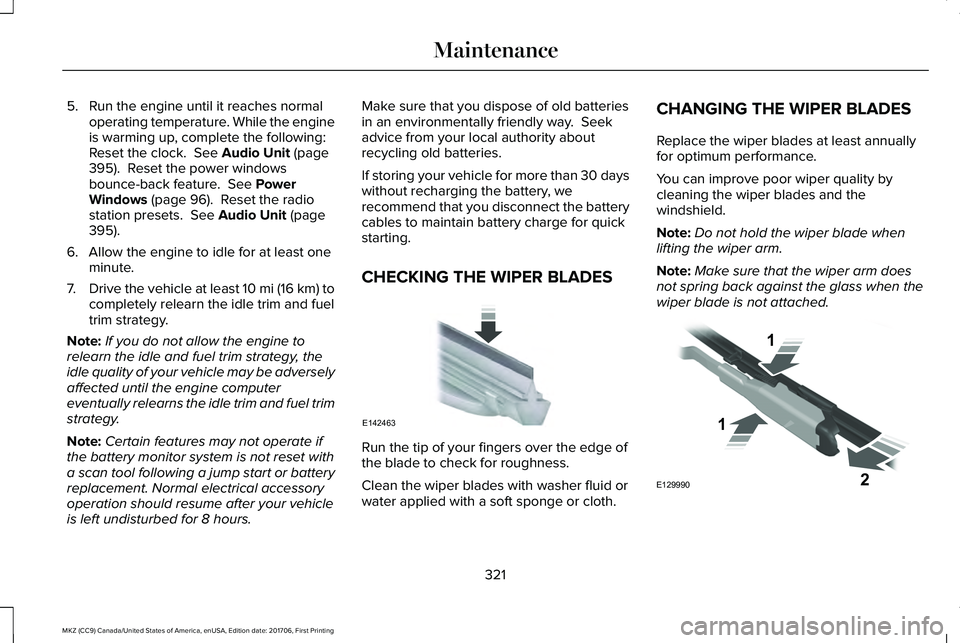
CHECKING THE WIPER BLADES
Run the tip of your fingers over the edge ofthe blade to check for roughness.
Clean the wiper blades with washer fluid orwater applied with a soft sponge or cloth.
CHANGING THE WIPER BLADES
Replace the wiper blades at least annuallyfor optimum performance.
You can improve poor wiper quality bycleaning the wiper blades and thewindshield.
Note:Do not hold the wiper blade whenlifting the wiper arm.
Note:Make sure that the wiper arm doesnot spring back against the glass when thewiper blade is not attached.
321
MKZ (CC9) Canada/United States of America, enUSA, Edition date: 201706, First Printing
MaintenanceE142463 E129990
1
1 2