wheel LINCOLN MKZ 2019 Owners Manual
[x] Cancel search | Manufacturer: LINCOLN, Model Year: 2019, Model line: MKZ, Model: LINCOLN MKZ 2019Pages: 595, PDF Size: 4.95 MB
Page 461 of 595
HERE is the digital map provider for thenavigation application. If you find map dataerrors, you may report them directly to HEREby going to www.here.com/mapcreator.HERE evaluates all reported map errors andresponds with the result of their investigationby e-mail.
Map coverage includes the USA (includingPuerto Rico and the US Virgin Islands),Canada and Mexico.
APPS
The system enables voice, steering wheel,and touch screen control of SYNC 3 AppLinkenabled smartphone apps. When an app isrunning through AppLink, you can controlmain features of the app through voicecommands and steering wheel controls.
Note:Available AppLink enabled apps willvary by market.
Note:You must pair and connect yoursmartphone via Bluetooth to SYNC 3 toaccess AppLink.
Note:iPhone users need to connect thephone to the USB port.
Note:For information on available apps,supported smartphone devices andtroubleshooting tips please visit:
Websites
owner.lincoln.comwww.syncmyride.cawww.syncmaroute.ca
Note:Make sure you have an active accountfor the app that you have downloaded. Someapps will work with no setup. Other apps willwant you to configure your personal settingsand personalize your experience by creatingstations or favorites. We recommend you dothis at home or outside of your vehicle.
Note:We encourage you to review thesmartphone app’s terms of service andprivacy policies because Lincoln is notresponsible for your app or its use of data.
Note:AppLink is a native SYNC systemfeature. Accessing mobile apps throughAppLink is only possible when Android Autoor Apple CarPlay are disabled. Some appsmay only be accessible in the car throughAppLink and others only through AndroidAuto or Apple CarPlay. Please refer to theSmartphone Connectivity information todisable Android Auto or Apple CarPlay.
Note:In order to use an app with SYNC 3,the app needs to be running in thebackground of your phone. If you shut downthe app on your phone, it shuts down theapp on SYNC 3 as well.
Note:If a SYNC 3 AppLink compatible appis not shown in the Apps Domain, make surethe required app is running on the mobiledevice.
458
MKZ (CC9) Canada/United States of America, enUSA, Edition date: 201805, First-Printing
SYNC™ 3
Page 502 of 595
For a complete listing of the accessories thatare available for your vehicle, please contactyour authorized dealer or visit our onlinestore at:
Web Address (United States)
www.Accessories.Lincoln.com
Web Address (Canada)
www.LincolnCanada.com
Lincoln Motor Company will repair or replaceany properly authorized dealer-installedLincoln Original Accessory found to bedefective in factory-supplied materials orworkmanship during the warranty period, aswell as any component damaged by thedefective accessories.
Lincoln Motor Company will warrant yourLincoln accessory through the warranty thatprovides the greatest benefit:
•24 months, unlimited mileage.
•The remainder of your new vehiclelimited warranty.
Contact an authorized dealer for details anda copy of the warranty.
Exterior Style
•Bumper protectors.
•Side-window deflectors*.
Interior Style
•Floor liners.
•Premium carpeted floor mats.
Lifestyle
•Ash cup (smoker's packages).
•Cargo area protector.
•Cargo net.
•Cargo organizer.
•Sun shade.
•Tablet cradle*.
Peace of Mind
•Car covers*.
•First aid kit.
•Remote start.
•Roadside assistance kit*.
•Vehicle security system.
•Wheel locks.
*Lincoln Licensed Accessory. The accessorymanufacturer designs, develops andtherefore warrants Lincoln LicensedAccessories, and does not design or testthese accessories to Lincoln Motor Companyengineering requirements. Contact anauthorized Lincoln dealer for themanufacturer's limited warranty details andrequest a copy of the Lincoln LicensedAccessories product limited warranty fromthe accessory manufacturer.
499
MKZ (CC9) Canada/United States of America, enUSA, Edition date: 201805, First-Printing
Accessories
Page 513 of 595
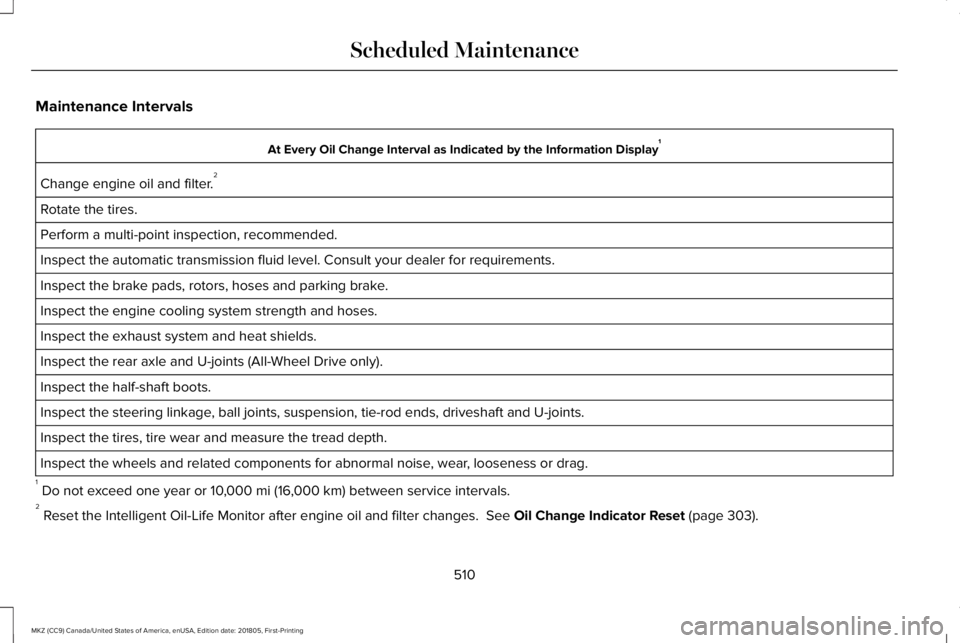
Maintenance Intervals
At Every Oil Change Interval as Indicated by the Information Display1
Change engine oil and filter.2
Rotate the tires.
Perform a multi-point inspection, recommended.
Inspect the automatic transmission fluid level. Consult your dealer for requirements.
Inspect the brake pads, rotors, hoses and parking brake.
Inspect the engine cooling system strength and hoses.
Inspect the exhaust system and heat shields.
Inspect the rear axle and U-joints (All-Wheel Drive only).
Inspect the half-shaft boots.
Inspect the steering linkage, ball joints, suspension, tie-rod ends, driveshaft and U-joints.
Inspect the tires, tire wear and measure the tread depth.
Inspect the wheels and related components for abnormal noise, wear, looseness or drag.
1 Do not exceed one year or 10,000 mi (16,000 km) between service intervals.2 Reset the Intelligent Oil-Life Monitor after engine oil and filter changes. See Oil Change Indicator Reset (page 303).
510
MKZ (CC9) Canada/United States of America, enUSA, Edition date: 201805, First-Printing
Scheduled Maintenance
Page 514 of 595
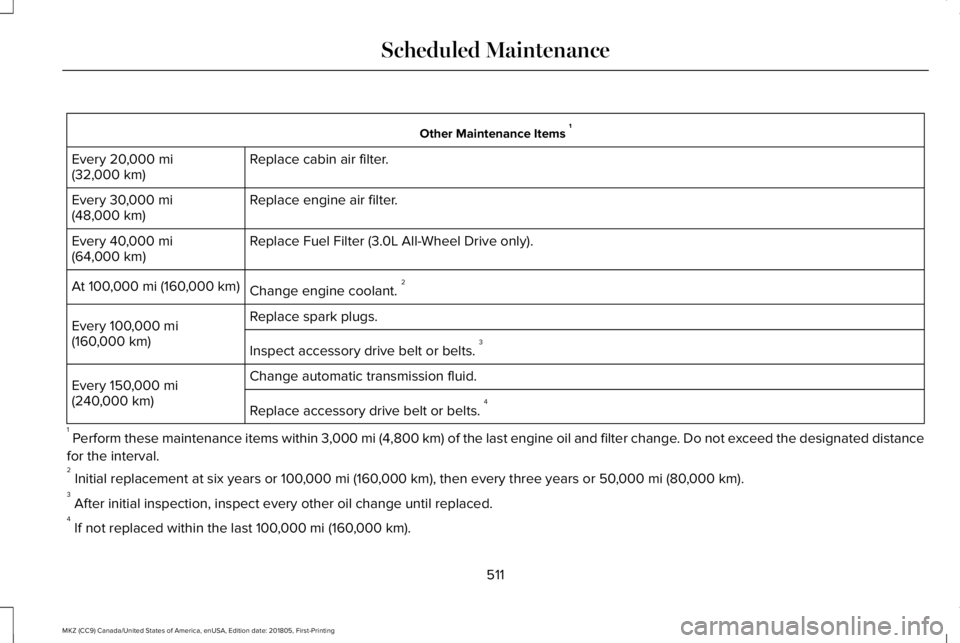
Other Maintenance Items 1
Replace cabin air filter.Every 20,000 mi(32,000 km)
Replace engine air filter.Every 30,000 mi(48,000 km)
Replace Fuel Filter (3.0L All-Wheel Drive only).Every 40,000 mi(64,000 km)
Change engine coolant. 2At 100,000 mi (160,000 km)
Replace spark plugs.Every 100,000 mi(160,000 km)Inspect accessory drive belt or belts. 3
Change automatic transmission fluid.Every 150,000 mi(240,000 km)Replace accessory drive belt or belts. 4
1 Perform these maintenance items within 3,000 mi (4,800 km) of the last engine oil and filter change. Do not exceed the designated distance
for the interval.2 Initial replacement at six years or 100,000 mi (160,000 km), then every three years or 50,000 mi (80,000 km).3 After initial inspection, inspect every other oil change until replaced.4 If not replaced within the last 100,000 mi (160,000 km).
511
MKZ (CC9) Canada/United States of America, enUSA, Edition date: 201805, First-Printing
Scheduled Maintenance
Page 517 of 595
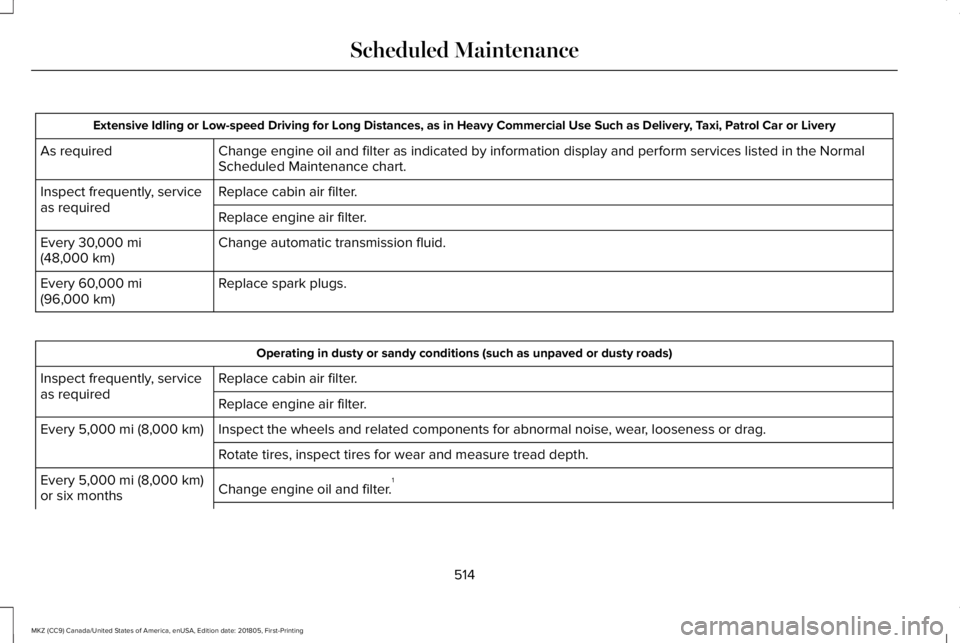
Extensive Idling or Low-speed Driving for Long Distances, as in Heavy Commercial Use Such as Delivery, Taxi, Patrol Car or Livery
Change engine oil and filter as indicated by information display and perform services listed in the NormalScheduled Maintenance chart.As required
Replace cabin air filter.Inspect frequently, serviceas requiredReplace engine air filter.
Change automatic transmission fluid.Every 30,000 mi(48,000 km)
Replace spark plugs.Every 60,000 mi(96,000 km)
Operating in dusty or sandy conditions (such as unpaved or dusty roads)
Replace cabin air filter.Inspect frequently, serviceas requiredReplace engine air filter.
Inspect the wheels and related components for abnormal noise, wear, looseness or drag.Every 5,000 mi (8,000 km)
Rotate tires, inspect tires for wear and measure tread depth.
Change engine oil and filter.1Every 5,000 mi (8,000 km)or six months
514
MKZ (CC9) Canada/United States of America, enUSA, Edition date: 201805, First-Printing
Scheduled Maintenance
Page 518 of 595
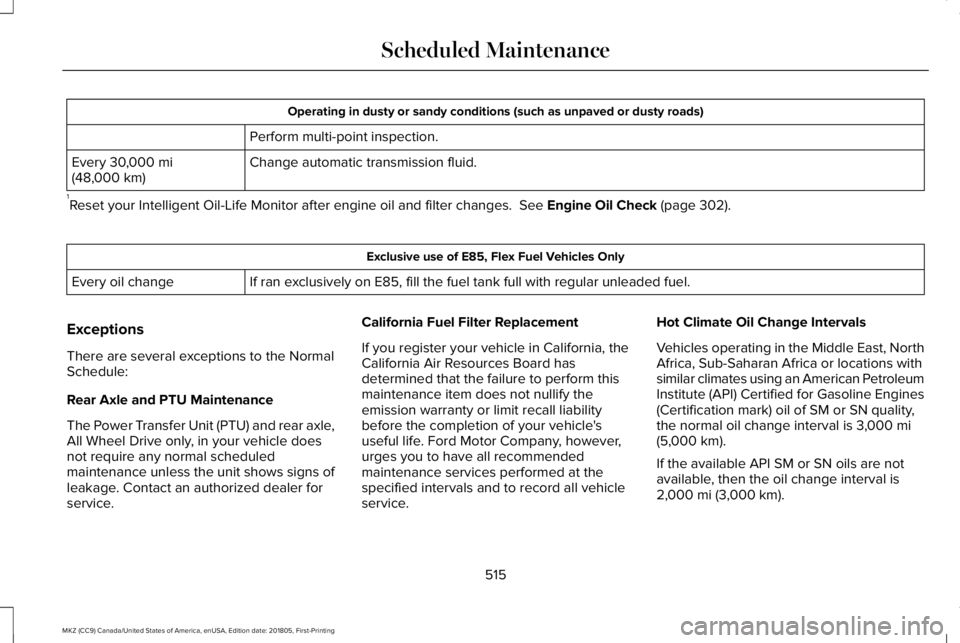
Operating in dusty or sandy conditions (such as unpaved or dusty roads)
Perform multi-point inspection.
Change automatic transmission fluid.Every 30,000 mi(48,000 km)
1Reset your Intelligent Oil-Life Monitor after engine oil and filter changes. See Engine Oil Check (page 302).
Exclusive use of E85, Flex Fuel Vehicles Only
If ran exclusively on E85, fill the fuel tank full with regular unleaded fuel.Every oil change
Exceptions
There are several exceptions to the NormalSchedule:
Rear Axle and PTU Maintenance
The Power Transfer Unit (PTU) and rear axle,All Wheel Drive only, in your vehicle doesnot require any normal scheduledmaintenance unless the unit shows signs ofleakage. Contact an authorized dealer forservice.
California Fuel Filter Replacement
If you register your vehicle in California, theCalifornia Air Resources Board hasdetermined that the failure to perform thismaintenance item does not nullify theemission warranty or limit recall liabilitybefore the completion of your vehicle'suseful life. Ford Motor Company, however,urges you to have all recommendedmaintenance services performed at thespecified intervals and to record all vehicleservice.
Hot Climate Oil Change Intervals
Vehicles operating in the Middle East, NorthAfrica, Sub-Saharan Africa or locations withsimilar climates using an American PetroleumInstitute (API) Certified for Gasoline Engines(Certification mark) oil of SM or SN quality,the normal oil change interval is 3,000 mi(5,000 km).
If the available API SM or SN oils are notavailable, then the oil change interval is2,000 mi (3,000 km).
515
MKZ (CC9) Canada/United States of America, enUSA, Edition date: 201805, First-Printing
Scheduled Maintenance
Page 548 of 595
EXPORT RESTRICTIONS: You acknowledgethat the SOFTWARE is subject to U.S. andEuropean Union export jurisdiction. Youagree to comply with all applicableinternational and national laws that apply tothe SOFTWARE, including the U.S. ExportAdministration Regulations, as well asend-user, end-use and destinationrestrictions issued by U.S. and othergovernments.
TRADEMARKS: This EULA does not grantyou any rights in connection with anytrademarks or service marks of FORDMOTOR COMPANY, its affiliates, and thirdparty software and service providers.
PRODUCT SUPPORT: Please refer to FORDMOTOR COMPANY instructions provided inthe documentation for the DEVICES productsupport, such as the vehicle owner guide.
Should you have any questions concerningthis EULA, or if you desire to contact FORDMOTOR COMPANY for any other reason,please refer to the address provided in thedocumentation for the DEVICES.
No Liability for Certain Damages: EXCEPTAS PROHIBITED BY LAW, FORD MOTORCOMPANY, ANY THIRD PARTY SOFTWAREOR SERVICES SUPPLIERS, AND THEIRAFFILIATES SHALL HAVE NO LIABILITY FORANY INDIRECT, SPECIAL, CONSEQUENTIALOR INCIDENTAL DAMAGES ARISING FROMOR IN CONNECTION WITH THE USE ORPERFORMANCE OF THE SOFTWARE. THISLIMITATION SHALL APPLY EVEN IF ANYREMEDY FAILS OF ITS ESSENTIALPURPOSE. THERE ARE NO WARRANTIESOTHER THAN THOSE THAT MAY BEEXPRESSLY PROVIDED FOR YOUR NEWVEHICLE.
SYNC® Automotive Important SafetyInformation Read and follow instructions:
•Before using your SYNC® system, readand follow all instructions and safetyinformation provided in this end usermanual ("Owner Guide".) Not followingprecautions found in the Owner Guidecan lead to an accident or other seriousinjuries.
General Operation
•Voice Command Control: Certainfunctions within the SYNC® system maybe accomplished using voice commands.Using voice commands while drivinghelps you to operate the system withoutremoving your hands from the wheel oreyes from the road.
•Prolonged Views of Screen: Do notaccess any function requiring aprolonged view of the screen while youare driving. Pull over in a safe and legalmanner before attempting to access afunction of the system requiringprolonged attention.
•Volume Setting: Do not raise the volumeexcessively. Keep the volume at a levelwhere you can still hear outside trafficand emergency signals while driving.Driving while unable to hear thesesounds could cause an accident.
545
MKZ (CC9) Canada/United States of America, enUSA, Edition date: 201805, First-Printing
Appendices
Page 584 of 595
A
A/CSee: Climate Control..........................................136
About This Manual............................................7ABSSee: Brakes...........................................................192
ABS driving hintsSee: Hints on Driving With Anti-LockBrakes................................................................193
Accessories...................................................499Exterior Style.......................................................499Interior Style.........................................................499Lifestyle.................................................................499Peace of Mind.....................................................499
AccessoriesSee: Replacement Parts Recommendation.....13
ACCSee: Using Adaptive Cruise Control..............218
Active Park Assist........................................205Using Active Park Assist..................................206
Adaptive Headlamps......................................91System Check........................................................92
Adjusting the Headlamps............................316Horizontal Aim Adjustment...............................317Vertical Aim Adjustment....................................316
Adjusting the Steering Wheel - VehiclesWith: Manual Adjustable SteeringColumn...........................................................80Adjusting the Steering Wheel - VehiclesWith: Power Adjustable SteeringColumn...........................................................80End of Travel Position...........................................81Memory Feature.....................................................81
AFSSee: Adaptive Headlamps...................................91
Airbag Disposal...............................................56Air ConditioningSee: Climate Control..........................................136
Air FilterSee: Changing the Engine Air Filter...............317
AlarmSee: Anti-Theft Alarm...........................................78
All-Wheel Drive..............................................183Ambient Lighting.............................................94Adjusting the Brightness.....................................94Changing the Color..............................................94Switching Ambient Lighting Off........................94Switching Ambient Lighting On........................94
Anti-Theft Alarm..............................................78Arming the Alarm..................................................79Disarming the Alarm.............................................79
Appendices....................................................536
Apps.................................................................458.................................................................................458SiriusXM Traffic and Travel Link.....................459
At a Glance........................................................17Audible Warnings and Indicators..............108Headlamps On Warning Chime.......................108Keyless Warning Alert........................................108Parking Brake On Warning Chime..................109
Audio Control..................................................82Seek, Next or Previous........................................82
Audio System................................................389General Information...........................................389
Audio Unit.......................................................391Adjusting the Volume.........................................391Changing Radio Stations...................................391Ejecting the CD....................................................391Inserting a CD.....................................................392Selecting the Audio Modes.............................392Switching the Audio Unit On and Off............392Using Seek, Fast Forward and Reverse.......392
Auto Hold........................................................194Using Auto Hold..................................................196
Autolamps.........................................................88Windshield Wiper Activated Headlamps........89
Automatic Climate Control..........................136Directing Air to the Footwell Air Vents..........136Directing Air to the Instrument Panel AirVents..................................................................136
581
MKZ (CC9) Canada/United States of America, enUSA, Edition date: 201805, First-Printing
Index
Page 585 of 595
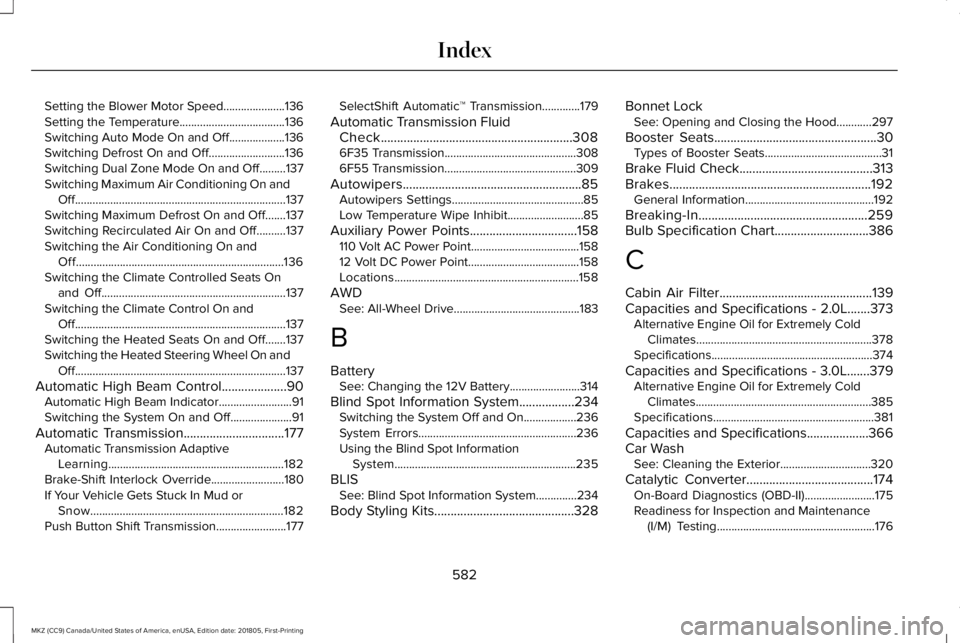
Setting the Blower Motor Speed.....................136Setting the Temperature....................................136Switching Auto Mode On and Off...................136Switching Defrost On and Off..........................136Switching Dual Zone Mode On and Off.........137Switching Maximum Air Conditioning On andOff........................................................................137Switching Maximum Defrost On and Off.......137Switching Recirculated Air On and Off..........137Switching the Air Conditioning On andOff.......................................................................136Switching the Climate Controlled Seats Onand Off...............................................................137Switching the Climate Control On andOff........................................................................137Switching the Heated Seats On and Off.......137Switching the Heated Steering Wheel On andOff........................................................................137
Automatic High Beam Control....................90Automatic High Beam Indicator.........................91Switching the System On and Off.....................91
Automatic Transmission...............................177Automatic Transmission AdaptiveLearning............................................................182Brake-Shift Interlock Override.........................180If Your Vehicle Gets Stuck In Mud orSnow..................................................................182Push Button Shift Transmission........................177
SelectShift Automatic™ Transmission.............179
Automatic Transmission FluidCheck...........................................................3086F35 Transmission.............................................3086F55 Transmission.............................................309
Autowipers.......................................................85Autowipers Settings.............................................85Low Temperature Wipe Inhibit..........................85
Auxiliary Power Points.................................158110 Volt AC Power Point.....................................15812 Volt DC Power Point......................................158Locations...............................................................158
AWDSee: All-Wheel Drive...........................................183
B
BatterySee: Changing the 12V Battery........................314
Blind Spot Information System.................234Switching the System Off and On..................236System Errors......................................................236Using the Blind Spot InformationSystem..............................................................235
BLISSee: Blind Spot Information System..............234
Body Styling Kits...........................................328
Bonnet LockSee: Opening and Closing the Hood............297
Booster Seats..................................................30Types of Booster Seats........................................31
Brake Fluid Check.........................................313Brakes..............................................................192General Information............................................192
Breaking-In....................................................259Bulb Specification Chart.............................386
C
Cabin Air Filter...............................................139Capacities and Specifications - 2.0L.......373Alternative Engine Oil for Extremely ColdClimates............................................................378Specifications.......................................................374
Capacities and Specifications - 3.0L.......379Alternative Engine Oil for Extremely ColdClimates............................................................385Specifications.......................................................381
Capacities and Specifications...................366Car WashSee: Cleaning the Exterior...............................320
Catalytic Converter.......................................174On-Board Diagnostics (OBD-II)........................175Readiness for Inspection and Maintenance(I/M) Testing......................................................176
582
MKZ (CC9) Canada/United States of America, enUSA, Edition date: 201805, First-Printing
Index
Page 586 of 595
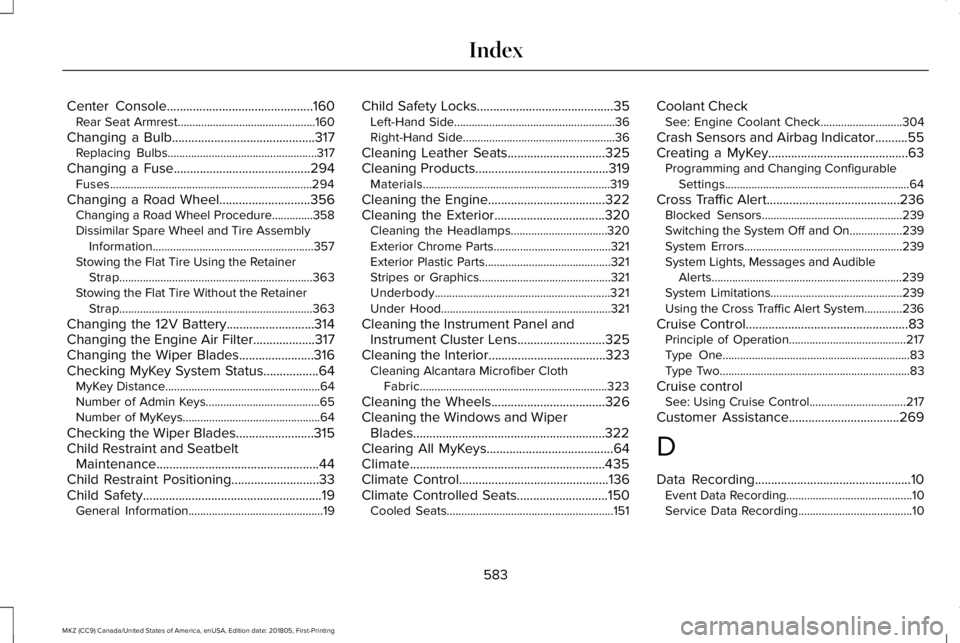
Center Console.............................................160Rear Seat Armrest...............................................160
Changing a Bulb............................................317Replacing Bulbs...................................................317
Changing a Fuse..........................................294Fuses.....................................................................294
Changing a Road Wheel............................356Changing a Road Wheel Procedure..............358Dissimilar Spare Wheel and Tire AssemblyInformation.......................................................357Stowing the Flat Tire Using the RetainerStrap..................................................................363Stowing the Flat Tire Without the RetainerStrap..................................................................363
Changing the 12V Battery...........................314Changing the Engine Air Filter...................317Changing the Wiper Blades.......................316Checking MyKey System Status.................64MyKey Distance.....................................................64Number of Admin Keys.......................................65Number of MyKeys...............................................64
Checking the Wiper Blades........................315Child Restraint and SeatbeltMaintenance..................................................44Child Restraint Positioning...........................33Child Safety.......................................................19General Information..............................................19
Child Safety Locks..........................................35Left-Hand Side.......................................................36Right-Hand Side....................................................36
Cleaning Leather Seats..............................325Cleaning Products.........................................319Materials................................................................319
Cleaning the Engine....................................322Cleaning the Exterior..................................320Cleaning the Headlamps.................................320Exterior Chrome Parts........................................321Exterior Plastic Parts...........................................321Stripes or Graphics.............................................321Underbody............................................................321Under Hood..........................................................321
Cleaning the Instrument Panel andInstrument Cluster Lens...........................325Cleaning the Interior....................................323Cleaning Alcantara Microfiber ClothFabric................................................................323
Cleaning the Wheels...................................326Cleaning the Windows and WiperBlades...........................................................322Clearing All MyKeys.......................................64Climate............................................................435Climate Control..............................................136Climate Controlled Seats............................150Cooled Seats.........................................................151
Coolant CheckSee: Engine Coolant Check............................304
Crash Sensors and Airbag Indicator..........55Creating a MyKey...........................................63Programming and Changing ConfigurableSettings...............................................................64
Cross Traffic Alert.........................................236Blocked Sensors................................................239Switching the System Off and On..................239System Errors......................................................239System Lights, Messages and AudibleAlerts.................................................................239System Limitations.............................................239Using the Cross Traffic Alert System.............236
Cruise Control..................................................83Principle of Operation........................................217Type One................................................................83Type Two.................................................................83
Cruise controlSee: Using Cruise Control.................................217
Customer Assistance..................................269
D
Data Recording................................................10Event Data Recording...........................................10Service Data Recording.......................................10
583
MKZ (CC9) Canada/United States of America, enUSA, Edition date: 201805, First-Printing
Index