set time LINCOLN MKZ 2019 Owner's Manual
[x] Cancel search | Manufacturer: LINCOLN, Model Year: 2019, Model line: MKZ, Model: LINCOLN MKZ 2019Pages: 595, PDF Size: 4.95 MB
Page 134 of 595
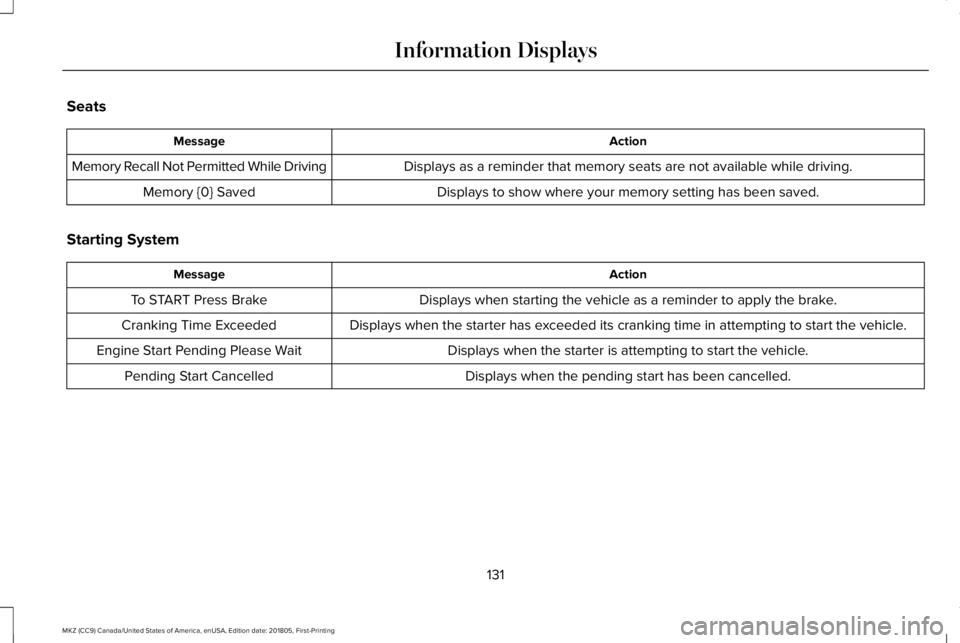
Seats
ActionMessage
Displays as a reminder that memory seats are not available while driving.Memory Recall Not Permitted While Driving
Displays to show where your memory setting has been saved.Memory {0} Saved
Starting System
ActionMessage
Displays when starting the vehicle as a reminder to apply the brake.To START Press Brake
Displays when the starter has exceeded its cranking time in attempting to start the vehicle.Cranking Time Exceeded
Displays when the starter is attempting to start the vehicle.Engine Start Pending Please Wait
Displays when the pending start has been cancelled.Pending Start Cancelled
131
MKZ (CC9) Canada/United States of America, enUSA, Edition date: 201805, First-Printing
Information Displays
Page 141 of 595
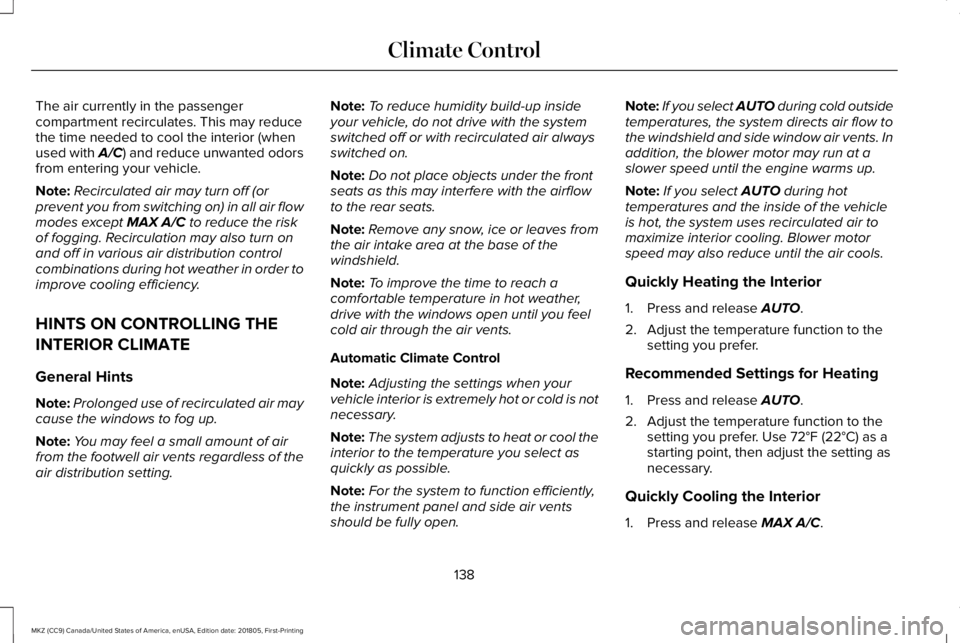
The air currently in the passengercompartment recirculates. This may reducethe time needed to cool the interior (whenused with A/C) and reduce unwanted odorsfrom entering your vehicle.
Note:Recirculated air may turn off (orprevent you from switching on) in all air flowmodes except MAX A/C to reduce the riskof fogging. Recirculation may also turn onand off in various air distribution controlcombinations during hot weather in order toimprove cooling efficiency.
HINTS ON CONTROLLING THE
INTERIOR CLIMATE
General Hints
Note:Prolonged use of recirculated air maycause the windows to fog up.
Note:You may feel a small amount of airfrom the footwell air vents regardless of theair distribution setting.
Note:To reduce humidity build-up insideyour vehicle, do not drive with the systemswitched off or with recirculated air alwaysswitched on.
Note:Do not place objects under the frontseats as this may interfere with the airflowto the rear seats.
Note:Remove any snow, ice or leaves fromthe air intake area at the base of thewindshield.
Note:To improve the time to reach acomfortable temperature in hot weather,drive with the windows open until you feelcold air through the air vents.
Automatic Climate Control
Note:Adjusting the settings when yourvehicle interior is extremely hot or cold is notnecessary.
Note:The system adjusts to heat or cool theinterior to the temperature you select asquickly as possible.
Note:For the system to function efficiently,the instrument panel and side air ventsshould be fully open.
Note:If you select AUTO during cold outsidetemperatures, the system directs air flow tothe windshield and side window air vents. Inaddition, the blower motor may run at aslower speed until the engine warms up.
Note:If you select AUTO during hottemperatures and the inside of the vehicleis hot, the system uses recirculated air tomaximize interior cooling. Blower motorspeed may also reduce until the air cools.
Quickly Heating the Interior
1. Press and release AUTO.
2. Adjust the temperature function to thesetting you prefer.
Recommended Settings for Heating
1. Press and release AUTO.
2. Adjust the temperature function to thesetting you prefer. Use 72°F (22°C) as astarting point, then adjust the setting asnecessary.
Quickly Cooling the Interior
1. Press and release MAX A/C.
138
MKZ (CC9) Canada/United States of America, enUSA, Edition date: 201805, First-Printing
Climate Control
Page 142 of 595
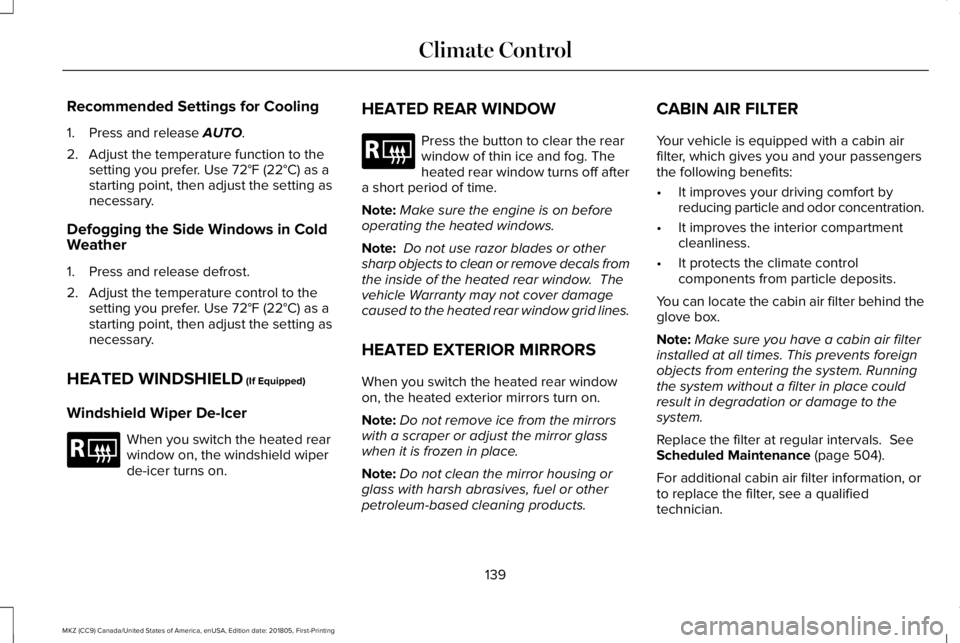
Recommended Settings for Cooling
1. Press and release AUTO.
2. Adjust the temperature function to thesetting you prefer. Use 72°F (22°C) as astarting point, then adjust the setting asnecessary.
Defogging the Side Windows in ColdWeather
1. Press and release defrost.
2. Adjust the temperature control to thesetting you prefer. Use 72°F (22°C) as astarting point, then adjust the setting asnecessary.
HEATED WINDSHIELD (If Equipped)
Windshield Wiper De-Icer
When you switch the heated rearwindow on, the windshield wiperde-icer turns on.
HEATED REAR WINDOW
Press the button to clear the rearwindow of thin ice and fog. Theheated rear window turns off aftera short period of time.
Note:Make sure the engine is on beforeoperating the heated windows.
Note: Do not use razor blades or othersharp objects to clean or remove decals fromthe inside of the heated rear window. Thevehicle Warranty may not cover damagecaused to the heated rear window grid lines.
HEATED EXTERIOR MIRRORS
When you switch the heated rear windowon, the heated exterior mirrors turn on.
Note:Do not remove ice from the mirrorswith a scraper or adjust the mirror glasswhen it is frozen in place.
Note:Do not clean the mirror housing orglass with harsh abrasives, fuel or otherpetroleum-based cleaning products.
CABIN AIR FILTER
Your vehicle is equipped with a cabin airfilter, which gives you and your passengersthe following benefits:
•It improves your driving comfort byreducing particle and odor concentration.
•It improves the interior compartmentcleanliness.
•It protects the climate controlcomponents from particle deposits.
You can locate the cabin air filter behind theglove box.
Note:Make sure you have a cabin air filterinstalled at all times. This prevents foreignobjects from entering the system. Runningthe system without a filter in place couldresult in degradation or damage to thesystem.
Replace the filter at regular intervals. SeeScheduled Maintenance (page 504).
For additional cabin air filter information, orto replace the filter, see a qualifiedtechnician.
139
MKZ (CC9) Canada/United States of America, enUSA, Edition date: 201805, First-Printing
Climate ControlE184884 E184884
Page 149 of 595
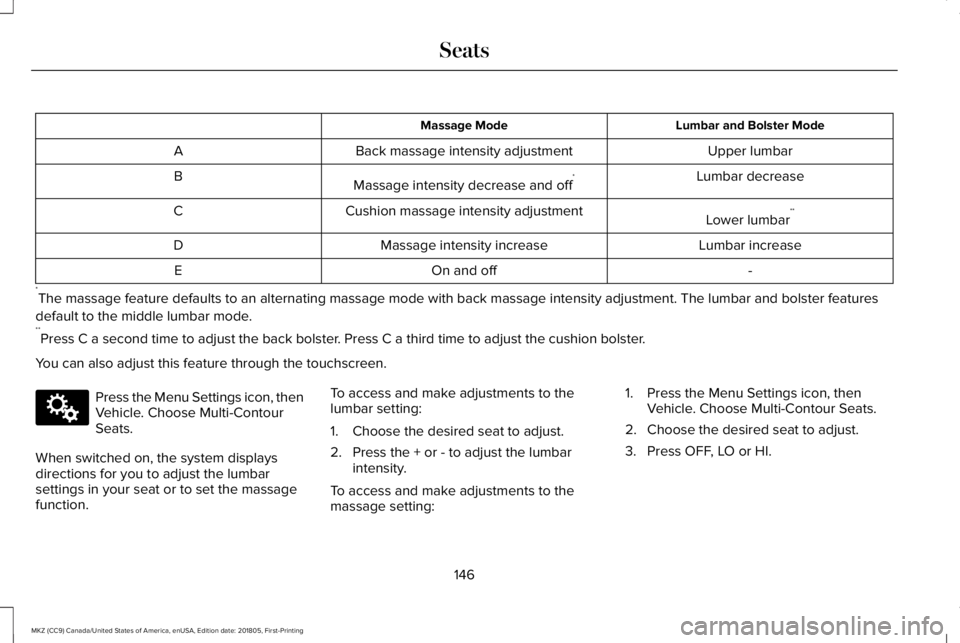
Lumbar and Bolster ModeMassage Mode
Upper lumbarBack massage intensity adjustmentA
Lumbar decreaseMassage intensity decrease and off*B
Lower lumbar**Cushion massage intensity adjustmentC
Lumbar increaseMassage intensity increaseD
-On and offE
*The massage feature defaults to an alternating massage mode with back massage intensity adjustment. The lumbar and bolster features
default to the middle lumbar mode.**Press C a second time to adjust the back bolster. Press C a third time to adjust the cushion bolster.
You can also adjust this feature through the touchscreen.
Press the Menu Settings icon, thenVehicle. Choose Multi-ContourSeats.
When switched on, the system displaysdirections for you to adjust the lumbarsettings in your seat or to set the massagefunction.
To access and make adjustments to thelumbar setting:
1. Choose the desired seat to adjust.
2. Press the + or - to adjust the lumbarintensity.
To access and make adjustments to themassage setting:
1. Press the Menu Settings icon, thenVehicle. Choose Multi-Contour Seats.
2. Choose the desired seat to adjust.
3. Press OFF, LO or HI.
146
MKZ (CC9) Canada/United States of America, enUSA, Edition date: 201805, First-Printing
SeatsE142607
Page 150 of 595
MEMORY FUNCTION
WARNING: Before activating thememory seat, make sure that the areaimmediately surrounding the seat is clear ofobstructions and that all occupants are clearof moving parts.
WARNING: Do not use the memoryfunction when your vehicle is moving.
This feature automatically recalls the positionof the following features:
•Driver seat.
•Power mirrors.
•Power steering column.
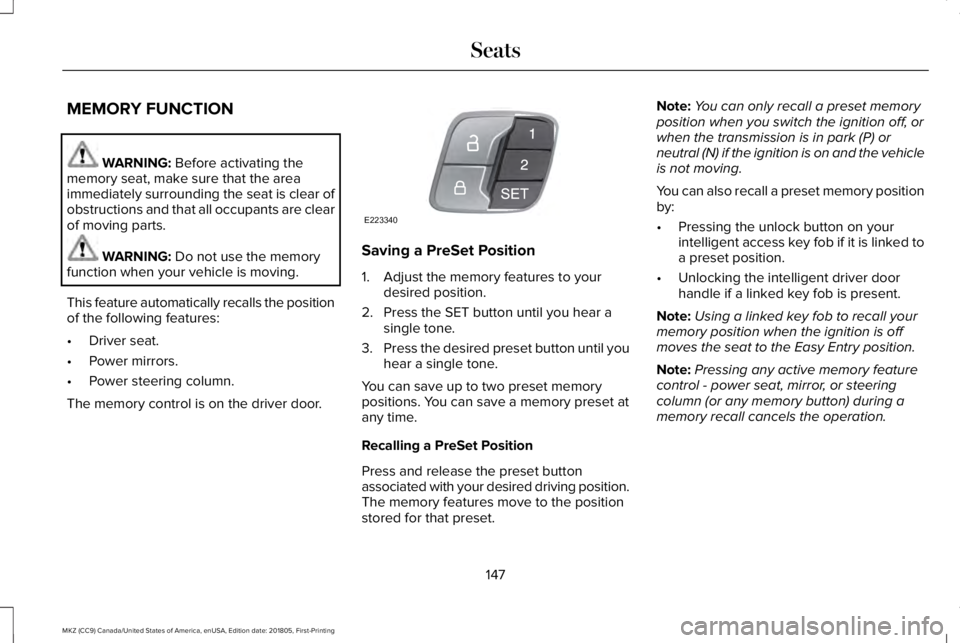
The memory control is on the driver door.
Saving a PreSet Position
1. Adjust the memory features to yourdesired position.
2. Press the SET button until you hear asingle tone.
3.Press the desired preset button until youhear a single tone.
You can save up to two preset memorypositions. You can save a memory preset atany time.
Recalling a PreSet Position
Press and release the preset buttonassociated with your desired driving position.The memory features move to the positionstored for that preset.
Note:You can only recall a preset memoryposition when you switch the ignition off, orwhen the transmission is in park (P) orneutral (N) if the ignition is on and the vehicleis not moving.
You can also recall a preset memory positionby:
•Pressing the unlock button on yourintelligent access key fob if it is linked toa preset position.
•Unlocking the intelligent driver doorhandle if a linked key fob is present.
Note:Using a linked key fob to recall yourmemory position when the ignition is offmoves the seat to the Easy Entry position.
Note:Pressing any active memory featurecontrol - power seat, mirror, or steeringcolumn (or any memory button) during amemory recall cancels the operation.
147
MKZ (CC9) Canada/United States of America, enUSA, Edition date: 201805, First-Printing
SeatsE223340
Page 152 of 595
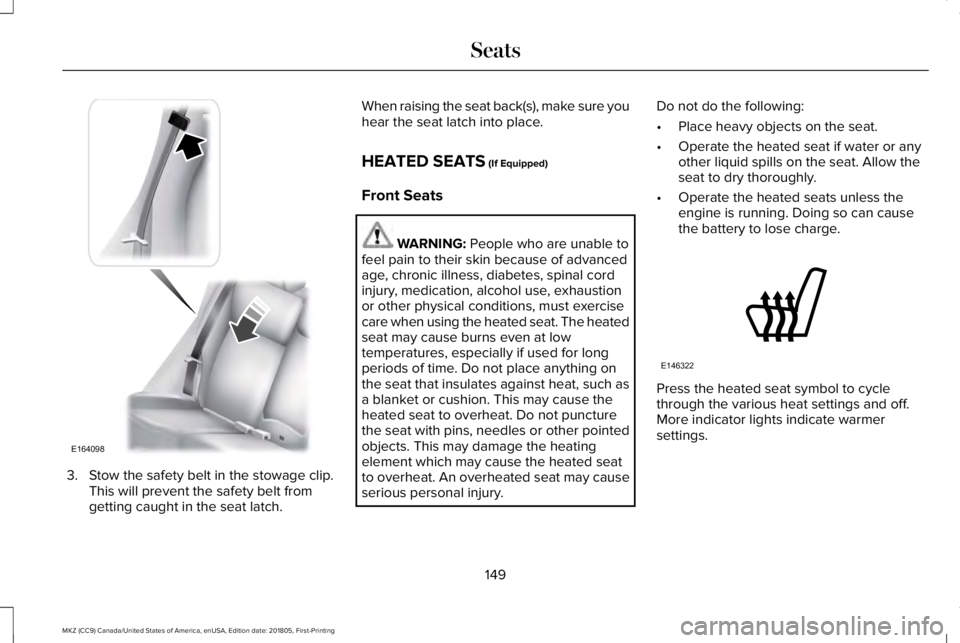
3. Stow the safety belt in the stowage clip.This will prevent the safety belt fromgetting caught in the seat latch.
When raising the seat back(s), make sure youhear the seat latch into place.
HEATED SEATS (If Equipped)
Front Seats
WARNING: People who are unable tofeel pain to their skin because of advancedage, chronic illness, diabetes, spinal cordinjury, medication, alcohol use, exhaustionor other physical conditions, must exercisecare when using the heated seat. The heatedseat may cause burns even at lowtemperatures, especially if used for longperiods of time. Do not place anything onthe seat that insulates against heat, such asa blanket or cushion. This may cause theheated seat to overheat. Do not puncturethe seat with pins, needles or other pointedobjects. This may damage the heatingelement which may cause the heated seatto overheat. An overheated seat may causeserious personal injury.
Do not do the following:
•Place heavy objects on the seat.
•Operate the heated seat if water or anyother liquid spills on the seat. Allow theseat to dry thoroughly.
•Operate the heated seats unless theengine is running. Doing so can causethe battery to lose charge.
Press the heated seat symbol to cyclethrough the various heat settings and off.More indicator lights indicate warmersettings.
149
MKZ (CC9) Canada/United States of America, enUSA, Edition date: 201805, First-Printing
SeatsE164098 E146322
Page 153 of 595
Rear Seats
WARNING: Persons who are unableto feel pain to the skin because of advancedage, chronic illness, diabetes, spinal cordinjury, medication, alcohol use, exhaustion,or other physical conditions, must exercisecare when using the seat heater. The seatheater may cause burns even at lowtemperatures, especially if used for longperiods of time. Do not place anything onthe seat that insulates against heat, such asa blanket or cushion, because this may causethe seat heater to overheat. Do not puncturethe seat with pins, needles, or other pointedobjects because this may damage theheating element which may cause the seatheater to overheat. An overheated seat maycause serious personal injury.
Do not do the following:
•Place heavy objects on the seat.
•Operate the seat heater if water or anyother liquid is spilled on the seat. Allowthe seat to dry thoroughly.
•Operate the heated seats unless theengine is running. Doing so can causethe battery to lose charge.
The rear seat heat controls are located onthe rear of the center console.
Press the heated seat symbol to cyclethrough the various heat settings and off.More indicator lights indicate warmersettings.
The heated seat module resets at everyignition run cycle. While the ignition is on,press the high or low heated seat switch toenable heating mode. When activated, theywill turn off automatically when you turn theengine off.
CLIMATE CONTROLLED SEATS (If
Equipped)
Heated Seats
WARNING: People who are unable tofeel pain to their skin because of advancedage, chronic illness, diabetes, spinal cordinjury, medication, alcohol use, exhaustionor other physical conditions, must exercisecare when using the heated seat. The heatedseat may cause burns even at lowtemperatures, especially if used for longperiods of time. Do not place anything onthe seat that insulates against heat, such asa blanket or cushion. This may cause the
150
MKZ (CC9) Canada/United States of America, enUSA, Edition date: 201805, First-Printing
SeatsE146322
Page 154 of 595
heated seat to overheat. Do not puncturethe seat with pins, needles or other pointedobjects. This may damage the heatingelement which may cause the heated seatto overheat. An overheated seat may causeserious personal injury.
Do not do the following:
•Place heavy objects on the seat.
•Operate the heated seat if water or anyother liquid spills on the seat. Allow theseat to dry thoroughly.
•Operate the heated seats unless theengine is running. Doing so can causethe battery to lose charge.
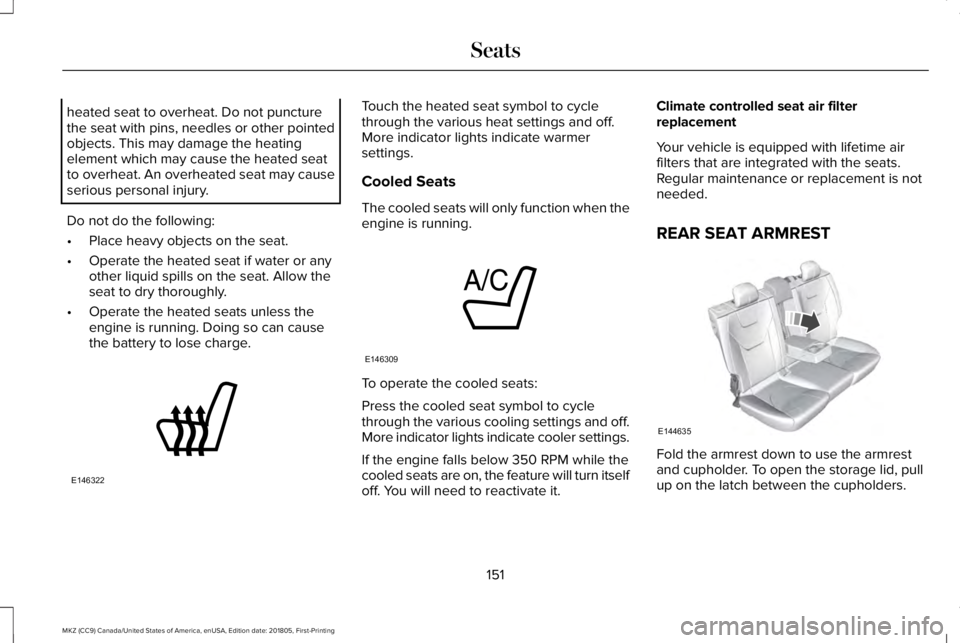
Touch the heated seat symbol to cyclethrough the various heat settings and off.More indicator lights indicate warmersettings.
Cooled Seats
The cooled seats will only function when theengine is running.
To operate the cooled seats:
Press the cooled seat symbol to cyclethrough the various cooling settings and off.More indicator lights indicate cooler settings.
If the engine falls below 350 RPM while thecooled seats are on, the feature will turn itselfoff. You will need to reactivate it.
Climate controlled seat air filterreplacement
Your vehicle is equipped with lifetime airfilters that are integrated with the seats.Regular maintenance or replacement is notneeded.
REAR SEAT ARMREST
Fold the armrest down to use the armrestand cupholder. To open the storage lid, pullup on the latch between the cupholders.
151
MKZ (CC9) Canada/United States of America, enUSA, Edition date: 201805, First-Printing
SeatsE146322 E146309 E144635
Page 158 of 595
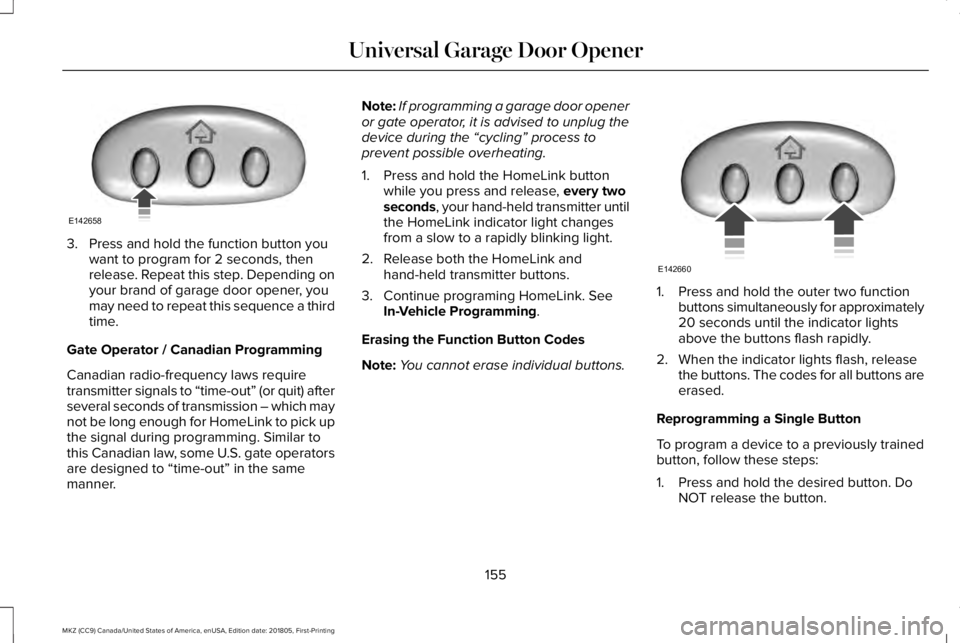
3. Press and hold the function button youwant to program for 2 seconds, thenrelease. Repeat this step. Depending onyour brand of garage door opener, youmay need to repeat this sequence a thirdtime.
Gate Operator / Canadian Programming
Canadian radio-frequency laws requiretransmitter signals to “time-out” (or quit) afterseveral seconds of transmission – which maynot be long enough for HomeLink to pick upthe signal during programming. Similar tothis Canadian law, some U.S. gate operatorsare designed to “time-out” in the samemanner.
Note:If programming a garage door openeror gate operator, it is advised to unplug thedevice during the “cycling” process toprevent possible overheating.
1. Press and hold the HomeLink buttonwhile you press and release, every twoseconds, your hand-held transmitter untilthe HomeLink indicator light changesfrom a slow to a rapidly blinking light.
2. Release both the HomeLink andhand-held transmitter buttons.
3. Continue programing HomeLink. SeeIn-Vehicle Programming.
Erasing the Function Button Codes
Note:You cannot erase individual buttons.
1. Press and hold the outer two functionbuttons simultaneously for approximately20 seconds until the indicator lightsabove the buttons flash rapidly.
2. When the indicator lights flash, releasethe buttons. The codes for all buttons areerased.
Reprogramming a Single Button
To program a device to a previously trainedbutton, follow these steps:
1. Press and hold the desired button. DoNOT release the button.
155
MKZ (CC9) Canada/United States of America, enUSA, Edition date: 201805, First-Printing
Universal Garage Door OpenerE142658 E142660
Page 166 of 595
Within 20 seconds of switching the engineoff, press the brake pedal and press thebutton. After 20 seconds have expired, youcan no longer restart the engine without thekey present inside your vehicle.
Once the engine has started, it remainsrunning until you press the button, even ifthe system does not detect a valid key. If youopen and close a door while the engine isrunning, the system searches for a valid key.You cannot restart the engine if the systemdoes not detect a valid key within 20seconds.
Failure to Start
If you cannot start the engine after threeattempts, wait 10 seconds and follow thisprocedure:
1. Fully press the brake pedal.
2. Fully press the accelerator pedal andhold it there.
3. Start the engine.
Note: You can crank the engine for a totalof 60 seconds without the engine startingbefore the starting system temporarilydisables. The 60 seconds does not have tobe all at once. For example, if you crank theengine three times for 20 seconds each time,without the engine starting, you reached the60-second time limit. A message appearsin the information display alerting you thatyou exceeded the cranking time. Youcannot attempt to start the engine for atleast 15 minutes.
Note: After 15 minutes, you are limited to a15-second engine cranking time. You needto wait 60 minutes before you can crank theengine for 60 seconds again.
Automatic Engine Shutdown
If your vehicle is equipped with a keylessignition, it has a feature that automaticallyshuts down the engine if it has been idlingfor an extended period. The ignition alsoturns off in order to save battery power.Before the engine shuts down, a messageappears in the information display showinga timer counting down from 30 seconds. If
you do not intervene within 30 seconds, theengine shuts down. Another messageappears in the information display to informyou that the engine has shut down in orderto save fuel. Start your vehicle as younormally do.
Automatic Engine Shutdown Override
Note:You cannot permanently switch off theautomatic engine shutdown feature. Whenyou switch it off temporarily, it turns on atthe next ignition cycle.
You can stop the engine shutdown, or resetthe timer, at any point before the 30-secondcountdown has expired by doing any of thefollowing:
163
MKZ (CC9) Canada/United States of America, enUSA, Edition date: 201805, First-Printing
Starting and Stopping the Engine