ad blue LINCOLN MKZ 2019 Owner's Guide
[x] Cancel search | Manufacturer: LINCOLN, Model Year: 2019, Model line: MKZ, Model: LINCOLN MKZ 2019Pages: 595, PDF Size: 4.95 MB
Page 491 of 595
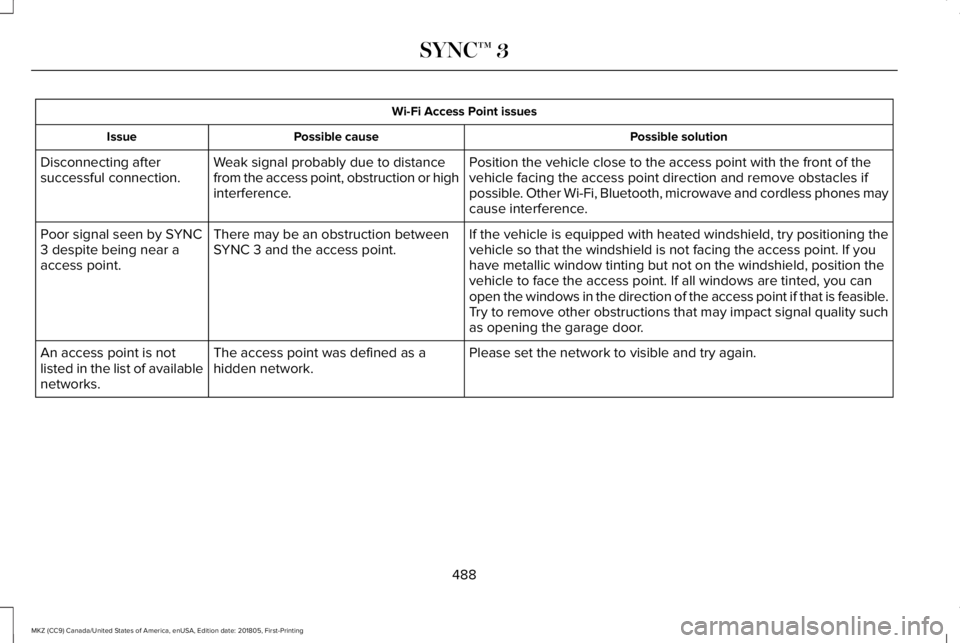
Wi-Fi Access Point issues
Possible solutionPossible causeIssue
Position the vehicle close to the access point with the front of thevehicle facing the access point direction and remove obstacles ifpossible. Other Wi-Fi, Bluetooth, microwave and cordless phones maycause interference.
Weak signal probably due to distancefrom the access point, obstruction or highinterference.
Disconnecting aftersuccessful connection.
If the vehicle is equipped with heated windshield, try positioning thevehicle so that the windshield is not facing the access point. If youhave metallic window tinting but not on the windshield, position thevehicle to face the access point. If all windows are tinted, you canopen the windows in the direction of the access point if that is feasible.
There may be an obstruction betweenSYNC 3 and the access point.Poor signal seen by SYNC3 despite being near aaccess point.
Try to remove other obstructions that may impact signal quality suchas opening the garage door.
Please set the network to visible and try again.The access point was defined as ahidden network.An access point is notlisted in the list of availablenetworks.
488
MKZ (CC9) Canada/United States of America, enUSA, Edition date: 201805, First-Printing
SYNC™ 3
Page 494 of 595
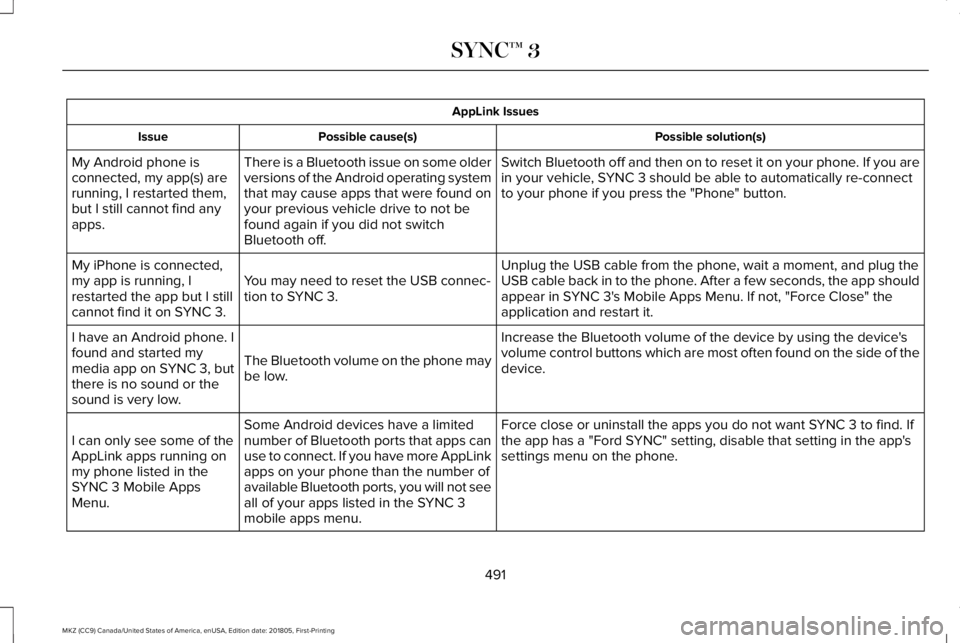
AppLink Issues
Possible solution(s)Possible cause(s)Issue
Switch Bluetooth off and then on to reset it on your phone. If you arein your vehicle, SYNC 3 should be able to automatically re-connectto your phone if you press the "Phone" button.
There is a Bluetooth issue on some olderversions of the Android operating systemthat may cause apps that were found onyour previous vehicle drive to not befound again if you did not switchBluetooth off.
My Android phone isconnected, my app(s) arerunning, I restarted them,but I still cannot find anyapps.
Unplug the USB cable from the phone, wait a moment, and plug theUSB cable back in to the phone. After a few seconds, the app shouldappear in SYNC 3's Mobile Apps Menu. If not, "Force Close" theapplication and restart it.
You may need to reset the USB connec-tion to SYNC 3.
My iPhone is connected,my app is running, Irestarted the app but I stillcannot find it on SYNC 3.
Increase the Bluetooth volume of the device by using the device'svolume control buttons which are most often found on the side of thedevice.The Bluetooth volume on the phone maybe low.
I have an Android phone. Ifound and started mymedia app on SYNC 3, butthere is no sound or thesound is very low.
Force close or uninstall the apps you do not want SYNC 3 to find. Ifthe app has a "Ford SYNC" setting, disable that setting in the app'ssettings menu on the phone.
Some Android devices have a limitednumber of Bluetooth ports that apps canuse to connect. If you have more AppLinkapps on your phone than the number ofavailable Bluetooth ports, you will not seeall of your apps listed in the SYNC 3mobile apps menu.
I can only see some of theAppLink apps running onmy phone listed in theSYNC 3 Mobile AppsMenu.
491
MKZ (CC9) Canada/United States of America, enUSA, Edition date: 201805, First-Printing
SYNC™ 3
Page 500 of 595
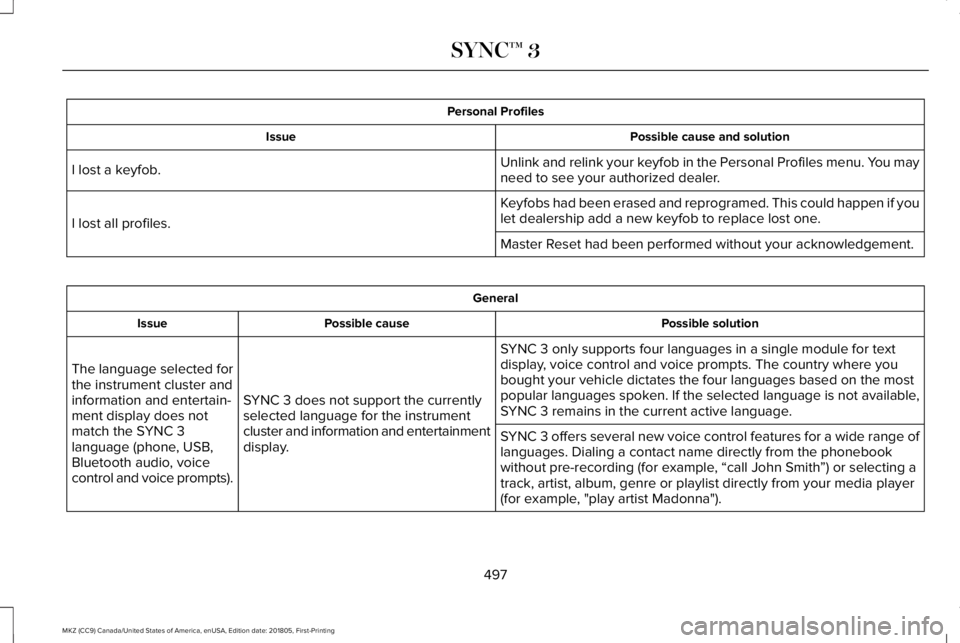
Personal Profiles
Possible cause and solutionIssue
Unlink and relink your keyfob in the Personal Profiles menu. You mayneed to see your authorized dealer.I lost a keyfob.
Keyfobs had been erased and reprogramed. This could happen if youlet dealership add a new keyfob to replace lost one.I lost all profiles.
Master Reset had been performed without your acknowledgement.
General
Possible solutionPossible causeIssue
SYNC 3 only supports four languages in a single module for textdisplay, voice control and voice prompts. The country where youbought your vehicle dictates the four languages based on the mostpopular languages spoken. If the selected language is not available,SYNC 3 remains in the current active language.SYNC 3 does not support the currentlyselected language for the instrumentcluster and information and entertainmentdisplay.
The language selected forthe instrument cluster andinformation and entertain-ment display does notmatch the SYNC 3language (phone, USB,Bluetooth audio, voicecontrol and voice prompts).
SYNC 3 offers several new voice control features for a wide range oflanguages. Dialing a contact name directly from the phonebookwithout pre-recording (for example, “call John Smith”) or selecting atrack, artist, album, genre or playlist directly from your media player(for example, "play artist Madonna").
497
MKZ (CC9) Canada/United States of America, enUSA, Edition date: 201805, First-Printing
SYNC™ 3
Page 587 of 595
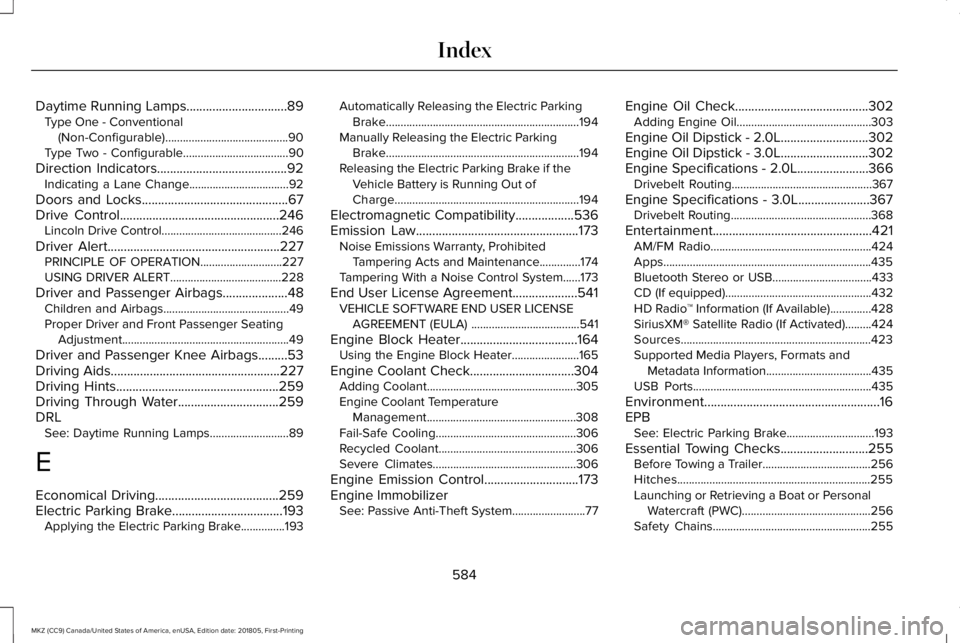
Daytime Running Lamps...............................89Type One - Conventional(Non-Configurable)..........................................90Type Two - Configurable....................................90
Direction Indicators........................................92Indicating a Lane Change..................................92
Doors and Locks.............................................67Drive Control.................................................246Lincoln Drive Control.........................................246
Driver Alert.....................................................227PRINCIPLE OF OPERATION............................227USING DRIVER ALERT......................................228
Driver and Passenger Airbags....................48Children and Airbags...........................................49Proper Driver and Front Passenger SeatingAdjustment.........................................................49
Driver and Passenger Knee Airbags.........53Driving Aids....................................................227Driving Hints..................................................259Driving Through Water...............................259DRLSee: Daytime Running Lamps...........................89
E
Economical Driving......................................259Electric Parking Brake..................................193Applying the Electric Parking Brake...............193
Automatically Releasing the Electric ParkingBrake..................................................................194Manually Releasing the Electric ParkingBrake..................................................................194Releasing the Electric Parking Brake if theVehicle Battery is Running Out ofCharge...............................................................194
Electromagnetic Compatibility..................536Emission Law..................................................173Noise Emissions Warranty, ProhibitedTampering Acts and Maintenance..............174Tampering With a Noise Control System......173
End User License Agreement....................541VEHICLE SOFTWARE END USER LICENSEAGREEMENT (EULA) .....................................541
Engine Block Heater....................................164Using the Engine Block Heater.......................165
Engine Coolant Check................................304Adding Coolant...................................................305Engine Coolant TemperatureManagement...................................................308Fail-Safe Cooling................................................306Recycled Coolant...............................................306Severe Climates.................................................306
Engine Emission Control.............................173Engine ImmobilizerSee: Passive Anti-Theft System.........................77
Engine Oil Check.........................................302Adding Engine Oil..............................................303
Engine Oil Dipstick - 2.0L...........................302Engine Oil Dipstick - 3.0L...........................302Engine Specifications - 2.0L......................366Drivebelt Routing................................................367
Engine Specifications - 3.0L......................367Drivebelt Routing................................................368
Entertainment.................................................421AM/FM Radio.......................................................424Apps.......................................................................435Bluetooth Stereo or USB..................................433CD (If equipped)..................................................432HD Radio™ Information (If Available)..............428SiriusXM® Satellite Radio (If Activated).........424Sources.................................................................423Supported Media Players, Formats andMetadata Information....................................435USB Ports.............................................................435
Environment......................................................16EPBSee: Electric Parking Brake..............................193
Essential Towing Checks...........................255Before Towing a Trailer.....................................256Hitches..................................................................255Launching or Retrieving a Boat or PersonalWatercraft (PWC)............................................256Safety Chains......................................................255
584
MKZ (CC9) Canada/United States of America, enUSA, Edition date: 201805, First-Printing
Index
Page 592 of 595
Rear Seats.......................................................148Rear View Camera........................................213Using the Rear View Camera System............214
Rear View CameraSee: Rear View Camera.....................................213
Recommended Towing Weights..............254Refueling.........................................................169System Warnings..................................................171
Remote Control...............................................58Car Finder...............................................................60Intelligent Access Key.........................................58Remote Start..........................................................60Replacing the Battery..........................................58Sounding the Panic Alarm..................................60
Remote Start...................................................140Automatic Settings..............................................140Heated and Cooled Features..........................140Last Settings.........................................................140
Repairing Minor Paint Damage.................326Replacement Parts Recommendation........13Collision Repairs.....................................................13Scheduled Maintenance and MechanicalRepairs.................................................................13Warranty on Replacement Parts.........................13
Replacing a Lost Key or RemoteControl.............................................................61Reporting Safety Defects (CanadaOnly)..............................................................276
Reporting Safety Defects (U.S. Only).......275Roadside Assistance...................................262Vehicles Sold in Canada: Getting RoadsideAssistance.......................................................262Vehicles Sold in Canada: Roadside AssistanceProgram Coverage........................................263Vehicles Sold in Canada: Using RoadsideAssistance.......................................................263Vehicles Sold in the United States: GettingRoadside Assistance....................................262Vehicles Sold in the United States: UsingRoadside Assistance....................................262
Roadside Emergencies...............................262Running-InSee: Breaking-In.................................................259
Running Out of Fuel.....................................168Adding Fuel From a Portable FuelContainer..........................................................168Filling a Portable Fuel Container.....................168
S
Safety Canopy™...............................................53Safety Precautions........................................166Scheduled Maintenance Record...............516Scheduled Maintenance............................504Seatbelt Extension.........................................45Seatbelt Height Adjustment..........................41
Seatbelt Reminder..........................................43Belt-Minder™...........................................................43
Seatbelts...........................................................37Principle of Operation..........................................37
Seatbelt Warning Lamp and IndicatorChime..............................................................42Conditions of operation......................................42
Seats..................................................................141Security..............................................................77Settings............................................................461911 Assist...............................................................469Ambient Lighting.................................................478Bluetooth..............................................................464Clock......................................................................463Display..................................................................480General..................................................................475Media Player........................................................462Mobile Apps.........................................................474Navigation.............................................................471Phone....................................................................464Radio......................................................................470SiriusXM.................................................................471Sound.....................................................................461Valet Mode............................................................481Vehicle...................................................................478Voice Control.......................................................480Wi-Fi & Hotspot...................................................476
Side Airbags.....................................................52
589
MKZ (CC9) Canada/United States of America, enUSA, Edition date: 201805, First-Printing
Index