lock LINCOLN MKZ 2019 Service Manual
[x] Cancel search | Manufacturer: LINCOLN, Model Year: 2019, Model line: MKZ, Model: LINCOLN MKZ 2019Pages: 595, PDF Size: 4.95 MB
Page 116 of 595
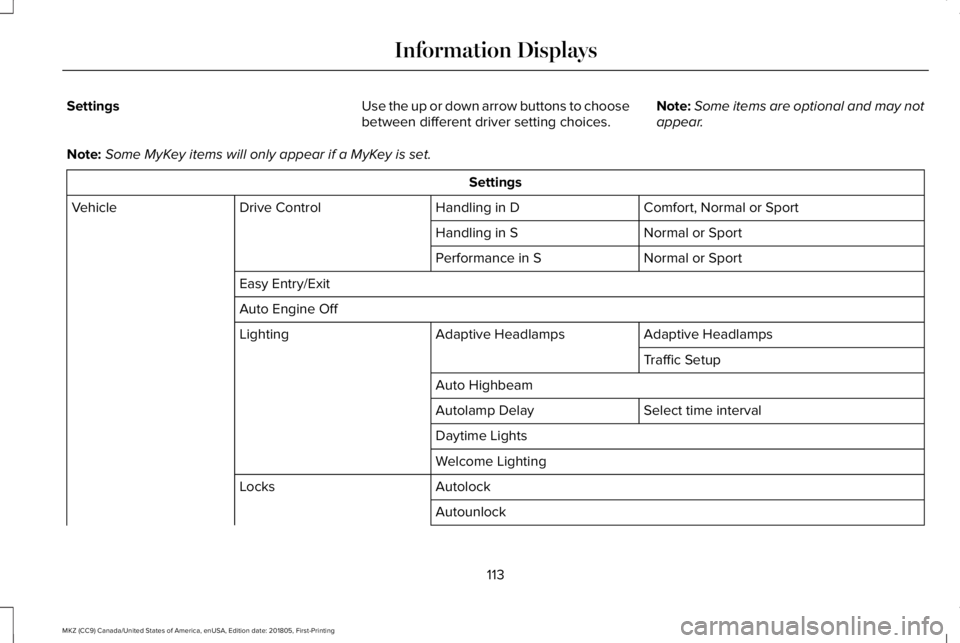
SettingsUse the up or down arrow buttons to choosebetween different driver setting choices.Note:Some items are optional and may notappear.
Note:Some MyKey items will only appear if a MyKey is set.
Settings
Comfort, Normal or SportHandling in DDrive ControlVehicle
Normal or SportHandling in S
Normal or SportPerformance in S
Easy Entry/Exit
Auto Engine Off
Adaptive HeadlampsAdaptive HeadlampsLighting
Traffic Setup
Auto Highbeam
Select time intervalAutolamp Delay
Daytime Lights
Welcome Lighting
AutolockLocks
Autounlock
113
MKZ (CC9) Canada/United States of America, enUSA, Edition date: 201805, First-Printing
Information Displays
Page 117 of 595
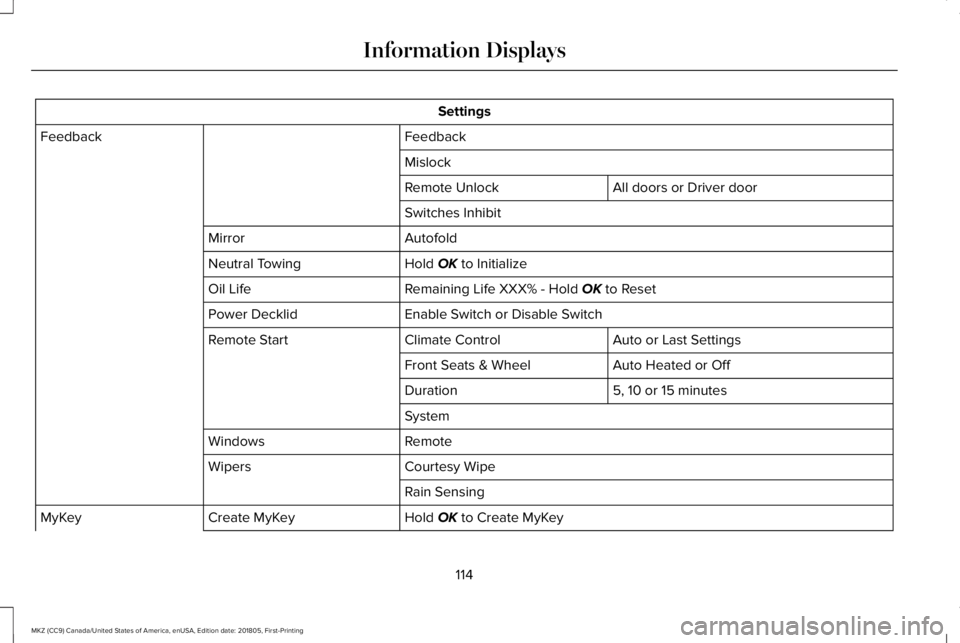
Settings
FeedbackFeedback
Mislock
All doors or Driver doorRemote Unlock
Switches Inhibit
AutofoldMirror
Hold OK to InitializeNeutral Towing
Remaining Life XXX% - Hold OK to ResetOil Life
Enable Switch or Disable SwitchPower Decklid
Auto or Last SettingsClimate ControlRemote Start
Auto Heated or OffFront Seats & Wheel
5, 10 or 15 minutesDuration
System
RemoteWindows
Courtesy WipeWipers
Rain Sensing
Hold OK to Create MyKeyCreate MyKeyMyKey
114
MKZ (CC9) Canada/United States of America, enUSA, Edition date: 201805, First-Printing
Information Displays
Page 120 of 595
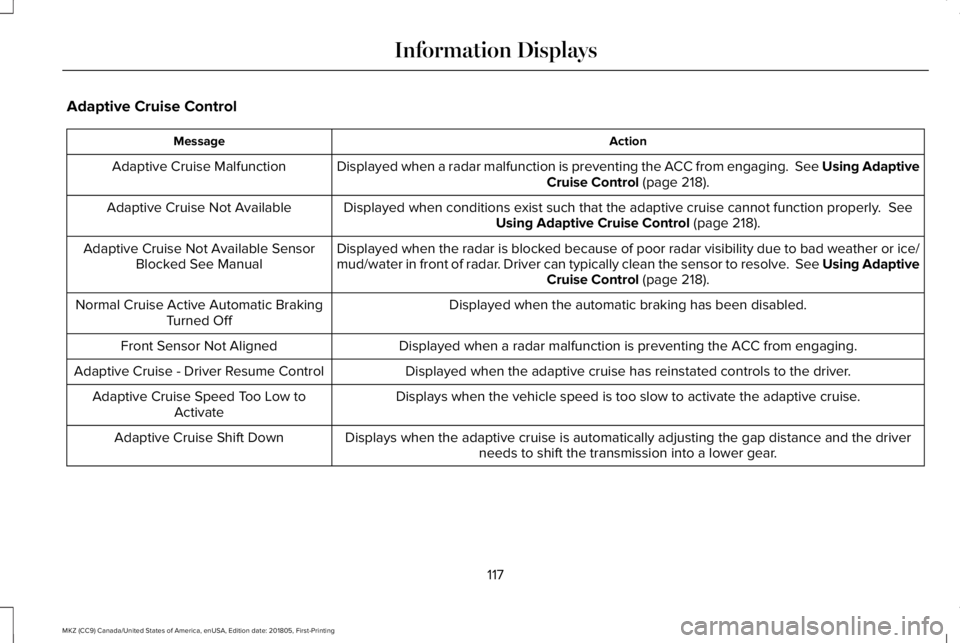
Adaptive Cruise Control
ActionMessage
Displayed when a radar malfunction is preventing the ACC from engaging. See Using AdaptiveCruise Control (page 218).Adaptive Cruise Malfunction
Displayed when conditions exist such that the adaptive cruise cannot function properly. SeeUsing Adaptive Cruise Control (page 218).Adaptive Cruise Not Available
Displayed when the radar is blocked because of poor radar visibility due to bad weather or ice/mud/water in front of radar. Driver can typically clean the sensor to resolve. See Using AdaptiveCruise Control (page 218).
Adaptive Cruise Not Available SensorBlocked See Manual
Displayed when the automatic braking has been disabled.Normal Cruise Active Automatic BrakingTurned Off
Displayed when a radar malfunction is preventing the ACC from engaging.Front Sensor Not Aligned
Displayed when the adaptive cruise has reinstated controls to the driver.Adaptive Cruise - Driver Resume Control
Displays when the vehicle speed is too slow to activate the adaptive cruise.Adaptive Cruise Speed Too Low toActivate
Displays when the adaptive cruise is automatically adjusting the gap distance and the driverneeds to shift the transmission into a lower gear.Adaptive Cruise Shift Down
117
MKZ (CC9) Canada/United States of America, enUSA, Edition date: 201805, First-Printing
Information Displays
Page 121 of 595
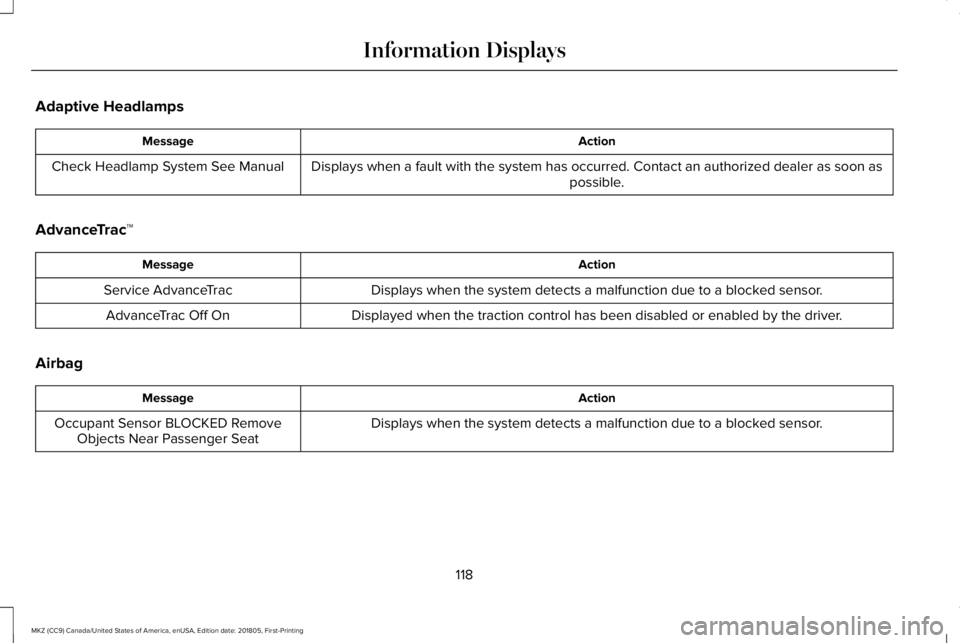
Adaptive Headlamps
ActionMessage
Displays when a fault with the system has occurred. Contact an authorized dealer as soon aspossible.Check Headlamp System See Manual
AdvanceTrac™
ActionMessage
Displays when the system detects a malfunction due to a blocked sensor.Service AdvanceTrac
Displayed when the traction control has been disabled or enabled by the driver.AdvanceTrac Off On
Airbag
ActionMessage
Displays when the system detects a malfunction due to a blocked sensor.Occupant Sensor BLOCKED RemoveObjects Near Passenger Seat
118
MKZ (CC9) Canada/United States of America, enUSA, Edition date: 201805, First-Printing
Information Displays
Page 125 of 595
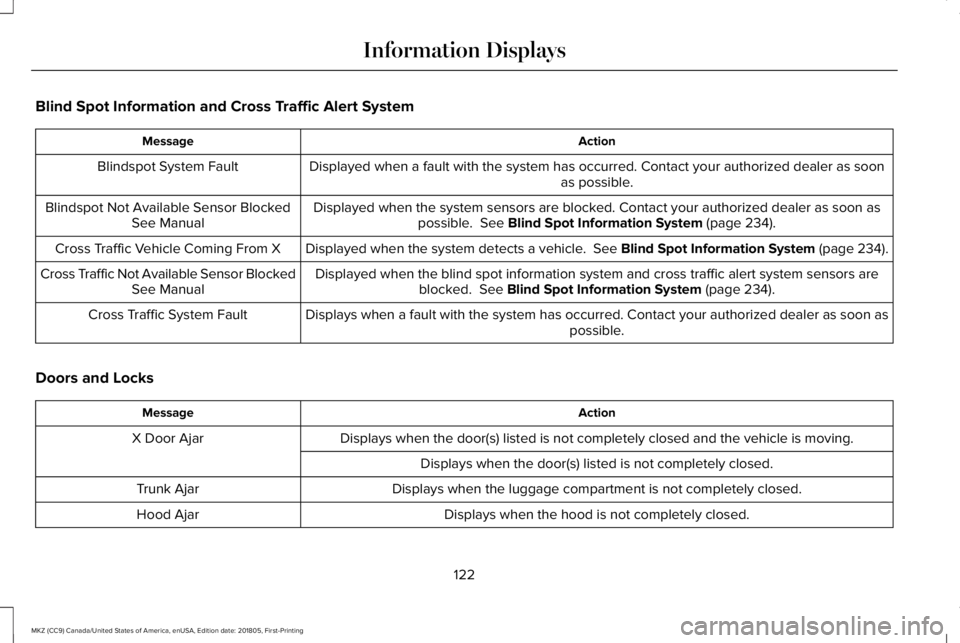
Blind Spot Information and Cross Traffic Alert System
ActionMessage
Displayed when a fault with the system has occurred. Contact your authorized dealer as soonas possible.Blindspot System Fault
Displayed when the system sensors are blocked. Contact your authorized dealer as soon aspossible. See Blind Spot Information System (page 234).Blindspot Not Available Sensor BlockedSee Manual
Displayed when the system detects a vehicle. See Blind Spot Information System (page 234).Cross Traffic Vehicle Coming From X
Displayed when the blind spot information system and cross traffic alert system sensors areblocked. See Blind Spot Information System (page 234).Cross Traffic Not Available Sensor BlockedSee Manual
Displays when a fault with the system has occurred. Contact your authorized dealer as soon aspossible.Cross Traffic System Fault
Doors and Locks
ActionMessage
Displays when the door(s) listed is not completely closed and the vehicle is moving.X Door Ajar
Displays when the door(s) listed is not completely closed.
Displays when the luggage compartment is not completely closed.Trunk Ajar
Displays when the hood is not completely closed.Hood Ajar
122
MKZ (CC9) Canada/United States of America, enUSA, Edition date: 201805, First-Printing
Information Displays
Page 126 of 595
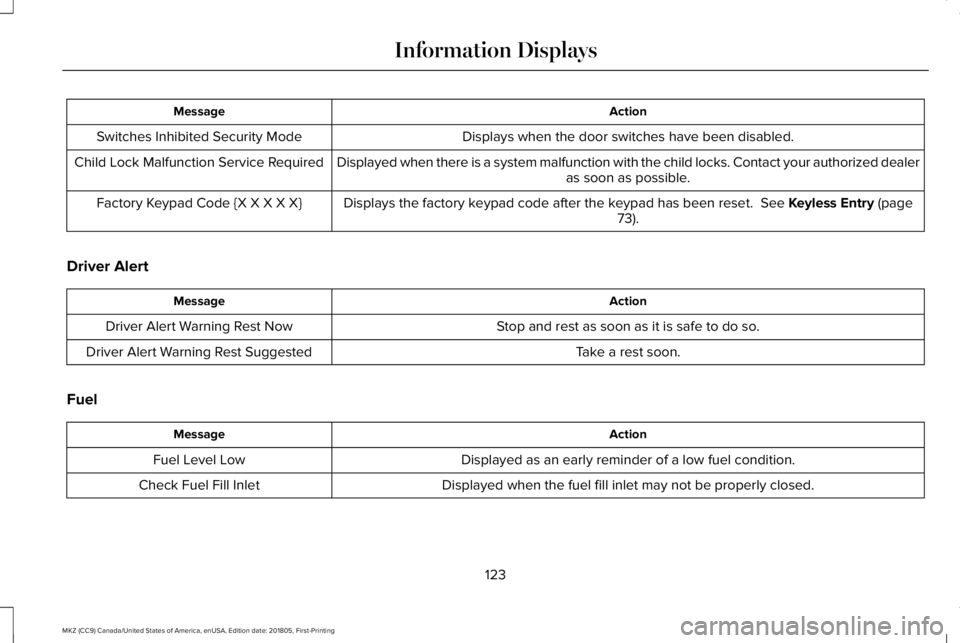
ActionMessage
Displays when the door switches have been disabled.Switches Inhibited Security Mode
Displayed when there is a system malfunction with the child locks. Contact your authorized dealeras soon as possible.Child Lock Malfunction Service Required
Displays the factory keypad code after the keypad has been reset. See Keyless Entry (page73).Factory Keypad Code {X X X X X}
Driver Alert
ActionMessage
Stop and rest as soon as it is safe to do so.Driver Alert Warning Rest Now
Take a rest soon.Driver Alert Warning Rest Suggested
Fuel
ActionMessage
Displayed as an early reminder of a low fuel condition.Fuel Level Low
Displayed when the fuel fill inlet may not be properly closed.Check Fuel Fill Inlet
123
MKZ (CC9) Canada/United States of America, enUSA, Edition date: 201805, First-Printing
Information Displays
Page 133 of 595
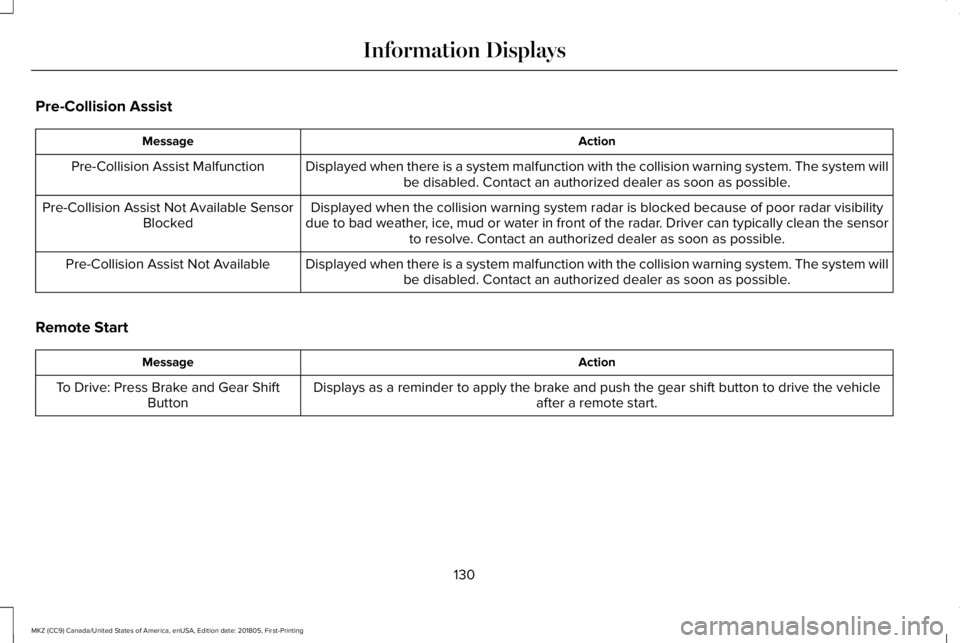
Pre-Collision Assist
ActionMessage
Displayed when there is a system malfunction with the collision warning system. The system willbe disabled. Contact an authorized dealer as soon as possible.Pre-Collision Assist Malfunction
Displayed when the collision warning system radar is blocked because of poor radar visibilitydue to bad weather, ice, mud or water in front of the radar. Driver can typically clean the sensorto resolve. Contact an authorized dealer as soon as possible.
Pre-Collision Assist Not Available SensorBlocked
Displayed when there is a system malfunction with the collision warning system. The system willbe disabled. Contact an authorized dealer as soon as possible.Pre-Collision Assist Not Available
Remote Start
ActionMessage
Displays as a reminder to apply the brake and push the gear shift button to drive the vehicleafter a remote start.To Drive: Press Brake and Gear ShiftButton
130
MKZ (CC9) Canada/United States of America, enUSA, Edition date: 201805, First-Printing
Information Displays
Page 136 of 595
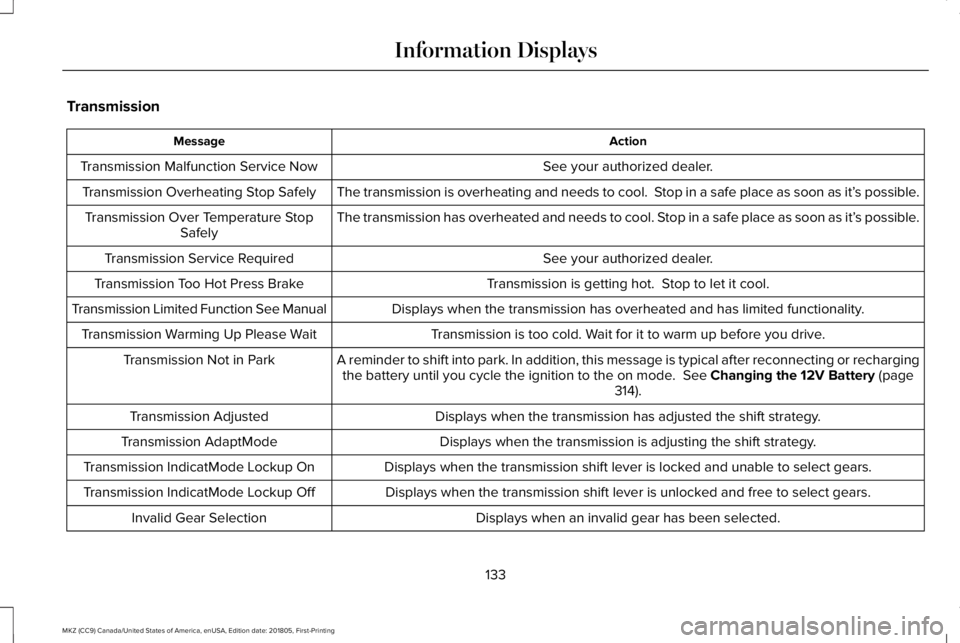
Transmission
ActionMessage
See your authorized dealer.Transmission Malfunction Service Now
The transmission is overheating and needs to cool. Stop in a safe place as soon as it’s possible.Transmission Overheating Stop Safely
The transmission has overheated and needs to cool. Stop in a safe place as soon as it’s possible.Transmission Over Temperature StopSafely
See your authorized dealer.Transmission Service Required
Transmission is getting hot. Stop to let it cool.Transmission Too Hot Press Brake
Displays when the transmission has overheated and has limited functionality.Transmission Limited Function See Manual
Transmission is too cold. Wait for it to warm up before you drive.Transmission Warming Up Please Wait
A reminder to shift into park. In addition, this message is typical after reconnecting or rechargingthe battery until you cycle the ignition to the on mode. See Changing the 12V Battery (page314).
Transmission Not in Park
Displays when the transmission has adjusted the shift strategy.Transmission Adjusted
Displays when the transmission is adjusting the shift strategy.Transmission AdaptMode
Displays when the transmission shift lever is locked and unable to select gears.Transmission IndicatMode Lockup On
Displays when the transmission shift lever is unlocked and free to select gears.Transmission IndicatMode Lockup Off
Displays when an invalid gear has been selected.Invalid Gear Selection
133
MKZ (CC9) Canada/United States of America, enUSA, Edition date: 201805, First-Printing
Information Displays
Page 146 of 595
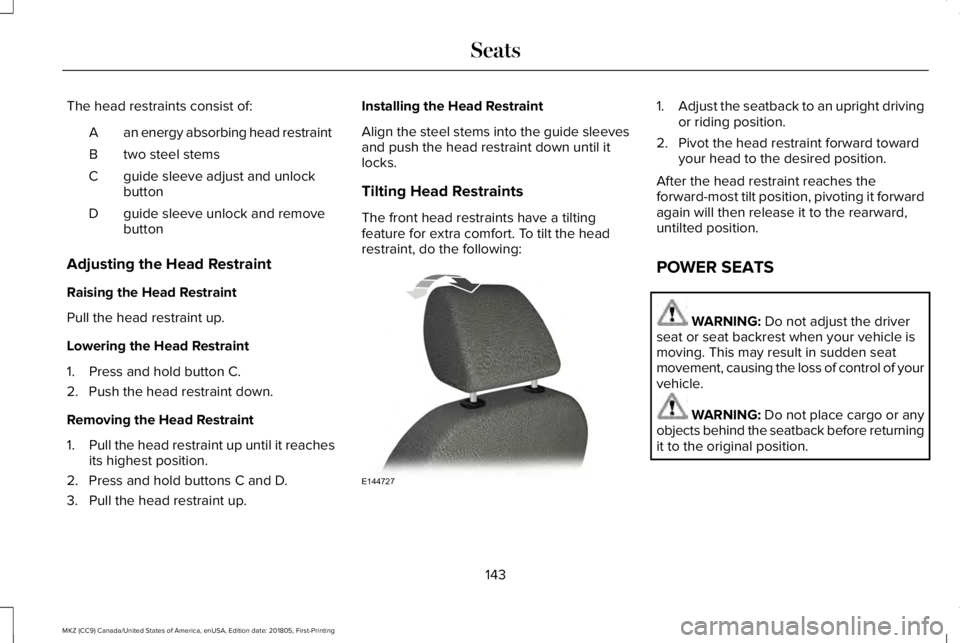
The head restraints consist of:
an energy absorbing head restraintA
two steel stemsB
guide sleeve adjust and unlockbuttonC
guide sleeve unlock and removebuttonD
Adjusting the Head Restraint
Raising the Head Restraint
Pull the head restraint up.
Lowering the Head Restraint
1. Press and hold button C.
2. Push the head restraint down.
Removing the Head Restraint
1.Pull the head restraint up until it reachesits highest position.
2. Press and hold buttons C and D.
3. Pull the head restraint up.
Installing the Head Restraint
Align the steel stems into the guide sleevesand push the head restraint down until itlocks.
Tilting Head Restraints
The front head restraints have a tiltingfeature for extra comfort. To tilt the headrestraint, do the following:
1.Adjust the seatback to an upright drivingor riding position.
2. Pivot the head restraint forward towardyour head to the desired position.
After the head restraint reaches theforward-most tilt position, pivoting it forwardagain will then release it to the rearward,untilted position.
POWER SEATS
WARNING: Do not adjust the driverseat or seat backrest when your vehicle ismoving. This may result in sudden seatmovement, causing the loss of control of yourvehicle.
WARNING: Do not place cargo or anyobjects behind the seatback before returningit to the original position.
143
MKZ (CC9) Canada/United States of America, enUSA, Edition date: 201805, First-Printing
SeatsE144727
Page 150 of 595
MEMORY FUNCTION
WARNING: Before activating thememory seat, make sure that the areaimmediately surrounding the seat is clear ofobstructions and that all occupants are clearof moving parts.
WARNING: Do not use the memoryfunction when your vehicle is moving.
This feature automatically recalls the positionof the following features:
•Driver seat.
•Power mirrors.
•Power steering column.
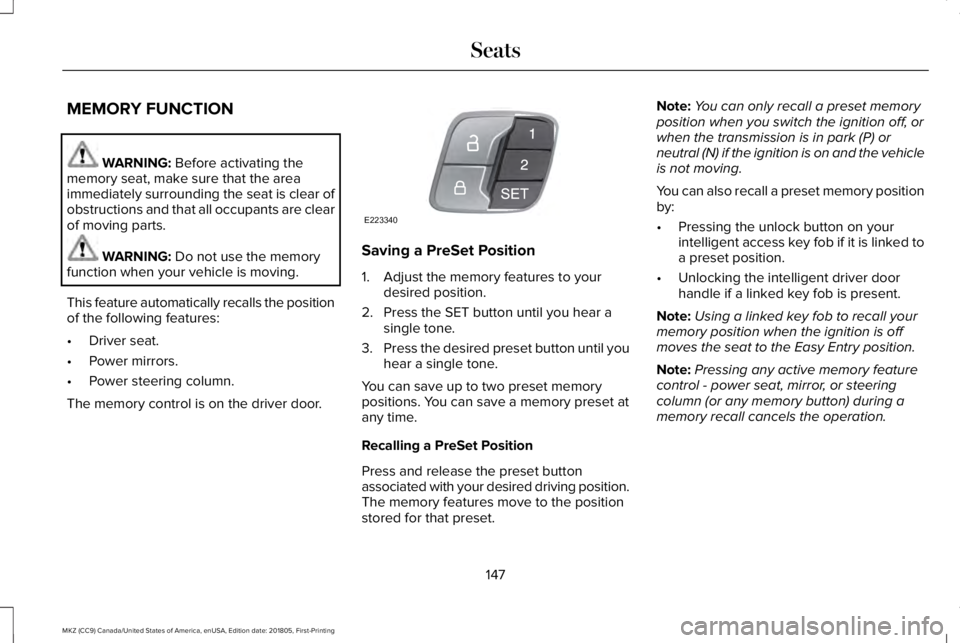
The memory control is on the driver door.
Saving a PreSet Position
1. Adjust the memory features to yourdesired position.
2. Press the SET button until you hear asingle tone.
3.Press the desired preset button until youhear a single tone.
You can save up to two preset memorypositions. You can save a memory preset atany time.
Recalling a PreSet Position
Press and release the preset buttonassociated with your desired driving position.The memory features move to the positionstored for that preset.
Note:You can only recall a preset memoryposition when you switch the ignition off, orwhen the transmission is in park (P) orneutral (N) if the ignition is on and the vehicleis not moving.
You can also recall a preset memory positionby:
•Pressing the unlock button on yourintelligent access key fob if it is linked toa preset position.
•Unlocking the intelligent driver doorhandle if a linked key fob is present.
Note:Using a linked key fob to recall yourmemory position when the ignition is offmoves the seat to the Easy Entry position.
Note:Pressing any active memory featurecontrol - power seat, mirror, or steeringcolumn (or any memory button) during amemory recall cancels the operation.
147
MKZ (CC9) Canada/United States of America, enUSA, Edition date: 201805, First-Printing
SeatsE223340