bulb LINCOLN MKZ 2019 Owners Manual
[x] Cancel search | Manufacturer: LINCOLN, Model Year: 2019, Model line: MKZ, Model: LINCOLN MKZ 2019Pages: 595, PDF Size: 4.95 MB
Page 8 of 595
Checking the Wiper Blades.......................315
Changing the Wiper Blades......................316
Adjusting the Headlamps..........................316
Changing a Bulb...........................................317
Changing the Engine Air Filter..................317
Vehicle Care
General Information.....................................319
Cleaning Products.......................................319
Cleaning the Exterior.................................320
Waxing............................................................321
Cleaning the Engine...................................322
Cleaning the Windows and Wiper Blades......................................................................322
Cleaning the Interior...................................323
Cleaning the Instrument Panel andInstrument Cluster Lens........................325
Cleaning Leather Seats.............................325
Repairing Minor Paint Damage................326
Cleaning the Wheels..................................326
Vehicle Storage............................................327
Body Styling Kits..........................................328
Wheels and Tires
Tire Sealant and Inflator Kit......................329
Tire Care........................................................336
Using Summer Tires...................................350
Using Snow Chains......................................351
Tire Pressure Monitoring System...........352
Changing a Road Wheel...........................356
Technical Specifications............................364
Capacities and Specifications
Engine Specifications - 2.0L.....................366
Engine Specifications - 3.0L.....................367
Motorcraft Parts - 2.0L...............................368
Motorcraft Parts - 3.0L................................370
Vehicle Identification Number...................371
Vehicle Certification Label.........................371
Transmission Code Designation.............372
Capacities and Specifications - 2.0L......373
Capacities and Specifications - 3.0L......379
Bulb Specification Chart............................386
Audio System
General Information....................................389
Audio Unit......................................................391
USB Port........................................................392
Media Hub....................................................392
SYNC™ 3
General Information....................................394
Home Screen...............................................409
Using Voice Recognition.............................411
Entertainment................................................421
Climate...........................................................435
Phone.............................................................439
Navigation.....................................................447
Apps...............................................................458
Settings...........................................................461
SYNC™ 3 Troubleshooting..........................481
Accessories
Accessories..................................................499
Lincoln Protect
Lincoln Protect..............................................501
5
MKZ (CC9) Canada/United States of America, enUSA, Edition date: 201805, First-Printing
Table of Contents
Page 109 of 595
Brake System Warning Lamp
WARNING: Driving your vehicle withthe warning lamp on is dangerous. Asignificant decrease in braking performancemay occur. It may take you longer to stopyour vehicle. Have your vehicle checked assoon as possible. Driving extended distanceswith the parking brake engaged can causebrake failure and the risk of personal injury.
Note:Indicators vary depending on region.
This lamp is a dual function lamp and willilluminate when:
•You apply the parking brake with theignition on.
•Your vehicle has a brake fault or lowbrake fluid level, regardless of parkingbrake position.
If the lamp illuminates while youare moving, you may have theparking brake applied. Be sure thatthe parking brake is off. Have yourvehicle checked as soon aspossible if the lamp continues toilluminate.
Cruise Control Indicator
It illuminates when you switch thesystem on.
See Using Cruise Control (page217).
Direction Indicator
Illuminates when the left or rightturn signal or the hazard warningflasher is turned on. If theindicators stay on or flash faster, check for aburned out bulb. See Changing a Bulb(page 317).
Door Ajar
Displays when the ignition is onand any door is not completelyclosed.
Electric Park Brake
It illuminates or flashes when theelectric parking brake has amalfunction. See Electric ParkingBrake (page 193).
Engine Coolant Temperature WarningLamp
Illuminates when the enginecoolant temperature is high. Stopthe vehicle as soon as possible,switch off the engine and let cool. SeeEngine Coolant Check (page 304).
Engine Oil
It illuminates when you switch theignition on.
106
MKZ (CC9) Canada/United States of America, enUSA, Edition date: 201805, First-Printing
Instrument ClusterE270480 E71340 E146190
Page 111 of 595
Parking Lamps
It illuminates when you switch theparking lamps on.
Powertrain Fault
Illuminates when a powertrain oran AWD fault has been detected.Contact your authorized dealer assoon as possible.
Service Engine Soon
If it illuminates when the engine isrunning this indicates amalfunction. The On BoardDiagnostics system has detected amalfunction of the vehicle emission controlsystem.
If it flashes, engine misfire may be occurring. Increased exhaust gas temperatures coulddamage the catalytic converter or othervehicle components. Drive in a moderatefashion (avoid heavy acceleration anddeceleration) and have your vehicleimmediately serviced.
It illuminates when you switch the ignitionon prior to engine start to check the bulb andto indicate whether your vehicle is ready forInspection and Maintenance (I/M) testing.
Normally, it illuminates until the engine iscranked and automatically turns off if nomalfunctions are present. However, if after15 seconds it flashes eight times, thisindicates that your vehicle is not ready forInspection and Maintenance (I/M) testing.See Emission Law (page 173).
Stability Control
It flashes when the system isactive. If it remains illuminated ordoes not illuminate when youswitch the ignition on, this indicates amalfunction. During a malfunction the systemwill switch off. Have the system checked byyour authorized dealer immediately. SeeUsing Stability Control (page 199).
Stability Control Off
It illuminates when you switch thesystem off.
Trunk Ajar
Displays when the ignition is onand the trunk is not completelyclosed.
AUDIBLE WARNINGS AND
INDICATORS
Keyless Warning Alert
The horn will sound twice when you exit yourvehicle with the intelligent access key andyour vehicle is in RUN, indicating your vehicleis still on.
Headlamps On Warning Chime
Sounds when you remove the key from theignition and open the driver's door and youhave left the headlamps or parking lampson.
108
MKZ (CC9) Canada/United States of America, enUSA, Edition date: 201805, First-Printing
Instrument Cluster E138639 E130458 E159323
Page 179 of 595
If the service engine soon indicator remainson, have your vehicle serviced at the firstavailable opportunity. Although somemalfunctions detected by the OBD-II may nothave symptoms that are apparent, continueddriving with the service engine soon indicatoron can result in increased emissions, lowerfuel economy, reduced engine andtransmission smoothness and lead to morecostly repairs.
Readiness for Inspection andMaintenance (I/M) Testing
Some state and provincial and localgovernments may haveInspection/Maintenance (I/M) programs toinspect the emission control equipment onyour vehicle. Failure to pass this inspectioncould prevent you from getting a vehicleregistration.
If the service engine soon indicatoris on or the bulb does not work,your vehicle may need service.See On-Board Diagnostics.
Your vehicle may not pass the I/M test if theservice engine soon indicator is on or notworking properly (bulb is burned out), or ifthe OBD-II system has determined that someof the emission control systems have notbeen properly checked. In this case, thevehicle is not ready for I/M testing.
If the vehicle’s engine or transmission hasjust been serviced, or the battery hasrecently run down or been replaced, theOBD-II system may indicate that the vehicleis not ready for I/M testing. To determine ifthe vehicle is ready for I/M testing, turn theignition key to the on position for 15 secondswithout cranking the engine. If the serviceengine soon indicator blinks eight times, itmeans that the vehicle is not ready for I/Mtesting; if the service engine soon indicatorstays on solid, it means that your vehicle isready for I/M testing.
The OBD-II system checks the emissioncontrol system during normal driving. Acomplete check may take several days.
If the vehicle is not ready for I/M testing, youcan perform the following driving cycleconsisting of mixed city and highway driving:
1. 15 minutes of steady driving on anexpressway or highway followed by 20minutes of stop-and-go driving with atleast four 30-second idle periods.
2.Allow your vehicle to sit for at least eighthours with the ignition off. Then, start thevehicle and complete the above drivingcycle. The vehicle must warm up to itsnormal operating temperature. Oncestarted, do not turn off the vehicle untilthe above driving cycle is complete.
If the vehicle is still not ready for I/M testing,you need to repeat the above driving cycle.
176
MKZ (CC9) Canada/United States of America, enUSA, Edition date: 201805, First-Printing
Engine Emission Control
Page 203 of 595
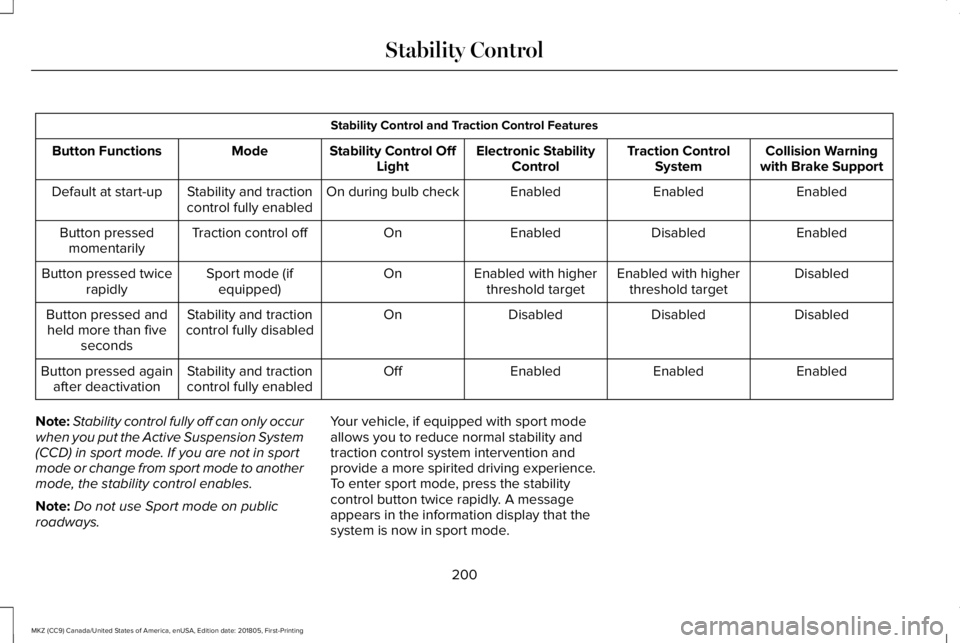
Stability Control and Traction Control Features
Collision Warningwith Brake SupportTraction ControlSystemElectronic StabilityControlStability Control OffLightModeButton Functions
EnabledEnabledEnabledOn during bulb checkStability and tractioncontrol fully enabledDefault at start-up
EnabledDisabledEnabledOnTraction control offButton pressedmomentarily
DisabledEnabled with higherthreshold targetEnabled with higherthreshold targetOnSport mode (ifequipped)Button pressed twicerapidly
DisabledDisabledDisabledOnStability and tractioncontrol fully disabledButton pressed andheld more than fiveseconds
EnabledEnabledEnabledOffStability and tractioncontrol fully enabledButton pressed againafter deactivation
Note:Stability control fully off can only occurwhen you put the Active Suspension System(CCD) in sport mode. If you are not in sportmode or change from sport mode to anothermode, the stability control enables.
Note:Do not use Sport mode on publicroadways.
Your vehicle, if equipped with sport modeallows you to reduce normal stability andtraction control system intervention andprovide a more spirited driving experience.To enter sport mode, press the stabilitycontrol button twice rapidly. A messageappears in the information display that thesystem is now in sport mode.
200
MKZ (CC9) Canada/United States of America, enUSA, Edition date: 201805, First-Printing
Stability Control
Page 320 of 595
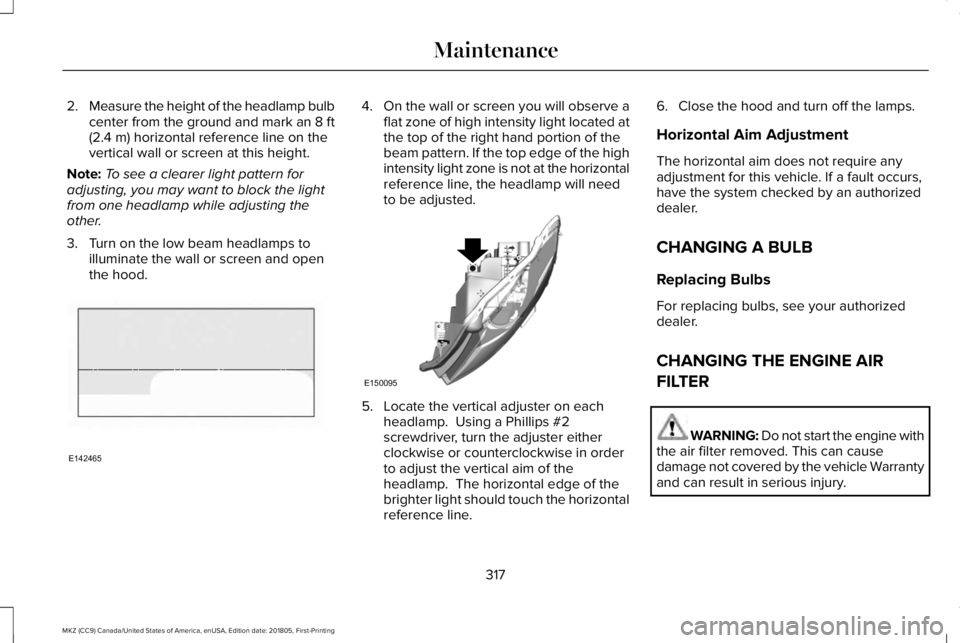
2.Measure the height of the headlamp bulbcenter from the ground and mark an 8 ft(2.4 m) horizontal reference line on thevertical wall or screen at this height.
Note:To see a clearer light pattern foradjusting, you may want to block the lightfrom one headlamp while adjusting theother.
3. Turn on the low beam headlamps toilluminate the wall or screen and openthe hood.
4.On the wall or screen you will observe aflat zone of high intensity light located atthe top of the right hand portion of thebeam pattern. If the top edge of the highintensity light zone is not at the horizontalreference line, the headlamp will needto be adjusted.
5. Locate the vertical adjuster on eachheadlamp. Using a Phillips #2screwdriver, turn the adjuster eitherclockwise or counterclockwise in orderto adjust the vertical aim of theheadlamp. The horizontal edge of thebrighter light should touch the horizontalreference line.
6. Close the hood and turn off the lamps.
Horizontal Aim Adjustment
The horizontal aim does not require anyadjustment for this vehicle. If a fault occurs,have the system checked by an authorizeddealer.
CHANGING A BULB
Replacing Bulbs
For replacing bulbs, see your authorizeddealer.
CHANGING THE ENGINE AIR
FILTER
WARNING: Do not start the engine withthe air filter removed. This can causedamage not covered by the vehicle Warrantyand can result in serious injury.
317
MKZ (CC9) Canada/United States of America, enUSA, Edition date: 201805, First-Printing
MaintenanceE142465 E150095
Page 389 of 595
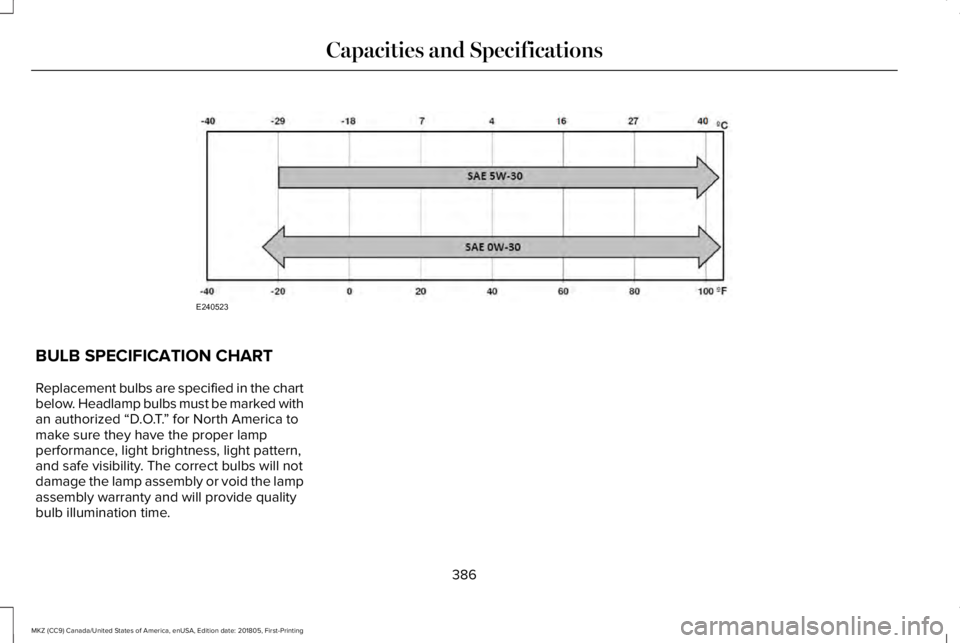
BULB SPECIFICATION CHART
Replacement bulbs are specified in the chartbelow. Headlamp bulbs must be marked withan authorized “D.O.T.” for North America tomake sure they have the proper lampperformance, light brightness, light pattern,and safe visibility. The correct bulbs will notdamage the lamp assembly or void the lampassembly warranty and will provide qualitybulb illumination time.
386
MKZ (CC9) Canada/United States of America, enUSA, Edition date: 201805, First-Printing
Capacities and SpecificationsE240523
Page 391 of 595
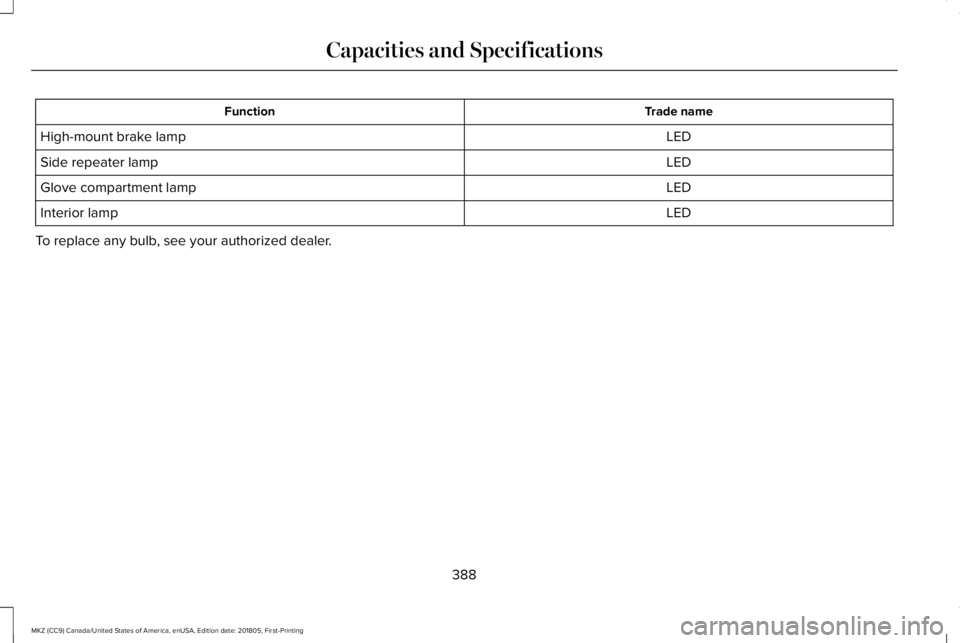
Trade nameFunction
LEDHigh-mount brake lamp
LEDSide repeater lamp
LEDGlove compartment lamp
LEDInterior lamp
To replace any bulb, see your authorized dealer.
388
MKZ (CC9) Canada/United States of America, enUSA, Edition date: 201805, First-Printing
Capacities and Specifications
Page 585 of 595
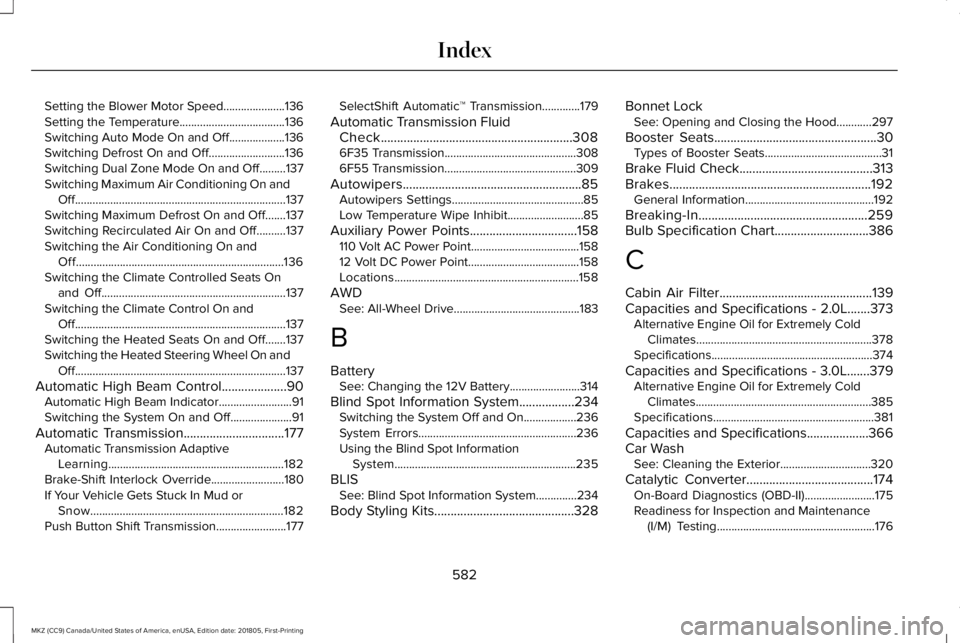
Setting the Blower Motor Speed.....................136Setting the Temperature....................................136Switching Auto Mode On and Off...................136Switching Defrost On and Off..........................136Switching Dual Zone Mode On and Off.........137Switching Maximum Air Conditioning On andOff........................................................................137Switching Maximum Defrost On and Off.......137Switching Recirculated Air On and Off..........137Switching the Air Conditioning On andOff.......................................................................136Switching the Climate Controlled Seats Onand Off...............................................................137Switching the Climate Control On andOff........................................................................137Switching the Heated Seats On and Off.......137Switching the Heated Steering Wheel On andOff........................................................................137
Automatic High Beam Control....................90Automatic High Beam Indicator.........................91Switching the System On and Off.....................91
Automatic Transmission...............................177Automatic Transmission AdaptiveLearning............................................................182Brake-Shift Interlock Override.........................180If Your Vehicle Gets Stuck In Mud orSnow..................................................................182Push Button Shift Transmission........................177
SelectShift Automatic™ Transmission.............179
Automatic Transmission FluidCheck...........................................................3086F35 Transmission.............................................3086F55 Transmission.............................................309
Autowipers.......................................................85Autowipers Settings.............................................85Low Temperature Wipe Inhibit..........................85
Auxiliary Power Points.................................158110 Volt AC Power Point.....................................15812 Volt DC Power Point......................................158Locations...............................................................158
AWDSee: All-Wheel Drive...........................................183
B
BatterySee: Changing the 12V Battery........................314
Blind Spot Information System.................234Switching the System Off and On..................236System Errors......................................................236Using the Blind Spot InformationSystem..............................................................235
BLISSee: Blind Spot Information System..............234
Body Styling Kits...........................................328
Bonnet LockSee: Opening and Closing the Hood............297
Booster Seats..................................................30Types of Booster Seats........................................31
Brake Fluid Check.........................................313Brakes..............................................................192General Information............................................192
Breaking-In....................................................259Bulb Specification Chart.............................386
C
Cabin Air Filter...............................................139Capacities and Specifications - 2.0L.......373Alternative Engine Oil for Extremely ColdClimates............................................................378Specifications.......................................................374
Capacities and Specifications - 3.0L.......379Alternative Engine Oil for Extremely ColdClimates............................................................385Specifications.......................................................381
Capacities and Specifications...................366Car WashSee: Cleaning the Exterior...............................320
Catalytic Converter.......................................174On-Board Diagnostics (OBD-II)........................175Readiness for Inspection and Maintenance(I/M) Testing......................................................176
582
MKZ (CC9) Canada/United States of America, enUSA, Edition date: 201805, First-Printing
Index
Page 586 of 595
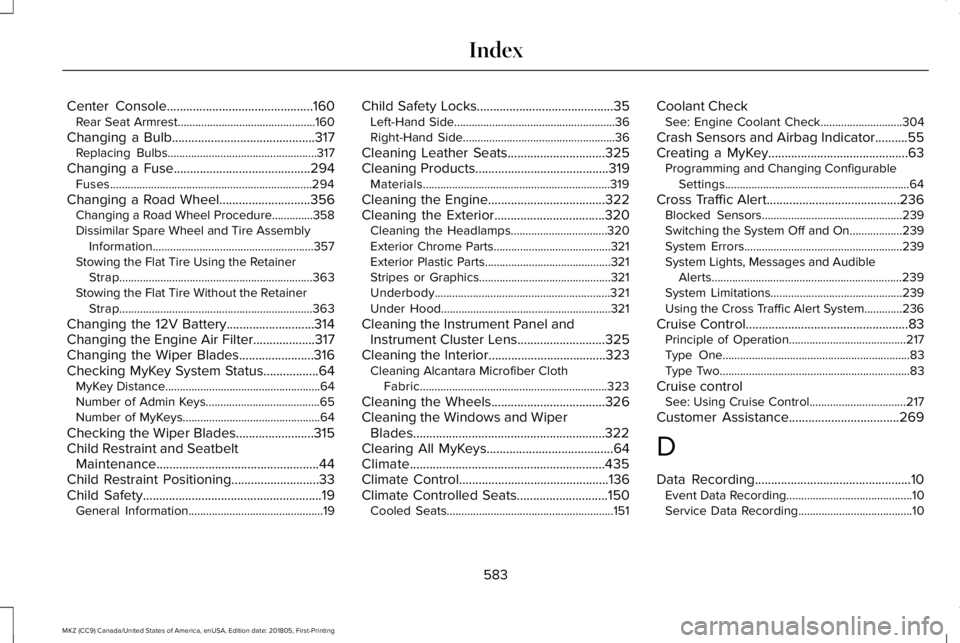
Center Console.............................................160Rear Seat Armrest...............................................160
Changing a Bulb............................................317Replacing Bulbs...................................................317
Changing a Fuse..........................................294Fuses.....................................................................294
Changing a Road Wheel............................356Changing a Road Wheel Procedure..............358Dissimilar Spare Wheel and Tire AssemblyInformation.......................................................357Stowing the Flat Tire Using the RetainerStrap..................................................................363Stowing the Flat Tire Without the RetainerStrap..................................................................363
Changing the 12V Battery...........................314Changing the Engine Air Filter...................317Changing the Wiper Blades.......................316Checking MyKey System Status.................64MyKey Distance.....................................................64Number of Admin Keys.......................................65Number of MyKeys...............................................64
Checking the Wiper Blades........................315Child Restraint and SeatbeltMaintenance..................................................44Child Restraint Positioning...........................33Child Safety.......................................................19General Information..............................................19
Child Safety Locks..........................................35Left-Hand Side.......................................................36Right-Hand Side....................................................36
Cleaning Leather Seats..............................325Cleaning Products.........................................319Materials................................................................319
Cleaning the Engine....................................322Cleaning the Exterior..................................320Cleaning the Headlamps.................................320Exterior Chrome Parts........................................321Exterior Plastic Parts...........................................321Stripes or Graphics.............................................321Underbody............................................................321Under Hood..........................................................321
Cleaning the Instrument Panel andInstrument Cluster Lens...........................325Cleaning the Interior....................................323Cleaning Alcantara Microfiber ClothFabric................................................................323
Cleaning the Wheels...................................326Cleaning the Windows and WiperBlades...........................................................322Clearing All MyKeys.......................................64Climate............................................................435Climate Control..............................................136Climate Controlled Seats............................150Cooled Seats.........................................................151
Coolant CheckSee: Engine Coolant Check............................304
Crash Sensors and Airbag Indicator..........55Creating a MyKey...........................................63Programming and Changing ConfigurableSettings...............................................................64
Cross Traffic Alert.........................................236Blocked Sensors................................................239Switching the System Off and On..................239System Errors......................................................239System Lights, Messages and AudibleAlerts.................................................................239System Limitations.............................................239Using the Cross Traffic Alert System.............236
Cruise Control..................................................83Principle of Operation........................................217Type One................................................................83Type Two.................................................................83
Cruise controlSee: Using Cruise Control.................................217
Customer Assistance..................................269
D
Data Recording................................................10Event Data Recording...........................................10Service Data Recording.......................................10
583
MKZ (CC9) Canada/United States of America, enUSA, Edition date: 201805, First-Printing
Index