jump start LINCOLN MKZ 2019 Owners Manual
[x] Cancel search | Manufacturer: LINCOLN, Model Year: 2019, Model line: MKZ, Model: LINCOLN MKZ 2019Pages: 595, PDF Size: 4.95 MB
Page 7 of 595
Using Cruise Control...................................217
Using Adaptive Cruise Control.................218
Driving Aids
Driver Alert....................................................227
Lane Keeping System................................229
Blind Spot Information System................234
Cross Traffic Alert........................................236
Steering.........................................................240
Pre-Collision Assist......................................241
Drive Control................................................246
Load Carrying
Load Limit......................................................248
Towing
Towing a Trailer............................................253
Recommended Towing Weights.............254
Essential Towing Checks..........................255
Towing the Vehicle on Four Wheels......257
Driving Hints
Breaking-In...................................................259
Economical Driving.....................................259
Driving Through Water..............................259
Floor Mats.....................................................260
Roadside Emergencies
Roadside Assistance..................................262
Hazard Flashers..........................................263
Fuel Shutoff..................................................263
Jump Starting the Vehicle.........................264
Post-Crash Alert System...........................266
Transporting the Vehicle...........................267
Towing Points...............................................268
Customer Assistance
Getting the Services You Need...............269
In California (U.S. Only)..............................270
The Better Business Bureau (BBB) AutoLine Program (U.S. Only)........................271
Utilizing the Mediation/Arbitration Program(Canada Only)..........................................272
Getting Assistance Outside the U.S. andCanada.......................................................273
Ordering Additional Owner's Literature......................................................................275
Reporting Safety Defects (U.S. Only)......275
Reporting Safety Defects (Canada Only)......................................................................276
Fuses
Fuse Specification Chart............................277
Changing a Fuse.........................................294
Maintenance
General Information....................................297
Opening and Closing the Hood..............297
Under Hood Overview - 2.0L...................298
Under Hood Overview - 3.0L...................300
Engine Oil Dipstick - 2.0L.........................302
Engine Oil Dipstick - 3.0L..........................302
Engine Oil Check........................................302
Oil Change Indicator Reset......................303
Engine Coolant Check...............................304
Automatic Transmission Fluid Check......308
Brake Fluid Check........................................313
Washer Fluid Check.....................................313
Fuel Filter........................................................313
Changing the 12V Battery..........................314
4
MKZ (CC9) Canada/United States of America, enUSA, Edition date: 201805, First-Printing
Table of Contents
Page 177 of 595
•An open or pinched sensor hose.
•Incorrect engine oil level.
•Incorrect fuel for climatic conditions.
•Incorrect engine oil viscosity for climacticconditions.
Note:Some vehicles have a lifetime fuel filterthat is integrated with the fuel tank. Regularmaintenance or replacement is not needed.
Note:If these checks do not help you correctthe concern, have your vehicle checked assoon as possible.
Noise Emissions Warranty, ProhibitedTampering Acts and Maintenance
On January 1, 1978, Federal regulationbecame effective governing the noiseemission on trucks over 10,000 lb (4,536 kg)Gross Vehicle Weight Rating (GVWR). Thepreceding statements concerning prohibitedtampering acts and maintenance, and thenoise warranty found in the Warranty Guide,are applicable to complete chassis cabs over10,000 lb (4,536 kg) GVWR.
CATALYTIC CONVERTER
WARNING: Do not park, idle or driveyour vehicle on dry grass or other dry groundcover. The emission system heats up theengine compartment and exhaust system,creating the risk of fire.
WARNING: The normal operatingtemperature of the exhaust system is veryhigh. Never work around or attempt to repairany part of the exhaust system until it hascooled. Use special care when workingaround the catalytic converter. The catalyticconverter heats up to a very hightemperature after only a short period ofengine operation and stays hot after theengine is switched off.
WARNING: Exhaust leaks may resultin entry of harmful and potentially lethalfumes into the passenger compartment. Ifyou smell exhaust fumes inside your vehicle,have your vehicle inspected immediately. Donot drive if you smell exhaust fumes.
Your vehicle has various emission controlcomponents and a catalytic converter thatenables it to comply with applicable exhaustemission standards.
To make sure that the catalytic converter andother emission control components continueto work properly:
•Do not crank the engine for more than10 seconds at a time.
•Do not run the engine with a spark pluglead disconnected.
•Do not push-start or tow-start yourvehicle. Use booster cables. See JumpStarting the Vehicle (page 264).
•Use only the specified fuel listed.
•Do not switch the ignition off when yourvehicle is moving.
•Avoid running out of fuel.
•Have the items listed in scheduledmaintenance information performedaccording to the specified schedule.
Note:Resulting component damage maynot be covered by the vehicle Warranty.
174
MKZ (CC9) Canada/United States of America, enUSA, Edition date: 201805, First-Printing
Engine Emission Control
Page 197 of 595
Pull the switch upward and hold it.
The red warning lamp illuminates,a tone sounds and the stoplampsturn on.
The electric parking brake continues to slowyour vehicle down unless you release theswitch.
Manually Releasing the Electric ParkingBrake
Switch the ignition on.
Press and hold the brake pedal.
Push the switch downward.
The red warning lamp turns off.
If it remains illuminated or flashes, the systemhas malfunctioned. Have your vehiclechecked as soon as possible.
Pulling Away on a Hill When Towing aTrailer
Press and hold the brake pedal.
Pull the switch upward and hold it.
Shift into gear.
Press the accelerator pedal until engine hasdeveloped sufficient torque to prevent yourvehicle from rolling down the hill.
Release the switch and pull awayin a normal manner.
Automatically Releasing the ElectricParking Brake
Close the driver door.
Shift into gear.
Press the accelerator pedal and pull away ina normal manner.
The red warning lamp turns off.
If it remains illuminated or flashes, the electricparking brake has not released. Manuallyrelease the parking brake.
Releasing the Electric Parking Brake ifthe Vehicle Battery is Running Out ofCharge
Connect a booster battery to the vehiclebattery to release the electric parking brakeif the vehicle battery is running out of charge.See Jump Starting the Vehicle (page 264).
AUTO HOLD
WARNING: The system does notreplace the parking brake. When you leaveyour vehicle, always apply the parking brake.
194
MKZ (CC9) Canada/United States of America, enUSA, Edition date: 201805, First-Printing
BrakesE267156 E270480 E267156 E270480 E267156 E267156 E270480
Page 265 of 595
ROADSIDE ASSISTANCE
Vehicles Sold in the United States:Getting Roadside Assistance
To fully assist you should you have a vehicleconcern, Lincoln Motor Company offers acomplimentary roadside assistance program. This program is separate from the NewVehicle Limited Warranty.
The service is available:
•Throughout the life of the vehicle fororiginal owners.
•For six years from the warranty start dateor 70,000 mi (110,000 km), whichevercomes first, for subsequent owners.
Roadside Assistance covers:
•A flat tire change with a good spare(except vehicles supplied with a tireinflation kit, which may need a tow to thenearest Lincoln dealer).
•Battery jump start.
•Lock-out assistance (key replacementcost is the client's responsibility).
•Fuel delivery — independent servicecontractors, if not prohibited by state,local or municipal law shall deliver up to2 gal (8 L) of gasoline or 5 gal (20 L) ofdiesel fuel to a disabled vehicle.Roadside Assistance limits fuel deliveryservice to two no-charge occurrenceswithin a 12-month period.
•Winch out — available within 100 ft (30 m)of a paved or county maintained road,no recoveries.
•Towing — independent servicecontractors, if not prohibited by state,local or municipal law shall tow Lincolneligible vehicles to the client's selling orpreferred dealer within 100 mi (160 km)of the disablement location or to thenearest Lincoln dealer. If a client requestsa tow to a selling or preferred dealer thatis more than 100 mi (160 km) from thedisablement location, the client isresponsible for any mileage costs inexcess of 100 mi (160 km).
•Roadside Assistance includes up to $200for a towed trailer if the disabled eligiblevehicle requires service at the nearestauthorized dealer.
Vehicles Sold in the United States:Using Roadside Assistance
United States clients who require roadsideassistance, call 1-800-521-4140.
If you need to arrange roadside assistancefor yourself, Lincoln Motor Companyreimburses a reasonable amount for towingto the nearest Lincoln dealership within100 mi (160 km). To obtain reimbursementinformation, United States clients, call1-800-521-4140. Clients need to submit theiroriginal receipts.
Vehicles Sold in Canada: GettingRoadside Assistance
To fully assist you should you have a vehicleconcern, Lincoln Motor Company offers acomplimentary roadside assistance program. This program is eligible within Canada or thecontinental United States.
262
MKZ (CC9) Canada/United States of America, enUSA, Edition date: 201805, First-Printing
Roadside Emergencies
Page 267 of 595
1. Press START/STOP to switch off yourvehicle.
2.Press the brake pedal and START/STOPto switch on your vehicle.
3. Remove your foot from the brake pedaland press START/STOP to switch offyour vehicle.
4. You can attempt to start the vehicle bypressing the brake pedal andSTART/STOP, or press START/STOPwithout pressing the brake pedal.
JUMP STARTING THE VEHICLE
WARNING: Batteries normally produceexplosive gases which can cause personalinjury. Therefore, do not allow flames, sparksor lighted substances to come near thebattery. When working near the battery,always shield your face and protect youreyes. Always provide correct ventilation.
WARNING: Keep batteries out of reachof children. Batteries contain sulfuric acid.Avoid contact with skin, eyes or clothing.Shield your eyes when working near thebattery to protect against possible splashingof acid solution. In case of acid contact withskin or eyes, flush immediately with waterfor a minimum of 15 minutes and get promptmedical attention. If acid is swallowed, call aphysician immediately.
WARNING: Use only adequately sizedcables with insulated clamps.
Preparing Your Vehicle
Do not attempt to push-start your automatictransmission vehicle.
Note:Attempting to push-start a vehicle withan automatic transmission may causetransmission damage.
Note:Use only a 12-volt supply to start yourvehicle.
Note:Do not disconnect the battery of thedisabled vehicle as this could damage thevehicle electrical system.
Park the booster vehicle close to the hoodof the disabled vehicle, making sure the twovehicles do not touch.
Connecting the Jumper Cables
WARNING: Do not connect the end ofthe second cable to the negative (-) terminalof the battery to be jumped. A spark maycause an explosion of the gases thatsurround the battery.
WARNING: Do not use fuel lines,engine valve covers, windshield wiper arms,the intake manifold, or hood latch as groundpoints.
Note:Do not attach the end of the positivecable to the studs or L-shaped eyelet locatedabove the positive (+) terminal of yourvehicle’s battery. High current may flowthrough and cause damage to the fuses.
264
MKZ (CC9) Canada/United States of America, enUSA, Edition date: 201805, First-Printing
Roadside Emergencies
Page 268 of 595
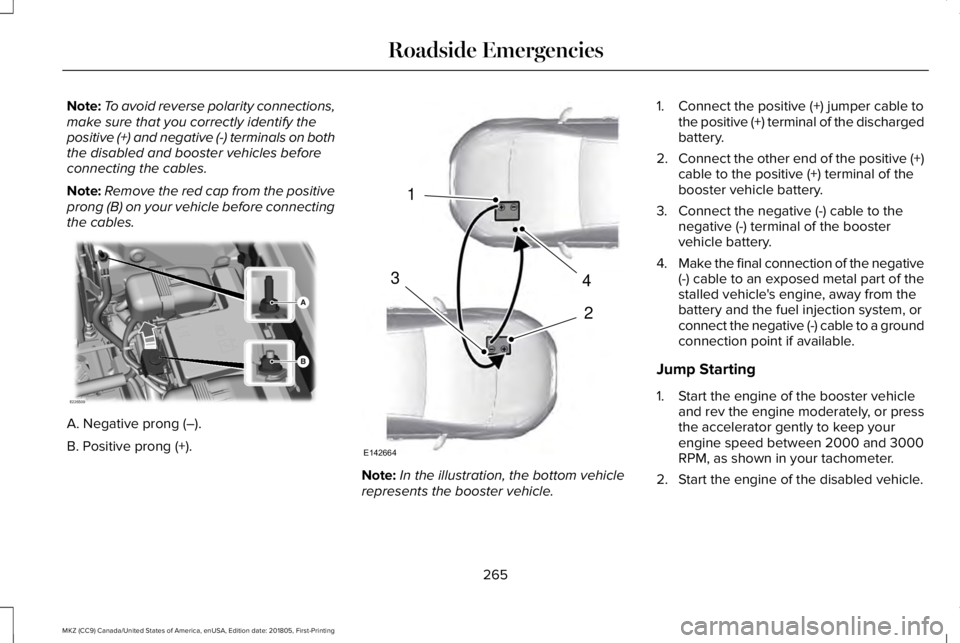
Note:To avoid reverse polarity connections,make sure that you correctly identify thepositive (+) and negative (-) terminals on boththe disabled and booster vehicles beforeconnecting the cables.
Note:Remove the red cap from the positiveprong (B) on your vehicle before connectingthe cables.
A. Negative prong (–).
B. Positive prong (+).
Note:In the illustration, the bottom vehiclerepresents the booster vehicle.
1. Connect the positive (+) jumper cable tothe positive (+) terminal of the dischargedbattery.
2.Connect the other end of the positive (+)cable to the positive (+) terminal of thebooster vehicle battery.
3. Connect the negative (-) cable to thenegative (-) terminal of the boostervehicle battery.
4.Make the final connection of the negative(-) cable to an exposed metal part of thestalled vehicle's engine, away from thebattery and the fuel injection system, orconnect the negative (-) cable to a groundconnection point if available.
Jump Starting
1. Start the engine of the booster vehicleand rev the engine moderately, or pressthe accelerator gently to keep yourengine speed between 2000 and 3000RPM, as shown in your tachometer.
2. Start the engine of the disabled vehicle.
265
MKZ (CC9) Canada/United States of America, enUSA, Edition date: 201805, First-Printing
Roadside EmergenciesE226509 4
2
1
3
E142664
Page 269 of 595
3. Once the disabled vehicle has beenstarted, run both vehicle engines for anadditional three minutes beforedisconnecting the jumper cables.
Removing the Jumper Cables
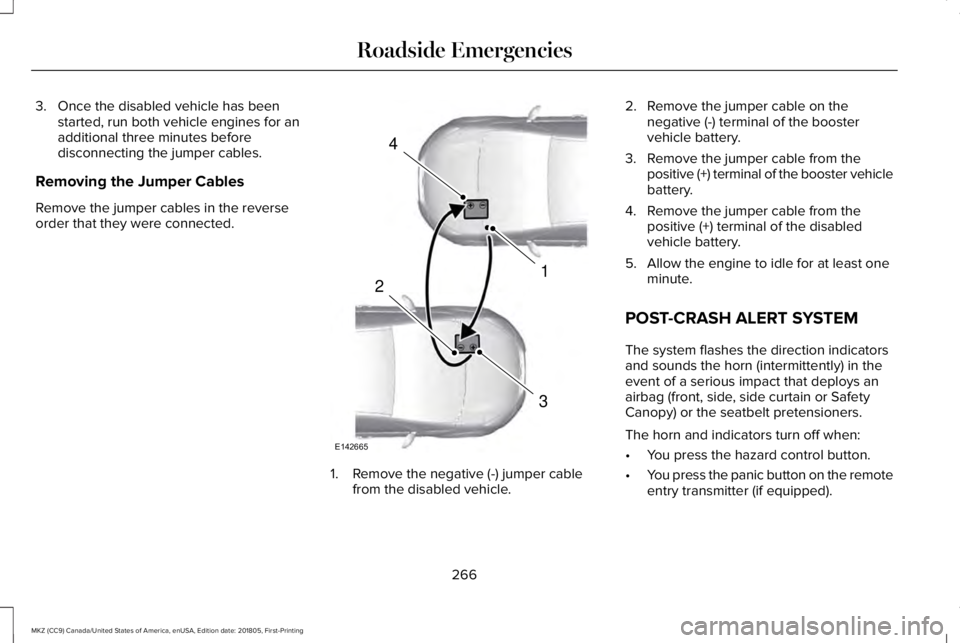
Remove the jumper cables in the reverseorder that they were connected.
1. Remove the negative (-) jumper cablefrom the disabled vehicle.
2. Remove the jumper cable on thenegative (-) terminal of the boostervehicle battery.
3. Remove the jumper cable from thepositive (+) terminal of the booster vehiclebattery.
4. Remove the jumper cable from thepositive (+) terminal of the disabledvehicle battery.
5. Allow the engine to idle for at least oneminute.
POST-CRASH ALERT SYSTEM
The system flashes the direction indicatorsand sounds the horn (intermittently) in theevent of a serious impact that deploys anairbag (front, side, side curtain or SafetyCanopy) or the seatbelt pretensioners.
The horn and indicators turn off when:
•You press the hazard control button.
•You press the panic button on the remoteentry transmitter (if equipped).
266
MKZ (CC9) Canada/United States of America, enUSA, Edition date: 201805, First-Printing
Roadside Emergencies4
1
3
2
E142665
Page 318 of 595
Because your vehicle’s engine iselectronically-controlled by a computer,some engine control settings are maintainedby power from the battery. Some enginecomputer settings, like the idle trim and fueltrim strategy, optimize the driveability andperformance of the engine. The clock andradio station presets are also maintained inmemory by power from the low-voltagebattery. These settings are erased when atechnician disconnects and connects thelow-voltage battery.
To restore the settings, do the following:
Note:Until you switch the ignition to the onposition, you will receive a message in yourinformation display stating that your vehicleis not in park.
1. Apply the parking brake.
2. Shift into park (P) or neutral (N).
3. Switch off all accessories.
4. Press the brake pedal and start yourvehicle.
5. Run the engine until it reaches normaloperating temperature. While the engineis warming up, complete the following:Reset the clock. See Audio Unit (page391). Reset the power windowsbounce-back feature. See PowerWindows (page 95). Reset the radiostation presets. See Audio Unit (page391).
6. Allow the engine to idle for at least oneminute.
7.Drive the vehicle at least 10 mi (16 km) tocompletely relearn the idle trim and fueltrim strategy.
Note:If you do not allow the engine torelearn the idle and fuel trim strategy, theidle quality of your vehicle may be adverselyaffected until the engine computereventually relearns the idle trim and fuel trimstrategy.
Note:Certain features may not operate ifthe battery monitor system is not reset witha scan tool following a jump start or batteryreplacement. Normal electrical accessoryoperation should resume after your vehicleis left undisturbed for 8 hours.
Make sure that you dispose of old batteriesin an environmentally friendly way. Seekadvice from your local authority aboutrecycling old batteries.
If storing your vehicle for more than 30 dayswithout recharging the battery, werecommend that you disconnect the batterycables to maintain battery charge for quickstarting.
CHECKING THE WIPER BLADES
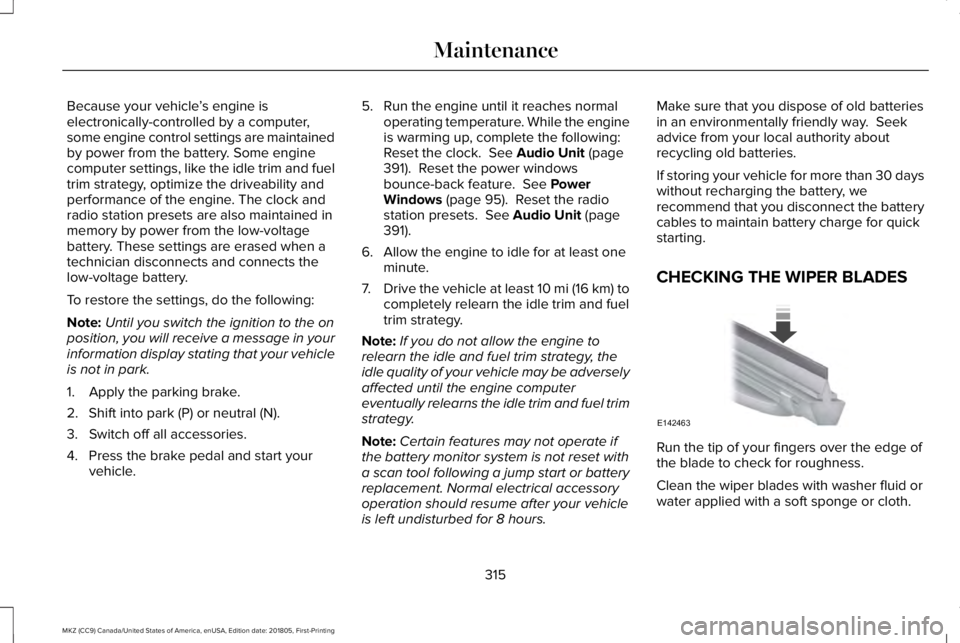
Run the tip of your fingers over the edge ofthe blade to check for roughness.
Clean the wiper blades with washer fluid orwater applied with a soft sponge or cloth.
315
MKZ (CC9) Canada/United States of America, enUSA, Edition date: 201805, First-Printing
MaintenanceE142463
Page 504 of 595
PROTECT YOURSELF FROM THE RISINGCOST OF VEHICLE REPAIRS WITHLINCOLN PROTECT EXTENDED SERVICEPLAN.
Lincoln Protect Extended Service Plans(U.S. Only)
Lincoln Protect means peace of mind. It’s theextended service plan backed by the LincolnMotor Company, and provides moreprotection beyond the New Vehicle LimitedWarranty coverage. When you visit yourLincoln Dealer, insist on genuine LincolnProtect extended service plans!
Lincoln Protect Extended Service Plan CanQuickly Pay for Itself
One trip to the Service Center could easilyexceed the price of your Lincoln Protectextended service plan. With Lincoln Protectyou minimize your risk for unexpected repairbills and rising repair costs.
Up to 1000+ Covered Vehicle Components
There are four mechanical Lincoln Protectextended service plans with different levelsof coverage. Ask your authorized dealer fordetails.
1.PremiumCARE - Our most comprehensivecoverage. With over 1,000 coveredcomponents, this plan is so complete it’sprobably easier to list what’s not covered.
2.ExtraCARE - Covers 113 components, andincludes many high-tech items.
3. BaseCARE - Covers 84 components.
4. PowertrainCARE - Covers 29 criticalcomponents.
Lincoln Protect extended service plans arehonored by all authorized Lincoln dealers inthe U.S., Canada and Mexico.
That means you get:
•Reliable, quality service at any Lincoln orFord dealership.
•Repairs performed by factory trainedtechnicians, using genuine parts.
Rental Car Reimbursement
1st day Rental Benefit
If you bring your car into your dealer forservice, we’ll give you a loaner to use for theday.
Extended Rental Benefits
If your vehicle is kept overnight for coveredrepairs, you are eligible for rental carcoverage, including bumper to bumperwarranty repairs, and Field Service Actions.
Roadside Assistance
Exclusive 24/7 roadside assistance, including:
•Towing, flat-tire change and battery jumpstarts.
•Out of fuel and lock-out assistance.
•Travel expense reimbursement forlodging, meals and rental car.
•Assistance for taxi, shuttle, rental carcoverage and other transportation.
501
MKZ (CC9) Canada/United States of America, enUSA, Edition date: 201805, First-Printing
Lincoln Protect
Page 590 of 595
J
Jump Starting the Vehicle..........................264Connecting the Jumper Cables.....................264Jump Starting......................................................265Preparing Your Vehicle.....................................264Removing the Jumper Cables........................266
K
Keyless Entry....................................................73SECURICODE™ KEYLESS ENTRYKEYPAD...............................................................73
Keyless Starting..............................................161Ignition Modes......................................................161
Keys and Remote Controls...........................57
L
Lane Keeping System.................................229Switching the System On and Off..................230
Lighting Control...............................................87Flashing the Headlamp High Beam.................88Headlamp High Beam.........................................88
Lighting..............................................................87General Information..............................................87
Lincoln Automotive Financial Services......12
Lincoln Protect...............................................501Lincoln Protect (CANADA ONLY)...................502Lincoln Protect Extended Service Plans (U.S.Only)...................................................................501
Load Carrying................................................248Load Limit.......................................................248Special Loading Instructions for Owners ofPick-up Trucks and Utility-typeVehicles............................................................252Vehicle Loading - with and without aTrailer................................................................248
Locking and Unlocking..................................67Activating Intelligent Access.............................68Autolock..................................................................70Battery Saver...........................................................71Illuminated Entry...................................................70Illuminated Exit......................................................70Locking and Unlocking the Doors with theKey Blade...........................................................69Luggage Compartment........................................71Power Door Locks................................................67Remote Control.....................................................67Smart Unlocks for Intelligent AccessKeys.....................................................................69
Lug NutsSee: Changing a Road Wheel.........................356
M
Maintenance..................................................297General Information...........................................297
Media Hub......................................................392Memory Function...........................................147Easy Entry and Exit Feature..............................148Linking a PreSet Position to your RemoteControl or Intelligent Access Key Fob.......148Saving a PreSet Position....................................147
Message CenterSee: Information Displays..................................110
MirrorsSee: Windows and Mirrors.................................95
Mobile Communications Equipment...........14Moonroof.........................................................100Opening and Closing.........................................102Type 1.......................................................................101Type 2.....................................................................101
Motorcraft Parts - 2.0L................................368Motorcraft Parts - 3.0L.................................370MyKey Troubleshooting................................65MyKey™..............................................................62Principle of Operation.........................................62
587
MKZ (CC9) Canada/United States of America, enUSA, Edition date: 201805, First-Printing
Index