battery LINCOLN MKZ HYBRID 2013 User Guide
[x] Cancel search | Manufacturer: LINCOLN, Model Year: 2013, Model line: MKZ HYBRID, Model: LINCOLN MKZ HYBRID 2013Pages: 475, PDF Size: 3.89 MB
Page 90 of 475
POWER WINDOWS
WARNINGS
Do not leave children
unattended in your vehicle and
do not let them play with the power
windows. They may seriously injure
themselves. When closing the power
windows, you should verify they
are free of obstructions and make sure
that children and pets are not in the
proximity of the window openings. Note:
Window operation may stop or
delay during low battery conditions and
engine re-cranking. It will resume after
the engine starts. Note:
You may hear a pulsing noise
when just one of the windows are open.
Lower the opposite window slightly to
reduce this noise.
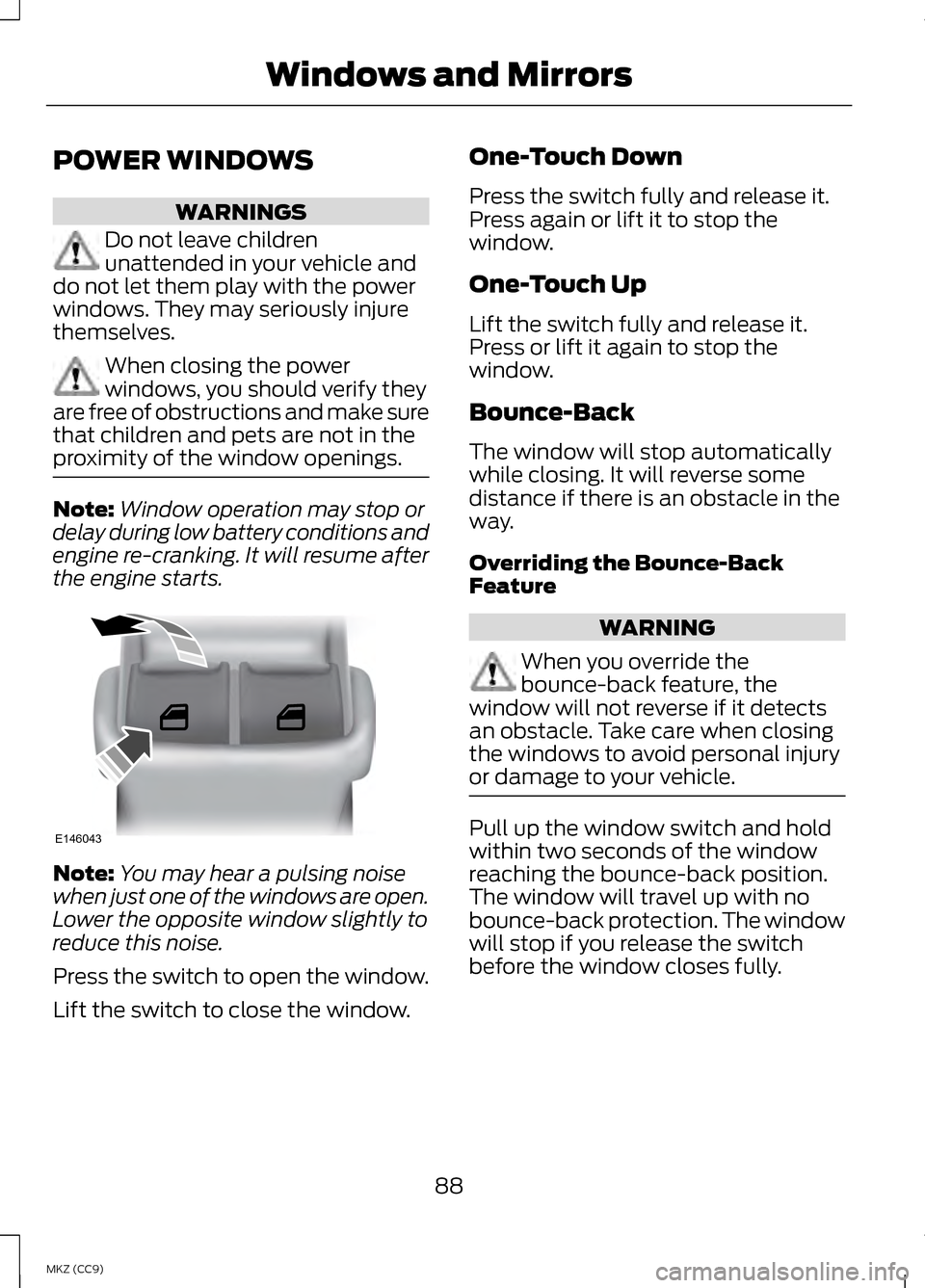
Press the switch to open the window.
Lift the switch to close the window. One-Touch Down
Press the switch fully and release it.
Press again or lift it to stop the
window.
One-Touch Up
Lift the switch fully and release it.
Press or lift it again to stop the
window.
Bounce-Back
The window will stop automatically
while closing. It will reverse some
distance if there is an obstacle in the
way.
Overriding the Bounce-Back
Feature
WARNING
When you override the
bounce-back feature, the
window will not reverse if it detects
an obstacle. Take care when closing
the windows to avoid personal injury
or damage to your vehicle. Pull up the window switch and hold
within two seconds of the window
reaching the bounce-back position.
The window will travel up with no
bounce-back protection. The window
will stop if you release the switch
before the window closes fully.
88
MKZ (CC9) Windows and MirrorsE146043
Page 98 of 475
Right Information Display
Efficiency Leaves
Efficiency leaves indicate short term
driving efficiency. The more leaves
and vines that are displayed, the
better your fuel economy. Leaves and
vines will occasionally appear and
disappear to indicate a change in
driving efficiency.
Note:
The efficiency leaves display can
be impacted by your use of brakes,
accelerator and accessories, as well as
environmental conditions such as hills
and weather.
Flowers
Flowers appear on the efficiency
leaves screen in addition to the leaves
and vines. The flowers indicate long
term driving efficiency. The more
flowers that are displayed, the more
efficiently you have driven. Once
earned, the flowers will remain unless
reset. The flowers, along with the
vehicle's lifetime fuel economy, can
be reset through the information
display. See General Information
(page 103).
Common Displays
Note: Battery gauge information can
be individually selected on or off
through Battery Display in the Options
sub-menu. From any main display a
right arrow press on the steering wheel
controls will take you to the options
sub-menu. Battery Gauge:
The high-voltage battery gauge
appears on the right side of the left
information display screen. This
provides Charge Fill (State of Charge),
Charge Assist and Regen Display.
Charge Fill (Hybrid Mode)
The fill level, or State of Charge
indicates the amount of energy stored
in the high-voltage battery as a
percent of total energy capacity. The
level will increase or decrease as the
battery charges and discharges during
normal operation, but the hybrid
system will attempt to control the
level to approximately the middle of
the gauge under most driving
conditions.
Charge Assist
The up and down arrows provide
information about the energy going
into and out of the high-voltage
battery. The up arrow above the
battery indicates battery charging
such as from regenerative braking.
The down arrow below the battery
indicates battery discharging to
provide power for propulsion or
vehicle accessories.
Regen Display
A circular arrow symbol appears in the
center of the Battery Gauge when
energy is being recaptured through
the regenerative braking system.
96
MKZ (CC9) Instrument Cluster
Page 99 of 475
Fuel Gauge:
The fuel gauge will indicate
approximately how much fuel is left
in the fuel tank. The fuel gauge may
vary slightly when your vehicle is
moving or on a gradient. The arrow
adjacent to the fuel pump symbol
indicates on which side of the vehicle
the fuel filler door is located.
Brake Coach Display:
The Brake Coach appears after the
vehicle has come to a stop. It coaches
you to brake in a manner which
maximizes the amount of energy
returned through the regenerative
braking system. The percent displayed
is an indication of the regenerative
braking efficiency with 100%
representing the maximum amount
of energy recovery.
Trip Summary and Lifetime
Summary:
These will be displayed upon shutting
off the vehicle. Trip Summary will
appear first, then Lifetime Summary
will be displayed. You can toggle
between these displays using the up
and down arrow keys on the left hand
steering wheel controls.
Trip Summary data is from the last
power cycle, while Lifetime Summary
data is cumulative from the last
Lifetime Summary reset done through
the Settings menu in the information
display screen.
Trip Summary:
•
Distance- The total distance
traveled, distance traveled on
battery power only (EV distance)
and Regen distance are displayed.
Regen distance is the estimated
range gained from energy
recaptured through regenerative
braking.
• Energy Use- The average fuel
economy and total fuel used are
displayed.
• Brake Score- The average
percentage of braking energy
recaptured and returned to the
high-voltage battery through
regenerative braking. The brake
score will be shown in blue if
greater than (better than) the
lifetime brake score.
Lifetime Summary:
• Distance- The distance traveled
on battery power only (EV
distance) and Regen distance are
displayed. Regen distance is the
estimated range gained from
energy recaptured through
regenerative braking.
• Energy Use- The average fuel
economy and total fuel used are
displayed.
• Brake Score- The average
percentage of braking energy
recaptured and returned to the
high-voltage battery through
regenerative braking.
97
MKZ (CC9) Instrument Cluster
Page 100 of 475
WARNING LAMPS AND
INDICATORS
The following warning lamps and
indicators will alert you to a vehicle
condition that may become serious.
Some lamps will illuminate when you
start your vehicle to make sure they
work. If any lamps remain on after
starting your vehicle, refer to the
respective system warning lamp for
further information.
Note:
Some warning indicators appear
in the information display and function
the same as a warning lamp but do not
display when you start your vehicle.
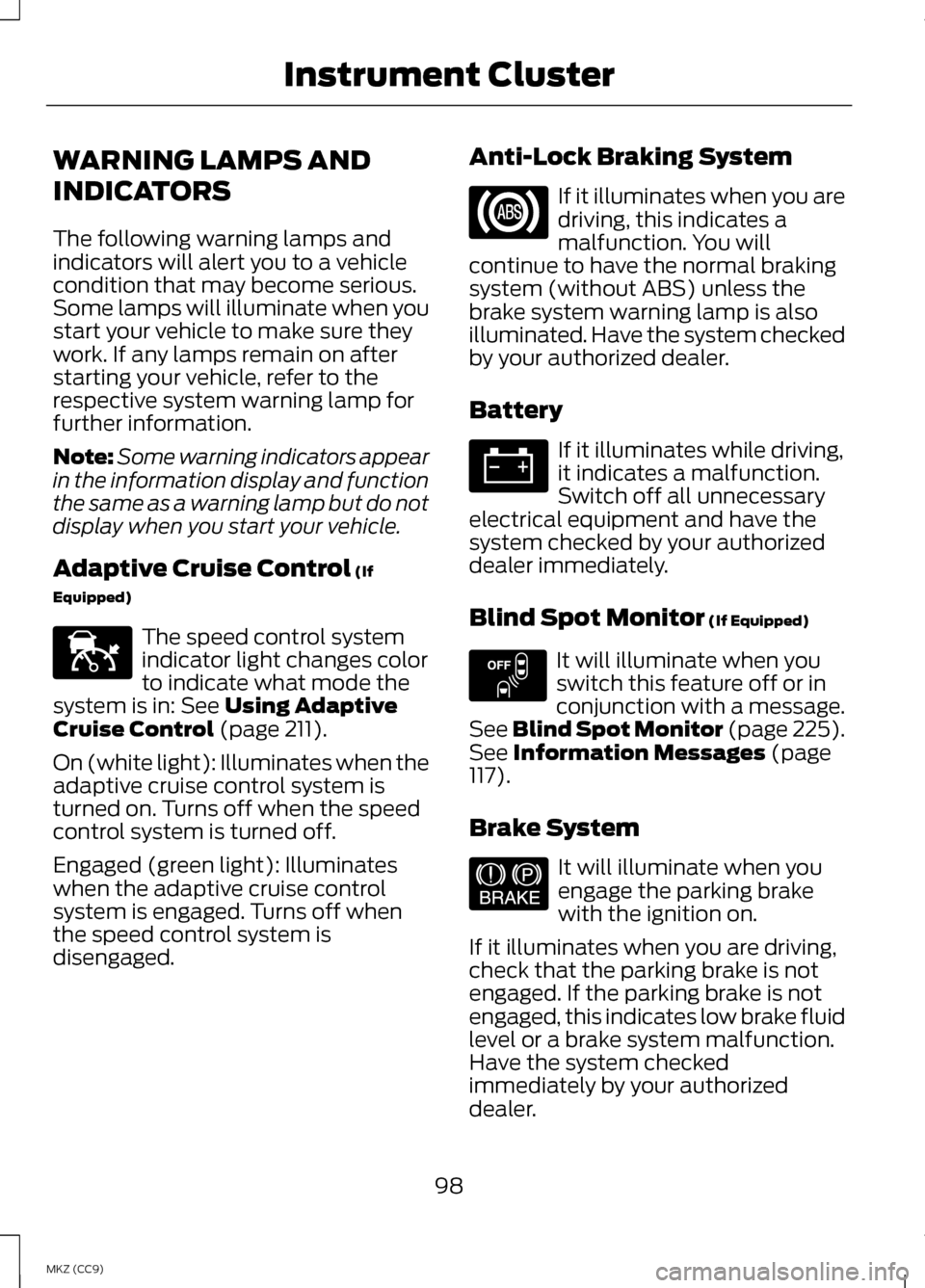
Adaptive Cruise Control (If
Equipped) The speed control system
indicator light changes color
to indicate what mode the
system is in:
See Using Adaptive
Cruise Control (page 211).
On (white light): Illuminates when the
adaptive cruise control system is
turned on. Turns off when the speed
control system is turned off.
Engaged (green light): Illuminates
when the adaptive cruise control
system is engaged. Turns off when
the speed control system is
disengaged. Anti-Lock Braking System If it illuminates when you are
driving, this indicates a
malfunction. You will
continue to have the normal braking
system (without ABS) unless the
brake system warning lamp is also
illuminated. Have the system checked
by your authorized dealer.
Battery If it illuminates while driving,
it indicates a malfunction.
Switch off all unnecessary
electrical equipment and have the
system checked by your authorized
dealer immediately.
Blind Spot Monitor
(If Equipped) It will illuminate when you
switch this feature off or in
conjunction with a message.
See Blind Spot Monitor (page 225).
See
Information Messages (page
117).
Brake System It will illuminate when you
engage the parking brake
with the ignition on.
If it illuminates when you are driving,
check that the parking brake is not
engaged. If the parking brake is not
engaged, this indicates low brake fluid
level or a brake system malfunction.
Have the system checked
immediately by your authorized
dealer.
98
MKZ (CC9) Instrument ClusterE144524 E151262 E144522
Page 106 of 475
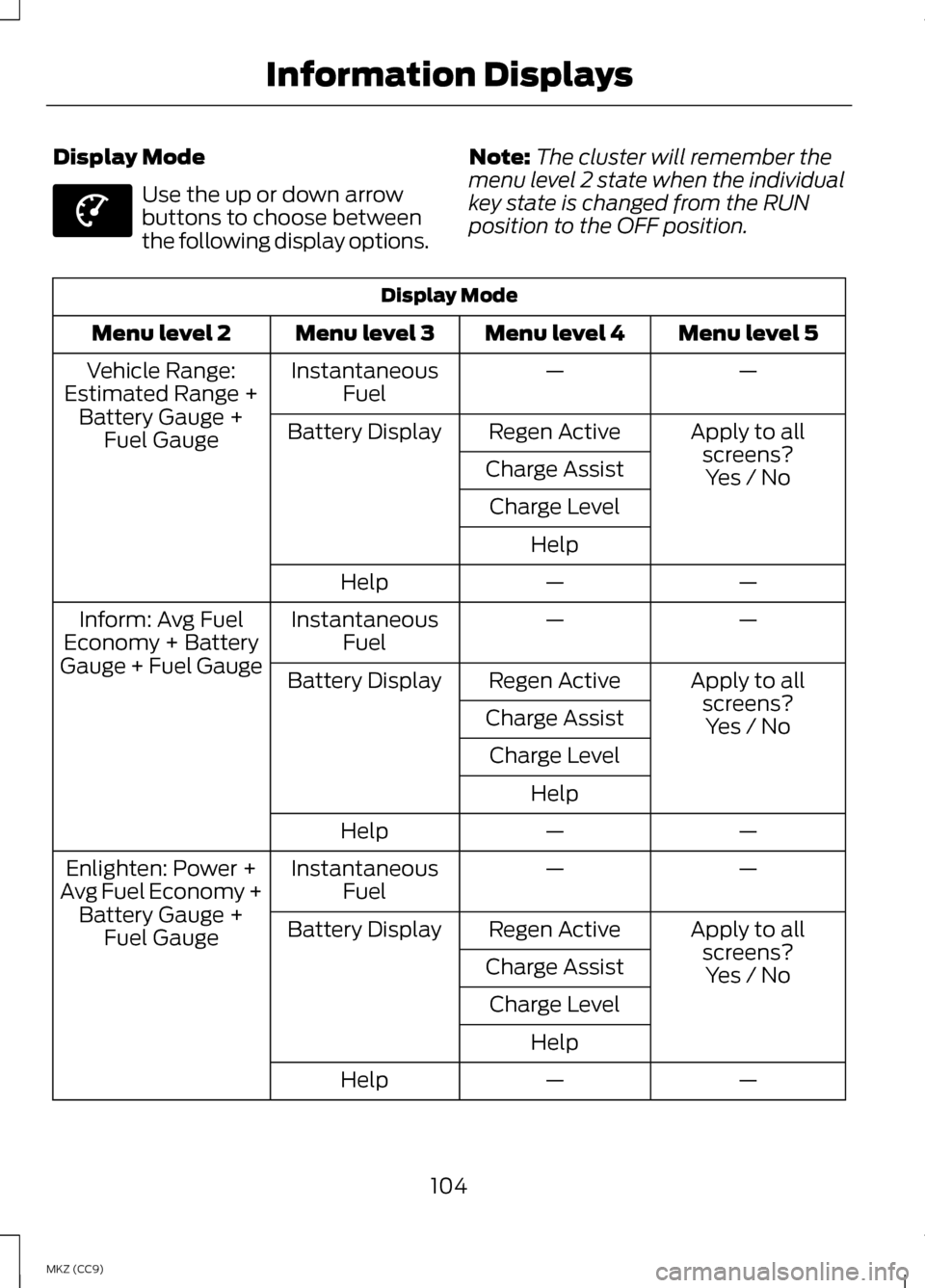
Display Mode
Use the up or down arrow
buttons to choose between
the following display options.
Note:
The cluster will remember the
menu level 2 state when the individual
key state is changed from the RUN
position to the OFF position. Display Mode
Menu level 5
Menu level 4
Menu level 3
Menu level 2
—
—
Instantaneous
Fuel
Vehicle Range:
Estimated Range + Battery Gauge + Fuel Gauge Apply to all
screens?
Regen Active
Battery Display
Charge Assist Yes / No
Charge Level
Help —
—
Help
—
—
Instantaneous
Fuel
Inform: Avg Fuel
Economy + Battery
Gauge + Fuel Gauge Apply to all
screens?
Regen Active
Battery Display
Charge Assist Yes / No
Charge Level
Help —
—
Help
—
—
Instantaneous
Fuel
Enlighten: Power +
Avg Fuel Economy + Battery Gauge + Fuel Gauge Apply to all
screens?
Regen Active
Battery Display
Charge Assist Yes / No
Charge Level
Help —
—
Help
104
MKZ (CC9) Information DisplaysE144639
Page 107 of 475
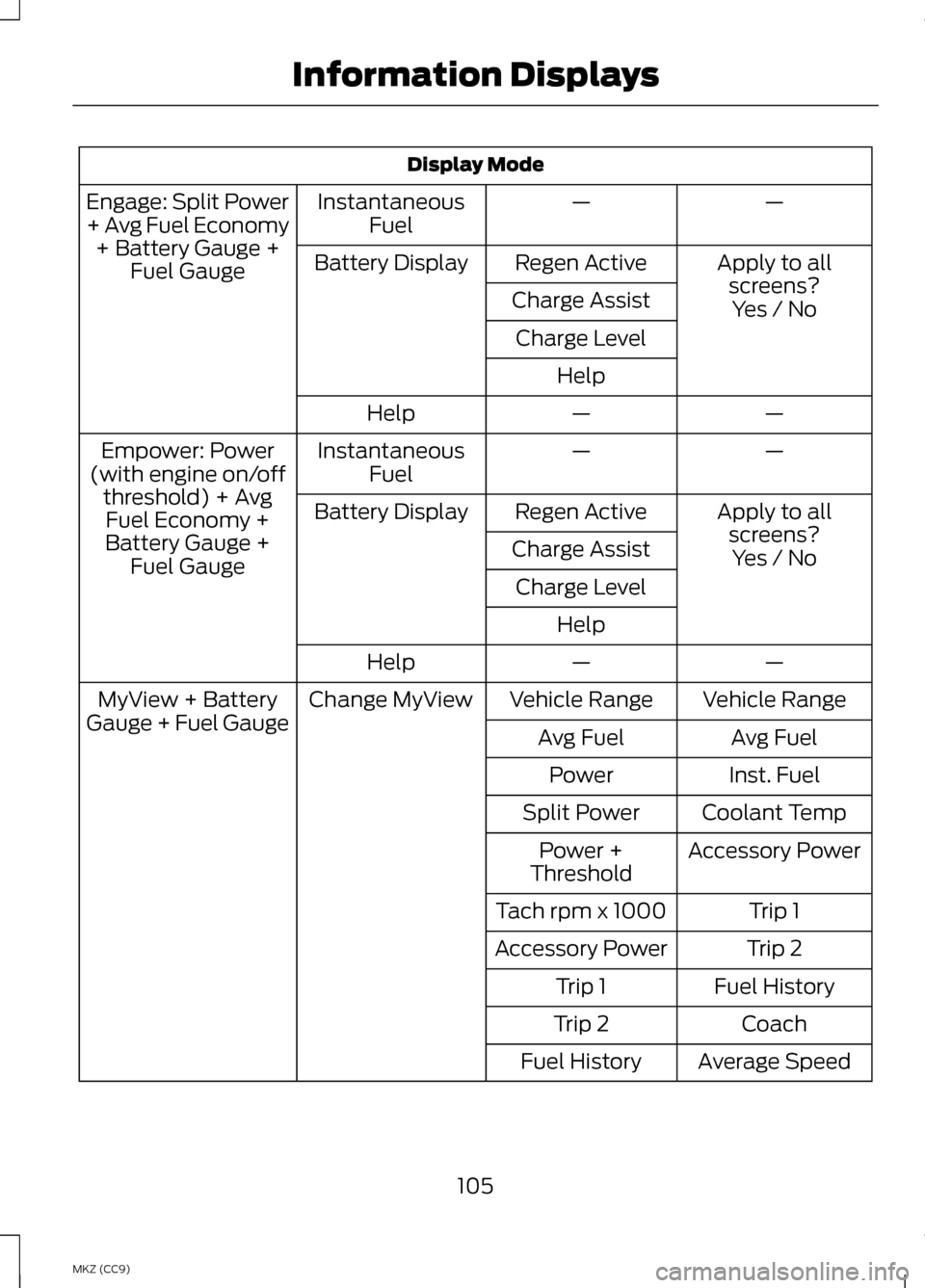
Display Mode
—
—
Instantaneous
Fuel
Engage: Split Power
+ Avg Fuel Economy
+ Battery Gauge + Fuel Gauge Apply to all
screens?
Regen Active
Battery Display
Charge Assist Yes / No
Charge Level
Help —
—
Help
—
—
Instantaneous
Fuel
Empower: Power
(with engine on/off threshold) + AvgFuel Economy +
Battery Gauge + Fuel Gauge Apply to all
screens?Yes / No
Regen Active
Battery Display
Charge AssistCharge Level Help —
—
Help
Vehicle Range
Vehicle Range
Change MyView
MyView + Battery
Gauge + Fuel Gauge Avg Fuel
Avg Fuel
Inst. Fuel
Power
Coolant Temp
Split Power
Accessory Power
Power +
Threshold
Trip 1
Tach rpm x 1000
Trip 2
Accessory Power
Fuel History
Trip 1
Coach
Trip 2
Average Speed
Fuel History
105
MKZ (CC9) Information Displays
Page 108 of 475
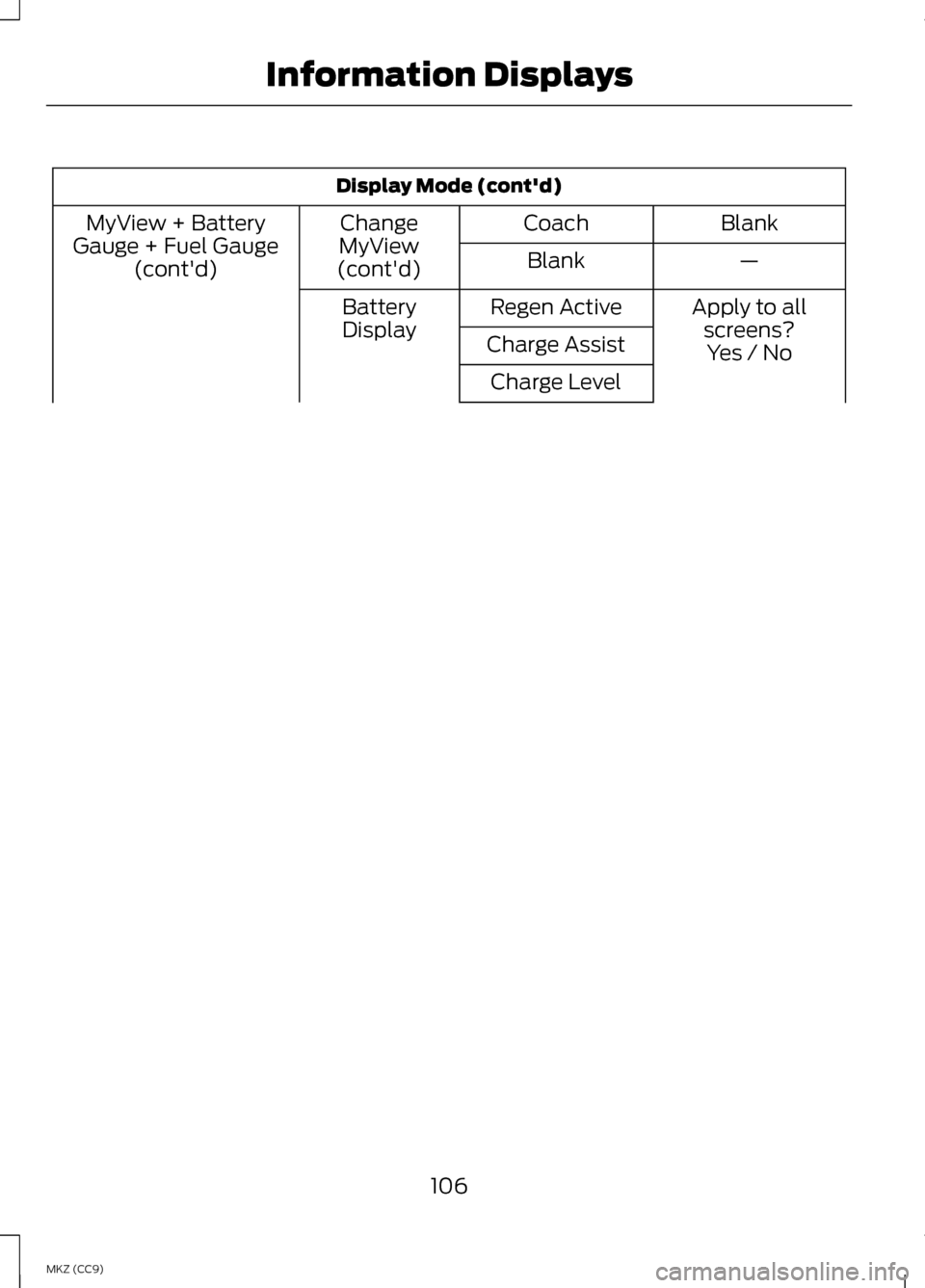
Display Mode (cont'd)
Blank
Coach
Change
MyView
(cont'd)
MyView + Battery
Gauge + Fuel Gauge (cont'd) —
Blank
Apply to allscreens?
Regen Active
Battery
Display Charge Assist Yes / No
Charge Level
106
MKZ (CC9) Information Displays
Page 110 of 475
•
Vehicle Range — Indicates the estimated distance the vehicle will travel
with the energy currently available. For Hybrid, the vehicle range estimate
is based on the fuel remaining in the gasoline tank. For Energi, the total
estimated range equals the range available in Hybrid Mode fueled by gasoline,
plus the electric range available in Plug-in Power Mode. Changes in driving
pattern may cause the values to vary.
• Inform
— Inform shows the fuel level, battery display and average fuel
economy, with options available for the Battery Display and an Instantaneous
Fuel Economy gauge. When the vehicle is operating on battery power only
with the engine off, EV is displayed.
• Enlighten
— Enlighten displays power demand in addition to the typical
information and options from Inform. The Instantaneous Fuel Economy
gauge will be displayed by default. When the vehicle is operating on battery
power only with the engine off, EV is displayed and the gauge fill is shown
in blue. When both the engine and high voltage battery are providing power
the gauge fill is white.
• Engage
— Engage replaces the power demand gauge from Enlighten with
separate gauges for engine power and high voltage battery power. The
engine power gauge fill is white and the high voltage battery power gauge
fill is blue. When the vehicle is operating on battery power only with the
engine off, EV is displayed.
• Empower — Empower adds an engine on/off threshold to the power demand
gauge from Enlighten. The threshold is shown as a blue double outline. The
gauge is designed to show you how close you are to the gasoline engine
on/off threshold and how much power you are requesting based on how far
you press the accelerator pedal.
When power demand is below the threshold the vehicle is operating on battery
power only with the engine off, EV is displayed and the gauge fill is shown in
blue.
When power demand exceeds the threshold both the engine and the high
voltage battery provide power and the gauge fill is white.
When power demand surpasses the amber indicator, this level of demand and
associated fuel economy are shown in amber.
MyView
— You can choose what to display in this view. Selecting Change
MyView in the Options menu allows you to scroll through two columns of content
choices.
108
MKZ (CC9) Information Displays
Page 111 of 475
•
Accessory Power — Indicates electrical power demands from your vehicle ’s
accessory systems. Accessories use power but do not contribute to propelling
the vehicle. The gauge separately displays power demand in kilowatts (kW)
for climate and other accessories.
Climate includes the power being used by high voltage climate control
components such as the electric A/C compressor and the electric heater (Energi
vehicles only)
Other includes all power being used by the low voltage accessories (cabin fans,
headlights, heated seats, etc.).
• Coolant Temp – Indicates engine coolant temperature. At normal operating
temperature, the level indicator will be white and will be in the normal range
(between H and C). If the engine coolant temperature exceeds the normal
range, the level indicator will change to red to indicate that the engine is
overheating. Stop the vehicle as soon as safely possible, turn off the vehicle
and let the engine cool.
The thermometer indicator next to the gauge will illuminate in blue or white to
indicate the following:
• Blue thermometer - This indicates that the hybrid system is not warm enough
to allow EV operation. The gasoline engine will typically run continuously
when the indicator is blue.
Note: During silent key start mode, the thermometer indicator will be blue, but
the gasoline engine will not run. This is the result of the vehicle computer allowing
the engine to be cooler during the silent key start period. This is normal operation
and does not indicate a problem with your vehicle. After the first engine start the
indicator will turn white when the gasoline engine is warm enough to turn off.
• White thermometer - This indicates that the hybrid system is warm enough
to allow EV operation. If the vehicle operates on battery power long enough,
it is possible that the gasoline engine may need to run to keep the system
warm. In this case, the thermometer indicator will revert back to blue.
• Tach rpm x 1000 — When the gasoline engine is running, the tachometer
gauge displays the engine speed in revolutions per minute (RPM). When the
vehicle is operating on battery power only with the engine off, EV is displayed
and the tachometer is greyed out.
Note: The trip data, and average fuel economy cannot be reset in MyView.
109
MKZ (CC9) Information Displays
Page 112 of 475
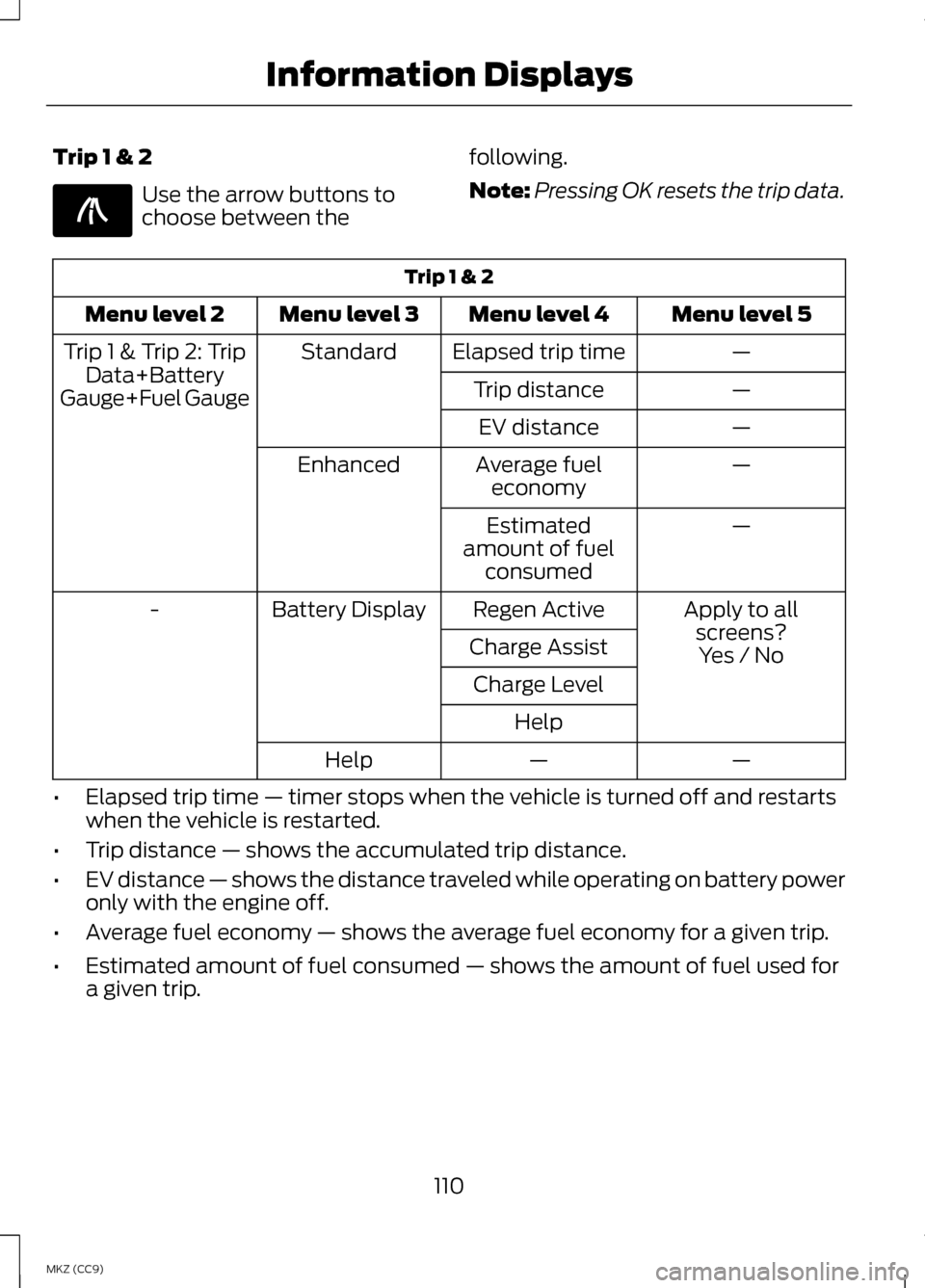
Trip 1 & 2
Use the arrow buttons to
choose between the
following.
Note:
Pressing OK resets the trip data. Trip 1 & 2
Menu level 5
Menu level 4
Menu level 3
Menu level 2
—
Elapsed trip time
Standard
Trip 1 & Trip 2: Trip
Data+Battery
Gauge+Fuel Gauge —
Trip distance
—
EV distance
—
Average fuel
economy
Enhanced
—
Estimated
amount of fuel consumed
Apply to allscreens?
Regen Active
Battery Display
-
Charge AssistYes / No
Charge Level
Help —
—
Help
• Elapsed trip time — timer stops when the vehicle is turned off and restarts
when the vehicle is restarted.
• Trip distance — shows the accumulated trip distance.
• EV distance — shows the distance traveled while operating on battery power
only with the engine off.
• Average fuel economy — shows the average fuel economy for a given trip.
• Estimated amount of fuel consumed — shows the amount of fuel used for
a given trip.
110
MKZ (CC9) Information DisplaysE138660