stop start LINCOLN MKZ HYBRID 2013 User Guide
[x] Cancel search | Manufacturer: LINCOLN, Model Year: 2013, Model line: MKZ HYBRID, Model: LINCOLN MKZ HYBRID 2013Pages: 475, PDF Size: 3.89 MB
Page 101 of 475
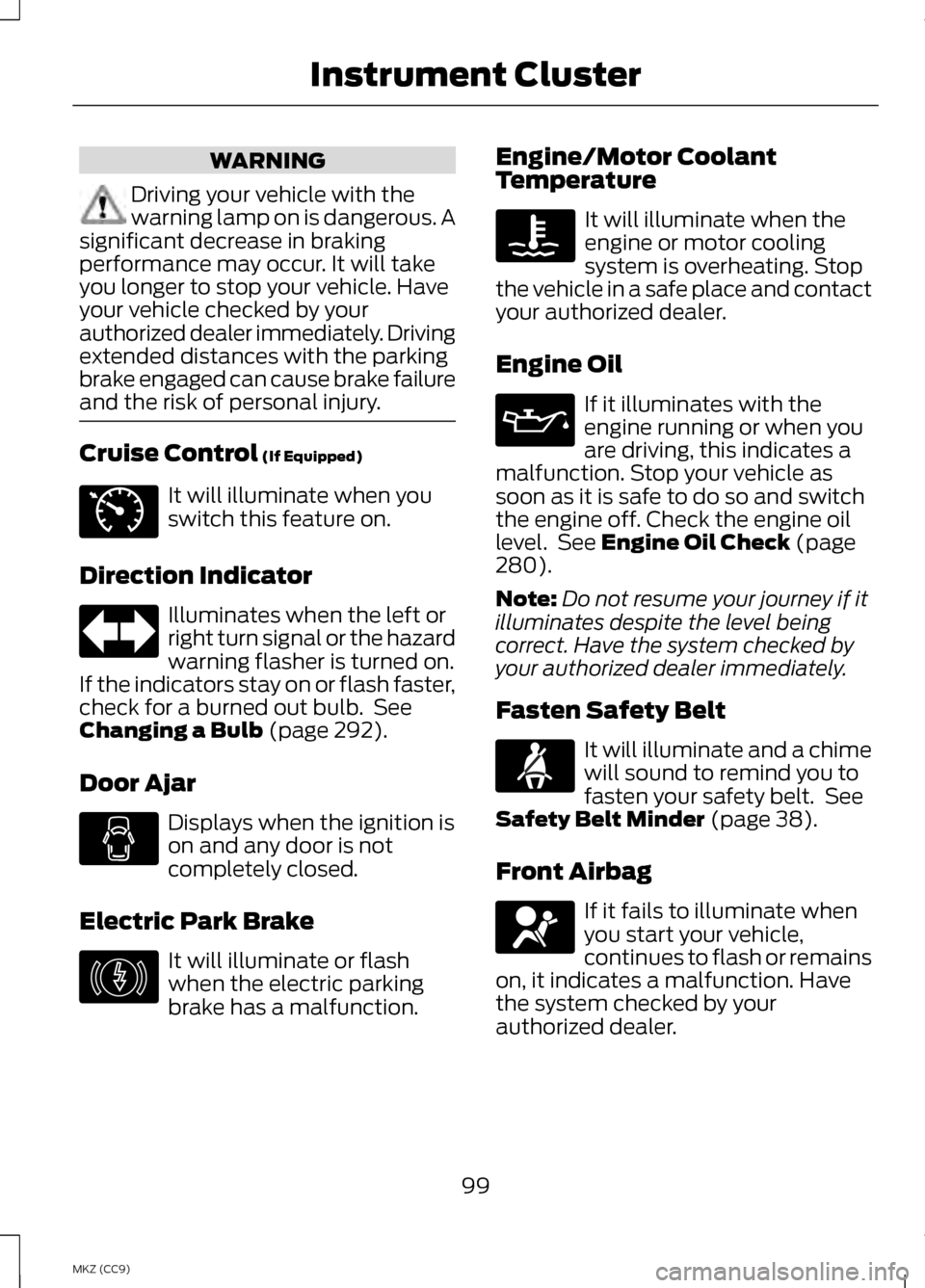
WARNING
Driving your vehicle with the
warning lamp on is dangerous. A
significant decrease in braking
performance may occur. It will take
you longer to stop your vehicle. Have
your vehicle checked by your
authorized dealer immediately. Driving
extended distances with the parking
brake engaged can cause brake failure
and the risk of personal injury. Cruise Control (If Equipped)
It will illuminate when you
switch this feature on.
Direction Indicator Illuminates when the left or
right turn signal or the hazard
warning flasher is turned on.
If the indicators stay on or flash faster,
check for a burned out bulb. See
Changing a Bulb
(page 292).
Door Ajar Displays when the ignition is
on and any door is not
completely closed.
Electric Park Brake It will illuminate or flash
when the electric parking
brake has a malfunction. Engine/Motor Coolant
Temperature It will illuminate when the
engine or motor cooling
system is overheating. Stop
the vehicle in a safe place and contact
your authorized dealer.
Engine Oil If it illuminates with the
engine running or when you
are driving, this indicates a
malfunction. Stop your vehicle as
soon as it is safe to do so and switch
the engine off. Check the engine oil
level. See
Engine Oil Check (page
280).
Note: Do not resume your journey if it
illuminates despite the level being
correct. Have the system checked by
your authorized dealer immediately.
Fasten Safety Belt It will illuminate and a chime
will sound to remind you to
fasten your safety belt. See
Safety Belt Minder
(page 38).
Front Airbag If it fails to illuminate when
you start your vehicle,
continues to flash or remains
on, it indicates a malfunction. Have
the system checked by your
authorized dealer.
99
MKZ (CC9) Instrument ClusterE71340 E146190
Page 103 of 475
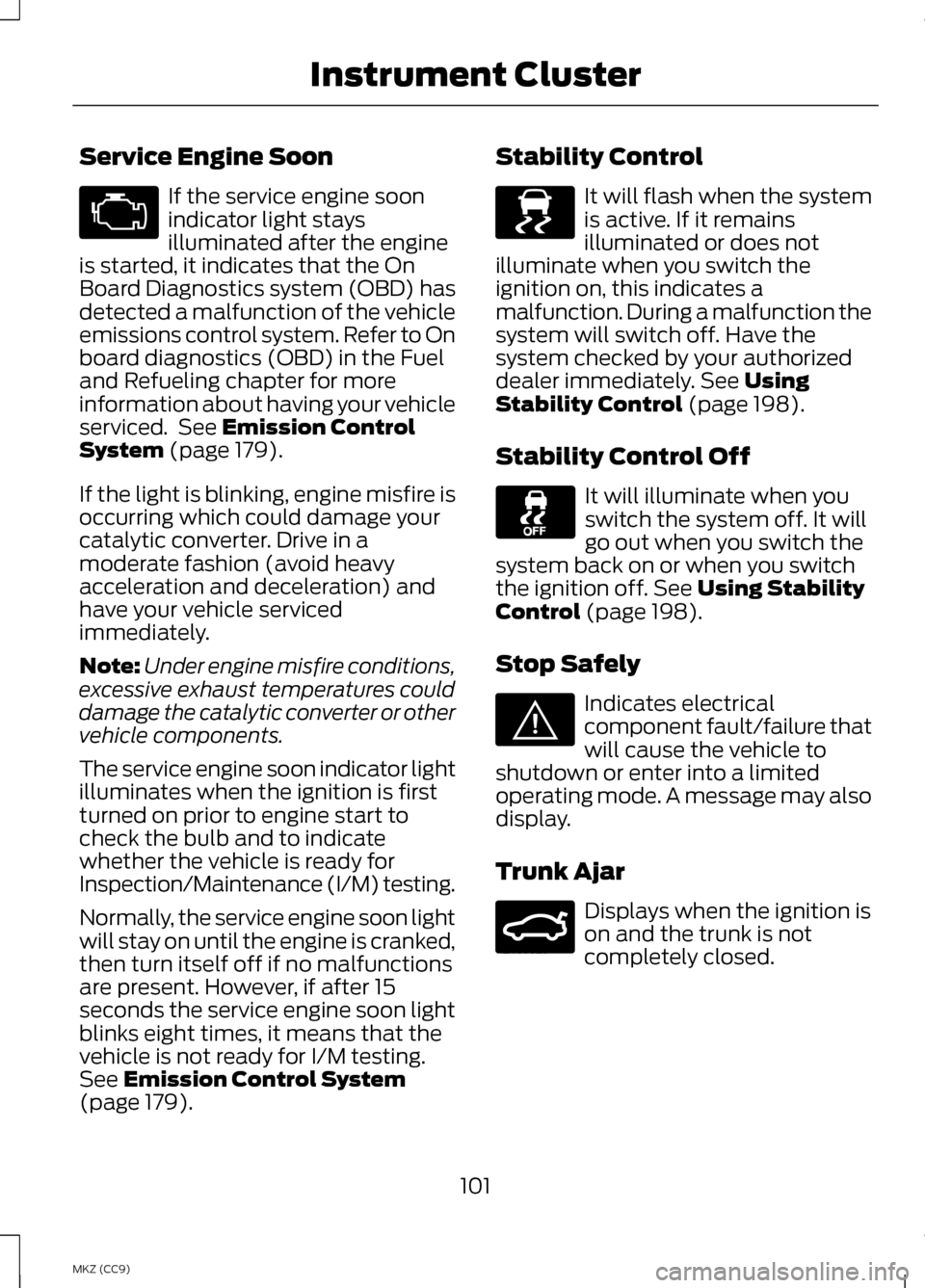
Service Engine Soon
If the service engine soon
indicator light stays
illuminated after the engine
is started, it indicates that the On
Board Diagnostics system (OBD) has
detected a malfunction of the vehicle
emissions control system. Refer to On
board diagnostics (OBD) in the Fuel
and Refueling chapter for more
information about having your vehicle
serviced. See Emission Control
System (page 179).
If the light is blinking, engine misfire is
occurring which could damage your
catalytic converter. Drive in a
moderate fashion (avoid heavy
acceleration and deceleration) and
have your vehicle serviced
immediately.
Note: Under engine misfire conditions,
excessive exhaust temperatures could
damage the catalytic converter or other
vehicle components.
The service engine soon indicator light
illuminates when the ignition is first
turned on prior to engine start to
check the bulb and to indicate
whether the vehicle is ready for
Inspection/Maintenance (I/M) testing.
Normally, the service engine soon light
will stay on until the engine is cranked,
then turn itself off if no malfunctions
are present. However, if after 15
seconds the service engine soon light
blinks eight times, it means that the
vehicle is not ready for I/M testing.
See
Emission Control System
(page 179). Stability Control It will flash when the system
is active. If it remains
illuminated or does not
illuminate when you switch the
ignition on, this indicates a
malfunction. During a malfunction the
system will switch off. Have the
system checked by your authorized
dealer immediately.
See Using
Stability Control (page 198).
Stability Control Off It will illuminate when you
switch the system off. It will
go out when you switch the
system back on or when you switch
the ignition off.
See Using Stability
Control (page 198).
Stop Safely Indicates electrical
component fault/failure that
will cause the vehicle to
shutdown or enter into a limited
operating mode. A message may also
display.
Trunk Ajar Displays when the ignition is
on and the trunk is not
completely closed.
101
MKZ (CC9) Instrument Cluster E138639 E144693 E159323
Page 111 of 475
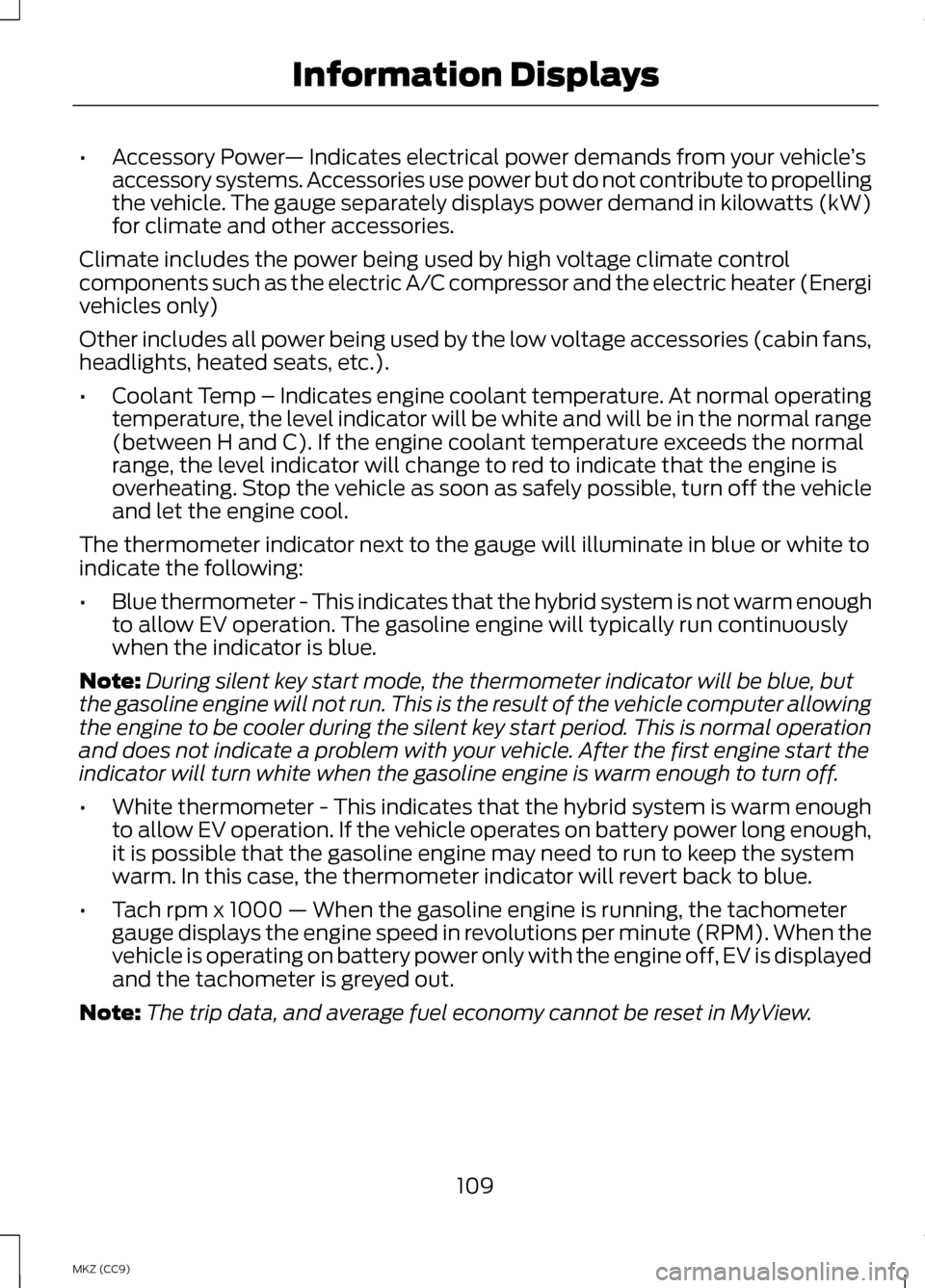
•
Accessory Power — Indicates electrical power demands from your vehicle ’s
accessory systems. Accessories use power but do not contribute to propelling
the vehicle. The gauge separately displays power demand in kilowatts (kW)
for climate and other accessories.
Climate includes the power being used by high voltage climate control
components such as the electric A/C compressor and the electric heater (Energi
vehicles only)
Other includes all power being used by the low voltage accessories (cabin fans,
headlights, heated seats, etc.).
• Coolant Temp – Indicates engine coolant temperature. At normal operating
temperature, the level indicator will be white and will be in the normal range
(between H and C). If the engine coolant temperature exceeds the normal
range, the level indicator will change to red to indicate that the engine is
overheating. Stop the vehicle as soon as safely possible, turn off the vehicle
and let the engine cool.
The thermometer indicator next to the gauge will illuminate in blue or white to
indicate the following:
• Blue thermometer - This indicates that the hybrid system is not warm enough
to allow EV operation. The gasoline engine will typically run continuously
when the indicator is blue.
Note: During silent key start mode, the thermometer indicator will be blue, but
the gasoline engine will not run. This is the result of the vehicle computer allowing
the engine to be cooler during the silent key start period. This is normal operation
and does not indicate a problem with your vehicle. After the first engine start the
indicator will turn white when the gasoline engine is warm enough to turn off.
• White thermometer - This indicates that the hybrid system is warm enough
to allow EV operation. If the vehicle operates on battery power long enough,
it is possible that the gasoline engine may need to run to keep the system
warm. In this case, the thermometer indicator will revert back to blue.
• Tach rpm x 1000 — When the gasoline engine is running, the tachometer
gauge displays the engine speed in revolutions per minute (RPM). When the
vehicle is operating on battery power only with the engine off, EV is displayed
and the tachometer is greyed out.
Note: The trip data, and average fuel economy cannot be reset in MyView.
109
MKZ (CC9) Information Displays
Page 112 of 475
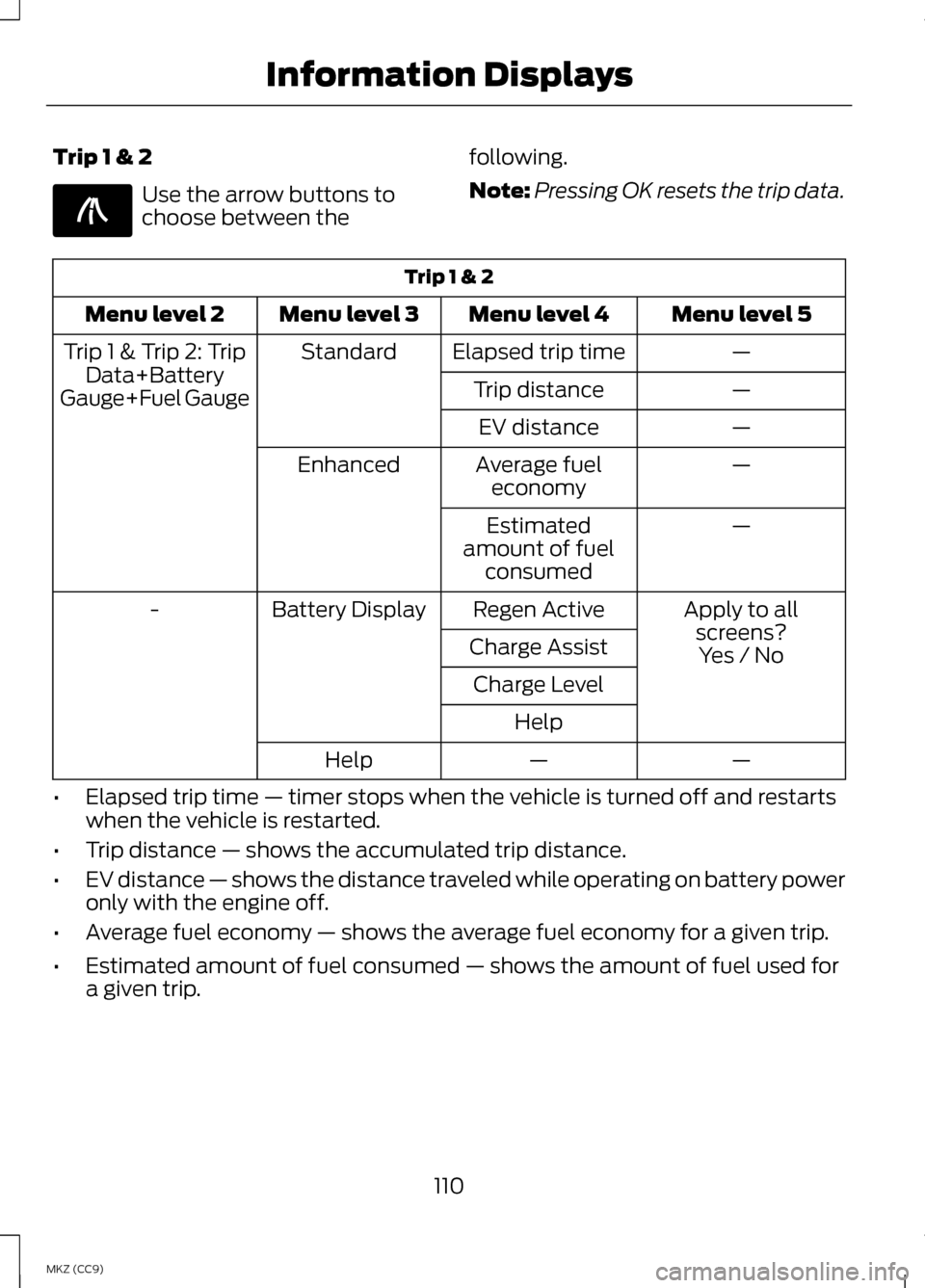
Trip 1 & 2
Use the arrow buttons to
choose between the
following.
Note:
Pressing OK resets the trip data. Trip 1 & 2
Menu level 5
Menu level 4
Menu level 3
Menu level 2
—
Elapsed trip time
Standard
Trip 1 & Trip 2: Trip
Data+Battery
Gauge+Fuel Gauge —
Trip distance
—
EV distance
—
Average fuel
economy
Enhanced
—
Estimated
amount of fuel consumed
Apply to allscreens?
Regen Active
Battery Display
-
Charge AssistYes / No
Charge Level
Help —
—
Help
• Elapsed trip time — timer stops when the vehicle is turned off and restarts
when the vehicle is restarted.
• Trip distance — shows the accumulated trip distance.
• EV distance — shows the distance traveled while operating on battery power
only with the engine off.
• Average fuel economy — shows the average fuel economy for a given trip.
• Estimated amount of fuel consumed — shows the amount of fuel used for
a given trip.
110
MKZ (CC9) Information DisplaysE138660
Page 121 of 475

AdvanceTrac
™ Action
Message
Displays when the system detects a malfunction dueto a blocked sensor.
Service AdvanceTrac
Displayed when the traction control has been disabledor enabled by the driver.
AdvanceTrac Off On
Airbag Action
Message
Displays when the system detects a malfunction dueto a blocked sensor.
Occupant Sensor
BLOCKED Remove Objects Near
Passenger Seat
Alarm Action
Message
Displays when the alarm has been triggered due to
unauthorized entry. See Anti-Theft Alarm (page 73).
Vehicle Alarm to Stop
Alarm, Start Vehicle
Automatic Engine Shutdown Action
Message
Displays when the engine is getting ready to shut off.
Engine Shuts Off in
XX Seconds
Displays when the engine has shut off to help increase fuel economy.
Engine Shut Off for
Fuel Economy
Displays when the engine is getting ready to shut off.
You can press OK on the left steering wheel button to override the shut down.
Engine Shuts Off in
XX Seconds Press Ok to Override
119
MKZ (CC9) Information Displays
Page 122 of 475
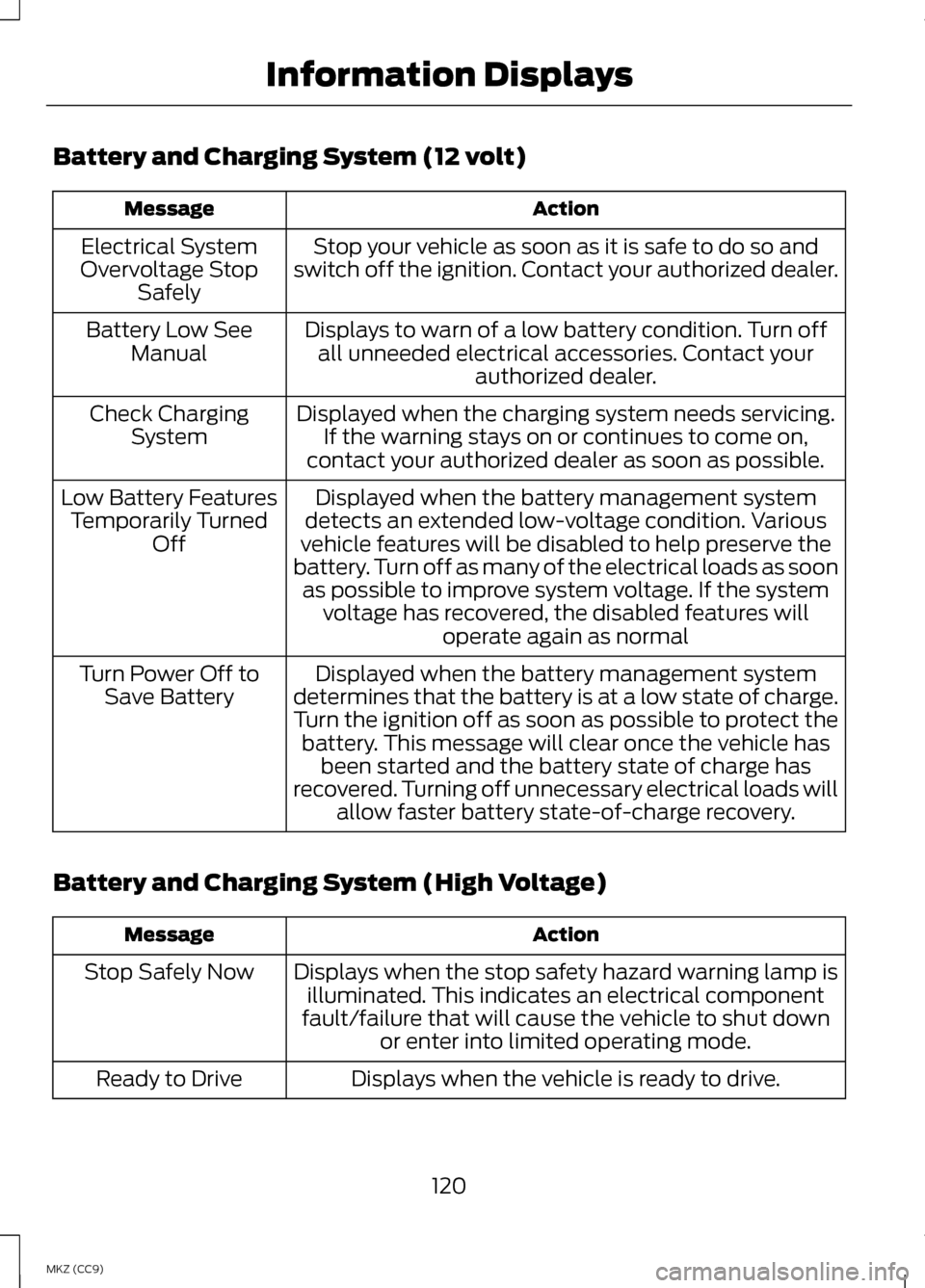
Battery and Charging System (12 volt)
Action
Message
Stop your vehicle as soon as it is safe to do so and
switch off the ignition. Contact your authorized dealer.
Electrical System
Overvoltage Stop Safely
Displays to warn of a low battery condition. Turn offall unneeded electrical accessories. Contact your authorized dealer.
Battery Low See
Manual
Displayed when the charging system needs servicing.If the warning stays on or continues to come on,
contact your authorized dealer as soon as possible.
Check Charging
System
Displayed when the battery management system
detects an extended low-voltage condition. Various
vehicle features will be disabled to help preserve the
battery. Turn off as many of the electrical loads as soon as possible to improve system voltage. If the system voltage has recovered, the disabled features will operate again as normal
Low Battery Features
Temporarily Turned Off
Displayed when the battery management system
determines that the battery is at a low state of charge.
Turn the ignition off as soon as possible to protect the battery. This message will clear once the vehicle has been started and the battery state of charge has
recovered. Turning off unnecessary electrical loads will allow faster battery state-of-charge recovery.
Turn Power Off to
Save Battery
Battery and Charging System (High Voltage) Action
Message
Displays when the stop safety hazard warning lamp isilluminated. This indicates an electrical component
fault/failure that will cause the vehicle to shut down or enter into limited operating mode.
Stop Safely Now
Displays when the vehicle is ready to drive.
Ready to Drive
120
MKZ (CC9) Information Displays
Page 125 of 475
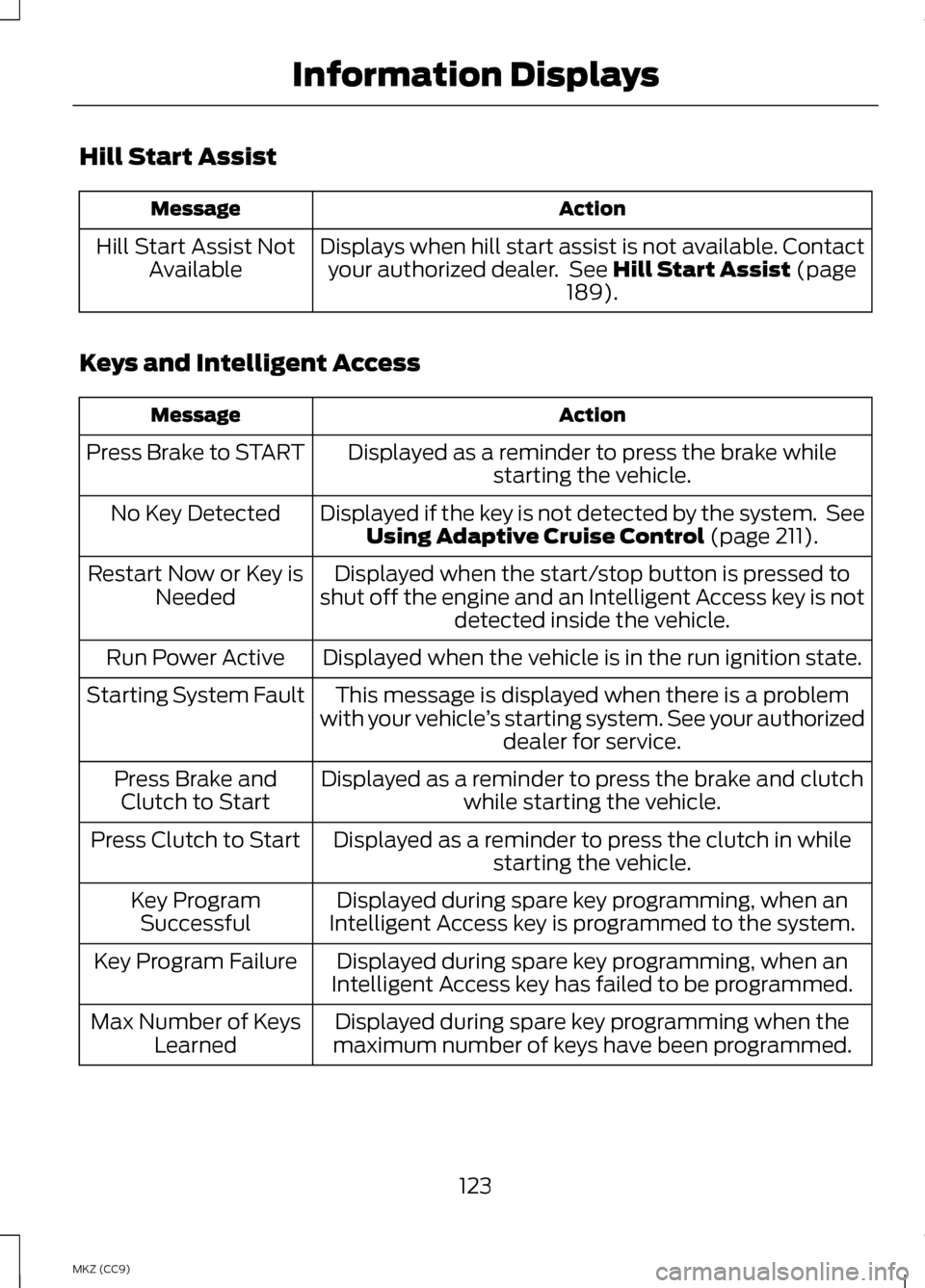
Hill Start Assist
Action
Message
Displays when hill start assist is not available. Contactyour authorized dealer. See Hill Start Assist (page
189).
Hill Start Assist Not
Available
Keys and Intelligent Access Action
Message
Displayed as a reminder to press the brake whilestarting the vehicle.
Press Brake to START
Displayed if the key is not detected by the system. SeeUsing Adaptive Cruise Control
(page 211).
No Key Detected
Displayed when the start/stop button is pressed to
shut off the engine and an Intelligent Access key is not detected inside the vehicle.
Restart Now or Key is
Needed
Displayed when the vehicle is in the run ignition state.
Run Power Active
This message is displayed when there is a problem
with your vehicle ’s starting system. See your authorized
dealer for service.
Starting System Fault
Displayed as a reminder to press the brake and clutchwhile starting the vehicle.
Press Brake and
Clutch to Start
Displayed as a reminder to press the clutch in whilestarting the vehicle.
Press Clutch to Start
Displayed during spare key programming, when an
Intelligent Access key is programmed to the system.
Key Program
Successful
Displayed during spare key programming, when an
Intelligent Access key has failed to be programmed.
Key Program Failure
Displayed during spare key programming when the
maximum number of keys have been programmed.
Max Number of Keys
Learned
123
MKZ (CC9) Information Displays
Page 131 of 475
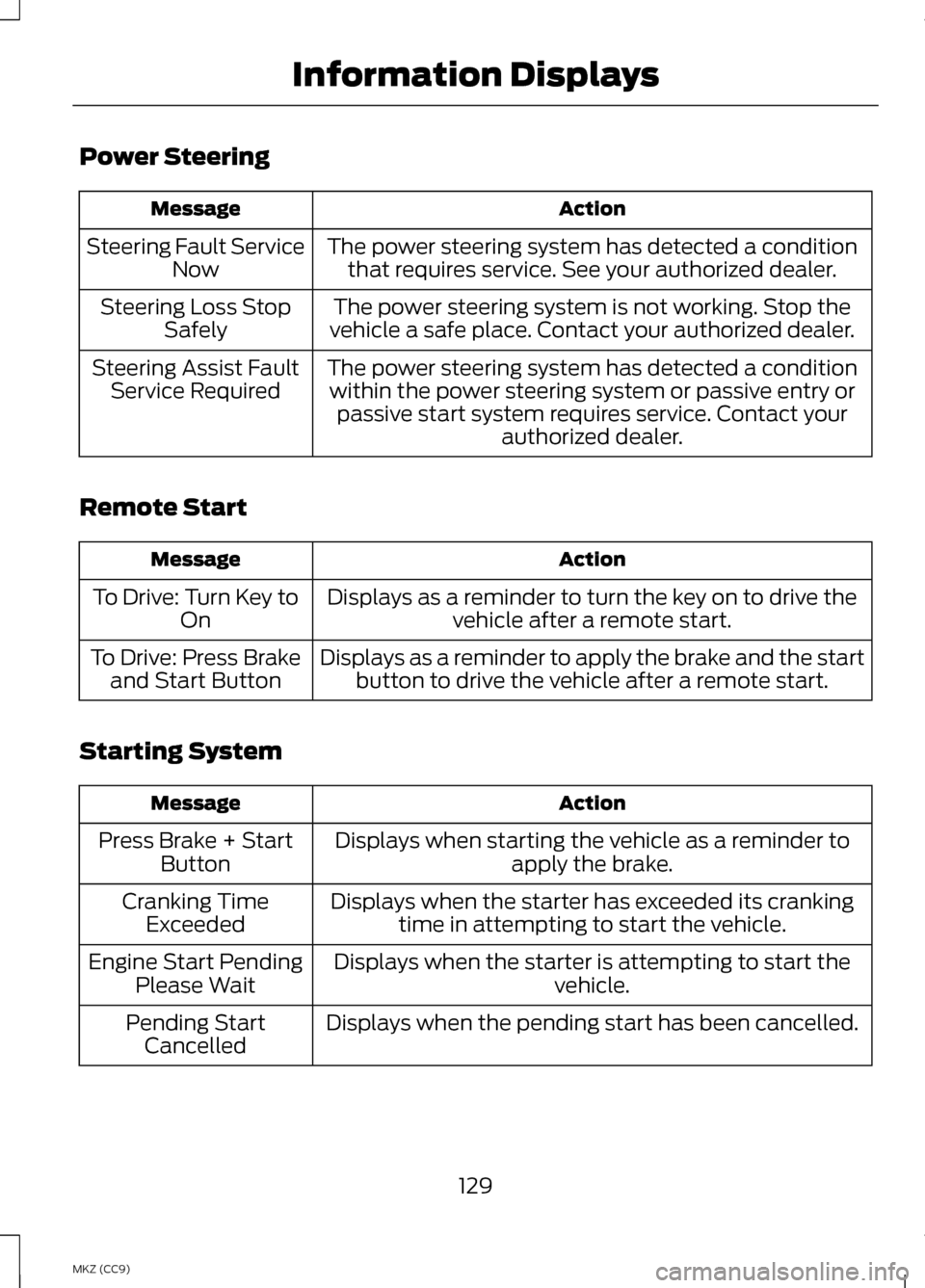
Power Steering
Action
Message
The power steering system has detected a conditionthat requires service. See your authorized dealer.
Steering Fault Service
Now
The power steering system is not working. Stop the
vehicle a safe place. Contact your authorized dealer.
Steering Loss Stop
Safely
The power steering system has detected a conditionwithin the power steering system or passive entry or passive start system requires service. Contact your authorized dealer.
Steering Assist Fault
Service Required
Remote Start Action
Message
Displays as a reminder to turn the key on to drive thevehicle after a remote start.
To Drive: Turn Key to
On
Displays as a reminder to apply the brake and the startbutton to drive the vehicle after a remote start.
To Drive: Press Brake
and Start Button
Starting System Action
Message
Displays when starting the vehicle as a reminder toapply the brake.
Press Brake + Start
Button
Displays when the starter has exceeded its crankingtime in attempting to start the vehicle.
Cranking Time
Exceeded
Displays when the starter is attempting to start the vehicle.
Engine Start Pending
Please Wait
Displays when the pending start has been cancelled.
Pending Start
Cancelled
129
MKZ (CC9) Information Displays
Page 163 of 475
GENERAL INFORMATION
WARNINGS
Extended idling at high engine
speeds can produce very high
temperatures in the engine and
exhaust system, creating the risk of
fire or other damage. Do not park, idle or drive your
vehicle on dry grass or other dry
ground cover. The emission system
heats up the engine compartment and
exhaust system, creating the risk of
fire. Do not start the engine in a
closed garage or in other
enclosed areas. Exhaust fumes can
be toxic. Always open the garage door
before you start the engine. If you smell exhaust fumes inside
your vehicle, have your vehicle
checked by an authorized dealer
immediately. Do not drive your vehicle
if you smell exhaust fumes. If you disconnect the battery, your
vehicle may exhibit some unusual
driving characteristics for
approximately 5 miles (8 kilometers)
after you reconnect it. This is because
the engine management system must
realign itself with the engine. You can
disregard any unusual driving
characteristics during this period.
The powertrain control system meets
all Canadian interference-causing
equipment standard requirements
regulating the impulse electrical field
or radio noise. When you start the engine, avoid
pressing the accelerator pedal before
and during operation. Only use the
accelerator pedal when you have
difficulty starting the engine.
KEYLESS STARTING
Note:
The keyless starting system may
not function if the key is close to metal
objects or electronic devices such as
cellular phones.
Note: A valid key must be located
inside your vehicle to switch the ignition
on and start the engine.
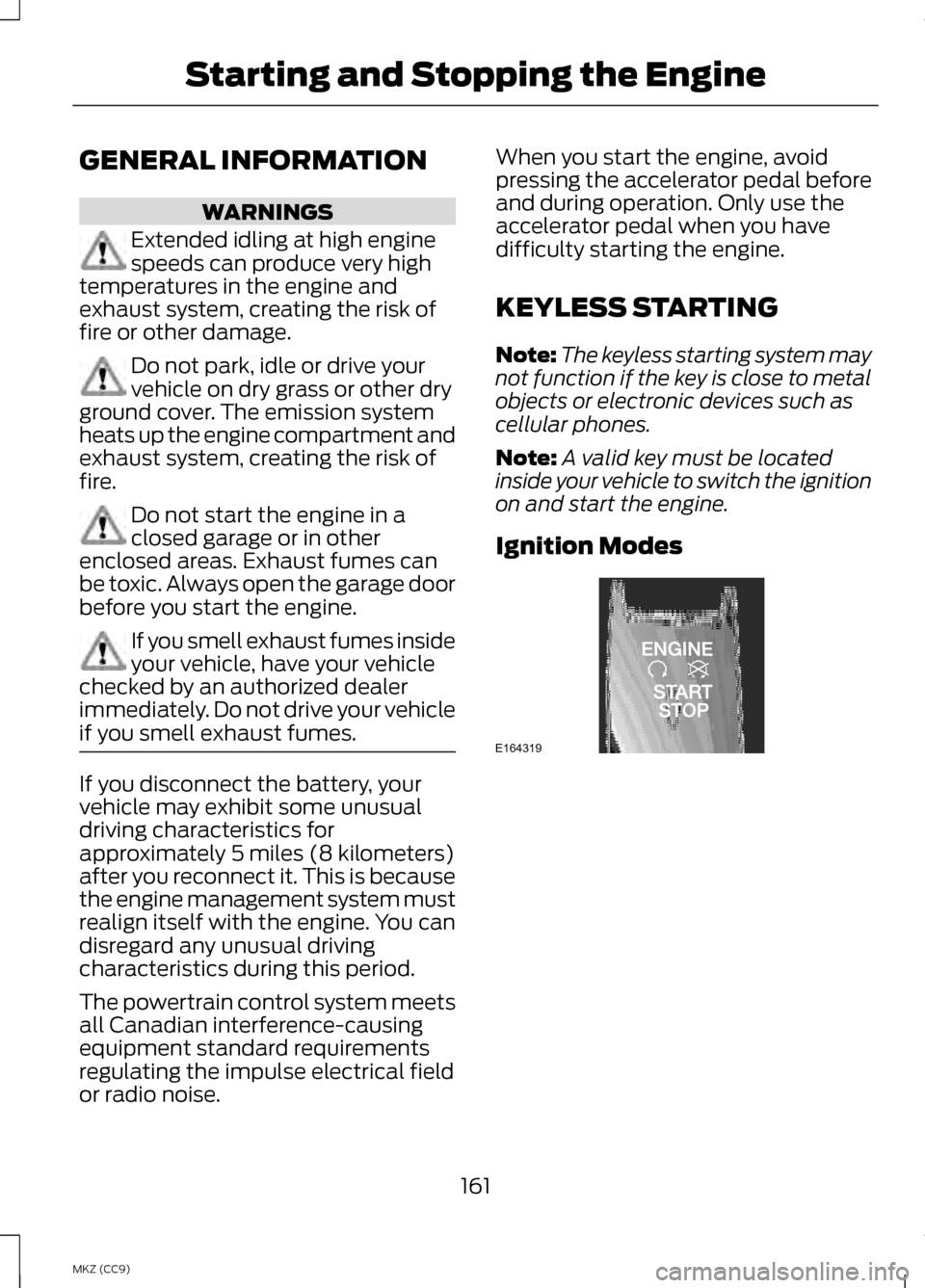
Ignition Modes 161
MKZ (CC9) Starting and Stopping the EngineE164319
Page 164 of 475
The keyless starting system has three
modes:
•
Off: Turns the ignition off.
• Without applying the brake
pedal, press and release the
button once when the ignition
is in the on mode, or when the
engine is running but the
vehicle is not moving.
• On:
All electrical circuits are
operational and the warning lamps
and indicators illuminate.
• Without applying the brake
pedal, press and release the
button once.
• Start:
Starts the vehicle. The
engine may not start when the
vehicle starts.
• Press the brake pedal, and then
press the button for any length
of time. An indicator light on the
button illuminates when then
ignition is on and when the
engine starts.
STARTING A GASOLINE
ENGINE
When the engine starts for the first
time on your drive, the idle speed
increases, this helps to warm up the
engine. If the engine idle speed does
not slow down automatically, have
your vehicle checked by an authorized
dealer. Before starting the vehicle, check the
following:
•
Make sure all occupants have
fastened their safety belts.
• Make sure the headlamps and
electrical accessories are off.
• Make sure the parking brake is on.
• Put the transmission in
P .
Note: Do not touch the accelerator
pedal.
1. Fully press the brake pedal.
2. Press the button.
Note: The green ready indicator
illuminates letting you know that the
vehicle is ready for driving. Since your
vehicle is equipped with a silent key
start, the engine may not start at the
time of the vehicle start. See
Hybrid
Electric Vehicle (page 166).
The system does not function if:
• The key frequencies are jammed.
• The key battery has no charge.
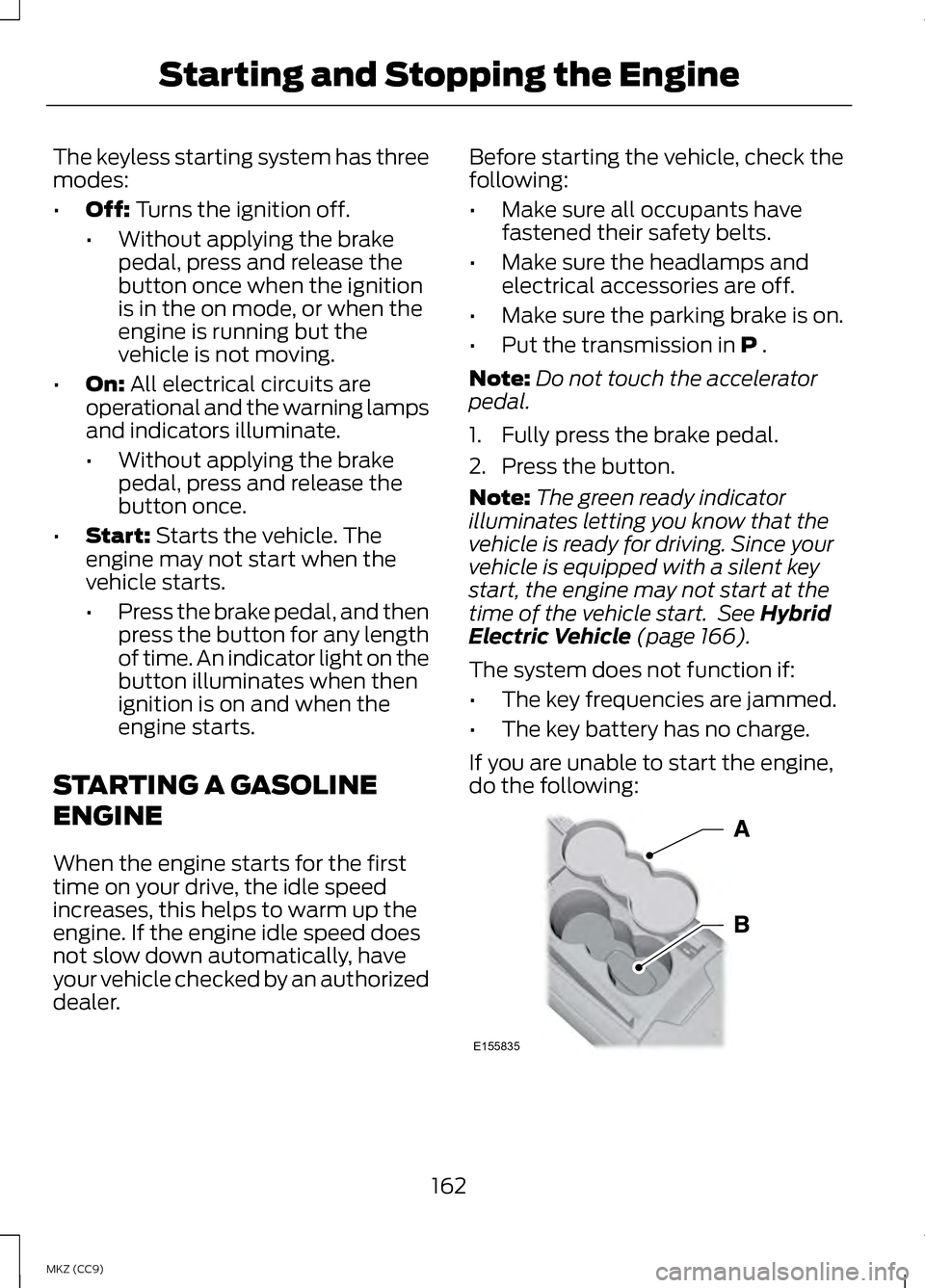
If you are unable to start the engine,
do the following: 162
MKZ (CC9) Starting and Stopping the EngineE155835