spare LINCOLN MKZ HYBRID 2013 Owners Manual
[x] Cancel search | Manufacturer: LINCOLN, Model Year: 2013, Model line: MKZ HYBRID, Model: LINCOLN MKZ HYBRID 2013Pages: 475, PDF Size: 3.89 MB
Page 62 of 475
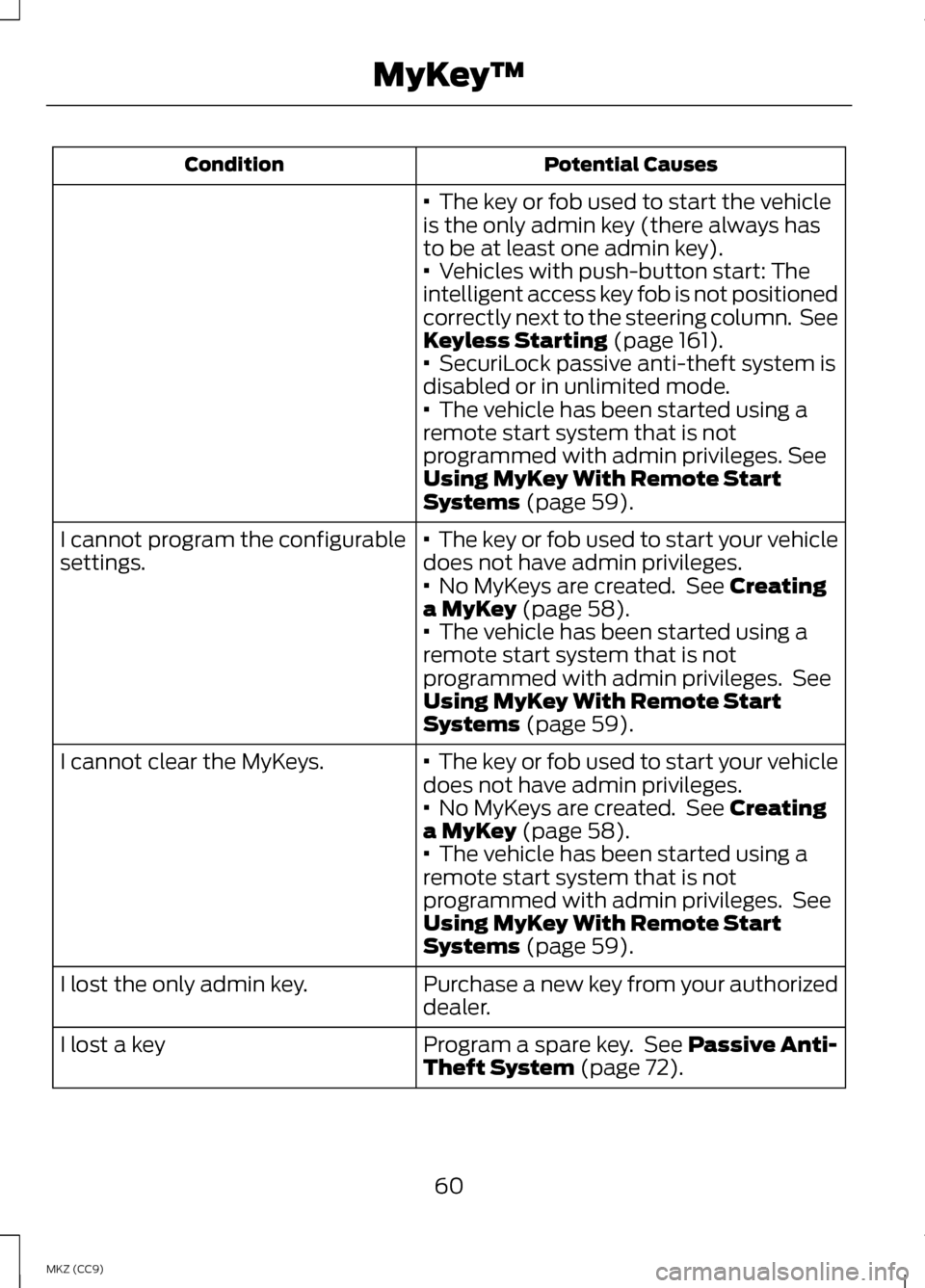
Potential Causes
Condition
· The key or fob used to start the vehicle
is the only admin key (there always has
to be at least one admin key).
·
Vehicles with push-button start: The
intelligent access key fob is not positioned
correctly next to the steering column. See
Keyless Starting
(page 161).
· SecuriLock passive anti-theft system is
disabled or in unlimited mode.
·
The vehicle has been started using a
remote start system that is not
programmed with admin privileges.
See
Using MyKey With Remote Start
Systems
(page 59).
· The key or fob used to start your vehicle
does not have admin privileges.
I cannot program the configurable
settings.
·
No MyKeys are created. See Creating
a MyKey (page 58).
· The vehicle has been started using a
remote start system that is not
programmed with admin privileges. See
Using MyKey With Remote Start
Systems
(page 59).
· The key or fob used to start your vehicle
does not have admin privileges.
I cannot clear the MyKeys.
·
No MyKeys are created. See Creating
a MyKey (page 58).
· The vehicle has been started using a
remote start system that is not
programmed with admin privileges. See
Using MyKey With Remote Start
Systems
(page 59).
Purchase a new key from your authorized
dealer.
I lost the only admin key.
Program a spare key. See
Passive Anti-
Theft System (page 72).
I lost a key
60
MKZ (CC9) MyKey
™
Page 74 of 475
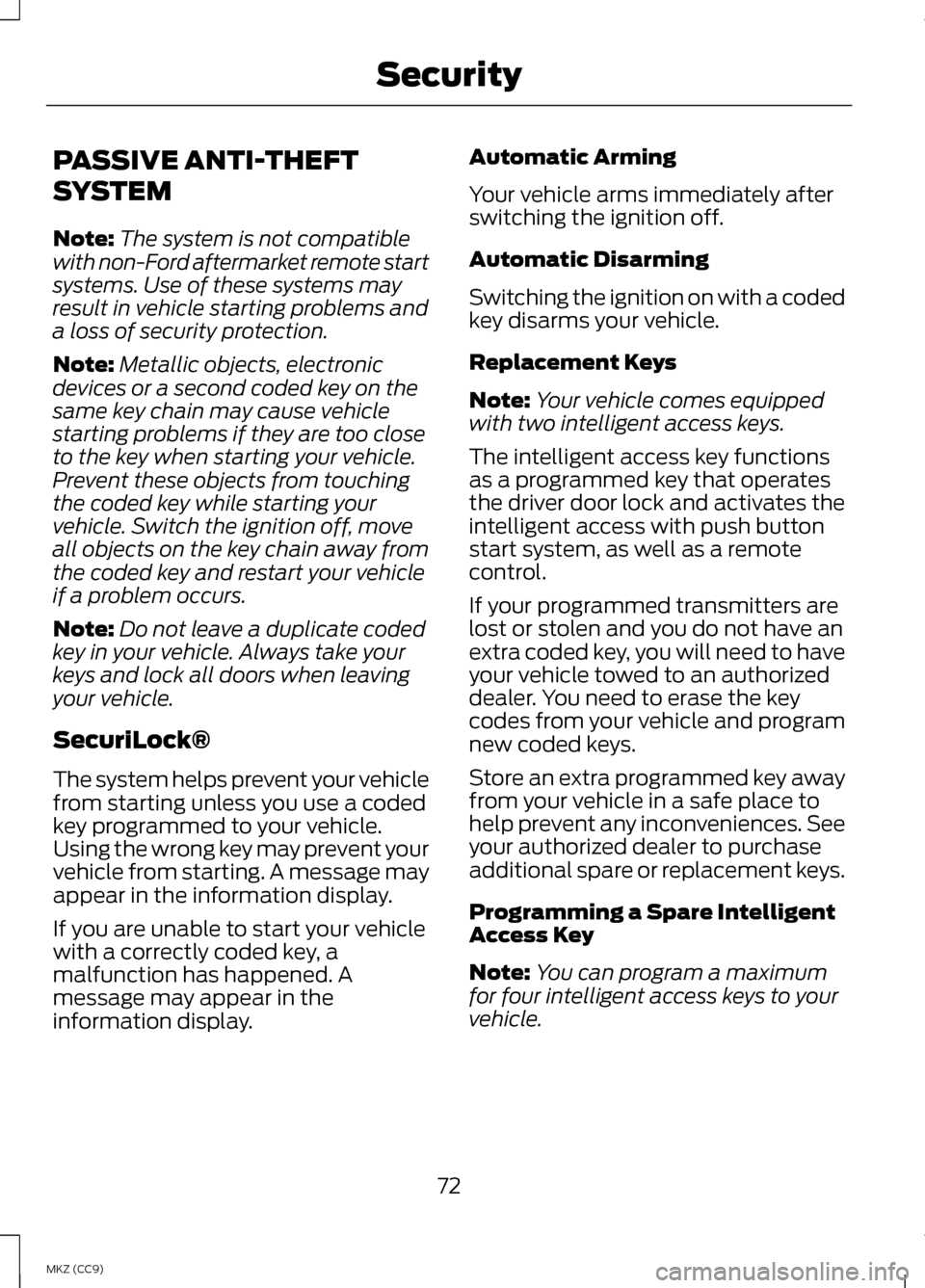
PASSIVE ANTI-THEFT
SYSTEM
Note:
The system is not compatible
with non-Ford aftermarket remote start
systems. Use of these systems may
result in vehicle starting problems and
a loss of security protection.
Note: Metallic objects, electronic
devices or a second coded key on the
same key chain may cause vehicle
starting problems if they are too close
to the key when starting your vehicle.
Prevent these objects from touching
the coded key while starting your
vehicle. Switch the ignition off, move
all objects on the key chain away from
the coded key and restart your vehicle
if a problem occurs.
Note: Do not leave a duplicate coded
key in your vehicle. Always take your
keys and lock all doors when leaving
your vehicle.
SecuriLock®
The system helps prevent your vehicle
from starting unless you use a coded
key programmed to your vehicle.
Using the wrong key may prevent your
vehicle from starting. A message may
appear in the information display.
If you are unable to start your vehicle
with a correctly coded key, a
malfunction has happened. A
message may appear in the
information display. Automatic Arming
Your vehicle arms immediately after
switching the ignition off.
Automatic Disarming
Switching the ignition on with a coded
key disarms your vehicle.
Replacement Keys
Note:
Your vehicle comes equipped
with two intelligent access keys.
The intelligent access key functions
as a programmed key that operates
the driver door lock and activates the
intelligent access with push button
start system, as well as a remote
control.
If your programmed transmitters are
lost or stolen and you do not have an
extra coded key, you will need to have
your vehicle towed to an authorized
dealer. You need to erase the key
codes from your vehicle and program
new coded keys.
Store an extra programmed key away
from your vehicle in a safe place to
help prevent any inconveniences. See
your authorized dealer to purchase
additional spare or replacement keys.
Programming a Spare Intelligent
Access Key
Note: You can program a maximum
for four intelligent access keys to your
vehicle.
72
MKZ (CC9) Security
Page 75 of 475
You must have two previously
programmed intelligent access keys
inside your vehicle and the new
unprogrammed intelligent access keys
readily accessible. See an authorized
dealer to have the spare key
programmed if two previously
programmed keys are not available.
Make sure that your vehicle is off
before beginning this procedure. Make
sure that you close all the doors
before beginning and that they remain
closed throughout the procedure.
Perform all steps within 30 seconds
of starting the sequence. Stop and
wait for at least one minute before
starting again if you perform any steps
out of sequence.
Read and understand the entire
procedure before you begin.
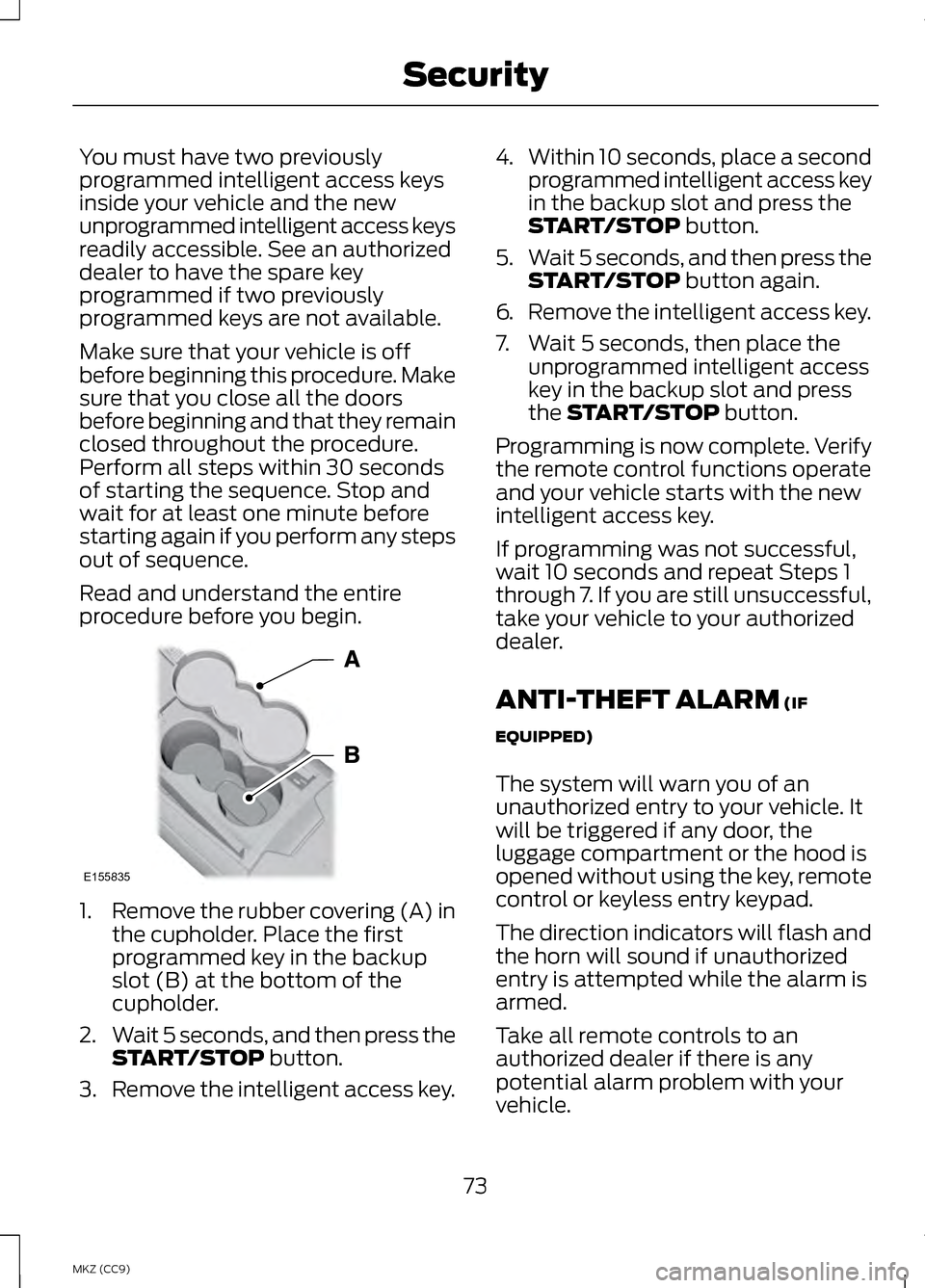
1.
Remove the rubber covering (A) in
the cupholder. Place the first
programmed key in the backup
slot (B) at the bottom of the
cupholder.
2. Wait 5 seconds, and then press the
START/STOP button.
3. Remove the intelligent access key. 4.
Within 10 seconds, place a second
programmed intelligent access key
in the backup slot and press the
START/STOP
button.
5. Wait 5 seconds, and then press the
START/STOP
button again.
6. Remove the intelligent access key.
7. Wait 5 seconds, then place the unprogrammed intelligent access
key in the backup slot and press
the
START/STOP button.
Programming is now complete. Verify
the remote control functions operate
and your vehicle starts with the new
intelligent access key.
If programming was not successful,
wait 10 seconds and repeat Steps 1
through 7. If you are still unsuccessful,
take your vehicle to your authorized
dealer.
ANTI-THEFT ALARM
(IF
EQUIPPED)
The system will warn you of an
unauthorized entry to your vehicle. It
will be triggered if any door, the
luggage compartment or the hood is
opened without using the key, remote
control or keyless entry keypad.
The direction indicators will flash and
the horn will sound if unauthorized
entry is attempted while the alarm is
armed.
Take all remote controls to an
authorized dealer if there is any
potential alarm problem with your
vehicle.
73
MKZ (CC9) SecurityE155835
Page 125 of 475
Hill Start Assist
Action
Message
Displays when hill start assist is not available. Contactyour authorized dealer. See Hill Start Assist (page
189).
Hill Start Assist Not
Available
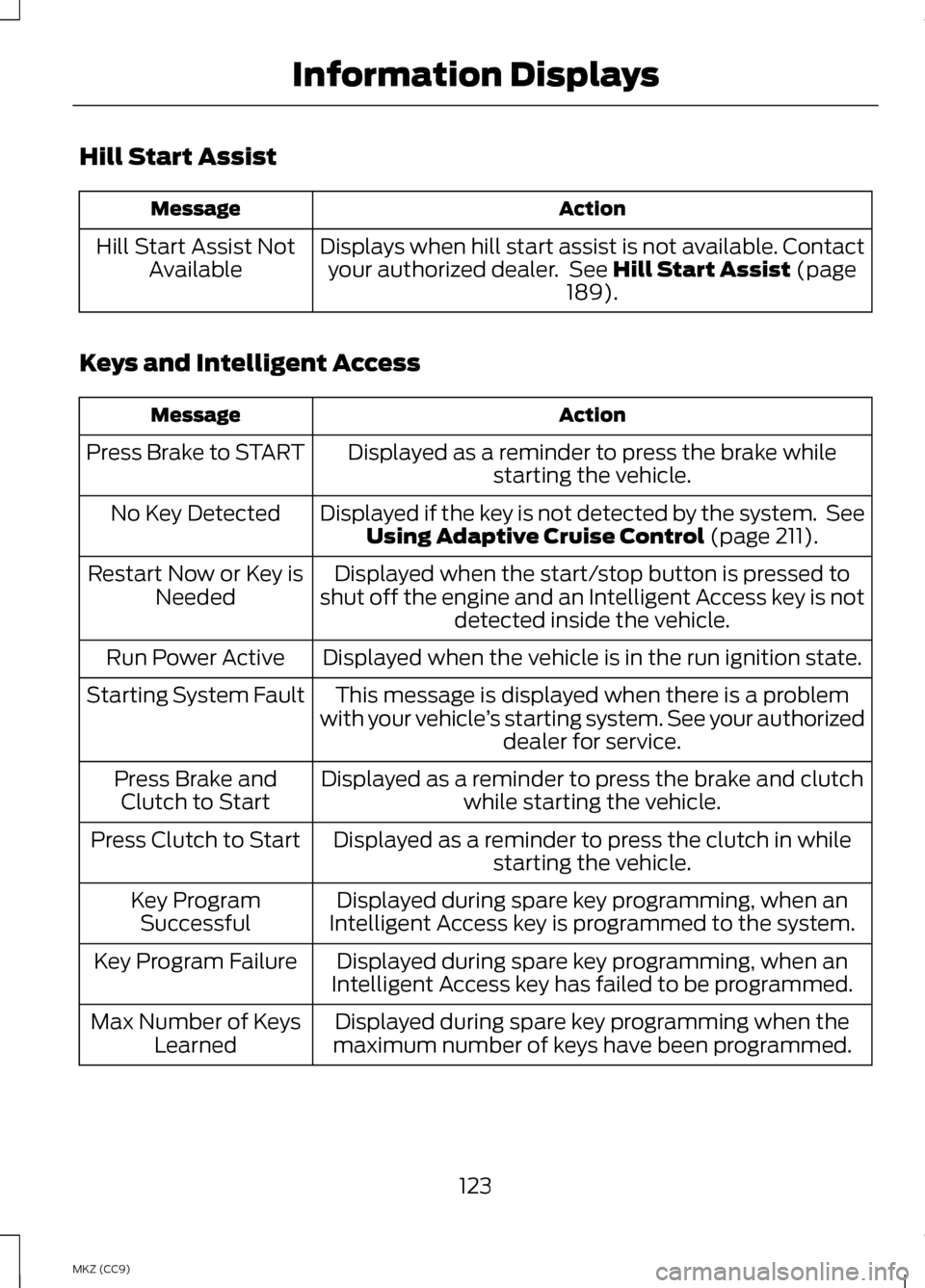
Keys and Intelligent Access Action
Message
Displayed as a reminder to press the brake whilestarting the vehicle.
Press Brake to START
Displayed if the key is not detected by the system. SeeUsing Adaptive Cruise Control
(page 211).
No Key Detected
Displayed when the start/stop button is pressed to
shut off the engine and an Intelligent Access key is not detected inside the vehicle.
Restart Now or Key is
Needed
Displayed when the vehicle is in the run ignition state.
Run Power Active
This message is displayed when there is a problem
with your vehicle ’s starting system. See your authorized
dealer for service.
Starting System Fault
Displayed as a reminder to press the brake and clutchwhile starting the vehicle.
Press Brake and
Clutch to Start
Displayed as a reminder to press the clutch in whilestarting the vehicle.
Press Clutch to Start
Displayed during spare key programming, when an
Intelligent Access key is programmed to the system.
Key Program
Successful
Displayed during spare key programming, when an
Intelligent Access key has failed to be programmed.
Key Program Failure
Displayed during spare key programming when the
maximum number of keys have been programmed.
Max Number of Keys
Learned
123
MKZ (CC9) Information Displays
Page 126 of 475
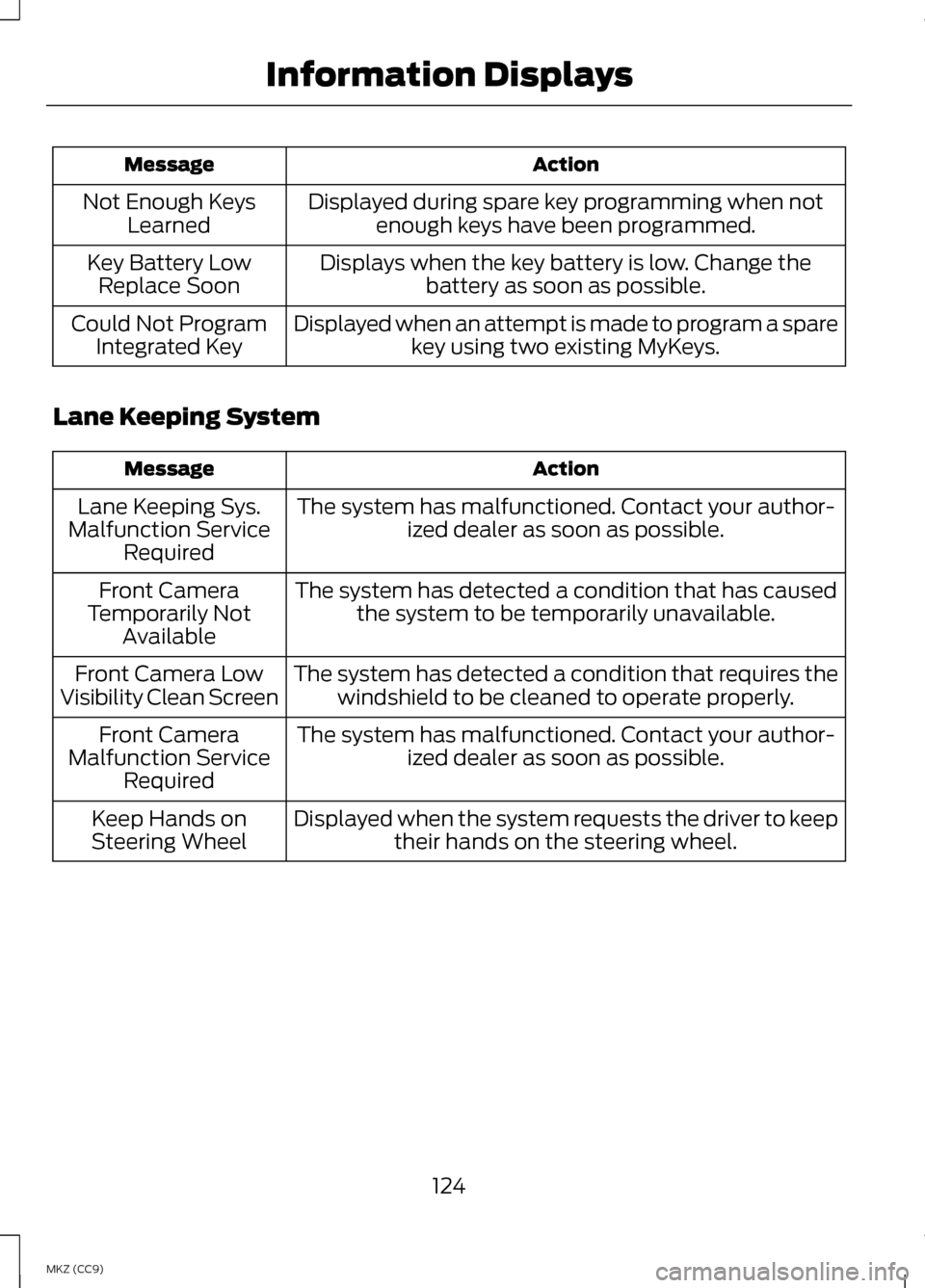
Action
Message
Displayed during spare key programming when notenough keys have been programmed.
Not Enough Keys
Learned
Displays when the key battery is low. Change thebattery as soon as possible.
Key Battery Low
Replace Soon
Displayed when an attempt is made to program a sparekey using two existing MyKeys.
Could Not Program
Integrated Key
Lane Keeping System Action
Message
The system has malfunctioned. Contact your author-ized dealer as soon as possible.
Lane Keeping Sys.
Malfunction Service Required
The system has detected a condition that has causedthe system to be temporarily unavailable.
Front Camera
Temporarily Not Available
The system has detected a condition that requires thewindshield to be cleaned to operate properly.
Front Camera Low
Visibility Clean Screen
The system has malfunctioned. Contact your author-ized dealer as soon as possible.
Front Camera
Malfunction Service Required
Displayed when the system requests the driver to keeptheir hands on the steering wheel.
Keep Hands on
Steering Wheel
124
MKZ (CC9) Information Displays
Page 132 of 475
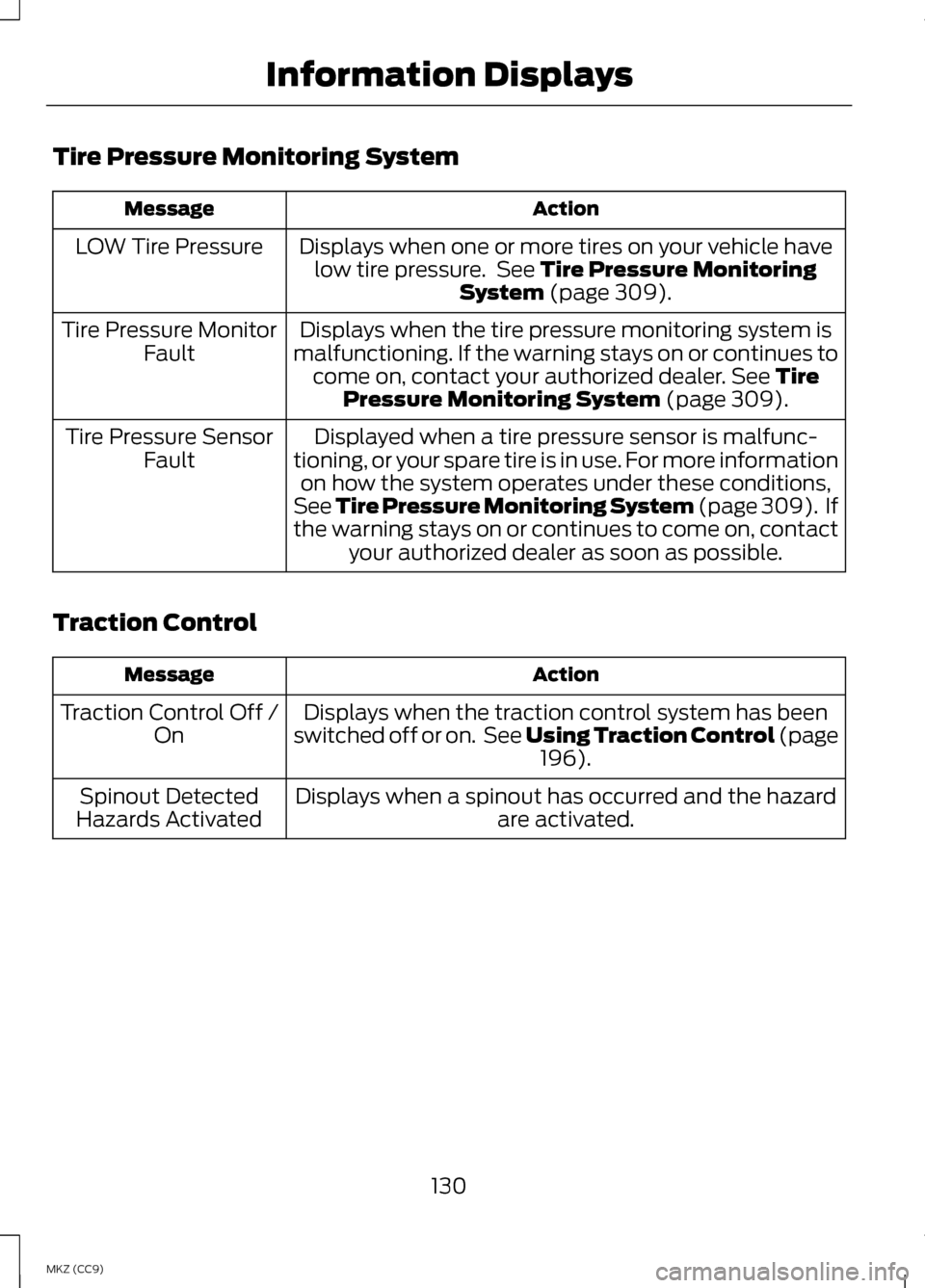
Tire Pressure Monitoring System
Action
Message
Displays when one or more tires on your vehicle havelow tire pressure. See Tire Pressure Monitoring
System (page 309).
LOW Tire Pressure
Displays when the tire pressure monitoring system is
malfunctioning. If the warning stays on or continues to come on, contact your authorized dealer.
See Tire
Pressure Monitoring System (page 309).
Tire Pressure Monitor
Fault
Displayed when a tire pressure sensor is malfunc-
tioning, or your spare tire is in use. For more information on how the system operates under these conditions,
See Tire Pressure Monitoring System (page 309). If
the warning stays on or continues to come on, contact your authorized dealer as soon as possible.
Tire Pressure Sensor
Fault
Traction Control Action
Message
Displays when the traction control system has been
switched off or on. See Using Traction Control (page 196
).
Traction Control Off /
On
Displays when a spinout has occurred and the hazard are activated.
Spinout Detected
Hazards Activated
130
MKZ (CC9) Information Displays
Page 204 of 475
Note:
The sensors may not detect
objects with surfaces that absorb
ultrasonic waves.
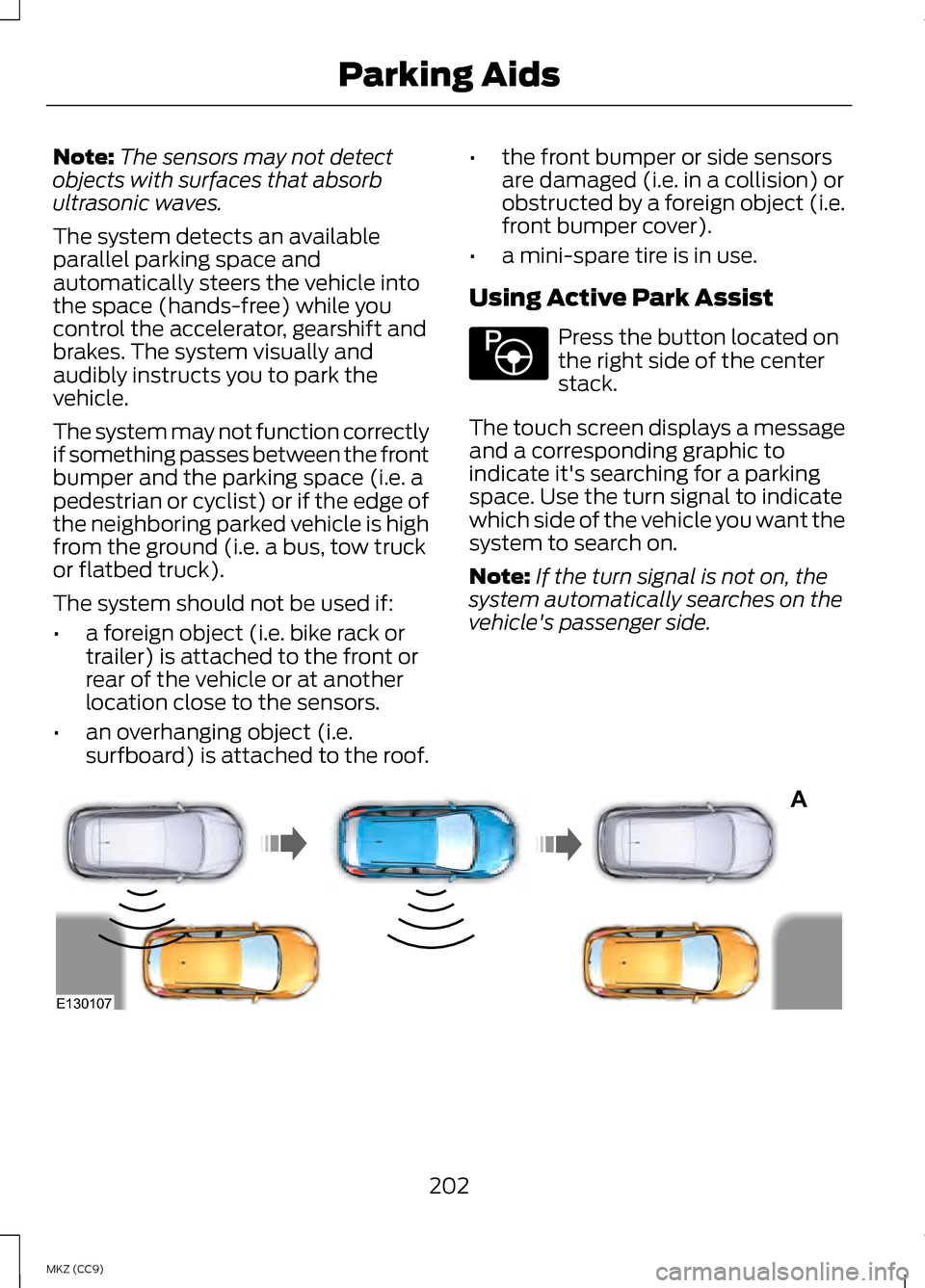
The system detects an available
parallel parking space and
automatically steers the vehicle into
the space (hands-free) while you
control the accelerator, gearshift and
brakes. The system visually and
audibly instructs you to park the
vehicle.
The system may not function correctly
if something passes between the front
bumper and the parking space (i.e. a
pedestrian or cyclist) or if the edge of
the neighboring parked vehicle is high
from the ground (i.e. a bus, tow truck
or flatbed truck).
The system should not be used if:
• a foreign object (i.e. bike rack or
trailer) is attached to the front or
rear of the vehicle or at another
location close to the sensors.
• an overhanging object (i.e.
surfboard) is attached to the roof. •
the front bumper or side sensors
are damaged (i.e. in a collision) or
obstructed by a foreign object (i.e.
front bumper cover).
• a mini-spare tire is in use.
Using Active Park Assist Press the button located on
the right side of the center
stack.
The touch screen displays a message
and a corresponding graphic to
indicate it's searching for a parking
space. Use the turn signal to indicate
which side of the vehicle you want the
system to search on.
Note: If the turn signal is not on, the
system automatically searches on the
vehicle's passenger side. 202
MKZ (CC9) Parking AidsE146186 A
E130107
Page 252 of 475
ROADSIDE ASSISTANCE
Vehicles Sold In The U.S.:
Getting Roadside Assistance
To fully assist you should you have a
vehicle concern Ford Motor Company
offers a complimentary roadside
assistance program. This program is
separate from the New Vehicle
Limited Warranty. The service is
available:
•
24-hours, seven days a week.
• for the coverage period listed on
the Roadside Assistance Card
included in your Owner's Manual
portfolio.
Roadside assistance will cover:
• a flat tire change with a good spare
(except vehicles that have been
supplied with a tire inflation kit).
• battery jump start.
• lock-out assistance (key
replacement cost is the customer's
responsibility).
• fuel delivery — Independent
Service Contractors, if not
prohibited by state, local or
municipal law shall deliver up to
2.0 gallons (7.5L) of gasoline or
5.0 gallons (18.9L) of diesel fuel
to a disabled vehicle. Fuel delivery
service is limited to two no-charge
occurrences within a 12-month
period. •
winch out — available within 100
feet (30.5 meters) of a paved or
county maintained road, no
recoveries.
• towing — Ford and Lincoln eligible
vehicles towed to an authorized
dealer within 35 miles (56 km) of
the disablement location or to the
nearest authorized dealer. If a
member requests to be towed to
an authorized dealer more than 35
miles (56 km) from the
disablement location, the member
shall be responsible for any
mileage costs in excess of 35 miles
(56 km).
Trailers shall be covered up to $200
if the disabled eligible vehicle requires
service at the nearest authorized
dealer. If the trailer is disabled, but the
towing vehicle is operational, the
trailer does not qualify for any
roadside services.
Vehicles Sold In The U.S. :
Using Roadside Assistance
Complete the roadside assistance
identification card and place it in your
wallet for quick reference. This card
is found in the owner's information
portfolio in the glove compartment.
U.S. Lincoln vehicle customers who
require Roadside Assistance, call
1-800-521-4140.
250
MKZ (CC9) Roadside Emergencies
Page 269 of 475
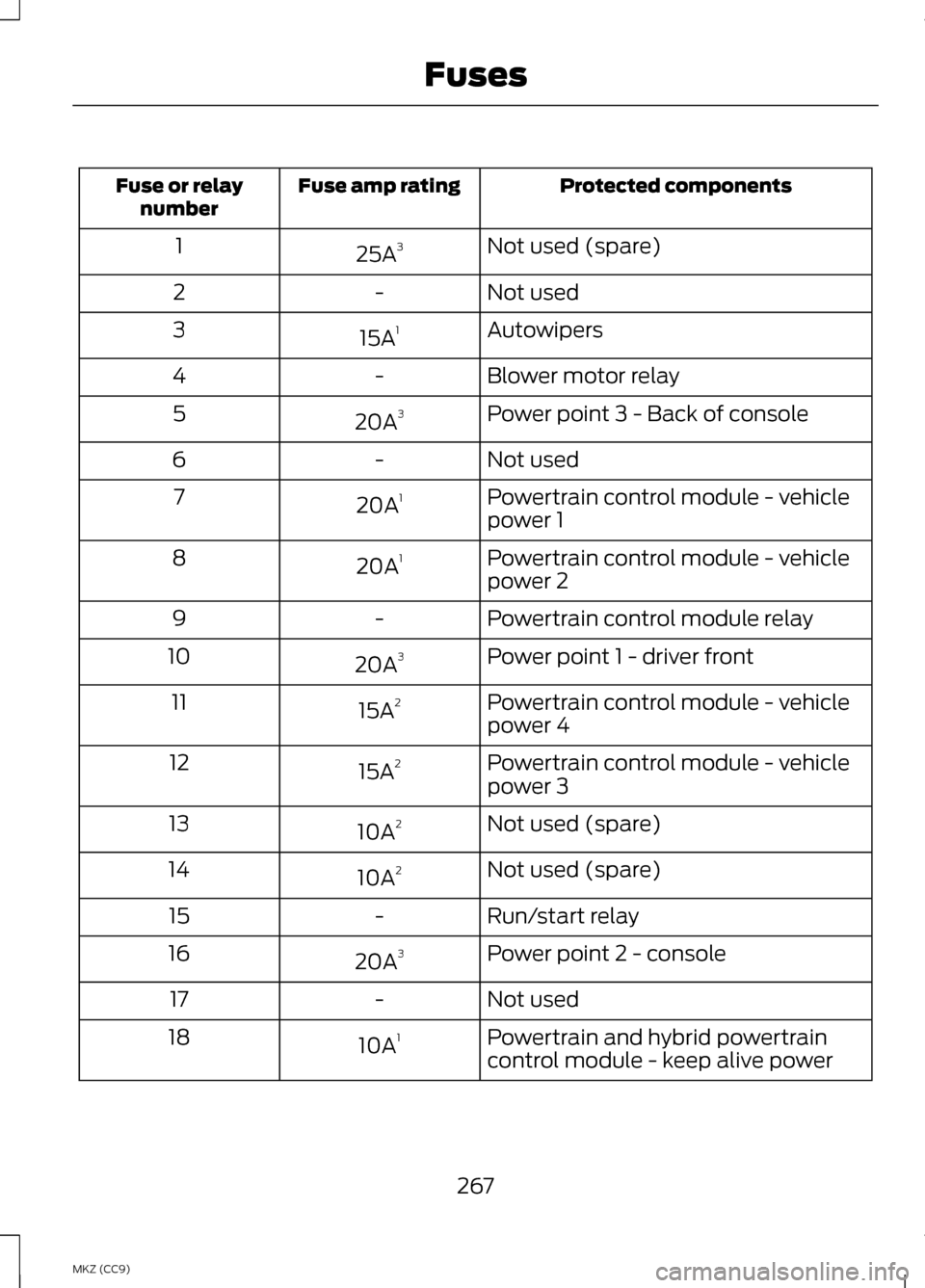
Protected components
Fuse amp rating
Fuse or relay
number
Not used (spare)
25A 3
1
Not used
-
2
Autowipers
15A 1
3
Blower motor relay
-
4
Power point 3 - Back of console
20A 3
5
Not used
-
6
Powertrain control module - vehicle
power 1
20A
1
7
Powertrain control module - vehicle
power 2
20A
1
8
Powertrain control module relay
-
9
Power point 1 - driver front
20A 3
10
Powertrain control module - vehicle
power 4
15A
2
11
Powertrain control module - vehicle
power 3
15A
2
12
Not used (spare)
10A 2
13
Not used (spare)
10A 2
14
Run/start relay
-
15
Power point 2 - console
20A 3
16
Not used
-
17
Powertrain and hybrid powertrain
control module - keep alive power
10A
1
18
267
MKZ (CC9) Fuses
Page 270 of 475
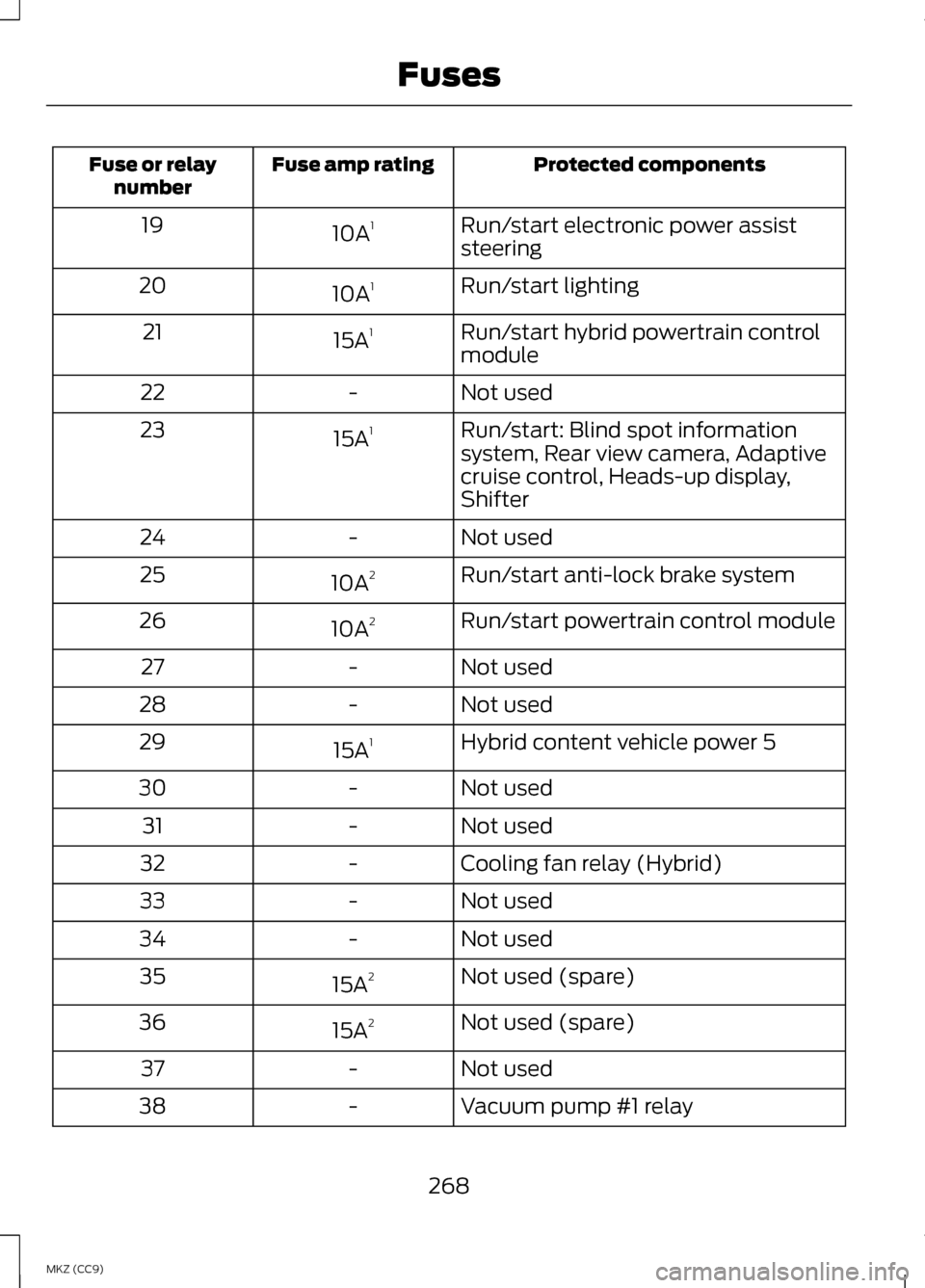
Protected components
Fuse amp rating
Fuse or relay
number
Run/start electronic power assist
steering
10A
1
19
Run/start lighting
10A 1
20
Run/start hybrid powertrain control
module
15A
1
21
Not used
-
22
Run/start: Blind spot information
system, Rear view camera, Adaptive
cruise control, Heads-up display,
Shifter
15A
1
23
Not used
-
24
Run/start anti-lock brake system
10A 2
25
Run/start powertrain control module
10A 2
26
Not used
-
27
Not used
-
28
Hybrid content vehicle power 5
15A 1
29
Not used
-
30
Not used
-
31
Cooling fan relay (Hybrid)
-
32
Not used
-
33
Not used
-
34
Not used (spare)
15A 2
35
Not used (spare)
15A 2
36
Not used
-
37
Vacuum pump #1 relay
-
38
268
MKZ (CC9) Fuses