lights LINCOLN MKZ HYBRID 2014 User Guide
[x] Cancel search | Manufacturer: LINCOLN, Model Year: 2014, Model line: MKZ HYBRID, Model: LINCOLN MKZ HYBRID 2014Pages: 445, PDF Size: 3.8 MB
Page 138 of 445
WARNING
People who are unable to feel pain
to their skin because of advanced
age, chronic illness, diabetes, spinal cord
injury, medication, alcohol use, exhaustion
or other physical conditions, must exercise
care when using the heated seat. The
heated seat may cause burns even at low
temperatures, especially if used for long
periods of time. Do not place anything on
the seat that insulates against heat, such
as a blanket or cushion. This may cause
the heated seat to overheat. Do not
puncture the seat with pins, needles or
other pointed objects. This may damage
the heating element which may cause the
heated seat to overheat. An overheated
seat may cause serious personal injury. Do not do the following:
•
Place heavy objects on the seat.
• Operate the heated seat if water or any
other liquid is spilled on the seat. Allow
the seat to dry thoroughly.
• Operate the heated seats unless the
engine is running. Doing so can cause
the battery to lose charge. Touch the heated seat symbol to cycle
through the various heat settings and off.
Warmer settings are indicated by more
indicator lights. Rear Heated Seats (If Equipped) WARNING
Persons who are unable to feel pain
to the skin because of advanced
age, chronic illness, diabetes, spinal cord
injury, medication, alcohol use, exhaustion,
or other physical conditions, must exercise
care when using the seat heater. The seat
heater may cause burns even at low
temperatures, especially if used for long
periods of time. Do not place anything on
the seat that insulates against heat, such
as a blanket or cushion, because this may
cause the seat heater to overheat. Do not
puncture the seat with pins, needles, or
other pointed objects because this may
damage the heating element which may
cause the seat heater to overheat. An
overheated seat may cause serious
personal injury. Note:
Do not do the following:
• Place heavy objects on the seat.
• Operate the seat heater if water or any
other liquid is spilled on the seat. Allow
the seat to dry thoroughly.
The rear seat heat controls are located on
the rear of the center console.
The heated seats only operate when the
ignition is on. 136
MKZ (CC9) SeatsE146322 E146322
Page 139 of 445
•
Press the heated seat symbol to cycle
through the various heat settings and
off. Warmer settings are indicated by
more indicator lights.
• Press again to deactivate.
The heated seat module resets at every
ignition run cycle. While the ignition is on,
press the high or low heated seat switch
to enable heating mode. When activated,
they will turn off automatically when you
turn the engine off.
VENTILATED SEATS (IF EQUIPPED)
The ventilated seats will only function
when the engine is running. To operate the ventilated seats:
Press the ventilated seat symbol to cycle
through the various cooling settings and
off. Cooler settings are indicated by more
indicator lights.
If the engine falls below 350 RPM while
the ventilated seats are on, the feature will
turn itself off and you will need to
reactivate it. Heated and ventilated seat air filter
replacement (if equipped)
Your vehicle is equipped with lifetime air
filters that are integrated with the seats.
Regular maintenance or replacement is
not needed.
REAR SEAT ARMREST
Fold the armrest down to use the armrest
and cupholder. To open the storage lid,
pull up on the latch located between the
cupholders.
Armrest pass-through
Note:
Do not exceed 80 pounds (36
kilograms) of weight on the pass-through
door.
137
MKZ (CC9) SeatsE146309 E144635
Page 143 of 445
3.
Press and hold the function button you
want to program for 2 seconds, then
release. Repeat this step. Depending
on your brand of garage door opener,
you may need to repeat this sequence
a third time.
Erasing the Function Button Codes
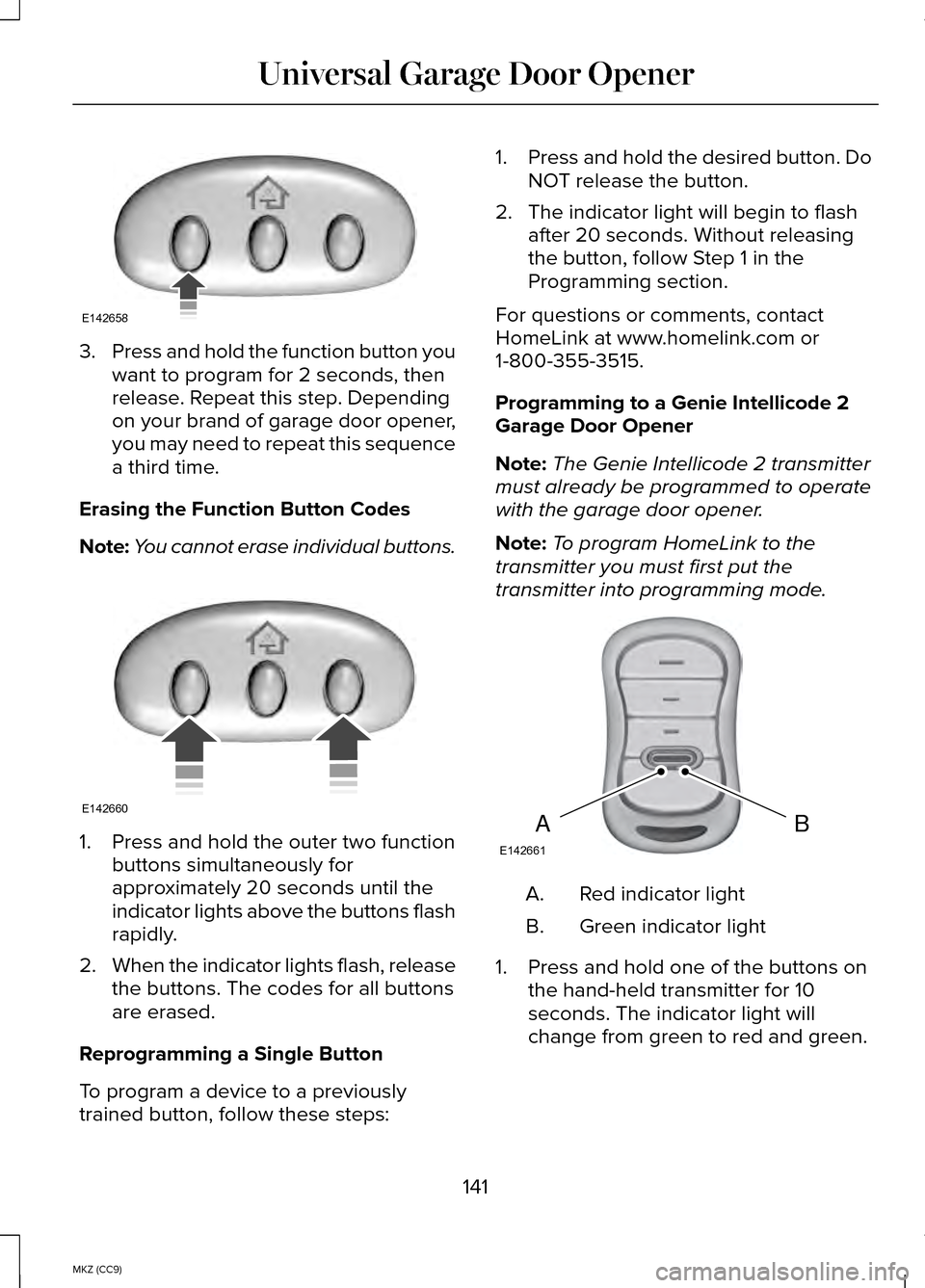
Note: You cannot erase individual buttons. 1. Press and hold the outer two function
buttons simultaneously for
approximately 20 seconds until the
indicator lights above the buttons flash
rapidly.
2. When the indicator lights flash, release
the buttons. The codes for all buttons
are erased.
Reprogramming a Single Button
To program a device to a previously
trained button, follow these steps: 1.
Press and hold the desired button. Do
NOT release the button.
2. The indicator light will begin to flash after 20 seconds. Without releasing
the button, follow Step 1 in the
Programming section.
For questions or comments, contact
HomeLink at www.homelink.com or
1-800-355-3515.
Programming to a Genie Intellicode 2
Garage Door Opener
Note: The Genie Intellicode 2 transmitter
must already be programmed to operate
with the garage door opener.
Note: To program HomeLink to the
transmitter you must first put the
transmitter into programming mode. Red indicator light
A.
Green indicator light
B.
1. Press and hold one of the buttons on the hand-held transmitter for 10
seconds. The indicator light will
change from green to red and green.
141
MKZ (CC9) Universal Garage Door OpenerE142658 E142660 BAE142661
Page 144 of 445
2.
Press the same button twice to confirm
the change to programming mode. If
done properly the indicator light will
appear red.
3. Hold the transmitter within 1–3 inches (2–8 centimeters) of the button on the
visor you want to program.
4. Press and hold both the programmed Genie button on the hand-held
transmitter and the button you want to
program. The indicator light on the
visor will flash rapidly when the
programming is successful.
Note: The Genie transmitter will transmit
for up to 30 seconds. If HomeLink does
not program within 30 seconds the Genie
transmitter will need to be pressed again.
If the Genie transmitter indicator light
displays green and red, release the button
until the indicator light turns off before
pressing the button again.
Once HomeLink has been programmed
successfully, the Genie transmitter must
be changed out of program mode. To do
this:
1. Press and hold the previously programmed Genie button on the
hand-held transmitter for 10 seconds.
The indicator light will change from red
to red and green.
2. Press the same button twice to confirm
the change. If done correctly the
indicator light will turn green.
Programming HomeLink to the Genie
Intellicode Garage Door Opener Motor
Note: You may need a ladder to access
the garage door opener motor. 1.
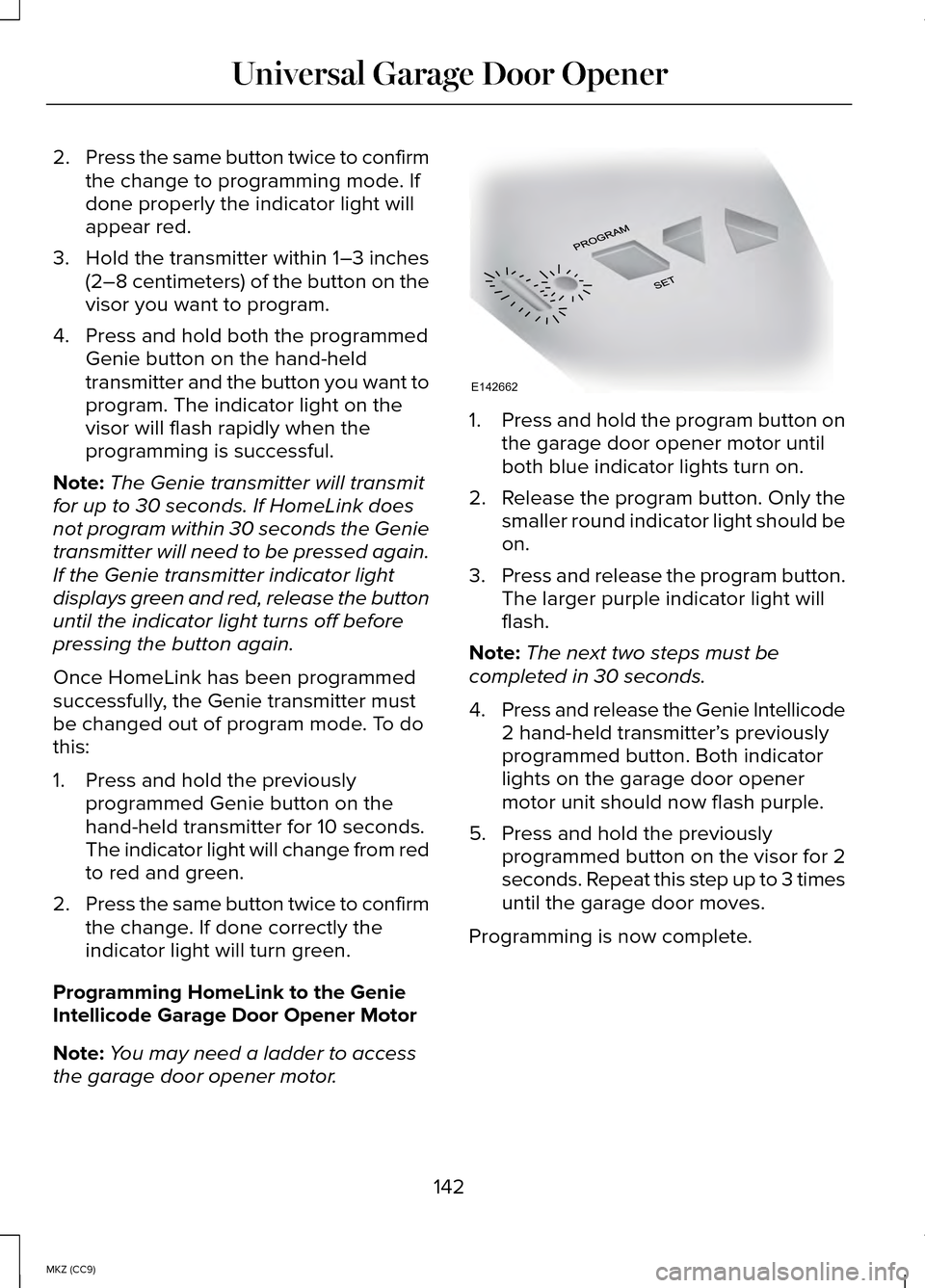
Press and hold the program button on
the garage door opener motor until
both blue indicator lights turn on.
2. Release the program button. Only the
smaller round indicator light should be
on.
3. Press and release the program button.
The larger purple indicator light will
flash.
Note: The next two steps must be
completed in 30 seconds.
4. Press and release the Genie Intellicode
2 hand-held transmitter’ s previously
programmed button. Both indicator
lights on the garage door opener
motor unit should now flash purple.
5. Press and hold the previously programmed button on the visor for 2
seconds. Repeat this step up to 3 times
until the garage door moves.
Programming is now complete.
142
MKZ (CC9) Universal Garage Door OpenerE142662
Page 180 of 445
When the system is active, your vehicle
will remain stationary on the slope for two
to three seconds after you release the
brake pedal. This allows you time to move
your foot from the brake to the accelerator
pedal. The brakes are released
automatically once the engine has
developed sufficient drive to prevent your
vehicle from rolling down the slope. This
is an advantage when pulling away on a
slope, (for example from a car park ramp,
traffic lights or when reversing uphill into
a parking space).
The system will activate automatically on
any slope that will cause significant vehicle
rollback.
Using Hill Start Assist
1. Press the brake pedal to bring your
vehicle to a complete standstill. Keep
the brake pedal pressed.
2. If the sensors detect that your vehicle is on a slope, the system will activate
automatically.
3. When you remove your foot from the brake pedal, your vehicle will remain
on the slope without rolling away for
about two or three seconds. This hold
time will automatically be extended if
you are in the process of driving off.
4. Drive off in the normal manner. The brakes will release automatically.
178
MKZ (CC9) Brakes
Page 181 of 445
PRINCIPLE OF OPERATION
The traction control system helps avoid
drive wheel spin and loss of traction.
If your vehicle begins to slide, the system
applies the brakes to individual wheels
and, when needed, reduces engine power
at the same time. If the wheels spin when
accelerating on slippery or loose surfaces,
the system reduces engine power in order
to increase traction.
USING TRACTION CONTROL
In certain situations for example, stuck in
snow or mud, turning the traction control
off may be beneficial as this allows the
wheels to spin with full engine power.
Depending on the type of system you have
on your vehicle, you can either turn the
system off using the information display
or by pressing the button.
Switching the System Off Using the
Information Display Controls (If Equipped)
Your vehicle comes with this feature
already enabled. If required, you can
switch this feature off using the information
display controls. See Principle of
Operation (page 179).
Switching the System Off Using a
Switch
(If Equipped)
The button is located in the instrument
panel.
Press the button. You will see a message
in conjunction with an illuminated icon in
the display. Press the button again to
return the system to normal mode. When you switch the traction control
system off, stability control remains fully
active.
System Indicator Lights and
Messages
WARNING
If a failure has been detected within
the AdvanceTrac system, the
stability control light will illuminate steadily.
Verify that the AdvanceTrac system was
not manually disabled through the
information display. If the stability control
light still illuminates steadily, have the
system serviced by an authorized dealer
immediately. Operating your vehicle with
AdvanceTrac disabled could lead to an
increased risk of loss of vehicle control,
vehicle rollover, personal injury and death. The stability control light
temporarily illuminates on
engine start-up and flashes
when a driving condition activates the
stability system. The stability control off light
temporarily illuminates on
engine start-up and stays on
when you turn the traction control system
off.
When you turn the traction control system
off or on, a message appears in the
information display showing system status.
179
MKZ (CC9) Traction ControlE138639
Page 192 of 445
The fixed and active guidelines fade in and
out depending on your steering wheel
position. When your steering wheel
position is straight, the active guidelines
are not visible.
Always use caution while reversing.
Objects in the red zone are closest to your
vehicle and objects in the green zone are
farther away. Objects are getting closer to
your vehicle as they move from the green
zone to the yellow or red zones. Use the
side view mirrors and rear view mirror to
get better coverage on both sides and rear
of your vehicle.
Selectable settings for this feature are
ACTIVE + FIXED, FIXED and OFF.
Visual Park Aid Alert
Note:
Visual park alert is only available
when the transmission is in Reverse (R).
Note: The reverse sensing system is not
effective at speeds above 3 mph (5 km/h)
and may not detect certain angular or
moving objects.
The system uses red, yellow and green
highlights that appear on top of the video
image when the reverse sensing system
detects an object. The alert highlights the
closest object detected. You can disable
the reverse sensing alert if you have visual
park aid alert enabled, you will still see the
displayed highlighted areas.
Selectable settings for this feature are ON
and OFF. Manual Zoom WARNING
When manual zoom is on, the full
area behind your vehicle is not
shown. Be aware of your surroundings
when using the manual zoom feature. Note:
Manual zoom is only available when
the transmission is in Reverse (R).
Note: Only the centerline shows when you
enable manual zoom.
This allows you to get a closer view of an
object behind your vehicle. The zoomed
image keeps the bumper in the image to
provide a reference. The zoom is only
active while the transmission is in Reverse
(R). When you shift the transmission out of
Reverse (R), the feature automatically turns
off and you must enable it to use it used
again.
Selectable settings for this feature are ON
and OFF.
Rear Camera Delay
When shifting the transmission out of
Reverse (R) and into any gear other than
Park (P), the camera image remains in the
display until your vehicle speed reaches
5 mph (8 km/h or until you select a radio
button.
Selectable settings for this feature are ON
and OFF. The default setting for the rear
camera delay is OFF.
190
MKZ (CC9) Parking Aids
Page 209 of 445
System Lights and Messages
The BLIS and cross traffic alert systems
illuminate a yellow alert indicator in the
outside mirror on the side of the vehicle
the approaching vehicle is coming from.
Note:
The alert indicator dims when
nighttime darkness is detected.
Cross traffic alert also sounds an audible
warning and a message appears in the
information display indicating a vehicle is
coming from the right or left. Cross traffic
alert works with the reverse sensing
system which sounds its own series of
tones. See Parking Aid (page 182).
System Sensors WARNING
Just prior to the system recognizing
a blocked condition and alerting the
driver, the number of missed objects will
increase. To help avoid injuries, NEVER
use the BLIS as a replacement for using
the side and rear view mirrors and looking
over your shoulder before changing lanes.
BLIS is not a replacement for careful
driving and only an assist. Note:
It is possible to get a blockage
warning with no blockage present; this is
rare and known as a false blockage
warning. A false blocked condition either
self-corrects or clears after a key cycle. The system uses radar sensors which are
located behind the bumper fascia on each
side of your vehicle. Do not allow these
areas to become obstructed by mud, snow
or bumper stickers, as this can cause
degraded system performance.
If the system detects a degraded
performance condition, a message
warning of a blocked sensor or a message
warning of low visibility will appear in the
information display and the alert indicator
illuminates in the appropriate mirror(s). The
information display warning can be cleared
but the alert indicator remains illuminated.
When the blockage is removed, the
system can be reset in two ways:
•
when at least two objects are detected
while driving, or
• turn the ignition from on to off, then
back on.
If the blockage is still present after the key
cycle, the system senses again that it is
blocked after driving in traffic.
207
MKZ (CC9) Driving AidsE142442 E142443
Page 232 of 445
Vehicle Information and General Safety
Practices
•
Know the make and model of your
vehicle.
• Review the owner’ s manual and
become familiar with your vehicle ’s
safety information and recommended
safety practices.
• Do not attempt to repair damaged
electric and hybrid-electric vehicles
yourself. Contact an authorized Ford
Dealer or vehicle manufacturer
representative for service.
Crashes
A crash or impact significant enough to
require an emergency response for
conventional vehicles would also require
the same response for an electric or
hybrid-electric vehicle.
If possible
• Move your car to a safe, nearby
location and remain on the scene.
• Roll down the windows before shutting
your vehicle off.
• Place your vehicle in Park, set the
parking brake, turn off the vehicle,
activate the hazard lights, and move
your key(s) at least 16 feet (5 meters)
away from the vehicle. Always
•
Call 911 if assistance is needed and
advise that an electric or hybrid-electric
vehicle is involved.
• Do not touch exposed electrical
components or the engine
compartment, as a shock hazard may
exist.
• Avoid contact with leaking fluids and
gases, and remain out of the way of
oncoming traffic until emergency
responders arrive.
• When emergency responders arrive,
tell them that the vehicle involved is
an electric vehicle or hybrid vehicle.
Fires
As with any vehicle, call 911 immediately if
you see sparks, smoke or flames coming
from the vehicle.
• Exit the vehicle immediately.
• Advise 911 that an electric or
hybrid-electric vehicle is involved.
• As with any vehicle fire, do not inhale
smoke, vapors or gas from the vehicle,
as they may be hazardous.
• Remain a safe distance upwind and
uphill from the vehicle fire.
• Stay out of the roadway and stay out
of the way of any oncoming traffic
while awaiting the arrival of emergency
responders.
230
MKZ (CC9) Roadside Emergencies
Page 279 of 445
General Information
WARNING
Failure to follow these guidelines
could result in an increased risk of
loss of vehicle control, injury or death. Note:
Do not use the kit if a tire has
become severely damaged by driving the
vehicle with a tire that has insufficient air
pressure. Only punctured areas located
within the tire tread can be sealed with
the kit.
Do not attempt to repair punctures larger
than 1/4 inch (6 millimeters) or damage to
the tire's sidewall. The tire may not
completely seal.
Loss of air pressure may adversely affect
tire performance. For this reason:
Note: Do not drive the vehicle above 50
mph (80 km/h).
Note: Do not drive further than 120 miles
(200 kilometers). Drive only to the closest
Ford Motor Company authorized dealer
or tire repair shop to have your tire
inspected.
• Drive carefully and avoid abrupt
steering maneuvers.
• Periodically monitor tire inflation
pressure in the affected tire; if the tire
is losing pressure, have the vehicle
towed.
• Read the information in the Tips for
Use of the Kit section to make sure
safe operation of the kit and your
vehicle. Tips for Use of the Kit
Read the following list of tips to ensure
safe operation of the kit:
•
Before operating the kit, make sure
your vehicle is safely off the road and
away from moving traffic. Turn on the
hazard lights.
• Always set the parking brake to ensure
the vehicle doesn't move
unexpectedly.
• Do not remove any foreign objects,
such as nails or screws, from the tire.
• When using the kit, leave the engine
running (only if the vehicle is outdoors
or in a well-ventilated area) so the
compressor doesn't drain the vehicle's
battery.
• Do not allow the compressor to
operate continuously for more than 15
minutes; this will help prevent the
compressor from overheating.
• Never leave the kit unattended when
it is operating.
• Sealant compound contains latex.
Make sure that you use the non-latex
gloves provided to avoid an allergic
reaction.
• Keep the kit away from children.
• Only use the kit when the ambient
temperature is between -22°F (–30°C)
and 158°F (70°C).
• Only use the sealing compound before
the use by date. The use by date is on
the lower right hand corner of the label
located on the sealant canister (bottle).
Check the use by date regularly and
replace the canister after four years.
277
MKZ (CC9) Wheels and Tires