climate control LINCOLN MKZ HYBRID 2016 Owner's Manual
[x] Cancel search | Manufacturer: LINCOLN, Model Year: 2016, Model line: MKZ HYBRID, Model: LINCOLN MKZ HYBRID 2016Pages: 543, PDF Size: 5.04 MB
Page 315 of 543
•
Clean the wheels weekly using
Motorcraft Wheel and Tire Cleaner. Apply
using manufacturer's instructions.
• Use a sponge to remove heavy deposits
of dirt and brake dust accumulation.
• Rinse thoroughly with a strong stream of
water when you have completed the
cleaning process.
• To remove tar and grease, use Motorcraft
Bug and Tar Remover.
VEHICLE STORAGE
If you plan on storing your vehicle for 30
days or more, read the following
maintenance recommendations to make sure
your vehicle stays in good operating
condition.
We engineer and test all motor vehicles and
their components for reliable, regular driving.
Under various conditions, long-term storage
may lead to degraded engine performance
or failure unless you use specific precautions
to preserve engine components. General
•
Store all vehicles in a dry, ventilated
place.
• Protect from sunlight, if possible.
• If vehicles are stored outside, they
require regular maintenance to protect
against rust and damage.
Body
• Wash your vehicle thoroughly to remove
dirt, grease, oil, tar or mud from exterior
surfaces, rear-wheel housing and the
underside of front fenders.
• Periodically wash your vehicle if it is
stored in exposed locations.
• Touch-up exposed or primed metal to
prevent rust.
• Cover chrome and stainless steel parts
with a thick coat of auto wax to prevent
discoloration. Re-wax as necessary when
you wash your vehicle.
• Lubricate all hood, door and luggage
compartment hinges and latches with a
light grade oil. •
Cover interior trim to prevent fading.
• Keep all rubber parts free from oil and
solvents.
Engine
• Change the engine oil and filter prior to
storage because used engine oil contains
contaminates which may cause engine
damage.
• Start the engine every 15 days for a
minimum of 15 minutes. Run at fast idle
with the climate controls set to defrost
until the engine reaches normal
operating temperature.
• With your foot on the brake, shift through
all the gears while the engine is running.
• We recommend that you change the
engine oil before you use your vehicle
again.
Fuel system
• Fill the fuel tank with high-quality fuel
until the first automatic shutoff of the fuel
pump nozzle.
312
MKZ Hybrid (CC9) Hybrid Electric Vehicle (HEV), Canada/United States of America, enUSA, First Printing Vehicle Care
Page 331 of 543
Tire Quality Grades apply to new
pneumatic passenger car tires. They do
not apply to deep tread, winter-type
snow tires, space-saver or temporary
use spare tires, light truck or LT type
tires, tires with nominal rim diameters of
10 to 12 inches or limited production tires
as defined in Title 49 Code of Federal
Regulations Part 575.104 (c)(2).
U.S. Department of Transportation Tire
quality grades: The U.S. Department of
Transportation requires Ford Motor
Company to give you the following
information about tire grades exactly as
the government has written it.
Treadwear
The treadwear grade is a comparative
rating based on the wear rate of the tire
when tested under controlled conditions
on a specified government test course.
For example, a tire graded 150 would
wear one and one-half (1 ½) times as well
on the government course as a tire
graded 100. The relative performance
of tires depends upon the actual
conditions of their use, however, and
may depart significantly from the norm
due to variations in driving habits,
service practices, and differences in
road characteristics and climate.
Traction AA A B C
WARNING
The traction grade assigned to this
tire is based on straight-ahead
braking traction tests, and does not
include acceleration, cornering,
hydroplaning or peak traction
characteristics. The traction grades, from highest to
lowest are AA, A, B, and C. The grades
represent the tire
’s ability to stop on wet
pavement as measured under controlled
conditions on specified government test
surfaces of asphalt and concrete. A tire
marked C may have poor traction
performance. Temperature A B C WARNING
The temperature grade for this tire
is established for a tire that is
properly inflated and not overloaded.
Excessive speed, underinflation, or
excessive loading, either separately or
in combination, can cause heat buildup
and possible tire failure. The temperature grades are A (the
highest), B and C, representing the tire
’s
resistance to the generation of heat and
its ability to dissipate heat when tested
under controlled conditions on a
specified indoor laboratory test wheel.
Sustained high temperature can cause
the material of the tire to degenerate
and reduce tire life, and excessive
temperature can lead to sudden tire
failure. The grade C corresponds to a
level of performance which all
328
MKZ Hybrid (CC9) Hybrid Electric Vehicle (HEV), Canada/United States of America, enUSA, First Printing Wheels and Tires
Page 367 of 543
Note:
You can access the entertainment
features for 30 minutes after you switch the
ignition off, and no doors are opened.
PHONE
Press to select any of the following: Message
Phone
Quick Dial
Phonebook
History
Messaging
Settings Navigation
Press to select any of the following: Message
My Home
Favorites
Previous Destinations
Point of Interest
Emergency
Street Address
Intersection
City Center
Map
Edit Route
Cancel Route
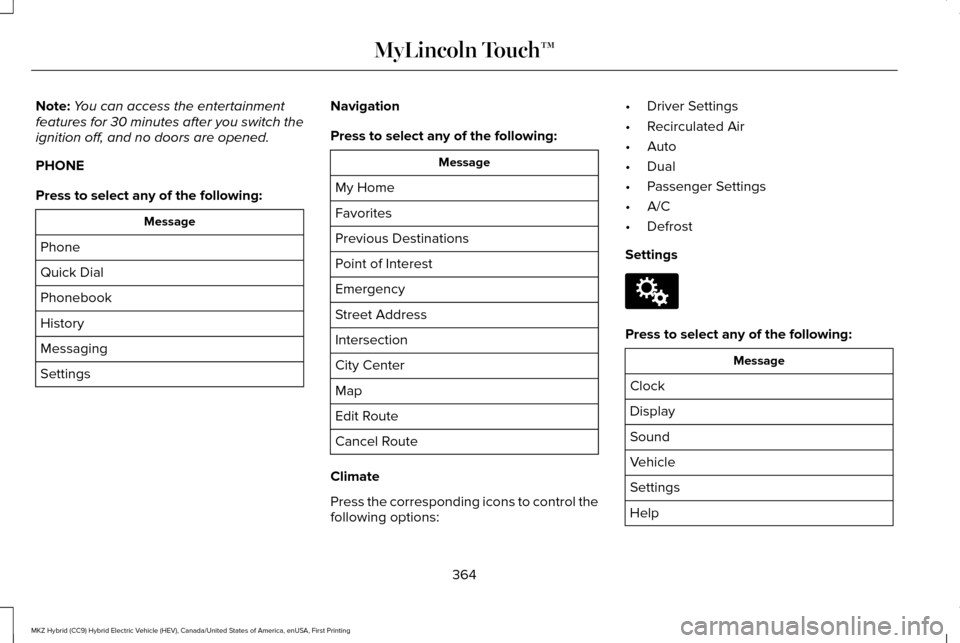
Climate
Press the corresponding icons to control the
following options: •
Driver Settings
• Recirculated Air
• Auto
• Dual
• Passenger Settings
• A/C
• Defrost
Settings Press to select any of the following:
Message
Clock
Display
Sound
Vehicle
Settings
Help
364
MKZ Hybrid (CC9) Hybrid Electric Vehicle (HEV), Canada/United States of America, enUSA, First Printing MyLincoln Touch™E142607
Page 432 of 543
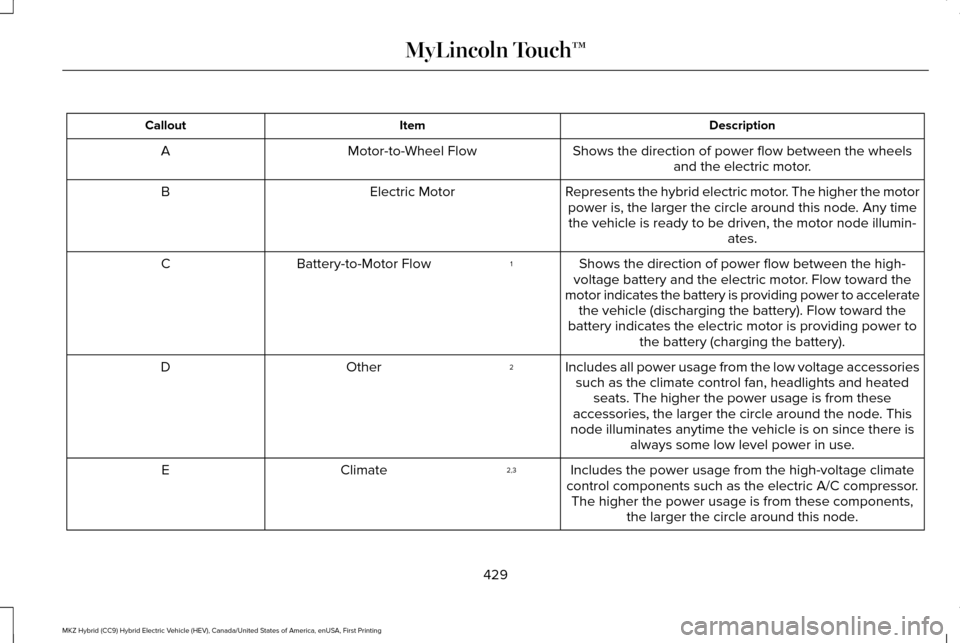
Description
Item
Callout
Shows the direction of power flow between the wheelsand the electric motor.
Motor-to-Wheel Flow
A
Represents the hybrid electric motor. The higher the motorpower is, the larger the circle around this node. Any timethe vehicle is ready to be driven, the motor node illumin- ates.
Electric Motor
B
Shows the direction of power flow between the high-
voltage battery and the electric motor. Flow toward the
motor indicates the battery is providing power to accelerate the vehicle (discharging the battery). Flow toward the
battery indicates the electric motor is providing power to the battery (charging the battery).
1
Battery-to-Motor Flow
C
Includes all power usage from the low voltage accessoriessuch as the climate control fan, headlights and heated seats. The higher the power usage is from these
accessories, the larger the circle around the node. This
node illuminates anytime the vehicle is on since there is always some low level power in use.
2
Other
D
Includes the power usage from the high-voltage climate
control components such as the electric A/C compressor. The higher the power usage is from these components, the larger the circle around this node.
2,3
Climate
E
429
MKZ Hybrid (CC9) Hybrid Electric Vehicle (HEV), Canada/United States of America, enUSA, First Printing MyLincoln Touch™
Page 434 of 543
Description
Item
Callout
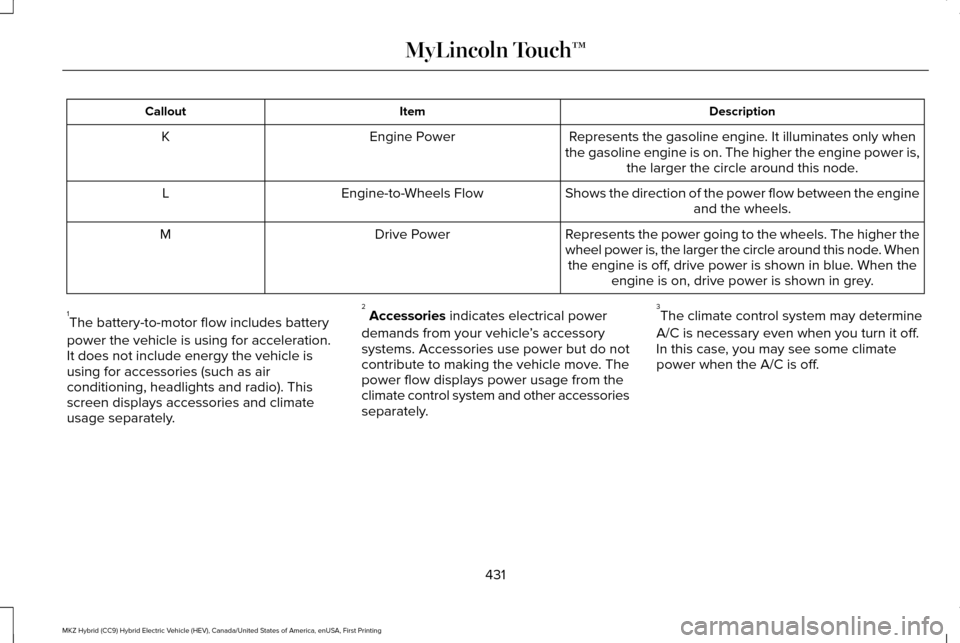
Represents the gasoline engine. It illuminates only when
the gasoline engine is on. The higher the engine power is, the larger the circle around this node.
Engine Power
K
Shows the direction of the power flow between the engineand the wheels.
Engine-to-Wheels Flow
L
Represents the power going to the wheels. The higher the
wheel power is, the larger the circle around this node. Whenthe engine is off, drive power is shown in blue. When the engine is on, drive power is shown in grey.
Drive Power
M
1 The battery-to-motor flow includes battery
power the vehicle is using for acceleration.
It does not include energy the vehicle is
using for accessories (such as air
conditioning, headlights and radio). This
screen displays accessories and climate
usage separately. 2
Accessories indicates electrical power
demands from your vehicle ’s accessory
systems. Accessories use power but do not
contribute to making the vehicle move. The
power flow displays power usage from the
climate control system and other accessories
separately. 3
The climate control system may determine
A/C is necessary even when you turn it off.
In this case, you may see some climate
power when the A/C is off.
431
MKZ Hybrid (CC9) Hybrid Electric Vehicle (HEV), Canada/United States of America, enUSA, First Printing MyLincoln Touch™
Page 451 of 543
Where Am I?
For information about your current location,
select:
Action and Descrip-
tion
Menu Item
View your vehicle's
current location, if
your vehicle is
equipped with
navigation. If your
vehicle is not
equipped with
Where Am I? Action and Descrip-
tion
Menu Item
navigation, nothing
displays.
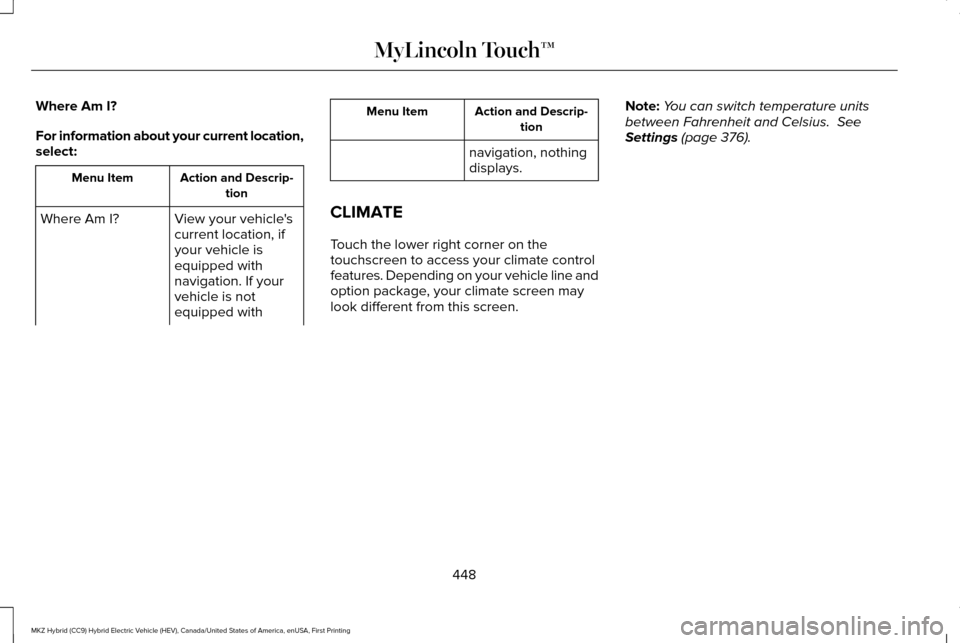
CLIMATE
Touch the lower right corner on the
touchscreen to access your climate control
features. Depending on your vehicle line and
option package, your climate screen may
look different from this screen. Note:
You can switch temperature units
between Fahrenheit and Celsius. See
Settings (page 376).
448
MKZ Hybrid (CC9) Hybrid Electric Vehicle (HEV), Canada/United States of America, enUSA, First Printing MyLincoln Touch™
Page 452 of 543

Power: Touch the button to switch the system on and off. Switching off the climate control system prevents outside air from enteri\
ng
the vehicle.
A
Passenger settings:
B
Touch the
+ or – to increase or decrease the air temperature on the passenger side of th\
e vehicle.
Touch the heated seat icon to switch the heated seat off and on (if equi\
pped).
Touch the climate-controlled seat icon to switch the climate-controlled s\
eat off and on (if equipped).
Touch
Dual to switch separate passenger side temperature controls off and on. When\
you switch off Dual, the passenger side
temperature changes to match the driver side temperature.
449
MKZ Hybrid (CC9) Hybrid Electric Vehicle (HEV), Canada/United States of America, enUSA, First Printing MyLincoln Touch™E171848
K
Page 454 of 543

Max Defrost: Touch the button to maximize defrosting. Outside air flows through the wi\
ndshield vents, fan automatically adjusts to
the highest speed and the temperature dial returns to the full heat posi\
tion. You can use this setting to defog or clear a thin covering
of ice from the windshield. The heated rear window also automatically tu\
rns on when you select Max Defrost.
I
Air distribution control:
Touch these buttons to switch airflow from the windshield, instrument pan\
el, or footwell vents on or off.
The system can distribute air through any combination of these vents.
J
Note:
To prevent window fogging, you cannot select recirculated air when MAX De\
frost is on.
Driver settings:
K
Touch the
+ or – to increase or decrease the air temperature on the driver side of the v\
ehicle.
Touch the heated seat icon to switch the heated seat off and on (if equi\
pped).
Touch the climate-controlled seat icon to switch the climate-controlled s\
eat off and on (if equipped).
Touch
MyTemp to select your preset temperature setpoint. Touch and hold MyTemp to save a new preset temperature setpoint.
Touch the heated steering wheel icon to switch the heated steering wheel \
on and off (if equipped).
Note: If your vehicle is equipped with a
wood-trimmed steering wheel, it does not
heat between the 10 o'clock and 2 o'clock
positions. Smart Zone Feature
Each time you start your vehicle and drive
without an occupant in the front passenger
seat, the climate control system may
automatically switch to single zone mode (if
it was previously in dual zone mode) in order
to improve fuel economy. When this occurs,
the DUAL button turns off and the passenger
temperature changes to agree with the
driver's temperature.Press the
DUAL button or adjust the
passenger temperature to start dual zone
mode without a passenger present. The
system remains in dual zone mode until the
start your vehicle again.
Turning the Feature On
Press and hold the
DUAL button for more
than four seconds. Only the driver's
temperature display flashes to signify that
the feature is on.
451
MKZ Hybrid (CC9) Hybrid Electric Vehicle (HEV), Canada/United States of America, enUSA, First Printing MyLincoln Touch™
Page 455 of 543
Turning the Feature Off
Press and hold the DUAL button for more
than four seconds. Both temperature displays
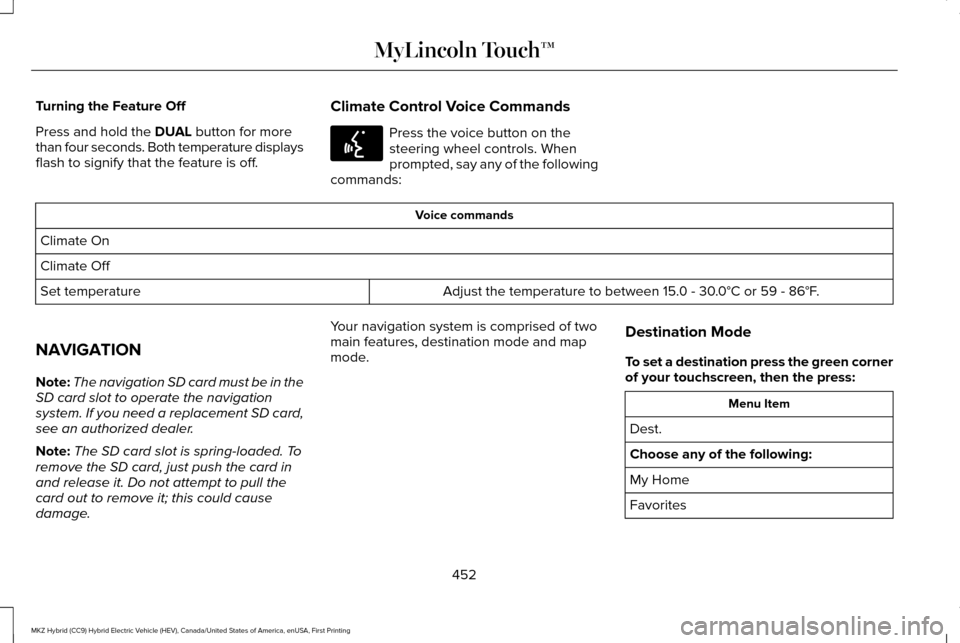
flash to signify that the feature is off. Climate Control Voice Commands Press the voice button on the
steering wheel controls. When
prompted, say any of the following
commands: Voice commands
Climate On
Climate Off Adjust the temperature to between 15.0 - 30.0°C or 59 - 86°F.
Set temperature
NAVIGATION
Note: The navigation SD card must be in the
SD card slot to operate the navigation
system. If you need a replacement SD card,
see an authorized dealer.
Note: The SD card slot is spring-loaded. To
remove the SD card, just push the card in
and release it. Do not attempt to pull the
card out to remove it; this could cause
damage. Your navigation system is comprised of two
main features, destination mode and map
mode.
Destination Mode
To set a destination press the green corner
of your touchscreen, then the press: Menu Item
Dest.
Choose any of the following:
My Home
Favorites
452
MKZ Hybrid (CC9) Hybrid Electric Vehicle (HEV), Canada/United States of America, enUSA, First Printing MyLincoln Touch™E142599
Page 532 of 543
A
A/C
See: Climate Control............................................141
About This Manual............................................7
Protecting the Environment..................................7
ABS See: Brakes...........................................................195
ABS driving hints See: Hints on Driving With Anti-Lock
Brakes................................................................196
Accessories....................................................474 Exterior style........................................................474
Interior style.........................................................474
Lifestyle.................................................................474
Peace of mind......................................................474
Accessories See: Replacement Parts Recommendation.....12
ACC See: Using Adaptive Cruise Control..............215
Active Park Assist........................................206 Automatic Steering into Parking Space........207
Deactivating the Park Assist Feature............208
Troubleshooting the System...........................209
Using Active Park Assist..................................206
Adaptive Headlamps......................................91 Adjusting the Headlamps..........................300
Horizontal Aim Adjustment...............................301
Vertical Aim Adjustment...................................300
Adjusting the Steering Wheel.....................80 Power Tilt and Telescope Steering
Column................................................................80
AFS See: Adaptive Headlamps...................................91
Airbag Disposal
...............................................53
Air Conditioning See: Climate Control............................................141
Alarm See: Anti-Theft Alarm...........................................78
Ambient Lighting
.............................................94
Anti-Theft Alarm..............................................78 Arming the Alarm..................................................79
Disarming the Alarm.............................................79
Appendices...................................................500
Audible Warnings and Indicators
..............109
Headlamps On Warning Chime.......................109
Key in Ignition Warning Chime........................109
Keyless Warning Alert........................................109
Parking Brake On Warning Chime..................
109
Audio Control
....................................................81
Seek, Next or Previous.........................................81
Audio System................................................358 General Information...........................................358 Audio Unit - Vehicles With: Premium AM/
FM/CD..........................................................359
Autolamps.........................................................87 Windshield Wiper Activated Headlamps........88
Automatic Climate Control...........................141
Automatic High Beam Control
....................90
Activating the System...........................................91
Manually Overriding the System.......................91
Automatic Transmission
..............................190
Brake-Shift Interlock Override.........................193
If Your Vehicle Gets Stuck In Mud or Snow..................................................................194
Push Button Shift Transmission.......................
190
Automatic Transmission Fluid Check...........................................................296
Autowipers.......................................................85
Auxiliary Power Points.................................163 110 Volt AC Power Point and Twisting Auxiliary
Cover..................................................................163
12 Volt DC Power Point......................................163
Locations...............................................................163
B
Blind Spot Information System.................229 Blind Spot Information System (BLIS®) with
Cross Traffic Alert..........................................229
529
MKZ Hybrid (CC9) Hybrid Electric Vehicle (HEV), Canada/United States of America, enUSA, First Printing Index