instrument cluster LINCOLN MKZ HYBRID 2016 Owner's Manual
[x] Cancel search | Manufacturer: LINCOLN, Model Year: 2016, Model line: MKZ HYBRID, Model: LINCOLN MKZ HYBRID 2016Pages: 543, PDF Size: 5.04 MB
Page 262 of 543
Jump Starting
1. Start the booster vehicle and press the
accelerator pedal moderately.
2. Start the disabled vehicle. Check the instrument cluster for the Ready to Drive
light as the gasoline engine may not start,
but the electric motor may be running.
3. Once you start the disabled vehicle, run both vehicles for an additional three
minutes before disconnecting the jumper
cables.
Removing the Jumper Cables
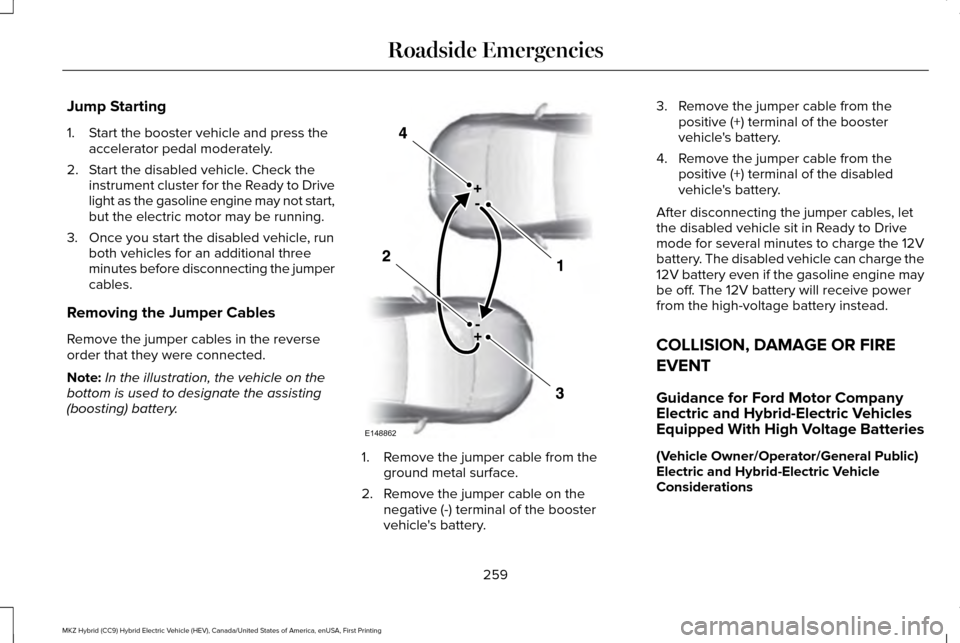
Remove the jumper cables in the reverse
order that they were connected.
Note: In the illustration, the vehicle on the
bottom is used to designate the assisting
(boosting) battery. 1. Remove the jumper cable from the
ground metal surface.
2. Remove the jumper cable on the negative (-) terminal of the booster
vehicle's battery. 3. Remove the jumper cable from the
positive (+) terminal of the booster
vehicle's battery.
4. Remove the jumper cable from the positive (+) terminal of the disabled
vehicle's battery.
After disconnecting the jumper cables, let
the disabled vehicle sit in Ready to Drive
mode for several minutes to charge the 12V
battery. The disabled vehicle can charge the
12V battery even if the gasoline engine may
be off. The 12V battery will receive power
from the high-voltage battery instead.
COLLISION, DAMAGE OR FIRE
EVENT
Guidance for Ford Motor Company
Electric and Hybrid-Electric Vehicles
Equipped With High Voltage Batteries
(Vehicle Owner/Operator/General Public)
Electric and Hybrid-Electric Vehicle
Considerations
259
MKZ Hybrid (CC9) Hybrid Electric Vehicle (HEV), Canada/United States of America, enUSA, First Printing Roadside EmergenciesE148862
Page 264 of 543
Fires
As with any vehicle, call 911 immediately if
you see sparks, smoke or flames coming
from the vehicle.
•
Exit the vehicle immediately.
• Advise 911 that an electric or
hybrid-electric vehicle is involved.
• As with any vehicle fire, do not inhale
smoke, vapors or gas from the vehicle,
as they may be hazardous.
• Remain a safe distance from the vehicle
and try to stay clear of the smoke.
• Stay out of the roadway and stay out of
the way of any oncoming traffic while
awaiting the arrival of emergency
responders.
Post-Incident
• Do not store a severely damaged vehicle
with a lithium-ion battery inside a
structure or within 50 feet (15 meters) of
any structure or vehicle.
• Make sure that passenger and cargo
compartments remain ventilated (i.e.
open window, door or trunk). •
For vehicles in the United States, notify
Ford Motor Company 1-800-392-3673
(then follow the prompts on the voice
response menu), an authorized Ford
dealer or service center as soon as
possible as there may be other steps to
secure and discharge the high-voltage
battery.
• For vehicles in Canada, notify Ford Motor
Company 1-800-565-3673 (then follow
the prompts on the voice response
menu), an authorized Ford dealer or
service center as soon as possible as
there may be other steps to secure and
discharge the high-voltage battery.
• Call 911 if you observe leaking fluids,
sparks, smoke or flames, or hear gurgling
or bubbling from the high-voltage battery.
POST-CRASH ALERT SYSTEM
The system flashes the direction indicators
and sounds the horn (intermittently) in the
event of a serious impact that deploys an
airbag (front, side, side curtain or Safety
Canopy) or the safety belt pretensioners. The horn and indicators will turn off when:
•
You press the hazard control button.
• You press the panic button on the remote
entry transmitter (if equipped).
• Your vehicle runs out of power.
Spinout Detection
If a spinout is detected, the vehicle comes
to a stop and the hazard warning flashers
come on. A message that states the spinout
hazards are activated will appear on the
instrument cluster. The message may not
appear if your vehicle runs out of power.
Once the hazard warning flashers have been
activated, you can turn them off by:
• Pressing the hazard warning flasher
button.
• Pressing the remote control unlock
button.
• Pressing the remote control panic button.
• Cycling the ignition on and off twice.
261
MKZ Hybrid (CC9) Hybrid Electric Vehicle (HEV), Canada/United States of America, enUSA, First Printing Roadside Emergencies
Page 286 of 543
Protected components
Fuse amp rating
Fuse or relay number
Not used (spare).
5A 2
11
Climate control.
7.5A 2
12
Gear shift.
Steering wheel column.
7.5A 2
13
Instrument cluster.
Datalink logic.
Battery electronic control module.
10A 2
14
Datalink/Gateway module.
10A 2
15
Decklid release.
15A 1
16
Child lock.
Tracking and blocking module.
5A 2
17
Ignition.
5A 2
18
Push button start/stop.
Passenger airbag disabled indicator, Transmission range.
7.5A 2
19
Adaptive headlamps.
7.5A 2
20
283
MKZ Hybrid (CC9) Hybrid Electric Vehicle (HEV), Canada/United States of America, enUSA, First Printing Fuses
Page 294 of 543
Only use oils certified for gasoline engines
by the American Petroleum Institute (API).
An oil with this trademark symbol conforms
to the current engine and emission system
protection standards and fuel economy
requirements of the International Lubricants
Specification Advisory Council (ILSAC),
comprised of U.S. and Japanese automobile
manufacturers.
1. Remove the filler cap.
2. Add engine oil that meets the Ford
specifications. See Capacities and
Specifications (page 349).
3. Replace the filler cap. Turn it until you feel a strong resistance.
OIL CHANGE INDICATOR RESET
Use the information display controls on the
steering wheel to reset the oil change
indicator. From the main menu scroll to: Action and description
Message
Press the right arrow button,
then from this menu scroll to
the following message.
Settings
Press the right arrow button,
then from this menu scroll to
the following message.
Vehicle
Press the right arrow button,
then from this menu scroll to
the following message.
Oil Life
Press and hold the OK button
until the instrument cluster
displays the following
message.
Hold OK to
Reset
Reset Successful
When the oil change indicator
resets the instrument cluster
displays 100%.
Remaining Life
{00}% Action and description
Message
If the instrument cluster
displays one of the following
messages, repeat the
process.
Not Reset
Reset Cancelled
ENGINE COOLANT CHECK WARNINGS
Do not add engine coolant when the
engine is hot. Steam and scalding
liquids released from a hot cooling system
can burn you badly. Also, you can be burned
if you spill coolant on hot engine parts. Do not put engine coolant in the
windshield washer fluid container. If
sprayed on the windshield, engine coolant
could make it difficult to see through the
windshield.
291
MKZ Hybrid (CC9) Hybrid Electric Vehicle (HEV), Canada/United States of America, enUSA, First Printing Maintenance
Page 313 of 543
CLEANING THE INSTRUMENT
PANEL AND INSTRUMENT
CLUSTER LENS
WARNING
Do not use chemical solvents or strong
detergents when cleaning the steering
wheel or instrument panel to avoid
contamination of the airbag system. Note:
Follow the same procedure as
cleaning leather seats for cleaning leather
instrument panels and leather interior trim
surfaces. See Cleaning Leather Seats (page
311).
Clean the instrument panel and cluster lens
with a clean, damp and soft cloth, then use
a clean, dry and soft cloth to dry these areas. •
Avoid cleaners or polishes that increase
the gloss of the upper portion of the
instrument panel. The dull finish in this
area helps protect you from undesirable
windshield reflection.
• Do not use any household cleaning
products or glass cleaners as these may
damage the finish of the instrument
panel, interior trim and cluster lens.
• Wash or wipe your hands clean if you
have been in contact with certain
products such as insect repellent and
suntan lotion to avoid possible damage
to the interior painted surfaces.
• Do not allow air fresheners and hand
sanitizers to spill onto interior surfaces.
If a spill occurs, wipe off immediately.
Your warranty may not cover these
damages.
If a staining liquid like coffee or juice has
been spilled on the instrument panel or on
interior trim surfaces:
1. Wipe up spilled liquid using a clean, soft
cloth as quickly as possible. 2. Use Motorcraft Premium Leather and
Vinyl Cleaner or a commercially available
leather cleaning product for automotive
interiors. Test any cleaner or stain
remover on an inconspicuous area.
3. Alternatively, wipe the surface with a clean, soft cloth and a mild soap and
water solution. Dry the area with a clean,
soft cloth.
4. If necessary, apply more soap and water
solution or cleaning product to a clean,
soft cloth and press it onto the soiled
area. Allow this to set at room
temperature for 30 minutes.
5. Remove the soaked cloth, then with a clean, damp cloth, use a rubbing motion
for 60 seconds on the soiled area.
6. Dry the area with a clean, soft cloth.
310
MKZ Hybrid (CC9) Hybrid Electric Vehicle (HEV), Canada/United States of America, enUSA, First Printing Vehicle Care
Page 375 of 543
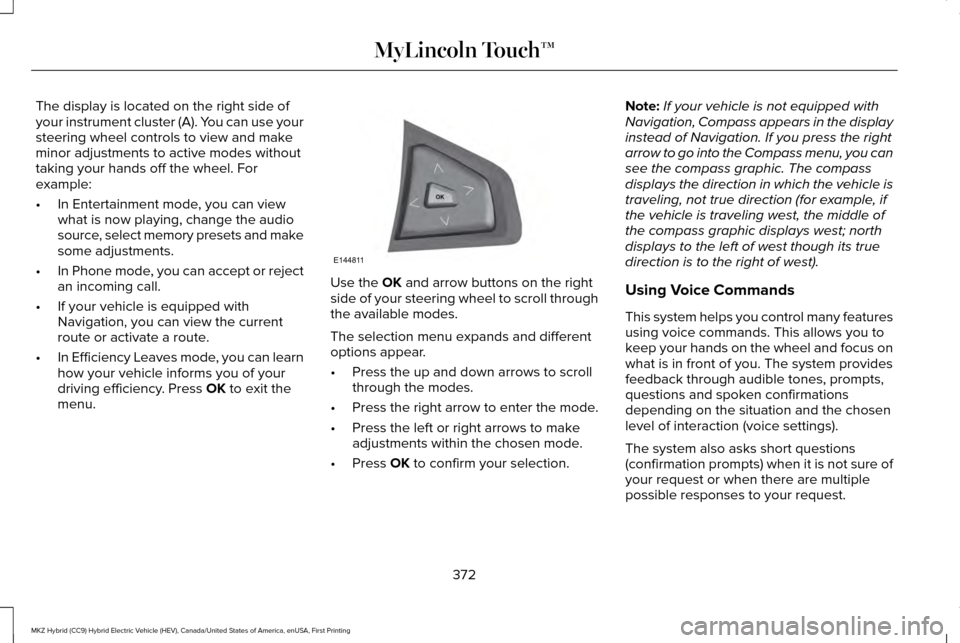
The display is located on the right side of
your instrument cluster (A). You can use your
steering wheel controls to view and make
minor adjustments to active modes without
taking your hands off the wheel. For
example:
•
In Entertainment mode, you can view
what is now playing, change the audio
source, select memory presets and make
some adjustments.
• In Phone mode, you can accept or reject
an incoming call.
• If your vehicle is equipped with
Navigation, you can view the current
route or activate a route.
• In Efficiency Leaves mode, you can learn
how your vehicle informs you of your
driving efficiency. Press OK to exit the
menu. Use the
OK and arrow buttons on the right
side of your steering wheel to scroll through
the available modes.
The selection menu expands and different
options appear.
• Press the up and down arrows to scroll
through the modes.
• Press the right arrow to enter the mode.
• Press the left or right arrows to make
adjustments within the chosen mode.
• Press
OK to confirm your selection. Note:
If your vehicle is not equipped with
Navigation, Compass appears in the display
instead of Navigation. If you press the right
arrow to go into the Compass menu, you can
see the compass graphic. The compass
displays the direction in which the vehicle is
traveling, not true direction (for example, if
the vehicle is traveling west, the middle of
the compass graphic displays west; north
displays to the left of west though its true
direction is to the right of west).
Using Voice Commands
This system helps you control many features
using voice commands. This allows you to
keep your hands on the wheel and focus on
what is in front of you. The system provides
feedback through audible tones, prompts,
questions and spoken confirmations
depending on the situation and the chosen
level of interaction (voice settings).
The system also asks short questions
(confirmation prompts) when it is not sure of
your request or when there are multiple
possible responses to your request.
372
MKZ Hybrid (CC9) Hybrid Electric Vehicle (HEV), Canada/United States of America, enUSA, First Printing MyLincoln Touch™E144811
Page 533 of 543
Bonnet Lock
See: Opening and Closing the Hood............287
Booster Seats...................................................27
Types of Booster Seats.......................................27
Brake Fluid Check.......................................296
Brakes..............................................................195 General Information............................................195
Breaking-In......................................................251
Bulb Specification Chart
..............................301
C
Cabin Air Filter...............................................144
California Proposition 65................................11
Capacities and Specifications...................353 Specifications......................................................354
Car Wash See: Cleaning the Exterior...............................305
Center Console
.............................................165
Changing a Bulb............................................301
Lamp Assembly Condensation........................301
Replacing Bulbs...................................................301
Changing a Fuse..........................................286 Fuses.....................................................................286
Changing the 12V Battery..........................297
Changing the Engine Air Filter.................304
Changing the Wiper Blades......................299
Checking MyKey System Status.................64 Checking the Wiper Blades.......................299
Child Restraint and Safety Belt
Maintenance...................................................41
Child Safety
.......................................................16
General Information..............................................16
Child Safety Locks...........................................31 Left-Hand Side.......................................................32
Right-Hand Side....................................................32
Child Seat Positioning...................................29
Cleaning Leather Seats................................311
Cleaning Products
.......................................305
Cleaning the Alloy Wheels...........................311
Cleaning the Engine....................................307
Cleaning the Exterior..................................305 Exterior Chrome Parts.......................................306
Exterior Plastic Parts..........................................306
Stripes or Graphics............................................306
Underbody...........................................................306
Cleaning the Instrument Panel and Instrument Cluster Lens............................310
Cleaning the Interior....................................308 Cleaning Black Label Interior (If
Equipped).........................................................308
Cleaning the Windows and Wiper Blades...........................................................307
Clearing All MyKeys
.......................................62 Climate............................................................448
Climate Control Voice Commands................
452
Smart Zone Feature............................................451
Climate Control
...............................................141
Climate Controlled Seats............................155
Cooled Seats........................................................156
Collision, Damage or Fire Event...............259 Guidance for Ford Motor Company Electric
and Hybrid-Electric Vehicles Equipped With
High Voltage Batteries.................................259
Coolant Check See: Engine Coolant Check.............................291
Crash Sensors and Airbag Indicator
..........52
Creating a MyKey............................................61 Programming/Changing Configurable
Settings................................................................61
Cruise Control.................................................82 Principle of Operation........................................214
Type 1.......................................................................82
Type 2......................................................................82
Cruise control See: Using Cruise Control.................................214
Customer Assistance..................................262
530
MKZ Hybrid (CC9) Hybrid Electric Vehicle (HEV), Canada/United States of America, enUSA, First Printing Index
Page 537 of 543
Information Messages..................................121
Active Park............................................................122
Adaptive Cruise Control....................................122
Adaptive Headlamps..........................................123
AdvanceTrac ™.......................................................123
Airbag.....................................................................124
Alarm......................................................................124
Automatic Engine Shutdown............................124
Battery and Charging System (12 volt)...........125
Battery and Charging System (High Voltage).............................................................125
Blind Spot Information and Cross Traffic Alert System...............................................................126
Doors and Locks..................................................126
Driver Alert............................................................127
Fuel........................................................................\
..127
Hill Start Assist.....................................................128
Keys and Intelligent Access.............................128
Lane Keeping System........................................129
Maintenance.........................................................130
MyKey......................................................................131
Park Aid..................................................................132
Park Brake.............................................................133
Power Steering.....................................................134
Pre-Collision Assist.............................................135
Remote Start.........................................................135
Seats.......................................................................136
Starting System ...................................................136 Tire Pressure Monitoring System................137
Traction Control....................................................137
Transmission.........................................................138
Installing Child Seats......................................18 Child Seats...............................................................18
Using Lap and Shoulder Belts............................18
Using Lower Anchors and Tethers for
CHildren (LATCH).............................................24
Using Tether Straps..............................................25
Instrument Cluster
........................................102
Instrument Lighting Dimmer........................88
Interior Lamps
..................................................93
Front Interior Lamp...............................................93
Rear Interior Lamp................................................94
Rear Interior Lamp (If Equipped).......................94
Interior Luggage Compartment Release
...........................................................75
Interior Mirror...................................................98
Auto-Dimming Mirror...........................................99
Introduction
.........................................................7
J
Jump Starting the Vehicle
..........................256
Connecting the Jumper Cables......................257
Jump Starting......................................................259
Preparing Your Vehicle.....................................256
Removing the Jumper Cables........................
259 K
Keyless Entry
....................................................72
SECURICODE™ KEYLESS ENTRY
KEYPAD...............................................................72
Keyless Starting
.............................................166
Ignition Modes.....................................................166
Keys and Remote Controls
...........................54
L
Lane Keeping System
.................................224
Switching the System On and Off..................225
Lighting Control
...............................................87
Headlamp Flasher.................................................87
High Beams............................................................87
Lighting
..............................................................87
Lincoln Automotive Financial Services......12
Load Carrying
................................................240
Load Limit.......................................................240 Vehicle Loading - with and without a
Trailer................................................................240
534
MKZ Hybrid (CC9) Hybrid Electric Vehicle (HEV), Canada/United States of America, enUSA, First Printing Index