display LINCOLN MKZ HYBRID 2016 Repair Manual
[x] Cancel search | Manufacturer: LINCOLN, Model Year: 2016, Model line: MKZ HYBRID, Model: LINCOLN MKZ HYBRID 2016Pages: 543, PDF Size: 5.04 MB
Page 147 of 543
2. Adjust the temperature control to the
desired setting. Use 72°F (22°C) as a
starting point, then adjust the setting as
necessary.
HEATED WINDOWS AND MIRRORS
Heated Rear Window
Note: Make sure the engine is running
before operating the heated windows. Press the button to clear the
heated rear window of thin ice and
fog. The heated rear window will
automatically turn off after a short period of
time. Start the engine before you switch the
heated rear window on.
Note: Do not use razor blades or other sharp
objects to clean or remove decals from the
inside of the heated rear window. The
vehicle warranty does not cover damage
caused to the heated rear window grid lines. Heated Exterior Mirror
When you switch the heated rear window
on, the heated exterior mirrors will
automatically turn on.
Note:
Do not remove ice from the mirrors
with a scraper or adjust the mirror glass
when it is frozen in place.
Note: Do not clean the mirror housing or
glass with harsh abrasives, fuel or other
petroleum-based cleaning products.
CABIN AIR FILTER
Your vehicle is equipped with a cabin air
filter, which gives you and your passengers
the following benefits:
• It improves your driving comfort by
reducing particle concentration.
• It improves the interior compartment
cleanliness.
• It protects the climate control
components from particle deposits.
You can locate the cabin air filter behind the
glove box. Note:
Make sure you have a cabin air filter
installed at all times. This prevents foreign
objects from entering the system. Running
the system without a filter in place could
result in degradation or damage to the
system.
Replace the filter at regular intervals. See
Scheduled Maintenance (page 479).
For additional cabin air filter information, or
to replace the filter, see an authorized dealer.
REMOTE START
The remote start feature allows you to
pre-condition the interior of your vehicle. The
climate control system works to achieve
comfort according to your pre-selected
settings.
Note: You cannot adjust the system during
remote start operation. You cannot switch
on the displays or indicators during remote
start.
144
MKZ Hybrid (CC9) Hybrid Electric Vehicle (HEV), Canada/United States of America, enUSA, First Printing Climate ControlE184884
Page 148 of 543
Switch the ignition on to return the system
to its pre-selected settings. You can now
make adjustments normally, but you need to
switch certain vehicle-dependent features
back on, such as:
•
Heated seats.
• Cooled seats.
• Heated steering wheel.
• Heated mirrors.
• Heated rear window.
You can adjust the default remote start
settings using the information display
controls. See Information Displays (page
110).
Automatic Settings
In hot weather, the system is set to 72°F
(22°C). The cooled seats are set to high (if
available, and selected to AUTO in the
information display).
In moderate weather, the system either heats
or cools (based on pre-selected settings).
The rear defroster, heated mirrors and
heated seats do not automatically switch on. In cold weather, the system is set to 72°F
(22°C). The heated seats are set to high (if
available, and selected to AUTO in the
information display). The rear defroster and
heated mirrors automatically switch on.
145
MKZ Hybrid (CC9) Hybrid Electric Vehicle (HEV), Canada/United States of America, enUSA, First Printing Climate Control
Page 154 of 543

Lumbar and bolster mode
Massage mode
Lumbar increase
Massage intensity increase
D
-
On and off
E
* The massage feature will default to an alternating massage mode with bac\
k massage intensity adjustment. The lumbar and bolster feature
will default to the middle lumbar mode.
** Press C a second time to adjust the back bolster. Press C a third time to adjust the cushion bolster.
You can also adjust this feature through the touchscreen. Press the Menu Settings icon, then
Vehicle. Choose Multi-Contour
Seats.
When switched on, the system displays
directions for you to adjust the lumbar
settings in your seat or to set the massage
function.
To access and make adjustments to the
lumbar setting:
1. Choose the desired seat to adjust.
2. Press the + or - to adjust the lumbar intensity. To access and make adjustments to the
massage setting:
1. Press the Menu Settings icon, then
Vehicle. Choose Multi-Contour Seats.
2. Choose the desired seat to adjust.
3. Press OFF, LO or HI. MEMORY FUNCTION WARNINGS
Before activating the seat memory,
make sure that the area immediately
surrounding the seat is clear of obstructions
and that all occupants are clear of moving
parts. Do not use the memory function when
your vehicle is moving.
151
MKZ Hybrid (CC9) Hybrid Electric Vehicle (HEV), Canada/United States of America, enUSA, First Printing SeatsE142607
Page 156 of 543
Note:
If more than one linked remote control
or IA key is in range, the memory function
moves to the settings of the first key to
initiate a memory recall.
Easy Entry and Exit Feature
If you enable the easy entry and exit feature,
it automatically moves the driver seat
position rearward up to two inches (five
centimeters) when you switch the ignition
off.
The driver seat will return to the previous
position when you switch the ignition on.
You can enable or disable this feature in the
information display. See Information
Displays (page 110).
REAR SEATS
Note: Your vehicle may have split seatbacks
that you must fold individually.
Note: Make sure the center safety belt is
unbuckled before folding the seatback.
To lower the seat back(s) from inside the
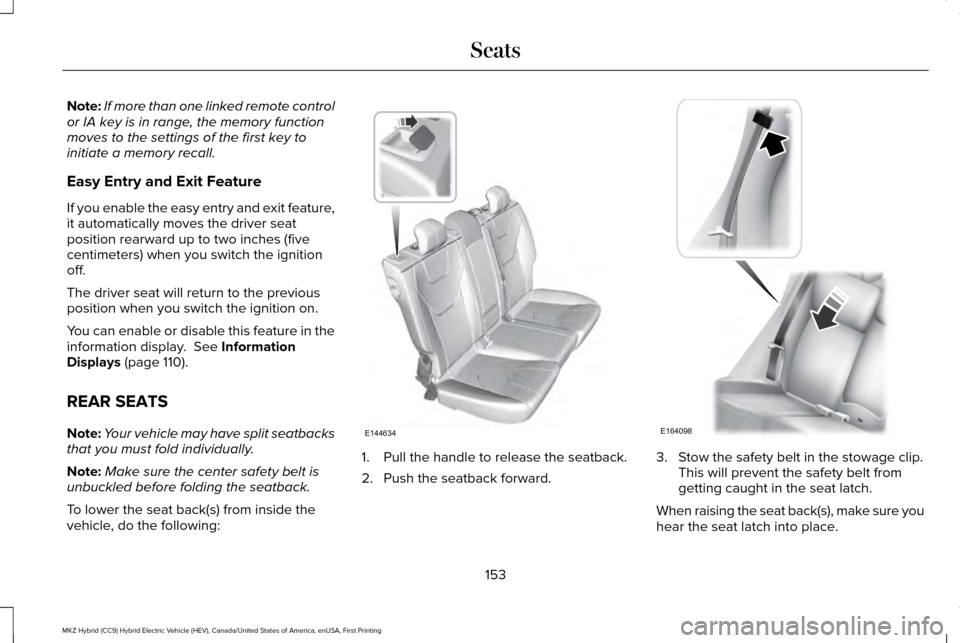
vehicle, do the following: 1. Pull the handle to release the seatback.
2. Push the seatback forward. 3. Stow the safety belt in the stowage clip.
This will prevent the safety belt from
getting caught in the seat latch.
When raising the seat back(s), make sure you
hear the seat latch into place.
153
MKZ Hybrid (CC9) Hybrid Electric Vehicle (HEV), Canada/United States of America, enUSA, First Printing SeatsE144634 E164098
Page 164 of 543
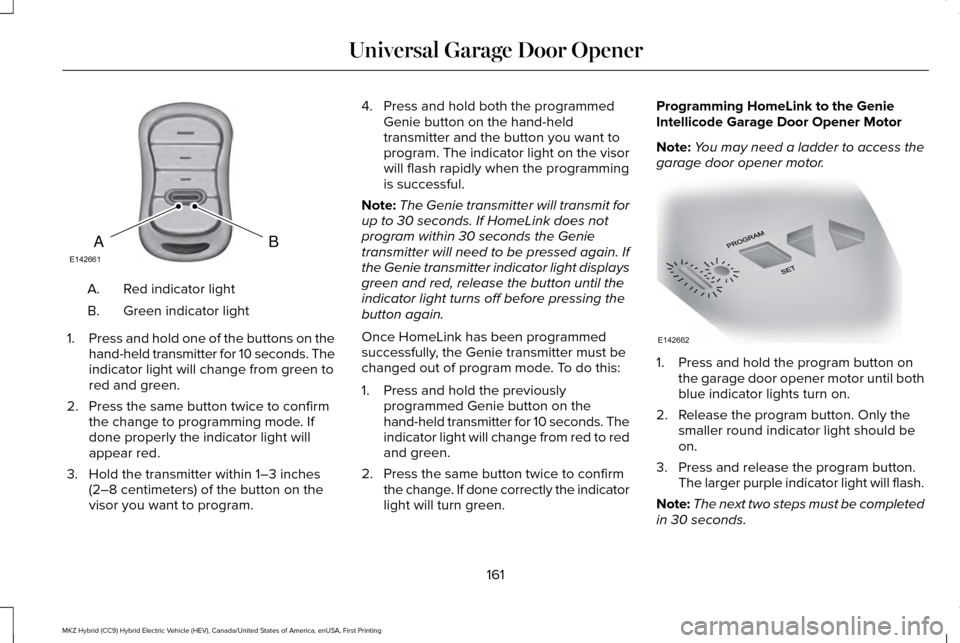
Red indicator light
A.
Green indicator light
B.
1. Press and hold one of the buttons on the
hand-held transmitter for 10 seconds. The
indicator light will change from green to
red and green.
2. Press the same button twice to confirm the change to programming mode. If
done properly the indicator light will
appear red.
3. Hold the transmitter within 1–3 inches (2–8 centimeters) of the button on the
visor you want to program. 4. Press and hold both the programmed
Genie button on the hand-held
transmitter and the button you want to
program. The indicator light on the visor
will flash rapidly when the programming
is successful.
Note: The Genie transmitter will transmit for
up to 30 seconds. If HomeLink does not
program within 30 seconds the Genie
transmitter will need to be pressed again. If
the Genie transmitter indicator light displays
green and red, release the button until the
indicator light turns off before pressing the
button again.
Once HomeLink has been programmed
successfully, the Genie transmitter must be
changed out of program mode. To do this:
1. Press and hold the previously programmed Genie button on the
hand-held transmitter for 10 seconds. The
indicator light will change from red to red
and green.
2. Press the same button twice to confirm the change. If done correctly the indicator
light will turn green. Programming HomeLink to the Genie
Intellicode Garage Door Opener Motor
Note:
You may need a ladder to access the
garage door opener motor. 1. Press and hold the program button on
the garage door opener motor until both
blue indicator lights turn on.
2. Release the program button. Only the smaller round indicator light should be
on.
3. Press and release the program button. The larger purple indicator light will flash.
Note: The next two steps must be completed
in 30 seconds.
161
MKZ Hybrid (CC9) Hybrid Electric Vehicle (HEV), Canada/United States of America, enUSA, First Printing Universal Garage Door OpenerBAE142661 E142662
Page 170 of 543
The keyless starting system has three
modes:
•
Off: Turns the ignition off.
• Without applying the brake pedal,
press and release the button once
when the ignition is in the on mode,
or when the vehicle is running but is
not moving.
• On:
All electrical circuits are operational
and the warning lamps and indicators
illuminate.
• Without applying the brake pedal,
press and release the button once.
• Start:
Starts the vehicle. The engine may
not start when the vehicle starts.
• Press the brake pedal, and then press
the button until the vehicle starts. An
indicator light on the button
illuminates when the ignition is on
and when the vehicle starts. STARTING A GASOLINE ENGINE
When the engine starts for the first time on
your drive, the idle speed increases, this
helps to warm up the engine. If the engine
idle speed does not slow down automatically,
have your vehicle checked by an authorized
dealer.
Note:
You can crank the engine for a total
of 60 seconds (without the engine starting)
before the starting system temporarily
disables. The 60 seconds does not have to
be all at once. For example, if you crank the
engine three times for 20 seconds each time,
without the engine starting, you reached the
60-second time limit. A message appears in
the information display alerting you that you
exceeded the cranking time. You cannot
attempt to start the engine for at least 15
minutes. After 15 minutes, you are limited to
a 15-second engine cranking time. You need
to wait 60 minutes before you can crank the
engine for 60 seconds again. Before starting the vehicle, check the
following:
•
Make sure all occupants have fastened
their safety belts.
• Make sure the headlamps and electrical
accessories are off.
• Make sure the parking brake is on.
• Put the transmission in
P.
Note: Do not touch the accelerator pedal.
1. Fully press the brake pedal.
2. Press the button.
Note: The green ready indicator illuminates
letting you know that the vehicle is ready for
driving. Since your vehicle is equipped with
a silent key start, the engine may not start
at the time of the vehicle start.
See Hybrid
Electric Vehicle (page 171).
The system does not function if:
• The key frequencies are jammed.
• The key battery has no charge.
If you are unable to start the vehicle, do the
following:
167
MKZ Hybrid (CC9) Hybrid Electric Vehicle (HEV), Canada/United States of America, enUSA, First Printing Starting and Stopping the Engine
Page 171 of 543
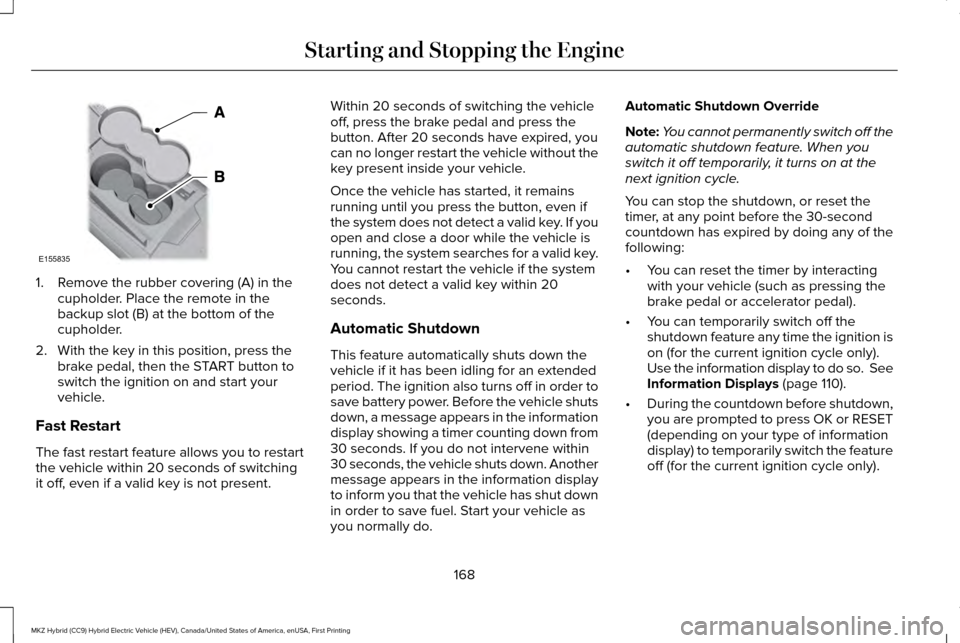
1. Remove the rubber covering (A) in the
cupholder. Place the remote in the
backup slot (B) at the bottom of the
cupholder.
2. With the key in this position, press the brake pedal, then the START button to
switch the ignition on and start your
vehicle.
Fast Restart
The fast restart feature allows you to restart
the vehicle within 20 seconds of switching
it off, even if a valid key is not present. Within 20 seconds of switching the vehicle
off, press the brake pedal and press the
button. After 20 seconds have expired, you
can no longer restart the vehicle without the
key present inside your vehicle.
Once the vehicle has started, it remains
running until you press the button, even if
the system does not detect a valid key. If you
open and close a door while the vehicle is
running, the system searches for a valid key.
You cannot restart the vehicle if the system
does not detect a valid key within 20
seconds.
Automatic Shutdown
This feature automatically shuts down the
vehicle if it has been idling for an extended
period. The ignition also turns off in order to
save battery power. Before the vehicle shuts
down, a message appears in the information
display showing a timer counting down from
30 seconds. If you do not intervene within
30 seconds, the vehicle shuts down. Another
message appears in the information display
to inform you that the vehicle has shut down
in order to save fuel. Start your vehicle as
you normally do.Automatic Shutdown Override
Note:
You cannot permanently switch off the
automatic shutdown feature. When you
switch it off temporarily, it turns on at the
next ignition cycle.
You can stop the shutdown, or reset the
timer, at any point before the 30-second
countdown has expired by doing any of the
following:
• You can reset the timer by interacting
with your vehicle (such as pressing the
brake pedal or accelerator pedal).
• You can temporarily switch off the
shutdown feature any time the ignition is
on (for the current ignition cycle only).
Use the information display to do so. See
Information Displays (page 110).
• During the countdown before shutdown,
you are prompted to press OK or RESET
(depending on your type of information
display) to temporarily switch the feature
off (for the current ignition cycle only).
168
MKZ Hybrid (CC9) Hybrid Electric Vehicle (HEV), Canada/United States of America, enUSA, First Printing Starting and Stopping the EngineE155835
Page 176 of 543
•
Keep the tires properly inflated and only
use the recommended size.
• Aggressive driving increases the amount
of energy required to move your vehicle.
In general, you can achieve better fuel
economy with mild to moderate
acceleration and deceleration. Moderate
braking is particularly important since it
allows you to maximize the energy
captured by the regenerative braking
system.
Additional Tips:
• Do not carry extra loads.
• Be mindful of adding external
accessories that may increase
aerodynamic drag.
• Observe posted speed limits.
• Perform all scheduled maintenance.
• There is no need to wait for your engine
to warm up. The vehicle is ready to drive
immediately after starting. EV+ Mode
Your vehicle will recognize your frequent
destinations and allow for more EV driving
as you approach them. For example, when
nearing your home it should be easier to stay
in electric mode. The EV indicator will display
EV+ when this mode is active. You should
see this about 1/8 mile (200 meters) from a
frequent destination. See Information
Displays (page 110).
Note: Frequent destinations are learned by
your vehicle after two to four weeks of use.
To add a destination immediately, perform
the following process: cycle the ignition on
for 2 seconds, but do not start your vehicle,
then off for 2 seconds. Repeat the process
10 times. This location is now programmed
for EV+. You can clear these destinations
with a Driving History reset through the
Settings menu.
Note: The EV+ feature can be turned on or
off through the Driver Assist section of the
Settings menu. EcoSelect
EcoSelect is designed to offer the best
possible fuel economy with only a slight
impact to vehicle performance and comfort. To
activate EcoSelect, press the ECO button on
the center console.
A graphic displays on your information
display when EcoSelect is active.
Your vehicle will remember the last selected
mode between key cycles.
173
MKZ Hybrid (CC9) Hybrid Electric Vehicle (HEV), Canada/United States of America, enUSA, First Printing Unique Driving CharacteristicsE198654
Page 182 of 543
However, if it knocks heavily under most
driving conditions while you are using fuel
with the recommended octane rating, contact
an authorized dealer to prevent any engine
damage.
Fuel Freshness Mode (If Equipped)
This helps keep the fuel system functional
and the fuel fresh.
If you mainly use your vehicle in electric
power mode without refueling, the gasoline
in the fuel tank may become stale due to
aging. Stale gasoline can damage the
engine and fuel system.
Your vehicle automatically switches to fuel
freshness mode if you do not refuel your
vehicle with fresh fuel within an 18-month
period. Fuel freshness mode protects your
vehicle from potential engine and fuel system
damage caused by using stale fuel.
Note: If you do not add new fuel during an
18-month period, fuel freshness mode will
use fuel until approximately 1.2 gal (4.5 L) of
fuel remains in the fuel tank. During fuel freshness mode:
•
The information display will indicate fuel
freshness mode is active.
• The vehicle will only run in hybrid mode.
EV Now mode will not be available.
• Most of the plug-in power will be stored
until fuel freshness mode is completed.
Note: EV Now mode resumes when less than
1.2 gal (4.5 L) of fuel remains in the fuel tank.
Note: When the fuel level is less than
one-quarter full, refueling your vehicle will
end fuel freshness mode.
Note: We recommend you use a fuel
stabilizer if you use less than a full tank of
fuel during an 18-month period.
RUNNING OUT OF FUEL
Avoid running out of fuel because this
situation may have an adverse effect on
vehicle components.
If you have run out of fuel: •
To start the vehicle with a keyless
ignition, just start the engine. Crank time
will be longer than usual.
• Normally, adding 1 gallon (3.8 liters) of
fuel is enough to restart the vehicle. If the
vehicle is out of fuel and on a steep
grade, more than 1 gallon (3.8 liters) may
be required.
• The service engine soon indicator may
come on.
Refilling With a Portable Fuel Container WARNINGS
Do not insert the nozzle of portable
fuel containers or aftermarket funnels
into the capless fuel system. This could
damage the fuel system and its seal, and
may cause fuel to run onto the ground
instead of filling the tank, which could result
in serious personal injury. Do not try to pry open or push open
the capless fuel system with foreign
objects. This could damage the fuel system
and its seal and cause injury to you or others. 179
MKZ Hybrid (CC9) Hybrid Electric Vehicle (HEV), Canada/United States of America, enUSA, First Printing Fuel and Refueling
Page 194 of 543
Note:
If the driver attempts to leave the
vehicle while it is in gear, the vehicle will
automatically shift into park (P). Seatbelt and
door monitors determine the driver's intent
and makes the shift for you. During this time
a Transmission not in Park message will
appear in the display screen, prompting the
driver to make the shift. To put the vehicle
in gear with the door open perform steps 1-4.
See the
Automatic Return to Park section
in this chapter for more information on this
feature.
Note: To put your vehicle in gear with the
door open, perform steps 1-4. See the
Automatic Return to Park
section in this
chapter for more information on this feature.
Park (P)
This position locks the transmission and
prevents the front wheels from turning.
Always come to a complete stop before
putting your vehicle into and out of park (P).
An audible chime will sound when park (P)
is manually selected. When you turn the ignition off, your vehicle
will automatically shift into park (P). If you turn
the ignition off while your vehicle is moving,
it will first shift into neutral (N) until a slow
enough speed is reached. Your vehicle will
then shift into park (P) automatically.
Automatic Return to Park
Note:
This feature will not operate when your
vehicle is in Stay in Neutral mode or neutral
tow.
Your vehicle has a safety feature that will
automatically shift your vehicle into park (P)
when any of the following circumstances are
met:
• Turn the ignition off.
• Open the driver's door with your seat belt
unlatched.
• Unlatching your seatbelt while the
driver's door is open.
If you turn the ignition off while your vehicle
is moving, your vehicle will first shift into
neutral (N) until it slows down enough to shift
into park (P) automatically. Note:
If you have waited an extended period
of time, (2-15 minutes) before starting your
vehicle, unlatching your safety belt will cause
this feature to activate, even with the driver's
door closed.
Note: This feature may not work properly if
the door ajar switch is malfunctioning. If your
door ajar indicator does not illuminate when
you open the driver’ s door or the indicator
illuminates with the driver’ s door closed, see
your authorized dealer.
Reverse (R)
With the transmission in reverse (R), your
vehicle will move backward. Always come
to a complete stop before shifting into and
out of reverse (R).
Neutral (N)
Press the neutral (N) button to put your
vehicle in neutral. In neutral, your vehicle can
start and is free to roll. Hold the brake pedal
down while in this position.
191
MKZ Hybrid (CC9) Hybrid Electric Vehicle (HEV), Canada/United States of America, enUSA, First Printing Transmission