light LINCOLN MKZ HYBRID 2017 Owners Manual
[x] Cancel search | Manufacturer: LINCOLN, Model Year: 2017, Model line: MKZ HYBRID, Model: LINCOLN MKZ HYBRID 2017Pages: 546, PDF Size: 5.12 MB
Page 433 of 546
cityseeker (If Equipped)
Note: cityseeker point of interest (POI)
information is limited to approximately 1110
cities (1049 in the United States, 36 in
Canada and 15 in Mexico). cityseeker, when available, is a service that
provides more information about certain
points of interest such as restaurants, hotels
and attractions.
When you have selected a point of interest,
the location and information appear, such as
address, phone number and a star rating.
Press
More Information to see a photo, a
review, a list of services and facilities, the
average room or meal price and the web
address. This screen displays the point of
interest icons. For restaurants, cityseeker can provide
information such as star rating, average cost,
review, handicap access, hours of operation,
and website address.
For hotels, cityseeker can provide
information such as star rating, price
category, review, check-in and checkout
times, hotel service icons and website
address. Hotel service icons include:
•
Restaurant
• Business center
• Handicap facilities
• Laundry
• Refrigerator
• 24 hour room service
• Fitness center
• Internet access
• Pool
• Wi-Fi
Attractions include nearby landmarks,
amusement parks, historic buildings and
more. cityseeker can provide information
such as star rating, reviews, hour of operation
and admission price. SiriusXM Traffic and Travel Link
SiriusXM Traffic and Travel Link is available
on vehicles equipped with navigation and
only in select markets. You must activate and
subscribe to receive SiriusXM Traffic and
Travel Link information. It helps you locate
the best gas prices, find movie listings, get
current traffic alerts, view the weather map,
get accurate ski conditions and see current
sports scores.
See Apps (page 438).
The system calculates a reasonable efficient
route based on available speed limits, traffic,
and road conditions. You may know a local
short cut that is more efficient at a given time
than the route provided by SYNC 3, but you
should expect a slight difference in minutes
or miles with the SYNC 3 route.
Navigation Map Updates
Annual navigation map updates are available
for purchase through your dealership, by
calling 1-866-462-8837 in the United States
and Canada or 01-800-557-5539 in Mexico.
You can also visit:
430
MKZ Hybrid (CC9) Hybrid Electric Vehicle (HEV), Canada/United States of America, enUSA, First Printing SYNC™ 3E225487
Page 438 of 546

Description
Item
Callout
Includes all power usage from the low voltage accessories such as the cl\
imate control
fan, headlights and heated seats. The higher the power usage is from the\
se
accessories, the larger the circle around the node. This node illuminates anytime the
vehicle is on since there is always some low level power in use.
2
Other
E
Includes the power usage from the high-voltage climate control component\
s such
as the electric A/C compressor and the electric heater (Energi only). \
The higher the
power usage is from these components, the larger the circle around this \
node.
2,3
Climate
F
Represents your high-voltage battery. A circle illuminates around the node when the
high-voltage battery is receiving power from regenerative braking or eng\
ine charging.
The higher the power going into the high-voltage battery, the larger the circle around
this node.
Battery
G
Represents the fuel tank in the vehicle.
Fuel
H
Shows flow from the fuel tank to the engine when the engine is on and us\
ing fuel
(there are some cases where the engine is on, but not using any fuel).\
When the
engine is on, but not using fuel, the engine node is active, but the fuel flow path is
off. An example of this is when your foot is off the accelerator pedal and \
the vehicle
is traveling at a high speed.
Fuel-to-Engine Flow
I
Provides you with the reason(s) the gasoline engine is on. When the ga\
soline engine
is off, this display does not appear. Engine On due to reasons displayed by the system
are in a chart following this list.
Engine On due to:
J
435
MKZ Hybrid (CC9) Hybrid Electric Vehicle (HEV), Canada/United States of America, enUSA, First Printing SYNC™ 3
Page 439 of 546

Description
Item
Callout
Shows the direction of power flow between the engine and the electric mo\
tor. The
direction indicates if the engine is providing power to the high-voltage\
electrical
system, or if the high-voltage electrical system is providing power to c\
ontrol or start
the engine.
Motor-to-Engine Flow
K
Represents the gasoline engine. It illuminates only when the gasoline engine is on.
The higher the engine power is, the larger the circle around this node.
Engine
L
Shows the direction of the power flow between the engine and the wheels.\
Engine-to-Wheels Flow
M
Represents the power going to the wheels. The higher the wheel power is, \
the larger
the circle around this node. When the engine is off, drive power displays in blue.
When the engine is on, drive power displays in grey.
Drive
N
1 The battery-to-motor flow includes battery
power the vehicle is using for acceleration.
It does not include energy the vehicle is
using for accessories (such as air
conditioning, headlights and radio). This
screen displays accessories and climate
usage separately. 2
Accessories indicates electrical power
demands from your vehicle ’s accessory
systems. Accessories use power but do not
contribute to making the vehicle move. The
power flow displays power usage from the
climate control system and other accessories
separately. 3
The climate control system may determine
A/C is necessary even when you turn it off.
In this case, you may see some climate
power when the A/C is off.
436
MKZ Hybrid (CC9) Hybrid Electric Vehicle (HEV), Canada/United States of America, enUSA, First Printing SYNC™ 3
Page 459 of 546
Ambient Lighting (If Equipped)
Tap a color once to active ambient lighting.
This sets the color to the highest intensity.
You can drag the colors up and down to
increase or decrease the intensity.
To switch ambient lighting off, press the
active color once or drag the active color all
the way down to zero intensity. Vehicle
Note:
You vehicle may not have all of these
features.
You can select the following features to
update their settings. Door Keypad Code
Select this button to add or erase a personal
door keypad code. To add or erase a
personal code, you first need to enter the
five-digit factory set code. You can find this
code on the owner's wallet card in the glove
box or from your authorized dealer.
Camera Settings
To make adjustments using the touchscreen, select: Action and Description
Message
Camera Settings
Then select from the following: You can enable or disable this option using the slider.
Rear Camera Delay
You can find more information on the rear-view camera system in the parki\
ng aids chapter of your owner manual.
456
MKZ Hybrid (CC9) Hybrid Electric Vehicle (HEV), Canada/United States of America, enUSA, First Printing SYNC™ 3
Page 460 of 546
Onboard Modem Serial Number (ESN)
Selecting this button on the settings menu
shows you the ESN number for your system.
You need this number for certain
registrations such as Satellite Radio.
Display
To make adjustments using the touchscreen, select: Action and Description
Menu Item
Make the screen display brighter or dimmer.
Brightness
You can select:
Mode
The screen automatically switches between day and night modes based on t\
he outside
light level.
Auto
The screen displays with a light background to enhance daytime viewing.
Day
The screen displays with a darker background to make nighttime viewing easier.
Night
The screen goes black and does not display anything. To switch the screen back on,
simply tap the screen.
Off
Enable this option to automatically dim the display brightness based on \
ambient lighting conditions.
Auto Dim
Voice Control
You can adjust the voice control settings by
selecting the following options.
457
MKZ Hybrid (CC9) Hybrid Electric Vehicle (HEV), Canada/United States of America, enUSA, First Printing SYNC™ 3
Page 462 of 546
Cell phone issues
Possible solution
Possible cause
Issue
Refer to your device's manual about audio adjustments.
The audio control settings on your cell
phone may be affecting SYNC 3
performance.
There is background noise
during a phone call.
Try switching your cell phone off, resetting it or removing the battery,
then try again.
Possible cell phone malfunction.
During a call, I can hear the
other person but they
cannot hear me.
Make sure that the microphone for SYNC 3 is not set to off. Look for
the microphone icon on the phone screen.
To restart your system, shut down the engine, open and close the
door, and then lock the door and wait for 2-3 minutes. Make sure that
your SYNC 3 screen is black and the lighted USB port is off.
The system may need to be restarted.
During a call, I cannot hear
the other person and they
cannot hear me.
Check your cell phone's compatibility.
This is a cell phone-dependent feature.
SYNC 3 is not able to
download my phonebook. Make sure you allow SYNC 3 to retrieve contacts from your phone.
Refer to your cell manual.
Possible cell phone malfunction. You must switch on your cell phone and the automatic phonebook
download feature on SYNC 3.
Try switching your cell phone off, resetting it or removing the battery,
then try again.
459
MKZ Hybrid (CC9) Hybrid Electric Vehicle (HEV), Canada/United States of America, enUSA, First Printing SYNC™ 3
Page 484 of 546
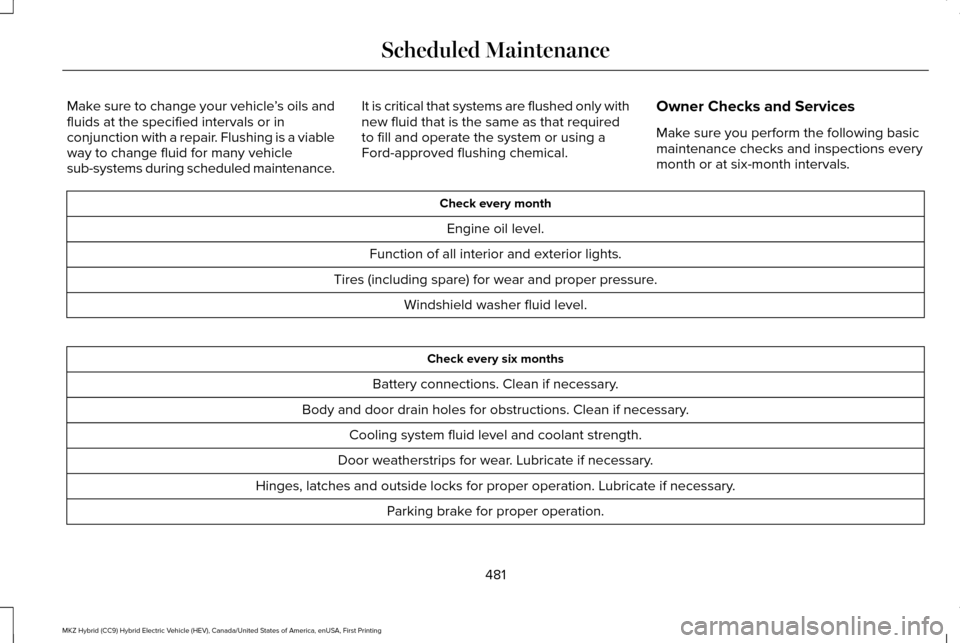
Make sure to change your vehicle
’s oils and
fluids at the specified intervals or in
conjunction with a repair. Flushing is a viable
way to change fluid for many vehicle
sub-systems during scheduled maintenance. It is critical that systems are flushed only with
new fluid that is the same as that required
to fill and operate the system or using a
Ford-approved flushing chemical.
Owner Checks and Services
Make sure you perform the following basic
maintenance checks and inspections every
month or at six-month intervals. Check every month
Engine oil level.
Function of all interior and exterior lights.
Tires (including spare) for wear and proper pressure. Windshield washer fluid level. Check every six months
Battery connections. Clean if necessary.
Body and door drain holes for obstructions. Clean if necessary. Cooling system fluid level and coolant strength.
Door weatherstrips for wear. Lubricate if necessary.
Hinges, latches and outside locks for proper operation. Lubricate if necessary. Parking brake for proper operation.
481
MKZ Hybrid (CC9) Hybrid Electric Vehicle (HEV), Canada/United States of America, enUSA, First Printing Scheduled Maintenance
Page 536 of 546
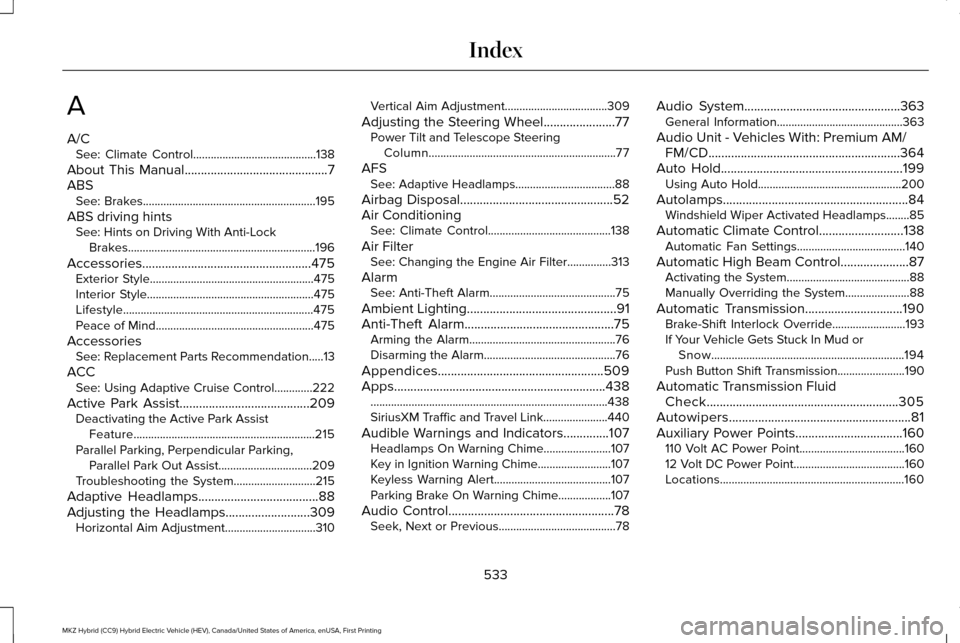
A
A/C
See: Climate Control..........................................138
About This Manual............................................7
ABS See: Brakes...........................................................195
ABS driving hints See: Hints on Driving With Anti-Lock
Brakes................................................................196
Accessories....................................................475 Exterior Style........................................................475
Interior Style.........................................................475
Lifestyle.................................................................475
Peace of Mind......................................................475
Accessories See: Replacement Parts Recommendation.....13
ACC See: Using Adaptive Cruise Control.............222
Active Park Assist........................................209 Deactivating the Active Park Assist
Feature..............................................................215
Parallel Parking, Perpendicular Parking, Parallel Park Out Assist................................209
Troubleshooting the System............................215
Adaptive Headlamps
.....................................88
Adjusting the Headlamps..........................309
Horizontal Aim Adjustment...............................310 Vertical Aim Adjustment...................................309
Adjusting the Steering Wheel......................77 Power Tilt and Telescope Steering
Column................................................................77
AFS See: Adaptive Headlamps..................................88
Airbag Disposal...............................................52
Air Conditioning See: Climate Control..........................................138
Air Filter See: Changing the Engine Air Filter...............313
Alarm See: Anti-Theft Alarm...........................................75
Ambient Lighting
..............................................91
Anti-Theft Alarm..............................................75
Arming the Alarm..................................................76
Disarming the Alarm.............................................76
Appendices...................................................509
Apps
.................................................................438
........................................................................\
.........438
SiriusXM Traffic and Travel Link......................440
Audible Warnings and Indicators..............107 Headlamps On Warning Chime.......................
107
Key in Ignition Warning Chime.........................107
Keyless Warning Alert........................................107
Parking Brake On Warning Chime
..................107
Audio Control
...................................................78
Seek, Next or Previous........................................78 Audio System................................................363
General Information...........................................363
Audio Unit - Vehicles With: Premium AM/ FM/CD...........................................................364
Auto Hold........................................................199 Using Auto Hold.................................................200
Autolamps
.........................................................84
Windshield Wiper Activated Headlamps........85
Automatic Climate Control..........................138 Automatic Fan Settings.....................................140
Automatic High Beam Control.....................87 Activating the System..........................................88
Manually Overriding the System......................88
Automatic Transmission
..............................190
Brake-Shift Interlock Override.........................193
If Your Vehicle Gets Stuck In Mud or Snow..................................................................194
Push Button Shift Transmission.......................
190
Automatic Transmission Fluid Check...........................................................305
Autowipers........................................................81
Auxiliary Power Points.................................160 110 Volt AC Power Point....................................160
12 Volt DC Power Point......................................160
Locations...............................................................160
533
MKZ Hybrid (CC9) Hybrid Electric Vehicle (HEV), Canada/United States of America, enUSA, First Printing Index
Page 538 of 546
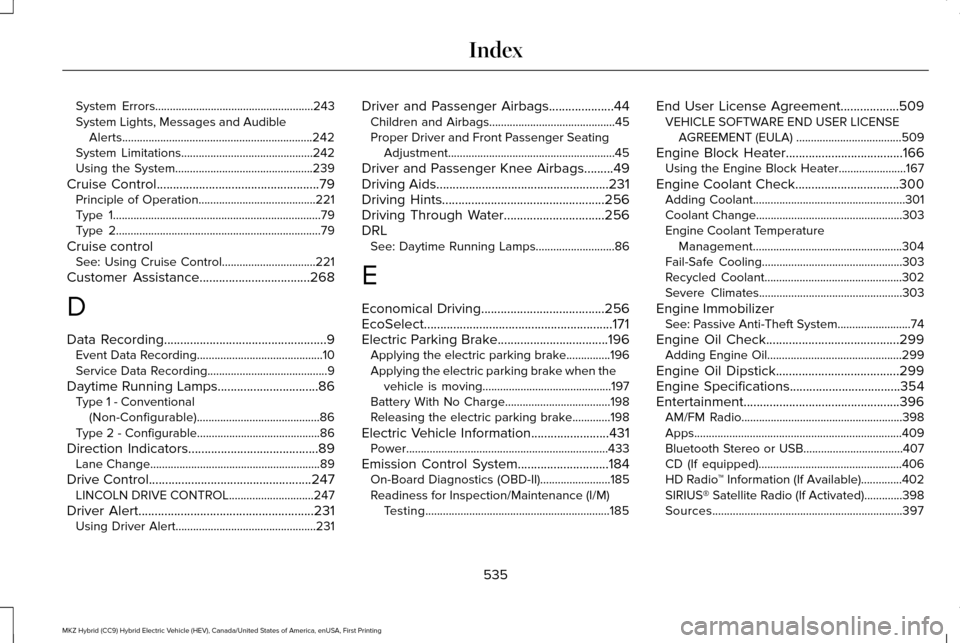
System Errors......................................................243
System Lights, Messages and Audible
Alerts.................................................................242
System Limitations.............................................242
Using the System...............................................239
Cruise Control..................................................79
Principle of Operation........................................221
Type 1.......................................................................79
Type 2......................................................................79
Cruise control See: Using Cruise Control................................221
Customer Assistance
..................................268
D
Data Recording
..................................................9
Event Data Recording...........................................10
Service Data Recording.........................................9
Daytime Running Lamps...............................86 Type 1 - Conventional
(Non-Configurable)..........................................86
Type 2 - Configurable..........................................86
Direction Indicators........................................89 Lane Change..........................................................89
Drive Control
..................................................247
LINCOLN DRIVE CONTROL.............................247
Driver Alert......................................................231 Using Driver Alert................................................231 Driver and Passenger Airbags....................44
Children and Airbags...........................................45
Proper Driver and Front Passenger Seating
Adjustment.........................................................45
Driver and Passenger Knee Airbags.........49
Driving Aids
.....................................................231
Driving Hints..................................................256
Driving Through Water
...............................256
DRL See: Daytime Running Lamps...........................86
E
Economical Driving
......................................256
EcoSelect..........................................................171
Electric Parking Brake..................................196 Applying the electric parking brake...............
196
Applying the electric parking brake when the vehicle is moving............................................197
Battery With No Charge....................................198
Releasing the electric parking brake.............198
Electric Vehicle Information
........................431
Power.....................................................................433
Emission Control System
............................184
On-Board Diagnostics (OBD-II)........................185
Readiness for Inspection/Maintenance (I/M)
Testing...............................................................185 End User License Agreement..................509
VEHICLE SOFTWARE END USER LICENSE
AGREEMENT (EULA) ....................................509
Engine Block Heater....................................166 Using the Engine Block Heater.......................167
Engine Coolant Check................................300 Adding Coolant....................................................301
Coolant Change..................................................303
Engine Coolant Temperature
Management...................................................304
Fail-Safe Cooling................................................303
Recycled Coolant...............................................302
Severe Climates.................................................303
Engine Immobilizer See: Passive Anti-Theft System.........................74
Engine Oil Check.........................................299 Adding Engine Oil..............................................299
Engine Oil Dipstick......................................299
Engine Specifications
..................................354
Entertainment................................................396 AM/FM Radio.......................................................398
Apps.......................................................................409
Bluetooth Stereo or USB..................................407
CD (If equipped).................................................406
HD Radio ™ Information (If Available)..............402
SIRIUS® Satellite Radio (If Activated).............398
Sources.................................................................397
535
MKZ Hybrid (CC9) Hybrid Electric Vehicle (HEV), Canada/United States of America, enUSA, First Printing Index
Page 541 of 546
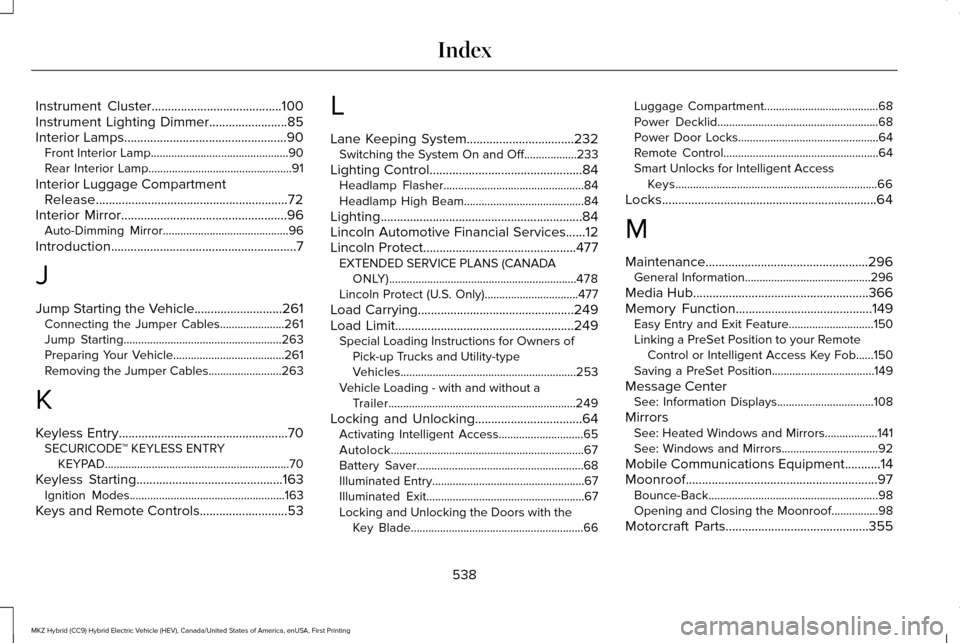
Instrument Cluster........................................100
Instrument Lighting Dimmer........................85
Interior Lamps..................................................90
Front Interior Lamp...............................................90
Rear Interior Lamp.................................................91
Interior Luggage Compartment Release...........................................................72
Interior Mirror...................................................96 Auto-Dimming Mirror...........................................96
Introduction
.........................................................7
J
Jump Starting the Vehicle...........................261 Connecting the Jumper Cables......................
261
Jump Starting......................................................263
Preparing Your Vehicle......................................261
Removing the Jumper Cables.........................263
K
Keyless Entry
....................................................70
SECURICODE™ KEYLESS ENTRY
KEYPAD...............................................................70
Keyless Starting
.............................................163
Ignition Modes.....................................................163
Keys and Remote Controls...........................53 L
Lane Keeping System
.................................232
Switching the System On and Off..................233
Lighting Control...............................................84 Headlamp Flasher................................................84
Headlamp High Beam.........................................
84
Lighting..............................................................84
Lincoln Automotive Financial Services......12
Lincoln Protect...............................................477 EXTENDED SERVICE PLANS (CANADA
ONLY)................................................................478
Lincoln Protect (U.S. Only)................................
477
Load Carrying
................................................249
Load Limit.......................................................249 Special Loading Instructions for Owners of
Pick-up Trucks and Utility-type
Vehicles............................................................253
Vehicle Loading - with and without a Trailer................................................................249
Locking and Unlocking.................................64 Activating Intelligent Access.............................65
Autolock..................................................................67
Battery Saver.........................................................68
Illuminated Entry....................................................67
Illuminated Exit......................................................67
Locking and Unlocking the Doors with the
Key Blade...........................................................66 Luggage Compartment.......................................68
Power Decklid.......................................................68
Power Door Locks................................................64
Remote Control.....................................................64
Smart Unlocks for Intelligent Access
Keys.....................................................................66
Locks..................................................................64
M
Maintenance..................................................296 General Information...........................................296
Media Hub......................................................366
Memory Function..........................................149 Easy Entry and Exit Feature.............................150
Linking a PreSet Position to your Remote Control or Intelligent Access Key Fob......
150
Saving a PreSet Position...................................149
Message Center See: Information Displays.................................
108
Mirrors See: Heated Windows and Mirrors..................
141
See: Windows and Mirrors.................................92
Mobile Communications Equipment
...........14
Moonroof...........................................................97 Bounce-Back..........................................................98
Opening and Closing the Moonroof................98
Motorcraft Parts
............................................355
538
MKZ Hybrid (CC9) Hybrid Electric Vehicle (HEV), Canada/United States of America, enUSA, First Printing Index