change time LINCOLN MKZ HYBRID 2017 User Guide
[x] Cancel search | Manufacturer: LINCOLN, Model Year: 2017, Model line: MKZ HYBRID, Model: LINCOLN MKZ HYBRID 2017Pages: 546, PDF Size: 5.12 MB
Page 160 of 546
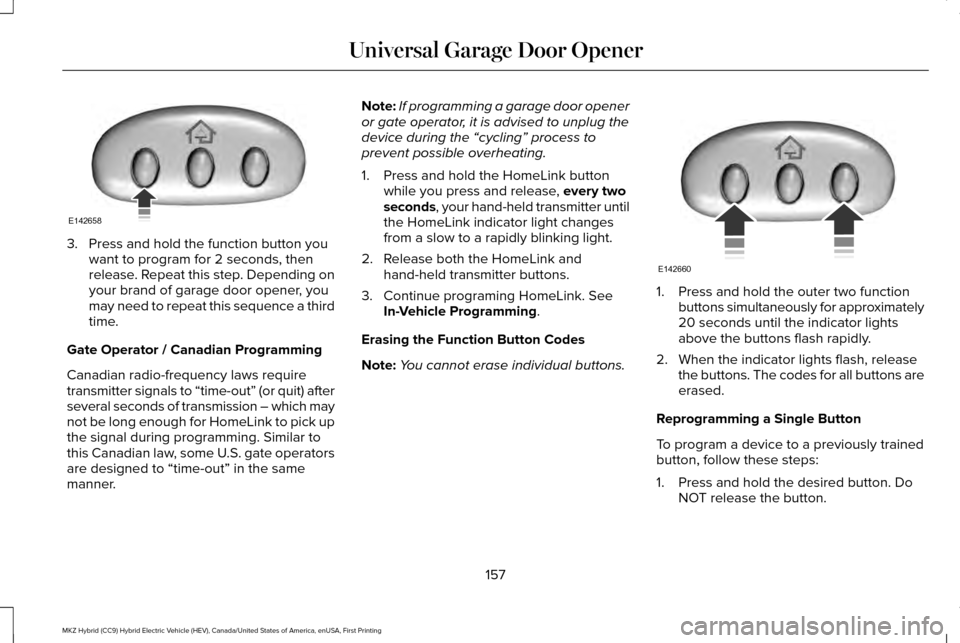
3. Press and hold the function button you
want to program for 2 seconds, then
release. Repeat this step. Depending on
your brand of garage door opener, you
may need to repeat this sequence a third
time.
Gate Operator / Canadian Programming
Canadian radio-frequency laws require
transmitter signals to “time-out” (or quit) after
several seconds of transmission – which may
not be long enough for HomeLink to pick up
the signal during programming. Similar to
this Canadian law, some U.S. gate operators
are designed to “time-out” in the same
manner. Note:
If programming a garage door opener
or gate operator, it is advised to unplug the
device during the “cycling” process to
prevent possible overheating.
1. Press and hold the HomeLink button while you press and release, every two
seconds, your hand-held transmitter until
the HomeLink indicator light changes
from a slow to a rapidly blinking light.
2. Release both the HomeLink and hand-held transmitter buttons.
3. Continue programing HomeLink. See In-Vehicle Programming
.
Erasing the Function Button Codes
Note: You cannot erase individual buttons. 1. Press and hold the outer two function
buttons simultaneously for approximately
20 seconds until the indicator lights
above the buttons flash rapidly.
2. When the indicator lights flash, release the buttons. The codes for all buttons are
erased.
Reprogramming a Single Button
To program a device to a previously trained
button, follow these steps:
1. Press and hold the desired button. Do NOT release the button.
157
MKZ Hybrid (CC9) Hybrid Electric Vehicle (HEV), Canada/United States of America, enUSA, First Printing Universal Garage Door OpenerE142658 E142660
Page 161 of 546
2.
The indicator light will begin to flash after
20 seconds. Without releasing the
button, follow Step 1 in the Programming
section.
For questions or comments, contact
HomeLink at www.homelink.com,
www.youtube.com/HomeLinkGentex or
1-800-355-3515.
Programming to a Genie Intellicode 2
Garage Door Opener
Note: The Genie Intellicode 2 transmitter
must already be programmed to operate
with the garage door opener.
Note: To program HomeLink to the
transmitter you must first put the transmitter
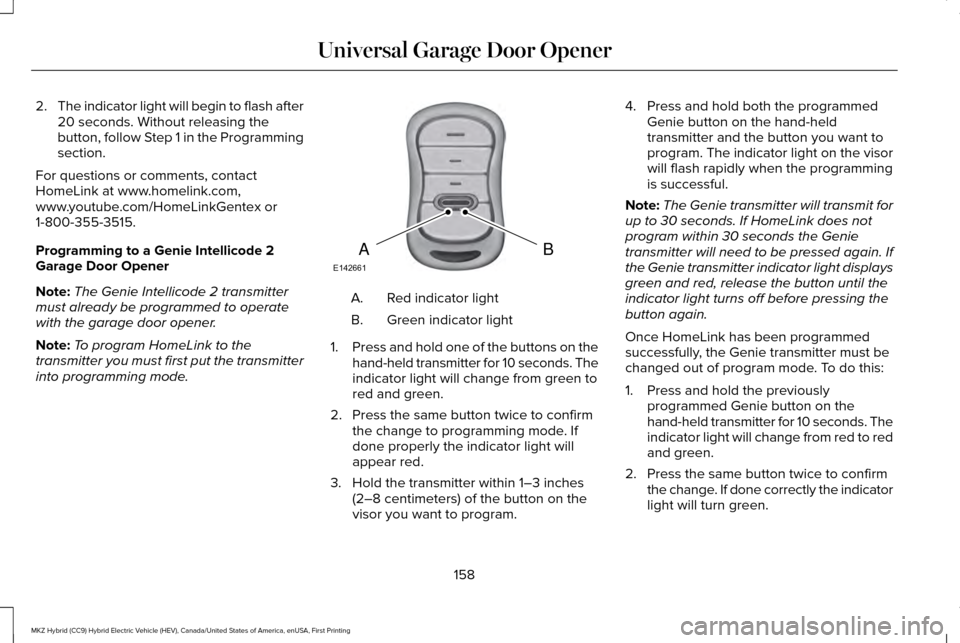
into programming mode. Red indicator light
A.
Green indicator light
B.
1. Press and hold one of the buttons on the
hand-held transmitter for 10 seconds. The
indicator light will change from green to
red and green.
2. Press the same button twice to confirm the change to programming mode. If
done properly the indicator light will
appear red.
3. Hold the transmitter within 1–3 inches (2–8 centimeters) of the button on the
visor you want to program. 4. Press and hold both the programmed
Genie button on the hand-held
transmitter and the button you want to
program. The indicator light on the visor
will flash rapidly when the programming
is successful.
Note: The Genie transmitter will transmit for
up to 30 seconds. If HomeLink does not
program within 30 seconds the Genie
transmitter will need to be pressed again. If
the Genie transmitter indicator light displays
green and red, release the button until the
indicator light turns off before pressing the
button again.
Once HomeLink has been programmed
successfully, the Genie transmitter must be
changed out of program mode. To do this:
1. Press and hold the previously programmed Genie button on the
hand-held transmitter for 10 seconds. The
indicator light will change from red to red
and green.
2. Press the same button twice to confirm the change. If done correctly the indicator
light will turn green.
158
MKZ Hybrid (CC9) Hybrid Electric Vehicle (HEV), Canada/United States of America, enUSA, First Printing Universal Garage Door OpenerBAE142661
Page 162 of 546
Programming HomeLink to the Genie
Intellicode Garage Door Opener Motor
Note:
You may need a ladder to access the
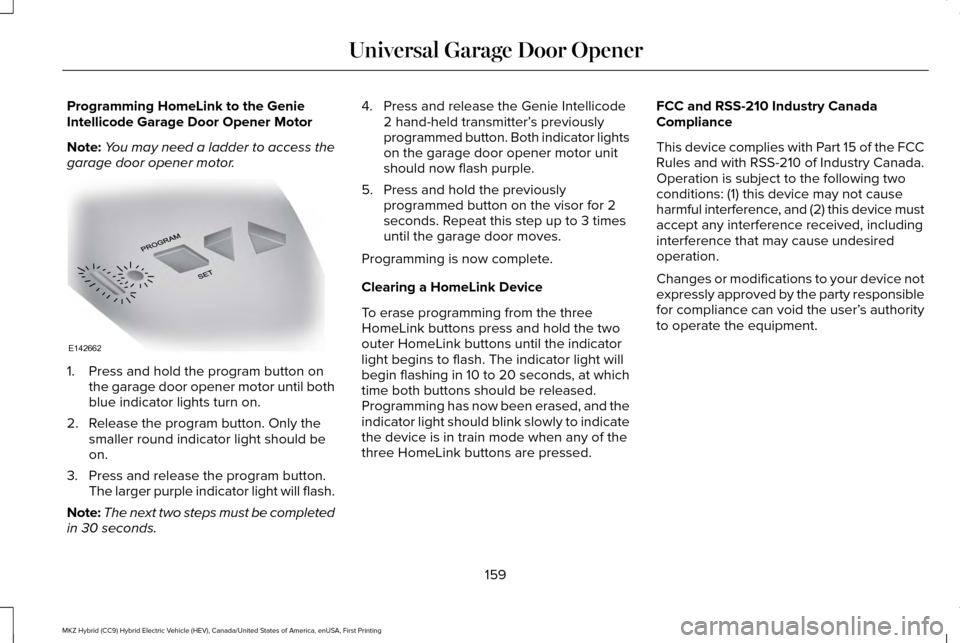
garage door opener motor. 1. Press and hold the program button on
the garage door opener motor until both
blue indicator lights turn on.
2. Release the program button. Only the smaller round indicator light should be
on.
3. Press and release the program button. The larger purple indicator light will flash.
Note: The next two steps must be completed
in 30 seconds. 4. Press and release the Genie Intellicode
2 hand-held transmitter’ s previously
programmed button. Both indicator lights
on the garage door opener motor unit
should now flash purple.
5. Press and hold the previously programmed button on the visor for 2
seconds. Repeat this step up to 3 times
until the garage door moves.
Programming is now complete.
Clearing a HomeLink Device
To erase programming from the three
HomeLink buttons press and hold the two
outer HomeLink buttons until the indicator
light begins to flash. The indicator light will
begin flashing in 10 to 20 seconds, at which
time both buttons should be released.
Programming has now been erased, and the
indicator light should blink slowly to indicate
the device is in train mode when any of the
three HomeLink buttons are pressed. FCC and RSS-210 Industry Canada
Compliance
This device complies with Part 15 of the FCC
Rules and with RSS-210 of Industry Canada.
Operation is subject to the following two
conditions: (1) this device may not cause
harmful interference, and (2) this device must
accept any interference received, including
interference that may cause undesired
operation.
Changes or modifications to your device not
expressly approved by the party responsible
for compliance can void the user’
s authority
to operate the equipment.
159
MKZ Hybrid (CC9) Hybrid Electric Vehicle (HEV), Canada/United States of America, enUSA, First Printing Universal Garage Door OpenerE142662
Page 172 of 546
Stopping:
The gas engine may shut off to conserve fuel
as you come to a stop. Restarting your
vehicle is not required. Simply step on the
accelerator when you are ready to drive.
Transmission Operation:
Due to the technologically advanced,
electronically-controlled continuously
variable transaxle, you will not feel shift
changes like those of a non-hybrid vehicle.
Note:
Since engine speed is controlled by
the transmission, it may seem elevated at
times. This is normal hybrid operation and
helps deliver fuel efficiency and
performance.
Neutral:
It is not recommended to idle the vehicle in
neutral (N) for an extended period of time
because this will discharge your high voltage
battery and decrease fuel economy. The
engine will not start or stop, and cannot
provide power to the hybrid system in neutral
(N). Low:
Low (L) is designed to mimic the enhanced
engine braking available in non-hybrid
vehicles. Low gear will produce high engine
speeds to provide necessary engine braking.
This is normal and will not damage your
vehicle. In low gear, the gas engine will
remain on more often than in drive (D).
Reverse:
In reverse (R), vehicle speed is limited to
22 mph (35 km/h).
Battery:
Your hybrid is equipped with a high voltage
battery. A cool battery maintains battery life
and provides the best possible performance.
The high voltage battery is cooled by cabin
air drawn from vent holes in the trim panels
behind the rear seats. Avoid placing objects
at the vent holes that block airflow to the
high voltage battery. Engine:
The engine speed in your hybrid is not
directly tied to your vehicle speed. Your
vehicle's engine and transmission are
designed to deliver the power you need at
the most efficient engine speed. During
heavy accelerations, your hybrid may reach
high engine speeds (up to 6000 RPM).
In prolonged mountainous driving, you may
see the engine speed changing without your
input. This is intentional and maintains the
battery charge level. You may also notice
during extended downhill driving that your
engine continues to run instead of shutting
off.
During this engine braking, the engine stays
on, but it is not using any fuel. You may also
hear a slight whine or whistle when operating
your vehicle. This is the normal operation of
the electric generator in the hybrid system.
169
MKZ Hybrid (CC9) Hybrid Electric Vehicle (HEV), Canada/United States of America, enUSA, First Printing Unique Driving Characteristics
Page 176 of 546
Answer
Question
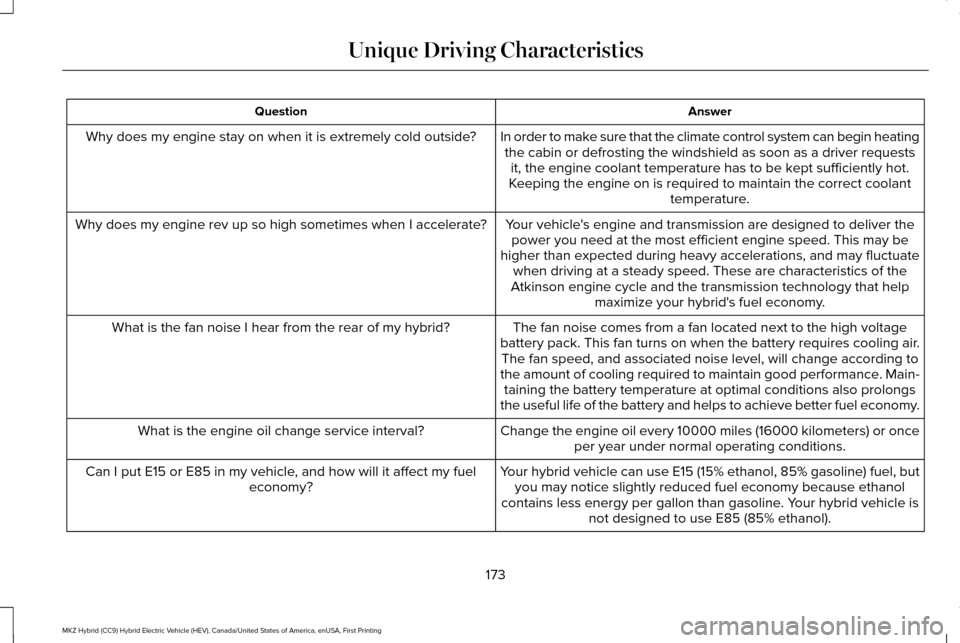
In order to make sure that the climate control system can begin heatingthe cabin or defrosting the windshield as soon as a driver requests it, the engine coolant temperature has to be kept sufficiently hot.
Keeping the engine on is required to maintain the correct coolant temperature.
Why does my engine stay on when it is extremely cold outside?
Your vehicle's engine and transmission are designed to deliver thepower you need at the most efficient engine speed. This may be
higher than expected during heavy accelerations, and may fluctuate when driving at a steady speed. These are characteristics of the
Atkinson engine cycle and the transmission technology that help maximize your hybrid's fuel economy.
Why does my engine rev up so high sometimes when I accelerate?
The fan noise comes from a fan located next to the high voltage
battery pack. This fan turns on when the battery requires cooling air. The fan speed, and associated noise level, will change according to
the amount of cooling required to maintain good performance. Main- taining the battery temperature at optimal conditions also prolongs
the useful life of the battery and helps to achieve better fuel economy.
What is the fan noise I hear from the rear of my hybrid?
Change the engine oil every 10000 miles (16000 kilometers) or onceper year under normal operating conditions.
What is the engine oil change service interval?
Your hybrid vehicle can use E15 (15% ethanol, 85% gasoline) fuel, butyou may notice slightly reduced fuel economy because ethanol
contains less energy per gallon than gasoline. Your hybrid vehicle is not designed to use E85 (85% ethanol).
Can I put E15 or E85 in my vehicle, and how will it affect my fuel
economy?
173
MKZ Hybrid (CC9) Hybrid Electric Vehicle (HEV), Canada/United States of America, enUSA, First Printing Unique Driving Characteristics
Page 206 of 546
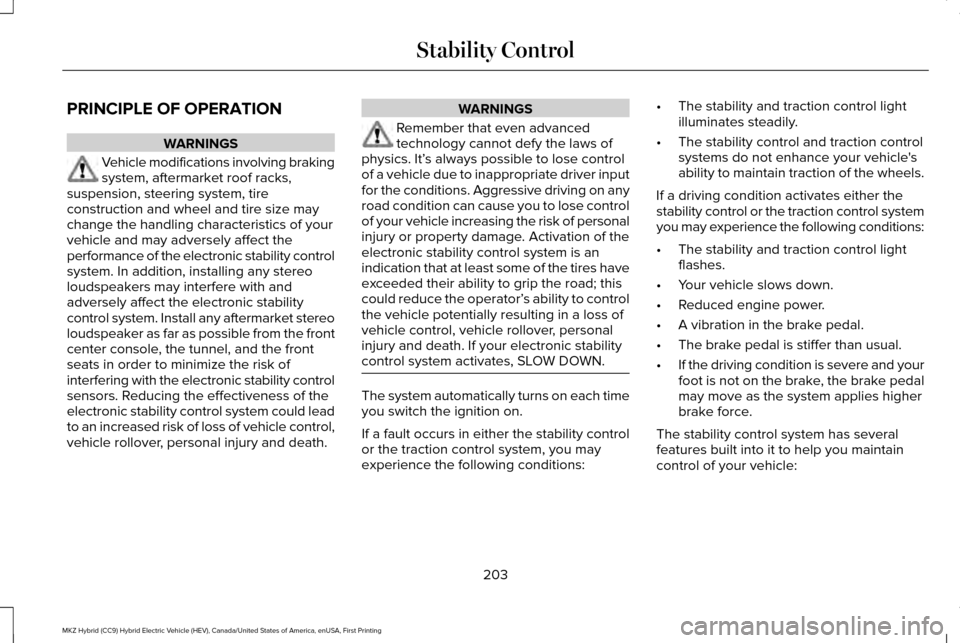
PRINCIPLE OF OPERATION
WARNINGS
Vehicle modifications involving braking
system, aftermarket roof racks,
suspension, steering system, tire
construction and wheel and tire size may
change the handling characteristics of your
vehicle and may adversely affect the
performance of the electronic stability control
system. In addition, installing any stereo
loudspeakers may interfere with and
adversely affect the electronic stability
control system. Install any aftermarket stereo
loudspeaker as far as possible from the front
center console, the tunnel, and the front
seats in order to minimize the risk of
interfering with the electronic stability control
sensors. Reducing the effectiveness of the
electronic stability control system could lead
to an increased risk of loss of vehicle control,
vehicle rollover, personal injury and death. WARNINGS
Remember that even advanced
technology cannot defy the laws of
physics. It’ s always possible to lose control
of a vehicle due to inappropriate driver input
for the conditions. Aggressive driving on any
road condition can cause you to lose control
of your vehicle increasing the risk of personal
injury or property damage. Activation of the
electronic stability control system is an
indication that at least some of the tires have
exceeded their ability to grip the road; this
could reduce the operator’ s ability to control
the vehicle potentially resulting in a loss of
vehicle control, vehicle rollover, personal
injury and death. If your electronic stability
control system activates, SLOW DOWN. The system automatically turns on each time
you switch the ignition on.
If a fault occurs in either the stability control
or the traction control system, you may
experience the following conditions:•
The stability and traction control light
illuminates steadily.
• The stability control and traction control
systems do not enhance your vehicle's
ability to maintain traction of the wheels.
If a driving condition activates either the
stability control or the traction control system
you may experience the following conditions:
• The stability and traction control light
flashes.
• Your vehicle slows down.
• Reduced engine power.
• A vibration in the brake pedal.
• The brake pedal is stiffer than usual.
• If the driving condition is severe and your
foot is not on the brake, the brake pedal
may move as the system applies higher
brake force.
The stability control system has several
features built into it to help you maintain
control of your vehicle:
203
MKZ Hybrid (CC9) Hybrid Electric Vehicle (HEV), Canada/United States of America, enUSA, First Printing Stability Control
Page 220 of 546
The system does not position the vehicle where I want in the space
A parked vehicle has a high attachment (salt sprayer, snowplow or moving truck bed).
The parking space length or position of parked objects changed after your vehicle passed.
The temperature around your vehicle changes quickly (driving from a hea\
ted garage into the cold, or after leaving a car wash).
REAR VIEW CAMERA WARNINGS
The rear view camera system is a
reverse aid supplement device that still
requires the driver to use it in conjunction
with the interior and exterior mirrors for
maximum coverage. Objects that are close to either corner
of the bumper or under the bumper,
might not be seen on the screen due to the
limited coverage of the camera system. Back up as slow as possible since
higher speeds might limit your reaction
time to stop your vehicle. WARNINGS
Use caution when using the rear video
camera and the trunk is ajar. If the trunk
is ajar, the camera will be out of position and
the video image may be incorrect. All
guidelines (if enabled) have been removed
when the trunk is ajar. Use caution when turning camera
features on or off while in reverse (R).
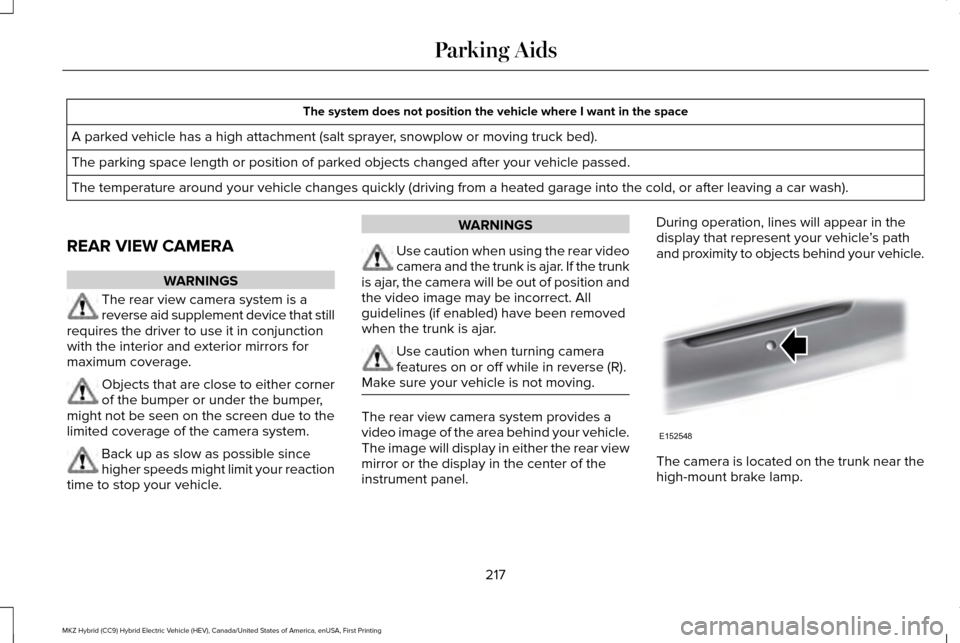
Make sure your vehicle is not moving. The rear view camera system provides a
video image of the area behind your vehicle.
The image will display in either the rear view
mirror or the display in the center of the
instrument panel.During operation, lines will appear in the
display that represent your vehicle
’s path
and proximity to objects behind your vehicle. The camera is located on the trunk near the
high-mount brake lamp.
217
MKZ Hybrid (CC9) Hybrid Electric Vehicle (HEV), Canada/United States of America, enUSA, First Printing Parking AidsE152548
Page 226 of 546
WARNINGS
Do not use tire sizes other than those
recommended because this can affect
the normal operation of the system. Failure
to do so may result in a loss of vehicle
control, which could result in serious injury. Note:
It is your responsibility to stay alert,
drive safely and be in control of the vehicle
at all times.
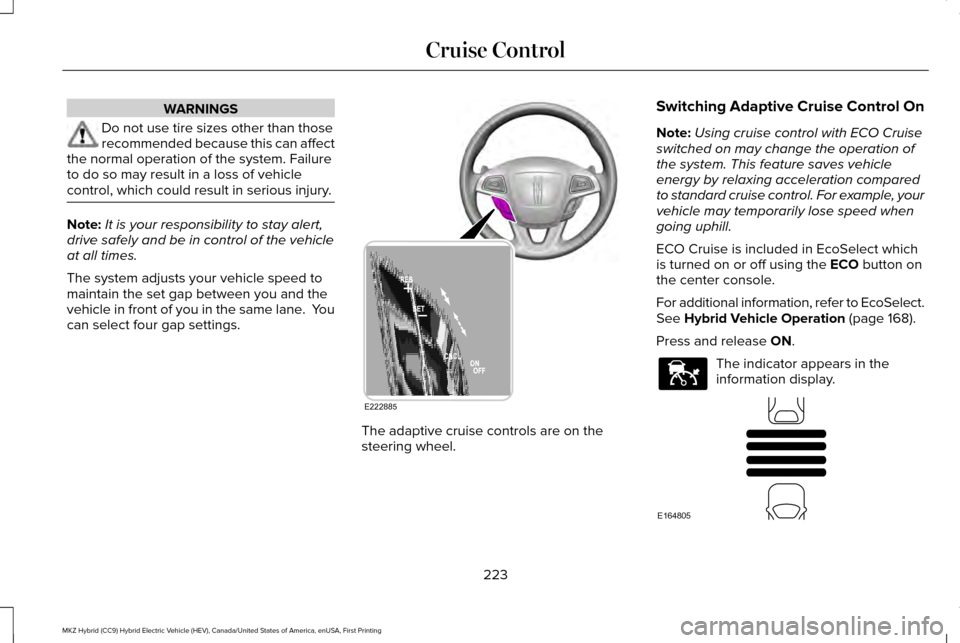
The system adjusts your vehicle speed to
maintain the set gap between you and the
vehicle in front of you in the same lane. You
can select four gap settings. The adaptive cruise controls are on the
steering wheel.Switching Adaptive Cruise Control On
Note:
Using cruise control with ECO Cruise
switched on may change the operation of
the system. This feature saves vehicle
energy by relaxing acceleration compared
to standard cruise control. For example, your
vehicle may temporarily lose speed when
going uphill.
ECO Cruise is included in EcoSelect which
is turned on or off using the ECO button on
the center console.
For additional information, refer to EcoSelect.
See
Hybrid Vehicle Operation (page 168).
Press and release
ON. The indicator appears in the
information display.
223
MKZ Hybrid (CC9) Hybrid Electric Vehicle (HEV), Canada/United States of America, enUSA, First Printing Cruise ControlE222885 E144529 E164805
Page 229 of 546
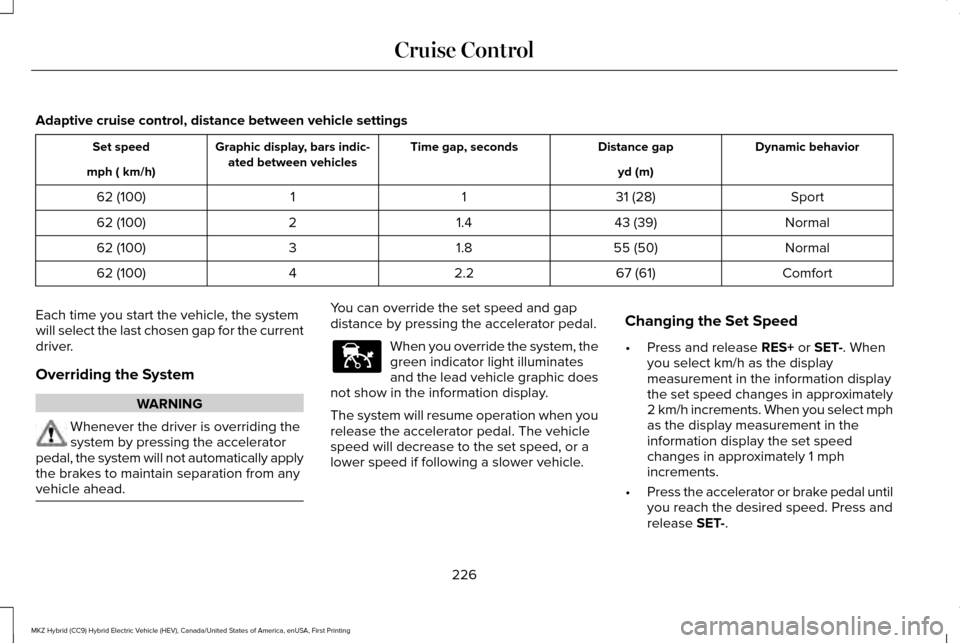
Adaptive cruise control, distance between vehicle settings
Dynamic behavior
Distance gap
Time gap, seconds
Graphic display, bars indic-
ated between vehicles
Set speed
yd (m)
mph ( km/h)
Sport
31 (28)
1
1
62 (100)
Normal
43 (39)
1.4
2
62 (100)
Normal
55 (50)
1.8
3
62 (100)
Comfort
67 (61)
2.2
4
62 (100)
Each time you start the vehicle, the system
will select the last chosen gap for the current
driver.
Overriding the System WARNING
Whenever the driver is overriding the
system by pressing the accelerator
pedal, the system will not automatically apply
the brakes to maintain separation from any
vehicle ahead. You can override the set speed and gap
distance by pressing the accelerator pedal.
When you override the system, the
green indicator light illuminates
and the lead vehicle graphic does
not show in the information display.
The system will resume operation when you
release the accelerator pedal. The vehicle
speed will decrease to the set speed, or a
lower speed if following a slower vehicle. Changing the Set Speed
•
Press and release RES+ or SET-. When
you select km/h as the display
measurement in the information display
the set speed changes in approximately
2 km/h increments. When you select mph
as the display measurement in the
information display the set speed
changes in approximately 1 mph
increments.
• Press the accelerator or brake pedal until
you reach the desired speed. Press and
release
SET-.
226
MKZ Hybrid (CC9) Hybrid Electric Vehicle (HEV), Canada/United States of America, enUSA, First Printing Cruise ControlE144529
Page 230 of 546
•
Press and hold RES+ or SET-. Release
the control when you reach the desired
speed. The set speed changes in
approximately 5 mph/10 km/h increments.
• Press the RES+ or SET- button to change
the set speed in increments of
approximately 1 mph or 2 km/h.
• Hold the RES+ or SET- button to change
the set speed in increments of
approximately 5 mph or 10 km/h.
The system may apply the brakes to slow
the vehicle to the new set speed. The set
speed displays continuously in the
information display when the system is
active.
Canceling the Set Speed
Press and release
CNCL or tap the brake
pedal. The set speed does not erase.
Resuming the Set Speed
Press and release RES+. Your vehicle speed
returns to the previously set speed and gap
setting. The set speed displays continuously
in the information display when the system
is active. Note:
Only use resume if you are aware of
the set speed and intend to return to it.
Automatic Cancellation
Automatic cancellation occurs if:
• The tires lose traction.
• The engine speed is too low.
• You apply the parking brake.
Note: If the engine speed drops too low, the
information display indicates low engine
speed. Shift to a lower gear (manual
transmission only) to avoid automatic
cancellation.
Hilly Condition Usage
Note: An audible alarm will sound and the
system will shut down if it is applying brakes
for an extended period of time. This allows
the brakes to cool down. The system will
function normally again when the brakes
have cooled down. You should select a lower gear position
when the system is active in situations such
as prolonged downhill driving on steep
grades, for example in mountainous areas.
The system needs additional engine braking
in these situations to reduce the load on the
vehicle
’s regular brake system to prevent
them from overheating.
Switching Adaptive Cruise Control Off
Press and release
OFF when the system is
in stand by mode or switch the ignition off.
Note: You erase the set speed when you
switch the system off.
Detection Issues WARNING
On rare occasions, detection issues
can occur due to the road
infrastructures, for example bridges, tunnels
and safety barriers. In these cases, the
system may brake late or unexpectedly. At
all times, you are responsible for controlling
your vehicle, supervising the system and
intervening, if required. 227
MKZ Hybrid (CC9) Hybrid Electric Vehicle (HEV), Canada/United States of America, enUSA, First Printing Cruise Control