start stop button LINCOLN MKZ HYBRID 2017 User Guide
[x] Cancel search | Manufacturer: LINCOLN, Model Year: 2017, Model line: MKZ HYBRID, Model: LINCOLN MKZ HYBRID 2017Pages: 546, PDF Size: 5.12 MB
Page 168 of 546
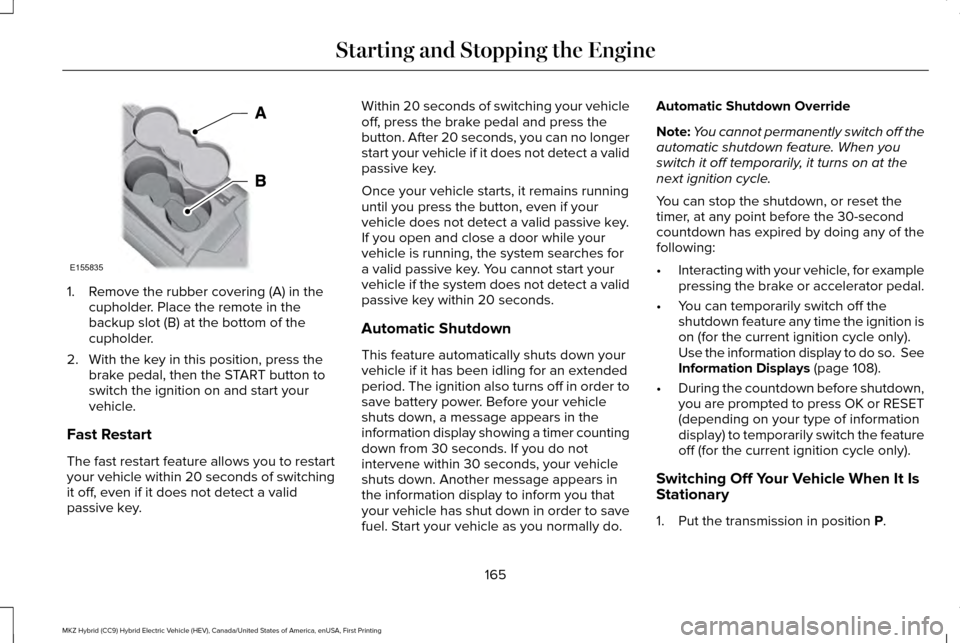
1. Remove the rubber covering (A) in the
cupholder. Place the remote in the
backup slot (B) at the bottom of the
cupholder.
2. With the key in this position, press the brake pedal, then the START button to
switch the ignition on and start your
vehicle.
Fast Restart
The fast restart feature allows you to restart
your vehicle within 20 seconds of switching
it off, even if it does not detect a valid
passive key. Within 20 seconds of switching your vehicle
off, press the brake pedal and press the
button. After 20 seconds, you can no longer
start your vehicle if it does not detect a valid
passive key.
Once your vehicle starts, it remains running
until you press the button, even if your
vehicle does not detect a valid passive key.
If you open and close a door while your
vehicle is running, the system searches for
a valid passive key. You cannot start your
vehicle if the system does not detect a valid
passive key within 20 seconds.
Automatic Shutdown
This feature automatically shuts down your
vehicle if it has been idling for an extended
period. The ignition also turns off in order to
save battery power. Before your vehicle
shuts down, a message appears in the
information display showing a timer counting
down from 30 seconds. If you do not
intervene within 30 seconds, your vehicle
shuts down. Another message appears in
the information display to inform you that
your vehicle has shut down in order to save
fuel. Start your vehicle as you normally do.Automatic Shutdown Override
Note:
You cannot permanently switch off the
automatic shutdown feature. When you
switch it off temporarily, it turns on at the
next ignition cycle.
You can stop the shutdown, or reset the
timer, at any point before the 30-second
countdown has expired by doing any of the
following:
• Interacting with your vehicle, for example
pressing the brake or accelerator pedal.
• You can temporarily switch off the
shutdown feature any time the ignition is
on (for the current ignition cycle only).
Use the information display to do so. See
Information Displays (page 108).
• During the countdown before shutdown,
you are prompted to press OK or RESET
(depending on your type of information
display) to temporarily switch the feature
off (for the current ignition cycle only).
Switching Off Your Vehicle When It Is
Stationary
1. Put the transmission in position
P.
165
MKZ Hybrid (CC9) Hybrid Electric Vehicle (HEV), Canada/United States of America, enUSA, First Printing Starting and Stopping the EngineE155835
Page 169 of 546
2. Press the button once.
3. Apply the parking brake.
Note:
This switches off the ignition, all
electrical circuits, warning lamps and
indicators.
Note: If your vehicle is left running for 30
minutes without any interaction, it
automatically shuts down.
Switching Off Your Vehicle When It Is
Moving WARNING
Switching off the engine when the
vehicle is still moving will result in a
loss of brake and steering assistance. The
steering will not lock, but higher effort will
be required. When the ignition is switched
off, some electrical circuits, including air
bags, warning lamps and indicators may also
be off. If the ignition was turned off
accidentally, you can shift into neutral (N) and
re-start the engine. 1. Put the transmission in position N and
use the brakes to bring your vehicle to a
safe stop.
2. When your vehicle has stopped, put the transmission in position
P.
3. Press and hold the button for one second, or press it three times within two
seconds.
4. Apply the parking brake.
Guarding Against Exhaust Fumes WARNING
If you smell exhaust fumes inside your
vehicle, have your vehicle checked by
your authorized dealer immediately. Do not
drive your vehicle if you smell exhaust fumes.
Carbon monoxide is present in exhaust
fumes. Take precautions to avoid its
dangerous effects. Important Ventilating Information
If you stop your vehicle and then leave the
engine idling for long periods of time, we
recommend that you do one of the following:•
Open the windows at least
1 in (3 cm).
• Set your climate control to outside air.
ENGINE BLOCK HEATER
(If Equipped) WARNINGS
Failure to follow engine block heater
instructions could result in property
damage or serious personal injury. Do not use your heater with
ungrounded electrical systems or
two-pronged adapters. There is a risk of
electrical shock. Do not fully close the hood, or allow it
to drop under its own weight when
using the engine block heater. This could
damage the power cable and may cause an
electrical short resulting in fire, injury and
property damage. Note:
The heater is most effective when
outdoor temperatures are below 0°F (-18°C).
166
MKZ Hybrid (CC9) Hybrid Electric Vehicle (HEV), Canada/United States of America, enUSA, First Printing Starting and Stopping the Engine
Page 192 of 546
3. If your vehicle is not powered after this
sequence, repeat steps 1 and 2 up to two
more times.
For vehicles equipped with a push button
start system:
1. Press the START/STOP button to turn
ignition off.
2. Press the brake pedal and press the START/STOP
button.
3. If your vehicle is not powered after this sequence, repeat steps 1 and 2 up to two
more times.
Note: During this process, your vehicle will
detect if the electrical system is safe and
reactivate. Once your vehicle determines
the electrical system safe, you can start your
vehicle as you would normally by either
turning the ignition key or by pressing the
brake in combination with the START/STOP
button.
Note: In the event your vehicle does not
reactivate after the third key cycle, contact
an authorized dealer.
189
MKZ Hybrid (CC9) Hybrid Electric Vehicle (HEV), Canada/United States of America, enUSA, First Printing High Voltage Battery
Page 194 of 546
3. The gear shift button you select will
illuminate and the instrument cluster will
show the selected gear.
4. Release the brake pedal and your transmission will remain in the selected
gear.
Note: If the driver attempts to leave the
vehicle while it is in gear, the vehicle will
automatically shift into park (P). Seatbelt and
door monitors determine the driver's intent
and makes the shift for you. During this time
a Transmission not in Park message will
appear in the display screen, prompting the
driver to make the shift. To put the vehicle
in gear with the door open perform steps 1-4.
See the
Automatic Return to Park section
in this chapter for more information on this
feature.
Note: To put your vehicle in gear with the
door open, perform steps 1-4. See the
Automatic Return to Park
section in this
chapter for more information on this feature. Park (P)
This position locks the transmission and
prevents the front wheels from turning.
Always come to a complete stop before
putting your vehicle into and out of park (P).
An audible chime will sound when park (P)
is manually selected.
When you turn the ignition off, your vehicle
will automatically shift into park (P). If you turn
the ignition off while your vehicle is moving,
it will first shift into neutral (N) until a slow
enough speed is reached. Your vehicle will
then shift into park (P) automatically.
Automatic Return to Park
Note:
This feature will not operate when your
vehicle is in Stay in Neutral mode or neutral
tow.
Your vehicle has a safety feature that will
automatically shift your vehicle into park (P)
when any of the following circumstances are
met: •
Turn the ignition off.
• Open the driver's door with your seat belt
unlatched.
• Unlatching your seatbelt while the
driver's door is open.
If you turn the ignition off while your vehicle
is moving, your vehicle will first shift into
neutral (N) until it slows down enough to shift
into park (P) automatically.
Note: If you have waited an extended period
of time, (2-15 minutes) before starting your
vehicle, unlatching your safety belt will cause
this feature to activate, even with the driver's
door closed.
Note: This feature may not work properly if
the door ajar switch is malfunctioning. If your
door ajar indicator does not illuminate when
you open the driver’ s door or the indicator
illuminates with the driver’ s door closed. See
your authorized dealer.
191
MKZ Hybrid (CC9) Hybrid Electric Vehicle (HEV), Canada/United States of America, enUSA, First Printing Transmission
Page 195 of 546
Reverse (R)
With the transmission in reverse (R), your
vehicle will move backward. Always come
to a complete stop before shifting into and
out of reverse (R).
Neutral (N)
Press the neutral (N) button to put your
vehicle in neutral. In neutral, your vehicle can
start and is free to roll. Hold the brake pedal
down while in this position.
Stay in Neutral mode
Stay in Neutral mode allows your vehicle to
stay in neutral when you exit your vehicle.
Your vehicle must be stationary to enter this
mode.
To enter Stay in Neutral mode:
1.
Press the neutral (N) button on the shifter
assembly.
2. The message Select N Again to Enter
Stay in Neutral mode will appear in the
information display screen.
3. Press the neutral (N) button again to enter Stay in Neutral mode. The message
Stay in Neutral mode
engaged will appear in the instrument cluster
when your vehicle has entered Stay in
Neutral mode.
Note: During this mode the neutral (N) button
will flash continuously and the instrument
cluster will display neutral as the selected
gear.
Exiting Stay in Neutral mode
To disable Stay in Neutral mode put your
vehicle in another gear. See the Putting the
Vehicle in Gear
section for instructions on
how to do this.
Entering a Carwash
Note: Always put your vehicle in Stay in
Neutral mode when entering an automatic
car wash. Failure to do this could result in
vehicle damage that may not be covered by
warranty.
Drive (D)
The normal driving position for the best fuel
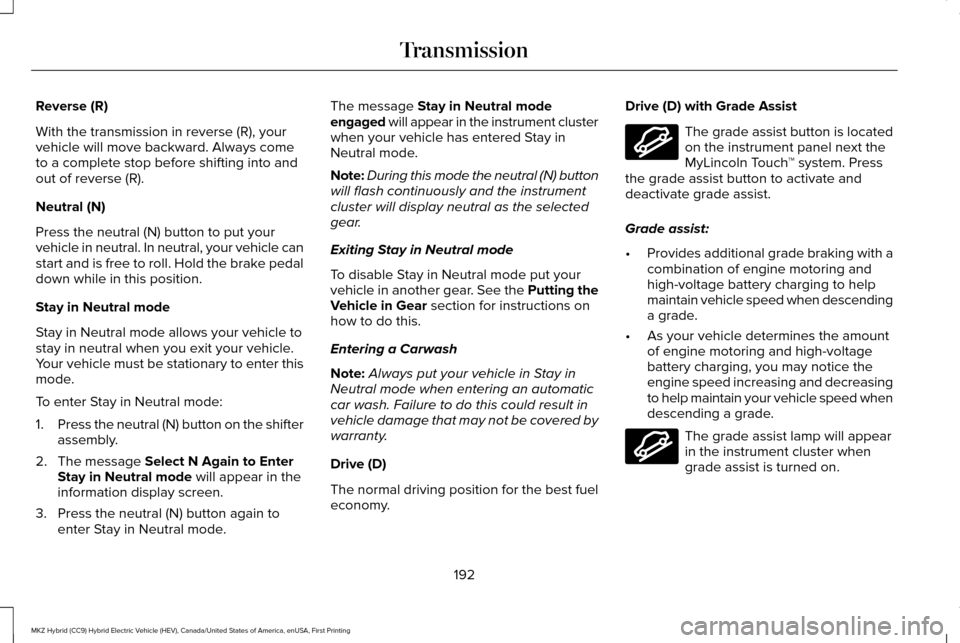
economy. Drive (D) with Grade Assist The grade assist button is located
on the instrument panel next the
MyLincoln Touch
™ system. Press
the grade assist button to activate and
deactivate grade assist.
Grade assist:
• Provides additional grade braking with a
combination of engine motoring and
high-voltage battery charging to help
maintain vehicle speed when descending
a grade.
• As your vehicle determines the amount
of engine motoring and high-voltage
battery charging, you may notice the
engine speed increasing and decreasing
to help maintain your vehicle speed when
descending a grade. The grade assist lamp will appear
in the instrument cluster when
grade assist is turned on.
192
MKZ Hybrid (CC9) Hybrid Electric Vehicle (HEV), Canada/United States of America, enUSA, First Printing TransmissionE144523 E144523
Page 203 of 546
Note:
You can only switch Auto Hold on if
you close the door and fasten your safety
belt.
Note: Auto Hold turns off every time you
power down your vehicle.
When Auto Hold is off, your vehicle behaves
the same as a vehicle without Auto Hold.
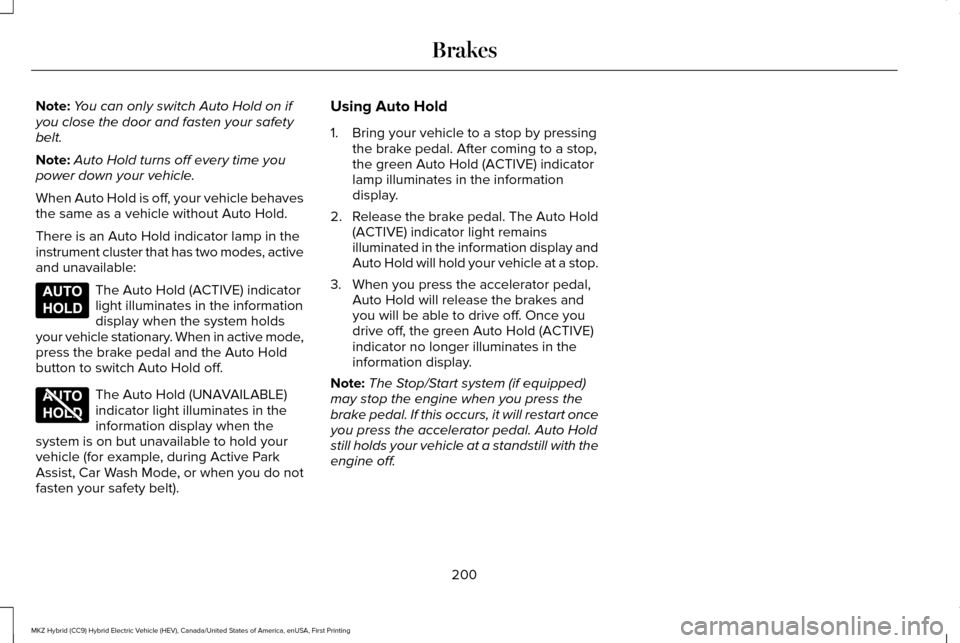
There is an Auto Hold indicator lamp in the
instrument cluster that has two modes, active
and unavailable: The Auto Hold (ACTIVE) indicator
light illuminates in the information
display when the system holds
your vehicle stationary. When in active mode,
press the brake pedal and the Auto Hold
button to switch Auto Hold off. The Auto Hold (UNAVAILABLE)
indicator light illuminates in the
information display when the
system is on but unavailable to hold your
vehicle (for example, during Active Park
Assist, Car Wash Mode, or when you do not
fasten your safety belt). Using Auto Hold
1. Bring your vehicle to a stop by pressing
the brake pedal. After coming to a stop,
the green Auto Hold (ACTIVE) indicator
lamp illuminates in the information
display.
2. Release the brake pedal. The Auto Hold
(ACTIVE) indicator light remains
illuminated in the information display and
Auto Hold will hold your vehicle at a stop.
3. When you press the accelerator pedal, Auto Hold will release the brakes and
you will be able to drive off. Once you
drive off, the green Auto Hold (ACTIVE)
indicator no longer illuminates in the
information display.
Note: The Stop/Start system (if equipped)
may stop the engine when you press the
brake pedal. If this occurs, it will restart once
you press the accelerator pedal. Auto Hold
still holds your vehicle at a standstill with the
engine off.
200
MKZ Hybrid (CC9) Hybrid Electric Vehicle (HEV), Canada/United States of America, enUSA, First Printing BrakesE197933 E197934
Page 263 of 546
Vehicles Sold in Canada: Getting
Roadside Assistance
To fully assist you should you have a vehicle
concern, Lincoln Motor Company offers a
complimentary roadside assistance program.
This program is eligible within Canada or the
continental United States.
This program is separate from the New
Vehicle Limited Warranty, but the coverage
is concurrent with the powertrain coverage
period of your vehicle.
Canadian customers who require roadside
assistance, call 1-800-387-5333.
Vehicles Sold in Canada: Using
Roadside Assistance
Complete the roadside assistance
identification card and place it in your wallet
for quick reference.
In Canada, this card is found in the Warranty
Guide in the glove compartment of your
vehicle.
Vehicles Sold in Canada: Roadside
Assistance Program Coverage
The service is available 24 hours a day,
seven days a week.
Canadian roadside coverage and benefits
may differ from the U.S. coverage.
For complete program coverage details
review your warranty guide, contact your
dealer, call us in Canada at 1-800-387-9333,
or visit our website at
www.lincolncanada.com.
HAZARD WARNING FLASHERS
Note:
If used when the vehicle is not running,
the battery will lose charge. There may be
insufficient power to restart your vehicle. The hazard warning button is
located on the instrument panel.
Use it when your vehicle is
creating a safety hazard for other motorists. •
Press the button to turn on the hazard
warning function, and the front and rear
direction indicators will flash.
• Press the button again to turn them off.
FUEL SHUTOFF WARNING
Failure to inspect and, if necessary,
repair fuel leaks after a collision may
increase the risk of fire and serious injury.
Ford Motor Company recommends that the
fuel system be inspected by an authorized
dealer after any collision. In the event of a moderate to severe
collision, this vehicle has a fuel pump shut-off
feature that stops the flow of fuel to the
engine. Not every impact will cause a
shut-off.
Should your vehicle shut off after a collision,
you may restart your vehicle.
For vehicles equipped with a key system:
1. Switch off the ignition.
260
MKZ Hybrid (CC9) Hybrid Electric Vehicle (HEV), Canada/United States of America, enUSA, First Printing Roadside Emergencies
Page 293 of 546
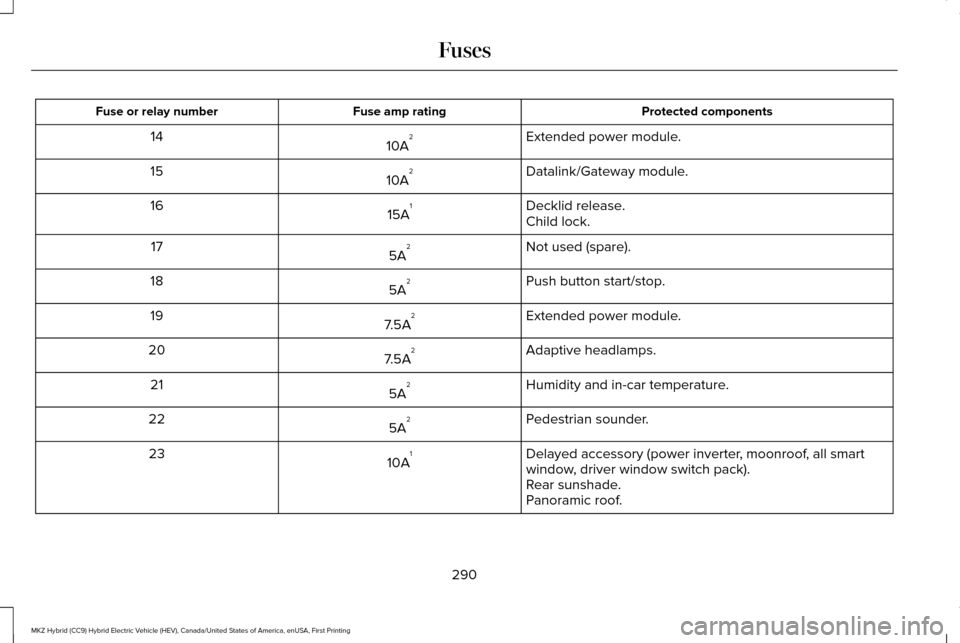
Protected components
Fuse amp rating
Fuse or relay number
Extended power module.
10A 2
14
Datalink/Gateway module.
10A 2
15
Decklid release.
15A 1
16
Child lock.
Not used (spare).
5A 2
17
Push button start/stop.
5A 2
18
Extended power module.
7.5A 2
19
Adaptive headlamps.
7.5A 2
20
Humidity and in-car temperature.
5A 2
21
Pedestrian sounder.
5A 2
22
Delayed accessory (power inverter, moonroof, all smart
window, driver window switch pack).
10A 1
23
Rear sunshade.
Panoramic roof.
290
MKZ Hybrid (CC9) Hybrid Electric Vehicle (HEV), Canada/United States of America, enUSA, First Printing Fuses
Page 425 of 546
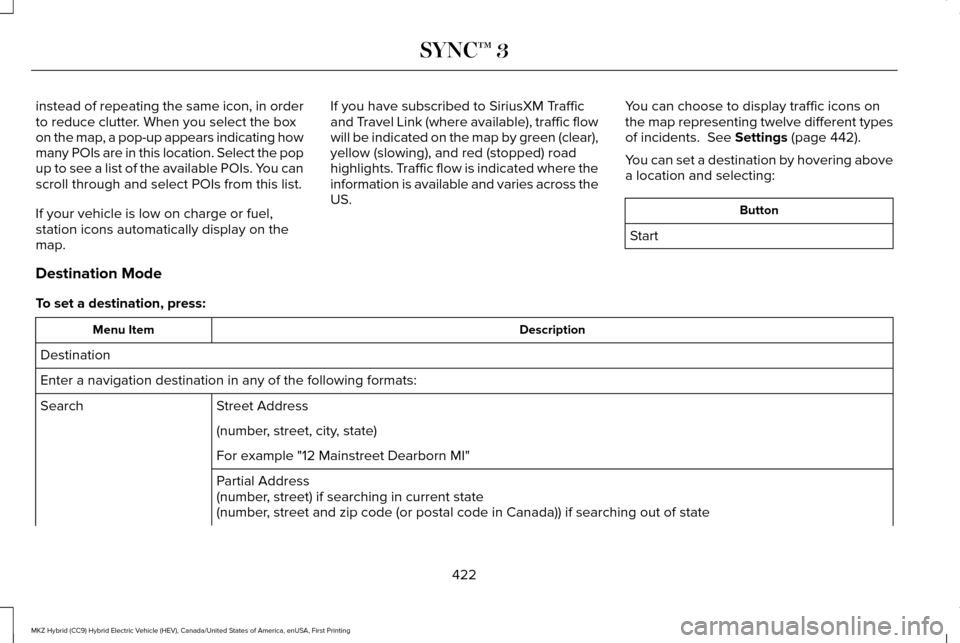
instead of repeating the same icon, in order
to reduce clutter. When you select the box
on the map, a pop-up appears indicating how
many POIs are in this location. Select the pop
up to see a list of the available POIs. You can
scroll through and select POIs from this list.
If your vehicle is low on charge or fuel,
station icons automatically display on the
map.
If you have subscribed to SiriusXM Traffic
and Travel Link (where available), traffic flow
will be indicated on the map by green (clear),
yellow (slowing), and red (stopped) road
highlights. Traffic flow is indicated where the
information is available and varies across the
US.
You can choose to display traffic icons on
the map representing twelve different types
of incidents. See Settings (page 442).
You can set a destination by hovering above
a location and selecting: Button
Start
Destination Mode
To set a destination, press: Description
Menu Item
Destination
Enter a navigation destination in any of the following formats: Street Address
Search
(number, street, city, state)
For example "12 Mainstreet Dearborn MI"
Partial Address
(number, street) if searching in current state
(number, street and zip code (or postal code in Canada)) if searching out of\
state
422
MKZ Hybrid (CC9) Hybrid Electric Vehicle (HEV), Canada/United States of America, enUSA, First Printing SYNC™ 3
Page 471 of 546
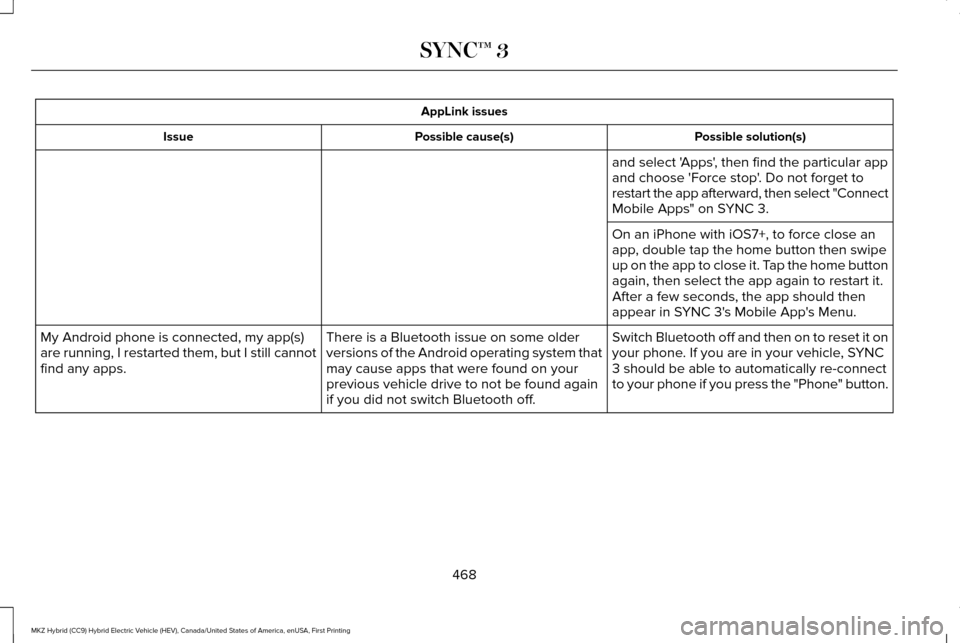
AppLink issues
Possible solution(s)
Possible cause(s)
Issue
and select 'Apps', then find the particular app
and choose 'Force stop'. Do not forget to
restart the app afterward, then select "Connect
Mobile Apps" on SYNC 3.
On an iPhone with iOS7+, to force close an
app, double tap the home button then swipe
up on the app to close it. Tap the home button
again, then select the app again to restart it.
After a few seconds, the app should then
appear in SYNC 3's Mobile App's Menu.
Switch Bluetooth off and then on to reset it on
your phone. If you are in your vehicle, SYNC
3 should be able to automatically re-connect
to your phone if you press the "Phone" button.
There is a Bluetooth issue on some older
versions of the Android operating system that
may cause apps that were found on your
previous vehicle drive to not be found again
if you did not switch Bluetooth off.
My Android phone is connected, my app(s)
are running, I restarted them, but I still cannot
find any apps.
468
MKZ Hybrid (CC9) Hybrid Electric Vehicle (HEV), Canada/United States of America, enUSA, First Printing SYNC™ 3