automatic transmission LINCOLN MKZ HYBRID 2017 Owner's Manual
[x] Cancel search | Manufacturer: LINCOLN, Model Year: 2017, Model line: MKZ HYBRID, Model: LINCOLN MKZ HYBRID 2017Pages: 546, PDF Size: 5.12 MB
Page 217 of 546
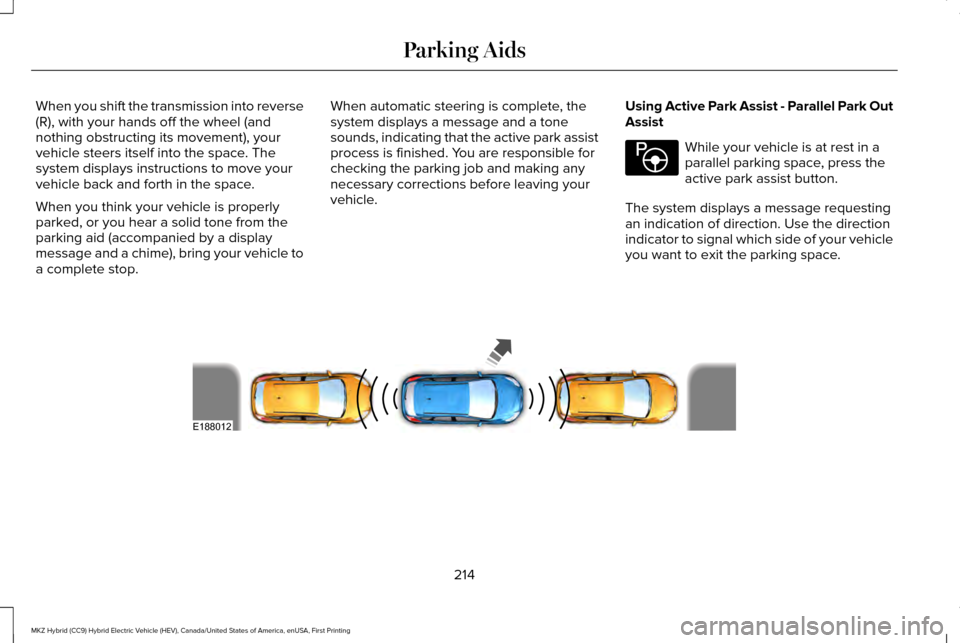
When you shift the transmission into reverse
(R), with your hands off the wheel (and
nothing obstructing its movement), your
vehicle steers itself into the space. The
system displays instructions to move your
vehicle back and forth in the space.
When you think your vehicle is properly
parked, or you hear a solid tone from the
parking aid (accompanied by a display
message and a chime), bring your vehicle to
a complete stop.
When automatic steering is complete, the
system displays a message and a tone
sounds, indicating that the active park assist
process is finished. You are responsible for
checking the parking job and making any
necessary corrections before leaving your
vehicle.
Using Active Park Assist - Parallel Park Out
Assist While your vehicle is at rest in a
parallel parking space, press the
active park assist button.
The system displays a message requesting
an indication of direction. Use the direction
indicator to signal which side of your vehicle
you want to exit the parking space. 214
MKZ Hybrid (CC9) Hybrid Electric Vehicle (HEV), Canada/United States of America, enUSA, First Printing Parking AidsE146186 E188012
Page 218 of 546
The system determines the clearance to the
front and rear of your vehicle and
automatically steers your vehicle out of a
parallel parking space (hands-free) while you
control the accelerator, gearshift and brakes.
The system visually and audibly guides you
to enter traffic.
After the system has directed your vehicle
past the adjacent vehicle or object, it guides
you to take control of the steering to
complete the exit from the parking spot.
Note:
If the clearance in front of your vehicle
allows easy departure, the Parallel Park Out
Assist feature might not be available.
Note: You are responsible for controlling
your vehicle and making sure the path is
clear prior to pulling into traffic. Note:
This system is not intended to assist
in exiting perpendicular parking spaces,
damages to your vehicle may occur.
Note: If your vehicle speed exceeds 3 mph
(5 km/h) or the maneuver is interrupted
(driver input), the system switches off and
you need to take full control of your vehicle.
Deactivating the Active Park Assist
Feature
Manually deactivate the system by:
• Pressing the active park assist button
during an active maneuver.
• Grabbing the steering wheel during an
active maneuver. •
Driving above approximately
22 mph
(35 km/h) for 30 seconds during an active
park search.
• Driving above approximately
6 mph
(10 km/h) during automatic steering.
• Switching off the traction control system.
Certain vehicle conditions can also
deactivate the system, such as:
• Traction control has activated.
• There is an anti-lock brake system
activation or failure.
If a problem occurs with the system, a
warning message displays accompanied by
a tone. Occasional system messages may
occur in normal operation. For recurring or
frequent system faults, contact an authorized
dealer to have your vehicle serviced.
Troubleshooting the System The system does not look for a space
The traction control system may be off.
The transmission is in reverse (R). Your vehicle must be moving forward to be able to detect a parking space.
215
MKZ Hybrid (CC9) Hybrid Electric Vehicle (HEV), Canada/United States of America, enUSA, First Printing Parking Aids
Page 223 of 546
Note:
Only the centerline shows when you
enable manual zoom.
This allows you to get a closer view of an
object behind your vehicle. The zoomed
image keeps the bumper in the image to
provide a reference. The zoom is only active
while the transmission is in reverse (R). When
you shift the transmission out of reverse (R),
the feature automatically turns off and you
must enable it to use it again.
Selectable settings for this feature are ON
and OFF.
Rear Camera Delay
When shifting the transmission out of reverse
(R) and into any gear other than park (P), the
camera image remains in the display until
your vehicle speed reaches 5 mph (8 km/h)
or until you select a radio button.
Selectable settings for this feature are ON
and OFF. The default setting for the rear
camera delay is OFF.
220
MKZ Hybrid (CC9) Hybrid Electric Vehicle (HEV), Canada/United States of America, enUSA, First Printing Parking Aids
Page 230 of 546
•
Press and hold RES+ or SET-. Release
the control when you reach the desired
speed. The set speed changes in
approximately 5 mph/10 km/h increments.
• Press the RES+ or SET- button to change
the set speed in increments of
approximately 1 mph or 2 km/h.
• Hold the RES+ or SET- button to change
the set speed in increments of
approximately 5 mph or 10 km/h.
The system may apply the brakes to slow
the vehicle to the new set speed. The set
speed displays continuously in the
information display when the system is
active.
Canceling the Set Speed
Press and release
CNCL or tap the brake
pedal. The set speed does not erase.
Resuming the Set Speed
Press and release RES+. Your vehicle speed
returns to the previously set speed and gap
setting. The set speed displays continuously
in the information display when the system
is active. Note:
Only use resume if you are aware of
the set speed and intend to return to it.
Automatic Cancellation
Automatic cancellation occurs if:
• The tires lose traction.
• The engine speed is too low.
• You apply the parking brake.
Note: If the engine speed drops too low, the
information display indicates low engine
speed. Shift to a lower gear (manual
transmission only) to avoid automatic
cancellation.
Hilly Condition Usage
Note: An audible alarm will sound and the
system will shut down if it is applying brakes
for an extended period of time. This allows
the brakes to cool down. The system will
function normally again when the brakes
have cooled down. You should select a lower gear position
when the system is active in situations such
as prolonged downhill driving on steep
grades, for example in mountainous areas.
The system needs additional engine braking
in these situations to reduce the load on the
vehicle
’s regular brake system to prevent
them from overheating.
Switching Adaptive Cruise Control Off
Press and release
OFF when the system is
in stand by mode or switch the ignition off.
Note: You erase the set speed when you
switch the system off.
Detection Issues WARNING
On rare occasions, detection issues
can occur due to the road
infrastructures, for example bridges, tunnels
and safety barriers. In these cases, the
system may brake late or unexpectedly. At
all times, you are responsible for controlling
your vehicle, supervising the system and
intervening, if required. 227
MKZ Hybrid (CC9) Hybrid Electric Vehicle (HEV), Canada/United States of America, enUSA, First Printing Cruise Control
Page 240 of 546
BLIND SPOT INFORMATION
SYSTEM
WARNING
To help avoid injuries, NEVER use the
Blind Spot Information System as a
replacement for using the interior and
exterior mirrors or looking over your shoulder
before changing lanes. The Blind Spot
Information System is not a replacement for
careful driving. The Blind Spot Information System is
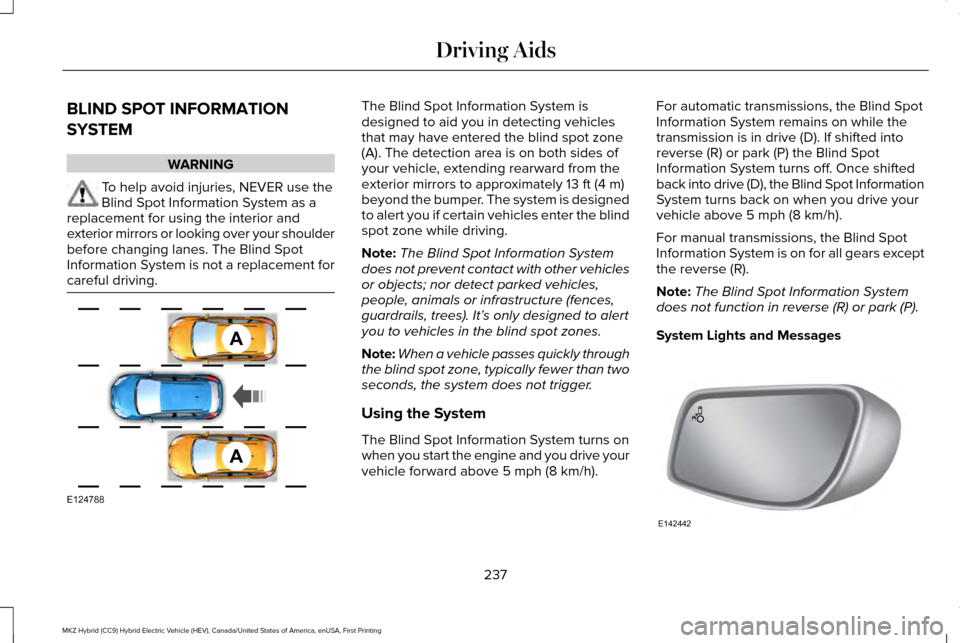
designed to aid you in detecting vehicles
that may have entered the blind spot zone
(A). The detection area is on both sides of
your vehicle, extending rearward from the
exterior mirrors to approximately 13 ft (4 m)
beyond the bumper. The system is designed
to alert you if certain vehicles enter the blind
spot zone while driving.
Note: The Blind Spot Information System
does not prevent contact with other vehicles
or objects; nor detect parked vehicles,
people, animals or infrastructure (fences,
guardrails, trees). It’ s only designed to alert
you to vehicles in the blind spot zones.
Note: When a vehicle passes quickly through
the blind spot zone, typically fewer than two
seconds, the system does not trigger.
Using the System
The Blind Spot Information System turns on
when you start the engine and you drive your
vehicle forward above
5 mph (8 km/h). For automatic transmissions, the Blind Spot
Information System remains on while the
transmission is in drive (D). If shifted into
reverse (R) or park (P) the Blind Spot
Information System turns off. Once shifted
back into drive (D), the Blind Spot Information
System turns back on when you drive your
vehicle above
5 mph (8 km/h).
For manual transmissions, the Blind Spot
Information System is on for all gears except
the reverse (R).
Note: The Blind Spot Information System
does not function in reverse (R) or park (P).
System Lights and Messages 237
MKZ Hybrid (CC9) Hybrid Electric Vehicle (HEV), Canada/United States of America, enUSA, First Printing Driving AidsA
A
E124788 E142442
Page 242 of 546
A "blocked" condition can be cleared in two
ways:
•
After the blockage in front of the sensors
is removed or the rainfall/snowfall rate
decreases or stops, drive for a few
minutes in traffic to allow the sensors to
detect passing vehicles.
• By cycling the ignition from ON to OFF
and then back ON.
Note: If your vehicle has a tow bar with a
factory equipped trailer tow module and it
is towing a trailer, the sensors will
automatically turn the Blind Spot Information
System off. If your vehicle has a tow bar but
no factory equipped trailer tow module, it is
recommended to turn the Blind Spot
Information System off manually. Operating
the Blind Spot Information System with a
trailer attached will cause poor system
performance. System Errors
If the system senses a problem with the left
or right sensor, the telltale will illuminate and
a message will appear in the information
display. See Information Messages (page
119).
Switching the System Off and On
You can temporarily switch the Blind Spot
Information System off in the information
display. See General Information (page 108).
When the Blind Spot Information System
switches off, you will not receive alerts and
the information display shows a system off
message. The telltale in the cluster also
illuminates. When you switch the Blind Spot
Information System on or off, the alert
indicators flash twice.
Note: The Blind Spot Information System
remembers the last selected on or off setting.
You can also have the Blind Spot Information
System switched off permanently at an
authorized dealer. Once switched off
permanently, the system can only be
switched back on at an authorized dealer. CROSS TRAFFIC ALERT WARNING
To help avoid personal injury, NEVER
use the Cross Traffic Alert system as a
replacement for using the interior and
exterior mirrors and looking over your
shoulder before backing out of a parking
space. Cross Traffic Alert is not a
replacement for careful driving. Cross Traffic Alert is designed to warn you
of vehicles approaching from the sides when
the transmission is in reverse (R).
Using the System
Cross Traffic Alert turns on when you start
the engine and you shift into reverse (R).
Once shifted out of reverse (R), Cross Traffic
Alert turns off.
Note:
Cross Traffic Alert only functions while
your transmission is in reverse (R).
239
MKZ Hybrid (CC9) Hybrid Electric Vehicle (HEV), Canada/United States of America, enUSA, First Printing Driving Aids
Page 246 of 546
•
Driving in reverse faster than 7 mph
(12 km/h).
• Backing out of an angled parking spot.
False Alerts
Note: If your vehicle has a tow bar with a
factory equipped trailer tow module and it
is towing a trailer, the sensors will
automatically turn the Cross Traffic Alert off.
If your vehicle has a tow bar but no factory
equipped trailer tow module, it is
recommended to turn the Cross Traffic Alert
off manually. Operating Cross Traffic Alert
with a trailer attached will cause poor Cross
Traffic Alert performance.
There may be certain instances when there
is a false alert by the Cross Traffic Alert
system that illuminates the alert indicator
with no vehicle in the coverage zone. Some
amount of false alerts are normal; they are
temporary and self-correct. System Errors
If Cross Traffic Alert senses a problem with
the left or right sensor a message will appear
in the information display.
See Information
Messages (page 119).
Switching the System Off and On
You can temporarily switch Cross Traffic Alert
off in the information display.
See General
Information (page 108). When you switch
Cross Traffic Alert off, you will not receive
alerts and the information display will display
a system off message.
Note: The Cross Traffic Alert switches on
whenever the ignition is switched on and
ready to provide appropriate alerts when
the transmission is in reverse (R). Cross
Traffic Alert will not remember the last
selected on or off setting.
You can also have Cross Traffic Alert
switched off permanently at an authorized
dealer. Once switched off permanently, the
system can only be switched back on at an
authorized dealer. STEERING
Electric Power Steering WARNINGS
The electric power steering system has
diagnostic checks that continuously
monitor the system. If a fault is detected, a
message displays in the information display.
Stop your vehicle as soon as it is safe to do
so. Switch the ignition off. After at least 10
seconds, switch the ignition on and watch
the information display for a steering system
warning message. If a steering system
warning message returns, have the system
checked by an authorized dealer. If the system detects an error, you may
not feel a difference in the steering,
however a serious condition may exist.
Obtain immediate service from an authorized
dealer, failure to do so may result in loss of
steering control. Your vehicle has an electric power steering
system. There is no fluid reservoir. No
maintenance is required.
243
MKZ Hybrid (CC9) Hybrid Electric Vehicle (HEV), Canada/United States of America, enUSA, First Printing Driving Aids
Page 264 of 546
2. Switch on the ignition.
3. Check the information display for the
Ready to Drive light as the gasoline
engine may not start, but the electric
motor may be running. If you do not see
the Ready to Drive light, repeat Steps 1
and 2 up to two more times.
For vehicles equipped with a push button
start system:
1. Press the push button start to switch off the ignition.
2. Press the brake pedal and press the push
button start to switch on the ignition.
3. Check the information display for the Ready to Drive light as the gasoline
engine may not start, but the electric
motor may be running. If you do not see
the Ready to Drive light, repeat Steps 1
and 2 up to two more times.
Note: When you try to restart your vehicle
after a fuel shutoff, the vehicle makes sure
that the electrical system is safe to restart.
Once your vehicle determines that the
electrical system is safe, then the vehicle will
allow you to restart. Note:
In the event that your vehicle does not
restart after your third attempt, contact an
authorized dealer.
JUMP STARTING THE VEHICLE WARNINGS
The gases around the battery can
explode if exposed to flames, sparks,
or lit cigarettes. An explosion could result in
injury or vehicle damage. Batteries contain sulfuric acid which
can burn skin, eyes and clothing, if
contacted. Do not attempt to push-start your automatic
transmission vehicle. Automatic
transmissions do not have push-start
capability. Attempting to push-start a vehicle
with an automatic transmission may cause
transmission damage.
Preparing Your Vehicle
Note:
Use only a 12-volt supply to start your
vehicle. Note:
Do not disconnect the battery of the
disabled vehicle as this could damage the
vehicle's electrical system.
1. Park the booster vehicle close to the hood of the disabled vehicle making sure
the two vehicles do not touch. Set the
parking brake on both vehicles and stay
clear of the engine cooling fan and other
moving parts.
2. Check all battery terminals and remove any excessive corrosion before you
attach the battery cables. Ensure that
vent caps are tight and level.
3. Turn the heater fan on in both vehicles to protect from any electrical surges. Turn
all other accessories off.
Connecting the Jumper Cables
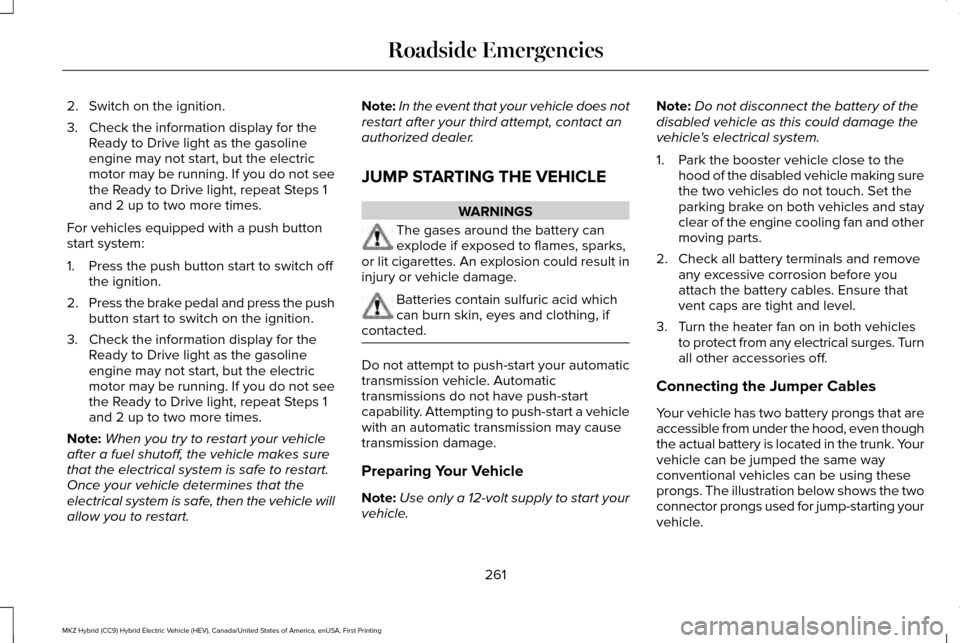
Your vehicle has two battery prongs that are
accessible from under the hood, even though
the actual battery is located in the trunk. Your
vehicle can be jumped the same way
conventional vehicles can be using these
prongs. The illustration below shows the two
connector prongs used for jump-starting your
vehicle.
261
MKZ Hybrid (CC9) Hybrid Electric Vehicle (HEV), Canada/United States of America, enUSA, First Printing Roadside Emergencies
Page 308 of 546
You may notice a reduction in vehicle speed
caused by reduced engine power. In order
to manage the engine coolant temperature.
Your vehicle may enter this mode if certain
high-temperature and high-load conditions
take place. The amount of speed reduction
depends on vehicle loading, grade and
ambient temperature. If this occurs, there is
no need to pull off the road. You can
continue to drive your vehicle.
The air conditioning may automatically turn
on and off during severe operating
conditions to protect the engine from
overheating. When the coolant temperature
decreases to the normal operating
temperature, the air conditioning turns on.
If the coolant temperature gauge moves fully
into the red zone, or if the coolant
temperature warning or service engine soon
messages appear in your information display,
do the following:
1. Pull off the road as soon as safely
possible and shift the transmission into
park (P). 2. Leave the engine running until the
coolant temperature gauge needle
returns to the normal position. After
several minutes, if the temperature does
not drop, follow the remaining steps.
3. Switch the engine off and wait for it to cool. Check the coolant level.
4. If the coolant level is at or below the minimum mark, add prediluted coolant
immediately.
5. If the coolant level is normal, restart the engine and continue.
AUTOMATIC TRANSMISSION
FLUID CHECK
Note: Transmission fluid should be checked
by an authorized dealer. If required, fluid
should be added by an authorized dealer.
The automatic transmission does not have
a transmission fluid dipstick. Have an authorized dealer check and change
the transmission fluid at the correct service
interval. See Scheduled Maintenance (page
479
). Your transmission does not consume
fluid. However, the fluid level should be
checked if the transmission is not working
properly, (i.e., if the transmission slips or
shifts slowly) or if you notice some sign of
fluid leakage.
Do not use supplemental transmission fluid
additives, treatments or cleaning agents. The
use of these materials may affect
transmission operation and result in damage
to internal transmission components.
BRAKE FLUID CHECK WARNINGS
Do not use any fluid other than the
recommended brake fluid as this will
reduce brake efficiency. Use of incorrect fluid
could result in the loss of vehicle control,
serious personal injury or death.
305
MKZ Hybrid (CC9) Hybrid Electric Vehicle (HEV), Canada/United States of America, enUSA, First Printing Maintenance
Page 360 of 546
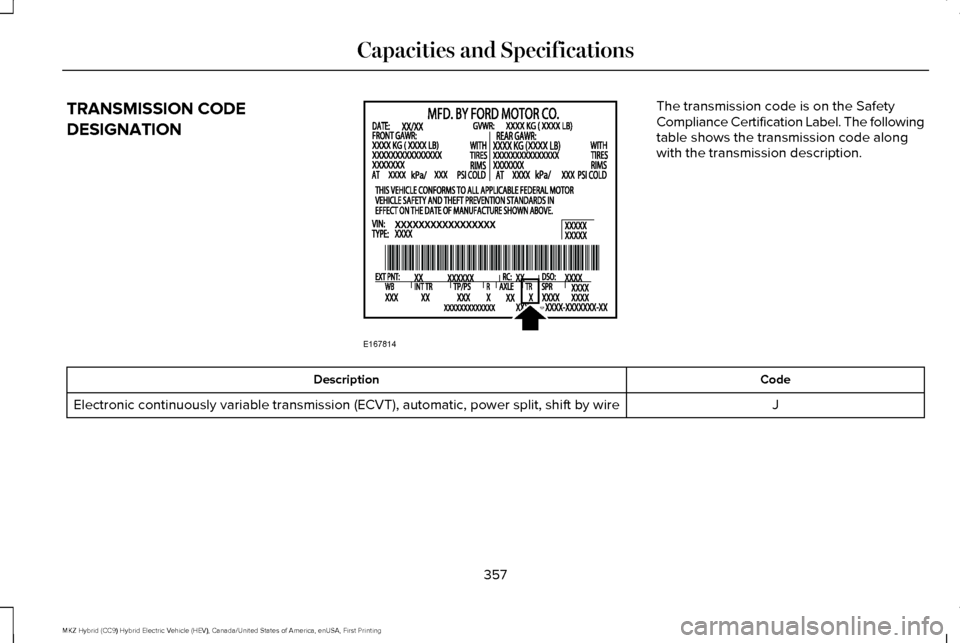
TRANSMISSION CODE
DESIGNATION The transmission code is on the Safety
Compliance Certification Label. The following
table shows the transmission code along
with the transmission description.
Code
Description
J
Electronic continuously variable transmission (ECVT), automatic, power split, shift by wire
357
MKZ Hybrid (CC9) Hybrid Electric Vehicle (HEV), Canada/United States of America, enUSA, First Printing Capacities and SpecificationsE167814