key LINCOLN MKZ HYBRID 2017 Owner's Manual
[x] Cancel search | Manufacturer: LINCOLN, Model Year: 2017, Model line: MKZ HYBRID, Model: LINCOLN MKZ HYBRID 2017Pages: 546, PDF Size: 5.12 MB
Page 77 of 546
PASSIVE ANTI-THEFT SYSTEM
Note:
The system is not compatible with
non-Ford aftermarket remote start systems.
Use of these systems may result in vehicle
starting problems and a loss of security
protection.
Note: Metallic objects, electronic devices or
a second coded key on the same key chain
may cause vehicle starting problems if they
are too close to the key when starting your
vehicle. Prevent these objects from touching
the coded key while starting your vehicle.
Switch the ignition off, move all objects on
the key chain away from the coded key and
restart your vehicle if a problem occurs.
Note: Do not leave a duplicate coded key
in your vehicle. Always take your keys and
lock all doors when leaving your vehicle. SecuriLock
The system helps prevent your vehicle from
starting unless you use a coded key
programmed to your vehicle. Using the
wrong key may prevent your vehicle from
starting. A message may appear in the
information display.
If you are unable to start your vehicle with a
correctly coded key, it is not operating
properly. A message may appear in the
information display.
Automatic Arming
Your vehicle arms immediately after
switching the ignition off.
Automatic Disarming
Switching the ignition on with a coded key
disarms your vehicle.
Replacement Keys
Note:
Your vehicle comes equipped with two
intelligent access keys. The intelligent access key functions as a
programmed key that operates the driver
door lock and activates the intelligent access
with push button start system, as well as a
remote control.
If your programmed transmitters are lost or
stolen and you do not have an extra coded
key, have your vehicle towed to an
authorized dealer. You need to erase the
key codes from your vehicle and program
new coded keys.
Store an extra programmed key away from
your vehicle in a safe place to help prevent
any inconveniences. See your authorized
dealer to purchase additional spare or
replacement keys.
Programming a Spare Intelligent Access
Key
Note:
You can program a maximum of four
intelligent access keys to your vehicle.
74
MKZ Hybrid (CC9) Hybrid Electric Vehicle (HEV), Canada/United States of America, enUSA, First Printing Security
Page 78 of 546
You must have two previously programmed
intelligent access keys inside your vehicle
and the new unprogrammed intelligent
access keys readily accessible. See an
authorized dealer to have the spare key
programmed if two previously programmed
keys are not available.
Make sure that your vehicle is off before
beginning this procedure. Make sure that
you close all the doors before beginning and
that they remain closed throughout the
procedure. Perform all steps within 30
seconds of starting the sequence. Stop and
wait for at least one minute before starting
again if you perform any steps out of
sequence.
Read and understand the entire procedure
before you begin.
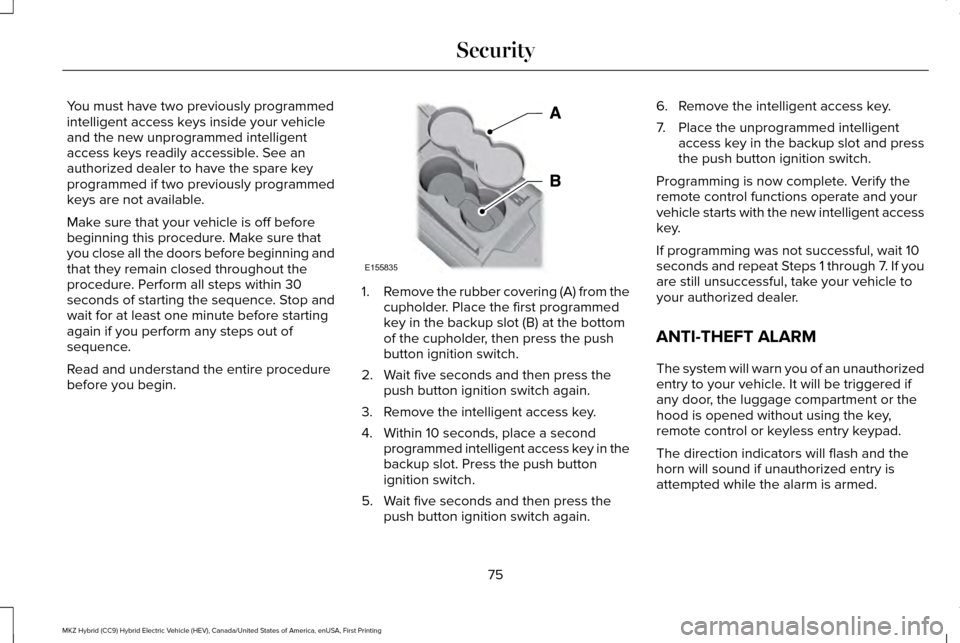
1.
Remove the rubber covering (A) from the
cupholder. Place the first programmed
key in the backup slot (B) at the bottom
of the cupholder, then press the push
button ignition switch.
2. Wait five seconds and then press the push button ignition switch again.
3. Remove the intelligent access key.
4. Within 10 seconds, place a second programmed intelligent access key in the
backup slot. Press the push button
ignition switch.
5. Wait five seconds and then press the push button ignition switch again. 6. Remove the intelligent access key.
7. Place the unprogrammed intelligent
access key in the backup slot and press
the push button ignition switch.
Programming is now complete. Verify the
remote control functions operate and your
vehicle starts with the new intelligent access
key.
If programming was not successful, wait 10
seconds and repeat Steps 1 through 7. If you
are still unsuccessful, take your vehicle to
your authorized dealer.
ANTI-THEFT ALARM
The system will warn you of an unauthorized
entry to your vehicle. It will be triggered if
any door, the luggage compartment or the
hood is opened without using the key,
remote control or keyless entry keypad.
The direction indicators will flash and the
horn will sound if unauthorized entry is
attempted while the alarm is armed.
75
MKZ Hybrid (CC9) Hybrid Electric Vehicle (HEV), Canada/United States of America, enUSA, First Printing SecurityE155835
Page 79 of 546
Take all remote controls to an authorized
dealer if there is any potential alarm problem
with your vehicle.
Arming the Alarm
The alarm is ready to arm when there is not
a key in your vehicle. Electronically lock your
vehicle to arm the alarm.
Disarming the Alarm
Disarm the alarm by any of the following
actions:
•
Unlock the doors or luggage
compartment with the remote control or
keyless entry keypad.
• Switch your vehicle on or start your
vehicle.
• Use a key in the driver door to unlock
your vehicle, then switch your vehicle on
within 12 seconds.
Note: Pressing the panic button on the
remote control will stop the horn and signal
indicators, but will not disarm the system.
76
MKZ Hybrid (CC9) Hybrid Electric Vehicle (HEV), Canada/United States of America, enUSA, First Printing Security
Page 110 of 546
Stop Safely
Lights if your vehicle has an
electrical component fault or failure
that will cause your vehicle to
shutdown or enter into a limited operating
mode. You may also see a message.
Trunk Ajar Lights when the ignition is on and
the trunk is not completely closed.
AUDIBLE WARNINGS AND
INDICATORS
Key in Ignition Warning Chime
Sounds when you open the driver's door and
you have left the key in the ignition. Keyless Warning Alert (If Equipped)
Sounds the horn twice when you exit your
vehicle with the intelligent access key, after
the last door is closed and your keyless
vehicle is in RUN, indicating your vehicle is
still on.
Headlamps On Warning Chime
Sounds when you remove the key from the
ignition and open the driver's door and you
have left the headlamps or parking lamps
on.
Parking Brake On Warning Chime
Sounds when you have left the parking brake
on and drive your vehicle. If the warning
chime remains on after you have released
the parking brake, have the system checked
by an authorized dealer immediately.
107
MKZ Hybrid (CC9) Hybrid Electric Vehicle (HEV), Canada/United States of America, enUSA, First Printing Instrument ClusterE144693 E159323
Page 111 of 546
GENERAL INFORMATION
WARNING
Driving while distracted can result in
loss of vehicle control, crash and injury.
We strongly recommend that you use
extreme caution when using any device that
may take your focus off the road. Your
primary responsibility is the safe operation
of your vehicle. We recommend against the
use of any hand-held device while driving
and encourage the use of voice-operated
systems when possible. Make sure you are
aware of all applicable local laws that may
affect the use of electronic devices while
driving Various systems on your vehicle can be
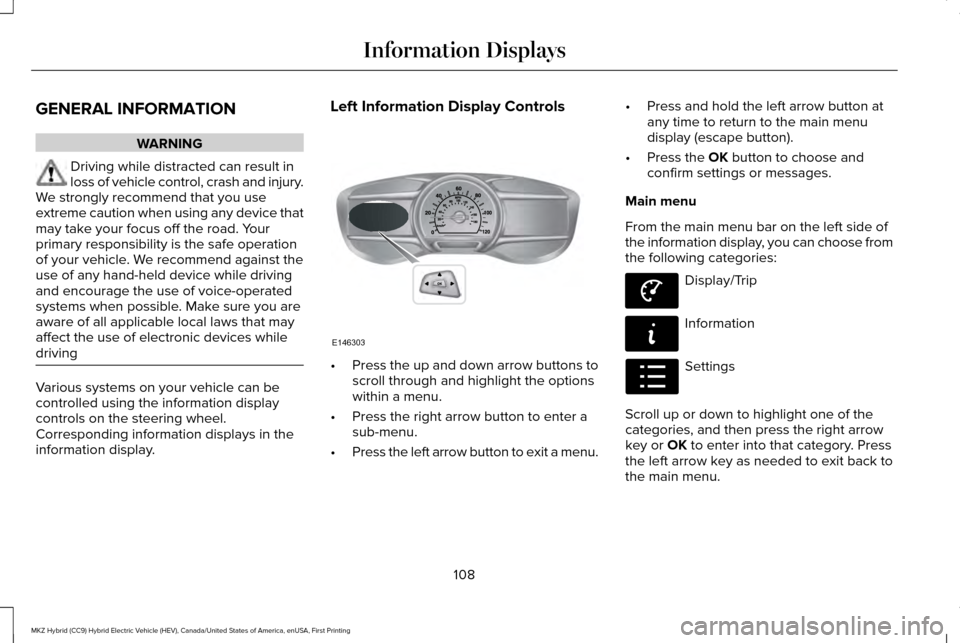
controlled using the information display
controls on the steering wheel.
Corresponding information displays in the
information display. Left Information Display Controls
•
Press the up and down arrow buttons to
scroll through and highlight the options
within a menu.
• Press the right arrow button to enter a
sub-menu.
• Press the left arrow button to exit a menu. •
Press and hold the left arrow button at
any time to return to the main menu
display (escape button).
• Press the OK button to choose and
confirm settings or messages.
Main menu
From the main menu bar on the left side of
the information display, you can choose from
the following categories: Display/Trip
Information
Settings
Scroll up or down to highlight one of the
categories, and then press the right arrow
key or
OK to enter into that category. Press
the left arrow key as needed to exit back to
the main menu.
108
MKZ Hybrid (CC9) Hybrid Electric Vehicle (HEV), Canada/United States of America, enUSA, First Printing Information DisplaysE146303 E144639 E144642 E100023
Page 112 of 546
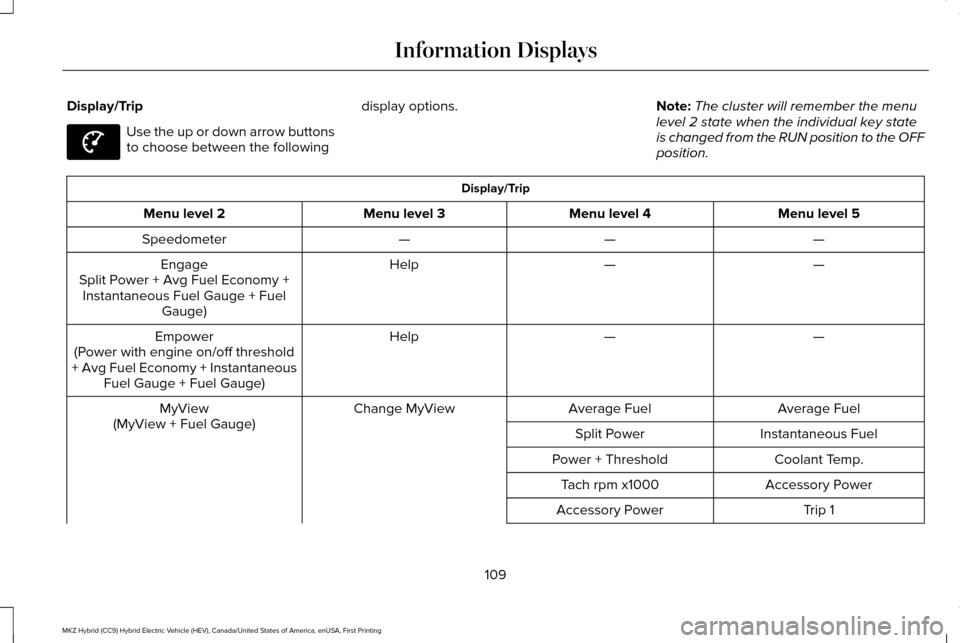
Display/Trip
Use the up or down arrow buttons
to choose between the following
display options.
Note:The cluster will remember the menu
level 2 state when the individual key state
is changed from the RUN position to the OFF
position. Display/Trip
Menu level 5
Menu level 4
Menu level 3
Menu level 2
—
—
—
Speedometer
—
—
Help
Engage
Split Power + Avg Fuel Economy + Instantaneous Fuel Gauge + Fuel Gauge)
—
—
Help
Empower
(Power with engine on/off threshold
+ Avg Fuel Economy + Instantaneous Fuel Gauge + Fuel Gauge)
Average Fuel
Average Fuel
Change MyView
MyView
(MyView + Fuel Gauge) Instantaneous Fuel
Split Power
Coolant Temp.
Power + Threshold
Accessory Power
Tach rpm x1000
Trip 1
Accessory Power
109
MKZ Hybrid (CC9) Hybrid Electric Vehicle (HEV), Canada/United States of America, enUSA, First Printing Information DisplaysE144639
Page 115 of 546
•
Tach rpm x 1000 — When the gasoline
engine is running, the tachometer gauge
displays the engine speed in revolutions
per minute (RPM). When your vehicle is
operating on battery power only with the
engine off, EV displays and the
tachometer is greyed out.
Note: The trip data, and average fuel
economy cannot be reset in MyView. Trip 1 & 2
Provides trip odometer, trip average fuel
economy and trip timer.
Distance traveled on battery power only with
the engine off is shown in blue next to total
trip distance.
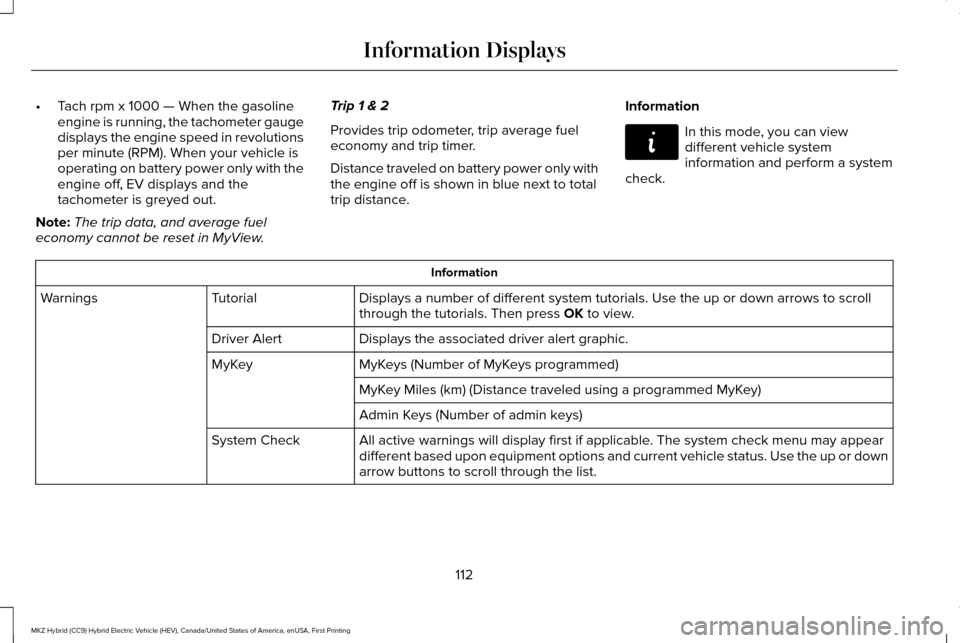
Information In this mode, you can view
different vehicle system
information and perform a system
check. Information
Displays a number of different system tutorials. Use the up or down arro\
ws to scroll
through the tutorials. Then press OK to view.
Tutorial
Warnings
Displays the associated driver alert graphic.
Driver Alert
MyKeys (Number of MyKeys programmed)
MyKey
MyKey Miles (km) (Distance traveled using a programmed MyKey)
Admin Keys (Number of admin keys)
All active warnings will display first if applicable. The system check menu may appear
different based upon equipment options and current vehicle status. Use t\
he up or down
arrow buttons to scroll through the list.
System Check
112
MKZ Hybrid (CC9) Hybrid Electric Vehicle (HEV), Canada/United States of America, enUSA, First Printing Information DisplaysE144642
Page 116 of 546
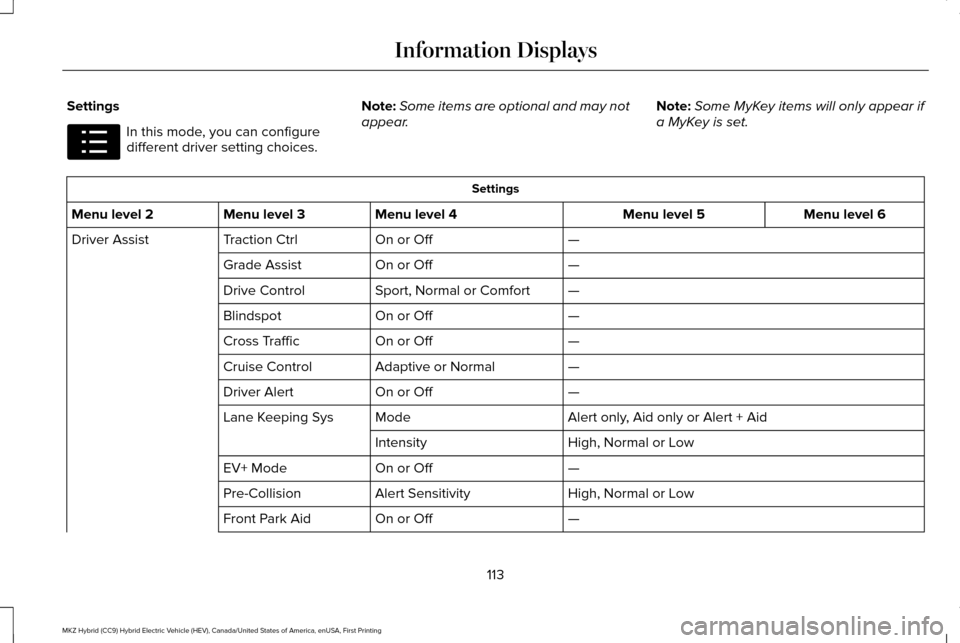
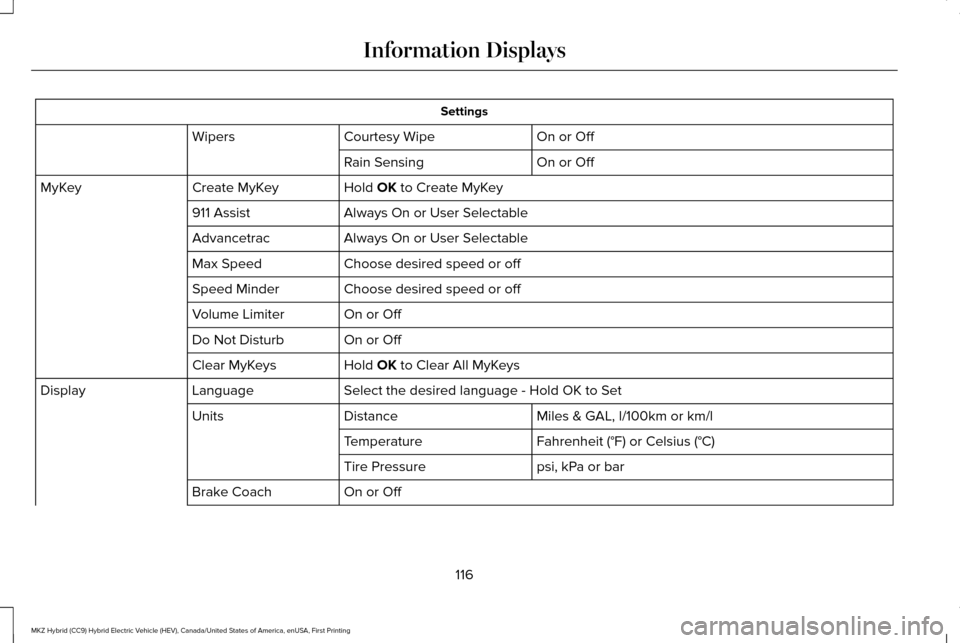
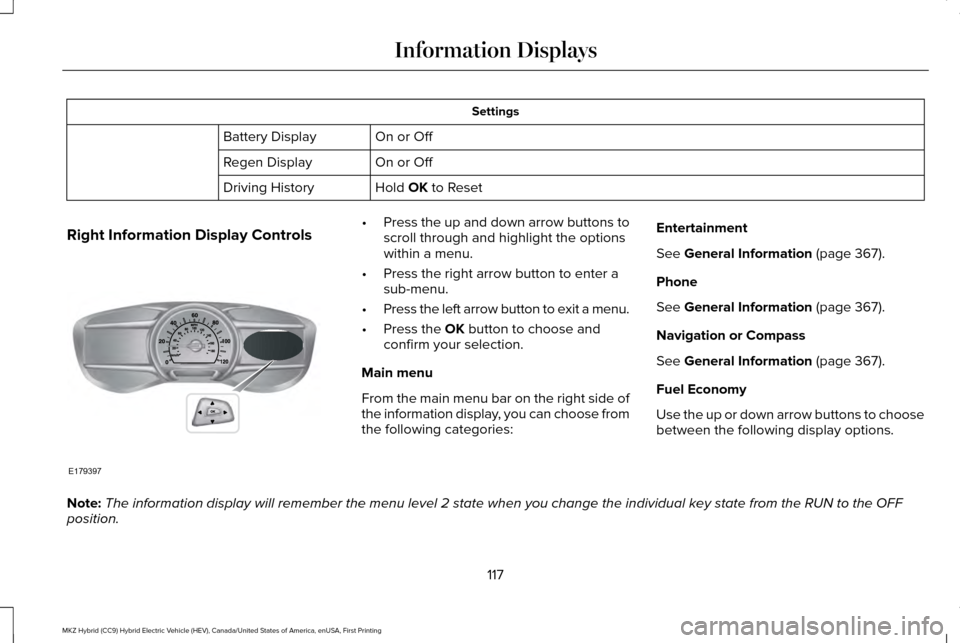
Settings
In this mode, you can configure
different driver setting choices.
Note:
Some items are optional and may not
appear. Note:
Some MyKey items will only appear if
a MyKey is set. Settings
Menu level 6
Menu level 5
Menu level 4
Menu level 3
Menu level 2
—
On or Off
Traction Ctrl
Driver Assist
—
On or Off
Grade Assist
—
Sport, Normal or Comfort
Drive Control
—
On or Off
Blindspot
—
On or Off
Cross Traffic
—
Adaptive or Normal
Cruise Control
—
On or Off
Driver Alert
Alert only, Aid only or Alert + Aid
Mode
Lane Keeping Sys
High, Normal or Low
Intensity
—
On or Off
EV+ Mode
High, Normal or Low
Alert Sensitivity
Pre-Collision
—
On or Off
Front Park Aid
113
MKZ Hybrid (CC9) Hybrid Electric Vehicle (HEV), Canada/United States of America, enUSA, First Printing Information DisplaysE100023
Page 119 of 546
Settings
On or Off
Courtesy Wipe
Wipers
On or Off
Rain Sensing
Hold OK to Create MyKey
Create MyKey
MyKey
Always On or User Selectable
911 Assist
Always On or User Selectable
Advancetrac
Choose desired speed or off
Max Speed
Choose desired speed or off
Speed Minder
On or Off
Volume Limiter
On or Off
Do Not Disturb
Hold
OK to Clear All MyKeys
Clear MyKeys
Select the desired language - Hold OK to Set
Language
Display
Miles & GAL, l/100km or km/l
Distance
Units
Fahrenheit (°F) or Celsius (°C)
Temperature
psi, kPa or bar
Tire Pressure
On or Off
Brake Coach
116
MKZ Hybrid (CC9) Hybrid Electric Vehicle (HEV), Canada/United States of America, enUSA, First Printing Information Displays
Page 120 of 546
Settings
On or Off
Battery Display
On or Off
Regen Display
Hold OK to Reset
Driving History
Right Information Display Controls •
Press the up and down arrow buttons to
scroll through and highlight the options
within a menu.
• Press the right arrow button to enter a
sub-menu.
• Press the left arrow button to exit a menu.
• Press the
OK button to choose and
confirm your selection.
Main menu
From the main menu bar on the right side of
the information display, you can choose from
the following categories: Entertainment
See
General Information (page 367).
Phone
See
General Information (page 367).
Navigation or Compass
See
General Information (page 367).
Fuel Economy
Use the up or down arrow buttons to choose
between the following display options.
Note: The information display will remember the menu level 2 state when you ch\
ange the individual key state from the RUN to the OFF
position.
117
MKZ Hybrid (CC9) Hybrid Electric Vehicle (HEV), Canada/United States of America, enUSA, First Printing Information DisplaysE179397