cruise control LINCOLN MKZ HYBRID 2018 User Guide
[x] Cancel search | Manufacturer: LINCOLN, Model Year: 2018, Model line: MKZ HYBRID, Model: LINCOLN MKZ HYBRID 2018Pages: 572, PDF Size: 4.49 MB
Page 128 of 572
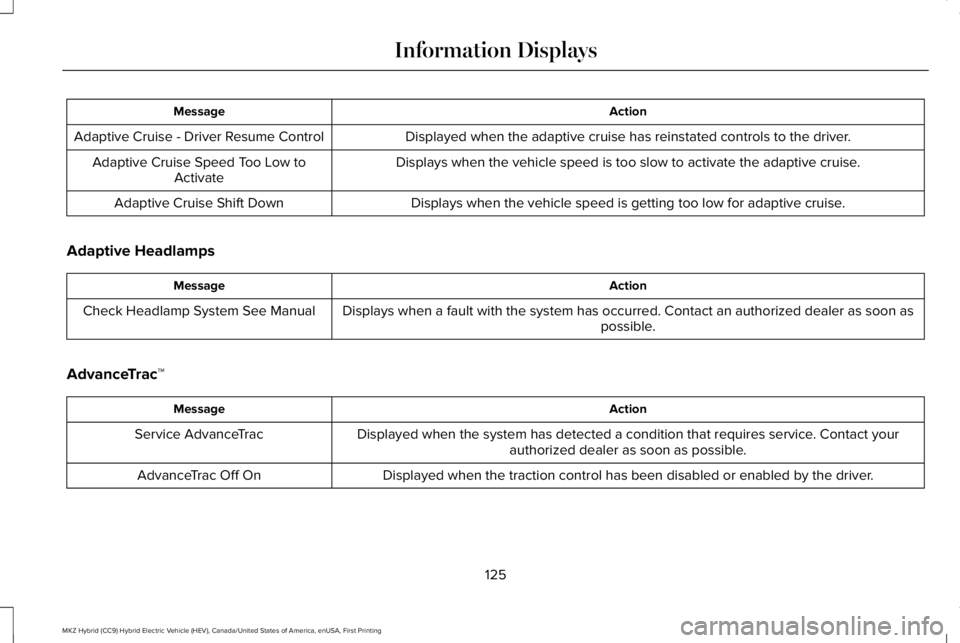
ActionMessage
Displayed when the adaptive cruise has reinstated controls to the driver.Adaptive Cruise - Driver Resume Control
Displays when the vehicle speed is too slow to activate the adaptive cruise.Adaptive Cruise Speed Too Low toActivate
Displays when the vehicle speed is getting too low for adaptive cruise.Adaptive Cruise Shift Down
Adaptive Headlamps
ActionMessage
Displays when a fault with the system has occurred. Contact an authorized dealer as soon aspossible.Check Headlamp System See Manual
AdvanceTrac™
ActionMessage
Displayed when the system has detected a condition that requires service. Contact yourauthorized dealer as soon as possible.Service AdvanceTrac
Displayed when the traction control has been disabled or enabled by the driver.AdvanceTrac Off On
125
MKZ Hybrid (CC9) Hybrid Electric Vehicle (HEV), Canada/United States of America, enUSA, First Printing
Information Displays
Page 133 of 572
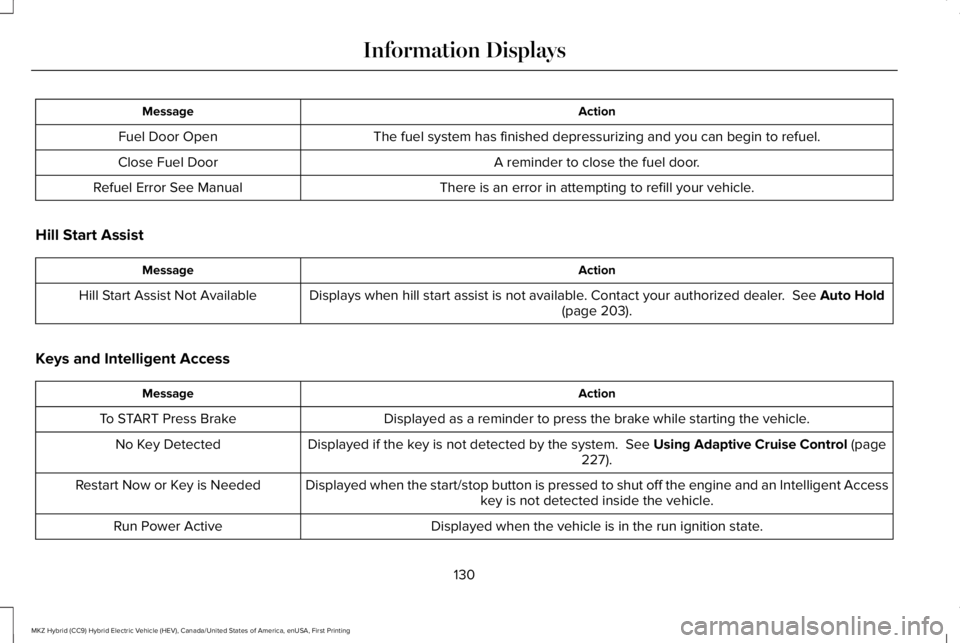
ActionMessage
The fuel system has finished depressurizing and you can begin to refuel.Fuel Door Open
A reminder to close the fuel door.Close Fuel Door
There is an error in attempting to refill your vehicle.Refuel Error See Manual
Hill Start Assist
ActionMessage
Displays when hill start assist is not available. Contact your authorized dealer. See Auto Hold(page 203).Hill Start Assist Not Available
Keys and Intelligent Access
ActionMessage
Displayed as a reminder to press the brake while starting the vehicle.To START Press Brake
Displayed if the key is not detected by the system. See Using Adaptive Cruise Control (page227).No Key Detected
Displayed when the start/stop button is pressed to shut off the engine and an Intelligent Accesskey is not detected inside the vehicle.Restart Now or Key is Needed
Displayed when the vehicle is in the run ignition state.Run Power Active
130
MKZ Hybrid (CC9) Hybrid Electric Vehicle (HEV), Canada/United States of America, enUSA, First Printing
Information Displays
Page 179 of 572
•Changes in engine behavior.•ECO cruise control activation.
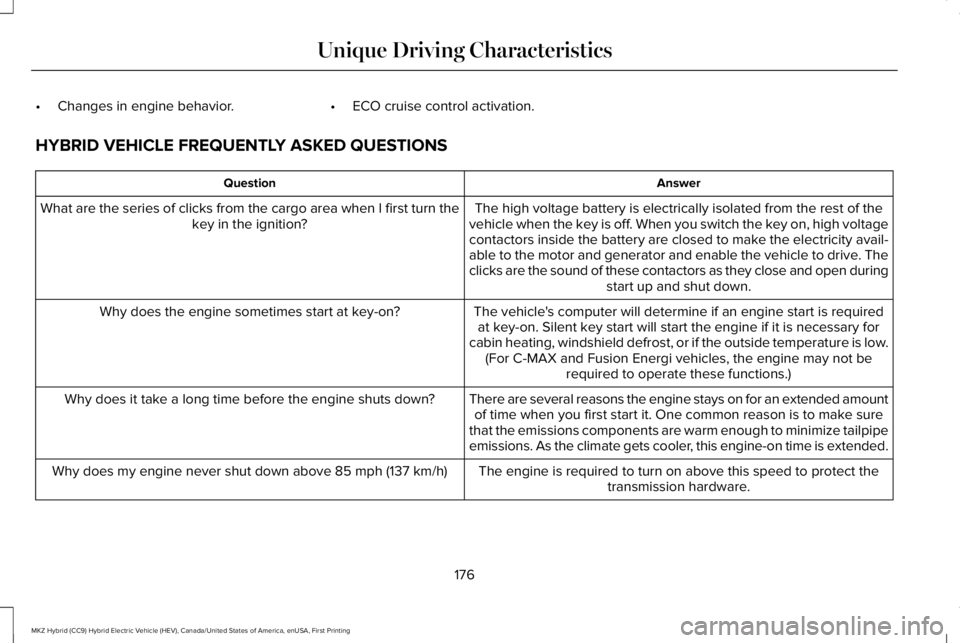
HYBRID VEHICLE FREQUENTLY ASKED QUESTIONS
AnswerQuestion
The high voltage battery is electrically isolated from the rest of thevehicle when the key is off. When you switch the key on, high voltagecontactors inside the battery are closed to make the electricity avail-able to the motor and generator and enable the vehicle to drive. Theclicks are the sound of these contactors as they close and open duringstart up and shut down.
What are the series of clicks from the cargo area when I first turn thekey in the ignition?
The vehicle's computer will determine if an engine start is requiredat key-on. Silent key start will start the engine if it is necessary forcabin heating, windshield defrost, or if the outside temperature is low.(For C-MAX and Fusion Energi vehicles, the engine may not berequired to operate these functions.)
Why does the engine sometimes start at key-on?
There are several reasons the engine stays on for an extended amountof time when you first start it. One common reason is to make surethat the emissions components are warm enough to minimize tailpipeemissions. As the climate gets cooler, this engine-on time is extended.
Why does it take a long time before the engine shuts down?
The engine is required to turn on above this speed to protect thetransmission hardware.Why does my engine never shut down above 85 mph (137 km/h)
176
MKZ Hybrid (CC9) Hybrid Electric Vehicle (HEV), Canada/United States of America, enUSA, First Printing
Unique Driving Characteristics
Page 229 of 572
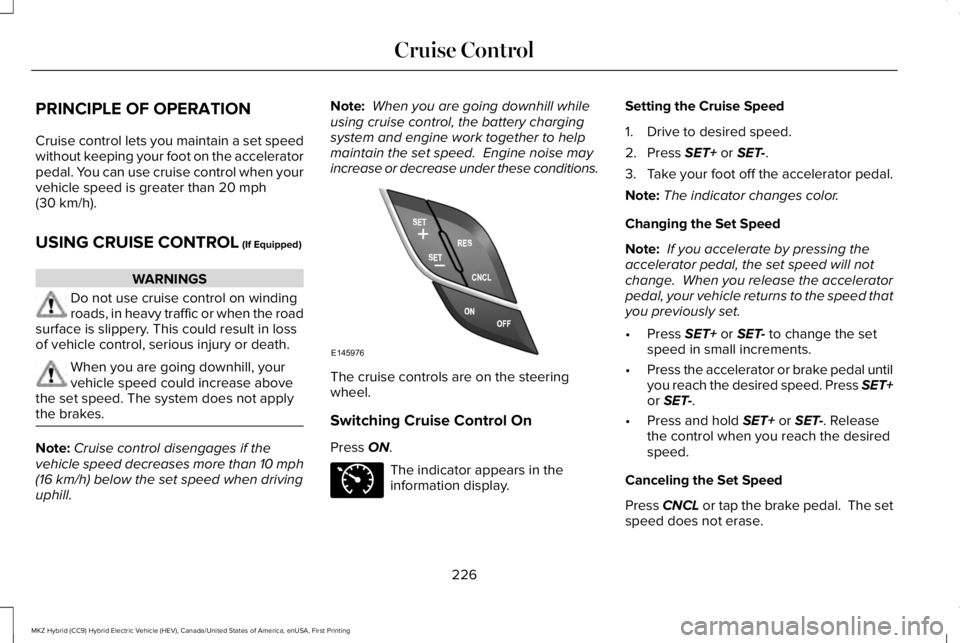
PRINCIPLE OF OPERATION
Cruise control lets you maintain a set speedwithout keeping your foot on the acceleratorpedal. You can use cruise control when yourvehicle speed is greater than 20 mph(30 km/h).
USING CRUISE CONTROL (If Equipped)
WARNINGS
Do not use cruise control on windingroads, in heavy traffic or when the roadsurface is slippery. This could result in lossof vehicle control, serious injury or death.
When you are going downhill, yourvehicle speed could increase abovethe set speed. The system does not applythe brakes.
Note:Cruise control disengages if thevehicle speed decreases more than 10 mph(16 km/h) below the set speed when drivinguphill.
Note: When you are going downhill whileusing cruise control, the battery chargingsystem and engine work together to helpmaintain the set speed. Engine noise mayincrease or decrease under these conditions.
The cruise controls are on the steeringwheel.
Switching Cruise Control On
Press ON.
The indicator appears in theinformation display.
Setting the Cruise Speed
1. Drive to desired speed.
2. Press SET+ or SET-.
3.Take your foot off the accelerator pedal.
Note:The indicator changes color.
Changing the Set Speed
Note: If you accelerate by pressing theaccelerator pedal, the set speed will notchange. When you release the acceleratorpedal, your vehicle returns to the speed thatyou previously set.
•Press SET+ or SET- to change the setspeed in small increments.
•Press the accelerator or brake pedal untilyou reach the desired speed. Press SET+or SET-.
•Press and hold SET+ or SET-. Releasethe control when you reach the desiredspeed.
Canceling the Set Speed
Press CNCL or tap the brake pedal. The setspeed does not erase.
226
MKZ Hybrid (CC9) Hybrid Electric Vehicle (HEV), Canada/United States of America, enUSA, First Printing
Cruise ControlE145976 E71340
Page 230 of 572
Resuming the Set Speed
Press RES.
Switching Cruise Control Off
Note:You erase the set speed when youswitch the system off.
Press OFF when the system is in standbymode, or switch the ignition off.
Switching to ECO Cruise
Using cruise control with ECO Cruiseswitched on may change the operation ofthe system. This feature saves vehicleenergy by relaxing acceleration comparedto standard cruise control. For example, yourvehicle may temporarily lose speed whengoing uphill.
For Hybrid vehicles, press ECO on the centerconsole.
For additional information, refer to ECOCruise and EcoSelect.
USING ADAPTIVE CRUISE
CONTROL (If Equipped)
WARNINGS
Always pay close attention to changingroad conditions when using adaptivecruise control. The system does not replaceattentive driving. Failing to pay attention tothe road may result in a crash, serious injuryor death.
Do not use the adaptive cruise controlwhen entering or leaving a highway,on roads with intersections or roundaboutsor non-vehicular traffic or roads that arewinding, slippery, unpaved, or steep slopes.
Do not use the system in poor visibility,for example fog, heavy rain, spray orsnow.
WARNINGS
Do not use the system when towing atrailer with aftermarket trailer brakecontrols. Aftermarket trailer brakes will notfunction properly when you switch thesystem on because the brakes areelectronically controlled. Failing to do so mayresult in loss of vehicle control, which couldresult in serious injury.
Do not use tire sizes other than thoserecommended because this can affectthe normal operation of the system. Failureto do so may result in a loss of vehiclecontrol, which could result in serious injury.
Adaptive cruise control may not detectstationary or slow moving vehiclesbelow 6 mph (10 km/h).
Adaptive cruise control does not detectpedestrians or objects in the road.
Adaptive cruise control does not detectoncoming vehicles in the same lane.
Adaptive cruise control is not a crashwarning or avoidance system.
227
MKZ Hybrid (CC9) Hybrid Electric Vehicle (HEV), Canada/United States of America, enUSA, First Printing
Cruise Control
Page 231 of 572
Note:It is your responsibility to stay alert,drive safely and be in control of the vehicleat all times.
The system adjusts your vehicle speed tomaintain the set gap between you and thevehicle in front of you in the same lane. Youcan select four gap settings.
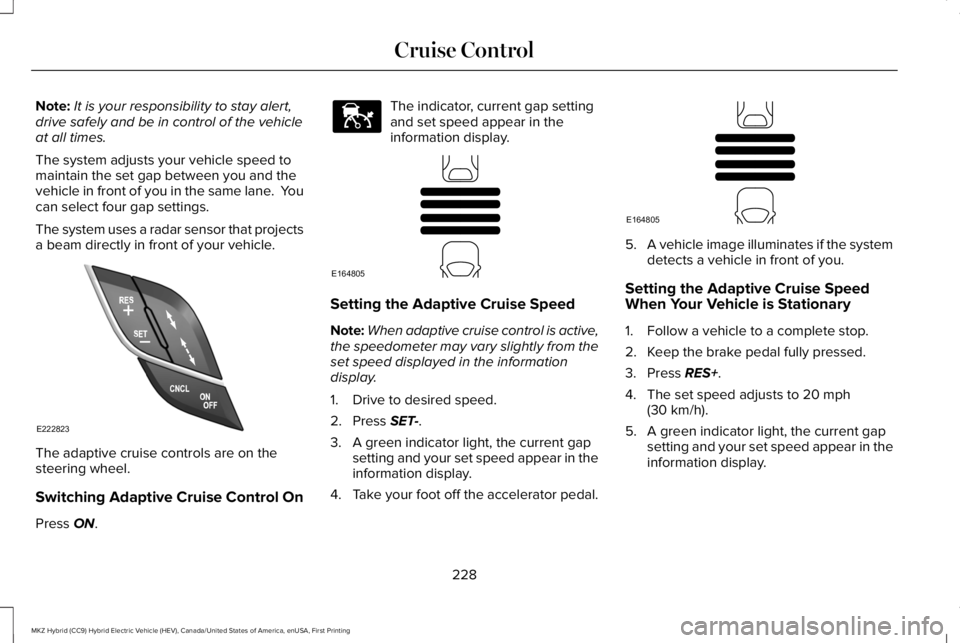
The system uses a radar sensor that projectsa beam directly in front of your vehicle.
The adaptive cruise controls are on thesteering wheel.
Switching Adaptive Cruise Control On
Press ON.
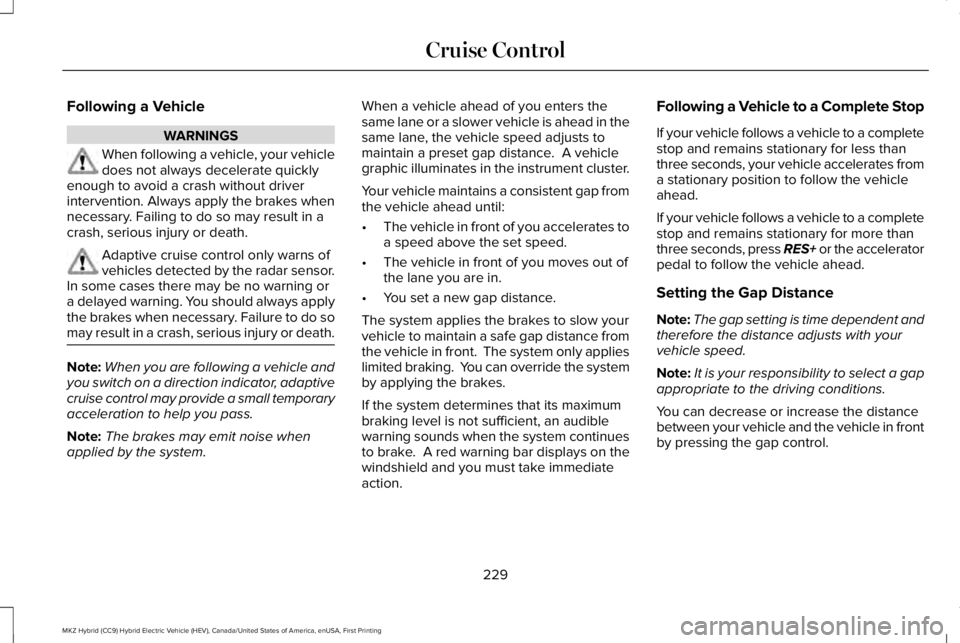
The indicator, current gap settingand set speed appear in theinformation display.
Setting the Adaptive Cruise Speed
Note:When adaptive cruise control is active,the speedometer may vary slightly from theset speed displayed in the informationdisplay.
1. Drive to desired speed.
2. Press SET-.
3. A green indicator light, the current gapsetting and your set speed appear in theinformation display.
4.Take your foot off the accelerator pedal.
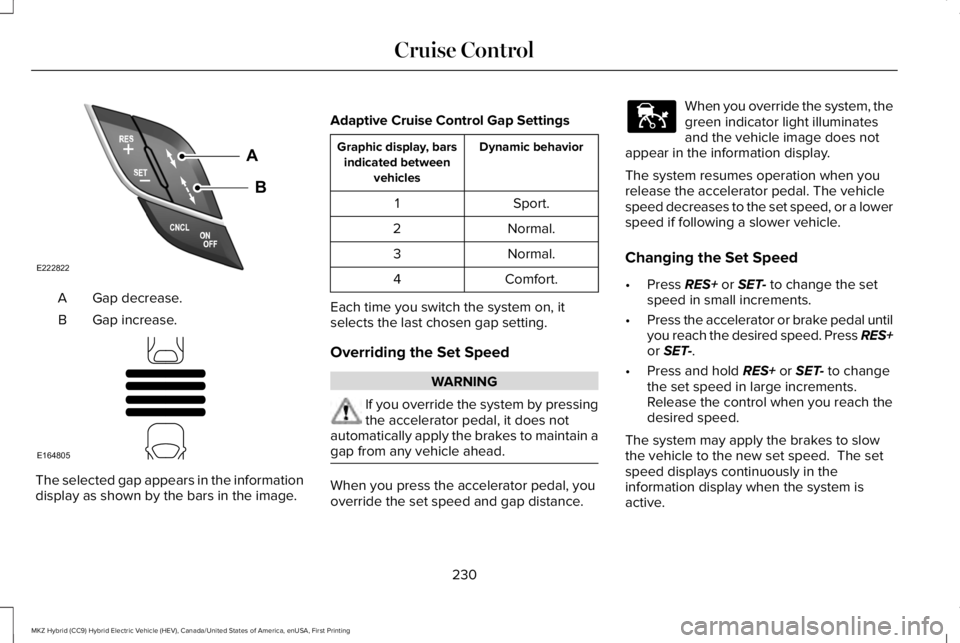
5.A vehicle image illuminates if the systemdetects a vehicle in front of you.
Setting the Adaptive Cruise SpeedWhen Your Vehicle is Stationary
1. Follow a vehicle to a complete stop.
2. Keep the brake pedal fully pressed.
3. Press RES+.
4. The set speed adjusts to 20 mph(30 km/h).
5. A green indicator light, the current gapsetting and your set speed appear in theinformation display.
228
MKZ Hybrid (CC9) Hybrid Electric Vehicle (HEV), Canada/United States of America, enUSA, First Printing
Cruise ControlE222823 E144529 E164805 E164805
Page 232 of 572
Following a Vehicle
WARNINGS
When following a vehicle, your vehicledoes not always decelerate quicklyenough to avoid a crash without driverintervention. Always apply the brakes whennecessary. Failing to do so may result in acrash, serious injury or death.
Adaptive cruise control only warns ofvehicles detected by the radar sensor.In some cases there may be no warning ora delayed warning. You should always applythe brakes when necessary. Failure to do somay result in a crash, serious injury or death.
Note:When you are following a vehicle andyou switch on a direction indicator, adaptivecruise control may provide a small temporaryacceleration to help you pass.
Note:The brakes may emit noise whenapplied by the system.
When a vehicle ahead of you enters thesame lane or a slower vehicle is ahead in thesame lane, the vehicle speed adjusts tomaintain a preset gap distance. A vehiclegraphic illuminates in the instrument cluster.
Your vehicle maintains a consistent gap fromthe vehicle ahead until:
•The vehicle in front of you accelerates toa speed above the set speed.
•The vehicle in front of you moves out ofthe lane you are in.
•You set a new gap distance.
The system applies the brakes to slow yourvehicle to maintain a safe gap distance fromthe vehicle in front. The system only applieslimited braking. You can override the systemby applying the brakes.
If the system determines that its maximumbraking level is not sufficient, an audiblewarning sounds when the system continuesto brake. A red warning bar displays on thewindshield and you must take immediateaction.
Following a Vehicle to a Complete Stop
If your vehicle follows a vehicle to a completestop and remains stationary for less thanthree seconds, your vehicle accelerates froma stationary position to follow the vehicleahead.
If your vehicle follows a vehicle to a completestop and remains stationary for more thanthree seconds, press RES+ or the acceleratorpedal to follow the vehicle ahead.
Setting the Gap Distance
Note:The gap setting is time dependent andtherefore the distance adjusts with yourvehicle speed.
Note:It is your responsibility to select a gapappropriate to the driving conditions.
You can decrease or increase the distancebetween your vehicle and the vehicle in frontby pressing the gap control.
229
MKZ Hybrid (CC9) Hybrid Electric Vehicle (HEV), Canada/United States of America, enUSA, First Printing
Cruise Control
Page 233 of 572
Gap decrease.A
Gap increase.B
The selected gap appears in the informationdisplay as shown by the bars in the image.
Adaptive Cruise Control Gap Settings
Dynamic behaviorGraphic display, barsindicated betweenvehicles
Sport.1
Normal.2
Normal.3
Comfort.4
Each time you switch the system on, itselects the last chosen gap setting.
Overriding the Set Speed
WARNING
If you override the system by pressingthe accelerator pedal, it does notautomatically apply the brakes to maintain agap from any vehicle ahead.
When you press the accelerator pedal, youoverride the set speed and gap distance.
When you override the system, thegreen indicator light illuminatesand the vehicle image does notappear in the information display.
The system resumes operation when yourelease the accelerator pedal. The vehiclespeed decreases to the set speed, or a lowerspeed if following a slower vehicle.
Changing the Set Speed
•Press RES+ or SET- to change the setspeed in small increments.
•Press the accelerator or brake pedal untilyou reach the desired speed. Press RES+or SET-.
•Press and hold RES+ or SET- to changethe set speed in large increments.Release the control when you reach thedesired speed.
The system may apply the brakes to slowthe vehicle to the new set speed. The setspeed displays continuously in theinformation display when the system isactive.
230
MKZ Hybrid (CC9) Hybrid Electric Vehicle (HEV), Canada/United States of America, enUSA, First Printing
Cruise ControlE222822
A
B E164805 E144529
Page 234 of 572
Canceling the Set Speed
Press CNCL or tap the brake pedal. The setspeed does not erase.
Resuming the Set Speed
Note:Only use resume if you are aware ofthe set speed and intend to return to it.
Press RES+. Your vehicle speed returns tothe previously set speed and gap setting. The set speed displays continuously in theinformation display when the system isactive.
Automatic Cancellation
Automatic cancellation can also occur if:
•The tires lose traction.
•You apply the parking brake.
Park Brake Application
Automatic parking brake application andcancellation occurs if:
•You unbuckle the seatbelt and open thedoor after you stop the vehicle.
•You hold the vehicle at a stopcontinuously for more than three minutes.
Hilly Condition Usage
Note:An audible alarm sounds and thesystem shuts down if it applies brakes for anextended period of time. This allows thebrakes to cool. The system functionsnormally again after the brakes cool.
Select a lower gear when the system isactive in situations such as prolongeddownhill driving on steep grades, forexample in mountainous areas. The systemneeds additional engine braking in thesesituations to reduce the load on the vehicle’sregular brake system to prevent it fromoverheating.
Switching Adaptive Cruise Control Off
Note:You erase the set speed and gapsetting when you switch the system off.
Press OFF when the system is in standbymode, or switch the ignition off.
Detection Issues
WARNINGS
On rare occasions, detection issuescan occur due to the roadinfrastructures, for example bridges, tunnelsand safety barriers. In these cases, thesystem may brake late or unexpectedly. Atall times, you are responsible for controllingyour vehicle, supervising the system andintervening, if required.
If the system malfunctions, have yourvehicle checked as soon as possible.
The radar sensor has a limited field of view.It may not detect vehicles at all or detect avehicle later than expected in somesituations. The lead vehicle graphic does notilluminate if the system does not detect avehicle in front of you.
231
MKZ Hybrid (CC9) Hybrid Electric Vehicle (HEV), Canada/United States of America, enUSA, First Printing
Cruise Control
Page 235 of 572
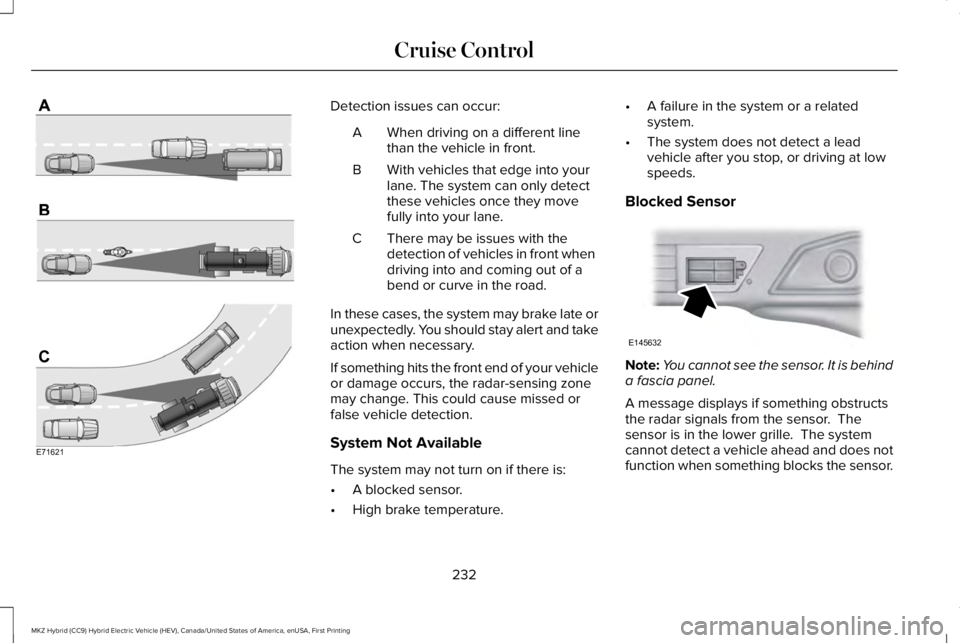
Detection issues can occur:
When driving on a different linethan the vehicle in front.A
With vehicles that edge into yourlane. The system can only detectthese vehicles once they movefully into your lane.
B
There may be issues with thedetection of vehicles in front whendriving into and coming out of abend or curve in the road.
C
In these cases, the system may brake late orunexpectedly. You should stay alert and takeaction when necessary.
If something hits the front end of your vehicleor damage occurs, the radar-sensing zonemay change. This could cause missed orfalse vehicle detection.
System Not Available
The system may not turn on if there is:
•A blocked sensor.
•High brake temperature.
•A failure in the system or a relatedsystem.
•The system does not detect a leadvehicle after you stop, or driving at lowspeeds.
Blocked Sensor
Note:You cannot see the sensor. It is behinda fascia panel.
A message displays if something obstructsthe radar signals from the sensor. Thesensor is in the lower grille. The systemcannot detect a vehicle ahead and does notfunction when something blocks the sensor.
232
MKZ Hybrid (CC9) Hybrid Electric Vehicle (HEV), Canada/United States of America, enUSA, First Printing
Cruise ControlE71621 E145632