USB LINCOLN MKZ HYBRID 2018 Owner's Manual
[x] Cancel search | Manufacturer: LINCOLN, Model Year: 2018, Model line: MKZ HYBRID, Model: LINCOLN MKZ HYBRID 2018Pages: 572, PDF Size: 4.49 MB
Page 475 of 572
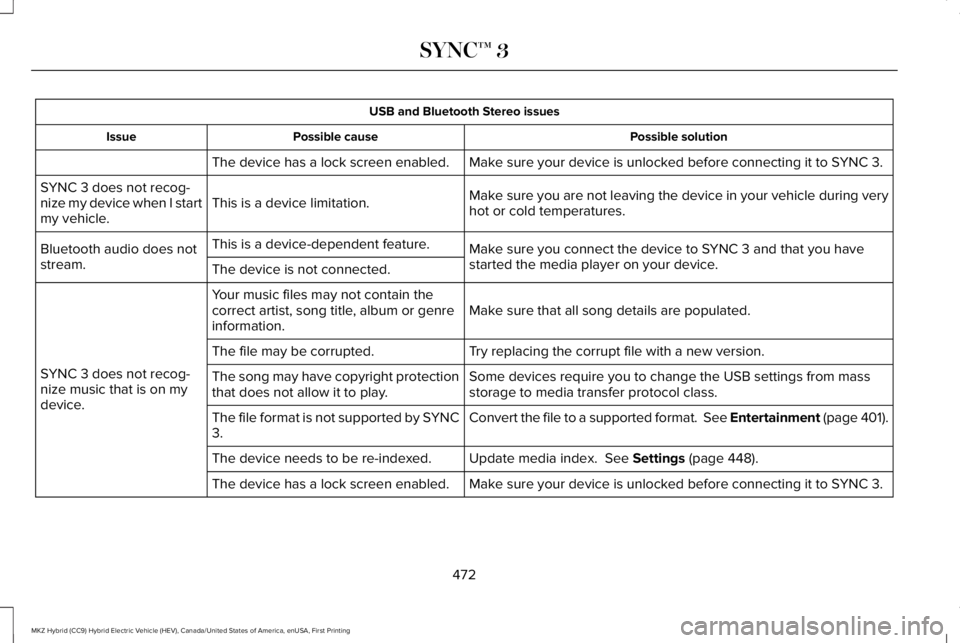
USB and Bluetooth Stereo issues
Possible solutionPossible causeIssue
Make sure your device is unlocked before connecting it to SYNC 3.The device has a lock screen enabled.
Make sure you are not leaving the device in your vehicle during veryhot or cold temperatures.This is a device limitation.SYNC 3 does not recog-nize my device when I startmy vehicle.
Make sure you connect the device to SYNC 3 and that you havestarted the media player on your device.
This is a device-dependent feature.Bluetooth audio does notstream.The device is not connected.
Make sure that all song details are populated.Your music files may not contain thecorrect artist, song title, album or genreinformation.
SYNC 3 does not recog-nize music that is on mydevice.
Try replacing the corrupt file with a new version.The file may be corrupted.
Some devices require you to change the USB settings from massstorage to media transfer protocol class.The song may have copyright protectionthat does not allow it to play.
Convert the file to a supported format. See Entertainment (page 401).The file format is not supported by SYNC3.
Update media index. See Settings (page 448).The device needs to be re-indexed.
Make sure your device is unlocked before connecting it to SYNC 3.The device has a lock screen enabled.
472
MKZ Hybrid (CC9) Hybrid Electric Vehicle (HEV), Canada/United States of America, enUSA, First Printing
SYNC™ 3
Page 476 of 572
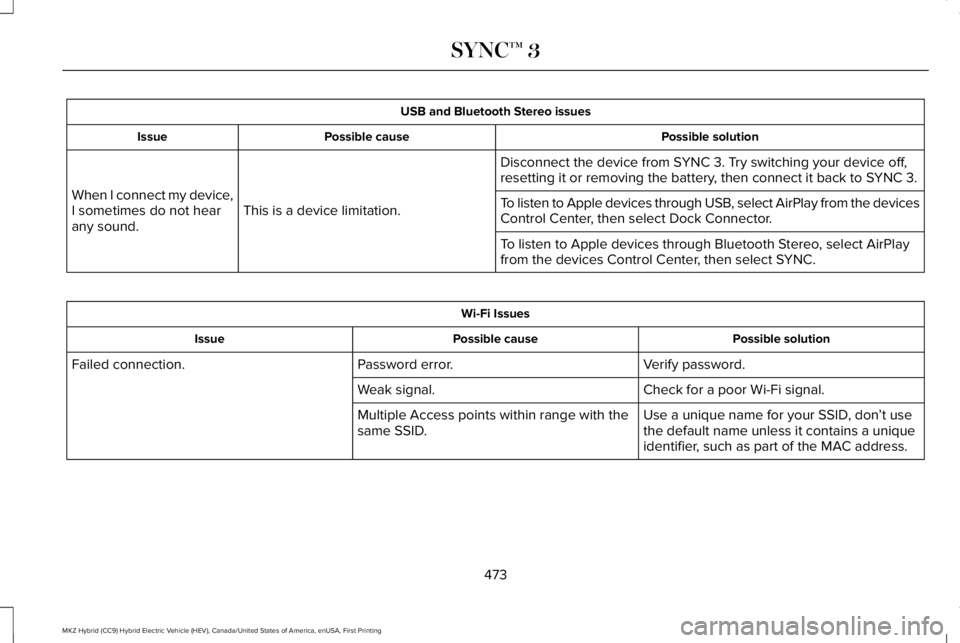
USB and Bluetooth Stereo issues
Possible solutionPossible causeIssue
Disconnect the device from SYNC 3. Try switching your device off,resetting it or removing the battery, then connect it back to SYNC 3.
This is a device limitation.When I connect my device,I sometimes do not hearany sound.
To listen to Apple devices through USB, select AirPlay from the devicesControl Center, then select Dock Connector.
To listen to Apple devices through Bluetooth Stereo, select AirPlayfrom the devices Control Center, then select SYNC.
Wi-Fi Issues
Possible solutionPossible causeIssue
Verify password.Password error.Failed connection.
Check for a poor Wi-Fi signal.Weak signal.
Use a unique name for your SSID, don’t usethe default name unless it contains a uniqueidentifier, such as part of the MAC address.
Multiple Access points within range with thesame SSID.
473
MKZ Hybrid (CC9) Hybrid Electric Vehicle (HEV), Canada/United States of America, enUSA, First Printing
SYNC™ 3
Page 479 of 572
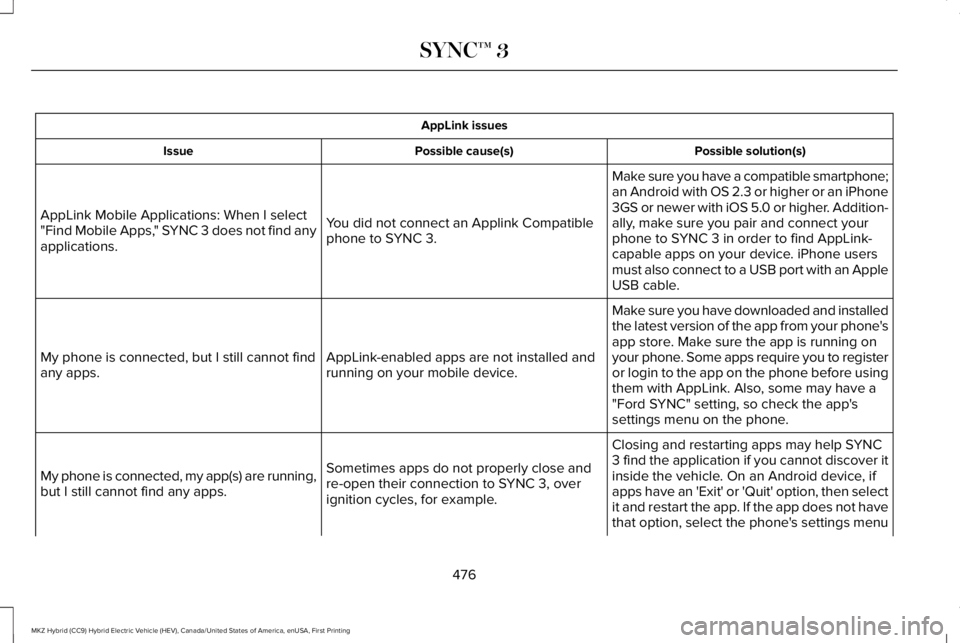
AppLink issues
Possible solution(s)Possible cause(s)Issue
Make sure you have a compatible smartphone;an Android with OS 2.3 or higher or an iPhone3GS or newer with iOS 5.0 or higher. Addition-ally, make sure you pair and connect yourphone to SYNC 3 in order to find AppLink-capable apps on your device. iPhone usersmust also connect to a USB port with an AppleUSB cable.
You did not connect an Applink Compatiblephone to SYNC 3.
AppLink Mobile Applications: When I select"Find Mobile Apps," SYNC 3 does not find anyapplications.
Make sure you have downloaded and installedthe latest version of the app from your phone'sapp store. Make sure the app is running onyour phone. Some apps require you to registeror login to the app on the phone before usingthem with AppLink. Also, some may have a"Ford SYNC" setting, so check the app'ssettings menu on the phone.
AppLink-enabled apps are not installed andrunning on your mobile device.My phone is connected, but I still cannot findany apps.
Closing and restarting apps may help SYNC3 find the application if you cannot discover itinside the vehicle. On an Android device, ifapps have an 'Exit' or 'Quit' option, then selectit and restart the app. If the app does not havethat option, select the phone's settings menu
Sometimes apps do not properly close andre-open their connection to SYNC 3, overignition cycles, for example.
My phone is connected, my app(s) are running,but I still cannot find any apps.
476
MKZ Hybrid (CC9) Hybrid Electric Vehicle (HEV), Canada/United States of America, enUSA, First Printing
SYNC™ 3
Page 481 of 572
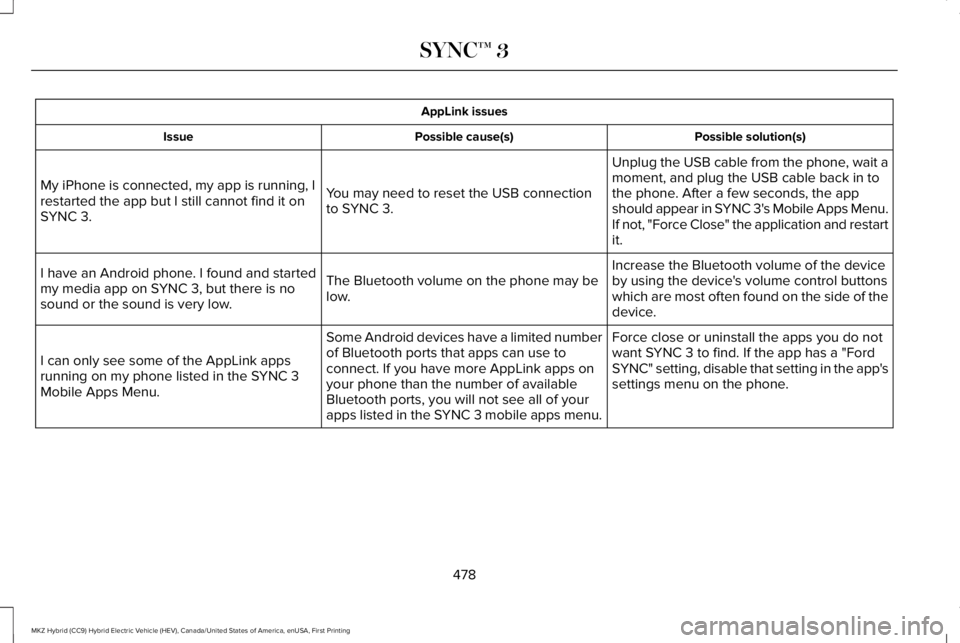
AppLink issues
Possible solution(s)Possible cause(s)Issue
Unplug the USB cable from the phone, wait amoment, and plug the USB cable back in tothe phone. After a few seconds, the appshould appear in SYNC 3's Mobile Apps Menu.If not, "Force Close" the application and restartit.
You may need to reset the USB connectionto SYNC 3.
My iPhone is connected, my app is running, Irestarted the app but I still cannot find it onSYNC 3.
Increase the Bluetooth volume of the deviceby using the device's volume control buttonswhich are most often found on the side of thedevice.
The Bluetooth volume on the phone may below.
I have an Android phone. I found and startedmy media app on SYNC 3, but there is nosound or the sound is very low.
Force close or uninstall the apps you do notwant SYNC 3 to find. If the app has a "FordSYNC" setting, disable that setting in the app'ssettings menu on the phone.
Some Android devices have a limited numberof Bluetooth ports that apps can use toconnect. If you have more AppLink apps onyour phone than the number of availableBluetooth ports, you will not see all of yourapps listed in the SYNC 3 mobile apps menu.
I can only see some of the AppLink appsrunning on my phone listed in the SYNC 3Mobile Apps Menu.
478
MKZ Hybrid (CC9) Hybrid Electric Vehicle (HEV), Canada/United States of America, enUSA, First Printing
SYNC™ 3
Page 484 of 572
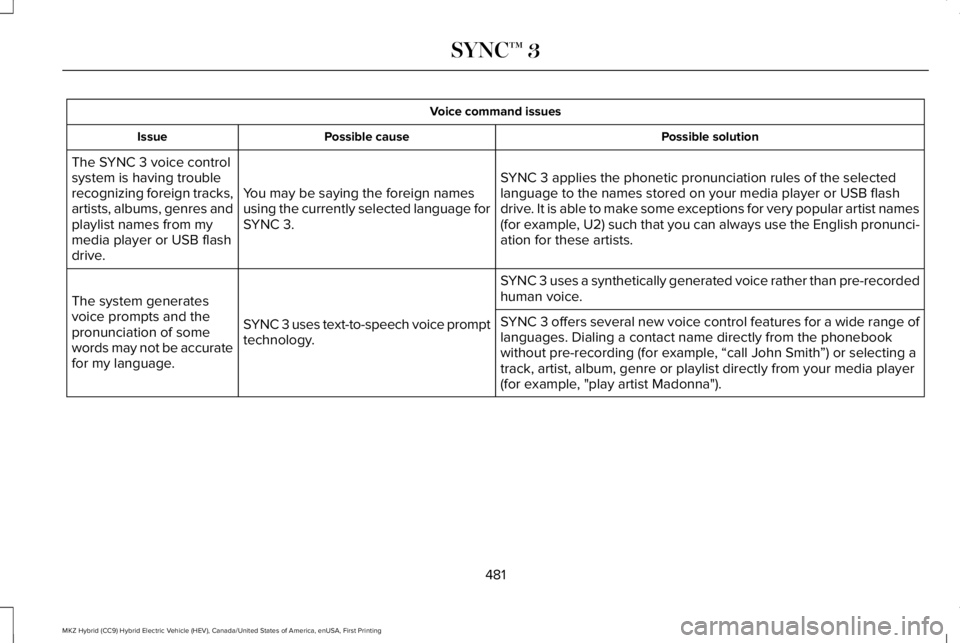
Voice command issues
Possible solutionPossible causeIssue
SYNC 3 applies the phonetic pronunciation rules of the selectedlanguage to the names stored on your media player or USB flashdrive. It is able to make some exceptions for very popular artist names(for example, U2) such that you can always use the English pronunci-ation for these artists.
You may be saying the foreign namesusing the currently selected language forSYNC 3.
The SYNC 3 voice controlsystem is having troublerecognizing foreign tracks,artists, albums, genres andplaylist names from mymedia player or USB flashdrive.
SYNC 3 uses a synthetically generated voice rather than pre-recordedhuman voice.
SYNC 3 uses text-to-speech voice prompttechnology.
The system generatesvoice prompts and thepronunciation of somewords may not be accuratefor my language.
SYNC 3 offers several new voice control features for a wide range oflanguages. Dialing a contact name directly from the phonebookwithout pre-recording (for example, “call John Smith”) or selecting atrack, artist, album, genre or playlist directly from your media player(for example, "play artist Madonna").
481
MKZ Hybrid (CC9) Hybrid Electric Vehicle (HEV), Canada/United States of America, enUSA, First Printing
SYNC™ 3
Page 485 of 572
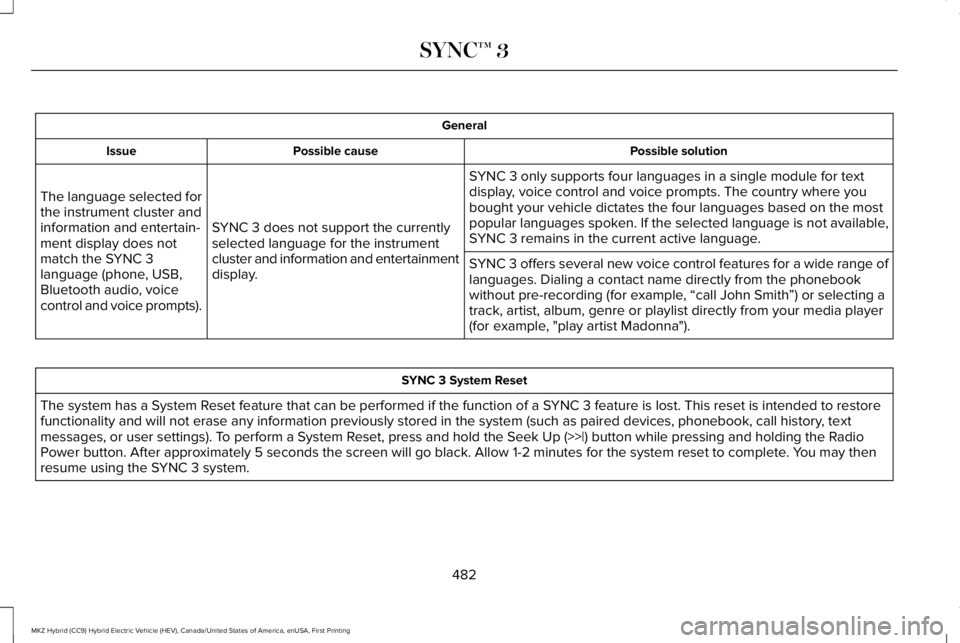
General
Possible solutionPossible causeIssue
SYNC 3 only supports four languages in a single module for textdisplay, voice control and voice prompts. The country where youbought your vehicle dictates the four languages based on the mostpopular languages spoken. If the selected language is not available,SYNC 3 remains in the current active language.SYNC 3 does not support the currentlyselected language for the instrumentcluster and information and entertainmentdisplay.
The language selected forthe instrument cluster andinformation and entertain-ment display does notmatch the SYNC 3language (phone, USB,Bluetooth audio, voicecontrol and voice prompts).
SYNC 3 offers several new voice control features for a wide range oflanguages. Dialing a contact name directly from the phonebookwithout pre-recording (for example, “call John Smith”) or selecting atrack, artist, album, genre or playlist directly from your media player(for example, "play artist Madonna").
SYNC 3 System Reset
The system has a System Reset feature that can be performed if the function of a SYNC 3 feature is lost. This reset is intended to restorefunctionality and will not erase any information previously stored in the system (such as paired devices, phonebook, call history, textmessages, or user settings). To perform a System Reset, press and hold the Seek Up (>>|) button while pressing and holding the RadioPower button. After approximately 5 seconds the screen will go black. Allow 1-2 minutes for the system reset to complete. You may thenresume using the SYNC 3 system.
482
MKZ Hybrid (CC9) Hybrid Electric Vehicle (HEV), Canada/United States of America, enUSA, First Printing
SYNC™ 3
Page 565 of 572
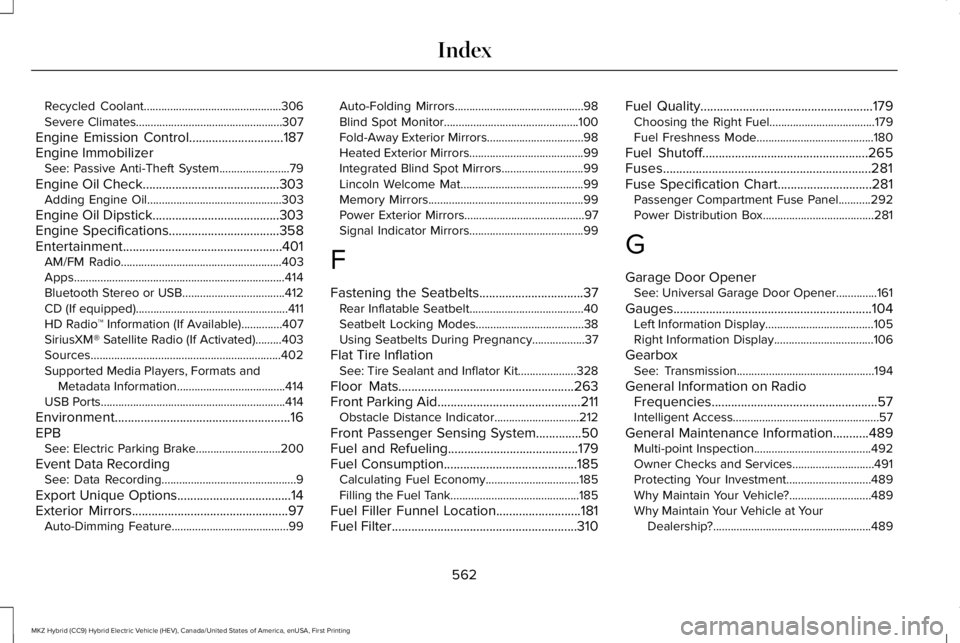
Recycled Coolant...............................................306Severe Climates..................................................307
Engine Emission Control.............................187Engine ImmobilizerSee: Passive Anti-Theft System........................79
Engine Oil Check..........................................303Adding Engine Oil..............................................303
Engine Oil Dipstick.......................................303Engine Specifications..................................358Entertainment.................................................401AM/FM Radio.......................................................403Apps........................................................................414Bluetooth Stereo or USB...................................412CD (If equipped)....................................................411HD Radio™ Information (If Available)..............407SiriusXM® Satellite Radio (If Activated).........403Sources.................................................................402Supported Media Players, Formats andMetadata Information.....................................414USB Ports...............................................................414
Environment......................................................16EPBSee: Electric Parking Brake.............................200
Event Data RecordingSee: Data Recording..............................................9
Export Unique Options...................................14Exterior Mirrors................................................97Auto-Dimming Feature........................................99
Auto-Folding Mirrors............................................98Blind Spot Monitor..............................................100Fold-Away Exterior Mirrors.................................98Heated Exterior Mirrors.......................................99Integrated Blind Spot Mirrors............................99Lincoln Welcome Mat..........................................99Memory Mirrors.....................................................99Power Exterior Mirrors.........................................97Signal Indicator Mirrors.......................................99
F
Fastening the Seatbelts................................37Rear Inflatable Seatbelt.......................................40Seatbelt Locking Modes.....................................38Using Seatbelts During Pregnancy..................37
Flat Tire InflationSee: Tire Sealant and Inflator Kit....................328
Floor Mats......................................................263Front Parking Aid............................................211Obstacle Distance Indicator.............................212
Front Passenger Sensing System..............50Fuel and Refueling........................................179Fuel Consumption.........................................185Calculating Fuel Economy................................185Filling the Fuel Tank............................................185
Fuel Filler Funnel Location..........................181Fuel Filter.........................................................310
Fuel Quality.....................................................179Choosing the Right Fuel....................................179Fuel Freshness Mode........................................180
Fuel Shutoff...................................................265Fuses................................................................281Fuse Specification Chart.............................281Passenger Compartment Fuse Panel...........292Power Distribution Box......................................281
G
Garage Door OpenerSee: Universal Garage Door Opener..............161
Gauges.............................................................104Left Information Display.....................................105Right Information Display..................................106
GearboxSee: Transmission...............................................194
General Information on RadioFrequencies...................................................57Intelligent Access..................................................57
General Maintenance Information...........489Multi-point Inspection........................................492Owner Checks and Services............................491Protecting Your Investment.............................489Why Maintain Your Vehicle?............................489Why Maintain Your Vehicle at YourDealership?......................................................489
562
MKZ Hybrid (CC9) Hybrid Electric Vehicle (HEV), Canada/United States of America, enUSA, First Printing
Index
Page 571 of 572
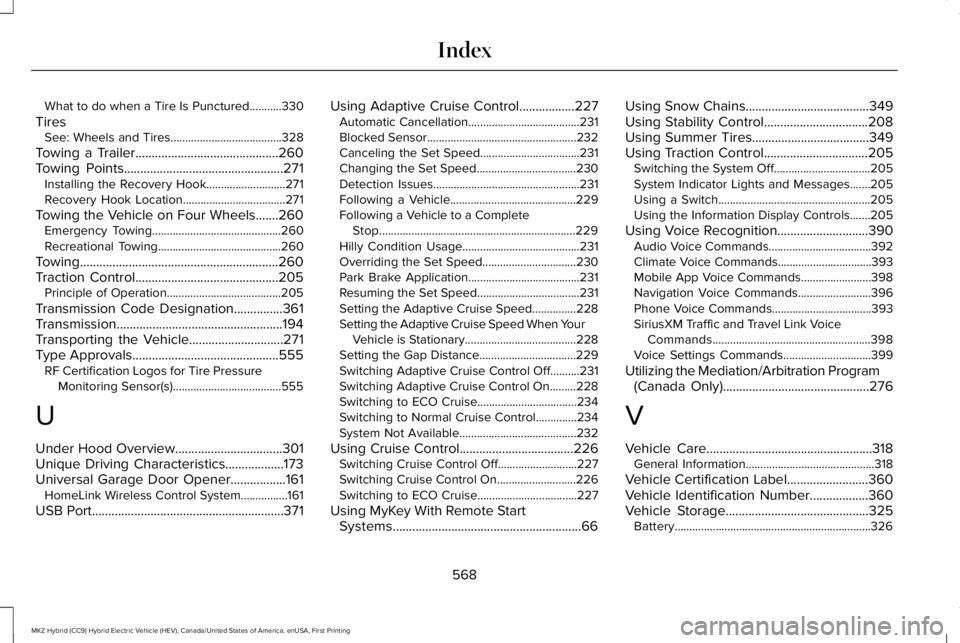
What to do when a Tire Is Punctured...........330
TiresSee: Wheels and Tires......................................328
Towing a Trailer............................................260Towing Points.................................................271Installing the Recovery Hook...........................271Recovery Hook Location...................................271
Towing the Vehicle on Four Wheels.......260Emergency Towing............................................260Recreational Towing..........................................260
Towing.............................................................260Traction Control............................................205Principle of Operation.......................................205
Transmission Code Designation...............361Transmission...................................................194Transporting the Vehicle.............................271Type Approvals.............................................555RF Certification Logos for Tire PressureMonitoring Sensor(s).....................................555
U
Under Hood Overview.................................301Unique Driving Characteristics..................173Universal Garage Door Opener.................161HomeLink Wireless Control System................161
USB Port...........................................................371
Using Adaptive Cruise Control.................227Automatic Cancellation......................................231Blocked Sensor...................................................232Canceling the Set Speed..................................231Changing the Set Speed..................................230Detection Issues..................................................231Following a Vehicle...........................................229Following a Vehicle to a CompleteStop...................................................................229Hilly Condition Usage........................................231Overriding the Set Speed................................230Park Brake Application......................................231Resuming the Set Speed...................................231Setting the Adaptive Cruise Speed...............228Setting the Adaptive Cruise Speed When YourVehicle is Stationary......................................228Setting the Gap Distance.................................229Switching Adaptive Cruise Control Off..........231Switching Adaptive Cruise Control On.........228Switching to ECO Cruise..................................234Switching to Normal Cruise Control..............234System Not Available........................................232
Using Cruise Control...................................226Switching Cruise Control Off...........................227Switching Cruise Control On...........................226Switching to ECO Cruise..................................227
Using MyKey With Remote StartSystems..........................................................66
Using Snow Chains......................................349Using Stability Control................................208Using Summer Tires....................................349Using Traction Control................................205Switching the System Off.................................205System Indicator Lights and Messages.......205Using a Switch....................................................205Using the Information Display Controls.......205
Using Voice Recognition............................390Audio Voice Commands...................................392Climate Voice Commands................................393Mobile App Voice Commands........................398Navigation Voice Commands.........................396Phone Voice Commands..................................393SiriusXM Traffic and Travel Link VoiceCommands......................................................398Voice Settings Commands..............................399
Utilizing the Mediation/Arbitration Program(Canada Only).............................................276
V
Vehicle Care...................................................318General Information............................................318
Vehicle Certification Label.........................360Vehicle Identification Number..................360Vehicle Storage............................................325Battery...................................................................326
568
MKZ Hybrid (CC9) Hybrid Electric Vehicle (HEV), Canada/United States of America, enUSA, First Printing
Index