remote control LINCOLN MKZ HYBRID 2018 Owner's Manual
[x] Cancel search | Manufacturer: LINCOLN, Model Year: 2018, Model line: MKZ HYBRID, Model: LINCOLN MKZ HYBRID 2018Pages: 572, PDF Size: 4.49 MB
Page 100 of 572
Pull up the window switch and hold within afew seconds of the window reaching thebounce-back position. The window travelsup with no bounce-back protection. Thewindow stops if you release the switchbefore the window fully closes.
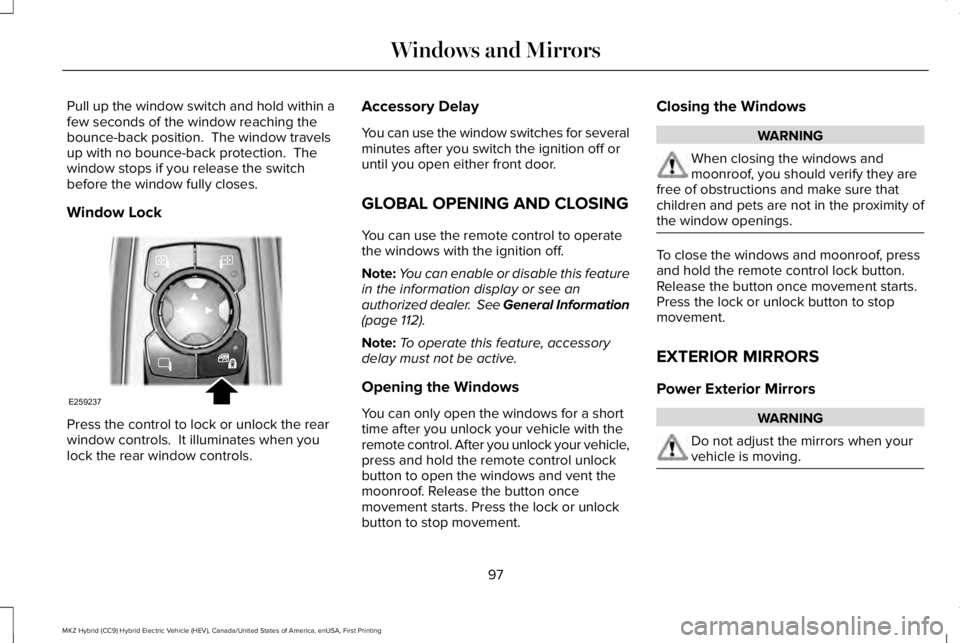
Window Lock
Press the control to lock or unlock the rearwindow controls. It illuminates when youlock the rear window controls.
Accessory Delay
You can use the window switches for severalminutes after you switch the ignition off oruntil you open either front door.
GLOBAL OPENING AND CLOSING
You can use the remote control to operatethe windows with the ignition off.
Note:You can enable or disable this featurein the information display or see anauthorized dealer. See General Information(page 112).
Note:To operate this feature, accessorydelay must not be active.
Opening the Windows
You can only open the windows for a shorttime after you unlock your vehicle with theremote control. After you unlock your vehicle,press and hold the remote control unlockbutton to open the windows and vent themoonroof. Release the button oncemovement starts. Press the lock or unlockbutton to stop movement.
Closing the Windows
WARNING
When closing the windows andmoonroof, you should verify they arefree of obstructions and make sure thatchildren and pets are not in the proximity ofthe window openings.
To close the windows and moonroof, pressand hold the remote control lock button.Release the button once movement starts.Press the lock or unlock button to stopmovement.
EXTERIOR MIRRORS
Power Exterior Mirrors
WARNING
Do not adjust the mirrors when yourvehicle is moving.
97
MKZ Hybrid (CC9) Hybrid Electric Vehicle (HEV), Canada/United States of America, enUSA, First Printing
Windows and MirrorsE259237
Page 122 of 572
Settings
Set to XXX % - Hold OK to ResetOil Life Reset
Enable or Disable SwitchPower Decklid
Auto or Last SettingsHeater – A/CClimate ControlRemote Start
Auto Heated or OffSteering Wheel
Auto or OffFront Defrost
Auto or OffRear Defrost
Auto or OffDriver Seat
Auto or OffPassenger Seat
5, 10 or 15 minutesDuration
On or OffQuiet Start
Enable or DisableSystem
On or OffSwitch Inhibit
Select number of yearsTire Mobility Kit
On or OffRemote OpenWindows
On or OffRemote Close
On or OffCourtesy WipeWipers
119
MKZ Hybrid (CC9) Hybrid Electric Vehicle (HEV), Canada/United States of America, enUSA, First Printing
Information Displays
Page 149 of 572
Note:The system adjusts to heat or cool theinterior to the temperature you select asquickly as possible.
Note:For the system to function efficiently,the instrument panel and side air ventsshould be fully open.
Note:If you select AUTO during cold outsidetemperatures, the system directs air flow tothe windshield and side window vents. Inaddition, the fan may run at a slower speeduntil the engine warms up.
Note:If you select AUTO during hottemperatures and the inside of the vehicleis hot, the system uses recirculated air tomaximize interior cooling. Fan speed mayalso reduce until the air cools.
Quickly Heating the Interior
1. Press AUTO.
2. Adjust the temperature function to thedesired setting.
Recommended Settings for Heating
1. Press AUTO.
2. Adjust the temperature function to thedesired setting. Use 72°F (22°C) as astarting point, then adjust the setting asnecessary.
Quickly Cooling the Interior
1. Press MAX A/C.
Recommended Settings for Cooling
1. Press AUTO.
2. Adjust the temperature function to thedesired setting. Use 72°F (22°C) as astarting point, then adjust the setting asnecessary.
Defogging the Side Windows in ColdWeather
1. Press defrost.
2. Adjust the temperature control to thedesired setting. Use 72°F (22°C) as astarting point, then adjust the setting asnecessary.
HEATED WINDOWS AND MIRRORS
Note:Make sure the engine is runningbefore operating the heated windows.
Note:Depending on your remote startsettings, the heated windows, mirrors andwipers may remain on after remote startingthe vehicle.
Heated Rear Window
Press the button to clear theheated rear window of thin ice andfog. The heated rear window turnsoff after a short period of time. Press thebutton again to switch it off.
Note: Do not use razor blades or othersharp objects to clean or remove decals fromthe inside of the heated rear window. Thevehicle warranty does not cover damagecaused to the heated rear window grid lines.
Heated Exterior Mirrors (If Equipped)
When you switch the heated rear windowon, the heated exterior mirrors turn on.
146
MKZ Hybrid (CC9) Hybrid Electric Vehicle (HEV), Canada/United States of America, enUSA, First Printing
Climate ControlE184884
Page 150 of 572
Note:Do not remove ice from the mirrorswith a scraper or adjust the mirror glasswhen it is frozen in place.
Note:Do not clean the mirror housing orglass with harsh abrasives, fuel or otherpetroleum-based cleaning products.
Windshield Wiper De-icer (If Equipped)
When you switch the heated rear windowon, the windshield wiper de-icer turns on.
CABIN AIR FILTER
Your vehicle is equipped with a cabin airfilter, which gives you and your passengersthe following benefits:
•It improves your driving comfort byreducing particle and odor concentration.
•It improves the interior compartmentcleanliness.
•It protects the climate controlcomponents from particle deposits.
You can locate the cabin air filter behind theglove box.
Note:Make sure you have a cabin air filterinstalled at all times. This prevents foreignobjects from entering the system. Runningthe system without a filter in place couldresult in degradation or damage to thesystem.
Replace the filter at regular intervals.
For additional cabin air filter information, orto replace the filter, see a qualifiedtechnician.
REMOTE START
The system adjusts the interior temperaturedepending on your chosen settings duringremote start.
You cannot adjust the climate control settingduring remote start operation. When youswitch the ignition on, the climate controlsystem returns to the previous settings. Youcan now make adjustments.
Some features may remain on if they turn onduring remote start:
•Driver heated seat.
•Driver ventilated seat.
•Heated steering wheel.
•Heated mirrors.
•Heated rear window.
•Windshield wiper de-icer.
Note:If the passenger heated or ventilatedseats are on when you switch the vehicleoff, they default to the driver setting whenyou switch the vehicle on.
You can adjust the default remote startsettings using the information displaycontrols. See Information Displays (page112).
Automatic Settings
In hot weather, the system sets to 72°F(22°C). The ventilated seats set to high (ifavailable, and if you select AUTO in theinformation display).
In moderate weather, the system heats orcools (based on pre-selected settings). Therear defroster, heated mirrors and heated orventilated seats do not turn on.
147
MKZ Hybrid (CC9) Hybrid Electric Vehicle (HEV), Canada/United States of America, enUSA, First Printing
Climate Control
Page 159 of 572
Linking a PreSet Position to yourRemote Control or Intelligent AccessKey Fob
Your vehicle can save the preset memorypositions for up to two remote controls orintelligent access (IA) keys.
After you have saved your desired memorypreset positions:
1.Press and hold the desired preset buttonfor about three seconds until you hear asingle tone.
2. Within three seconds, press the lockbutton on the remote control you arelinking.
To unlink a remote control, follow the sameprocedure – except in step 2, press theunlock button on the remote control.
Note:If more than one linked remote controlor intelligent access key is in range, thememory function moves to the settings ofthe first key to initiate a memory recall.
Easy Entry and Exit Feature
If you enable the easy entry and exit feature,it automatically moves the driver seatposition rearward up to 2 in (5 cm) when youswitch the ignition off.
The driver seat returns to the previousposition when you switch the ignition on.
You can enable or disable this feature in theinformation display. See GeneralInformation (page 112).
REAR SEATS
Note:Your vehicle may have split seatbacksthat you must fold individually.
Note:Make sure the center safety belt isunbuckled before folding the seatback.
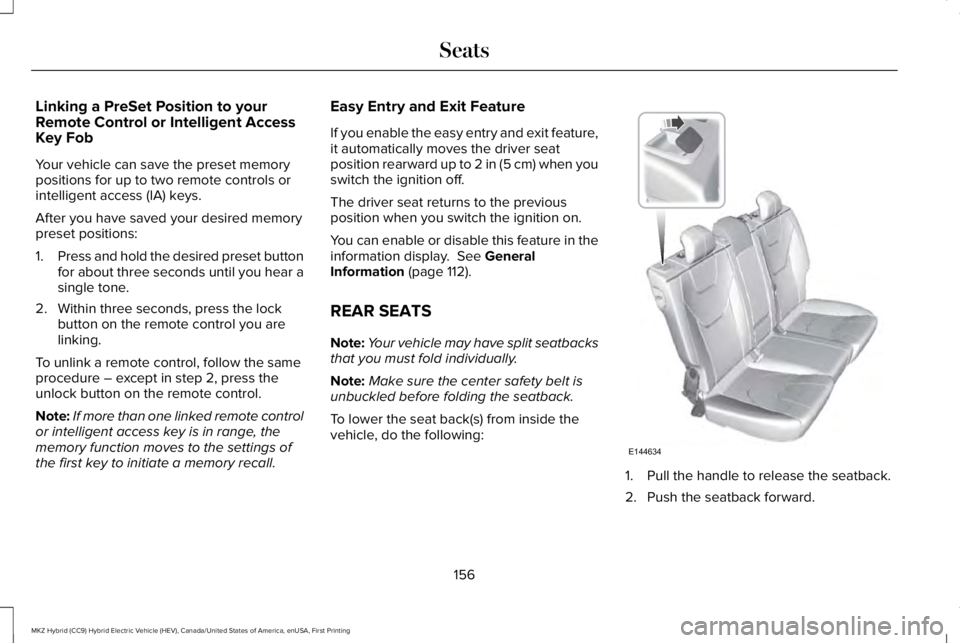
To lower the seat back(s) from inside thevehicle, do the following:
1. Pull the handle to release the seatback.
2. Push the seatback forward.
156
MKZ Hybrid (CC9) Hybrid Electric Vehicle (HEV), Canada/United States of America, enUSA, First Printing
SeatsE144634
Page 164 of 572
HomeLink Wireless Control System
WARNINGS
Make sure that the garage door andsecurity device are free fromobstruction when you are programming. Donot program the system with the vehicle inthe garage.
Do not use the system with any garagedoor opener that does not have thesafety stop and reverse feature as requiredby U.S. Federal Safety Standards (thisincludes any garage door openermanufactured before April 1, 1982). A garagedoor opener which cannot detect an object,signaling the door to stop and reverse, doesnot meet current federal safety standards.Using a garage door opener without thesefeatures increases the risk of serious injuryor death.
Note:Make sure you keep the originalremote control transmitter for use in othervehicles as well as for future systemprogramming.
Note:We recommend that upon the sale orlease termination of your vehicle, you erasethe programmed function buttons for securityreasons. See Erasing the Function ButtonCodes later in this section.
Note:You can program a maximum of threedevices. To change or replace any of thethree devices after it has been initiallyprogrammed, you must first erase the currentsettings. See Erasing the Function ButtonCodes.
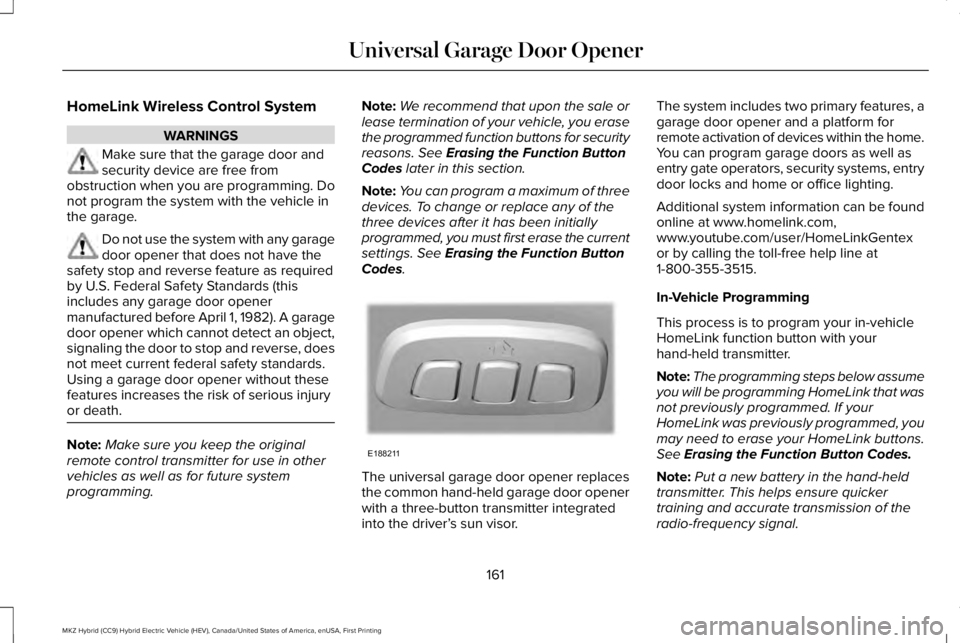
The universal garage door opener replacesthe common hand-held garage door openerwith a three-button transmitter integratedinto the driver’s sun visor.
The system includes two primary features, agarage door opener and a platform forremote activation of devices within the home.You can program garage doors as well asentry gate operators, security systems, entrydoor locks and home or office lighting.
Additional system information can be foundonline at www.homelink.com,www.youtube.com/user/HomeLinkGentexor by calling the toll-free help line at1-800-355-3515.
In-Vehicle Programming
This process is to program your in-vehicleHomeLink function button with yourhand-held transmitter.
Note:The programming steps below assumeyou will be programming HomeLink that wasnot previously programmed. If yourHomeLink was previously programmed, youmay need to erase your HomeLink buttons.See Erasing the Function Button Codes.
Note:Put a new battery in the hand-heldtransmitter. This helps ensure quickertraining and accurate transmission of theradio-frequency signal.
161
MKZ Hybrid (CC9) Hybrid Electric Vehicle (HEV), Canada/United States of America, enUSA, First Printing
Universal Garage Door OpenerE188211
Page 236 of 572
Possible Causes and Actions for This Message Displaying:
ActionCause
Clean the grille surface in front of the radar or remove the objectcausing the obstruction.The surface of the radar is dirty or obstructed.
Wait a short time. It may take several minutes for the radar to detectthat it is free from obstruction.The surface of the radar is clean but the message remains in thedisplay.
Do not use the system in these conditions because it may not detectany vehicles ahead.Heavy rain or snow is interfering with the radar signals.
Do not use the system in these conditions because it may not detectany vehicles ahead.Water, snow or ice on the surface of the road may interfere with theradar signals.
Wait a short time or switch to normal cruise control.You are in a desert or remote area with no other vehicles and noroadside objects.
Due to the nature of radar technology, it is possible to get a blockage warning with no actual block. This happens, for example, when drivingin sparse rural or desert environments. A false blocked condition either self clears, or clears after you restart your vehicle.
233
MKZ Hybrid (CC9) Hybrid Electric Vehicle (HEV), Canada/United States of America, enUSA, First Printing
Cruise Control
Page 273 of 572
Crashes
A crash or impact significant enough torequire an emergency response forconventional vehicles would also require thesame response for an electric orhybrid-electric vehicle.
If possible:
•Move your vehicle to a safe, nearbylocation and remain on the scene.
•Roll down the windows before switchingyour vehicle off.
•Place your vehicle in park (P), set theparking brake, switch off the vehicle,activate the hazard warning flashers andmove your key(s) at least 15 ft (5 m) awayfrom the vehicle.
Always:
•Call emergency assistance if needed andadvise that an electric or hybrid-electricvehicle is involved.
•Exposed electrical components, wires,and high-voltage batteries presentpotential high-voltage shock hazards.
•Avoid contact with leaking fluids andgases, and remain out of the way ofoncoming traffic until emergencyresponders arrive.
•When emergency responders arrive, tellthem that the vehicle involved is anelectric vehicle or hybrid-electric vehicle.
Fires
As with any vehicle, call emergencyassistance immediately if you see sparks,smoke or flames coming from the vehicle. Remain a safe distance from the vehicle andtry to stay clear of the smoke.
•Exit the vehicle immediately.
•Advise emergency assistance that anelectric or hybrid-electric vehicle isinvolved.
•As with any vehicle fire, do not inhalesmoke, vapors or gas from the vehicle,as they may be hazardous.
•Stay out of the roadway and stay out ofthe way of any oncoming traffic whileawaiting the arrival of emergencyresponders.
Post-Incident
•Do not store a severely damaged vehiclewith a lithium-ion battery inside astructure or within 49 ft (15 m) of anystructure or vehicle.
•Make sure that passenger and luggagecompartments remain ventilated.
•Call emergency assistance if you observeleaking fluids, sparks, smoke or flames,or hear gurgling or bubbling from thehigh-voltage battery.
POST-CRASH ALERT SYSTEM
The system flashes the direction indicatorsand sounds the horn (intermittently) in theevent of a serious impact that deploys anairbag (front, side, side curtain or SafetyCanopy) or the seatbelt pretensioners.
The horn and indicators turn off when:
•You press the hazard control button.
•You press the panic button on the remoteentry transmitter (if equipped).
•Your vehicle runs out of power.
270
MKZ Hybrid (CC9) Hybrid Electric Vehicle (HEV), Canada/United States of America, enUSA, First Printing
Roadside Emergencies
Page 349 of 572
U.S. DOT Tire Identification Number
Both U.S. and Canada Federalregulations require tire manufacturersto place standardized information on thesidewall of all tires. This informationidentifies and describes the fundamentalcharacteristics of the tire and alsoprovides a U.S. DOT Tire IdentificationNumber for safety standard certificationand in case of a recall.
This begins with the letters DOT andindicates that the tire meets all federalstandards. The next two numbers orletters are the plant code designatingwhere it was manufactured, the next twoare the tire size code and the last fournumbers represent the week and yearthe tire was built. For example, the
numbers 317 mean the 31st week of1997. After 2000 the numbers go to fourdigits. For example, 2501 means the25th week of 2001. The numbers inbetween are identification codes usedfor traceability. This information is usedto contact customers if a tire defectrequires a recall.
Tire Replacement Requirements
Your vehicle is equipped with tiresdesigned to provide a safe ride andhandling capability.
WARNINGS
Only use replacement tires andwheels that are the same size, loadindex, speed rating and type (such asP-metric versus LT-metric or all-seasonversus all-terrain) as those originallyprovided by Ford. The recommendedtire and wheel size may be found oneither the Safety ComplianceCertification Label (affixed to either thedoor hinge pillar, door-latch post, or thedoor edge that meets the door-latchpost, next to the driver's seatingposition), or the Tire Label which is
located on the B-Pillar or edge of thedriver's door. If this information is notfound on these labels, then you shouldcontact your authorized dealer as soon
WARNINGS
as possible. Use of any tire or wheel notrecommended by Ford can affect thesafety and performance of your vehicle,which could result in an increased riskof loss of vehicle control, vehiclerollover, personal injury and death.
To reduce the risk of serious injury,when mounting replacement tiresand wheels, you should not exceed themaximum pressure indicated on thesidewall of the tire to set the beadswithout additional precautions listedbelow. If the beads do not seat at themaximum pressure indicated,re-lubricate and try again.
For a mounting pressure more than20 psi (1.38 bar) greater than the
maximum pressure, a Ford dealer orother tire service professional should dothe mounting.
Always inflate steel carcass tireswith a remote air fill with the personinflating standing at a minimum of 12 ft(3.66 m) away from the wheel and tireassembly.
346
MKZ Hybrid (CC9) Hybrid Electric Vehicle (HEV), Canada/United States of America, enUSA, First Printing
Wheels and Tires
Page 567 of 572
Park Brake.............................................................135Power Steering....................................................136Pre-Collision Assist..............................................137Remote Start.........................................................137Seats.......................................................................138Starting System ...................................................138Tire Pressure Monitoring System....................139Traction Control...................................................139Transmission.........................................................140
Installing Child Restraints..............................21Child Seats..............................................................21Using Lap and Shoulder Belts............................21Using Lower Anchors and Tethers forCHildren (LATCH).............................................27Using Tether Straps..............................................29
Instrument Cluster.........................................104Instrument Lighting Dimmer........................90Instrument Panel Overview...........................17Interior Lamps..................................................94Front Interior Lamp...............................................94Rear Interior Lamp................................................95
Interior Luggage CompartmentRelease............................................................77Interior Mirror.................................................100Auto-Dimming Mirror..........................................100
Introduction.........................................................7
J
Jump Starting the Vehicle..........................266Connecting the Jumper Cables.....................266Jump Starting......................................................268Preparing Your Vehicle.....................................266Removing the Jumper Cables........................268
K
Keyless Entry....................................................74SECURICODE™ KEYLESS ENTRYKEYPAD...............................................................74
Keyless Starting.............................................168Ignition Modes.....................................................168
Keys and Remote Controls...........................57
L
Lane Keeping System..................................237Switching the System On and Off..................238
Lighting Control...............................................88Headlamp Flasher................................................89Headlamp High Beam.........................................89
Lighting..............................................................88General Information.............................................88
Lincoln Automotive Financial Services......12
Lincoln Protect..............................................486Lincoln Protect (CANADA ONLY)....................487Lincoln Protect Extended Service Plans (U.S.Only)..................................................................486
Load Carrying................................................255Load Limit.......................................................255Special Loading Instructions for Owners ofPick-up Trucks and Utility-typeVehicles............................................................259Vehicle Loading - with and without aTrailer................................................................255
Locking and Unlocking.................................68Activating Intelligent Access.............................69Autolock...................................................................71Battery Saver..........................................................72Illuminated Entry....................................................72Illuminated Exit......................................................72Locking and Unlocking the Doors with theKey Blade...........................................................70Luggage Compartment.......................................72Power Door Locks................................................68Remote Control.....................................................68Smart Unlocks for Intelligent AccessKeys.......................................................................71
564
MKZ Hybrid (CC9) Hybrid Electric Vehicle (HEV), Canada/United States of America, enUSA, First Printing
Index