center console LINCOLN MKZ HYBRID 2018 Owners Manual
[x] Cancel search | Manufacturer: LINCOLN, Model Year: 2018, Model line: MKZ HYBRID, Model: LINCOLN MKZ HYBRID 2018Pages: 572, PDF Size: 4.49 MB
Page 6 of 572
Universal Garage Door Opener
Universal Garage Door Opener.................161
Auxiliary Power Points
Auxiliary Power Points.................................165
Storage Compartments
Center Console..............................................167
Overhead Console........................................167
Starting and Stopping the
Engine
General Information......................................168
Keyless Starting.............................................168
Starting a Gasoline Engine.........................169
Engine Block Heater......................................171
Unique Driving Characteristics
Hybrid Vehicle Operation............................173
EcoSelect.........................................................175
Hybrid Vehicle Frequently AskedQuestions....................................................176
Fuel and Refueling
Safety Precautions........................................179
Fuel Quality.....................................................179
Fuel Filler Funnel Location..........................181
Running Out of Fuel......................................181
Refueling.........................................................182
Fuel Consumption.........................................185
Engine Emission Control
Emission Law..................................................187
Catalytic Converter.......................................188
High Voltage Battery
General Information.......................................191
High Voltage Battery Cut-Off Switch.......192
Transmission
Automatic Transmission..............................194
Brakes
General Information......................................199
Hints on Driving With Anti-LockBrakes.........................................................200
Electric Parking Brake................................200
Auto Hold.......................................................203
Traction Control
Principle of Operation.................................205
Using Traction Control................................205
Stability Control
Principle of Operation.................................207
Using Stability Control................................208
Parking Aids
Principle of Operation..................................210
Rear Parking Aid............................................210
Front Parking Aid............................................211
Side Sensing System...................................212
Active Park Assist..........................................214
Rear View Camera.......................................223
Cruise Control
Principle of Operation.................................226
Using Cruise Control...................................226
Using Adaptive Cruise Control.................227
3
MKZ Hybrid (CC9) Hybrid Electric Vehicle (HEV), Canada/United States of America, enUSA, First Printing
Table of Contents
Page 161 of 572
Rear Seats
WARNING
Persons who are unable to feel pain tothe skin because of advanced age,chronic illness, diabetes, spinal cord injury,medication, alcohol use, exhaustion, or otherphysical conditions, must exercise care whenusing the seat heater. The seat heater maycause burns even at low temperatures,especially if used for long periods of time.Do not place anything on the seat thatinsulates against heat, such as a blanket orcushion, because this may cause the seatheater to overheat. Do not puncture the seatwith pins, needles, or other pointed objectsbecause this may damage the heatingelement which may cause the seat heater tooverheat. An overheated seat may causeserious personal injury.
Do not do the following:
•Place heavy objects on the seat.
•Operate the seat heater if water or anyother liquid is spilled on the seat. Allowthe seat to dry thoroughly.
•Operate the heated seats unless theengine is running. Doing so can causethe battery to lose charge.
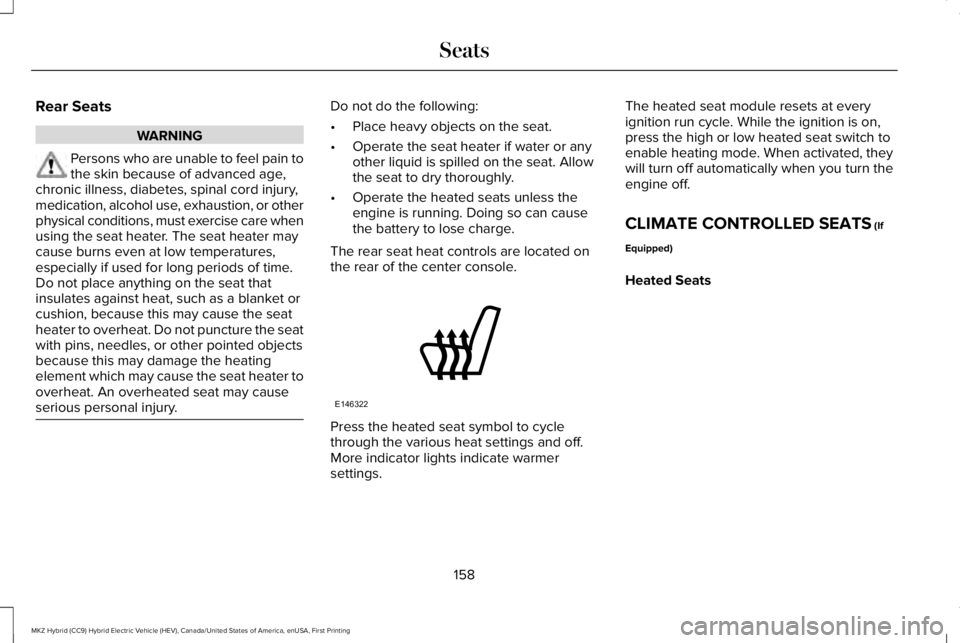
The rear seat heat controls are located onthe rear of the center console.
Press the heated seat symbol to cyclethrough the various heat settings and off.More indicator lights indicate warmersettings.
The heated seat module resets at everyignition run cycle. While the ignition is on,press the high or low heated seat switch toenable heating mode. When activated, theywill turn off automatically when you turn theengine off.
CLIMATE CONTROLLED SEATS (If
Equipped)
Heated Seats
158
MKZ Hybrid (CC9) Hybrid Electric Vehicle (HEV), Canada/United States of America, enUSA, First Printing
SeatsE146322
Page 168 of 572
12 Volt DC Power Point
WARNING
Do not plug optional electricalaccessories into the cigar lightersocket. Incorrect use of the cigar lighter cancause damage not covered by the vehiclewarranty, and can result in fire or seriousinjury.
Note:When you switch the ignition on, youcan use the socket to power 12 voltappliances with a maximum current ratingof 15 amps.
If the power supply does not work after youswitch the ignition off, switch the ignition on.Note:Do not hang any accessory from theaccessory plug.
Note:Do not use the power point over thevehicle capacity of 12 volt DC 180 watts ora fuse may blow.
Note:Always keep the power point capsclosed when not in use.
Do not insert objects other than an accessoryplug into the power point. This damages thepower point and may blow the fuse.
Run the vehicle for full capacity use of thepower point.
To prevent the battery from running out ofcharge:
•Do not use the power point longer thannecessary when the vehicle is notrunning.
•Do not leave devices plugged inovernight or when you park your vehiclefor extended periods.
Locations
Power points may be in the followinglocations:
•On the front of the center console.
•Inside the center console.
•On the rear of the center console.
110 Volt AC Power Point
WARNING
Do not keep electrical devices pluggedin the power point whenever thedevice is not in use. Do not use anyextension cord with the 110 volt AC powerpoint, since it will defeat the safety protectiondesign. Doing so may cause the power pointto overload due to powering multiple devicesthat can reach beyond the 150 watt load limitand could result in fire or serious injury.
Note:The power point turns off when youswitch the ignition off, or when the batteryvoltage drops below 11 volts.
You can use the power point for electricdevices that require up to 150 watts. It is onthe rear of the center console.
165
MKZ Hybrid (CC9) Hybrid Electric Vehicle (HEV), Canada/United States of America, enUSA, First Printing
Auxiliary Power Points
Page 170 of 572
CENTER CONSOLE
Stow items in the cup holder carefully asitems may become loose during hardbraking, acceleration or crashes, includinghot drinks which may spill.
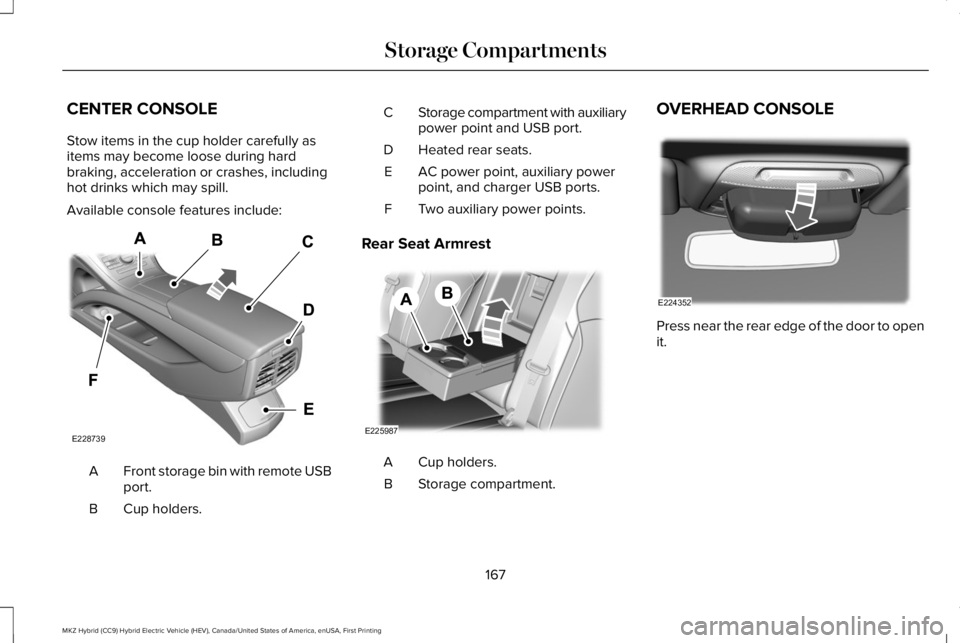
Available console features include:
Front storage bin with remote USBport.A
Cup holders.B
Storage compartment with auxiliarypower point and USB port.C
Heated rear seats.D
AC power point, auxiliary powerpoint, and charger USB ports.E
Two auxiliary power points.F
Rear Seat Armrest
Cup holders.A
Storage compartment.B
OVERHEAD CONSOLE
Press near the rear edge of the door to openit.
167
MKZ Hybrid (CC9) Hybrid Electric Vehicle (HEV), Canada/United States of America, enUSA, First Printing
Storage CompartmentsE228739 E225987 E224352
Page 200 of 572
Low (L)
•Provides maximum engine braking.
•The transmission may be put into low (L)at any vehicle speed.
•Not intended for use under extended ornormal driving conditions and results inlower fuel economy.
Brake-Shift Interlock Override
WARNINGS
Do not drive your vehicle until youverify that the stoplamps are working.
When doing this procedure, you needto take the transmission out of park (P)which means your vehicle can roll freely. Toavoid unwanted vehicle movement, alwaysfully apply the parking brake prior to doingthis procedure. Use wheels chocks ifappropriate.
If the parking brake is fully released,but the brake warning lamp remainsilluminated, the brakes may not be workingproperly. Have your vehicle checked as soonas possible.
Note:See your authorized dealer as soonas possible if this procedure is used.
Note:For some markets this feature isdisabled.
Note:This feature only functions if your12-volt battery has power. If vehicle batteryvoltage is not sufficient, an external 12-voltpower source (for example, jumper cables,battery charger or jump pack) may berequired to function the interlock overrideswitch.
Use the brake-shift interlock override tomove your transmission from the parkposition in the event of an electricalmalfunction. If your vehicle has a deadbattery, an external power source is required.
1. Apply the parking brake and turn yourignition off before performing thisprocedure.
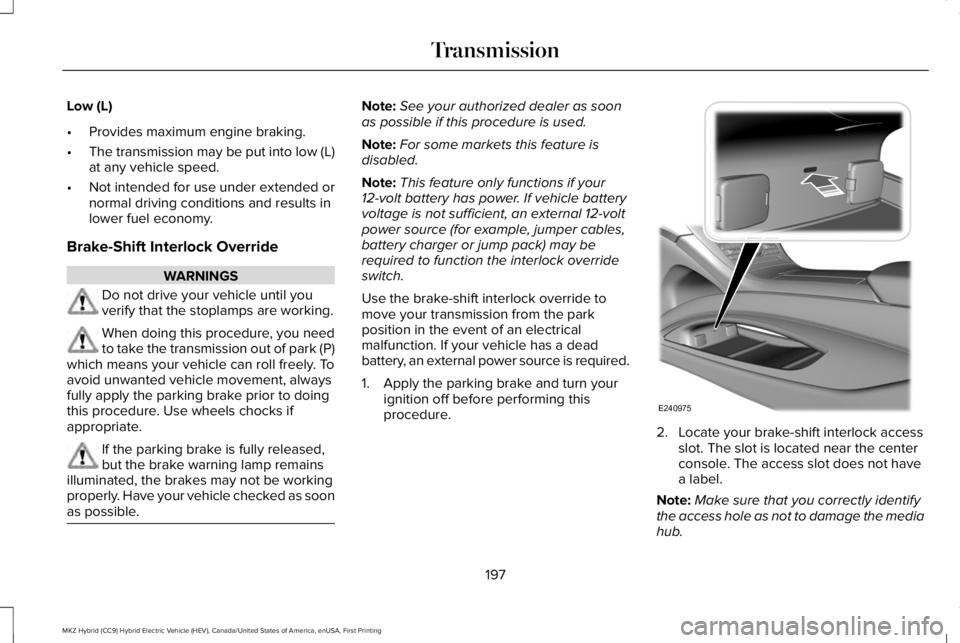
2. Locate your brake-shift interlock accessslot. The slot is located near the centerconsole. The access slot does not havea label.
Note:Make sure that you correctly identifythe access hole as not to damage the mediahub.
197
MKZ Hybrid (CC9) Hybrid Electric Vehicle (HEV), Canada/United States of America, enUSA, First Printing
TransmissionE240975
Page 210 of 572
PRINCIPLE OF OPERATION
WARNINGS
Vehicle modifications involving brakingsystem, aftermarket roof racks,suspension, steering system, tireconstruction and wheel and tire size maychange the handling characteristics of yourvehicle and may adversely affect theperformance of the electronic stability controlsystem. In addition, installing any stereoloudspeakers may interfere with andadversely affect the electronic stabilitycontrol system. Install any aftermarket stereoloudspeaker as far as possible from the frontcenter console, the tunnel, and the frontseats in order to minimize the risk ofinterfering with the electronic stability controlsensors. Reducing the effectiveness of theelectronic stability control system could leadto an increased risk of loss of vehicle control,vehicle rollover, personal injury and death.
WARNINGS
Remember that even advancedtechnology cannot defy the laws ofphysics. It’s always possible to lose controlof a vehicle due to inappropriate driver inputfor the conditions. Aggressive driving on anyroad condition can cause you to lose controlof your vehicle increasing the risk of personalinjury or property damage. Activation of theelectronic stability control system is anindication that at least some of the tires haveexceeded their ability to grip the road; thiscould reduce the operator’s ability to controlthe vehicle potentially resulting in a loss ofvehicle control, vehicle rollover, personalinjury and death. If your electronic stabilitycontrol system activates, SLOW DOWN.
The system automatically turns on each timeyou switch the ignition on.
If a fault occurs in either the stability controlor the traction control system, you mayexperience the following conditions:
•The stability and traction control lightilluminates steadily.
•The stability control and traction controlsystems do not enhance your vehicle'sability to maintain traction of the wheels.
If a driving condition activates either thestability control or the traction control systemyou may experience the following conditions:
•The stability and traction control lightflashes.
•Your vehicle slows down.
•Reduced engine power.
•A vibration in the brake pedal.
•The brake pedal is stiffer than usual.
•If the driving condition is severe and yourfoot is not on the brake, the brake pedalmay move as the system applies higherbrake force.
The stability control system has severalfeatures built into it to help you maintaincontrol of your vehicle:
207
MKZ Hybrid (CC9) Hybrid Electric Vehicle (HEV), Canada/United States of America, enUSA, First Printing
Stability Control
Page 230 of 572
Resuming the Set Speed
Press RES.
Switching Cruise Control Off
Note:You erase the set speed when youswitch the system off.
Press OFF when the system is in standbymode, or switch the ignition off.
Switching to ECO Cruise
Using cruise control with ECO Cruiseswitched on may change the operation ofthe system. This feature saves vehicleenergy by relaxing acceleration comparedto standard cruise control. For example, yourvehicle may temporarily lose speed whengoing uphill.
For Hybrid vehicles, press ECO on the centerconsole.
For additional information, refer to ECOCruise and EcoSelect.
USING ADAPTIVE CRUISE
CONTROL (If Equipped)
WARNINGS
Always pay close attention to changingroad conditions when using adaptivecruise control. The system does not replaceattentive driving. Failing to pay attention tothe road may result in a crash, serious injuryor death.
Do not use the adaptive cruise controlwhen entering or leaving a highway,on roads with intersections or roundaboutsor non-vehicular traffic or roads that arewinding, slippery, unpaved, or steep slopes.
Do not use the system in poor visibility,for example fog, heavy rain, spray orsnow.
WARNINGS
Do not use the system when towing atrailer with aftermarket trailer brakecontrols. Aftermarket trailer brakes will notfunction properly when you switch thesystem on because the brakes areelectronically controlled. Failing to do so mayresult in loss of vehicle control, which couldresult in serious injury.
Do not use tire sizes other than thoserecommended because this can affectthe normal operation of the system. Failureto do so may result in a loss of vehiclecontrol, which could result in serious injury.
Adaptive cruise control may not detectstationary or slow moving vehiclesbelow 6 mph (10 km/h).
Adaptive cruise control does not detectpedestrians or objects in the road.
Adaptive cruise control does not detectoncoming vehicles in the same lane.
Adaptive cruise control is not a crashwarning or avoidance system.
227
MKZ Hybrid (CC9) Hybrid Electric Vehicle (HEV), Canada/United States of America, enUSA, First Printing
Cruise Control
Page 237 of 572
Switching to Normal Cruise Control
WARNING
Normal cruise control will not brakewhen your vehicle is approachingslower vehicles. Always be aware of whichmode you have selected and apply thebrakes when necessary.
You can change from adaptive cruise controlto normal cruise control through theinformation display.
The cruise control indicator lightreplaces the adaptive cruisecontrol indicator light if you selectnormal cruise control. The gap setting doesnot display, and the system does not respondto lead vehicles. Automatic braking remainsactive to maintain set speed.
Switching to ECO Cruise
Using cruise control with ECO Cruiseswitched on may change the operation ofthe system. This feature saves vehicleenergy by relaxing acceleration comparedto standard cruise control. For example, yourvehicle may temporarily lose speed whengoing uphill.
For Hybrid vehicles, press ECO on the centerconsole.
For additional information, refer to ECOCruise and EcoSelect.
234
MKZ Hybrid (CC9) Hybrid Electric Vehicle (HEV), Canada/United States of America, enUSA, First Printing
Cruise ControlE71340
Page 417 of 572
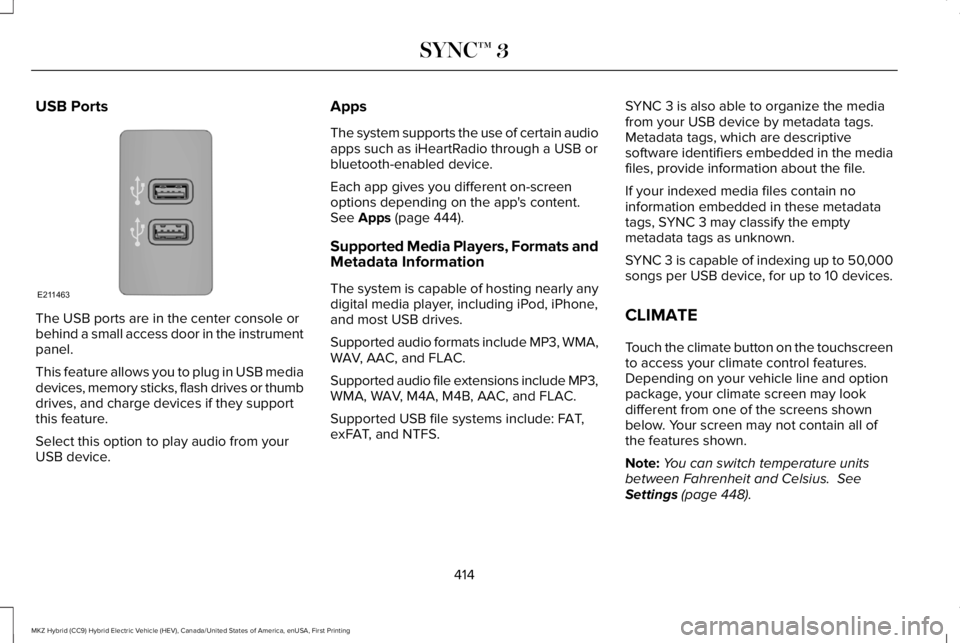
USB Ports
The USB ports are in the center console orbehind a small access door in the instrumentpanel.
This feature allows you to plug in USB mediadevices, memory sticks, flash drives or thumbdrives, and charge devices if they supportthis feature.
Select this option to play audio from yourUSB device.
Apps
The system supports the use of certain audioapps such as iHeartRadio through a USB orbluetooth-enabled device.
Each app gives you different on-screenoptions depending on the app's content.See Apps (page 444).
Supported Media Players, Formats andMetadata Information
The system is capable of hosting nearly anydigital media player, including iPod, iPhone,and most USB drives.
Supported audio formats include MP3, WMA,WAV, AAC, and FLAC.
Supported audio file extensions include MP3,WMA, WAV, M4A, M4B, AAC, and FLAC.
Supported USB file systems include: FAT,exFAT, and NTFS.
SYNC 3 is also able to organize the mediafrom your USB device by metadata tags.Metadata tags, which are descriptivesoftware identifiers embedded in the mediafiles, provide information about the file.
If your indexed media files contain noinformation embedded in these metadatatags, SYNC 3 may classify the emptymetadata tags as unknown.
SYNC 3 is capable of indexing up to 50,000songs per USB device, for up to 10 devices.
CLIMATE
Touch the climate button on the touchscreento access your climate control features.Depending on your vehicle line and optionpackage, your climate screen may lookdifferent from one of the screens shownbelow. Your screen may not contain all ofthe features shown.
Note:You can switch temperature unitsbetween Fahrenheit and Celsius. SeeSettings (page 448).
414
MKZ Hybrid (CC9) Hybrid Electric Vehicle (HEV), Canada/United States of America, enUSA, First Printing
SYNC™ 3E211463
Page 563 of 572
B
BatterySee: Changing the 12V Battery........................310
Blind Spot Information System.................242Switching the System Off and On..................243System Errors......................................................243Using the Blind Spot InformationSystem..............................................................242
Body Styling Kits...........................................327Bonnet LockSee: Opening and Closing the Hood............300
Booster Seats..................................................30Types of Booster Seats........................................31
Brake Fluid Check.......................................309Brakes..............................................................199General Information............................................199
Breaking-In....................................................262Bulb Specification Chart..............................315
C
Cabin Air Filter................................................147California Proposition 65...............................12Capacities and Specifications...................362Alternative Engine Oil for Extremely ColdClimates...........................................................366Specifications......................................................363
Car WashSee: Cleaning the Exterior................................319
Catalytic Converter.......................................188On-Board Diagnostics (OBD-II)........................189Readiness for Inspection and Maintenance(I/M) Testing......................................................190
Center Console..............................................167Rear Seat Armrest...............................................167
Changing a Bulb............................................314Lamp Assembly Condensation........................314Replacing Bulbs...................................................314
Changing a Fuse..........................................297Fuses.....................................................................297
Changing the 12V Battery...........................310Changing the Engine Air Filter...................317Changing the Wiper Blades.......................312Checking MyKey System Status.................66MyKey Distance....................................................66Number of Admin Keys.......................................66Number of MyKeys...............................................66
Checking the Wiper Blades........................312Child Restraint and SeatbeltMaintenance..................................................44Child Restraint Positioning...........................33Child Safety.......................................................19General Information..............................................19
Child Safety Locks..........................................34Left-Hand Side.......................................................35
Right-Hand Side....................................................35
Cleaning Leather Seats..............................324Cleaning Products.........................................318Materials................................................................318
Cleaning the Engine....................................320Cleaning the Exterior....................................319Cleaning the Headlamps...................................319Exterior Chrome Parts........................................319Exterior Plastic Parts..........................................320Stripes or Graphics............................................320Underbody...........................................................320Under Hood.........................................................320
Cleaning the Instrument Panel andInstrument Cluster Lens...........................323Cleaning the Interior.....................................321Cleaning Alcantara Microfiber ClothFabric................................................................322
Cleaning the Wheels...................................325Cleaning the Windows and WiperBlades............................................................321Clearing All MyKeys.......................................65Climate.............................................................414Climate Control..............................................143Climate Controlled Seats............................158Cooled Seats........................................................159
560
MKZ Hybrid (CC9) Hybrid Electric Vehicle (HEV), Canada/United States of America, enUSA, First Printing
Index