wheel LINCOLN MKZ HYBRID 2019 Manual Online
[x] Cancel search | Manufacturer: LINCOLN, Model Year: 2019, Model line: MKZ HYBRID, Model: LINCOLN MKZ HYBRID 2019Pages: 575, PDF Size: 4.77 MB
Page 354 of 575
When Inflating Your Tires
WARNING: Do not use the tirepressure displayed in the information displayas a tire pressure gauge. Failure to followthis instruction could result in personal injuryor death.
When putting air into your tires (such as at agas station or in your garage), the tirepressure monitoring system may not respondimmediately to the air added to your tires.
It may take up to two minutes of driving over20 mph (32 km/h) for the light to turn off afteryou have filled your tires to therecommended inflation pressure.
How Temperature Affects Your TirePressure
The tire pressure monitoring system monitorstire pressure in each pneumatic tire. Whiledriving in a normal manner, a typicalpassenger tire inflation pressure mayincrease about 2–4 psi (14–28 kPa) from acold start situation. If the vehicle is stationaryovernight with the outside temperaturesignificantly lower than the daytimetemperature, the tire pressure may decreaseabout 3 psi (21 kPa) for a drop of 30°F (17°C)in ambient temperature. This lower pressurevalue may be detected by the tire pressuremonitoring system as being significantlylower than the recommended inflation
pressure and activate the system warninglight for low tire pressure. If the low tirepressure warning light is on, visually checkeach tire to verify that no tire is flat. If one ormore tires are flat, repair as necessary.Check the air pressure in the road tires. Ifany tire is under-inflated, carefully drive thevehicle to the nearest location where air canbe added to the tires. Inflate all the tires tothe recommended inflation pressure.
TECHNICAL SPECIFICATIONS
Wheel Lug Nut Torque Specifications
WARNING: When you install a wheel, always remove any corrosion, dirt or foreign materials present on the mounting surfaces of thewheel or the surface of the wheel hub, brake drum or brake disc that contacts the wheel. Make sure to secure any fasteners that attach therotor to the hub so they do not interfere with the mounting surfaces of the wheel. Installing wheels without correct metal-to-metal contact atthe wheel mounting surfaces can cause the wheel nuts to loosen and the wheel to come off while your vehicle is in motion, resulting in lossof vehicle control, personal injury or death.
351
MKZ Hybrid (CC9) Hybrid Electric Vehicle (HEV), Canada/United States of America, enUSA, Edition date: 201805, First-Printing
Wheels and Tires
Page 355 of 575
lb.ft (Nm)1Bolt Size
150 lb.ft (204 Nm)M14 x 1.5
1 Torque specifications are for nut and bolt threads free of dirt and rust. Use only Ford recommended replacement fasteners.
Retighten the lug nuts to the specified torque within 100 miles (160 kilometers) after any wheel disturbance, such as tire rotation, changing aflat tire or wheel removal.
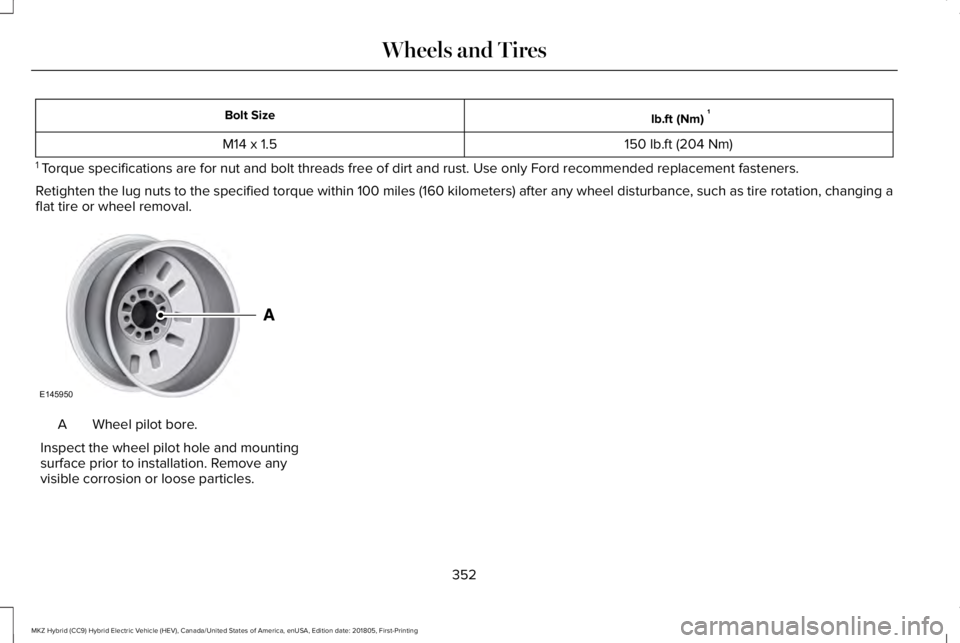
Wheel pilot bore.A
Inspect the wheel pilot hole and mountingsurface prior to installation. Remove anyvisible corrosion or loose particles.
352
MKZ Hybrid (CC9) Hybrid Electric Vehicle (HEV), Canada/United States of America, enUSA, Edition date: 201805, First-Printing
Wheels and TiresE145950
Page 378 of 575
DescriptionItemCallout
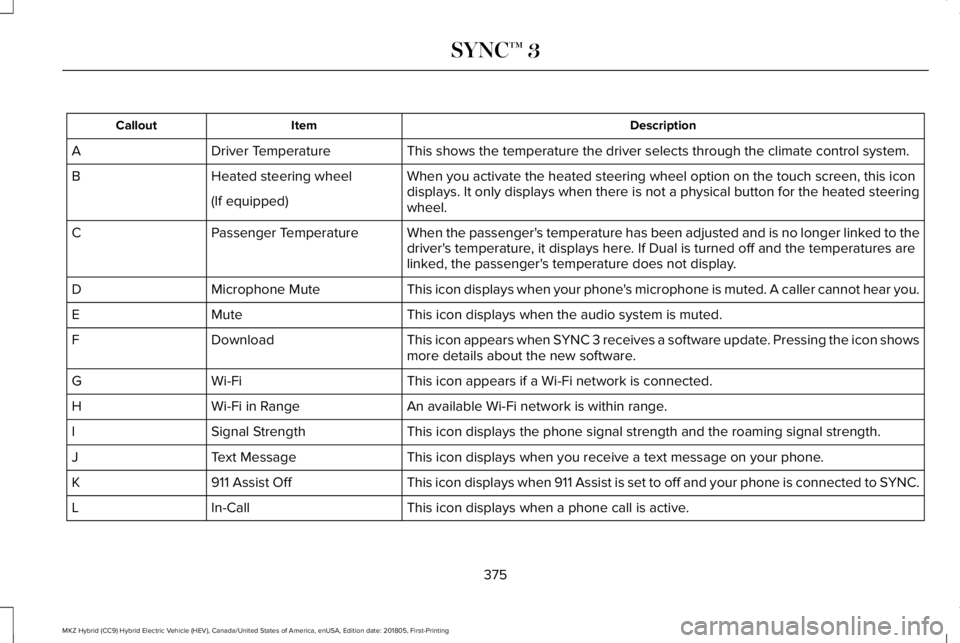
This shows the temperature the driver selects through the climate control system.Driver TemperatureA
When you activate the heated steering wheel option on the touch screen, this icondisplays. It only displays when there is not a physical button for the heated steeringwheel.
Heated steering wheelB
(If equipped)
When the passenger's temperature has been adjusted and is no longer linked to thedriver's temperature, it displays here. If Dual is turned off and the temperatures arelinked, the passenger's temperature does not display.
Passenger TemperatureC
This icon displays when your phone's microphone is muted. A caller cannot hear you.Microphone MuteD
This icon displays when the audio system is muted.MuteE
This icon appears when SYNC 3 receives a software update. Pressing the icon showsmore details about the new software.DownloadF
This icon appears if a Wi-Fi network is connected.Wi-FiG
An available Wi-Fi network is within range.Wi-Fi in RangeH
This icon displays the phone signal strength and the roaming signal strength.Signal StrengthI
This icon displays when you receive a text message on your phone.Text MessageJ
This icon displays when 911 Assist is set to off and your phone is connected to SYNC.911 Assist OffK
This icon displays when a phone call is active.In-CallL
375
MKZ Hybrid (CC9) Hybrid Electric Vehicle (HEV), Canada/United States of America, enUSA, Edition date: 201805, First-Printing
SYNC™ 3
Page 380 of 575
FunctionsFeature Bar Item
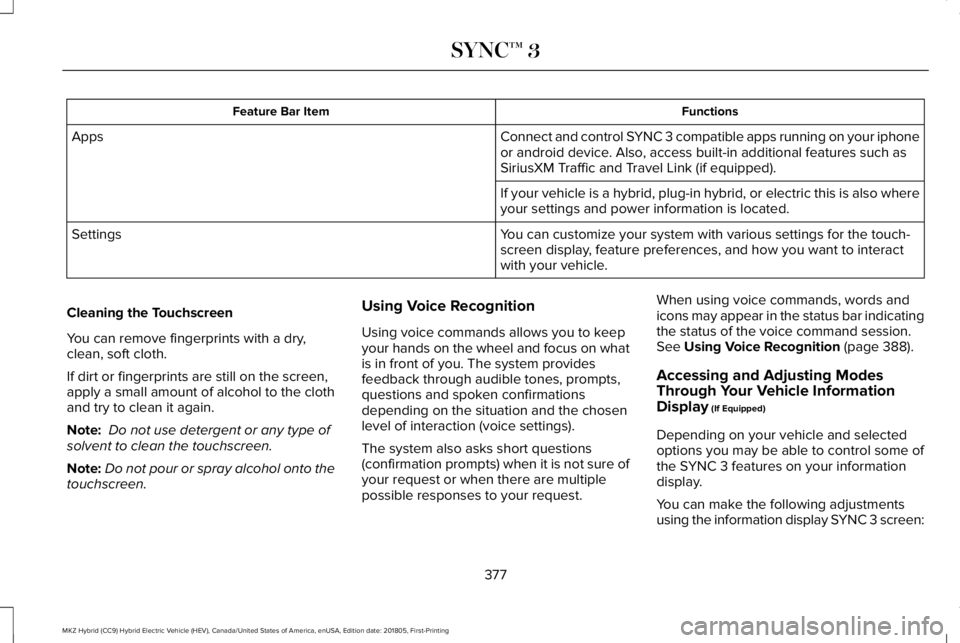
Connect and control SYNC 3 compatible apps running on your iphoneor android device. Also, access built-in additional features such asSiriusXM Traffic and Travel Link (if equipped).
Apps
If your vehicle is a hybrid, plug-in hybrid, or electric this is also whereyour settings and power information is located.
You can customize your system with various settings for the touch-screen display, feature preferences, and how you want to interactwith your vehicle.
Settings
Cleaning the Touchscreen
You can remove fingerprints with a dry,clean, soft cloth.
If dirt or fingerprints are still on the screen,apply a small amount of alcohol to the clothand try to clean it again.
Note: Do not use detergent or any type ofsolvent to clean the touchscreen.
Note:Do not pour or spray alcohol onto thetouchscreen.
Using Voice Recognition
Using voice commands allows you to keepyour hands on the wheel and focus on whatis in front of you. The system providesfeedback through audible tones, prompts,questions and spoken confirmationsdepending on the situation and the chosenlevel of interaction (voice settings).
The system also asks short questions(confirmation prompts) when it is not sure ofyour request or when there are multiplepossible responses to your request.
When using voice commands, words andicons may appear in the status bar indicatingthe status of the voice command session.See Using Voice Recognition (page 388).
Accessing and Adjusting ModesThrough Your Vehicle InformationDisplay (If Equipped)
Depending on your vehicle and selectedoptions you may be able to control some ofthe SYNC 3 features on your informationdisplay.
You can make the following adjustmentsusing the information display SYNC 3 screen:
377
MKZ Hybrid (CC9) Hybrid Electric Vehicle (HEV), Canada/United States of America, enUSA, Edition date: 201805, First-Printing
SYNC™ 3
Page 381 of 575
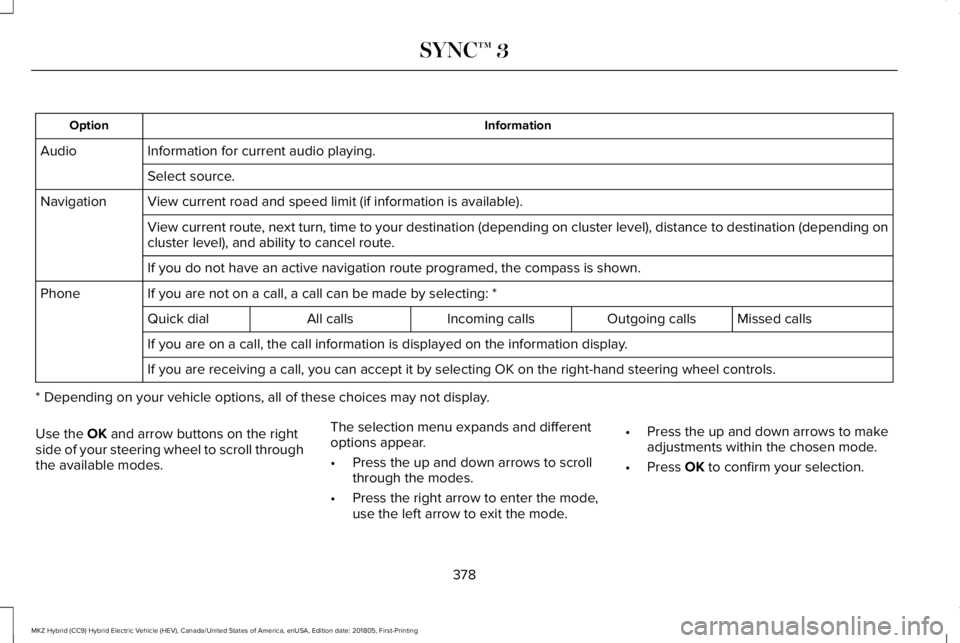
InformationOption
Information for current audio playing.Audio
Select source.
View current road and speed limit (if information is available).Navigation
View current route, next turn, time to your destination (depending on cluster level), distance to destination (depending oncluster level), and ability to cancel route.
If you do not have an active navigation route programed, the compass is shown.
If you are not on a call, a call can be made by selecting: *Phone
Missed callsOutgoing callsIncoming callsAll callsQuick dial
If you are on a call, the call information is displayed on the information display.
If you are receiving a call, you can accept it by selecting OK on the right-hand steering wheel controls.
* Depending on your vehicle options, all of these choices may not display.
Use the OK and arrow buttons on the rightside of your steering wheel to scroll throughthe available modes.
The selection menu expands and differentoptions appear.
•Press the up and down arrows to scrollthrough the modes.
•Press the right arrow to enter the mode,use the left arrow to exit the mode.
•Press the up and down arrows to makeadjustments within the chosen mode.
•Press OK to confirm your selection.
378
MKZ Hybrid (CC9) Hybrid Electric Vehicle (HEV), Canada/United States of America, enUSA, Edition date: 201805, First-Printing
SYNC™ 3
Page 382 of 575
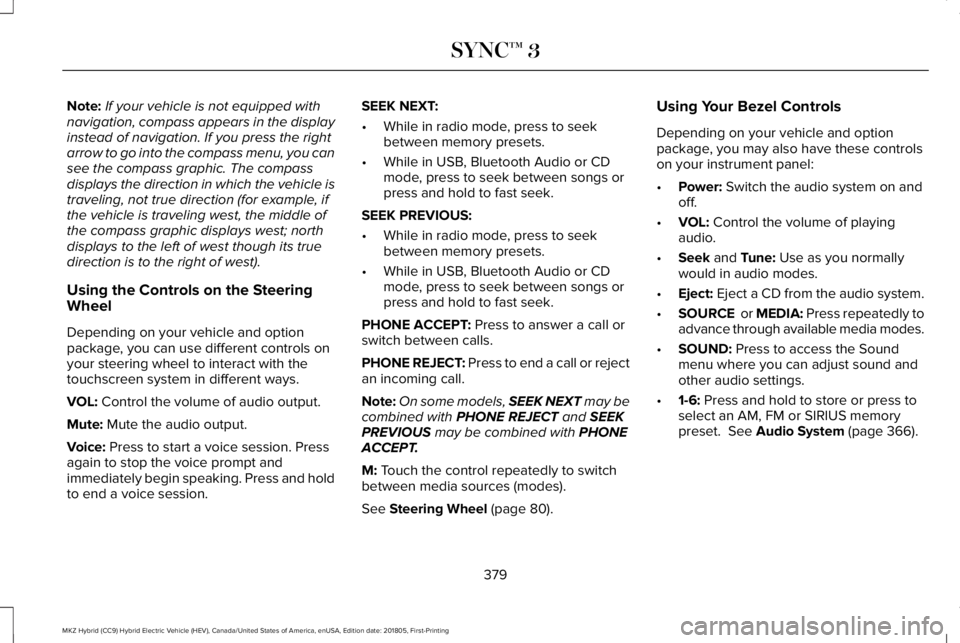
Note:If your vehicle is not equipped withnavigation, compass appears in the displayinstead of navigation. If you press the rightarrow to go into the compass menu, you cansee the compass graphic. The compassdisplays the direction in which the vehicle istraveling, not true direction (for example, ifthe vehicle is traveling west, the middle ofthe compass graphic displays west; northdisplays to the left of west though its truedirection is to the right of west).
Using the Controls on the SteeringWheel
Depending on your vehicle and optionpackage, you can use different controls onyour steering wheel to interact with thetouchscreen system in different ways.
VOL: Control the volume of audio output.
Mute: Mute the audio output.
Voice: Press to start a voice session. Pressagain to stop the voice prompt andimmediately begin speaking. Press and holdto end a voice session.
SEEK NEXT:
•While in radio mode, press to seekbetween memory presets.
•While in USB, Bluetooth Audio or CDmode, press to seek between songs orpress and hold to fast seek.
SEEK PREVIOUS:
•While in radio mode, press to seekbetween memory presets.
•While in USB, Bluetooth Audio or CDmode, press to seek between songs orpress and hold to fast seek.
PHONE ACCEPT: Press to answer a call orswitch between calls.
PHONE REJECT: Press to end a call or rejectan incoming call.
Note:On some models, SEEK NEXT may becombined with PHONE REJECT and SEEKPREVIOUS may be combined with PHONEACCEPT.
M: Touch the control repeatedly to switchbetween media sources (modes).
See Steering Wheel (page 80).
Using Your Bezel Controls
Depending on your vehicle and optionpackage, you may also have these controlson your instrument panel:
•Power: Switch the audio system on andoff.
•VOL: Control the volume of playingaudio.
•Seek and Tune: Use as you normallywould in audio modes.
•Eject: Eject a CD from the audio system.
•SOURCE or MEDIA: Press repeatedly toadvance through available media modes.
•SOUND: Press to access the Soundmenu where you can adjust sound andother audio settings.
•1-6: Press and hold to store or press toselect an AM, FM or SIRIUS memorypreset. See Audio System (page 366).
379
MKZ Hybrid (CC9) Hybrid Electric Vehicle (HEV), Canada/United States of America, enUSA, Edition date: 201805, First-Printing
SYNC™ 3
Page 384 of 575
To make sure that 911 Assist works correctly:
•SYNC must be powered and workingproperly at the time of the incident andthroughout feature activation and use.
•The 911 Assist feature must be set onbefore the incident.
•You must pair and connect a Bluetoothenabled and compatible cell phone toSYNC.
•A connected Bluetooth enabled phonemust have the ability to make andmaintain an outgoing call at the time ofthe incident.
•A connected Bluetooth enabled phonemust have adequate network coverage,battery power and signal strength.
•The vehicle must have battery power andbe located in the U.S., Canada or in aterritory in which 911 is the emergencynumber.
In the Event of a Crash
Not all crashes will deploy an airbag oractivate the fuel pump shut-off (the triggersfor 911 Assist). If a connected cell phonesustains damage or loses its connection toSYNC during a crash, SYNC will search forand try to connect to a previously paired cellphone; SYNC will then attempt to call theemergency services.
Before making the call:
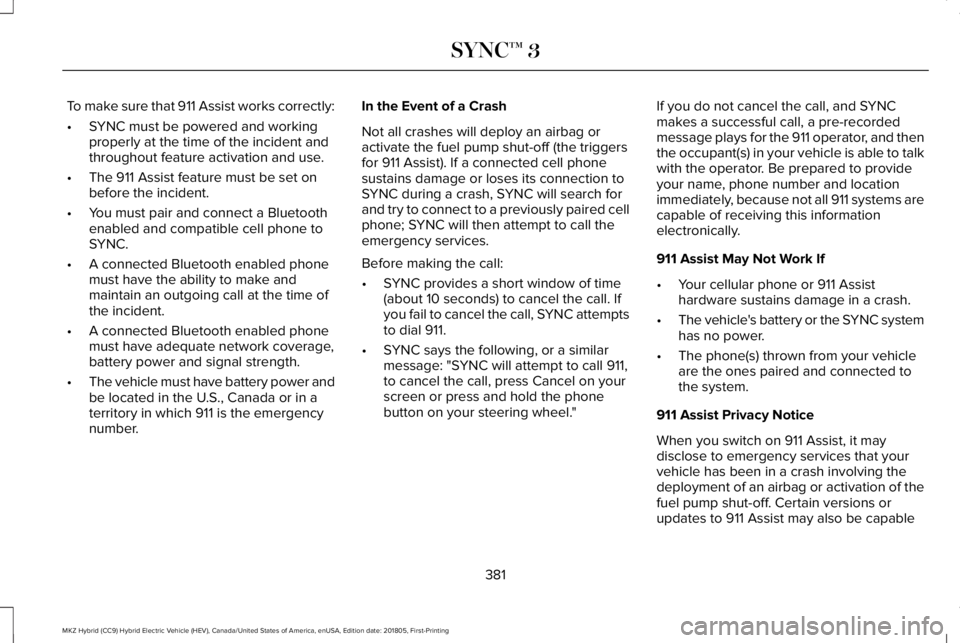
•SYNC provides a short window of time(about 10 seconds) to cancel the call. Ifyou fail to cancel the call, SYNC attemptsto dial 911.
•SYNC says the following, or a similarmessage: "SYNC will attempt to call 911,to cancel the call, press Cancel on yourscreen or press and hold the phonebutton on your steering wheel."
If you do not cancel the call, and SYNCmakes a successful call, a pre-recordedmessage plays for the 911 operator, and thenthe occupant(s) in your vehicle is able to talkwith the operator. Be prepared to provideyour name, phone number and locationimmediately, because not all 911 systems arecapable of receiving this informationelectronically.
911 Assist May Not Work If
•Your cellular phone or 911 Assisthardware sustains damage in a crash.
•The vehicle's battery or the SYNC systemhas no power.
•The phone(s) thrown from your vehicleare the ones paired and connected tothe system.
911 Assist Privacy Notice
When you switch on 911 Assist, it maydisclose to emergency services that yourvehicle has been in a crash involving thedeployment of an airbag or activation of thefuel pump shut-off. Certain versions orupdates to 911 Assist may also be capable
381
MKZ Hybrid (CC9) Hybrid Electric Vehicle (HEV), Canada/United States of America, enUSA, Edition date: 201805, First-Printing
SYNC™ 3
Page 391 of 575
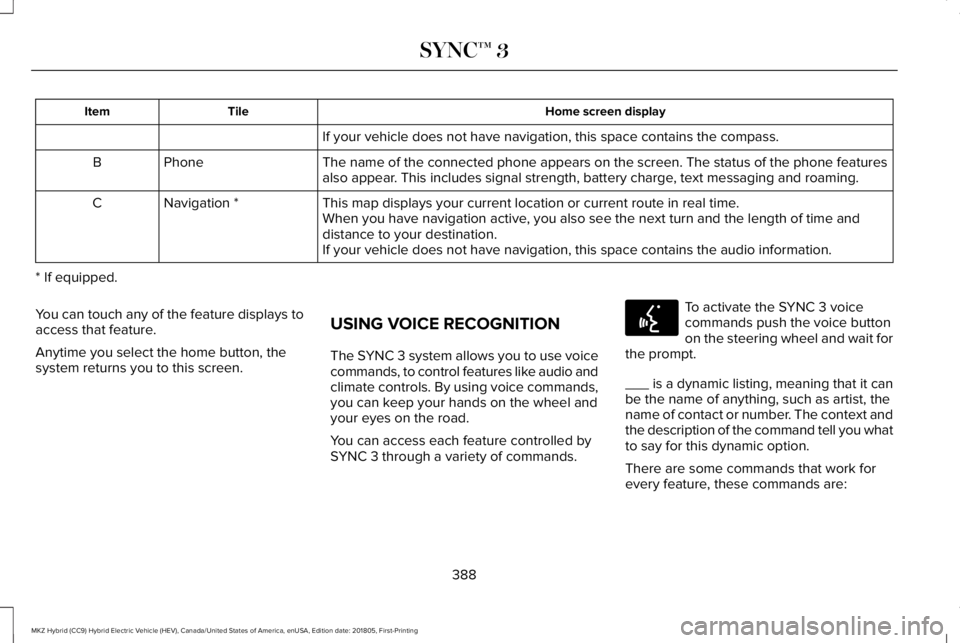
Home screen displayTileItem
If your vehicle does not have navigation, this space contains the compass.
The name of the connected phone appears on the screen. The status of the phone featuresalso appear. This includes signal strength, battery charge, text messaging and roaming.PhoneB
This map displays your current location or current route in real time.Navigation *CWhen you have navigation active, you also see the next turn and the length of time anddistance to your destination.If your vehicle does not have navigation, this space contains the audio information.
* If equipped.
You can touch any of the feature displays toaccess that feature.
Anytime you select the home button, thesystem returns you to this screen.
USING VOICE RECOGNITION
The SYNC 3 system allows you to use voicecommands, to control features like audio andclimate controls. By using voice commands,you can keep your hands on the wheel andyour eyes on the road.
You can access each feature controlled bySYNC 3 through a variety of commands.
To activate the SYNC 3 voicecommands push the voice buttonon the steering wheel and wait forthe prompt.
___ is a dynamic listing, meaning that it canbe the name of anything, such as artist, thename of contact or number. The context andthe description of the command tell you whatto say for this dynamic option.
There are some commands that work forevery feature, these commands are:
388
MKZ Hybrid (CC9) Hybrid Electric Vehicle (HEV), Canada/United States of America, enUSA, Edition date: 201805, First-Printing
SYNC™ 3E142599
Page 417 of 575
Driver temperature: Touch up ordown to adjust the temperature.A
Heated steering wheel:B
Note: This feature only functionswhen you switch the engine on.
Touch this icon to switch theheated steering wheel on and off.It takes about 5 minutes to warmthe steering wheel to 74°F (23.3°C)in temperatures as low as -4°F(-20°C). The wheel maintains anapproximate temperature of 90°F(32.2°C) and operatesindependently from the heatedseats and other climate-controlfunctions. The heating element isin between the leather coveringand foam core to help providemaximum heat without adverselyaffecting the feel of the steeringwheel.
Note: For steering wheels withwood trim, the heating feature willnot heat the wheel between the 10and 2 o'clock positions.
Defrost: A pop up appears on thescreen to display the defrostoptions.
C
MAX Defrost: Touch the button tomaximize defrosting. Air flowsthrough the windshield vents, thefan automatically adjusts to thehighest speed and the driver andpassenger temperatures are set toHI. You can use this setting todefog or clear a thin covering ofice from the windshield. Theheated rear window alsoautomatically turns on when youselect MAX Defrost.
Defrost: Distributes air through thewindshield defroster vents anddemister vents.
Heated rear window: Turns theheated rear window on and off.See Heated Rear Window (page144).
AUTO: Touch the button to switchon automatic operation. Select thedesired temperature using thetemperature control. The systemadjusts fan speed, air distribution,air conditioning operation, andselects outside air or recirculatedair to heat or cool the vehicle inorder to maintain the desiredtemperature.
D
Power: Touch the button to switchthe system on and off. Switchingoff the climate control systemprevents outside air from enteringthe vehicle.
E
DUAL: This button lights up whenthe passenger temperaturecontrols are active. To switch thepassenger temperature controlsoff and link the passengertemperature to the drivertemperature, touch the DUALbutton.
F
414
MKZ Hybrid (CC9) Hybrid Electric Vehicle (HEV), Canada/United States of America, enUSA, Edition date: 201805, First-Printing
SYNC™ 3
Page 423 of 575
If your phone has a voice assistant feature,you may see a button to access it in themenu. You can also press and hold the voicebutton on the steering wheel to use thisfeature. See Voice Control (page 81).
Making Calls
There are many ways to make calls from theSYNC 3 system, including using voicecommands. See Using Voice Recognition(page 388). You can use the touchscreen toplace calls as well.
420
MKZ Hybrid (CC9) Hybrid Electric Vehicle (HEV), Canada/United States of America, enUSA, Edition date: 201805, First-Printing
SYNC™ 3