ECU LINCOLN MKZ HYBRID 2020 Owner's Manual
[x] Cancel search | Manufacturer: LINCOLN, Model Year: 2020, Model line: MKZ HYBRID, Model: LINCOLN MKZ HYBRID 2020Pages: 544, PDF Size: 5.26 MB
Page 160 of 544
UNIVERSAL GARAGE DOOR
OPENER
HomeLink Wireless Control System
WARNING: Do not use the system
with any garage door opener that does not
have the safety stop and reverse feature
as required by U.S. Federal Safety
Standards (this includes any garage door
opener manufactured before April 1, 1982).
A garage door opener which cannot detect
an object, signaling the door to stop and
reverse, does not meet current federal
safety standards. Using a garage door
opener without these features increases
the risk of serious injury or death.
Note: Make sure that the garage door and
security device are free from obstruction
when you are programming. Do not program
the system with the vehicle in the garage.
Note: Make sure you keep the original
remote control transmitter for use in other
vehicles as well as for future system
programming. Note:
We recommend that upon the sale or
lease termination of your vehicle, you erase
the programmed function buttons for security
reasons. See
Erasing the Function Button
Codes.
Note: You can program a maximum of three
devices. To change or replace any of the
three devices after it has been initially
programmed, you must first erase the current
settings. See
Erasing the Function Button
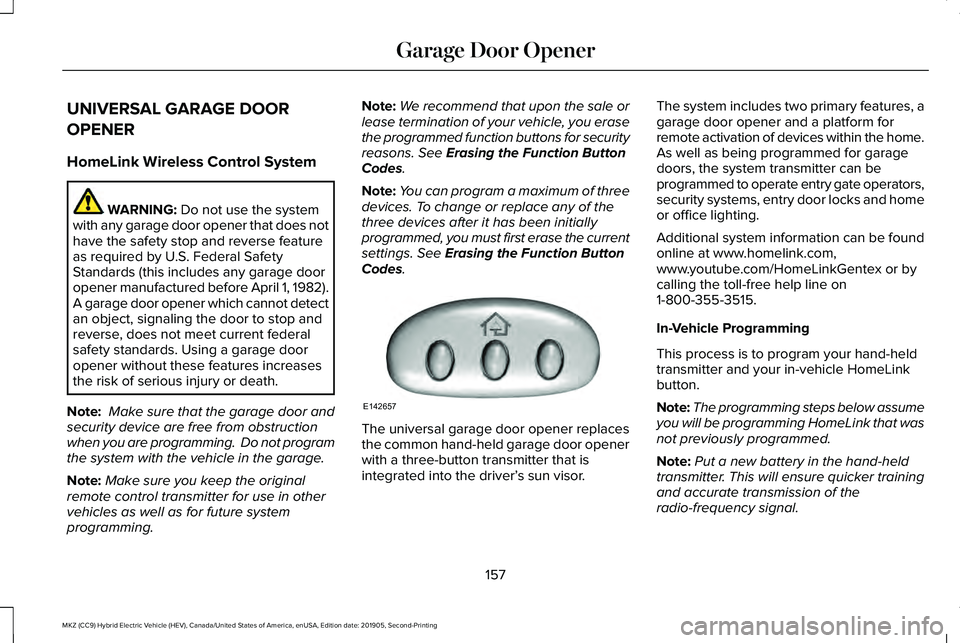
Codes. The universal garage door opener replaces
the common hand-held garage door opener
with a three-button transmitter that is
integrated into the driver’
s sun visor.The system includes two primary features, a
garage door opener and a platform for
remote activation of devices within the home.
As well as being programmed for garage
doors, the system transmitter can be
programmed to operate entry gate operators,
security systems, entry door locks and home
or office lighting.
Additional system information can be found
online at www.homelink.com,
www.youtube.com/HomeLinkGentex or by
calling the toll-free help line on
1-800-355-3515.
In-Vehicle Programming
This process is to program your hand-held
transmitter and your in-vehicle HomeLink
button.
Note:
The programming steps below assume
you will be programming HomeLink that was
not previously programmed.
Note: Put a new battery in the hand-held
transmitter. This will ensure quicker training
and accurate transmission of the
radio-frequency signal.
157
MKZ (CC9) Hybrid Electric Vehicle (HEV), Canada/United States of America, enUSA, Edition date: 201905, Second-Printing Garage Door OpenerE142657
Page 267 of 544
FLOOR MATS
WARNING: Use a floor mat designed
to fit the footwell of your vehicle that does
not obstruct the pedal area. Failure to
follow this instruction could result in the
loss of control of your vehicle, personal
injury or death. WARNING:
Pedals that cannot move
freely can cause loss of vehicle control and
increase the risk of serious personal injury. WARNING:
Secure the floor mat to
both retention devices so that it cannot slip
out of position and interfere with the
pedals. Failure to follow this instruction
could result in the loss of control of your
vehicle, personal injury or death. WARNING:
Do not place additional
floor mats or any other covering on top of
the original floor mats. This could result in
the floor mat interfering with the operation
of the pedals. Failure to follow this
instruction could result in the loss of
control of your vehicle, personal injury or
death. WARNING:
Always make sure that
objects cannot fall into the driver foot well
while your vehicle is moving. Objects that
are loose can become trapped under the
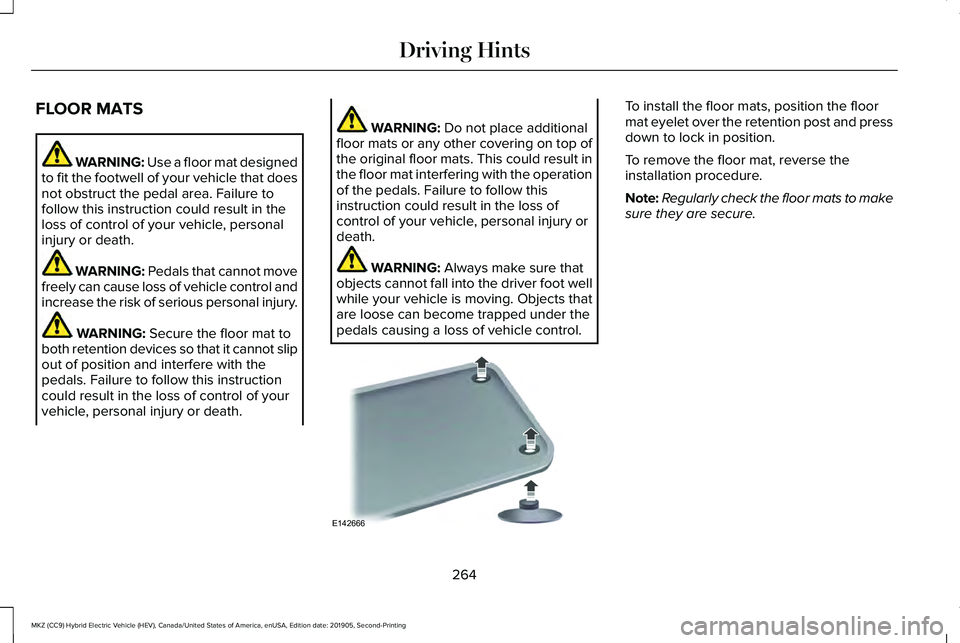
pedals causing a loss of vehicle control. To install the floor mats, position the floor
mat eyelet over the retention post and press
down to lock in position.
To remove the floor mat, reverse the
installation procedure.
Note:
Regularly check the floor mats to make
sure they are secure.
264
MKZ (CC9) Hybrid Electric Vehicle (HEV), Canada/United States of America, enUSA, Edition date: 201905, Second-Printing Driving HintsE142666
Page 278 of 544
vehicle and reimburse the buyer in an
amount equal to the actual price paid or
payable by the consumer (less a reasonable
allowance for consumer use). The consumer
has the right to choose whether to receive
a refund or replacement vehicle.
California Civil Code Section 1793.22(b)
presumes that the manufacturer has had a
reasonable number of attempts to conform
the vehicle to its applicable express
warranties if, within the first 18 months of
ownership of a new vehicle or the first
18,000 mi (29,000 km), whichever occurs
first:
1. Two or more repair attempts are made on the same non-conformity likely to
cause death or serious bodily injury OR
2. Four or more repair attempts are made on the same nonconformity (a defect or
condition that substantially impairs the
use, value or safety of the vehicle) OR
3. The vehicle is out of service for repair of
nonconformities for a total of more than
30 calendar days (not necessarily all at
one time). In the case of 1 or 2 above, the consumer
must also notify the manufacturer of the need
for the repair of the nonconformity at the
following address:
Ford Motor Company
16800 Executive Plaza Drive
Mail Drop 3NE-B
Dearborn, MI 48126
You are required to submit your warranty
dispute to BBB AUTO LINE before asserting
in court any rights or remedies conferred by
California Civil Code Section 1793.22(b). You
are also required to use BBB AUTO LINE
before exercising rights or seeking remedies
created by the Federal Magnuson-Moss
Warranty Act, 15 U.S.C. sec. 2301 et seq. If
you choose to seek redress by pursuing
rights and remedies not created by California
Civil Code Section 1793.22(b) or the
Magnuson-Moss Warranty Act, resort to BBB
AUTO LINE is not required by those statutes.
THE BETTER BUSINESS BUREAU
(BBB) AUTO LINE PROGRAM (U.S.
ONLY)
Your satisfaction is important to Ford Motor
Company and to your dealer. If a warranty
concern has not been resolved using the
three-step procedure outlined earlier in this
chapter in the Getting the Services you need
section, you may be eligible to participate in
the BBB AUTO LINE program.
The BBB AUTO LINE program consists of
two parts – mediation and arbitration. During
mediation, a representative of the BBB will
contact both you and Ford Motor Company
to explore options for settlement of the claim.
If an agreement is not reached during
mediation or you do not want to participate
in mediation, and if your claim is eligible, you
may participate in the arbitration process. An
arbitration hearing will be scheduled so that
you can present your case in an informal
setting before an impartial person. The
arbitrator will consider the testimony
provided and make a decision after the
hearing.
275
MKZ (CC9) Hybrid Electric Vehicle (HEV), Canada/United States of America, enUSA, Edition date: 201905, Second-Printing Customer Assistance
Page 283 of 544
REPORTING SAFETY DEFECTS
(U.S. ONLY)
If you believe that your vehicle has a
defect which could cause a crash or
could cause injury or death, you should
immediately inform the National
Highway Traffic Safety Administration
(NHTSA) in addition to notifying Ford
Motor Company.
If NHTSA receives similar complaints, it
may open an investigation, and if it finds
that a safety defect exists in a group of
vehicles, it may order a recall and
remedy campaign. However, NHTSA
cannot become involved in individual
problems between you, your dealer, or
Ford Motor Company.
To contact NHTSA, you may call the
Vehicle Safety Hotline toll-free at
1-888-327-4236 (TTY: 1-800-424-9153);
go to www .safercar . gov ; or write to:
Administrator
1200 New Jersey Avenue, Southeast Washington, D.C. 20590
You can also obtain other information
about motor vehicle safety from
www .safercar . gov .
REPORTING SAFETY DEFECTS
(CANADA ONLY)
If you believe that your vehicle has a defect
which could cause a crash or could cause
injury or death, you should immediately
inform Transport Canada and Ford of
Canada. Transport Canada Contact Information
http://www.tc.gc.ca/eng/motorvehiclesafety/reporting-defects-motor-vehicles.html (Englis\
h)
Website
http://www.tc.gc.ca/fra/securiteautomobile/signaler-defauts-vehicules-automobiles.html (\
French)
Website
1-800-333-0510
Phone
280
MKZ (CC9) Hybrid Electric Vehicle (HEV), Canada/United States of America, enUSA, Edition date: 201905, Second-Printing Customer Assistance
Page 333 of 544
Loss of air pressure may adversely affect tire
performance. For this reason:
Note:
Do not drive the vehicle above 50 mph
(80 km/h).
Note: Do not drive further than
120 mi
(200 km). Drive only to the closest authorized
Lincoln dealer or tire repair shop to have
your tire inspected.
• Drive carefully and avoid abrupt steering
maneuvers.
• Periodically monitor tire inflation pressure
in the affected tire; if the tire is losing
pressure, have the vehicle towed.
• Read the information in the Tips for Use
of the Kit section to make sure safe
operation of the kit and your vehicle.
Tips for Use of your TMK
To ensure safe operation of the TMK:
• Read all instructions and cautions fully.
• Do not remove any foreign objects, such
as nails or screws, from the tire. •
Before operating the kit, make sure your
vehicle is safely off the road and away
from moving traffic. Turn on the hazard
lights.
• Always set the parking brake to ensure
the vehicle doesn't move unexpectedly.
• When using the kit, leave the engine
running (only if the vehicle is outdoors or
in a well-ventilated area) so the
compressor does not drain the vehicle's
battery.
• Do not allow the compressor to operate
continuously for more than 15 minutes.
This helps prevent the compressor from
overheating.
• Never leave the kit unattended during
operation.
• Sealant compound contains latex. Those
with latex sensitivities should use
appropriate precautions to avoid an
allergic reaction.
• Keep the kit away from children.
• Only use the kit when the ambient
temperature is between -22°F (-30°C) and
158°F (70°C)
. •
Only use the sealing compound before
the use-by date. The use-by date is on a
label on the sealant bottle and can be
seen through the rectangular viewing
window on the bottom of the compressor
housing. Check the use-by date regularly
and replace the bottle when the fluid has
expired.
• Do not store the kit unsecured inside the
passenger compartment of the vehicle
as it may cause injury during a sudden
stop or crash. Always store the kit in its
original location.
• After sealant use, the tire pressure
monitoring system sensor and valve stem
on the wheel must be replaced by an
authorized Lincoln dealer.
• Operating the kit could cause an
electrical disturbance in radio, CD, and
DVD player operation. * When inflation only is required for
a tire or other objects, the selector
must be in the Air position.
330
MKZ (CC9) Hybrid Electric Vehicle (HEV), Canada/United States of America, enUSA, Edition date: 201905, Second-Printing Wheels and TiresE175978
Page 334 of 544
What to do when a Tire Is Punctured
A tire puncture within the tire's tread area
can be repaired in two stages with the kit:
•
In the first stage, the tire is reinflated with
a sealing compound and air. After the tire
has been inflated, you need to drive the
vehicle about 3.7 mi (6 km) to distribute
the sealant in the tire.
• In the second stage, you need to check
the tire pressure and adjust, if necessary,
to the vehicle's specified tire inflation
pressure.
First Stage: Reinflating the Tire with
Sealing Compound and Air WARNING:
Do not stand directly
beside the tire while the compressor is
operating. This could cause personal injury
if the tire bursts.
Note: If the tire does not inflate to the
recommended tire pressure within 15
minutes, stop and call roadside assistance. WARNING: Watch the sidewall of the
tire when inflating. If any cracks, bumps or
similar damage appears, switch the
compressor off and let the air out by means
of the pressure relief valve. Do not
continue driving with this tire. This could
cause loss of vehicle control. WARNING:
Do not run the engine
when operating the air compressor unless
the vehicle is outdoors or in a
well-ventilated area.
Preparation: Park the vehicle in a safe, level
and secure area, away from moving traffic.
Turn the hazard lights on. Apply the parking
brake and turn the engine off. Inspect the
flat tire for visible damage.
Sealant compound contains latex. Use
appropriate precautions to avoid any allergic
reactions.
Do not remove any foreign object that has
pierced the tire. If a puncture is located in
the tire sidewall, stop and call roadside
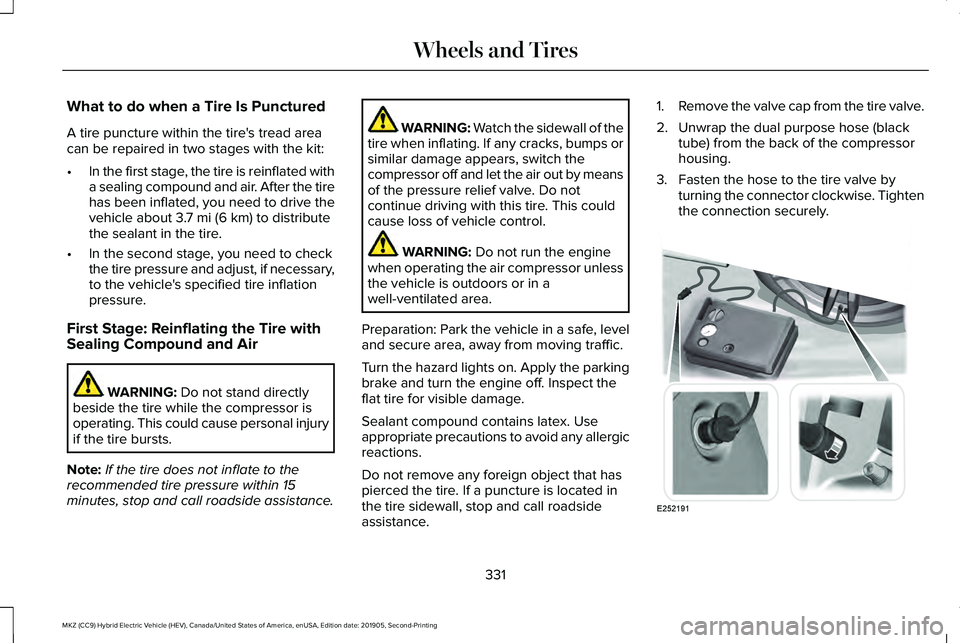
assistance. 1.
Remove the valve cap from the tire valve.
2. Unwrap the dual purpose hose (black tube) from the back of the compressor
housing.
3. Fasten the hose to the tire valve by turning the connector clockwise. Tighten
the connection securely. 331
MKZ (CC9) Hybrid Electric Vehicle (HEV), Canada/United States of America, enUSA, Edition date: 201905, Second-Printing Wheels and TiresE252191
Page 360 of 544

TECHNICAL SPECIFICATIONS
Wheel Lug Nut Torque Specifications
WARNING: When you install a wheel, always remove any corrosion, dirt or foreign m\
aterials present on the mounting surfaces of the
wheel or the surface of the wheel hub, brake drum or brake disc that contacts the wheel. Make sure to secure any fasteners that attach
the rotor to the hub so they do not interfere with the mounting surfaces\
of the wheel. Installing wheels without correct metal-to-metal contact
at the wheel mounting surfaces can cause the wheel nuts to loosen and th\
e wheel to come off while your vehicle is in motion, resulting in
loss of vehicle control, personal injury or death. lb.ft (Nm)
1
Bolt Size
150 lb.ft (204 Nm)
M14 x 1.5
1 Torque specifications are for nut and bolt threads free of dirt and rust.\
Use only Ford recommended replacement fasteners.
Retighten the lug nuts to the specified torque within 100 miles (160 kil\
ometers) after any wheel disturbance, such as tire rotation, changing a
flat tire or wheel removal.
357
MKZ (CC9) Hybrid Electric Vehicle (HEV), Canada/United States of America, enUSA, Edition date: 201905, Second-Printing Wheels and Tires
Page 382 of 544
CREATING A WI-FI HOTSPOT
You can create a Wi-Fi hotspot in your
vehicle and allow devices to connect to it for
access to the Internet.
Press the button to enter the
settings menu.
1. Select Lincoln Connect.
2. Select
Vehicle Hotspot.
Note: The vehicle hotspot default setting is
on.
Finding the Wi-Fi Hotspot Name and
Password Press the button to enter the
settings menu.
1. Select
Lincoln Connect.
2. Select
Vehicle Hotspot.
3. Select
Settings.
Note: The SSID is the hotspot name.
4. Select
View Password. Connecting a Device to the Wi-Fi
Hotspot
1.
On your device, turn on Wi-Fi and select
the hotspot from the list of available Wi-Fi
networks.
2. When prompted, enter the password.
Purchasing a Data Plan
1. Connect a device to the hotspot.
Note: The vehicle network carrier’ s portal
opens on your device.
2. If the portal does not open on your device, open a website and it redirects
to the vehicle network carrier’ s portal.
Note: Secure websites do not redirect.
3. Follow the instructions on the carrier portal to purchase a plan.
Note: If you have an active plan, the system
does not redirect to the vehicle network
carrier’ s portal when you connect a device.
Visit the vehicle network carrier’ s website to
purchase more data. Note:
If data usage information is available
in the vehicle hotspot menu, it is
approximate.
Note: If you carry out a master reset, the
system does not remove your vehicle from
your vehicle network carrier’ s account. To
remove your vehicle from the account,
contact your vehicle network carrier.
Note: The vehicle network carrier provides
Vehicle Hotspot services, subject to your
vehicle network carrier agreement, coverage
and availability.
CHANGING THE WI-FI HOTSPOT
NAME OR PASSWORD Press the button to enter the
settings menu.
1. Select
Lincoln Connect .
2. Select
Vehicle Hotspot.
3. Select
Settings.
4. Select
Edit .
5. Select
Change SSID Name.
379
MKZ (CC9) Hybrid Electric Vehicle (HEV), Canada/United States of America, enUSA, Edition date: 201905, Second-Printing Wi-Fi HotspotE280315 E280315 E280315
Page 446 of 544

Possible Cause and Resolution
Symptom
–Incorrect device settings.
•Make sure that your device does not have an auto-install program or active \
security
settings.
• Check that your device is not set only to charge.
– Device lock screen enabled.
•Unlock your device before connecting it.
The system does not recognize my device. –Device limitation.
•Do not leave your device in your vehicle during very hot or very cold we\
ather condi-
tions.
– Cable connection issue.
•Correctly connect the cable to your device and the vehicle USB port.
– Incompatible cable.
•Use the cable recommended by the manufacturer of your device.
The system does not understand the name of
a track or artist. –
Device limitation. Bluetooth does not support voice commands.
•Connect your device to a USB port.
• If you have an iOS device, press and hold the voice control button on the steering
wheel to use Siri to play specific tracks.
443
MKZ (CC9) Hybrid Electric Vehicle (HEV), Canada/United States of America, enUSA, Edition date: 201905, Second-Printing SYNC™ 3
Page 463 of 544
Transferable Coverage
If you sell your vehicle before your Lincoln
Protect extended service plan coverage
expires, you can transfer any remaining
coverage to the new owner. Which should
give you and your potential buyer a little
more peace of mind.
Less Cost to Properly Maintain Your Vehicle
Lincoln Protect extended service plan also
offers a Premium Maintenance Plan that
covers all scheduled maintenance, and
selected wear items. The coverage is
prepaid, so you never have to worry about
the cost of your vehicle
’s maintenance.
Covered maintenance includes:
• Windshield wiper blades.
• Spark plugs.
• The clutch disc (if equipped).
• Brake pads and linings.
• Shock absorbers and struts.
• Engine cooling hoses, clamps and
o-rings. •
Engine belts.
• Diesel exhaust fluid replenishment (if
equipped).
Interest Free Finance Options
Just a 10% down payment will provide you
with an affordable, no interest, no fee
payment program allowing you all the
security and benefits Lincoln Protect
extended service plan has to offer while
paying over time. You are pre-approved with
no credit check or hassles. To learn more,
call our Lincoln Protect extended service
plan specialists at 800-367-3377.
Complete the information below and mail to:
Lincoln Protect Extended Service Plan
P.O. Box 321067
Detroit, MI 48232 Lincoln Protect (CANADA ONLY)
You can get more protection for your vehicle
by purchasing a Lincoln Protect extended
service plan. Lincoln Protect extended
service plan is the only service contract
backed by Lincoln Motor Company of
Canada, Limited. Depending on the plan you
purchase, Lincoln Protect extended service
plan provides benefits such as:
•
Rental reimbursement.
• Coverage for certain maintenance and
wear items.
• Protection against repair costs after your
New Vehicle Limited Warranty Coverage
expires.
• Roadside Assistance benefits.
460
MKZ (CC9) Hybrid Electric Vehicle (HEV), Canada/United States of America, enUSA, Edition date: 201905, Second-Printing Lincoln Protect