belt LINCOLN MKZ HYBRID 2020 Owner's Guide
[x] Cancel search | Manufacturer: LINCOLN, Model Year: 2020, Model line: MKZ HYBRID, Model: LINCOLN MKZ HYBRID 2020Pages: 544, PDF Size: 5.26 MB
Page 58 of 544
WHAT IS 911 ASSIST
911 Assist is a SYNC system feature that can
call for help if you are in an accident. If a
crash deploys an airbag, excluding knee
airbags and rear inflatable seatbelts [if
equipped], or activates the fuel pump
shut-off, your SYNC-equipped vehicle may
be able to contact emergency services by
dialing 911 through a paired and connected
Bluetooth enabled phone. You can learn
more about the 911 Assist feature, by visiting:
Website
www.owner.lincoln.com
www.syncmyride.ca
www.syncmaroute.ca
Not all crashes will deploy an airbag or
activate the fuel pump shut-off, the triggers
for 911 Assist. If a connected cell phone
sustains damage or loses its connection to
SYNC during a crash, SYNC will search for
and try to connect to a previously paired cell
phone. SYNC will then attempt to call the
emergency services. Before making the call:
•
SYNC provides a short window of time,
about 10 seconds, to cancel the call. If
you fail to cancel the call, SYNC attempts
to dial 911.
• SYNC says the following, or a similar
message: SYNC will attempt to call 911,
to cancel the call, press Cancel on your
screen or press and hold the phone
button on your steering wheel.
If you do not cancel the call, and SYNC
makes a successful call, a pre-recorded
message plays for the 911 operator, and then
the occupant(s) in your vehicle is able to talk
with the operator. Be prepared to
immediately provide your name, phone
number and location, because not all 911
systems are capable of receiving this
information electronically.
During an emergency call, the system
transmits vehicle data to the emergency
service. See Data Recording (page 10). EMERGENCY CALL
REQUIREMENTS WARNING: Do not wait for 911 Assist
to make an emergency call if you can do
it yourself. Dial emergency services
immediately to avoid delayed response
time which could increase the risk of
serious injury or death after a crash. If you
do not hear 911 Assist within five seconds
of the crash, the system or phone may be
damaged or non-functional. WARNING: Always place your phone
in a secure location in your vehicle so it
does not become a projectile or get
damaged in a crash. Failure to do so may
cause serious injury to someone or
damage the phone which could prevent
911 Assist from working properly. WARNING: Unless the 911 Assist
setting is set on before a crash, the system
will not dial for help which could delay
response time, potentially increasing the
risk of serious injury or death after a crash.
55
MKZ (CC9) Hybrid Electric Vehicle (HEV), Canada/United States of America, enUSA, Edition date: 201905, Second-Printing 911 Assist
Page 65 of 544
PRINCIPLE OF OPERATION
MyKey allows you to program keys with
restricted driving modes to promote good
driving habits. You can program the
restrictions to all keys except one. Any keys
that you did not program are administrator
keys or admin keys.
You can use admin keys to:
•
Create a MyKey with certain vehicle
restrictions.
• Program certain MyKey settings.
• Clear all MyKey restrictions.
After you program a MyKey, you can view
the following information through the
information display:
• The total number of admin keys and
MyKeys for your vehicle.
• The total distance a MyKey driver
traveled with your vehicle.
Note: Every MyKey receives the same
restrictions and settings. You cannot
program them individually. Note:
For vehicles equipped with a
push-button start switch: When both a MyKey
and an admin key are present when you
start your vehicle, the system recognizes the
admin key only.
Standard Settings
Not every vehicle includes the features listed
below. If your vehicle has this equipment,
then you cannot change the following
settings when using a MyKey:
• Seatbelt reminder or Belt-Minder™. MyKey
mutes the audio system until drivers, and
in some instances, passengers, fasten
their seatbelts. Note: If your vehicle
includes an AM/FM radio or a very basic
audio system, then the radio may not
mute.
• Earlier low-fuel warning. The low-fuel
warning activates earlier for MyKey
drivers, giving them more time to refuel. •
Certain driver alerts, stability systems or
parking aids turn on automatically when
you use the MyKey system. For example,
Blind Spot Information System (BLIS),
cross traffic alert, lane departure warning
or forward collision warning. Note: MyKey
drivers may be able to turn the lane
departure warning feature off, but this
feature turns back on automatically with
every new key cycle.
• Restricted touchscreen operation in some
markets. For example, MyKey may
prevent manual navigation destination
input while the vehicle is in any gear
other than park (P) or when the vehicle
reaches a certain rate of speed.
• Satellite radio adult content restrictions,
if this feature is available in your market.
Optional Settings
You can configure certain vehicle feature
settings when you first create a MyKey. You
can also change the settings afterward with
an admin key.
62
MKZ (CC9) Hybrid Electric Vehicle (HEV), Canada/United States of America, enUSA, Edition date: 201905, Second-Printing MyKey™
Page 110 of 544
If it illuminates when the engine is running
this indicates a malfunction. Stop your
vehicle as soon as it is safe to do so and
switch the engine off. Check the engine oil
level. If the oil level is sufficient, this
indicates a system malfunction. Have your
vehicle checked as soon as possible.
See Engine Oil Check (page 304).
Fasten Seatbelt Warning Lamp It illuminates and a chime sounds
until you fasten the seatbelts.
Front Airbag Lights when you start your vehicle.
If it continues to flash or remains
on, it indicates a malfunction. Have
an authorized dealer check the system.
Grade Assist Lights when you switch on the
grade assist function. Heads Up Display
(If Equipped) A red beam of lights appears on
the windshield in certain instances
when using adaptive cruise control
and/or the collision warning system. To make
sure the display works, it will also appear
momentarily when you start your vehicle.
Headlamp High Beam Indicator Lights when you switch on the
high-beam headlamps. Flashes
when you use the headlamp
flasher.
Hood Ajar Lights when the ignition is on and
the hood is not completely closed.
Lane Keeping System Lamp
(If Equipped) Lights when you activate the lane
keeping system.Low Fuel Level Warning Lamp Lights when the fuel level is low or
the fuel tank is nearly empty.
Refuel as soon as possible.
Low Tire Pressure Warning Lamp It illuminates when your tire
pressure is low. If the lamp remains
on with the engine running or
when driving, check your tire pressure as
soon as possible.
It also illuminates momentarily when you
switch the ignition on to confirm the lamp is
functional. If it does not illuminate when you
switch the ignition on, or begins to flash at
any time, have the system checked by your
authorized dealer.
Low Washer Fluid Level Warning Lamp Lights when the windshield washer
fluid is low.
107
MKZ (CC9) Hybrid Electric Vehicle (HEV), Canada/United States of America, enUSA, Edition date: 201905, Second-Printing Instrument ClusterE71880 E67017 E144523 E156133 E159324 E144813 E178202
Page 135 of 544
MyKey
Action
Message
Displayed during key programming when MyKey cannot be programmed.
MyKey not Created
Displays when MyKey is active.
MyKey Active Drive Safely
Displays when starting the vehicle and MyKey is in use and the MyKey speed limit is on.
Speed Limited to XX MPH/km/h
Displays when a MyKey is in use and the MyKey speed limit is on and the vehicle speed isapproaching 80 mph (130 km/h).
Near Vehicle Top Speed
Displays when a MyKey is in use and the MyKey speed limit is reached.
Vehicle at Top Speed of MyKey Setting
Displays when MyKey is active.
Check Speed Drive Safely
Displays when a MyKey is in use and seatbelt reminder is activated.
Buckle Up to Unmute Audio
Displays when a MyKey is in use and AdvanceTrac is activated.
AdvanceTrac On - MyKey Setting
Displays when a MyKey is in use and Traction control is activated.
Traction Control On - MyKey Setting
Displays when a MyKey is in use and park aid is activated.
MyKey Park Aid Cannot be Deactivated
Displayed when the lane keeping aid is on per MyKey settings.
Lane Keeping Alert On MyKey Setting
132
MKZ (CC9) Hybrid Electric Vehicle (HEV), Canada/United States of America, enUSA, Edition date: 201905, Second-Printing Information Displays
Page 149 of 544
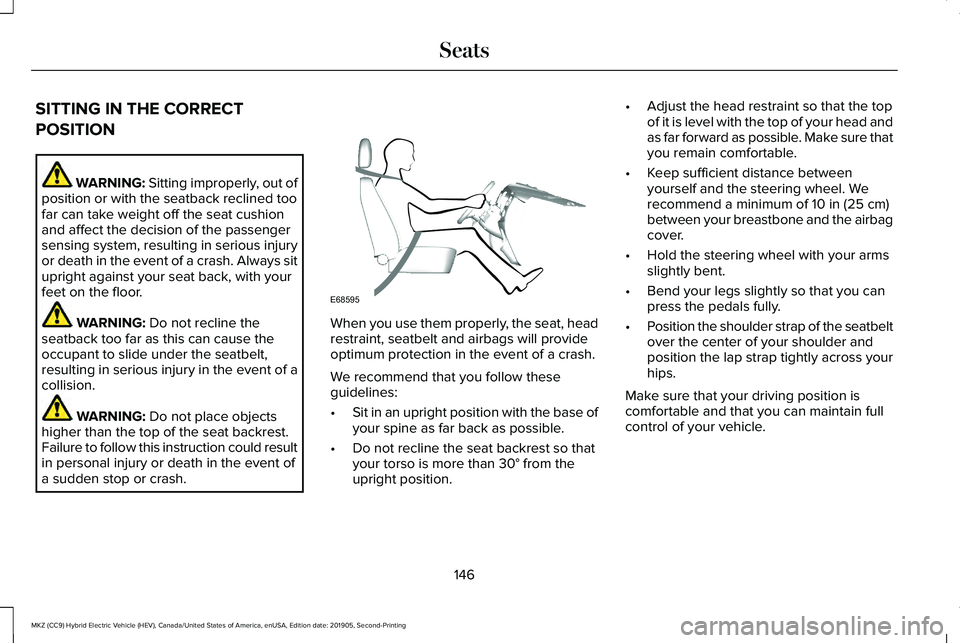
SITTING IN THE CORRECT
POSITION
WARNING: Sitting improperly, out of
position or with the seatback reclined too
far can take weight off the seat cushion
and affect the decision of the passenger
sensing system, resulting in serious injury
or death in the event of a crash. Always sit
upright against your seat back, with your
feet on the floor. WARNING: Do not recline the
seatback too far as this can cause the
occupant to slide under the seatbelt,
resulting in serious injury in the event of a
collision. WARNING:
Do not place objects
higher than the top of the seat backrest.
Failure to follow this instruction could result
in personal injury or death in the event of
a sudden stop or crash. When you use them properly, the seat, head
restraint, seatbelt and airbags will provide
optimum protection in the event of a crash.
We recommend that you follow these
guidelines:
•
Sit in an upright position with the base of
your spine as far back as possible.
• Do not recline the seat backrest so that
your torso is more than
30° from the
upright position. •
Adjust the head restraint so that the top
of it is level with the top of your head and
as far forward as possible. Make sure that
you remain comfortable.
• Keep sufficient distance between
yourself and the steering wheel. We
recommend a minimum of
10 in (25 cm)
between your breastbone and the airbag
cover.
• Hold the steering wheel with your arms
slightly bent.
• Bend your legs slightly so that you can
press the pedals fully.
• Position the shoulder strap of the seatbelt
over the center of your shoulder and
position the lap strap tightly across your
hips.
Make sure that your driving position is
comfortable and that you can maintain full
control of your vehicle.
146
MKZ (CC9) Hybrid Electric Vehicle (HEV), Canada/United States of America, enUSA, Edition date: 201905, Second-Printing SeatsE68595
Page 156 of 544
Linking a PreSet Position to your
Remote Control or Intelligent Access
Key Fob
Your vehicle can save the preset memory
positions for up to two remote controls or
intelligent access (IA) keys.
After you have saved your desired memory
preset positions:
1.
Press and hold the desired preset button
for about three seconds until you hear a
single tone.
2. Within three seconds, press the lock button on the remote control you are
linking.
To unlink a remote control, follow the same
procedure – except in step 2, press the
unlock button on the remote control.
Note: If more than one linked remote control
or intelligent access key is in range, the
memory function moves to the settings of
the first key to initiate a memory recall. Easy Entry and Exit Feature
If you enable the easy entry and exit feature,
it automatically moves the driver seat
position rearward up to 2 in (5 cm) when you
switch the ignition off.
The driver seat returns to the previous
position when you switch the ignition on.
You can enable or disable this feature in the
information display.
See General
Information (page 110).
REAR SEATS
Note: Your vehicle may have split seatbacks
that you must fold individually.
Note: Make sure the center safety belt is
unbuckled before folding the seatback.
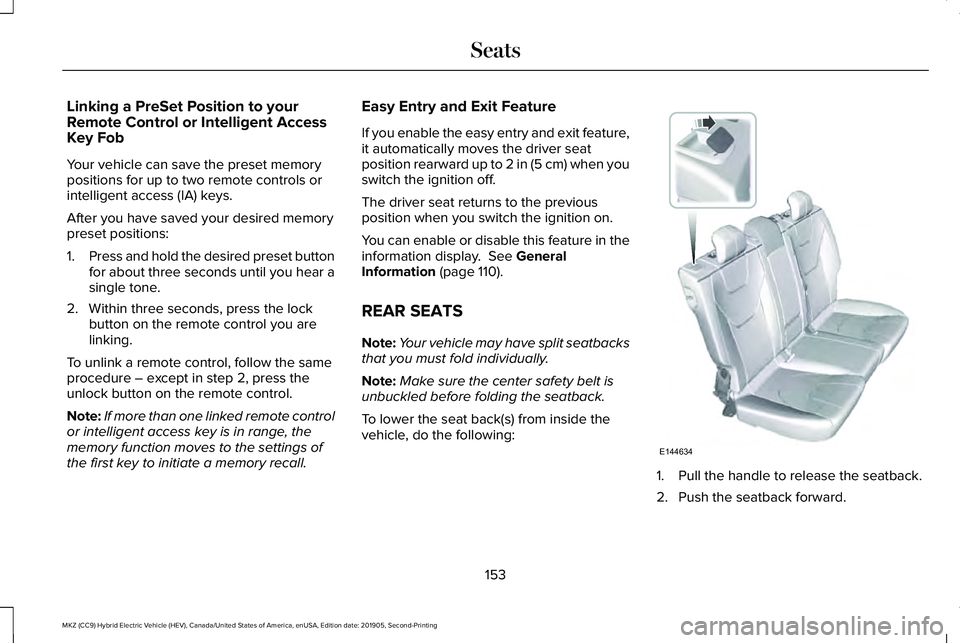
To lower the seat back(s) from inside the
vehicle, do the following: 1. Pull the handle to release the seatback.
2. Push the seatback forward.
153
MKZ (CC9) Hybrid Electric Vehicle (HEV), Canada/United States of America, enUSA, Edition date: 201905, Second-Printing SeatsE144634
Page 157 of 544
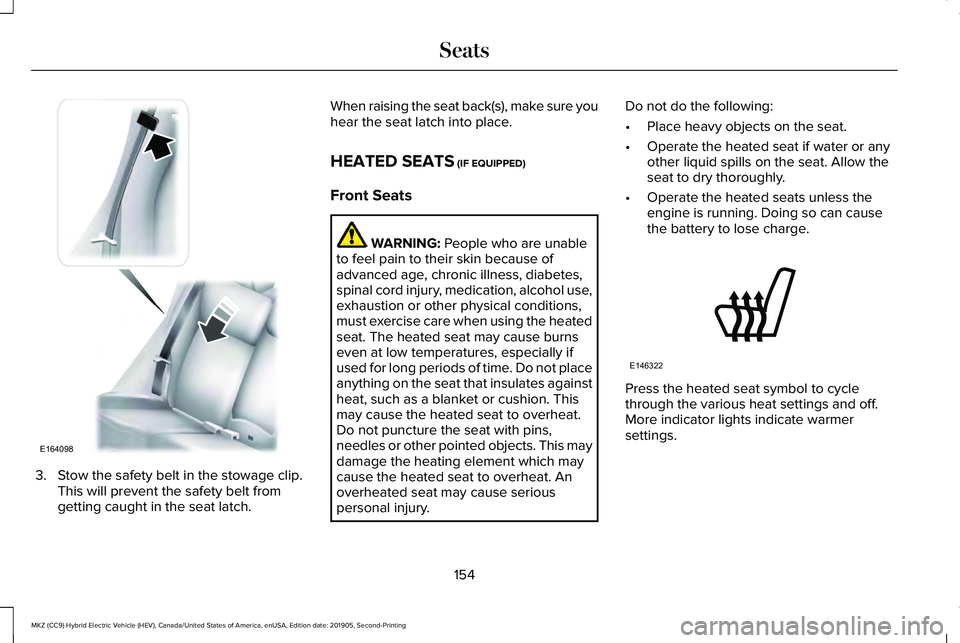
3. Stow the safety belt in the stowage clip.
This will prevent the safety belt from
getting caught in the seat latch. When raising the seat back(s), make sure you
hear the seat latch into place.
HEATED SEATS (IF EQUIPPED)
Front Seats WARNING:
People who are unable
to feel pain to their skin because of
advanced age, chronic illness, diabetes,
spinal cord injury, medication, alcohol use,
exhaustion or other physical conditions,
must exercise care when using the heated
seat. The heated seat may cause burns
even at low temperatures, especially if
used for long periods of time. Do not place
anything on the seat that insulates against
heat, such as a blanket or cushion. This
may cause the heated seat to overheat.
Do not puncture the seat with pins,
needles or other pointed objects. This may
damage the heating element which may
cause the heated seat to overheat. An
overheated seat may cause serious
personal injury. Do not do the following:
•
Place heavy objects on the seat.
• Operate the heated seat if water or any
other liquid spills on the seat. Allow the
seat to dry thoroughly.
• Operate the heated seats unless the
engine is running. Doing so can cause
the battery to lose charge. Press the heated seat symbol to cycle
through the various heat settings and off.
More indicator lights indicate warmer
settings.
154
MKZ (CC9) Hybrid Electric Vehicle (HEV), Canada/United States of America, enUSA, Edition date: 201905, Second-Printing SeatsE164098 E146322
Page 171 of 544
The keyless starting system has three
modes:
•
Off: Turns the ignition off.
• Without applying the brake pedal,
press and release the button once
when the ignition is in the on mode,
or when the vehicle is running but is
not moving.
• On:
All electrical circuits are operational
and the warning lamps and indicators
illuminate.
• Without applying the brake pedal,
press and release the button once.
• Start:
Starts the vehicle. The engine may
not start when the vehicle starts.
• Press the brake pedal, and then press
the button until the vehicle starts. An
indicator light on the button
illuminates when the ignition is on
and when the vehicle starts. STARTING A HYBRID ELECTRIC
VEHICLE SYSTEM
When the engine starts for the first time on
your drive, the idle speed increases, this
helps to warm up the engine. If the engine
idle speed does not slow down automatically,
have your vehicle checked by an authorized
dealer.
Note:
You can crank the engine for a total
of 60 seconds without the engine starting
before the starting system temporarily
disables. The 60 seconds does not have to
be all at once. For example, if you crank the
engine three times for 20 seconds each time,
without the engine starting, you reached the
60-second time limit. A message appears
in the information display alerting you that
you exceeded the cranking time. You
cannot attempt to start the engine for at
least 15 minutes.
Note: After 15 minutes, you are limited to a
15-second engine cranking time. You need
to wait 60 minutes before you can crank the
engine for 60 seconds again. Before starting your vehicle, check the
following:
•
Make sure all occupants have fastened
their seatbelts.
• Make sure the headlamps and electrical
accessories are off.
• Make sure the parking brake is on.
• Put the transmission in
P.
Note: Do not touch the accelerator pedal.
1. Fully depress the brake pedal.
2. Press the button.
Note: The green ready indicator illuminates
letting you know that your vehicle is ready
for driving. Since your vehicle is equipped
with a silent key start, the engine may not
start when your vehicle starts.
See Hybrid
Vehicle Operation (page 173).
The system does not function if:
• The key frequencies are jammed.
• The key battery has no charge.
If you are unable to start your vehicle, do the
following:
168
MKZ (CC9) Hybrid Electric Vehicle (HEV), Canada/United States of America, enUSA, Edition date: 201905, Second-Printing Starting and Stopping the Engine
Page 197 of 544
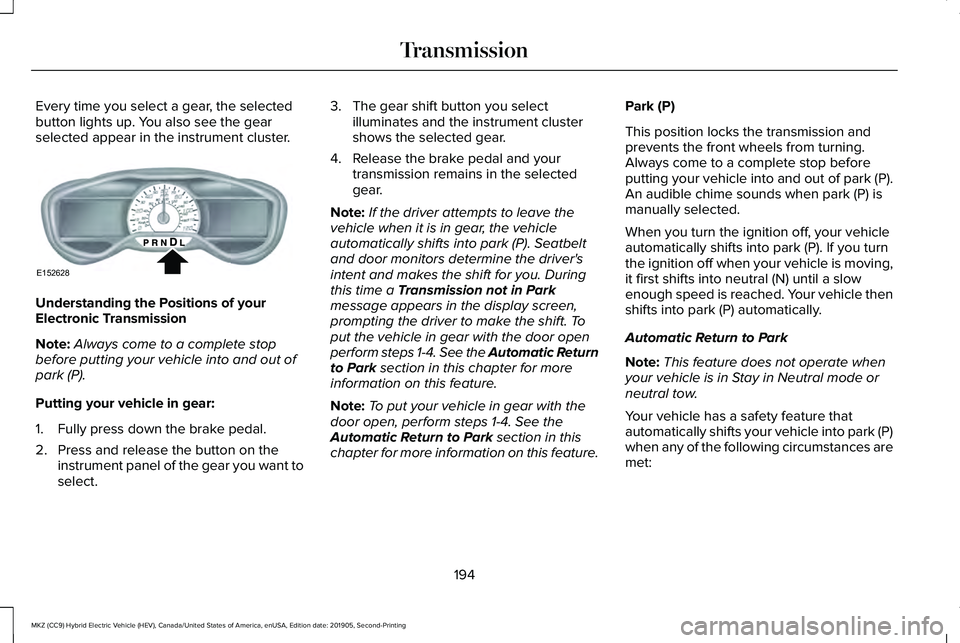
Every time you select a gear, the selected
button lights up. You also see the gear
selected appear in the instrument cluster.
Understanding the Positions of your
Electronic Transmission
Note:
Always come to a complete stop
before putting your vehicle into and out of
park (P).
Putting your vehicle in gear:
1. Fully press down the brake pedal.
2. Press and release the button on the instrument panel of the gear you want to
select. 3. The gear shift button you select
illuminates and the instrument cluster
shows the selected gear.
4. Release the brake pedal and your transmission remains in the selected
gear.
Note: If the driver attempts to leave the
vehicle when it is in gear, the vehicle
automatically shifts into park (P). Seatbelt
and door monitors determine the driver's
intent and makes the shift for you. During
this time a Transmission not in Park
message appears in the display screen,
prompting the driver to make the shift. To
put the vehicle in gear with the door open
perform steps 1-4. See the Automatic Return
to Park
section in this chapter for more
information on this feature.
Note: To put your vehicle in gear with the
door open, perform steps 1-4. See the
Automatic Return to Park
section in this
chapter for more information on this feature. Park (P)
This position locks the transmission and
prevents the front wheels from turning.
Always come to a complete stop before
putting your vehicle into and out of park (P).
An audible chime sounds when park (P) is
manually selected.
When you turn the ignition off, your vehicle
automatically shifts into park (P). If you turn
the ignition off when your vehicle is moving,
it first shifts into neutral (N) until a slow
enough speed is reached. Your vehicle then
shifts into park (P) automatically.
Automatic Return to Park
Note:
This feature does not operate when
your vehicle is in Stay in Neutral mode or
neutral tow.
Your vehicle has a safety feature that
automatically shifts your vehicle into park (P)
when any of the following circumstances are
met:
194
MKZ (CC9) Hybrid Electric Vehicle (HEV), Canada/United States of America, enUSA, Edition date: 201905, Second-Printing TransmissionE152628
Page 198 of 544
•
Turn the ignition off.
• Open the driver's door with your seat belt
unlatched.
• Unlatching your seatbelt when the
driver's door is open.
If you turn the ignition off when your vehicle
is moving, your vehicle first shifts into neutral
(N) until it slows down enough to shift into
park (P) automatically.
Note: If you have waited an extended period
of time, (2-15 minutes) before starting your
vehicle, unlatching your safety belt does
cause this feature to activate, even with the
driver's door closed.
Note: This feature may not work properly if
the door ajar switch is malfunctioning. If your
door ajar indicator does not illuminate when
you open the driver’ s door or the indicator
illuminates with the driver’ s door closed, see
your authorized dealer. Reverse (R)
With the transmission in reverse (R), your
vehicle moves backward. Always come to a
complete stop before shifting into and out
of reverse (R).
Neutral (N)
Press the neutral (N) button to put your
vehicle in neutral. In neutral, your vehicle can
start and is free to roll. Hold the brake pedal
down when in this position.
Stay in Neutral mode
Stay in Neutral mode allows your vehicle to
stay in neutral when you exit your vehicle.
Your vehicle must be stationary to enter this
mode.
To enter Stay in Neutral mode:
1.
Press the neutral (N) button on the shifter
assembly.
2. The message Select N Again to Enter
Stay in Neutral mode appears in the
information display screen.
3. Press the neutral (N) button again to enter Stay in Neutral mode. The message
Stay in Neutral mode
engaged appears in the instrument cluster
when your vehicle has entered Stay in
Neutral mode.
Note: During this mode the neutral (N) button
flashes continuously and the instrument
cluster displays neutral as the selected gear.
Exiting Stay in Neutral mode
To disable Stay in Neutral mode put your
vehicle in another gear. See the Putting the
Vehicle in Gear
section for instructions on
how to do this.
Entering a Carwash
Note: Always put your vehicle in Stay in
Neutral mode when entering an automatic
car wash. Failure to do this could result in
vehicle damage that may not be covered by
warranty.
Drive (D)
The normal driving position for the best fuel
economy.
195
MKZ (CC9) Hybrid Electric Vehicle (HEV), Canada/United States of America, enUSA, Edition date: 201905, Second-Printing Transmission