ignition LINCOLN MKZ HYBRID 2020 Manual PDF
[x] Cancel search | Manufacturer: LINCOLN, Model Year: 2020, Model line: MKZ HYBRID, Model: LINCOLN MKZ HYBRID 2020Pages: 544, PDF Size: 5.26 MB
Page 362 of 544
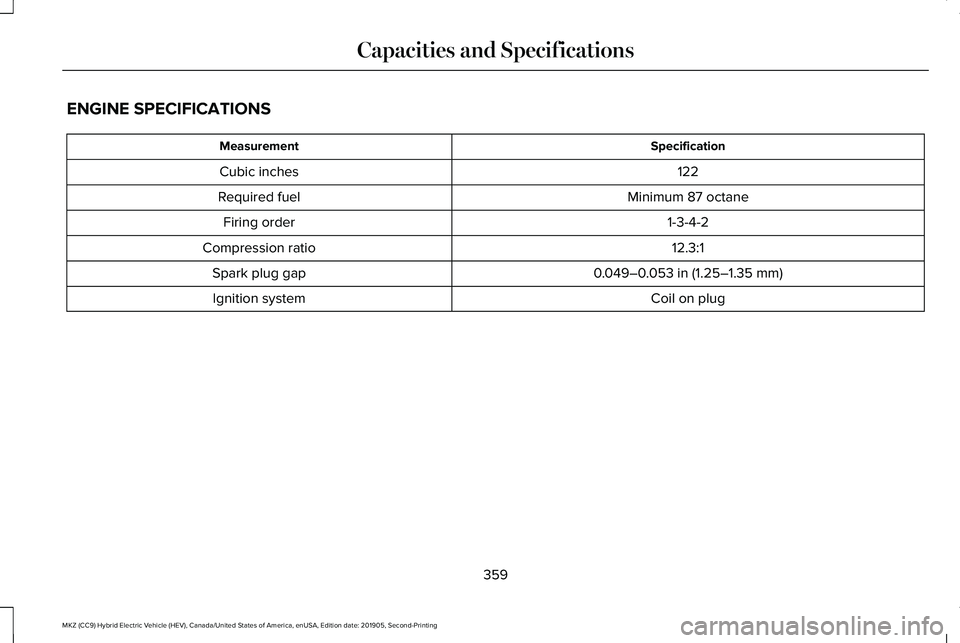
ENGINE SPECIFICATIONS
Specification
Measurement
122
Cubic inches
Minimum 87 octane
Required fuel
1-3-4-2
Firing order
12.3:1
Compression ratio
0.049–0.053 in (1.25–1.35 mm)
Spark plug gap
Coil on plug
Ignition system
359
MKZ (CC9) Hybrid Electric Vehicle (HEV), Canada/United States of America, enUSA, Edition date: 201905, Second-Printing Capacities and Specifications
Page 378 of 544
CONNECTING THE VEHICLE TO A
MOBILE NETWORK
What Is the Modem
The modem allows you to connect your
vehicle to the Internet to use when you are
on the road.
If you enable the modem using the Lincoln
Way app, you can access the following
services:
•
Locating and remotely starting, locking
and unlocking your vehicle. See the
information in the Lincoln Way app.
• Automatic system updates. Note:
We may need to update operating
system software on your vehicle to keep
connected services updated without prior
notice to you.
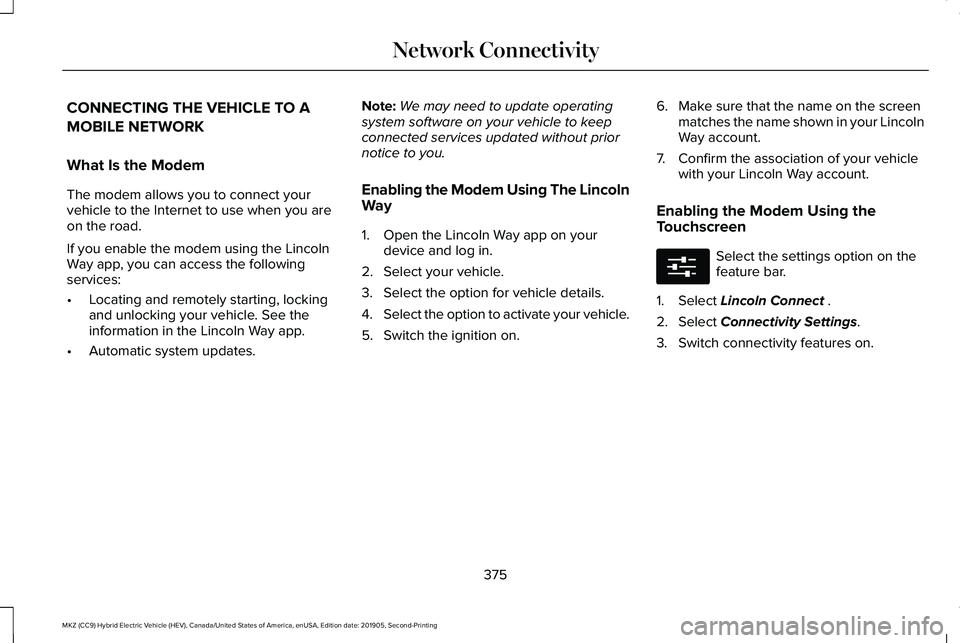
Enabling the Modem Using The Lincoln
Way
1. Open the Lincoln Way app on your device and log in.
2. Select your vehicle.
3. Select the option for vehicle details.
4. Select the option to activate your vehicle.
5. Switch the ignition on. 6. Make sure that the name on the screen
matches the name shown in your Lincoln
Way account.
7. Confirm the association of your vehicle with your Lincoln Way account.
Enabling the Modem Using the
Touchscreen Select the settings option on the
feature bar.
1. Select Lincoln Connect .
2. Select
Connectivity Settings.
3. Switch connectivity features on.
375
MKZ (CC9) Hybrid Electric Vehicle (HEV), Canada/United States of America, enUSA, Edition date: 201905, Second-Printing Network ConnectivityE280315
Page 391 of 544
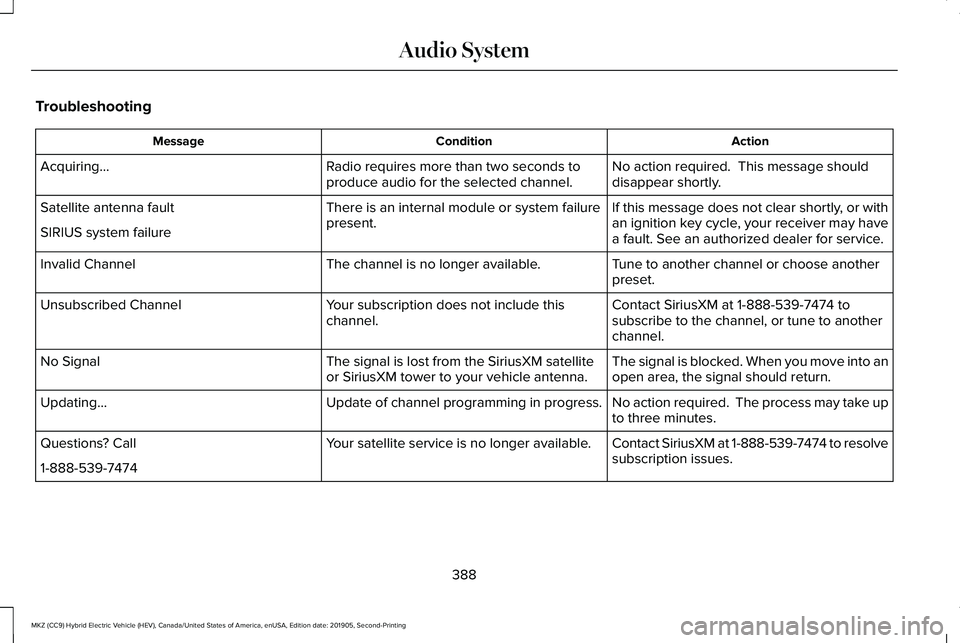
Troubleshooting
Action
Condition
Message
No action required. This message should
disappear shortly.
Radio requires more than two seconds to
produce audio for the selected channel.
Acquiring…
If this message does not clear shortly, or with
an ignition key cycle, your receiver may have
a fault. See an authorized dealer for service.
There is an internal module or system failure
present.
Satellite antenna fault
SIRIUS system failure
Tune to another channel or choose another
preset.
The channel is no longer available.
Invalid Channel
Contact SiriusXM at 1-888-539-7474 to
subscribe to the channel, or tune to another
channel.
Your subscription does not include this
channel.
Unsubscribed Channel
The signal is blocked. When you move into an
open area, the signal should return.
The signal is lost from the SiriusXM satellite
or SiriusXM tower to your vehicle antenna.
No Signal
No action required. The process may take up
to three minutes.
Update of channel programming in progress.
Updating…
Contact SiriusXM at 1-888-539-7474 to resolve
subscription issues.
Your satellite service is no longer available.
Questions? Call
1-888-539-7474
388
MKZ (CC9) Hybrid Electric Vehicle (HEV), Canada/United States of America, enUSA, Edition date: 201905, Second-Printing Audio System
Page 393 of 544
GENERAL INFORMATION
WARNING: Driving while distracted
can result in loss of vehicle control, crash
and injury. We strongly recommend that
you use extreme caution when using any
device that may take your focus off the
road. Your primary responsibility is the safe
operation of your vehicle. We recommend
against the use of any hand-held device
while driving and encourage the use of
voice-operated systems when possible.
Make sure you are aware of all applicable
local laws that may affect the use of
electronic devices while driving.
About SYNC
The system allows you to interact with the
entertainment, information and
communication systems on your vehicle
using voice commands and a touchscreen.
The system provides easy interaction with
audio, phone, navigation, mobile apps and
settings. Note:
You can switch the system on and use
it for up to an hour without switching the
ignition on.
Note: You can use the system after you
switch the ignition off for up to 10 minutes or
until you open a door.
Note: For your safety, some features are
speed-dependent. Their use is limited to
when your vehicle speed is less than 3 mph
(5 km/h)
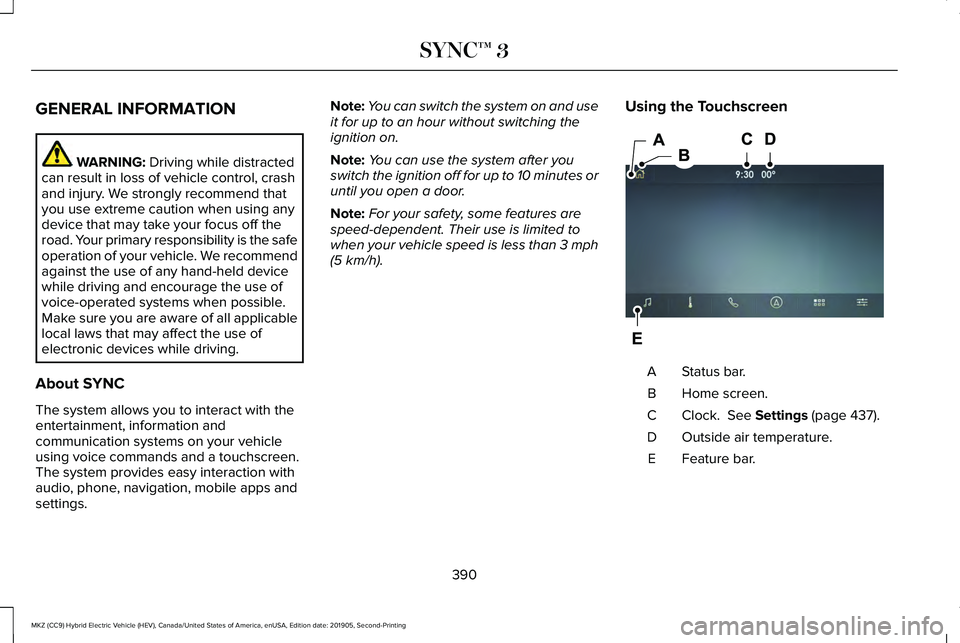
. Using the Touchscreen Status bar.
A
Home screen.
B
Clock.
See Settings (page 437).
C
Outside air temperature.
D
Feature bar.
E
390
MKZ (CC9) Hybrid Electric Vehicle (HEV), Canada/United States of America, enUSA, Edition date: 201905, Second-Printing SYNC™ 3E297844
Page 411 of 544
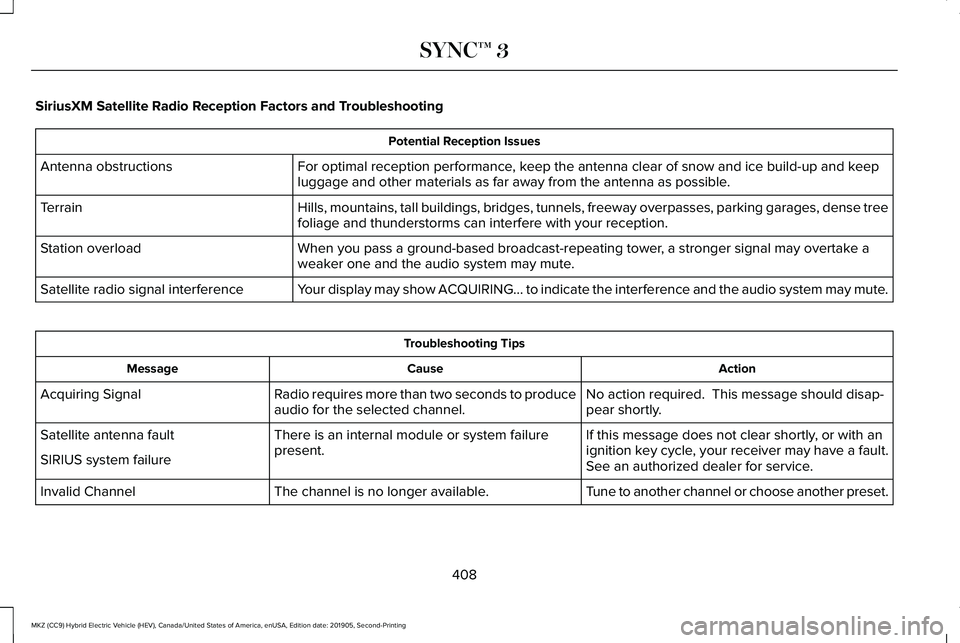
SiriusXM Satellite Radio Reception Factors and Troubleshooting
Potential Reception Issues
For optimal reception performance, keep the antenna clear of snow and ice build-up and keep
luggage and other materials as far away from the antenna as possible.
Antenna obstructions
Hills, mountains, tall buildings, bridges, tunnels, freeway overpasses, \
parking garages, dense tree
foliage and thunderstorms can interfere with your reception.
Terrain
When you pass a ground-based broadcast-repeating tower, a stronger signal may overtake a
weaker one and the audio system may mute.
Station overload
Your display may show ACQUIRING... to indicate the interference and the a\
udio system may mute.
Satellite radio signal interference Troubleshooting Tips
Action
Cause
Message
No action required. This message should disap-
pear shortly.
Radio requires more than two seconds to produce
audio for the selected channel.
Acquiring Signal
If this message does not clear shortly, or with an
ignition key cycle, your receiver may have a fault.
See an authorized dealer for service.
There is an internal module or system failure
present.
Satellite antenna fault
SIRIUS system failure
Tune to another channel or choose another preset.
The channel is no longer available.
Invalid Channel
408
MKZ (CC9) Hybrid Electric Vehicle (HEV), Canada/United States of America, enUSA, Edition date: 201905, Second-Printing SYNC™ 3
Page 449 of 544
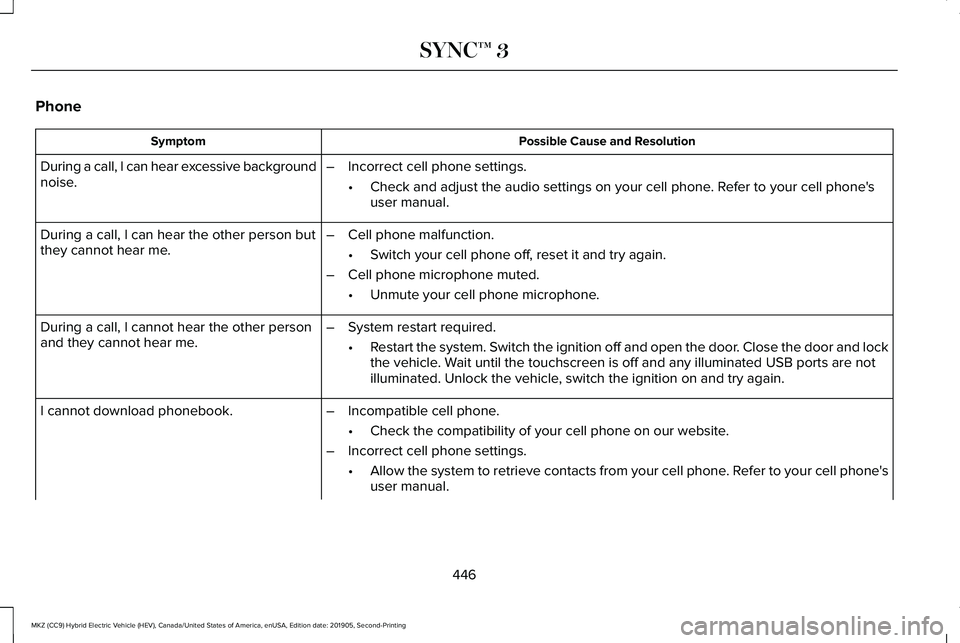
Phone
Possible Cause and Resolution
Symptom
During a call, I can hear excessive background
noise. –
Incorrect cell phone settings.
•Check and adjust the audio settings on your cell phone. Refer to your cell phone's
user manual.
– Cell phone malfunction.
•Switch your cell phone off, reset it and try again.
– Cell phone microphone muted.
•Unmute your cell phone microphone.
During a call, I can hear the other person but
they cannot hear me.
During a call, I cannot hear the other person
and they cannot hear me.
–
System restart required.
•Restart the system. Switch the ignition off and open the door. Close the door and lock
the vehicle. Wait until the touchscreen is off and any illuminated USB ports are not
illuminated. Unlock the vehicle, switch the ignition on and try again.
I cannot download phonebook. –Incompatible cell phone.
•Check the compatibility of your cell phone on our website.
– Incorrect cell phone settings.
•Allow the system to retrieve contacts from your cell phone. Refer to your cell phone's
user manual.
446
MKZ (CC9) Hybrid Electric Vehicle (HEV), Canada/United States of America, enUSA, Edition date: 201905, Second-Printing SYNC™ 3
Page 457 of 544
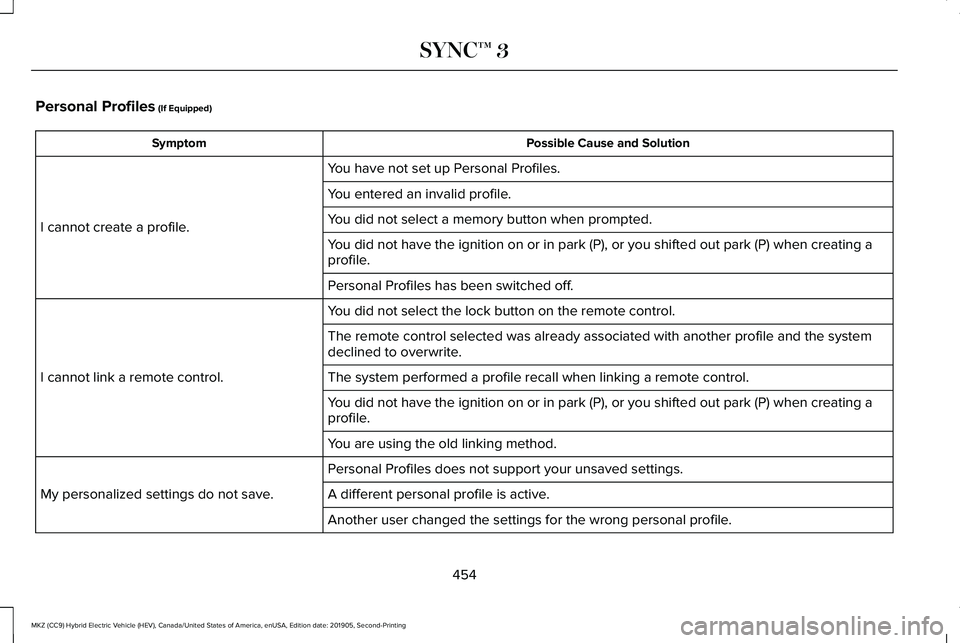
Personal Profiles (If Equipped)
Possible Cause and Solution
Symptom
You have not set up Personal Profiles.
I cannot create a profile. You entered an invalid profile.
You did not select a memory button when prompted.
You did not have the ignition on or in park (P), or you shifted out par\
k (P) when creating a
profile.
Personal Profiles has been switched off.
You did not select the lock button on the remote control.
I cannot link a remote control. The remote control selected was already associated with another profile \
and the system
declined to overwrite.
The system performed a profile recall when linking a remote control.
You did not have the ignition on or in park (P), or you shifted out par\
k (P) when creating a
profile.
You are using the old linking method.
Personal Profiles does not support your unsaved settings.
My personalized settings do not save. A different personal profile is active. Another user changed the settings for the wrong personal profile.
454
MKZ (CC9) Hybrid Electric Vehicle (HEV), Canada/United States of America, enUSA, Edition date: 201905, Second-Printing SYNC™ 3
Page 499 of 544
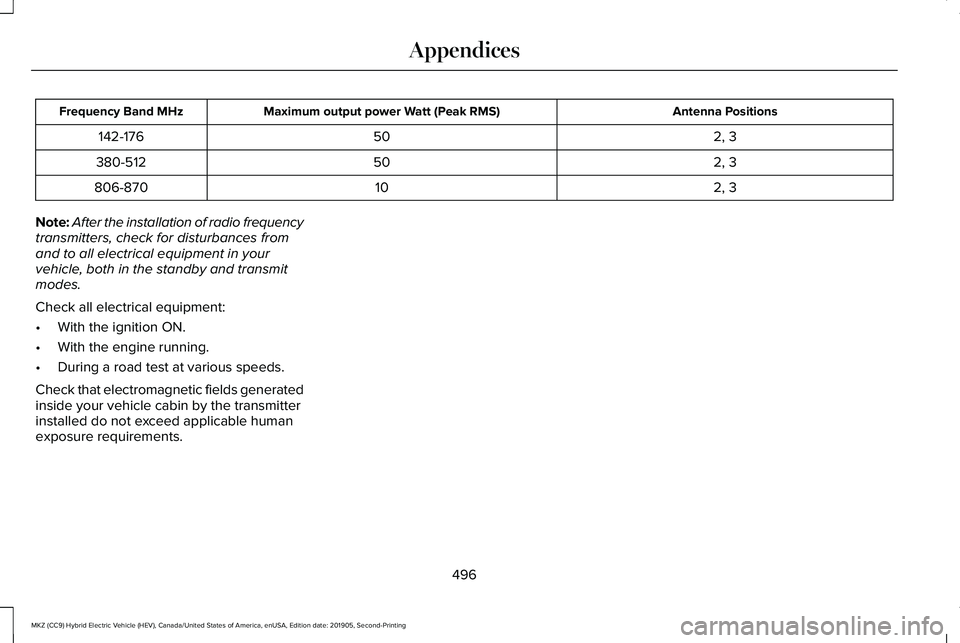
Antenna Positions
Maximum output power Watt (Peak RMS)
Frequency Band MHz
2, 3
50
142-176
2, 3
50
380-512
2, 3
10
806-870
Note: After the installation of radio frequency
transmitters, check for disturbances from
and to all electrical equipment in your
vehicle, both in the standby and transmit
modes.
Check all electrical equipment:
• With the ignition ON.
• With the engine running.
• During a road test at various speeds.
Check that electromagnetic fields generated
inside your vehicle cabin by the transmitter
installed do not exceed applicable human
exposure requirements.
496
MKZ (CC9) Hybrid Electric Vehicle (HEV), Canada/United States of America, enUSA, Edition date: 201905, Second-Printing Appendices
Page 538 of 544
Driving:...................................................................173
Driving to Optimize Fuel Economy.................175
Engine:....................................................................174
Starting:..................................................................173
Stopping:................................................................173
Transmission Operation:....................................174
I
In California (U.S. Only)...............................274
Information Display Control.........................83
Information Displays......................................110 General Information.............................................110
Information Messages..................................121 Active Park............................................................122
Adaptive Cruise Control....................................122
Adaptive Headlamps..........................................123
AdvanceTrac ™.......................................................123
Airbag.....................................................................124
Alarm......................................................................124
Automatic Engine Shutdown............................124
Battery and Charging System (12 volt)...........125
Battery and Charging System (High Voltage).............................................................125
Blind Spot Information and Cross Traffic Alert System...............................................................126
Doors and Locks..................................................126
Driver Alert............................................................127 Fuel........................................................................\
..127
Hill Start Assist.....................................................128
Keys and Intelligent Access.............................128
Lane Keeping System........................................130
Maintenance.........................................................130
MyKey.....................................................................132
Park Aid..................................................................133
Park Brake.............................................................133
Power Steering.....................................................134
Pre-Collision Assist.............................................135
Remote Start.........................................................135
Seats.......................................................................136
Starting System ...................................................136
Tire Pressure Monitoring System....................
137
Traction Control....................................................137
Transmission.........................................................138
Installing Child Restraints.............................23 Child Seats..............................................................23
Using Lap and Shoulder Belts...........................23
Using Lower Anchors and Tethers for
CHildren (LATCH).............................................26
Using Tether Straps..............................................28
Instrument Cluster
........................................102
Instrument Lighting Dimmer........................89
Instrument Panel..............................................19
Interior Lamps
...................................................91
Front Interior Lamp................................................91
Rear Interior Lamps..............................................92 Interior Luggage Compartment
Release
...........................................................75
Interior Mirror...................................................98
Auto-Dimming Mirror...........................................98
Introduction
.........................................................7
J
Jump Starting the Vehicle..........................267 Connecting the Jumper Cables.....................268
Jump Starting......................................................269
Preparing Your Vehicle.....................................267
Removing the Jumper Cables........................269
K
Keyless Entry
....................................................73
SECURICODE™ KEYLESS ENTRY
KEYPAD...............................................................73
Keyless Starting.............................................167 Ignition Modes......................................................167
Keys and Remote Controls
...........................57
L
Lane Keeping System..................................237 Switching the System On and Off..................238
535
MKZ (CC9) Hybrid Electric Vehicle (HEV), Canada/United States of America, enUSA, Edition date: 201905, Second-Printing Index