audio LINCOLN MKZ HYBRID 2020 Owners Manual
[x] Cancel search | Manufacturer: LINCOLN, Model Year: 2020, Model line: MKZ HYBRID, Model: LINCOLN MKZ HYBRID 2020Pages: 544, PDF Size: 5.26 MB
Page 5 of 544
MyKey – Troubleshooting
...........................65
Doors and Locks
Locking and Unlocking .................................
67
Power Decklid ..................................................
71
Keyless Entry ...................................................
73
Interior Luggage Compartment Release ........................................................................\
.
75
Security
Passive Anti-Theft System ...........................
77
Anti-Theft Alarm .............................................
78
Steering Wheel
Adjusting the Steering Wheel - Vehicles With: Manual Adjustable Steering
Column .........................................................
80
Adjusting the Steering Wheel - Vehicles With: Power Adjustable Steering Column
........................................................................\
80
Audio Control .................................................
82
Voice Control ..................................................
82
Cruise Control - Vehicles With: Adaptive Cruise Control With Stop and Go ..........
82Cruise Control - Vehicles With: Cruise
Control .........................................................
83
Information Display Control ........................
83
Heated Steering Wheel ...............................
83
Horn ..................................................................
83
Wipers and Washers
Windshield Wipers ........................................
84
Autowipers ......................................................
85
Windshield Washers .....................................
86
Lighting
General Information ......................................
87
Lighting Control ..............................................
87
Autolamps .......................................................
88
Instrument Lighting Dimmer .......................
89
Headlamp Exit Delay ....................................
89
Daytime Running Lamps - Vehicles With: Daytime Running Lamps (DRL) ..............
89
Daytime Running Lamps - Vehicles With: Configurable Daytime Running Lamps
........................................................................\
89
Adaptive Headlamps ....................................
90
Direction Indicators .......................................
90Welcome Lighting
...........................................
91
Interior Lamps ..................................................
91
Ambient Lighting ...........................................
92
Automatic High Beam Control
What Is Automatic High Beam Control ........................................................................\
.
93
Switching Automatic High Beam Control On and Off ...................................................
93
Automatic High Beam Control Indicators ........................................................................\
.
94
Overriding Automatic High Beam Control ........................................................................\
.
94
Windows and Mirrors
Power Windows .............................................
95
Global Opening and Closing ......................
96
Exterior Mirrors ...............................................
96
Interior Mirror ..................................................
98
Sun Visors .......................................................
99
Sun Shades .....................................................
99
Moonroof .........................................................
99
2
MKZ (CC9) Hybrid Electric Vehicle (HEV), Canada/United States of America, enUSA, Edition date: 201905, Second-Printing Table of Contents
Page 9 of 544
Network Connectivity
Connecting the Vehicle to a Mobile
Network .....................................................375
Network Connectivity – Troubleshooting ......................................................................
376
Wi-Fi Hotspot
Creating a Wi-Fi Hotspot ...........................
379
Changing the Wi-Fi Hotspot Name or Password ...................................................
379
Audio System
General Information .....................................
381
Audio Unit .....................................................
382
Digital Radio .................................................
383
Satellite Radio ..............................................
386
USB Port ........................................................
389
SYNC™ 3
General Information ...................................
390
Using Voice Recognition ...........................
392
Entertainment ...............................................
404
Climate ............................................................
416Phone
..............................................................
419
Navigation ......................................................
421
Electric Vehicle Information ......................
429
Apps ................................................................
435
Settings ..........................................................
437
SYNC™ 3 Troubleshooting .........................
440
Accessories
Accessories ...................................................
457
Lincoln Protect
Lincoln Protect .............................................
459
Scheduled Maintenance
General Maintenance Information ..........
462
Normal Scheduled Maintenance .............
467
Special Operating Conditions Scheduled Maintenance ............................................
469
Scheduled Maintenance Record ..............
471
Appendices
Electromagnetic Compatibility ................
492
End User License Agreement ..................
497Declaration of Conformity
.........................
527
Declaration of Conformity - Vehicles With: SYNC 3 ......................................................
528
6
MKZ (CC9) Hybrid Electric Vehicle (HEV), Canada/United States of America, enUSA, Edition date: 201905, Second-Printing Table of Contents
Page 23 of 544
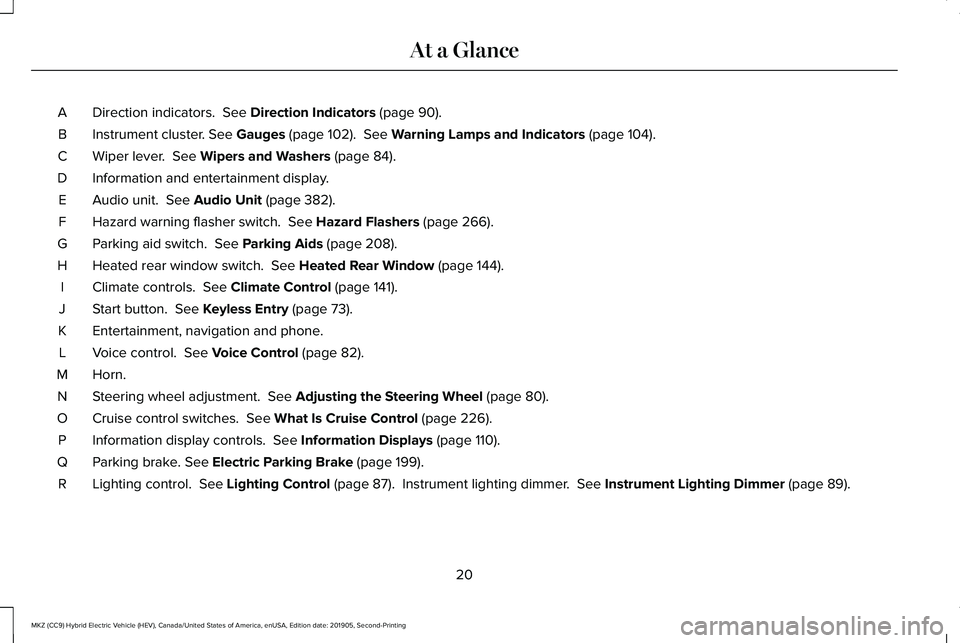
Direction indicators. See Direction Indicators (page 90).
A
Instrument cluster.
See Gauges (page 102). See Warning Lamps and Indicators (page 104).
B
Wiper lever.
See Wipers and Washers (page 84).
C
Information and entertainment display.
D
Audio unit.
See Audio Unit (page 382).
E
Hazard warning flasher switch.
See Hazard Flashers (page 266).
F
Parking aid switch.
See Parking Aids (page 208).
G
Heated rear window switch.
See Heated Rear Window (page 144).
H
Climate controls.
See Climate Control (page 141).
I
Start button.
See Keyless Entry (page 73).
J
Entertainment, navigation and phone.
K
Voice control.
See Voice Control (page 82).
L
Horn.M
Steering wheel adjustment.
See Adjusting the Steering Wheel (page 80).
N
Cruise control switches.
See What Is Cruise Control (page 226).
O
Information display controls.
See Information Displays (page 110).
P
Parking brake.
See Electric Parking Brake (page 199).
Q
Lighting control.
See Lighting Control (page 87). Instrument lighting dimmer. See Instrument Lighting Dimmer (page 89).
R
20
MKZ (CC9) Hybrid Electric Vehicle (HEV), Canada/United States of America, enUSA, Edition date: 201905, Second-Printing At a Glance
Page 65 of 544
PRINCIPLE OF OPERATION
MyKey allows you to program keys with
restricted driving modes to promote good
driving habits. You can program the
restrictions to all keys except one. Any keys
that you did not program are administrator
keys or admin keys.
You can use admin keys to:
•
Create a MyKey with certain vehicle
restrictions.
• Program certain MyKey settings.
• Clear all MyKey restrictions.
After you program a MyKey, you can view
the following information through the
information display:
• The total number of admin keys and
MyKeys for your vehicle.
• The total distance a MyKey driver
traveled with your vehicle.
Note: Every MyKey receives the same
restrictions and settings. You cannot
program them individually. Note:
For vehicles equipped with a
push-button start switch: When both a MyKey
and an admin key are present when you
start your vehicle, the system recognizes the
admin key only.
Standard Settings
Not every vehicle includes the features listed
below. If your vehicle has this equipment,
then you cannot change the following
settings when using a MyKey:
• Seatbelt reminder or Belt-Minder™. MyKey
mutes the audio system until drivers, and
in some instances, passengers, fasten
their seatbelts. Note: If your vehicle
includes an AM/FM radio or a very basic
audio system, then the radio may not
mute.
• Earlier low-fuel warning. The low-fuel
warning activates earlier for MyKey
drivers, giving them more time to refuel. •
Certain driver alerts, stability systems or
parking aids turn on automatically when
you use the MyKey system. For example,
Blind Spot Information System (BLIS),
cross traffic alert, lane departure warning
or forward collision warning. Note: MyKey
drivers may be able to turn the lane
departure warning feature off, but this
feature turns back on automatically with
every new key cycle.
• Restricted touchscreen operation in some
markets. For example, MyKey may
prevent manual navigation destination
input while the vehicle is in any gear
other than park (P) or when the vehicle
reaches a certain rate of speed.
• Satellite radio adult content restrictions,
if this feature is available in your market.
Optional Settings
You can configure certain vehicle feature
settings when you first create a MyKey. You
can also change the settings afterward with
an admin key.
62
MKZ (CC9) Hybrid Electric Vehicle (HEV), Canada/United States of America, enUSA, Edition date: 201905, Second-Printing MyKey™
Page 66 of 544
Note:
Not every feature applies to every
vehicle in every market. When they are
available for your vehicle, then they appear
in your information display, providing choices
to switch them on or off, or to select a more
specific setting.
• Various vehicle speed limits so the
MyKey driver cannot exceed certain
speeds. The information display shows
warnings followed by an audible tone
when the MyKey driver reaches the set
speed. You cannot override the set
speed by fully depressing the accelerator
pedal. WARNING: Do not set MyKey
maximum speed limit to a limit that will
prevent the driver from maintaining a safe
speed considering posted speed limits and
prevailing road conditions. The driver is
always responsible to drive in accordance
with local laws and prevailing conditions.
Failure to do so could result in accident or
injury. •
Various vehicle speed reminders so
MyKey drivers know when their vehicle
speed approaches the limits. Warnings
appear in your information display and a
tone sounds when the MyKey drivers
exceed the set vehicle speed.
• The audio system's maximum volume
limits to 45% so MyKey drivers can
concentrate on the road. A message
appears in the information display when
MyKey drivers attempt to exceed the
limited volume. MyKey also disables the
automatic volume control.
Note: If your
vehicle includes an AM/FM radio or a
very basic audio system, then the radio
may not limit.
• Always on setting. This setting forces
certain features to remain on and active
for MyKey drivers. For example, E911 or
emergency assistance and the do not
disturb features stay on even if a MyKey
driver uses the feature's control to switch
it off. When selected, you will not be able
to turn off Advance Trac or traction
control (if your vehicle has this feature). CREATING A MYKEY
Use the information display to create a
MyKey:
1. Insert the key you want to program into
the ignition. If your vehicle is equipped
with a push-button start, place the remote
control into the backup slot. See Starting
a Hybrid Electric Vehicle System
(page
168).
2. Switch the ignition on.
3. Access the main menu in the information
display and then scroll through the
menus to change the settings of your
MyKey. From the MyKey menu select the
option Create MyKey.
See Information
Displays (page 110).
4. When prompted, hold the OK button until
you see a message informing you to label
this key as a MyKey. The programmed
restrictions apply when you key off, open
and close the driver door and restart your
vehicle with the programmed key or
transmitter.
63
MKZ (CC9) Hybrid Electric Vehicle (HEV), Canada/United States of America, enUSA, Edition date: 201905, Second-Printing MyKey™
Page 85 of 544
AUDIO CONTROL
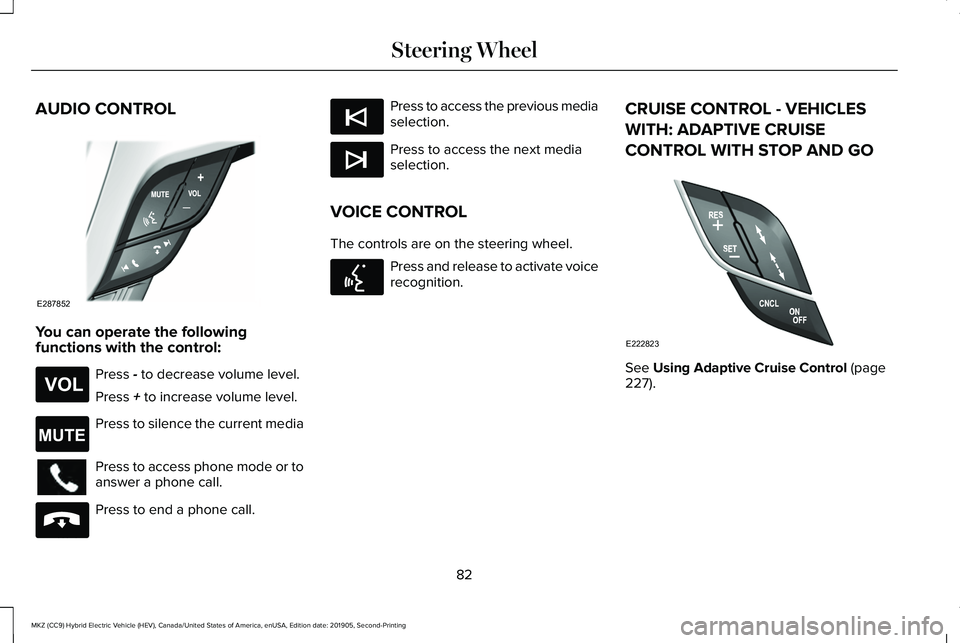
You can operate the following
functions with the control:
Press - to decrease volume level.
Press
+ to increase volume level. Press to silence the current media
Press to access phone mode or to
answer a phone call.
Press to end a phone call. Press to access the previous media
selection.
Press to access the next media
selection.
VOICE CONTROL
The controls are on the steering wheel. Press and release to activate voice
recognition.
CRUISE CONTROL - VEHICLES
WITH: ADAPTIVE CRUISE
CONTROL WITH STOP AND GO See
Using Adaptive Cruise Control (page
227).
82
MKZ (CC9) Hybrid Electric Vehicle (HEV), Canada/United States of America, enUSA, Edition date: 201905, Second-Printing Steering WheelE287852 E265304 E265043 E265040 E265045 E265044 E142599 E222823
Page 135 of 544
MyKey
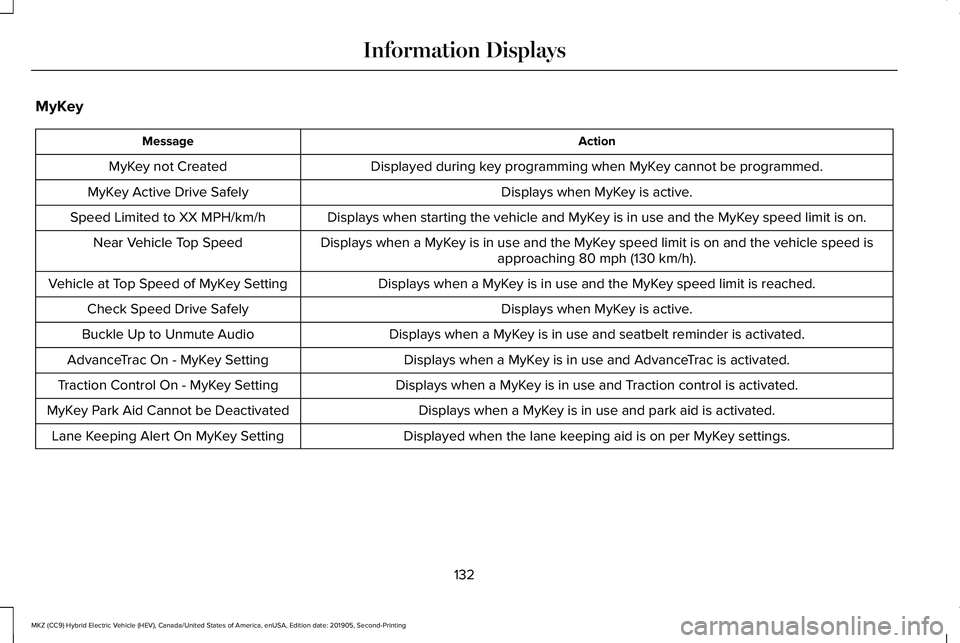
Action
Message
Displayed during key programming when MyKey cannot be programmed.
MyKey not Created
Displays when MyKey is active.
MyKey Active Drive Safely
Displays when starting the vehicle and MyKey is in use and the MyKey speed limit is on.
Speed Limited to XX MPH/km/h
Displays when a MyKey is in use and the MyKey speed limit is on and the vehicle speed isapproaching 80 mph (130 km/h).
Near Vehicle Top Speed
Displays when a MyKey is in use and the MyKey speed limit is reached.
Vehicle at Top Speed of MyKey Setting
Displays when MyKey is active.
Check Speed Drive Safely
Displays when a MyKey is in use and seatbelt reminder is activated.
Buckle Up to Unmute Audio
Displays when a MyKey is in use and AdvanceTrac is activated.
AdvanceTrac On - MyKey Setting
Displays when a MyKey is in use and Traction control is activated.
Traction Control On - MyKey Setting
Displays when a MyKey is in use and park aid is activated.
MyKey Park Aid Cannot be Deactivated
Displayed when the lane keeping aid is on per MyKey settings.
Lane Keeping Alert On MyKey Setting
132
MKZ (CC9) Hybrid Electric Vehicle (HEV), Canada/United States of America, enUSA, Edition date: 201905, Second-Printing Information Displays
Page 169 of 544
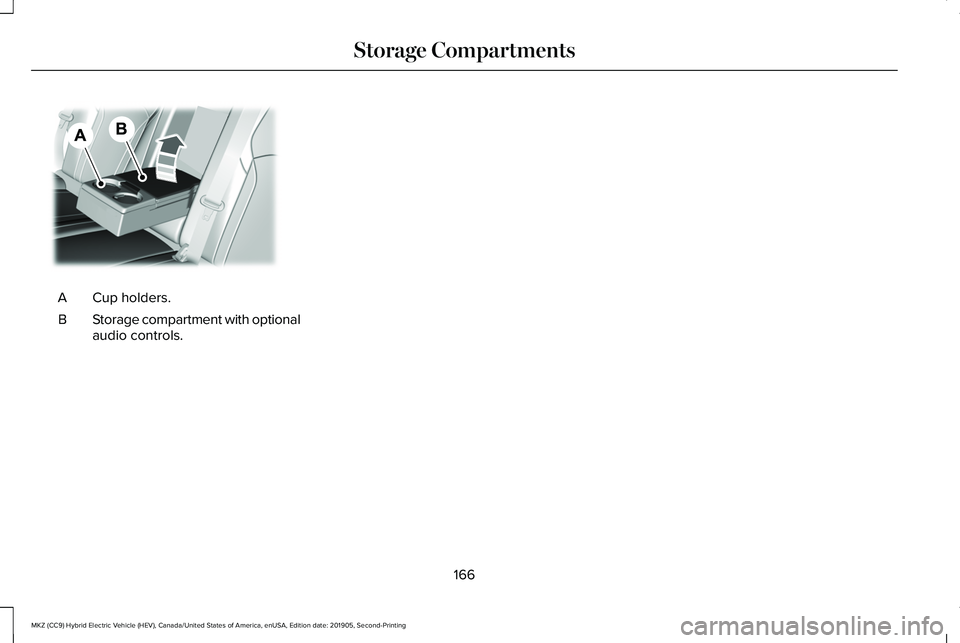
Cup holders.
A
Storage compartment with optional
audio controls.
B
166
MKZ (CC9) Hybrid Electric Vehicle (HEV), Canada/United States of America, enUSA, Edition date: 201905, Second-Printing Storage CompartmentsE298216
Page 212 of 544
WARNING: The system may not
detect small or moving objects, particularly
those close to the ground. WARNING:
To help avoid personal
injury, always use caution when in reverse
(R) and when using the sensing system. WARNING:
The parking aid system
can only assist you to detect objects when
your vehicle is moving at parking speeds.
To help avoid personal injury you must
take care when using the parking aid
system.
Note: Keep the sensors free from snow, ice
and large accumulations of dirt.
Note: Do not cover up the sensors.
Note: Do not clean the sensors with sharp
objects.
Note: If your vehicle sustains damage
leaving the sensors misaligned, this may
cause inaccurate measurements or false
alerts. Note:
Some accessories, for example large
trailer hitches or bike or surfboard racks can
cause reduced performance or false alerts.
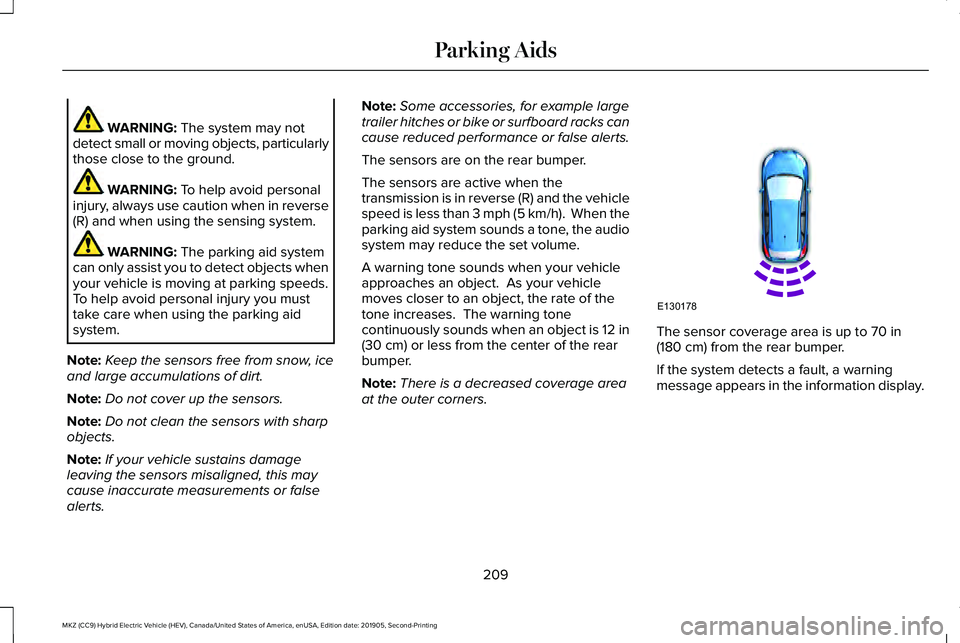
The sensors are on the rear bumper.
The sensors are active when the
transmission is in reverse (R) and the vehicle
speed is less than 3 mph (5 km/h). When the
parking aid system sounds a tone, the audio
system may reduce the set volume.
A warning tone sounds when your vehicle
approaches an object. As your vehicle
moves closer to an object, the rate of the
tone increases. The warning tone
continuously sounds when an object is 12 in
(30 cm)
or less from the center of the rear
bumper.
Note: There is a decreased coverage area
at the outer corners. The sensor coverage area is up to 70 in
(180 cm) from the rear bumper.
If the system detects a fault, a warning
message appears in the information display.
209
MKZ (CC9) Hybrid Electric Vehicle (HEV), Canada/United States of America, enUSA, Edition date: 201905, Second-Printing Parking AidsE130178
Page 214 of 544
WARNING: The parking aid system
can only assist you to detect objects when
your vehicle is moving at parking speeds.
To help avoid personal injury you must
take care when using the parking aid
system.
Note: Keep the sensors free from snow, ice
and large accumulations of dirt.
Note: Do not cover up the sensors.
Note: Do not clean the sensors with sharp
objects.
Note: If your vehicle sustains damage
leaving the sensors misaligned, this may
cause inaccurate measurements or false
alerts.
Note: Some accessories, for example large
trailer hitches or bike or surfboard racks can
cause reduced performance or false alerts.
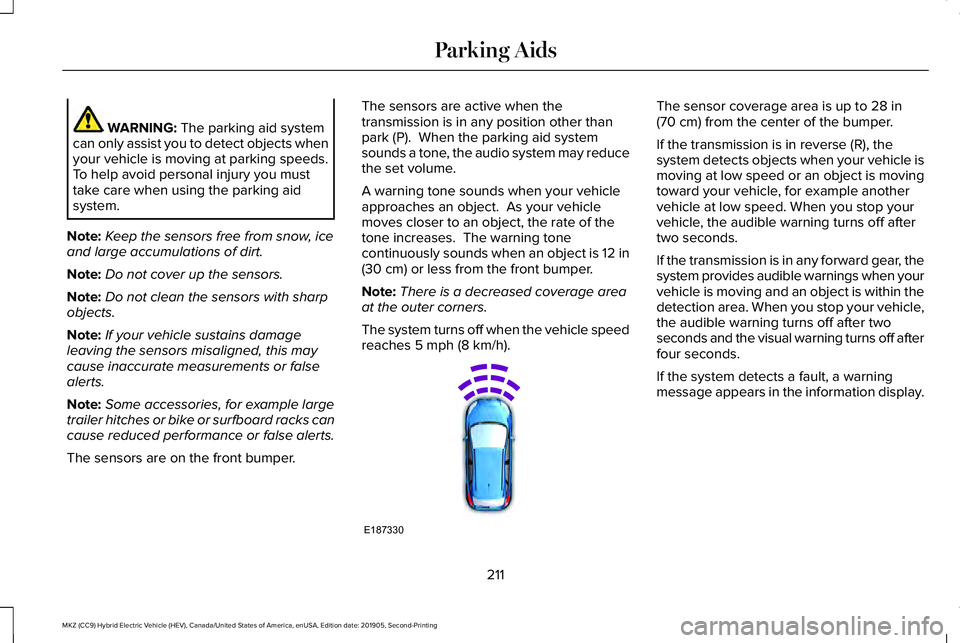
The sensors are on the front bumper. The sensors are active when the
transmission is in any position other than
park (P). When the parking aid system
sounds a tone, the audio system may reduce
the set volume.
A warning tone sounds when your vehicle
approaches an object. As your vehicle
moves closer to an object, the rate of the
tone increases. The warning tone
continuously sounds when an object is 12 in
(30 cm)
or less from the front bumper.
Note: There is a decreased coverage area
at the outer corners.
The system turns off when the vehicle speed
reaches
5 mph (8 km/h). The sensor coverage area is up to
28 in
(70 cm) from the center of the bumper.
If the transmission is in reverse (R), the
system detects objects when your vehicle is
moving at low speed or an object is moving
toward your vehicle, for example another
vehicle at low speed. When you stop your
vehicle, the audible warning turns off after
two seconds.
If the transmission is in any forward gear, the
system provides audible warnings when your
vehicle is moving and an object is within the
detection area. When you stop your vehicle,
the audible warning turns off after two
seconds and the visual warning turns off after
four seconds.
If the system detects a fault, a warning
message appears in the information display.
211
MKZ (CC9) Hybrid Electric Vehicle (HEV), Canada/United States of America, enUSA, Edition date: 201905, Second-Printing Parking AidsE187330