center console LINCOLN MKZ HYBRID 2020 Owners Manual
[x] Cancel search | Manufacturer: LINCOLN, Model Year: 2020, Model line: MKZ HYBRID, Model: LINCOLN MKZ HYBRID 2020Pages: 544, PDF Size: 5.26 MB
Page 6 of 544
Instrument Cluster
Gauges
...........................................................102
Warning Lamps and Indicators .................
104
Audible Warnings and Indicators .............
109
Information Displays
General Information .....................................
110
Information Messages .................................
121
Climate Control
Automatic Climate Control ..........................
141
Hints on Controlling the Interior Climate .......................................................................
143
Heated Rear Window ..................................
144
Heated Exterior Mirrors ..............................
144
Cabin Air Filter ..............................................
145
Remote Start ..................................................
145
Seats
Sitting in the Correct Position ...................
146
Head Restraints .............................................
147
Power Seats ...................................................
148
Memory Function .........................................
152Rear Seats
......................................................
153
Heated Seats .................................................
154
Climate Controlled Seats ...........................
155
Garage Door Opener
Universal Garage Door Opener ...............
157
Auxiliary Power Points
Auxiliary Power Points ................................
163
Storage Compartments
Center Console ............................................
165
Overhead Console ......................................
165
Rear Seat Armrest ........................................
165
Starting and Stopping the Engine
General Information .....................................
167
Keyless Starting ............................................
167
Starting a Hybrid Electric Vehicle System .......................................................................
168
Engine Block Heater .....................................
171Unique Driving Characteristics
Hybrid Vehicle Operation
...........................
173
EcoSelect ........................................................
175
Hybrid Vehicle Frequently Asked Questions ...................................................
176
Fuel and Refueling
Safety Precautions .......................................
179
Fuel Quality ...................................................
180
Fuel Filler Funnel Location .........................
181
Running Out of Fuel .....................................
181
Refueling ........................................................
182
Fuel Consumption ........................................
185
Engine Emission Control
Emission Law .................................................
187
Catalytic Converter ......................................
188
High Voltage Battery
General Information ......................................
191
High Voltage Shutoff Switch .....................
192
3
MKZ (CC9) Hybrid Electric Vehicle (HEV), Canada/United States of America, enUSA, Edition date: 201905, Second-Printing Table of Contents
Page 158 of 544
Rear Seats
WARNING: Persons who are unable
to feel pain to the skin because of
advanced age, chronic illness, diabetes,
spinal cord injury, medication, alcohol use,
exhaustion, or other physical conditions,
must exercise care when using the seat
heater. The seat heater may cause burns
even at low temperatures, especially if
used for long periods of time. Do not place
anything on the seat that insulates against
heat, such as a blanket or cushion,
because this may cause the seat heater to
overheat. Do not puncture the seat with
pins, needles, or other pointed objects
because this may damage the heating
element which may cause the seat heater
to overheat. An overheated seat may
cause serious personal injury. Do not do the following:
•
Place heavy objects on the seat.
• Operate the seat heater if water or any
other liquid is spilled on the seat. Allow
the seat to dry thoroughly.
• Operate the heated seats unless the
engine is running. Doing so can cause
the battery to lose charge.
The rear seat heat controls are located on
the rear of the center console. Press the heated seat symbol to cycle
through the various heat settings and off.
More indicator lights indicate warmer
settings.The heated seat module resets at every
ignition run cycle. While the ignition is on,
press the high or low heated seat switch to
enable heating mode. When activated, they
will turn off automatically when you turn the
engine off.
CLIMATE CONTROLLED SEATS
Heated Seats
WARNING:
People who are unable
to feel pain to their skin because of
advanced age, chronic illness, diabetes,
spinal cord injury, medication, alcohol use,
exhaustion or other physical conditions,
must exercise care when using the heated
seat. The heated seat may cause burns
even at low temperatures, especially if
used for long periods of time. Do not place
anything on the seat that insulates against
heat, such as a blanket or cushion. This
may cause the heated seat to overheat.
155
MKZ (CC9) Hybrid Electric Vehicle (HEV), Canada/United States of America, enUSA, Edition date: 201905, Second-Printing SeatsE146322
Page 166 of 544
12 Volt DC Power Point
WARNING: Do not plug optional
electrical accessories into the cigar lighter
socket. Incorrect use of the cigar lighter
can cause damage not covered by the
vehicle warranty, and can result in fire or
serious injury.
Note: When you switch the ignition on, you
can use the socket to power 12 volt
appliances with a maximum current rating
of 15 amps.
If the power supply does not work after you
switch the ignition off, switch the ignition on.
Note: Do not hang any accessory from the
accessory plug.
Note: Do not use the power point over the
vehicle capacity of 12 volt DC 180 watts or
a fuse may blow.
Note: Always keep the power point caps
closed when not in use.
Do not insert objects other than an accessory
plug into the power point. This damages the
power point and may blow the fuse. Run the vehicle for full capacity use of the
power point.
To prevent the battery from running out of
charge:
•
Do not use the power point longer than
necessary when the vehicle is not
running.
• Do not leave devices plugged in
overnight or when you park your vehicle
for extended periods.
Locations
Power points may be in the following
locations:
• On the front of the center console.
• Inside the center console.
• On the rear of the center console. 110 Volt AC Power Point WARNING: Do not keep electrical
devices plugged in the power point
whenever the device is not in use. Do not
use any extension cord with the 110 volt
AC power point, since it will defeat the
safety protection design. Doing so may
cause the power point to overload due to
powering multiple devices that can reach
beyond the 150 watt load limit and could
result in fire or serious injury.
Note: The power point turns off when you
switch the ignition off, or when the battery
voltage drops below 11 volts.
You can use the power point for electric
devices that require up to 150 watts. It is on
the rear of the center console.
163
MKZ (CC9) Hybrid Electric Vehicle (HEV), Canada/United States of America, enUSA, Edition date: 201905, Second-Printing Auxiliary Power Points
Page 168 of 544
CENTER CONSOLE
Stow items in the cup holder carefully as
items may become loose during hard
braking, acceleration or crashes, including
hot drinks which may spill.
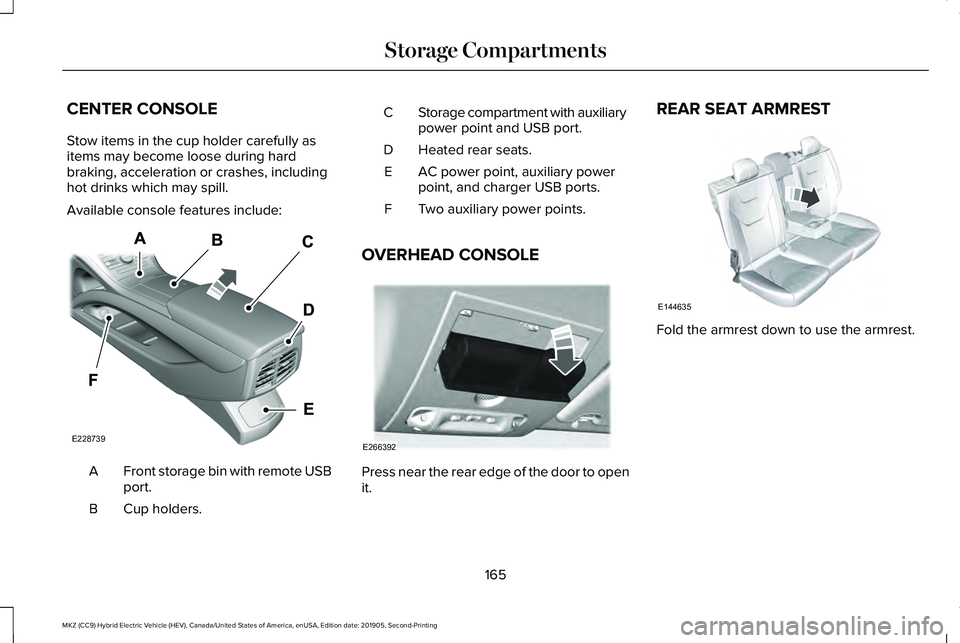
Available console features include:
Front storage bin with remote USB
port.
A
Cup holders.
B Storage compartment with auxiliary
power point and USB port.
C
Heated rear seats.
D
AC power point, auxiliary power
point, and charger USB ports.
E
Two auxiliary power points.
F
OVERHEAD CONSOLE Press near the rear edge of the door to open
it.REAR SEAT ARMREST
Fold the armrest down to use the armrest.
165
MKZ (CC9) Hybrid Electric Vehicle (HEV), Canada/United States of America, enUSA, Edition date: 201905, Second-Printing Storage CompartmentsE228739 E266392 E144635
Page 200 of 544
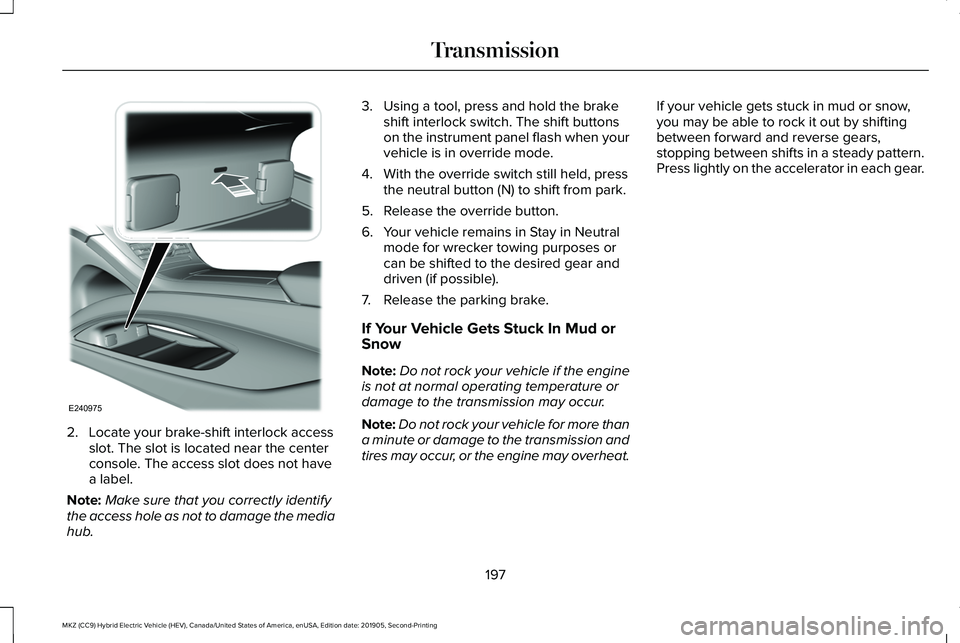
2. Locate your brake-shift interlock access
slot. The slot is located near the center
console. The access slot does not have
a label.
Note: Make sure that you correctly identify
the access hole as not to damage the media
hub. 3. Using a tool, press and hold the brake
shift interlock switch. The shift buttons
on the instrument panel flash when your
vehicle is in override mode.
4. With the override switch still held, press the neutral button (N) to shift from park.
5. Release the override button.
6. Your vehicle remains in Stay in Neutral mode for wrecker towing purposes or
can be shifted to the desired gear and
driven (if possible).
7. Release the parking brake.
If Your Vehicle Gets Stuck In Mud or
Snow
Note: Do not rock your vehicle if the engine
is not at normal operating temperature or
damage to the transmission may occur.
Note: Do not rock your vehicle for more than
a minute or damage to the transmission and
tires may occur, or the engine may overheat. If your vehicle gets stuck in mud or snow,
you may be able to rock it out by shifting
between forward and reverse gears,
stopping between shifts in a steady pattern.
Press lightly on the accelerator in each gear.
197
MKZ (CC9) Hybrid Electric Vehicle (HEV), Canada/United States of America, enUSA, Edition date: 201905, Second-Printing TransmissionE240975
Page 202 of 544
Regenerative Braking System
This feature is used to simulate the engine
braking of an internal combustion engine
and assist the standard brake system while
recovering some of the energy of motion and
storing it in the battery to improve fuel
economy. The standard brake system is
designed to fully stop the car if regenerative
braking is not available. During regenerative
braking, the motor is spun as a generator to
create electrical current. This recharges the
battery and slows the vehicle. In effect, once
the accelerator pedal is released, the motor
changes from an energy user to an energy
producer.
When you release the accelerator pedal or
press the brake pedal, the brake controller
automatically detects the amount of
deceleration requested and optimizes how
much of the deceleration will be produced
by regenerative braking. The remaining
portion is generated by standard friction
braking. When the battery is almost fully
charged, the amount of regenerative braking
is limited to avoid overcharging, and the
requested deceleration is produced by
standard friction braking alone.
Regenerative braking does not take the
place of the standard friction brakes; it only
assists them. Regenerative braking has also
been designed to interact with the anti-lock
brake system. Regenerative braking is
disabled when the anti-lock brake system is
activated or the battery is fully charged.
HINTS ON DRIVING WITH ANTI-
LOCK BRAKES
The anti-lock braking system does not
eliminate the risks when:
•
You drive too closely to the vehicle in
front of you.
• Your vehicle is hydroplaning.
• You take corners too fast.
• The road surface is poor.
Note: If the system activates, the brake
pedal may pulse and may travel further.
Maintain pressure on the brake pedal. You
may also hear a noise from the system. This
is normal. ELECTRIC PARKING BRAKE WARNING: Always fully apply the
parking brake and make sure you shift into
park (P). Failure to follow this instruction
could result in personal injury or death. WARNING:
If you drive extended
distances with the parking brake applied,
you could cause damage to the brake
system. WARNING:
The electric parking
brake does not operate if the vehicle
battery is running out of charge.
Your vehicle has an electric parking brake.
You operate it with a switch instead of a
lever. The switch is on the center console or
to the left-hand side of the steering wheel,
on the lower part of the instrument panel.
Note: The electric parking brake makes
noises during operation. This is normal.
199
MKZ (CC9) Hybrid Electric Vehicle (HEV), Canada/United States of America, enUSA, Edition date: 201905, Second-Printing Brakes
Page 208 of 544
PRINCIPLE OF OPERATION
WARNING: Vehicle modifications
involving braking system, aftermarket roof
racks, suspension, steering system, tire
construction and wheel and tire size may
change the handling characteristics of your
vehicle and may adversely affect the
performance of the electronic stability
control system. In addition, installing any
stereo loudspeakers may interfere with
and adversely affect the electronic stability
control system. Install any aftermarket
stereo loudspeaker as far as possible from
the front center console, the tunnel, and
the front seats in order to minimize the risk
of interfering with the electronic stability
control sensors. Reducing the
effectiveness of the electronic stability
control system could lead to an increased
risk of loss of vehicle control, vehicle
rollover, personal injury and death. WARNING:
Remember that even
advanced technology cannot defy the laws
of physics. It’ s always possible to lose
control of a vehicle due to inappropriate
driver input for the conditions. Aggressive
driving on any road condition can cause
you to lose control of your vehicle
increasing the risk of personal injury or
property damage. Activation of the
electronic stability control system is an
indication that at least some of the tires
have exceeded their ability to grip the
road; this could reduce the operator’ s
ability to control the vehicle potentially
resulting in a loss of vehicle control, vehicle
rollover, personal injury and death. If your
electronic stability control system activates,
SLOW DOWN.
The system automatically turns on each time
you switch the ignition on.
If a fault occurs in either the stability control
or the traction control system, you may
experience the following conditions: •
The stability and traction control light
illuminates steadily.
• The stability control and traction control
systems do not enhance your vehicle's
ability to maintain traction of the wheels.
If a driving condition activates either the
stability control or the traction control system
you may experience the following conditions:
• The stability and traction control light
flashes.
• Your vehicle slows down.
• Reduced engine power.
• A vibration in the brake pedal.
• The brake pedal is stiffer than usual.
• If the driving condition is severe and your
foot is not on the brake, the brake pedal
may move as the system applies higher
brake force.
The stability control system has several
features built into it to help you maintain
control of your vehicle:
205
MKZ (CC9) Hybrid Electric Vehicle (HEV), Canada/United States of America, enUSA, Edition date: 201905, Second-Printing Stability Control
Page 392 of 544
Action
Condition
Message
Use the channel guide to turn off the Lock or
Skip function on that station.
All the channels in the selected category are
either skipped or locked.
None found
Check Channel Guide
No action required.
SiriusXM has updated the channels available
for your vehicle.
Subscription Updated
USB PORT WARNING: Driving while distracted
can result in loss of vehicle control, crash
and injury. We strongly recommend that
you use extreme caution when using any
device that may take your focus off the
road. Your primary responsibility is the safe
operation of your vehicle. We recommend
against the use of any hand-held device
while driving and encourage the use of
voice-operated systems when possible.
Make sure you are aware of all applicable
local laws that may affect the use of
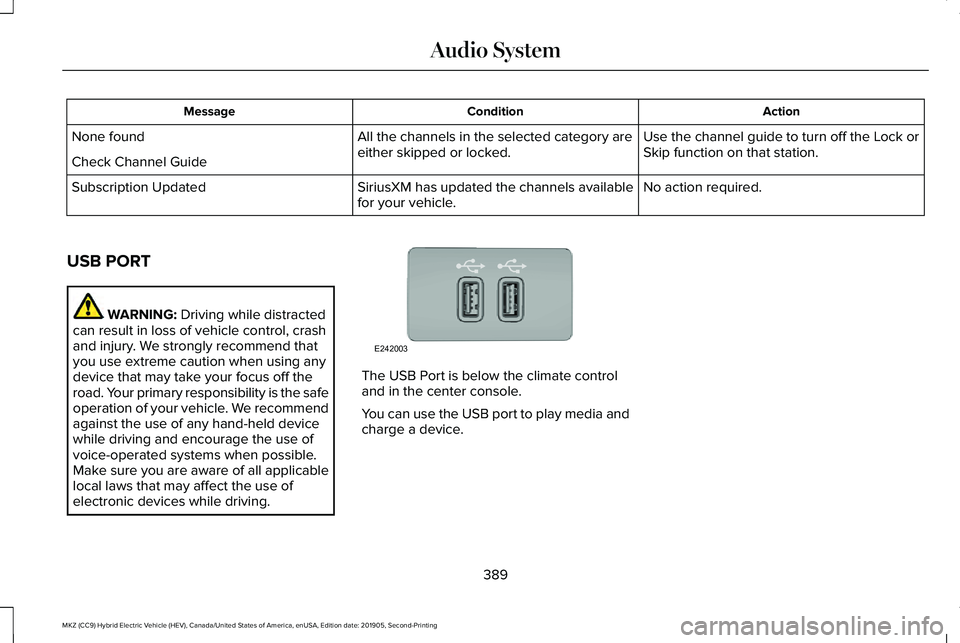
electronic devices while driving. The USB Port is below the climate control
and in the center console.
You can use the USB port to play media and
charge a device.
389
MKZ (CC9) Hybrid Electric Vehicle (HEV), Canada/United States of America, enUSA, Edition date: 201905, Second-Printing Audio SystemE242003
Page 419 of 544
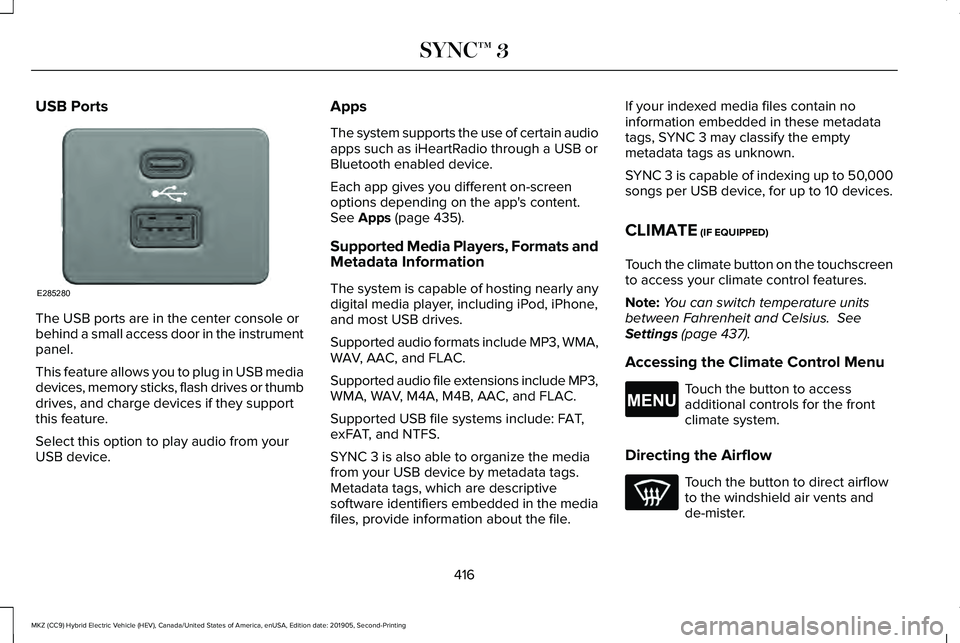
USB Ports
The USB ports are in the center console or
behind a small access door in the instrument
panel.
This feature allows you to plug in USB media
devices, memory sticks, flash drives or thumb
drives, and charge devices if they support
this feature.
Select this option to play audio from your
USB device. Apps
The system supports the use of certain audio
apps such as iHeartRadio through a USB or
Bluetooth enabled device.
Each app gives you different on-screen
options depending on the app's content.
See Apps (page 435).
Supported Media Players, Formats and
Metadata Information
The system is capable of hosting nearly any
digital media player, including iPod, iPhone,
and most USB drives.
Supported audio formats include MP3, WMA,
WAV, AAC, and FLAC.
Supported audio file extensions include MP3,
WMA, WAV, M4A, M4B, AAC, and FLAC.
Supported USB file systems include: FAT,
exFAT, and NTFS.
SYNC 3 is also able to organize the media
from your USB device by metadata tags.
Metadata tags, which are descriptive
software identifiers embedded in the media
files, provide information about the file. If your indexed media files contain no
information embedded in these metadata
tags, SYNC 3 may classify the empty
metadata tags as unknown.
SYNC 3 is capable of indexing up to 50,000
songs per USB device, for up to 10 devices.
CLIMATE (IF EQUIPPED)
Touch the climate button on the touchscreen
to access your climate control features.
Note: You can switch temperature units
between Fahrenheit and Celsius.
See
Settings (page 437).
Accessing the Climate Control Menu Touch the button to access
additional controls for the front
climate system.
Directing the Airflow Touch the button to direct airflow
to the windshield air vents and
de-mister.
416
MKZ (CC9) Hybrid Electric Vehicle (HEV), Canada/United States of America, enUSA, Edition date: 201905, Second-Printing SYNC™ 3E285280 E265038
Page 533 of 544
Automatic Climate Control...........................141
Directing Air to the Footwell Air Vents...........141
Directing Air to the Instrument Panel Air
Vents...................................................................141
Setting the Blower Motor Speed......................141
Setting the Temperature.....................................141
Switching Auto Mode On and Off....................141
Switching Defrost On and Off..........................142
Switching Dual Zone Mode On and Off........143
Switching Maximum Air Conditioning On and Off.......................................................................143
Switching Maximum Defrost On and Off.......143
Switching Recirculated Air On and Off..........143
Switching the Air Conditioning On and Off.......................................................................142
Switching the Climate Control On and Off.......................................................................142
Automatic High Beam Control....................93
Automatic High Beam Control Indicators........................................................94
Automatic Transmission..............................193 Brake-Shift Interlock Override.........................196
If Your Vehicle Gets Stuck In Mud or
Snow...................................................................197
Push Button Shift Transmission.......................193
Automatic Transmission Fluid Check.......310
Autowipers.......................................................85 Autowipers Settings.............................................85 Auxiliary Power Points.................................163
110 Volt AC Power Point.....................................163
12 Volt DC Power Point......................................163
Locations...............................................................163
B
Battery See: Changing the 12V Battery........................312
Blind Spot Information System.................242 Switching the System Off and On..................244
System Errors......................................................244
Using the Blind Spot Information
System..............................................................243
BLIS See: Blind Spot Information System..............242
Body Styling Kits...........................................328
Bonnet Lock See: Opening and Closing the Hood.............301
Booster Seats
..................................................30
Types of Booster Seats.......................................30
Brake Fluid Check..........................................311 Brake Fluid Service Interval..............................312
Brakes..............................................................198 General Information............................................198
Breaking-In....................................................262
Bulb Specification Chart.............................372 C
Cabin Air Filter
...............................................145
Canceling the Set Speed...........................227
Capacities and Specifications...................364 Air Conditioning System...................................
364
Automatic Transmission...................................365
Engine Coolant...................................................366
Engine Oil.............................................................368
Fuel Tank..............................................................369
Grease...................................................................369
Hydraulic Brake System...................................370
Inverter System Coolant...................................367
Locks.......................................................................371
Washer Reservoir.................................................371
Car Wash See: Cleaning the Exterior................................319
Catalytic Converter
.......................................188
On-Board Diagnostics (OBD-II)........................189
Readiness for Inspection and Maintenance
(I/M) Testing......................................................190
Center Console
.............................................165
Changing a Bulb............................................316
Replacing Bulbs...................................................316
Changing a Fuse..........................................298 Fuses.....................................................................298
Changing the 12V Battery...........................312
Changing the Engine Air Filter..................316
530
MKZ (CC9) Hybrid Electric Vehicle (HEV), Canada/United States of America, enUSA, Edition date: 201905, Second-Printing Index