child lock LINCOLN NAUTILUS 2020 User Guide
[x] Cancel search | Manufacturer: LINCOLN, Model Year: 2020, Model line: NAUTILUS, Model: LINCOLN NAUTILUS 2020Pages: 596, PDF Size: 5.88 MB
Page 41 of 596
Slide the clip away from the tongue so there
is no loose webbing when an occupant or
child seat is buckled up. You can also use
the sliding clip to raise the tongue and
prevent it from rattling or to ease access to
the tongue.
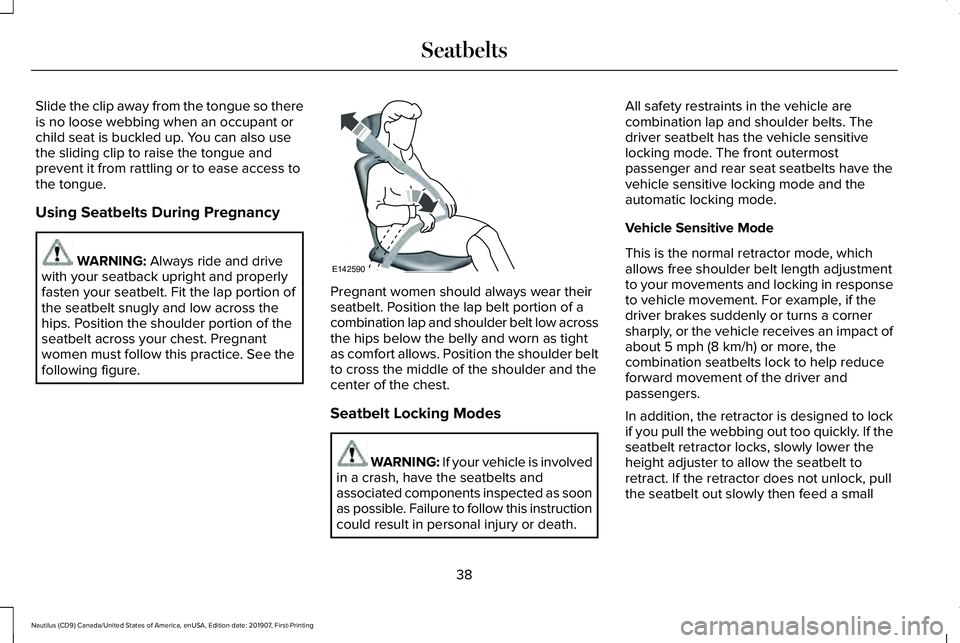
Using Seatbelts During Pregnancy
WARNING: Always ride and drive
with your seatback upright and properly
fasten your seatbelt. Fit the lap portion of
the seatbelt snugly and low across the
hips. Position the shoulder portion of the
seatbelt across your chest. Pregnant
women must follow this practice. See the
following figure. Pregnant women should always wear their
seatbelt. Position the lap belt portion of a
combination lap and shoulder belt low across
the hips below the belly and worn as tight
as comfort allows. Position the shoulder belt
to cross the middle of the shoulder and the
center of the chest.
Seatbelt Locking Modes
WARNING: If your vehicle is involved
in a crash, have the seatbelts and
associated components inspected as soon
as possible. Failure to follow this instruction
could result in personal injury or death. All safety restraints in the vehicle are
combination lap and shoulder belts. The
driver seatbelt has the vehicle sensitive
locking mode. The front outermost
passenger and rear seat seatbelts have the
vehicle sensitive locking mode and the
automatic locking mode.
Vehicle Sensitive Mode
This is the normal retractor mode, which
allows free shoulder belt length adjustment
to your movements and locking in response
to vehicle movement. For example, if the
driver brakes suddenly or turns a corner
sharply, or the vehicle receives an impact of
about
5 mph (8 km/h) or more, the
combination seatbelts lock to help reduce
forward movement of the driver and
passengers.
In addition, the retractor is designed to lock
if you pull the webbing out too quickly. If the
seatbelt retractor locks, slowly lower the
height adjuster to allow the seatbelt to
retract. If the retractor does not unlock, pull
the seatbelt out slowly then feed a small
38
Nautilus (CD9) Canada/United States of America, enUSA, Edition date: 201907, First-Printing SeatbeltsE142590
Page 42 of 596
length of webbing back toward the stowed
position. For rear seatbelts, recline the rear
seat backrest or push the seat backrest
cushion away from the seatbelt. Feed a small
length of webbing back toward the stowed
position.
Automatic Locking Mode
In this mode, the shoulder belt automatically
pre-locks. The belt still retracts to remove
any slack in the shoulder belt. The automatic
locking mode is not available on the driver
seatbelt.
When to Use the Automatic Locking Mode
Use this mode any time a child safety seat,
except a booster, is installed in passenger
front or rear seating positions. Properly
restrain children 12 years old and under in a
rear seating position whenever possible.
See Child Safety (page 21).
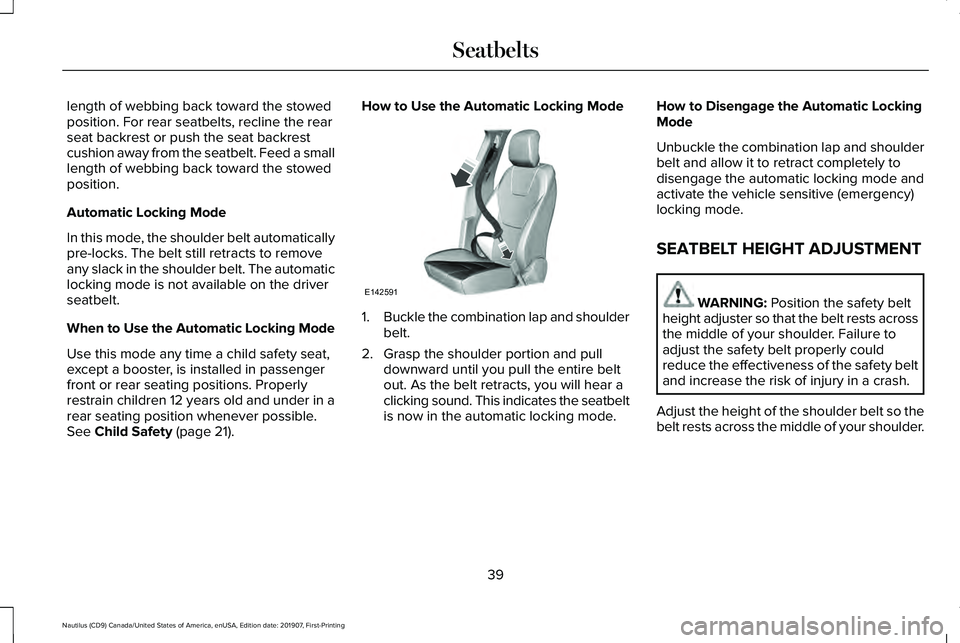
How to Use the Automatic Locking Mode
1.
Buckle the combination lap and shoulder
belt.
2. Grasp the shoulder portion and pull downward until you pull the entire belt
out. As the belt retracts, you will hear a
clicking sound. This indicates the seatbelt
is now in the automatic locking mode. How to Disengage the Automatic Locking
Mode
Unbuckle the combination lap and shoulder
belt and allow it to retract completely to
disengage the automatic locking mode and
activate the vehicle sensitive (emergency)
locking mode.
SEATBELT HEIGHT ADJUSTMENT
WARNING:
Position the safety belt
height adjuster so that the belt rests across
the middle of your shoulder. Failure to
adjust the safety belt properly could
reduce the effectiveness of the safety belt
and increase the risk of injury in a crash.
Adjust the height of the shoulder belt so the
belt rests across the middle of your shoulder.
39
Nautilus (CD9) Canada/United States of America, enUSA, Edition date: 201907, First-Printing SeatbeltsE142591
Page 62 of 596
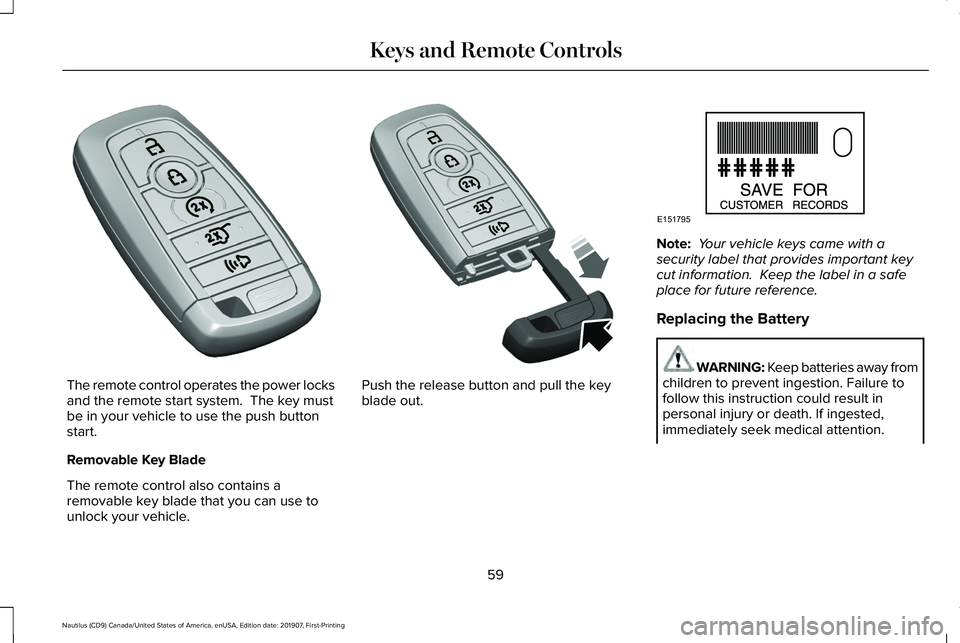
The remote control operates the power locks
and the remote start system. The key must
be in your vehicle to use the push button
start.
Removable Key Blade
The remote control also contains a
removable key blade that you can use to
unlock your vehicle. Push the release button and pull the key
blade out. Note:
Your vehicle keys came with a
security label that provides important key
cut information. Keep the label in a safe
place for future reference.
Replacing the Battery WARNING: Keep batteries away from
children to prevent ingestion. Failure to
follow this instruction could result in
personal injury or death. If ingested,
immediately seek medical attention.
59
Nautilus (CD9) Canada/United States of America, enUSA, Edition date: 201907, First-Printing Keys and Remote ControlsE305198 E305199 E151795
Page 107 of 596
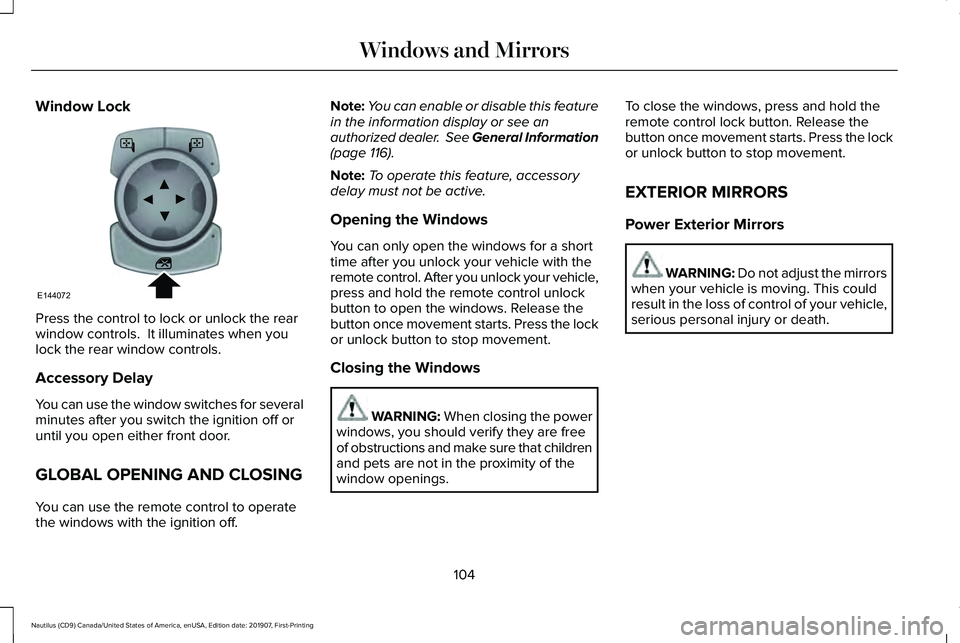
Window Lock
Press the control to lock or unlock the rear
window controls. It illuminates when you
lock the rear window controls.
Accessory Delay
You can use the window switches for several
minutes after you switch the ignition off or
until you open either front door.
GLOBAL OPENING AND CLOSING
You can use the remote control to operate
the windows with the ignition off. Note:
You can enable or disable this feature
in the information display or see an
authorized dealer. See General Information
(page 116).
Note: To operate this feature, accessory
delay must not be active.
Opening the Windows
You can only open the windows for a short
time after you unlock your vehicle with the
remote control. After you unlock your vehicle,
press and hold the remote control unlock
button to open the windows. Release the
button once movement starts. Press the lock
or unlock button to stop movement.
Closing the Windows WARNING: When closing the power
windows, you should verify they are free
of obstructions and make sure that children
and pets are not in the proximity of the
window openings. To close the windows, press and hold the
remote control lock button. Release the
button once movement starts. Press the lock
or unlock button to stop movement.
EXTERIOR MIRRORS
Power Exterior Mirrors
WARNING: Do not adjust the mirrors
when your vehicle is moving. This could
result in the loss of control of your vehicle,
serious personal injury or death.
104
Nautilus (CD9) Canada/United States of America, enUSA, Edition date: 201907, First-Printing Windows and MirrorsE144072
Page 131 of 596

Blind Spot Information and Cross Traffic Alert System
Action
Message
A fault with the system has occurred. Contact an authorized dealer as so\
on as possible.
Blindspot System Fault
The system sensors are blocked. Contact an authorized dealer as soon as possible. See Blind
Spot Information System (page 253).
Blindspot Not Available Sensor Blocked
See Manual
The system detects a vehicle.
See Blind Spot Information System (page 253).
Vehicle Coming From X
The blind spot information system and cross traffic alert system sensors\
are blocked. See BlindSpot Information System
(page 253).
Cross Traffic Not Available Sensor Blocked
See Manual
A fault with the system has occurred. Contact an authorized dealer as so\
on as possible.
Cross Traffic System Fault
Doors and Locks Action
Message
The door listed is not completely closed.
X Door Ajar
The driver’s door is opened, your vehicle is in park and the engine is on.
Engine ON
Displays when the hood is not completely closed.
Hood Ajar
Displays when the door switches have been disabled.
Switches Inhibited Security Mode
There is a system malfunction with the child locks. Contact an authorize\
d dealer as soon as possible.
Child Lock Malfunction Service Required
128
Nautilus (CD9) Canada/United States of America, enUSA, Edition date: 201907, First-Printing Information Displays
Page 132 of 596

Action
Message
Indicates that the rear seat interior door release switches and power wi\
ndows are switched off,preventing rear seat occupants from opening the doors or windows.
Child Lock ON
Indicates that the rear seat interior door release switches and power wi\
ndows are switched on.
Child Lock OFF
Displays when the door lock turns off.
Door Unlocked
Displays when the door lock is turned on and you attempt to open the doo\
r.
Doors Locked Unlock Before Opening
Indicates a driver door fault that requires manually opening the door by\
the override lever.Contact an authorized dealer.
Driver Door Fault Use Inside Override
Lever In Map Pocket
Indicates a fault with the electronic door system. Contact an authorized\
dealer.
Door Fault Service Required
Displays the factory keypad code after the keypad has been reset. See Keyless Entry (page
74).
Factory Keypad Code {X X X X X}
Driver Alert Action
Message
Stop and rest as soon as it is safe to do so.
Driver Alert Warning Rest Now
Take a rest soon.
Driver Alert Warning Rest Suggested
129
Nautilus (CD9) Canada/United States of America, enUSA, Edition date: 201907, First-Printing Information Displays
Page 339 of 596
WARNING: Keep batteries out of
reach of children. Batteries contain sulfuric
acid. Avoid contact with skin, eyes or
clothing. Shield your eyes when working
near the battery to protect against possible
splashing of acid solution. In case of acid
contact with skin or eyes, flush immediately
with water for a minimum of 15 minutes and
get prompt medical attention. If acid is
swallowed, call a physician immediately. WARNING:
Battery posts, terminals
and related accessories contain lead and
lead compounds. Wash hands after
handling. WARNING:
For vehicles with
Auto-Start-Stop the battery requirement is
different. You must replace the battery with
one of exactly the same specification.
Your vehicle is fitted with a Motorcraft
maintenance-free battery which normally
does not require additional water. When a battery replacement is required, you
must use a recommended replacement
battery that matches the electrical
requirements of the vehicle.
Note:
If your vehicle has a battery cover,
after cleaning or replacing the battery, make
sure you reinstall it.
Note: See an authorized dealer for battery
access, testing, or replacement.
To make sure the battery management
system works correctly, do not connect an
electrical device ground connection directly
to the battery negative post. This can cause
inaccurate measurements of the battery
condition and potential incorrect system
operation.
Note: If you add electrical accessories or
components to the vehicle, it may adversely
affect battery performance and durability.
This may also affect the performance of
other electrical systems in the vehicle.
If you see any corrosion on the battery or
terminals, remove the cables from the
terminals and clean with a wire brush. You
can neutralize the acid with a solution of
baking soda and water. Because your vehicle
’s engine is
electronically-controlled by a computer,
some engine control settings are maintained
by power from the battery. Some engine
computer settings, like the idle trim and fuel
trim strategy, optimize the driveability and
performance of the engine. The clock and
radio station presets are also maintained in
memory by power from the low-voltage
battery. These settings are erased when a
technician disconnects and connects the
low-voltage battery.
To restore the settings, do the following:
Note: Until you switch the ignition to the on
position, you will receive a message in your
information display stating that your vehicle
is not in park.
1. Apply the parking brake.
2. Shift into park (P) or neutral (N).
3. Switch off all accessories.
4. Press the brake pedal and start your vehicle.
336
Nautilus (CD9) Canada/United States of America, enUSA, Edition date: 201907, First-Printing Maintenance
Page 584 of 596
Engine Oil.............................................................394
Fuel Tank..............................................................397
Grease...................................................................397
Hydraulic Brake System...................................398
Locks.....................................................................398
Power Transfer Unit...........................................399
Rear Axle..............................................................400
Washer Reservoir...............................................400
Capacities and Specifications - 2.7L........401
Air Conditioning System....................................401
Alternative Engine Oil for Extremely Cold
Climates...........................................................405
Automatic Transmission...................................402
Engine Coolant...................................................403
Engine Oil.............................................................404
Fuel Tank..............................................................407
Grease...................................................................407
Hydraulic Brake System...................................408
Locks.....................................................................408
Power Transfer Unit...........................................409
Rear Axle...............................................................410
Washer Reservoir................................................410
Capacities and Specifications...................385
Cargo Nets
.....................................................270
Car Wash See: Cleaning the Exterior...............................344
Catalytic Converter
.......................................189
On-Board Diagnostics (OBD-II)........................190 Readiness for Inspection and Maintenance
(I/M) Testing.......................................................191
Center Console
..............................................170
Changing a Bulb...........................................340 LED Lamps...........................................................340
Changing a Fuse
...........................................319
Fuses......................................................................319
Changing a Road Wheel.............................376 Dissimilar Spare Wheel and Tire Assembly
Information.......................................................377
Stowing the flat tire ............................................381
Tire Change Procedure....................................378
Changing the 12V Battery..........................335
Changing the Engine Air Filter - 2.0L...............................................................340
Changing the Engine Air Filter - 2.7L
.......341
Changing the Wi-Fi Hotspot Name or Password......................................................416
Changing the Wiper Blades.......................337 Front Wiper Blades.............................................337
Rear Window Wiper Blade...............................
338
Checking MyKey System Status.................67 MyKey Distance.....................................................67
Number of Admin Keys.......................................68
Number of MyKeys...............................................67
Checking the Wiper Blades.......................337
Child Restraint and Seatbelt Maintenance..................................................42 Child Restraint Positioning
...........................32
Child Safety.......................................................21
General Information..............................................21
Child Safety Locks..........................................34 Left-Hand Side.......................................................35
Right-Hand Side....................................................35
Cleaning Leather Seats
..............................349
Cleaning Products........................................343 Materials................................................................343
Cleaning the Engine....................................346
Cleaning the Exterior...................................344 Cleaning the Headlamps..................................
344
Exterior Chrome Parts.......................................345
Exterior Plastic Parts..........................................345
Stripes or Graphics............................................345
Underbody...........................................................345
Under Hood.........................................................345
Cleaning the Instrument Panel and Instrument Cluster Lens...........................349
Cleaning the Interior....................................347 Cleaning Black Label or Presidential
Interior...............................................................347
Cleaning the Wheels...................................350
Cleaning the Windows and Wiper Blades...........................................................346
Clearing All MyKeys
.......................................67
Climate............................................................455 Accessing Rear Climate Controls..................458
581
Nautilus (CD9) Canada/United States of America, enUSA, Edition date: 201907, First-Printing Index
Page 586 of 596
Services That Third Parties Provide..................12
Services That We Provide...................................12
Vehicles With a Modem.......................................13
Vehicles With an Emergency Call System.......14
Vehicles With SYNC..............................................13
Daytime Running Lamps - Vehicles With: Configurable Daytime Running
Lamps..............................................................96
Daytime Running Lamps - Vehicles With: Daytime Running Lamps (DRL).................96
Declaration of Conformity..........................564 Radio Frequency Statement............................564
Digital Radio..................................................420 HD Radio Reception and Station
Troubleshooting.............................................422
Direction Indicators........................................98 Indicating a Lane Change...................................98
Doors and Locks.............................................70
Drive Control.................................................267 EcoCoach.............................................................268
LINCOLN DRIVE CONTROL............................267
Driver Alert
.....................................................246
Principle of Operation.......................................246
Using Driver Alert...............................................246
Driver and Passenger Airbags....................46 Children and Airbags...........................................47
Proper Driver and Front Passenger Seating
Adjustment.........................................................47 Driver and Passenger Knee Airbags.........52
Driving Aids
...................................................246
Driving Hints..................................................285
Driving Through Water...............................286
DRL See: Daytime Running Lamps - Vehicles With:
Configurable Daytime Running Lamps.......96
See: Daytime Running Lamps - Vehicles With: Daytime Running Lamps (DRL).....................96
E
Economical Driving......................................285
Electric Parking Brake
.................................205
Applying the Electric Parking Brake.............205
Automatically Releasing the Electric Parking
Brake .................................................................206
Manually Releasing the Electric Parking Brake .................................................................206
Releasing the Electric Parking Brake if the Vehicle Battery is Running Out of
Charge..............................................................206
Electromagnetic Compatibility
..................528
Emergency Call Limitations..........................57
Emergency Call Requirements...................56
Emission Law..................................................188
Noise Emissions Warranty, Prohibited
Tampering Acts and Maintenance.............189 Tampering With a Noise Control
System...............................................................188
End User License Agreement
...................533
VEHICLE SOFTWARE END USER LICENSE
AGREEMENT (EULA) ....................................533
Engine Block Heater
.....................................176
Using the Engine Block Heater........................177
Engine Coolant Check
................................329
Adding Coolant...................................................329
Coolant Change...................................................331
Engine Coolant Temperature
Management...................................................333
Fail-Safe Cooling.................................................331
Recycled Coolant................................................331
Severe Climates...................................................331
Engine Emission Control.............................188
Engine Immobilizer See: Passive Anti-Theft System........................82
Engine Oil Check
..........................................327
Adding Engine Oil..............................................327
Engine Oil Dipstick
.......................................327
Engine Specifications - 2.0L......................385
Drivebelt Routing................................................385
Engine Specifications - 2.7L......................386 Drivebelt Routing................................................386
Entertainment................................................443 AM/FM Radio.......................................................444
Apps.......................................................................455
583
Nautilus (CD9) Canada/United States of America, enUSA, Edition date: 201907, First-Printing Index
Page 589 of 596
Power Steering....................................................136
Pre-Collision Assist..............................................137
Remote Start.........................................................137
Seats.......................................................................137
Stability Control....................................................138
Starting System ...................................................138
Tire Pressure Monitoring System....................139
Transmission.........................................................139
Installing Child Restraints.............................23 Child Seats..............................................................23
Using Lap and Shoulder Belts...........................23
Using Lower Anchors and Tethers for
CHildren (LATCH).............................................26
Using Tether Straps..............................................28
Instrument Cluster........................................109
Instrument Lighting Dimmer........................96
Instrument Panel..............................................19
Interior Lamps
..................................................98
Front Interior Lamp...............................................98
Interior Lamp Function........................................99
Rear Interior Lamps..............................................99
Switching All of the Interior Lamps Off...........99
Switching All of the Interior Lamps On...........99
Switching the Individual Map Lamps On and
Off........................................................................\
.99
Interior Mirror
.................................................106
Auto-Dimming Mirror..........................................106
Introduction
.........................................................7 J
Jump Starting the Vehicle..........................290
Connecting the Jumper Cables......................
291
Jump Starting.......................................................291
Preparing Your Vehicle.....................................290
Removing the Jumper Cables........................292
K
Keyless Entry....................................................74 SECURICODE™ Keyless Entry Keypad.............
74
Keyless Starting
.............................................172
Ignition Modes......................................................172
Keys and Remote Controls..........................58
L
Lane Keeping System
..................................247
Switching the System On and Off..................248
Liftgate...............................................................78
Lighting Control
...............................................94
Flashing the Headlamp High Beam.................95
Headlamp High Beam.........................................95
Lighting..............................................................94 General Information.............................................94
Lincoln Automotive Financial Services......14 Lincoln Protect
..............................................492
Lincoln Protect (CANADA ONLY)....................493
Lincoln Protect Extended Service Plans (U.S.
Only)..................................................................492
Load Carriers See: Roof Racks and Load Carriers...............272
Load Carrying
................................................270
Load Limit.......................................................273
Special Loading Instructions for Owners of
Pick-up Trucks and Utility-type
Vehicles............................................................277
Vehicle Loading - with and without a Trailer.................................................................273
Locking and Unlocking..................................70 Activating Intelligent Access..............................
72
Autolock..................................................................73
Auto Relock............................................................73
Autounlock..............................................................74
Battery Saver..........................................................74
Illuminated Entry....................................................74
Illuminated Exit.......................................................74
Locking and Unlocking the Doors with the Key Blade.............................................................71
Power Door Locks................................................70
Remote Control.....................................................70
Smart Unlocks for Intelligent Access Keys......................................................................73
586
Nautilus (CD9) Canada/United States of America, enUSA, Edition date: 201907, First-Printing Index