height LINCOLN NAUTILUS 2020 User Guide
[x] Cancel search | Manufacturer: LINCOLN, Model Year: 2020, Model line: NAUTILUS, Model: LINCOLN NAUTILUS 2020Pages: 596, PDF Size: 5.88 MB
Page 45 of 596
Deactivating and Activating the Belt-Minder
Feature
WARNING: While the system allows
you to switch it off, this system is designed
to improve your chances of being safely
belted and surviving a crash. We
recommend you leave the system switched
on. To reduce the risk of injury, do not
switch the system on or off while driving
your vehicle.
Note: The driver and front passenger
warnings switch on and off independently.
When you perform this procedure for one
seating position, do not buckle the other
position as this will terminate the process.
Read Steps 1–4 thoroughly before
proceeding with the programming
procedure.
Before following the procedure, make sure
that:
• The parking brake is set.
• The transmission is in park (P) or neutral
(N). •
The ignition is off.
• The driver and front passenger seatbelts
are unbuckled.
1. Switch the ignition on. Do not start the vehicle.
2. Wait until the seatbelt warning lamp turns
off (about 1 minute). After Step 2, wait an
additional 5 seconds before proceeding
with Step 3. Once you start Step 3, you
must complete the procedure within 30
seconds.
3. For the seating position you are switching
off, buckle then unbuckle the seatbelt
three times at a moderate speed, ending
in the unbuckled state. After Step 3, the
seatbelt warning lamp turns on.
4. While the seatbelt warning lamp is on, buckle and then unbuckle the seatbelt.
After Step 4, the seatbelt warning lamp
flashes for confirmation.
• This will switch the feature off for that
seating position if it is currently on.
• This will switch the feature on for that
seating position if it is currently off. CHILD RESTRAINT AND SEATBELT
MAINTENANCE
Inspect the vehicle seatbelts and child safety
seat systems periodically to make sure they
work properly and are not damaged. Inspect
the vehicle and child restraint seatbelts to
make sure there are no nicks, tears or cuts.
Replace if necessary. All vehicle seatbelt
assemblies, including retractors, buckles,
front seatbelt buckle assemblies, buckle
support assemblies (slide bar-if equipped),
shoulder belt height adjusters (if equipped),
shoulder belt guide on seat backrest (if
equipped), child safety seat LATCH and
tether anchors, and attaching hardware,
should be inspected after a crash. Read the
child restraint manufacturer's instructions for
additional inspection and maintenance
information specific to the child restraint.
42
Nautilus (CD9) Canada/United States of America, enUSA, Edition date: 201907, First-Printing Seatbelts
Page 83 of 596
Note:
Allow the power system to open the
liftgate. Manually pushing or pulling the
liftgate may activate the system’ s obstacle
detection feature and stop the power
operation or reverse its direction, replicate
a strut failure, or damage mechanical
components.
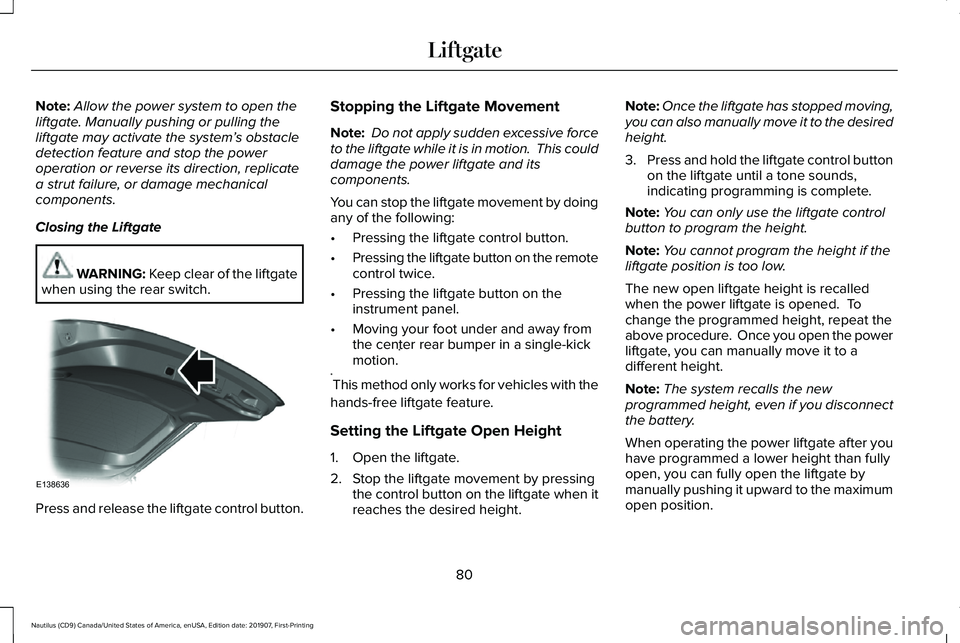
Closing the Liftgate WARNING: Keep clear of the liftgate
when using the rear switch. Press and release the liftgate control button. Stopping the Liftgate Movement
Note:
Do not apply sudden excessive force
to the liftgate while it is in motion. This could
damage the power liftgate and its
components.
You can stop the liftgate movement by doing
any of the following:
• Pressing the liftgate control button.
• Pressing the liftgate button on the remote
control twice.
• Pressing the liftgate button on the
instrument panel.
• Moving your foot under and away from
the center rear bumper in a single-kick
motion. *
* This method only works for vehicles with the
hands-free liftgate feature.
Setting the Liftgate Open Height
1. Open the liftgate.
2. Stop the liftgate movement by pressing the control button on the liftgate when it
reaches the desired height. Note:
Once the liftgate has stopped moving,
you can also manually move it to the desired
height.
3. Press and hold the liftgate control button
on the liftgate until a tone sounds,
indicating programming is complete.
Note: You can only use the liftgate control
button to program the height.
Note: You cannot program the height if the
liftgate position is too low.
The new open liftgate height is recalled
when the power liftgate is opened. To
change the programmed height, repeat the
above procedure. Once you open the power
liftgate, you can manually move it to a
different height.
Note: The system recalls the new
programmed height, even if you disconnect
the battery.
When operating the power liftgate after you
have programmed a lower height than fully
open, you can fully open the liftgate by
manually pushing it upward to the maximum
open position.
80
Nautilus (CD9) Canada/United States of America, enUSA, Edition date: 201907, First-Printing LiftgateE138636
Page 104 of 596
WHAT IS AUTOMATIC HIGH BEAM
CONTROL
The system turns on high beams if it is dark
enough and no other traffic is present. If it
detects an approaching vehicle
’s headlamps
or tail lamps, or street lighting ahead, the
system turns the high beams off. Low beams
remain on.
A camera sensor, centrally mounted behind
the windshield of your vehicle, continuously
monitors conditions to turn the high beams
on and off.
SWITCHING AUTOMATIC HIGH
BEAM CONTROL ON AND OFF
Switch the system on or off using the
information display. See General
Information (page 116). Activating the Automatic High Beam
Control Switch the lighting control to the
autolamps position to activate.
See
Autolamps (page 95).
Note: Automatic high beams are not
available when autolamps are not turned
on.
When active, the high beams turn on if:
• The ambient light level is low enough.
• There is no traffic in front of your vehicle.
• The vehicle speed is greater than
approximately
32 mph (52 km/h).
When active, the high beams turn off if:
• The ambient light level is high enough
that high beams are not required.
• The system detects an approaching
vehicle's headlamps or tail lamps.
• The system detects severe rain, snow or
fog.
• The camera is blocked.
• The vehicle speed falls below
approximately
27 mph (44 km/h). Note:
The deactivation speed is lower on
curves.
Note: High beam reactivation may be
delayed in certain curvy road situations.
Note: The system may not operate properly
if the sensor is blocked. Keep the windshield
free from obstruction or damage.
Note: The system may not operate properly
in cold or inclement conditions. You can
switch on the high beams by overriding the
system.
Note: If the system detects a blockage, for
example bird droppings, bug splatter, snow
or ice, the system goes into low beam mode
until you clear the blockage. A message may
appear in the information display if the
camera is blocked.
Note: Using much larger tires or equipping
vehicle accessories such as snowplows can
modify your vehicle's ride height and
degrade automatic high beam control
performance.
101
Nautilus (CD9) Canada/United States of America, enUSA, Edition date: 201907, First-Printing Automatic High Beam Control
Page 342 of 596
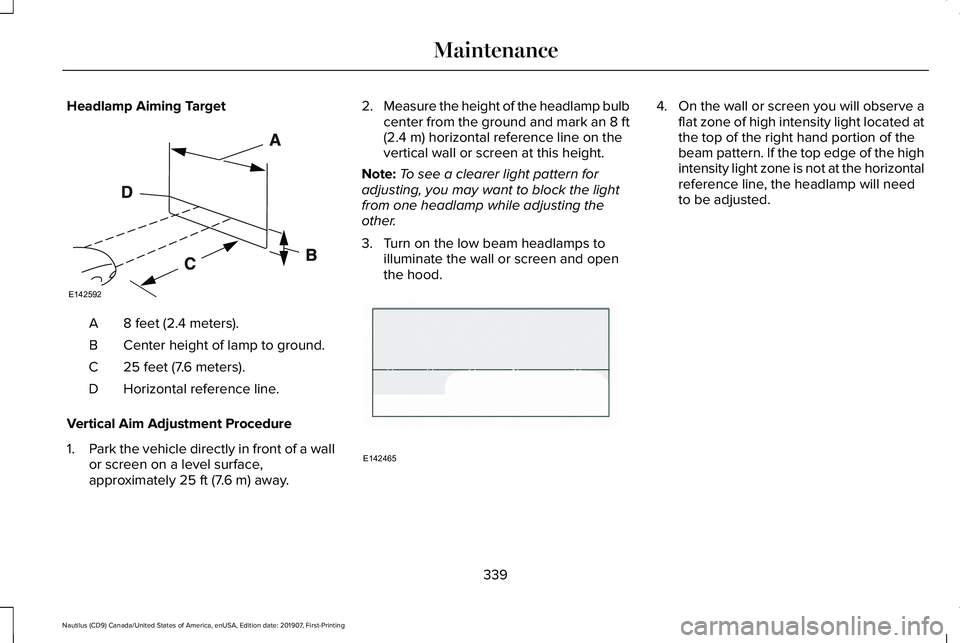
Headlamp Aiming Target
8 feet (2.4 meters).
A
Center height of lamp to ground.
B
25 feet (7.6 meters).
C
Horizontal reference line.
D
Vertical Aim Adjustment Procedure
1. Park the vehicle directly in front of a wall
or screen on a level surface,
approximately 25 ft (7.6 m) away. 2.
Measure the height of the headlamp bulb
center from the ground and mark an 8 ft
(2.4 m)
horizontal reference line on the
vertical wall or screen at this height.
Note: To see a clearer light pattern for
adjusting, you may want to block the light
from one headlamp while adjusting the
other.
3. Turn on the low beam headlamps to illuminate the wall or screen and open
the hood. 4.
On the wall or screen you will observe a
flat zone of high intensity light located at
the top of the right hand portion of the
beam pattern. If the top edge of the high
intensity light zone is not at the horizontal
reference line, the headlamp will need
to be adjusted.
339
Nautilus (CD9) Canada/United States of America, enUSA, Edition date: 201907, First-Printing MaintenanceE142592 E142465
Page 363 of 596
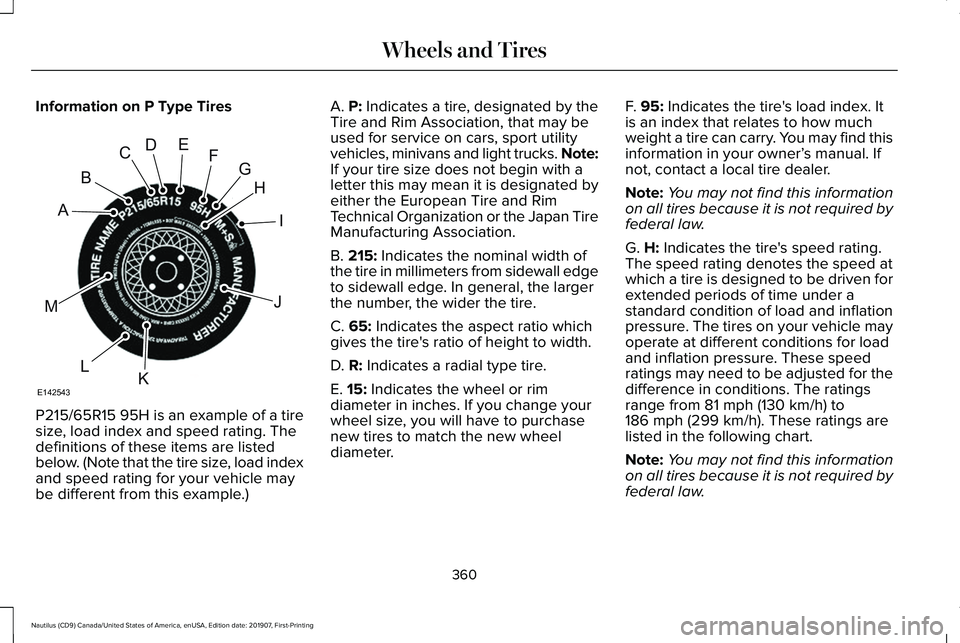
Information on P Type Tires
P215/65R15 95H is an example of a tire
size, load index and speed rating. The
definitions of these items are listed
below. (Note that the tire size, load index
and speed rating for your vehicle may
be different from this example.) A. P: Indicates a tire, designated by the
Tire and Rim Association, that may be
used for service on cars, sport utility
vehicles, minivans and light trucks.
Note:
If your tire size does not begin with a
letter this may mean it is designated by
either the European Tire and Rim
Technical Organization or the Japan Tire
Manufacturing Association.
B.
215: Indicates the nominal width of
the tire in millimeters from sidewall edge
to sidewall edge. In general, the larger
the number, the wider the tire.
C.
65: Indicates the aspect ratio which
gives the tire's ratio of height to width.
D.
R: Indicates a radial type tire.
E.
15: Indicates the wheel or rim
diameter in inches. If you change your
wheel size, you will have to purchase
new tires to match the new wheel
diameter. F.
95: Indicates the tire's load index. It
is an index that relates to how much
weight a tire can carry. You may find this
information in your owner’ s manual. If
not, contact a local tire dealer.
Note: You may not find this information
on all tires because it is not required by
federal law.
G.
H: Indicates the tire's speed rating.
The speed rating denotes the speed at
which a tire is designed to be driven for
extended periods of time under a
standard condition of load and inflation
pressure. The tires on your vehicle may
operate at different conditions for load
and inflation pressure. These speed
ratings may need to be adjusted for the
difference in conditions. The ratings
range from
81 mph (130 km/h) to
186 mph (299 km/h). These ratings are
listed in the following chart.
Note: You may not find this information
on all tires because it is not required by
federal law.
360
Nautilus (CD9) Canada/United States of America, enUSA, Edition date: 201907, First-Printing Wheels and TiresH
I
J
KL
M
A
B
CDEFG
E142543
Page 367 of 596
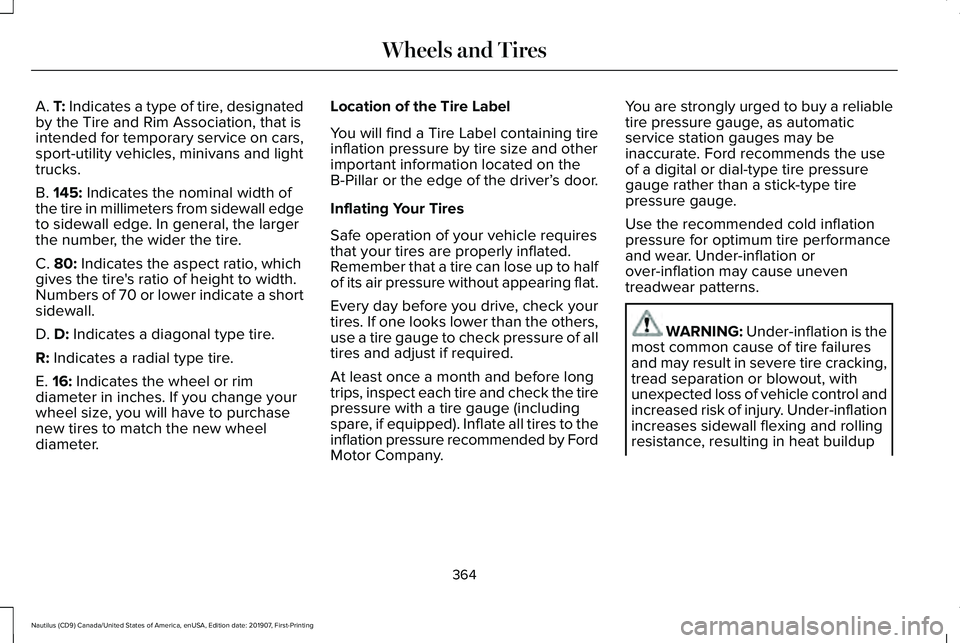
A. T: Indicates a type of tire, designated
by the Tire and Rim Association, that is
intended for temporary service on cars,
sport-utility vehicles, minivans and light
trucks.
B.
145: Indicates the nominal width of
the tire in millimeters from sidewall edge
to sidewall edge. In general, the larger
the number, the wider the tire.
C.
80: Indicates the aspect ratio, which
gives the tire's ratio of height to width.
Numbers of 70 or lower indicate a short
sidewall.
D.
D: Indicates a diagonal type tire.
R:
Indicates a radial type tire.
E.
16: Indicates the wheel or rim
diameter in inches. If you change your
wheel size, you will have to purchase
new tires to match the new wheel
diameter. Location of the Tire Label
You will find a Tire Label containing tire
inflation pressure by tire size and other
important information located on the
B-Pillar or the edge of the driver’
s door.
Inflating Your Tires
Safe operation of your vehicle requires
that your tires are properly inflated.
Remember that a tire can lose up to half
of its air pressure without appearing flat.
Every day before you drive, check your
tires. If one looks lower than the others,
use a tire gauge to check pressure of all
tires and adjust if required.
At least once a month and before long
trips, inspect each tire and check the tire
pressure with a tire gauge (including
spare, if equipped). Inflate all tires to the
inflation pressure recommended by Ford
Motor Company. You are strongly urged to buy a reliable
tire pressure gauge, as automatic
service station gauges may be
inaccurate. Ford recommends the use
of a digital or dial-type tire pressure
gauge rather than a stick-type tire
pressure gauge.
Use the recommended cold inflation
pressure for optimum tire performance
and wear. Under-inflation or
over-inflation may cause uneven
treadwear patterns.
WARNING: Under-inflation is the
most common cause of tire failures
and may result in severe tire cracking,
tread separation or blowout, with
unexpected loss of vehicle control and
increased risk of injury. Under-inflation
increases sidewall flexing and rolling
resistance, resulting in heat buildup
364
Nautilus (CD9) Canada/United States of America, enUSA, Edition date: 201907, First-Printing Wheels and Tires
Page 370 of 596
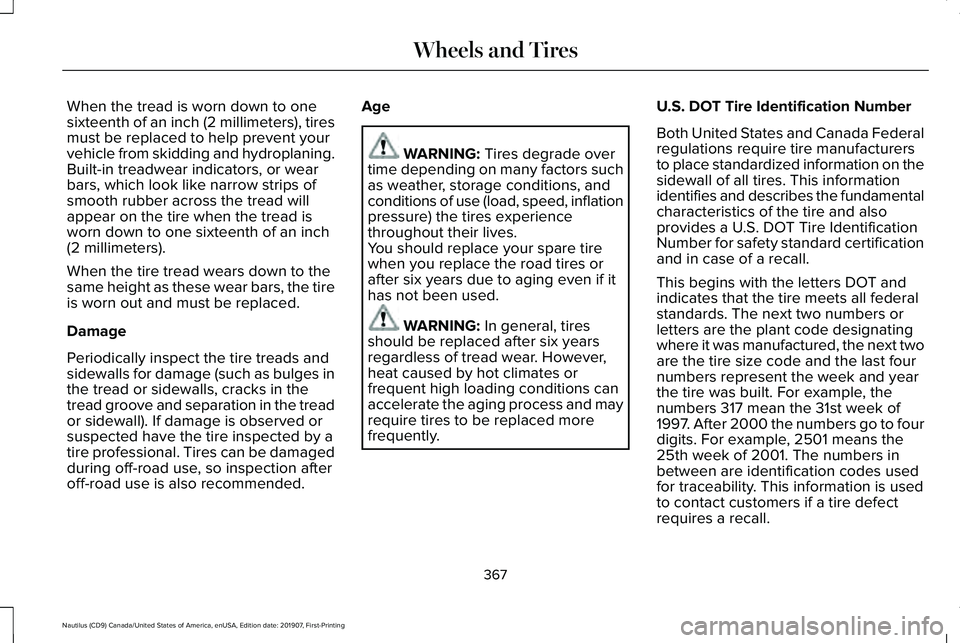
When the tread is worn down to one
sixteenth of an inch (2 millimeters), tires
must be replaced to help prevent your
vehicle from skidding and hydroplaning.
Built-in treadwear indicators, or wear
bars, which look like narrow strips of
smooth rubber across the tread will
appear on the tire when the tread is
worn down to one sixteenth of an inch
(2 millimeters).
When the tire tread wears down to the
same height as these wear bars, the tire
is worn out and must be replaced.
Damage
Periodically inspect the tire treads and
sidewalls for damage (such as bulges in
the tread or sidewalls, cracks in the
tread groove and separation in the tread
or sidewall). If damage is observed or
suspected have the tire inspected by a
tire professional. Tires can be damaged
during off-road use, so inspection after
off-road use is also recommended.
Age WARNING: Tires degrade over
time depending on many factors such
as weather, storage conditions, and
conditions of use (load, speed, inflation
pressure) the tires experience
throughout their lives.
You should replace your spare tire
when you replace the road tires or
after six years due to aging even if it
has not been used. WARNING:
In general, tires
should be replaced after six years
regardless of tread wear. However,
heat caused by hot climates or
frequent high loading conditions can
accelerate the aging process and may
require tires to be replaced more
frequently. U.S. DOT Tire Identification Number
Both United States and Canada Federal
regulations require tire manufacturers
to place standardized information on the
sidewall of all tires. This information
identifies and describes the fundamental
characteristics of the tire and also
provides a U.S. DOT Tire Identification
Number for safety standard certification
and in case of a recall.
This begins with the letters DOT and
indicates that the tire meets all federal
standards. The next two numbers or
letters are the plant code designating
where it was manufactured, the next two
are the tire size code and the last four
numbers represent the week and year
the tire was built. For example, the
numbers 317 mean the 31st week of
1997. After 2000 the numbers go to four
digits. For example, 2501 means the
25th week of 2001. The numbers in
between are identification codes used
for traceability. This information is used
to contact customers if a tire defect
requires a recall.
367
Nautilus (CD9) Canada/United States of America, enUSA, Edition date: 201907, First-Printing Wheels and Tires
Page 384 of 596
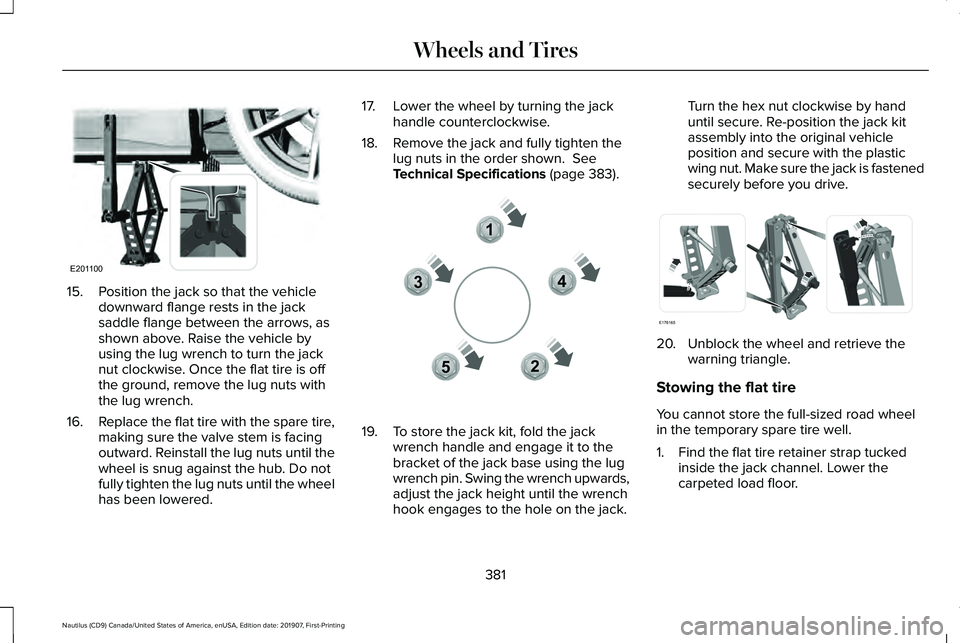
15. Position the jack so that the vehicle
downward flange rests in the jack
saddle flange between the arrows, as
shown above. Raise the vehicle by
using the lug wrench to turn the jack
nut clockwise. Once the flat tire is off
the ground, remove the lug nuts with
the lug wrench.
16. Replace the flat tire with the spare tire,
making sure the valve stem is facing
outward. Reinstall the lug nuts until the
wheel is snug against the hub. Do not
fully tighten the lug nuts until the wheel
has been lowered. 17. Lower the wheel by turning the jack
handle counterclockwise.
18. Remove the jack and fully tighten the lug nuts in the order shown. See
Technical Specifications (page 383). 19. To store the jack kit, fold the jack
wrench handle and engage it to the
bracket of the jack base using the lug
wrench pin. Swing the wrench upwards,
adjust the jack height until the wrench
hook engages to the hole on the jack. Turn the hex nut clockwise by hand
until secure. Re-position the jack kit
assembly into the original vehicle
position and secure with the plastic
wing nut. Make sure the jack is fastened
securely before you drive.
20. Unblock the wheel and retrieve the
warning triangle.
Stowing the flat tire
You cannot store the full-sized road wheel
in the temporary spare tire well.
1. Find the flat tire retainer strap tucked inside the jack channel. Lower the
carpeted load floor.
381
Nautilus (CD9) Canada/United States of America, enUSA, Edition date: 201907, First-Printing Wheels and TiresE201100 12
3
4
5E306781 E176165
Page 591 of 596
Using Your Cell Phone......................................459
Post-Crash Alert System............................292
Power Door Locks See: Locking and Unlocking..............................
70
Power Liftgate..................................................78 Hands-Free Feature..............................................81
Obstacle Detection...............................................81
Opening and Closing the Liftgate....................79
Setting the Liftgate Open Height.....................80
Stopping the Liftgate Movement......................
80
Switching the Power Liftgate On or Off...........81
Power Seats
.....................................................151
Adjusting the Lumbar Support.........................153
Adjusting the Multi-Contour Front Seats With Active Motion ..................................................153
Power Windows
.............................................103
Accessory Delay..................................................104
Bounce-Back........................................................103
One-Touch Down................................................103
One-Touch Up......................................................103
Window Lock........................................................104
Pre-Collision Assist
.......................................261
Adjusting the Pre-Collision Assist
Settings............................................................264
Blocked Sensors................................................264
Distance Indication and Alert..........................262
Evasive Steer Assist..........................................264
Using the Pre-Collision Assist System...........261 Protecting the Environment
..........................18
Puncture See: Changing a Road Wheel.........................376
R
Rear Parking Aid............................................214 Object Distance Indicator.................................216
Rear Seat Armrest..........................................171 Type One ...............................................................171
Type Two ...............................................................171
Rear Seats
.......................................................158
Adjusting the Rear Seats...................................158
Rear Under Floor Storage..........................270 Cargo Management System............................270
In-Floor Storage - Second Row.......................270
Rear View Camera.......................................228 Camera Guidelines............................................229
Manual Zoom........................................................231
Obstacle Distance Indicator............................230
Rear Camera Delay.............................................231
Using the Rear View Camera System...........229
Rear View Camera See: Rear View Camera...................................228
Rear Window Wiper and Washers..............92 Rear Camera Washer...........................................93
Rear Window Washer..........................................93
Rear Window Wiper.............................................92 Recommended Towing Weights...............279
Reduced Engine Performance..................285
Refueling..........................................................184
Refueling System Overview.............................184
Refueling System Warning................................186
Refueling Your Vehicle.......................................185
Remote Control
...............................................58
Global Opening and Closing..............................61
Intelligent Access Key.........................................58
Linking a Preset Position to Your Remote Control.................................................................61
Locating Your Vehicle...........................................61
Memory Feature....................................................63
Remote Control Information Messages..........
63
Remote Start...........................................................61
Replacing the Battery..........................................59
Sounding the Panic Alarm...................................61
Remote Start
...................................................145
Automatic Settings..............................................145
Repairing Minor Paint Damage.................350
Replacement Parts Recommendation........15 Collision Repairs....................................................15
Scheduled Maintenance and Mechanical
Repairs.................................................................15
Warranty on Replacement Parts........................15
Replacing a Lost Key or Remote Control............................................................64
588
Nautilus (CD9) Canada/United States of America, enUSA, Edition date: 201907, First-Printing Index
Page 592 of 596
Reporting Safety Defects (Canada
Only)...............................................................301
Reporting Safety Defects (U.S. Only).......301
Resuming the Set Speed...........................235
Roadside Assistance...................................288 Vehicles Sold in Canada: Getting Roadside
Assistance.......................................................289
Vehicles sold in the United States: Getting Roadside Assistance.....................................288
Vehicles Sold in the United States: Using Roadside Assistance.....................................288
Roadside Emergencies
...............................288
Roof Racks and Load Carriers...................272
Running-In See: Breaking-In.................................................285
Running Out of Fuel.....................................183 Adding Fuel From a Portable Fuel
Container..........................................................183
Filling a Portable Fuel Container.....................183
S
Safety Canopy™
...............................................52
Safety Precautions.........................................181
Satellite Radio...............................................424 Satellite Radio Electronic Serial Number
(ESN)..................................................................425
Satellite Radio Reception Factors..................424 SiriusXM Satellite Radio Service....................425
Troubleshooting..................................................426
Scheduled Maintenance Record..............507
Scheduled Maintenance............................495
Seatbelt Extensions
........................................43
Seatbelt Height Adjustment.........................39
Seatbelt Reminder
...........................................41
Belt-Minder™............................................................41
Seatbelts...........................................................36 Principle of Operation..........................................36
Seatbelt Warning Lamp and Indicator Chime..............................................................40
Conditions of operation......................................40
Seats.................................................................147
Security.............................................................82
Settings............................................................471 911 Assist................................................................471
Ambient Lighting................................................472
Audio.......................................................................471
Automatic Updates.............................................471
Bluetooth...............................................................471
Charge Settings...................................................471
Clock.......................................................................471
Display....................................................................471
Driver Assist..........................................................471
General...................................................................471
Lincoln Way...........................................................471
Message Center.................................................472 Mobile Apps..........................................................471
Multi Contour Seats...........................................472
Navigation.............................................................471
Personal Profiles.................................................472
Phone......................................................................471
Seats......................................................................472
Sound......................................................................471
Valet Mode...........................................................472
Vehicle....................................................................471
Voice Control........................................................471
Setting the Cruise Control Speed............234 Changing the Set Speed..................................234
Side Airbags
......................................................51
Side Sensing System...................................218 Object Distance Indicator.................................219
Sitting in the Correct Position.....................147
Snow Chains See: Using Snow Chains..................................
370
Spare Wheel See: Changing a Road Wheel.........................376
Special Notices
................................................15
New Vehicle Limited Warranty...........................15
Notice to Owners of Pickup Trucks and Utility
Type Vehicles.....................................................16
On Board Diagnostics Data Link Connector...........................................................16
Special Instructions...............................................15
Using Your Vehicle as an Ambulance..............
16
589
Nautilus (CD9) Canada/United States of America, enUSA, Edition date: 201907, First-Printing Index