ignition LINCOLN NAUTILUS 2020 Owner's Manual
[x] Cancel search | Manufacturer: LINCOLN, Model Year: 2020, Model line: NAUTILUS, Model: LINCOLN NAUTILUS 2020Pages: 596, PDF Size: 5.88 MB
Page 99 of 596
Note:
If you switch the autolamps and the
autowipers on, the headlamps turn on when
the windshield wipers continuously operate.
INSTRUMENT LIGHTING DIMMER
The instrument lighting dimmer buttons are
on the lighting control. Repeatedly press one of the
buttons to adjust the brightness.
HEADLAMP EXIT DELAY
After you switch the ignition off, you can
switch the headlamps on by pulling the
direction indicator lever toward you. You will
hear a short tone. The headlamps will switch
off automatically after three minutes with any
door open or 30 seconds after the last door
has been closed. You can cancel this feature
by pulling the direction indicator toward you
again or switching the ignition on. DAYTIME RUNNING LAMPS -
VEHICLES WITH: DAYTIME
RUNNING LAMPS (DRL) WARNING: The daytime running
lamps system does not activate the rear
lamps and may not provide adequate
lighting during low visibility driving
conditions. Make sure you switch the
headlamps on, as appropriate, during all
low visibility conditions. Failure to do so
may result in a crash.
The system turns the lamps on in daylight
conditions.
To switch the system on, switch the lighting
control to any position except headlamps. DAYTIME RUNNING LAMPS -
VEHICLES WITH: CONFIGURABLE
DAYTIME RUNNING LAMPS WARNING: The daytime running
lamps system does not activate the rear
lamps and may not provide adequate
lighting during low visibility driving
conditions. Make sure you switch the
headlamps on, as appropriate, during all
low visibility conditions. Failure to do so
may result in a crash.
Switch the daytime running lamps on or off
using the information display.
See General
Information (page 116).
The daytime running lamps turn on when:
1. The lamps are on in the information display.
2. You switch the ignition on.
3. The transmission is not in park (P) for vehicles with automatic transmissions or
you release the parking brake for
vehicles with manual transmissions.
96
Nautilus (CD9) Canada/United States of America, enUSA, Edition date: 201907, First-Printing LightingE291299 E291298
Page 107 of 596
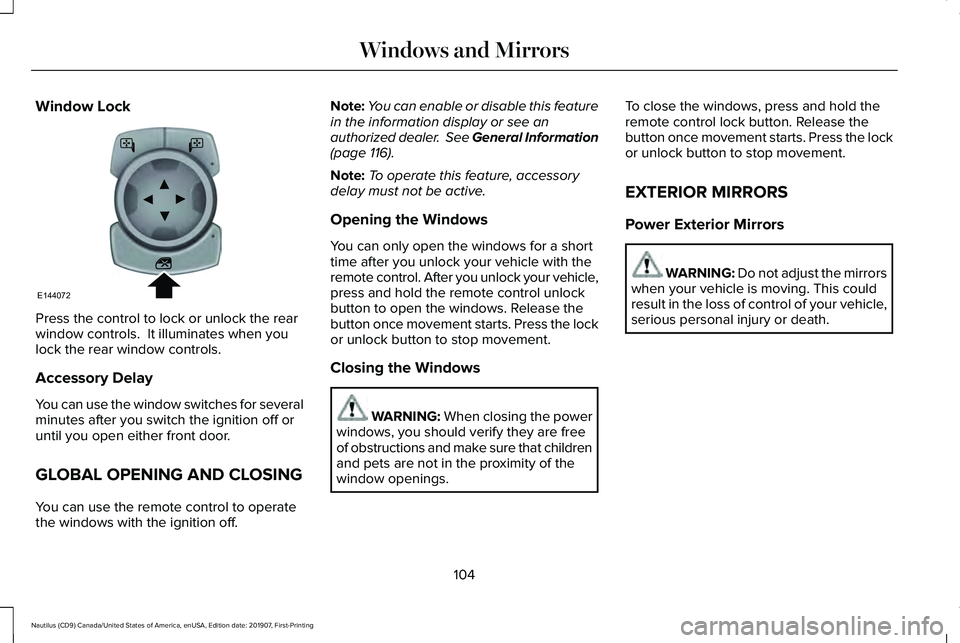
Window Lock
Press the control to lock or unlock the rear
window controls. It illuminates when you
lock the rear window controls.
Accessory Delay
You can use the window switches for several
minutes after you switch the ignition off or
until you open either front door.
GLOBAL OPENING AND CLOSING
You can use the remote control to operate
the windows with the ignition off. Note:
You can enable or disable this feature
in the information display or see an
authorized dealer. See General Information
(page 116).
Note: To operate this feature, accessory
delay must not be active.
Opening the Windows
You can only open the windows for a short
time after you unlock your vehicle with the
remote control. After you unlock your vehicle,
press and hold the remote control unlock
button to open the windows. Release the
button once movement starts. Press the lock
or unlock button to stop movement.
Closing the Windows WARNING: When closing the power
windows, you should verify they are free
of obstructions and make sure that children
and pets are not in the proximity of the
window openings. To close the windows, press and hold the
remote control lock button. Release the
button once movement starts. Press the lock
or unlock button to stop movement.
EXTERIOR MIRRORS
Power Exterior Mirrors
WARNING: Do not adjust the mirrors
when your vehicle is moving. This could
result in the loss of control of your vehicle,
serious personal injury or death.
104
Nautilus (CD9) Canada/United States of America, enUSA, Edition date: 201907, First-Printing Windows and MirrorsE144072
Page 108 of 596
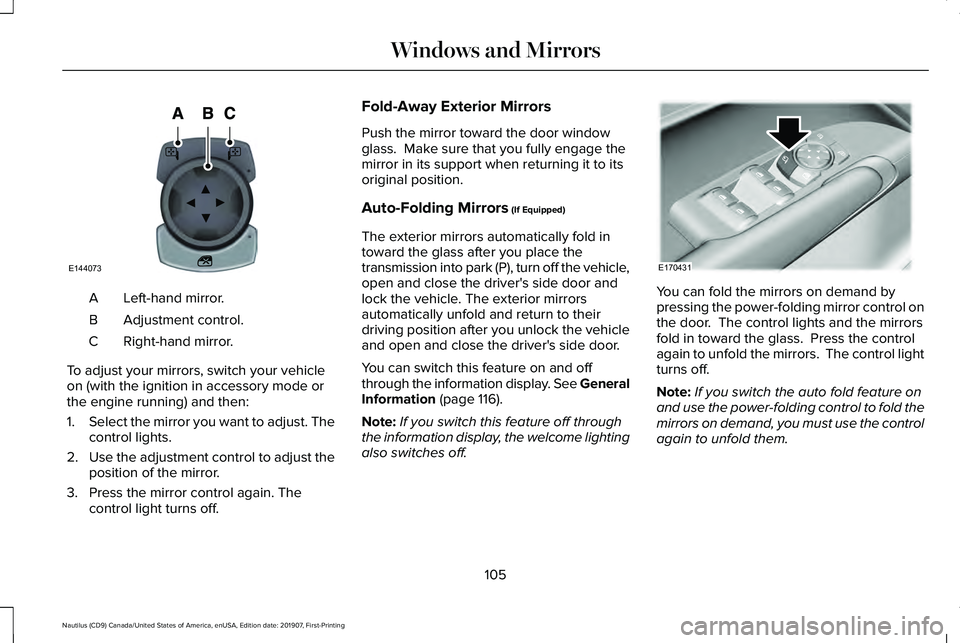
Left-hand mirror.
A
Adjustment control.
B
Right-hand mirror.
C
To adjust your mirrors, switch your vehicle
on (with the ignition in accessory mode or
the engine running) and then:
1. Select the mirror you want to adjust. The
control lights.
2. Use the adjustment control to adjust the
position of the mirror.
3. Press the mirror control again. The control light turns off. Fold-Away Exterior Mirrors
Push the mirror toward the door window
glass. Make sure that you fully engage the
mirror in its support when returning it to its
original position.
Auto-Folding Mirrors (If Equipped)
The exterior mirrors automatically fold in
toward the glass after you place the
transmission into park (P), turn off the vehicle,
open and close the driver's side door and
lock the vehicle. The exterior mirrors
automatically unfold and return to their
driving position after you unlock the vehicle
and open and close the driver's side door.
You can switch this feature on and off
through the information display. See General
Information
(page 116).
Note: If you switch this feature off through
the information display, the welcome lighting
also switches off. You can fold the mirrors on demand by
pressing the power-folding mirror control on
the door. The control lights and the mirrors
fold in toward the glass. Press the control
again to unfold the mirrors. The control light
turns off.
Note:
If you switch the auto fold feature on
and use the power-folding control to fold the
mirrors on demand, you must use the control
again to unfold them.
105
Nautilus (CD9) Canada/United States of America, enUSA, Edition date: 201907, First-Printing Windows and MirrorsE144073 E170431
Page 114 of 596
Indicates engine coolant temperature. At
normal operating temperature, the level
indicator will be in the normal range. If the
engine coolant temperature exceeds the
normal range, stop your vehicle as soon as
safely possible, switch off the engine and let
the engine cool.
WARNING LAMPS AND
INDICATORS
The following warning lamps and indicators
alert you to a vehicle condition that may
become serious. Some lamps illuminate
when you start your vehicle to make sure
they work. If any lamps remain on after
starting your vehicle, refer to the respective
system warning lamp for further information.
Note:
Some warning indicators appear in
the information display and operate the
same as a warning lamp but do not
illuminate when you start your vehicle. Adaptive Cruise Control Indicator (If
Equipped) It illuminates when you switch the
system on.
It illuminates white when the
system is in standby mode. It illuminates
green when you set the adaptive cruise
speed.
See
Using Adaptive Cruise Control (page
235).
Adaptive Steering
(If Equipped) The adaptive steering system
indicator illuminates if the system
detects a fault during the
continuous diagnostic checks.
Adaptive Steering Initialization (yellow,
flashing): The adaptive steering system has
detected a difference between steering
wheel angle and the desired road wheel
angle. The steering wheel adjusts itself to
correct this difference. This adjustment is
part of normal system operation. Adaptive Steering Off (yellow, solid): The
adaptive steering system is off. It is possible
that the steering wheel may not be straight
when the vehicle is driving straight ahead. If
this message persists, see an authorized
dealer.
Adaptive Steering Loss (red, solid): The
adaptive steering system integrity cannot be
verified. Do not drive the vehicle and contact
an authorized dealer immediately.
See
Steering (page 260).
Airbag Warning Lamp If it does not illuminate when you
switch the ignition on, continues
to flash or remains on when the
engine is running, this indicates a
malfunction. Have your vehicle checked as
soon as possible.
111
Nautilus (CD9) Canada/United States of America, enUSA, Edition date: 201907, First-Printing Instrument ClusterE144524 E223375 E67017
Page 115 of 596
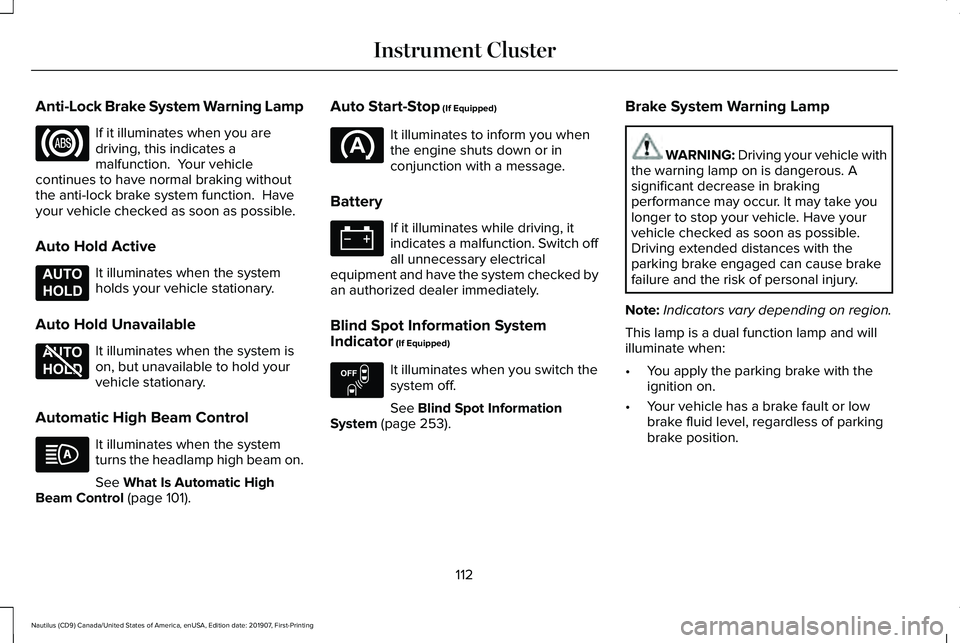
Anti-Lock Brake System Warning Lamp
If it illuminates when you are
driving, this indicates a
malfunction. Your vehicle
continues to have normal braking without
the anti-lock brake system function. Have
your vehicle checked as soon as possible.
Auto Hold Active It illuminates when the system
holds your vehicle stationary.
Auto Hold Unavailable It illuminates when the system is
on, but unavailable to hold your
vehicle stationary.
Automatic High Beam Control It illuminates when the system
turns the headlamp high beam on.
See What Is Automatic High
Beam Control (page 101). Auto Start-Stop
(If Equipped) It illuminates to inform you when
the engine shuts down or in
conjunction with a message.
Battery If it illuminates while driving, it
indicates a malfunction. Switch off
all unnecessary electrical
equipment and have the system checked by
an authorized dealer immediately.
Blind Spot Information System
Indicator
(If Equipped) It illuminates when you switch the
system off.
See
Blind Spot Information
System (page 253). Brake System Warning Lamp WARNING: Driving your vehicle with
the warning lamp on is dangerous. A
significant decrease in braking
performance may occur. It may take you
longer to stop your vehicle. Have your
vehicle checked as soon as possible.
Driving extended distances with the
parking brake engaged can cause brake
failure and the risk of personal injury.
Note: Indicators vary depending on region.
This lamp is a dual function lamp and will
illuminate when:
• You apply the parking brake with the
ignition on.
• Your vehicle has a brake fault or low
brake fluid level, regardless of parking
brake position.
112
Nautilus (CD9) Canada/United States of America, enUSA, Edition date: 201907, First-Printing Instrument Cluster E197933 E197934 E151262
Page 116 of 596
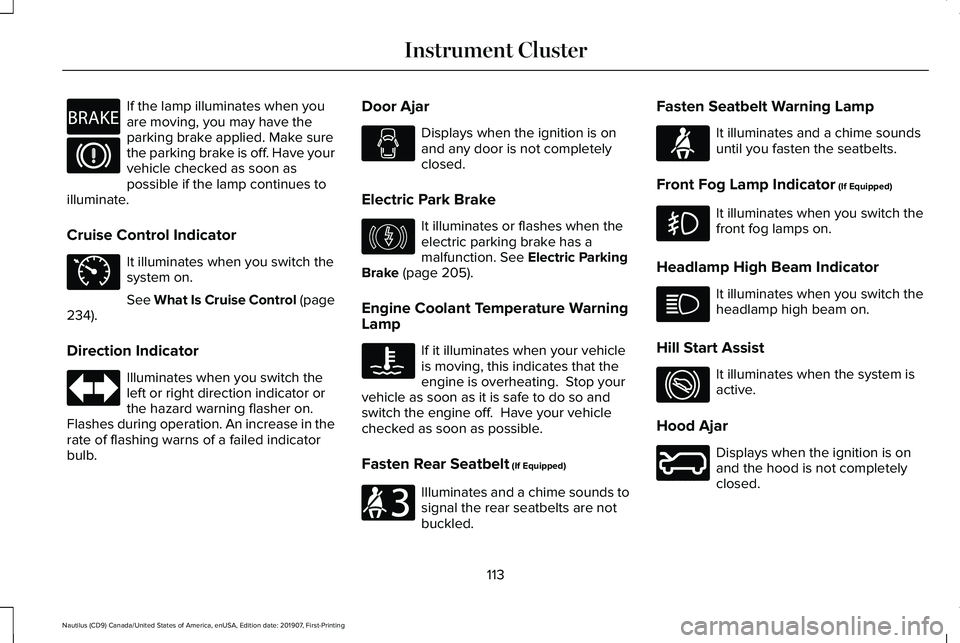
If the lamp illuminates when you
are moving, you may have the
parking brake applied. Make sure
the parking brake is off. Have your
vehicle checked as soon as
possible if the lamp continues to
illuminate.
Cruise Control Indicator It illuminates when you switch the
system on.
See What Is Cruise Control (page
234).
Direction Indicator Illuminates when you switch the
left or right direction indicator or
the hazard warning flasher on.
Flashes during operation. An increase in the
rate of flashing warns of a failed indicator
bulb. Door Ajar Displays when the ignition is on
and any door is not completely
closed.
Electric Park Brake It illuminates or flashes when the
electric parking brake has a
malfunction.
See Electric Parking
Brake (page 205).
Engine Coolant Temperature Warning
Lamp If it illuminates when your vehicle
is moving, this indicates that the
engine is overheating. Stop your
vehicle as soon as it is safe to do so and
switch the engine off. Have your vehicle
checked as soon as possible.
Fasten Rear Seatbelt
(If Equipped) Illuminates and a chime sounds to
signal the rear seatbelts are not
buckled.Fasten Seatbelt Warning Lamp It illuminates and a chime sounds
until you fasten the seatbelts.
Front Fog Lamp Indicator
(If Equipped) It illuminates when you switch the
front fog lamps on.
Headlamp High Beam Indicator It illuminates when you switch the
headlamp high beam on.
Hill Start Assist It illuminates when the system is
active.
Hood Ajar Displays when the ignition is on
and the hood is not completely
closed.
113
Nautilus (CD9) Canada/United States of America, enUSA, Edition date: 201907, First-Printing Instrument ClusterE270480 E71340 E146190 E206718 E71880 E274708 E246598
Page 117 of 596
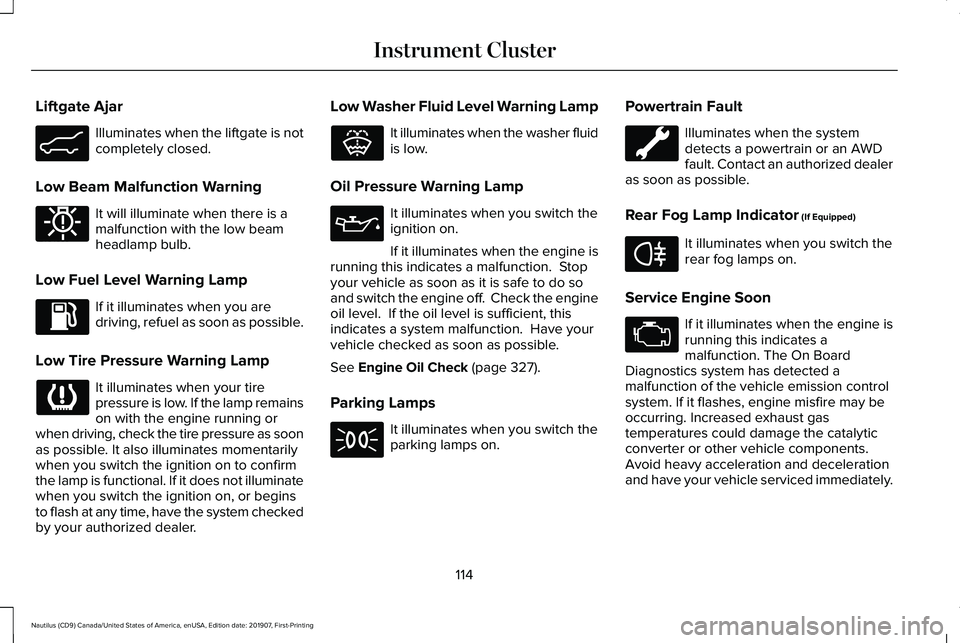
Liftgate Ajar
Illuminates when the liftgate is not
completely closed.
Low Beam Malfunction Warning It will illuminate when there is a
malfunction with the low beam
headlamp bulb.
Low Fuel Level Warning Lamp If it illuminates when you are
driving, refuel as soon as possible.
Low Tire Pressure Warning Lamp It illuminates when your tire
pressure is low. If the lamp remains
on with the engine running or
when driving, check the tire pressure as soon
as possible. It also illuminates momentarily
when you switch the ignition on to confirm
the lamp is functional. If it does not illuminate
when you switch the ignition on, or begins
to flash at any time, have the system checked
by your authorized dealer. Low Washer Fluid Level Warning Lamp It illuminates when the washer fluid
is low.
Oil Pressure Warning Lamp It illuminates when you switch the
ignition on.
If it illuminates when the engine is
running this indicates a malfunction. Stop
your vehicle as soon as it is safe to do so
and switch the engine off. Check the engine
oil level. If the oil level is sufficient, this
indicates a system malfunction. Have your
vehicle checked as soon as possible.
See Engine Oil Check (page 327).
Parking Lamps It illuminates when you switch the
parking lamps on.Powertrain Fault Illuminates when the system
detects a powertrain or an AWD
fault. Contact an authorized dealer
as soon as possible.
Rear Fog Lamp Indicator
(If Equipped) It illuminates when you switch the
rear fog lamps on.
Service Engine Soon If it illuminates when the engine is
running this indicates a
malfunction. The On Board
Diagnostics system has detected a
malfunction of the vehicle emission control
system. If it flashes, engine misfire may be
occurring. Increased exhaust gas
temperatures could damage the catalytic
converter or other vehicle components.
Avoid heavy acceleration and deceleration
and have your vehicle serviced immediately.
114
Nautilus (CD9) Canada/United States of America, enUSA, Edition date: 201907, First-Printing Instrument ClusterE162453 E181350 E132353 E67040
Page 118 of 596
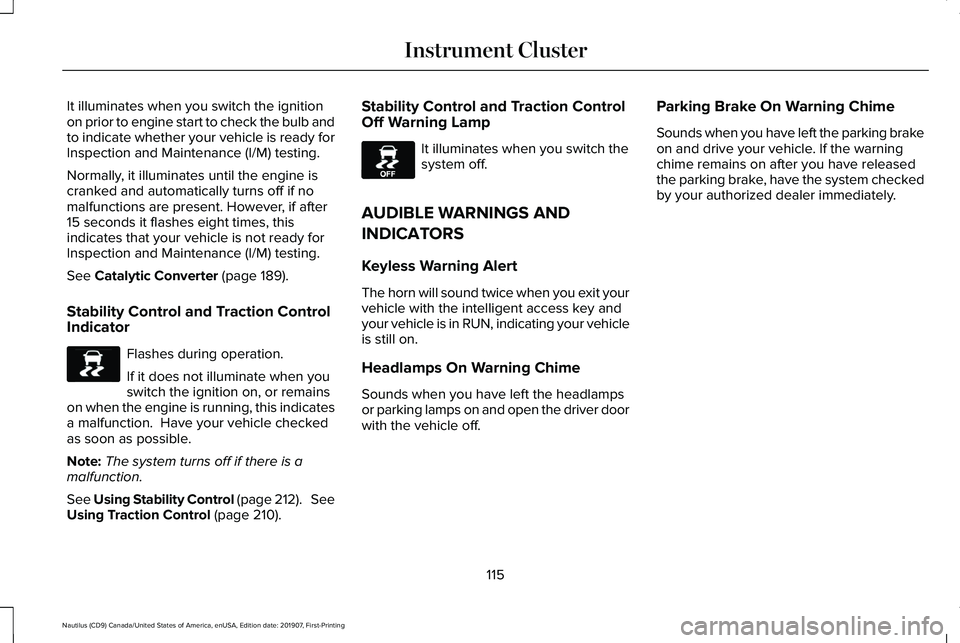
It illuminates when you switch the ignition
on prior to engine start to check the bulb and
to indicate whether your vehicle is ready for
Inspection and Maintenance (I/M) testing.
Normally, it illuminates until the engine is
cranked and automatically turns off if no
malfunctions are present. However, if after
15 seconds it flashes eight times, this
indicates that your vehicle is not ready for
Inspection and Maintenance (I/M) testing.
See Catalytic Converter (page 189).
Stability Control and Traction Control
Indicator Flashes during operation.
If it does not illuminate when you
switch the ignition on, or remains
on when the engine is running, this indicates
a malfunction. Have your vehicle checked
as soon as possible.
Note: The system turns off if there is a
malfunction.
See Using Stability Control (page 212). See
Using Traction Control
(page 210). Stability Control and Traction Control
Off Warning Lamp It illuminates when you switch the
system off.
AUDIBLE WARNINGS AND
INDICATORS
Keyless Warning Alert
The horn will sound twice when you exit your
vehicle with the intelligent access key and
your vehicle is in RUN, indicating your vehicle
is still on.
Headlamps On Warning Chime
Sounds when you have left the headlamps
or parking lamps on and open the driver door
with the vehicle off. Parking Brake On Warning Chime
Sounds when you have left the parking brake
on and drive your vehicle. If the warning
chime remains on after you have released
the parking brake, have the system checked
by your authorized dealer immediately.
115
Nautilus (CD9) Canada/United States of America, enUSA, Edition date: 201907, First-Printing Instrument ClusterE138639 E130458
Page 129 of 596
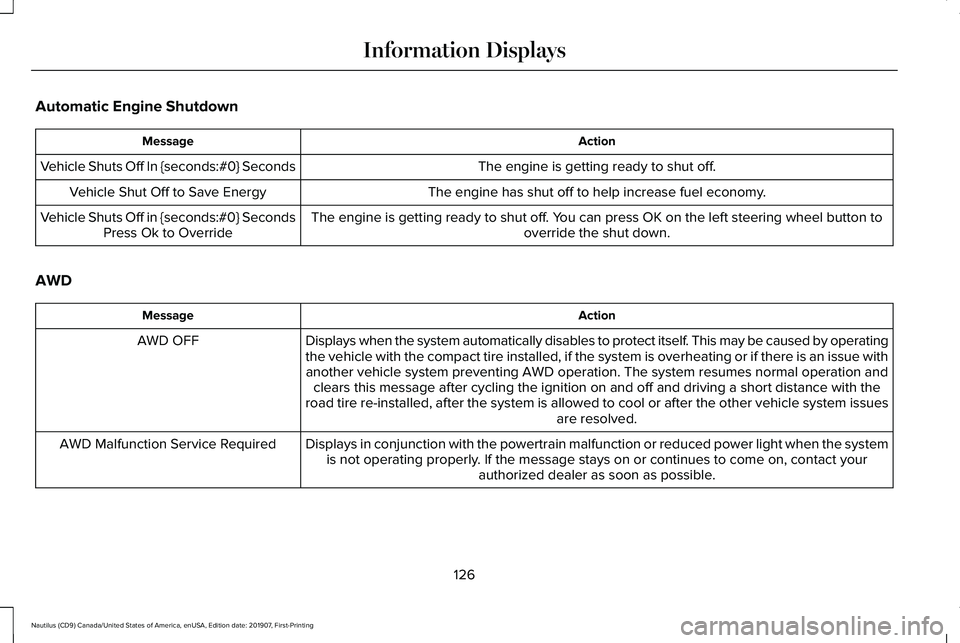
Automatic Engine Shutdown
Action
Message
The engine is getting ready to shut off.
Vehicle Shuts Off In {seconds:#0} Seconds
The engine has shut off to help increase fuel economy.
Vehicle Shut Off to Save Energy
The engine is getting ready to shut off. You can press OK on the left steering wheel button tooverride the shut down.
Vehicle Shuts Off in {seconds:#0} Seconds
Press Ok to Override
AWD Action
Message
Displays when the system automatically disables to protect itself. This may be caused by operating
the vehicle with the compact tire installed, if the system is overheatin\
g or if there is an issue withanother vehicle system preventing AWD operation. The system resumes norm\
al operation and clears this message after cycling the ignition on and off and driving a \
short distance with the
road tire re-installed, after the system is allowed to cool or after the\
other vehicle system issues are resolved.
AWD OFF
Displays in conjunction with the powertrain malfunction or reduced power\
light when the systemis not operating properly. If the message stays on or continues to come on, contact your authorized dealer as soon as possible.
AWD Malfunction Service Required
126
Nautilus (CD9) Canada/United States of America, enUSA, Edition date: 201907, First-Printing Information Displays
Page 130 of 596

Battery and Charging System
Action
Message
The charging system needs servicing. If the warning stays on or continue\
s to come on, contactan authorized dealer as soon as possible.
Check Charging System
The charging system needs servicing. If the warning stays on or continue\
s to come on, contactan authorized dealer as soon as possible.
Charging System Service Soon
The charging system needs servicing. Contact an authorized dealer as soo\
n as possible.
Charging System Service Now
The battery management system determines that the 12V battery is at a lo\
w state of charge.
Start the engine to charge the battery or charge the battery using an aft\
ermarket battery charger.
This message clears once you restart your vehicle and the battery state \
of charge has recovered.
Battery State of Charge Low
The battery management system determines that the battery is at a low st\
ate of charge. Turn
the ignition off as soon as possible to protect the battery. This message will clear once the vehicle
has been started and the battery state of charge has recovered. Turning off unnecessary electrical loads will allow faster battery state-of-charge recovery.
Turn Power Off To Save Battery
Displayed when the battery management system detects an extended low-vol\
tage condition.Various vehicle features will be disabled to help preserve the battery. Turn off as many of the electrical loads as soon as possible to improve system voltage. If the system voltage has recovered, the disabled features will operate again as normal.
Low Battery Features Temporarily Turned
Off
127
Nautilus (CD9) Canada/United States of America, enUSA, Edition date: 201907, First-Printing Information Displays