steering wheel LINCOLN NAUTILUS 2020 Service Manual
[x] Cancel search | Manufacturer: LINCOLN, Model Year: 2020, Model line: NAUTILUS, Model: LINCOLN NAUTILUS 2020Pages: 596, PDF Size: 5.88 MB
Page 247 of 596
Note:
In exceptional conditions, the system
may deviate from the center line.
The system only activates when all of the
following occur:
• You have adaptive cruise control with
stop-and-go on.
• The system detects both lane markings.
• Your hands are on the steering wheel at
all times.
Note: The system may not function if the
front camera or sensor is blocked or not
available.
Switching Lane Centering On and Off Press and release the button.
The indicator appears in the information
display. When the system is on, the color of
the indicator changes to indicate the system
status.
Gray indicates the system is on but inactive.
Green indicates the system is active and
applying assistance steering torque input to
keep your vehicle in the center of the lane. The system activates when it detects valid
lane markings. If it does not detect valid lane
markings, the system stays inactive until valid
markings are available.
The system may not correctly operate in any
of the following conditions:
•
Your vehicle is not centered in the lane.
• The lane is too narrow or wide.
• The system does not detect at least one
lane marking or when lanes merge or
split.
• You switch the direction indicator on.
• Limited steering torque input is applied.
• Areas under construction or new
infrastructure.
• When modifications to the steering
system have been made.
• When using a spare tire.
When the system is active and detects no
steering activity for a certain period of time,
the system alerts you to put your hands on
the steering wheel. If you do not react to the
warnings the system cancels and slows your
vehicle down to idle speeds while
maintaining steering control. The system also alerts you if your vehicle
crosses lane markings without detected
steering activity.
Note:
The system may detect a light grip or
touch on the steering wheel as hands-off
driving.
You can override the system at any time by
steering your vehicle.
Automatic Cancellation
When an external condition cancels the
system, for example, no lane markings
available, a tone sounds and a message
appears in the information display. If your vehicle starts to slow down,
you must contribute to the steering
control and press and release the
button to regain full system performance.
Automatic cancellation can also occur if:
• The lane becomes too wide or too
narrow.
• The system cannot detect valid lane
markings.
• Lane markings are crossed.
244
Nautilus (CD9) Canada/United States of America, enUSA, Edition date: 201907, First-Printing Cruise ControlE262175 E265299
Page 250 of 596
The warning system has two stages:
1.
A temporary warning is issued to advise
you to take a rest. This message only
appears for a short time.
2. If you do not rest and the system continues to detect that your driving
deteriorates, it issues a further warning.
This remains in the information display
until you cancel it. See Information
Messages (page 122).
Press
OK on the steering wheel control to
remove the warning.
Resetting the System
You can reset the system by:
• Switching the ignition off and on.
• Stopping your vehicle and then opening
and closing the driver door. LANE KEEPING SYSTEM WARNING:
You are responsible for
controlling your vehicle at all times. The
system is designed to be an aid and does
not relieve you of your responsibility to
drive with due care and attention. Failure
to follow this instruction could result in the
loss of control of your vehicle, personal
injury or death. WARNING:
Always drive with due
care and attention when using and
operating the controls and features on your
vehicle. WARNING:
In cold and severe
weather conditions the system may not
function. Rain, snow and spray can all limit
sensor performance. WARNING: Large contrasts in outside
lighting can limit sensor performance. WARNING:
The system will not
operate if the sensor cannot track the road
lane markings. WARNING:
The sensor may
incorrectly track lane markings as other
structures or objects. This can result in a
false or missed warning. WARNING:
The system may not
operate properly if the sensor is blocked.
Keep the windshield free from obstruction. WARNING:
If damage occurs in the
immediate area surrounding the sensor,
have your vehicle checked as soon as
possible. WARNING:
The system may not
correctly operate if your vehicle is fitted
with a suspension kit not approved by us.
Note: The system works above
40 mph
(64 km/h).
Note: The system works as long as the
camera can detect one lane marking.
247
Nautilus (CD9) Canada/United States of America, enUSA, Edition date: 201907, First-Printing Driving Aids
Page 251 of 596
Note:
When you select Aid or Alert and Aid
mode and the system detects no steering
activity for a short period, the system alerts
you to put your hands on the steering wheel.
The system may detect a light grip or touch
on the steering wheel as hands off driving.
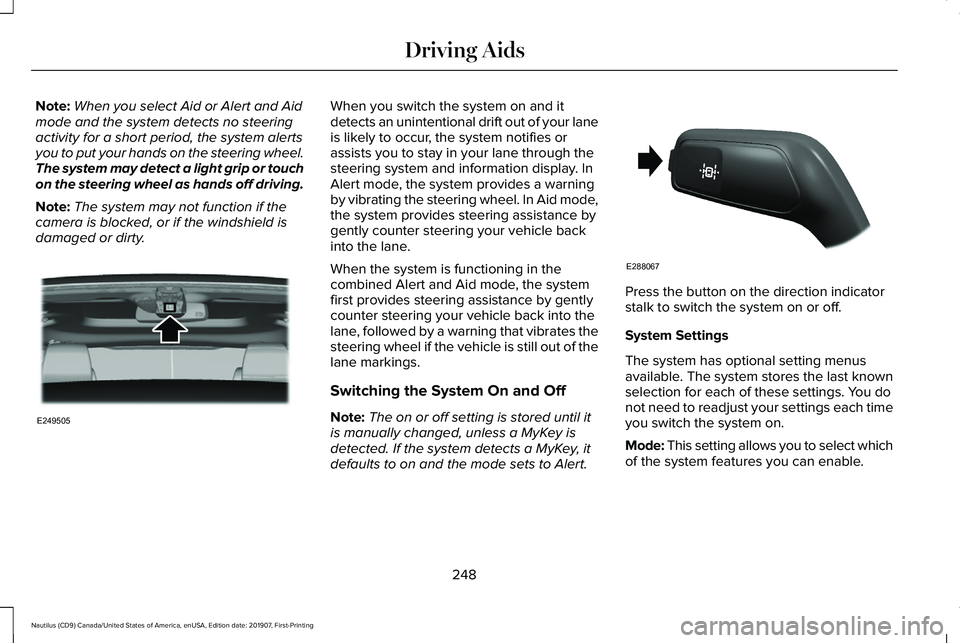
Note: The system may not function if the
camera is blocked, or if the windshield is
damaged or dirty. When you switch the system on and it
detects an unintentional drift out of your lane
is likely to occur, the system notifies or
assists you to stay in your lane through the
steering system and information display. In
Alert mode, the system provides a warning
by vibrating the steering wheel. In Aid mode,
the system provides steering assistance by
gently counter steering your vehicle back
into the lane.
When the system is functioning in the
combined Alert and Aid mode, the system
first provides steering assistance by gently
counter steering your vehicle back into the
lane, followed by a warning that vibrates the
steering wheel if the vehicle is still out of the
lane markings.
Switching the System On and Off
Note:
The on or off setting is stored until it
is manually changed, unless a MyKey is
detected. If the system detects a MyKey, it
defaults to on and the mode sets to Alert. Press the button on the direction indicator
stalk to switch the system on or off.
System Settings
The system has optional setting menus
available. The system stores the last known
selection for each of these settings. You do
not need to readjust your settings each time
you switch the system on.
Mode: This setting allows you to select which
of the system features you can enable.
248
Nautilus (CD9) Canada/United States of America, enUSA, Edition date: 201907, First-Printing Driving AidsE249505 E288067
Page 252 of 596
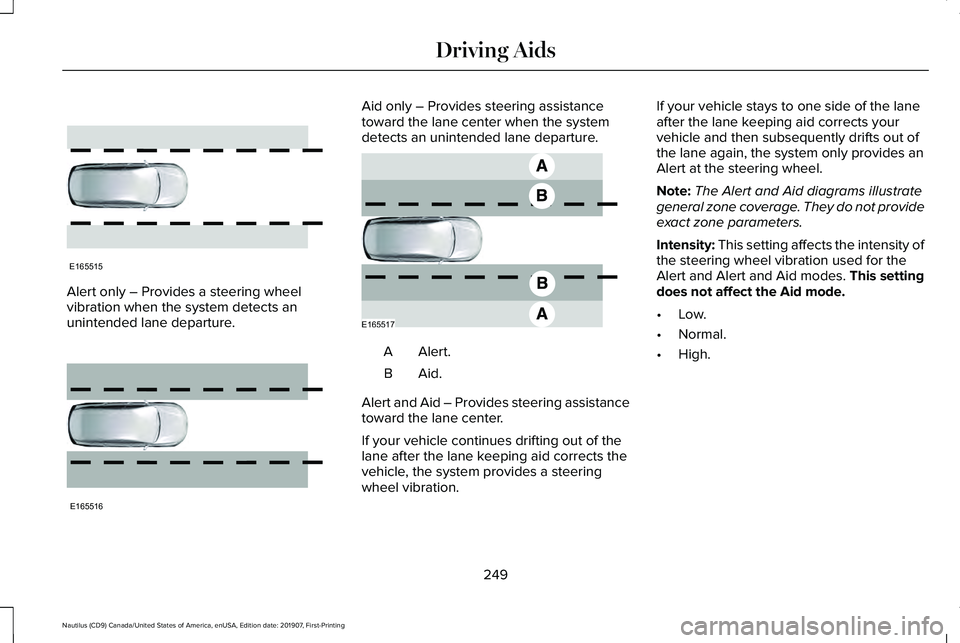
Alert only – Provides a steering wheel
vibration when the system detects an
unintended lane departure. Aid only – Provides steering assistance
toward the lane center when the system
detects an unintended lane departure.
Alert.A
Aid.B
Alert and Aid – Provides steering assistance
toward the lane center.
If your vehicle continues drifting out of the
lane after the lane keeping aid corrects the
vehicle, the system provides a steering
wheel vibration. If your vehicle stays to one side of the lane
after the lane keeping aid corrects your
vehicle and then subsequently drifts out of
the lane again, the system only provides an
Alert at the steering wheel.
Note:
The Alert and Aid diagrams illustrate
general zone coverage. They do not provide
exact zone parameters.
Intensity: This setting affects the intensity of
the steering wheel vibration used for the
Alert and Alert and Aid modes.
This setting
does not affect the Aid mode.
• Low.
• Normal.
• High.
249
Nautilus (CD9) Canada/United States of America, enUSA, Edition date: 201907, First-Printing Driving AidsE165515 E165516 E165517
Page 267 of 596
Evasive Steer Assist (If Equipped)
If your vehicle is rapidly approaching a
stationary vehicle or a vehicle traveling in
the same direction as your vehicle, the
system is designed to help you steer around
the vehicle.
The system only activates when all of the
following occur:
• The Pre-Collision Assist system detects
a vehicle ahead and starts to apply Active
Braking.
• You turn the steering wheel in an attempt
to steer around the vehicle.
After you turn the steering wheel, the system
applies additional steering torque to help
you steer around the vehicle. After you pass
the vehicle, the system applies steering
torque in the opposite direction to encourage
you to steer back into the lane. The system
deactivates after you fully pass the vehicle.
Note: The system does not automatically
steer around a vehicle. If you do not turn the
steering wheel, the system does not activate. Note:
The system does not activate if the
distance to the vehicle ahead is too small
and a crash cannot be avoided.
Adjusting the Pre-Collision Assist
Settings
The following settings can be adjusted by
using the information display controls.
See
General Information (page 116).
• You can change Alert and Distance Alert
sensitivity to one of three possible
settings.
• You can switch Distance Indication and
Alert on or off.
• If required, you can switch Active Braking
on or off.
• If required, you can switch Evasive Steer
Assist on or off.
Note: Active Braking and Evasive Steering
Assist automatically turn on every time you
switch the ignition on.
Note: If you switch Active Braking off,
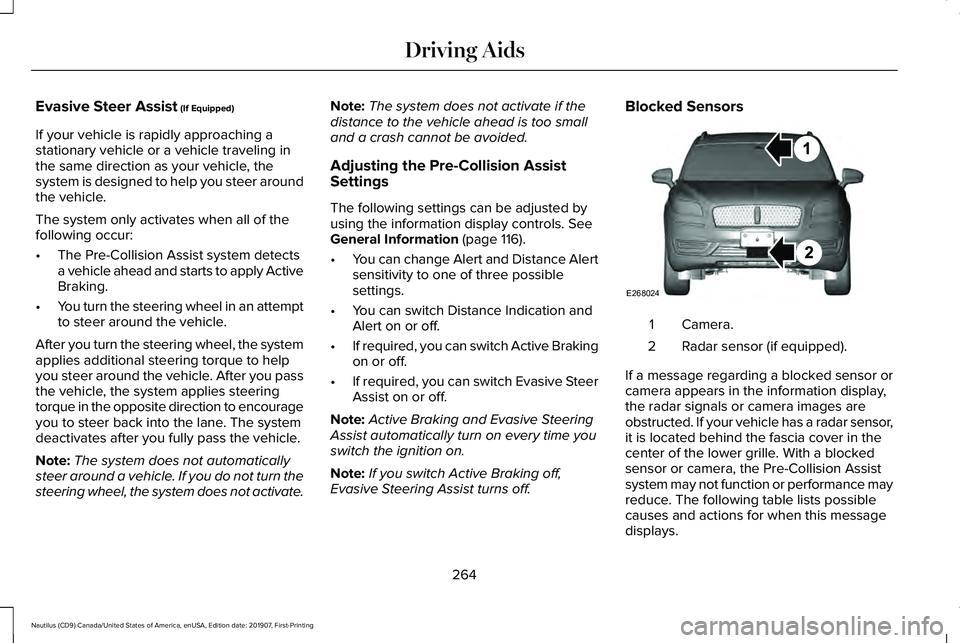
Evasive Steering Assist turns off. Blocked Sensors
Camera.
1
Radar sensor (if equipped).
2
If a message regarding a blocked sensor or
camera appears in the information display,
the radar signals or camera images are
obstructed. If your vehicle has a radar sensor,
it is located behind the fascia cover in the
center of the lower grille. With a blocked
sensor or camera, the Pre-Collision Assist
system may not function or performance may
reduce. The following table lists possible
causes and actions for when this message
displays.
264
Nautilus (CD9) Canada/United States of America, enUSA, Edition date: 201907, First-Printing Driving AidsE268024
Page 270 of 596
DRIVE CONTROL
LINCOLN DRIVE CONTROL
The system delivers a driving experience
through a suite of sophisticated electronic
vehicle systems. These systems continuously
monitor your driving inputs and the road
conditions to optimize ride comfort, steering,
handling, powertrain response and sound.
You can preset your preferences for these
systems within the information display. The
system responds to your preferences based
on what gear position you select. This
provides a single location to control multiple
systems performance settings.
Lincoln Drive Control consists of the
following systems:
•
Continuously controlled damping
dynamically adjusts the shock absorbers
stiffness in real time to match the road
surface and driver inputs. This system
continuously monitors your vehicle ’s
motion, suspension position, load, speed,
road conditions and steering to adjust
the suspension damping for optimal
vehicle control.
• Electronically power-assisted steering
adjusts steering effort and feel based on
your vehicle speed and your inputs.
• Adaptive steering optimizes your
vehicle's steering response based on
your steering wheel input, changes in
vehicle speed and other conditions.
• Active noise control utilizes your vehicle
electronics to enhance the acoustic
experience. •
Electronic stability control and traction
control maintain your vehicle control in
adverse conditions or high performance
driving.
• Electronic throttle control enhances the
powertrain response to your inputs.
Using Lincoln Drive Control
You can configure which of the Drive Control
modes are active when your vehicle is in
drive (D) or in sport (S). The configuration
remains active until modified from the main
menu on the information display.
267
Nautilus (CD9) Canada/United States of America, enUSA, Edition date: 201907, First-Printing Driving Aids
Page 285 of 596
Trailer lamps are required on most towed
vehicles. Make sure all running lights, brake
lights, turn signals and hazard lights are
working.
Before Towing a Trailer
Practice turning, stopping and backing up to
get the feel of your vehicle-trailer
combination before starting on a trip. When
turning, make wider turns so the trailer
wheels clear curbs and other obstacles.
When Towing a Trailer
•
Do not drive faster than 70 mph
(113 km/h) during the first 500 mi
(800 km).
• Do not make full-throttle starts.
• Check your hitch, electrical connections
and trailer wheel lug nuts thoroughly after
you have traveled
50 mi (80 km).
• When stopped in congested or heavy
traffic during hot weather, place the
transmission in park (P) to aid engine and
transmission cooling and to help A/C
performance. •
Turn off the speed control with heavy
loads or in hilly terrain. The speed control
may turn off automatically when you are
towing on long, steep grades.
• Shift to a lower gear when driving down
a long or steep hill. Do not apply the
brakes continuously, as they may
overheat and become less effective.
• If your transmission is equipped with a
Grade Assist or Tow/Haul feature, use
this feature when towing. This provides
engine braking and helps eliminate
excessive transmission shifting for
optimum fuel economy and transmission
cooling.
• Allow more distance for stopping with a
trailer attached. Anticipate stops and
brake gradually.
• Avoid parking on a grade. However, if
you must park on a grade:
1. Turn the steering wheel to point your vehicle tires away from traffic flow.
2. Set your vehicle parking brake.
3. Place the transmission in park (P). 4. Place wheel chocks in front and back of
the trailer wheels. Chocks are not
included with your vehicle.
Launching or Retrieving a Boat or
Personal Watercraft (PWC)
Note: Disconnect the wiring to the trailer
before
backing the trailer into the water.
Note: Reconnect the wiring to the trailer
after
removing the trailer from the water.
When backing down a ramp during boat
launching or retrieval:
• Do not allow the static water level to rise
above the bottom edge of the rear
bumper.
• Do not allow waves to break higher than
6 in (15 cm)
above the bottom edge of
the rear bumper.
Exceeding these limits may allow water to
enter vehicle components:
• Causing internal damage to the
components.
• Affecting driveability, emissions, and
reliability.
282
Nautilus (CD9) Canada/United States of America, enUSA, Edition date: 201907, First-Printing Towing
Page 286 of 596
Replace the rear axle lubricant anytime you
submerge the rear axle in water. Water may
contaminate the rear axle lubricant, which is
not a normal maintenance inspection item
unless there is a possibility of a leak or other
axle repair is required.
TOWING THE VEHICLE ON FOUR
WHEELS - 2.0L
Emergency Towing
WARNING: If your vehicle has a
steering wheel lock make sure the ignition
is in the accessory or on position when
being towed. If your vehicle becomes inoperable without
access to wheel dollies or a vehicle transport
trailer, it can be flat-towed with all wheels on
the ground, regardless of the powertrain and
transmission configuration, under the
following conditions:
•
Your vehicle is facing forward for towing
in a forward direction.
• Refer to the Manual Park Release
procedure. See Automatic Transmission
(page
192). Failing to do so may result in
damage to the transmission.
• Maximum speed is
35 mph (56 km/h).
• Maximum distance is
50 mi (80 km).
Recreational Towing
Front-wheel Drive Vehicles
You cannot recreational tow your vehicle
with all wheels on the ground because
vehicle or transmission damage may occur.
Place the front wheels on a two-wheel tow
dolly. If you are using a tow dolly, follow the
instructions specified by the equipment
provider. All-wheel Drive Vehicles
You cannot recreational tow your vehicle
with all wheels on the ground because
vehicle or transmission damage may occur.
We recommend towing your vehicle with all
four wheels off the ground such as when
using a car-hauling trailer. Otherwise, you
cannot recreational tow your vehicle.
TOWING THE VEHICLE ON FOUR
WHEELS - 2.7L
Emergency Towing
WARNING:
If your vehicle has a
steering wheel lock make sure the ignition
is in the accessory or on position when
being towed.
283
Nautilus (CD9) Canada/United States of America, enUSA, Edition date: 201907, First-Printing Towing
Page 289 of 596

There are also some things you may want to
avoid doing because they reduce your fuel
economy:
•
Avoid sudden or hard accelerations.
• Avoid revving the engine before turning
off the car.
• Avoid long idle periods.
• Do not warm up your vehicle on cold
mornings.
• Reduce the use of air conditioning and
heat.
• Avoid using speed control in hilly terrain.
• Do not rest your foot on the brake pedal
while driving.
• Avoid carrying unnecessary weight.
• Avoid adding particular accessories to
your vehicle (e.g. bug deflectors,
rollbars/light bars, running boards, ski
racks).
• Avoid driving with the wheels out of
alignment. COLD WEATHER PRECAUTIONS
The functional operation of some
components and systems can be affected at
temperatures below -13°F (-25°C).
DRIVING THROUGH WATER WARNING:
Do not drive through
flowing or deep water as you may lose
control of your vehicle.
Note: Driving through standing water can
cause vehicle damage.
Note: Engine damage can occur if water
enters the air filter.
Before driving through standing water, check
the depth. Never drive through water that is
higher than the bottom of the front rocker
area of your vehicle. When driving through standing water, drive
very slowly and do not stop your vehicle.
Your brake performance and traction may
be limited. After driving through water and
as soon as it is safe to do so:
•
Lightly press the brake pedal to dry the
brakes and to check that they work.
• Check that the horn works.
• Check that the exterior lights work.
• Turn the steering wheel to check that the
steering power assist works.
286
Nautilus (CD9) Canada/United States of America, enUSA, Edition date: 201907, First-Printing Driving HintsE259345
Page 322 of 596
Protected Components
Fuse Rating
Fuse or Relay Number
Not used (spare).
5A 1
35
Auto-dimming rear view mirror.
15A 1
36
Automatic high beam and lane departure mirror module.
Rear heated seat module.
Suspension module.
Active front steering.
20A 1
37
Heated steering wheel module.
Not used.
-
38
1 Micro 2 fuse.
2 Micro 3 fuse.
CHANGING A FUSE
Fuses WARNING: Always replace a fuse
with one that has the specified amperage
rating. Using a fuse with a higher
amperage rating can cause severe wire
damage and could start a fire. If electrical components in the vehicle are
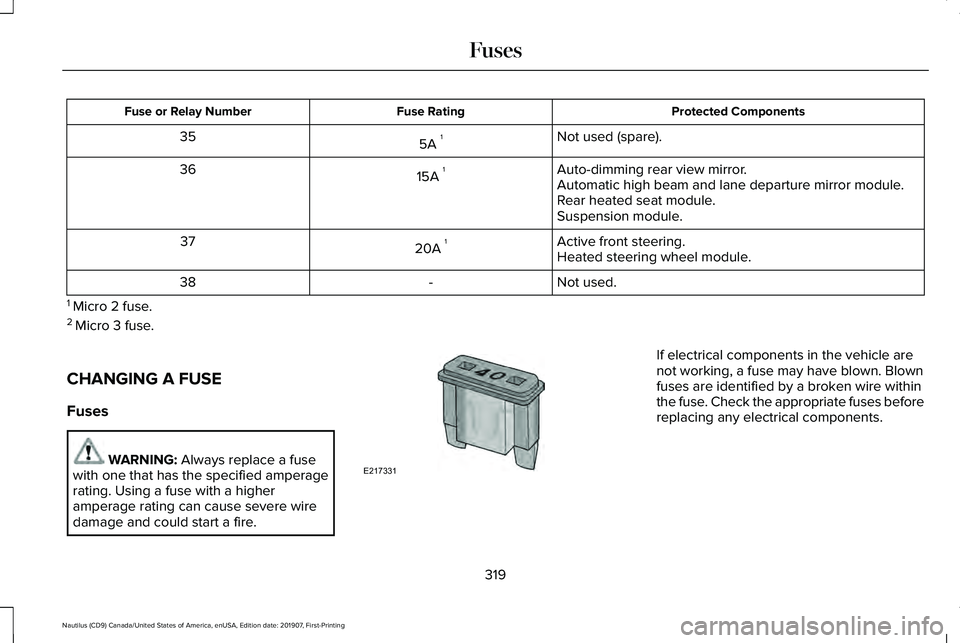
not working, a fuse may have blown. Blown
fuses are identified by a broken wire within
the fuse. Check the appropriate fuses before
replacing any electrical components.
319
Nautilus (CD9) Canada/United States of America, enUSA, Edition date: 201907, First-Printing FusesE217331