Fog LINCOLN NAUTILUS 2020 Owners Manual
[x] Cancel search | Manufacturer: LINCOLN, Model Year: 2020, Model line: NAUTILUS, Model: LINCOLN NAUTILUS 2020Pages: 596, PDF Size: 5.88 MB
Page 5 of 596
MyKey – Troubleshooting
...........................68
Doors and Locks
Locking and Unlocking ................................
70
Keyless Entry ...................................................
74
Liftgate
Power Liftgate .................................................
78
Security
Passive Anti-Theft System ...........................
82
Anti-Theft Alarm .............................................
84
Steering Wheel
Adjusting the Steering Wheel - Vehicles With: Manual Adjustable Steering
Column .........................................................
85
Adjusting the Steering Wheel - Vehicles With: Power Adjustable Steering Column
........................................................................\
85
Audio Control .................................................
86
Voice Control ..................................................
87
Cruise Control .................................................
87Cruise Control - Vehicles With: Adaptive
Cruise Control With Lane Centering
........................................................................\
.
88
Information Display Control ........................
88
Heated Steering Wheel ...............................
89
Horn ..................................................................
89
Wipers and Washers
Windshield Wipers ........................................
90
Autowipers .......................................................
91
Windshield Washers .....................................
92
Rear Window Wiper and Washers ............
92
Lighting
General Information ......................................
94
Lighting Control .............................................
94
Autolamps .......................................................
95
Instrument Lighting Dimmer .......................
96
Headlamp Exit Delay ....................................
96
Daytime Running Lamps - Vehicles With: Daytime Running Lamps (DRL) ..............
96
Daytime Running Lamps - Vehicles With: Configurable Daytime Running Lamps
........................................................................\
96 Front Fog Lamps
............................................
97
Adaptive Headlamps ....................................
97
Direction Indicators .......................................
98
Welcome Lighting ..........................................
98
Interior Lamps .................................................
98
Ambient Lighting ...........................................
99
Automatic High Beam Control
What Is Automatic High Beam Control ........................................................................\
101
Switching Automatic High Beam Control On and Off ..................................................
101
Automatic High Beam Control Indicators .......................................................................
102
Overriding Automatic High Beam Control .......................................................................
102
Windows and Mirrors
Power Windows ............................................
103
Global Opening and Closing .....................
104
Exterior Mirrors .............................................
104
Interior Mirror ................................................
106
Sun Visors ......................................................
107
Moonroof ........................................................
107
2
Nautilus (CD9) Canada/United States of America, enUSA, Edition date: 201907, First-Printing Table of Contents
Page 11 of 596
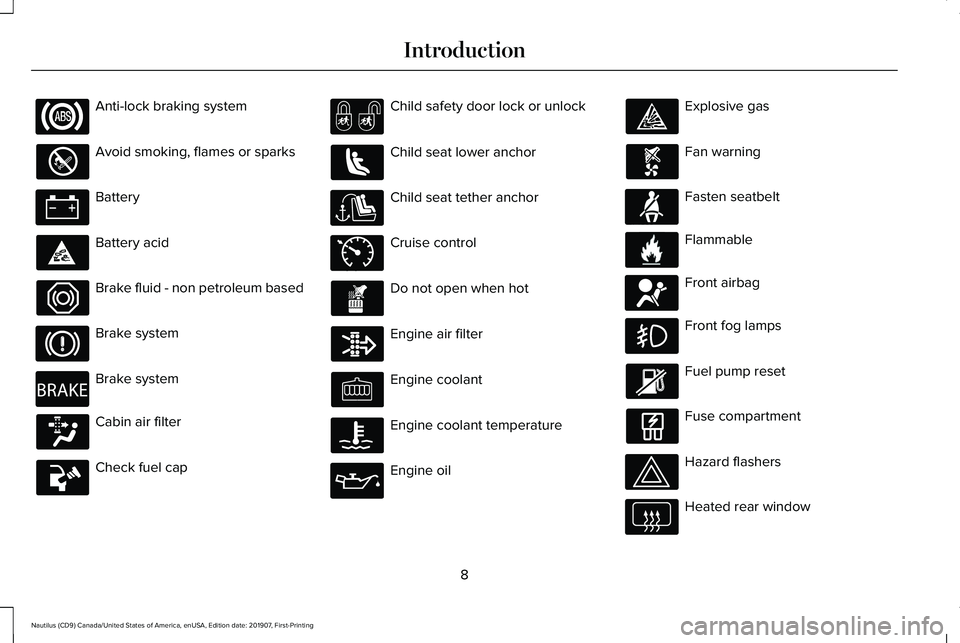
Anti-lock braking system
Avoid smoking, flames or sparks
Battery
Battery acid
Brake fluid - non petroleum based
Brake system
Brake system
Cabin air filter
Check fuel cap Child safety door lock or unlock
Child seat lower anchor
Child seat tether anchor
Cruise control
Do not open when hot
Engine air filter
Engine coolant
Engine coolant temperature
Engine oil Explosive gas
Fan warning
Fasten seatbelt
Flammable
Front airbag
Front fog lamps
Fuel pump reset
Fuse compartment
Hazard flashers
Heated rear window
8
Nautilus (CD9) Canada/United States of America, enUSA, Edition date: 201907, First-Printing Introduction E270480 E71340 E71880 E231160 E67017
Page 98 of 596
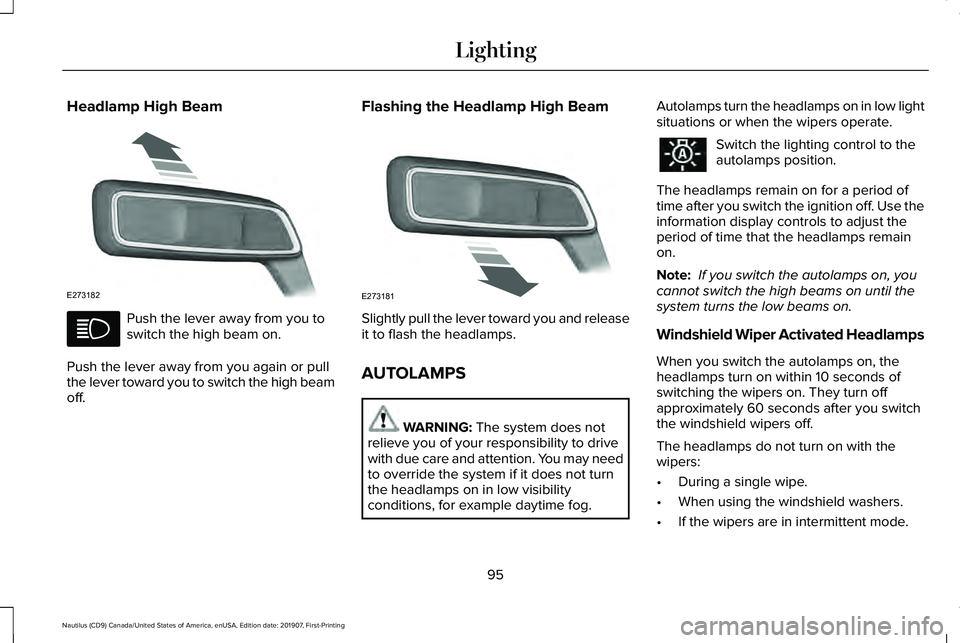
Headlamp High Beam
Push the lever away from you to
switch the high beam on.
Push the lever away from you again or pull
the lever toward you to switch the high beam
off. Flashing the Headlamp High Beam
Slightly pull the lever toward you and release
it to flash the headlamps.
AUTOLAMPS
WARNING: The system does not
relieve you of your responsibility to drive
with due care and attention. You may need
to override the system if it does not turn
the headlamps on in low visibility
conditions, for example daytime fog. Autolamps turn the headlamps on in low light
situations or when the wipers operate. Switch the lighting control to the
autolamps position.
The headlamps remain on for a period of
time after you switch the ignition off. Use the
information display controls to adjust the
period of time that the headlamps remain
on.
Note: If you switch the autolamps on, you
cannot switch the high beams on until the
system turns the low beams on.
Windshield Wiper Activated Headlamps
When you switch the autolamps on, the
headlamps turn on within 10 seconds of
switching the wipers on. They turn off
approximately 60 seconds after you switch
the windshield wipers off.
The headlamps do not turn on with the
wipers:
• During a single wipe.
• When using the windshield washers.
• If the wipers are in intermittent mode.
95
Nautilus (CD9) Canada/United States of America, enUSA, Edition date: 201907, First-Printing LightingE273182 E273181
Page 100 of 596
4. The lighting control is in the autolamps
position.
5. The headlamps are off.
The other lighting control switch positions
do not turn on the daytime running lamps.
If the daytime running lamps are off in the
information display, the lamps stay off in all
switch positions.
FRONT FOG LAMPS (IF EQUIPPED)
Switching the Front Fog Lamps On or
Off
Only switch the front fog lamps on during
reduced visibility.
You can switch the front fog lamps on if any
of the following occur:
• You set the lighting control to the parking
lamps position.
• You set the lighting control to the
headlamps position.
• You set the lighting control to the
autolamps position and the headlamps
are on. The front fog lamp button is on the lighting
control. Press the button to switch the front
fog lamps on or off.
Note: The brightness of the daytime running
lamps may decrease when the front fog
lamps are switched on.
Front Fog Lamp Indicator It illuminates when you switch the
front fog lamps on.
ADAPTIVE HEADLAMPS
(IF EQUIPPED)
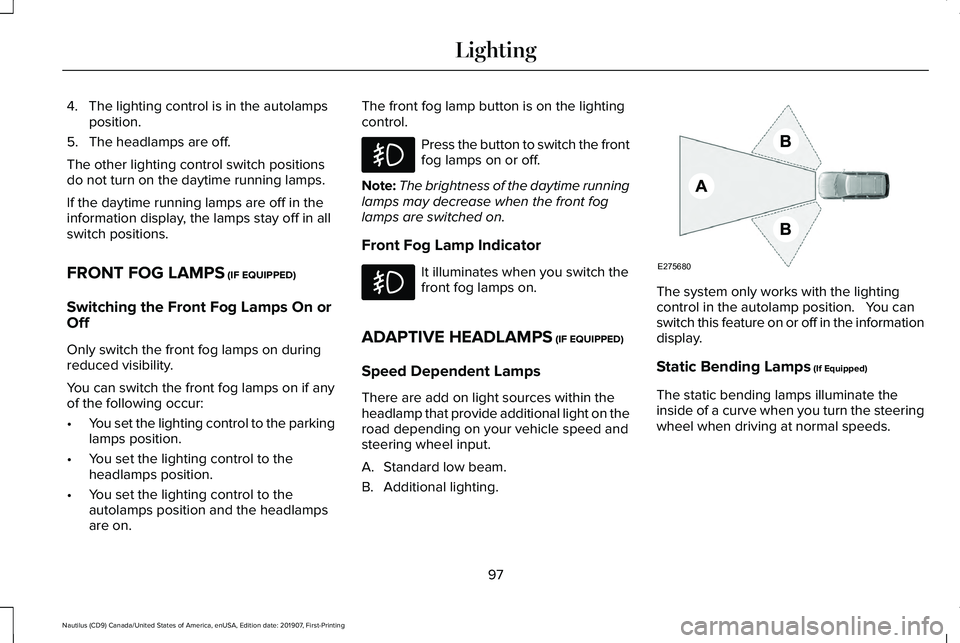
Speed Dependent Lamps
There are add on light sources within the
headlamp that provide additional light on the
road depending on your vehicle speed and
steering wheel input.
A. Standard low beam.
B. Additional lighting. The system only works with the lighting
control in the autolamp position. You can
switch this feature on or off in the information
display.
Static Bending Lamps
(If Equipped)
The static bending lamps illuminate the
inside of a curve when you turn the steering
wheel when driving at normal speeds.
97
Nautilus (CD9) Canada/United States of America, enUSA, Edition date: 201907, First-Printing Lighting E275680
Page 104 of 596
WHAT IS AUTOMATIC HIGH BEAM
CONTROL
The system turns on high beams if it is dark
enough and no other traffic is present. If it
detects an approaching vehicle
’s headlamps
or tail lamps, or street lighting ahead, the
system turns the high beams off. Low beams
remain on.
A camera sensor, centrally mounted behind
the windshield of your vehicle, continuously
monitors conditions to turn the high beams
on and off.
SWITCHING AUTOMATIC HIGH
BEAM CONTROL ON AND OFF
Switch the system on or off using the
information display. See General
Information (page 116). Activating the Automatic High Beam
Control Switch the lighting control to the
autolamps position to activate.
See
Autolamps (page 95).
Note: Automatic high beams are not
available when autolamps are not turned
on.
When active, the high beams turn on if:
• The ambient light level is low enough.
• There is no traffic in front of your vehicle.
• The vehicle speed is greater than
approximately
32 mph (52 km/h).
When active, the high beams turn off if:
• The ambient light level is high enough
that high beams are not required.
• The system detects an approaching
vehicle's headlamps or tail lamps.
• The system detects severe rain, snow or
fog.
• The camera is blocked.
• The vehicle speed falls below
approximately
27 mph (44 km/h). Note:
The deactivation speed is lower on
curves.
Note: High beam reactivation may be
delayed in certain curvy road situations.
Note: The system may not operate properly
if the sensor is blocked. Keep the windshield
free from obstruction or damage.
Note: The system may not operate properly
in cold or inclement conditions. You can
switch on the high beams by overriding the
system.
Note: If the system detects a blockage, for
example bird droppings, bug splatter, snow
or ice, the system goes into low beam mode
until you clear the blockage. A message may
appear in the information display if the
camera is blocked.
Note: Using much larger tires or equipping
vehicle accessories such as snowplows can
modify your vehicle's ride height and
degrade automatic high beam control
performance.
101
Nautilus (CD9) Canada/United States of America, enUSA, Edition date: 201907, First-Printing Automatic High Beam Control
Page 116 of 596
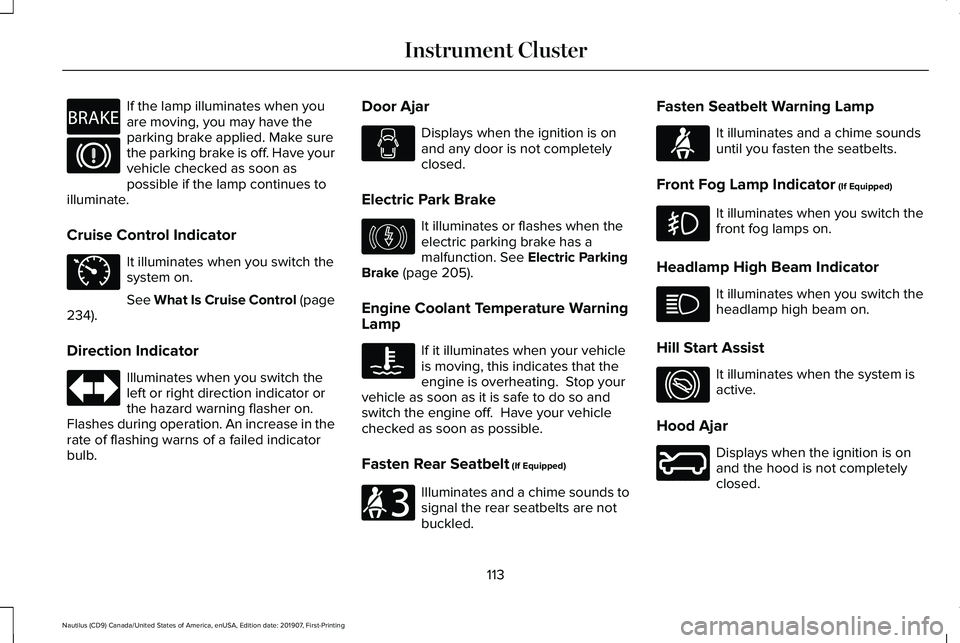
If the lamp illuminates when you
are moving, you may have the
parking brake applied. Make sure
the parking brake is off. Have your
vehicle checked as soon as
possible if the lamp continues to
illuminate.
Cruise Control Indicator It illuminates when you switch the
system on.
See What Is Cruise Control (page
234).
Direction Indicator Illuminates when you switch the
left or right direction indicator or
the hazard warning flasher on.
Flashes during operation. An increase in the
rate of flashing warns of a failed indicator
bulb. Door Ajar Displays when the ignition is on
and any door is not completely
closed.
Electric Park Brake It illuminates or flashes when the
electric parking brake has a
malfunction.
See Electric Parking
Brake (page 205).
Engine Coolant Temperature Warning
Lamp If it illuminates when your vehicle
is moving, this indicates that the
engine is overheating. Stop your
vehicle as soon as it is safe to do so and
switch the engine off. Have your vehicle
checked as soon as possible.
Fasten Rear Seatbelt
(If Equipped) Illuminates and a chime sounds to
signal the rear seatbelts are not
buckled.Fasten Seatbelt Warning Lamp It illuminates and a chime sounds
until you fasten the seatbelts.
Front Fog Lamp Indicator
(If Equipped) It illuminates when you switch the
front fog lamps on.
Headlamp High Beam Indicator It illuminates when you switch the
headlamp high beam on.
Hill Start Assist It illuminates when the system is
active.
Hood Ajar Displays when the ignition is on
and the hood is not completely
closed.
113
Nautilus (CD9) Canada/United States of America, enUSA, Edition date: 201907, First-Printing Instrument ClusterE270480 E71340 E146190 E206718 E71880 E274708 E246598
Page 117 of 596
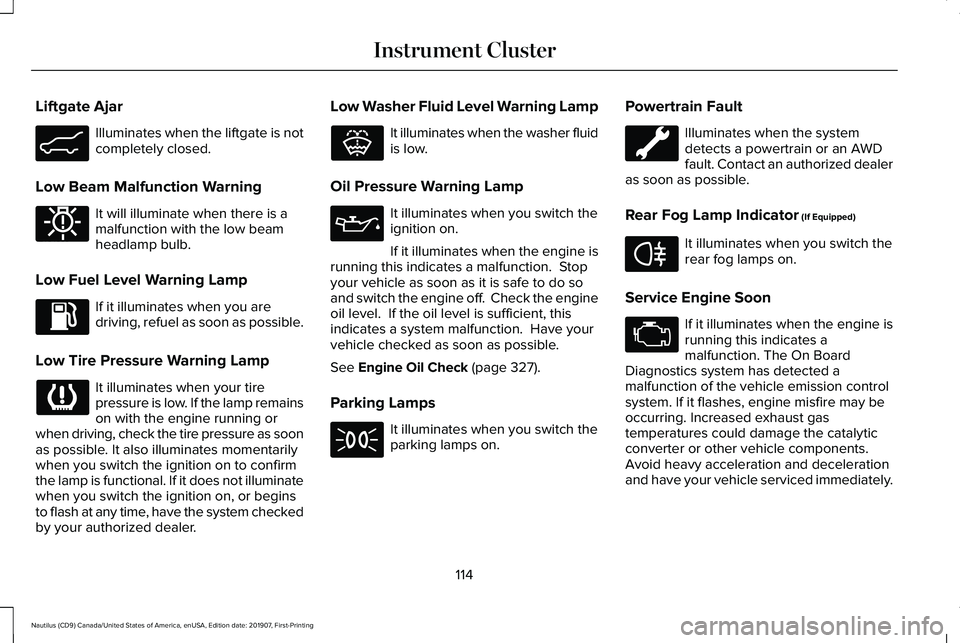
Liftgate Ajar
Illuminates when the liftgate is not
completely closed.
Low Beam Malfunction Warning It will illuminate when there is a
malfunction with the low beam
headlamp bulb.
Low Fuel Level Warning Lamp If it illuminates when you are
driving, refuel as soon as possible.
Low Tire Pressure Warning Lamp It illuminates when your tire
pressure is low. If the lamp remains
on with the engine running or
when driving, check the tire pressure as soon
as possible. It also illuminates momentarily
when you switch the ignition on to confirm
the lamp is functional. If it does not illuminate
when you switch the ignition on, or begins
to flash at any time, have the system checked
by your authorized dealer. Low Washer Fluid Level Warning Lamp It illuminates when the washer fluid
is low.
Oil Pressure Warning Lamp It illuminates when you switch the
ignition on.
If it illuminates when the engine is
running this indicates a malfunction. Stop
your vehicle as soon as it is safe to do so
and switch the engine off. Check the engine
oil level. If the oil level is sufficient, this
indicates a system malfunction. Have your
vehicle checked as soon as possible.
See Engine Oil Check (page 327).
Parking Lamps It illuminates when you switch the
parking lamps on.Powertrain Fault Illuminates when the system
detects a powertrain or an AWD
fault. Contact an authorized dealer
as soon as possible.
Rear Fog Lamp Indicator
(If Equipped) It illuminates when you switch the
rear fog lamps on.
Service Engine Soon If it illuminates when the engine is
running this indicates a
malfunction. The On Board
Diagnostics system has detected a
malfunction of the vehicle emission control
system. If it flashes, engine misfire may be
occurring. Increased exhaust gas
temperatures could damage the catalytic
converter or other vehicle components.
Avoid heavy acceleration and deceleration
and have your vehicle serviced immediately.
114
Nautilus (CD9) Canada/United States of America, enUSA, Edition date: 201907, First-Printing Instrument ClusterE162453 E181350 E132353 E67040
Page 145 of 596
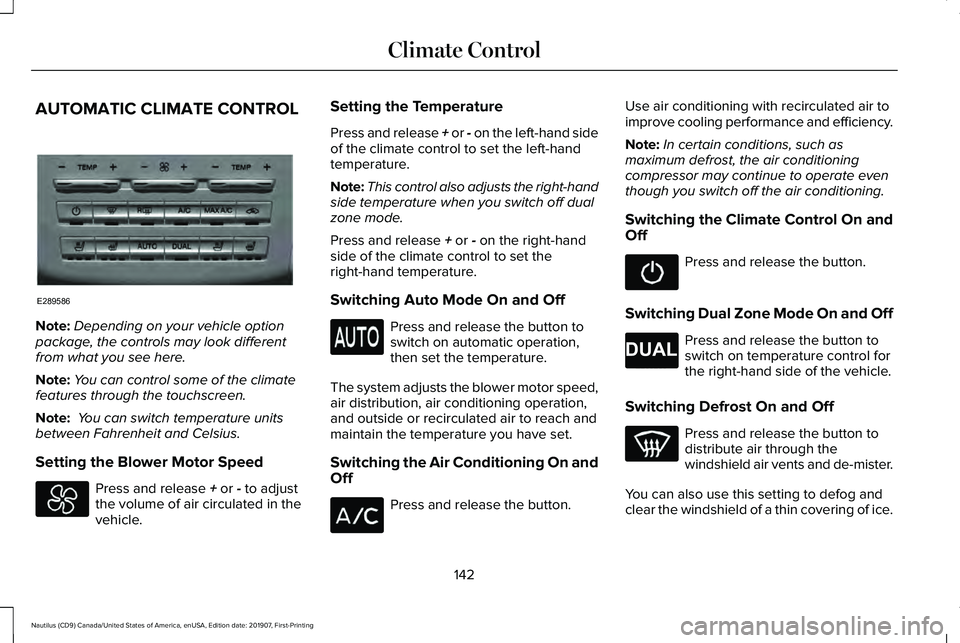
AUTOMATIC CLIMATE CONTROL
Note:
Depending on your vehicle option
package, the controls may look different
from what you see here.
Note: You can control some of the climate
features through the touchscreen.
Note: You can switch temperature units
between Fahrenheit and Celsius.
Setting the Blower Motor Speed Press and release + or - to adjust
the volume of air circulated in the
vehicle. Setting the Temperature
Press and release + or - on the left-hand side
of the climate control to set the left-hand
temperature.
Note:
This control also adjusts the right-hand
side temperature when you switch off dual
zone mode.
Press and release
+ or - on the right-hand
side of the climate control to set the
right-hand temperature.
Switching Auto Mode On and Off Press and release the button to
switch on automatic operation,
then set the temperature.
The system adjusts the blower motor speed,
air distribution, air conditioning operation,
and outside or recirculated air to reach and
maintain the temperature you have set.
Switching the Air Conditioning On and
Off Press and release the button.Use air conditioning with recirculated air to
improve cooling performance and efficiency.
Note:
In certain conditions, such as
maximum defrost, the air conditioning
compressor may continue to operate even
though you switch off the air conditioning.
Switching the Climate Control On and
Off Press and release the button.
Switching Dual Zone Mode On and Off Press and release the button to
switch on temperature control for
the right-hand side of the vehicle.
Switching Defrost On and Off Press and release the button to
distribute air through the
windshield air vents and de-mister.
You can also use this setting to defog and
clear the windshield of a thin covering of ice.
142
Nautilus (CD9) Canada/United States of America, enUSA, Edition date: 201907, First-Printing Climate ControlE289586 E265280
Page 146 of 596
Switching Maximum Air Conditioning
On and Off
Press and release the button for
maximum cooling.
The driver and passenger temperatures are
set to LO, recirculated air flows through the
instrument panel air vents, air conditioning
turns on and the blower motor adjusts to the
highest speed.
Switching Recirculated Air On and Off Press and release the button to
switch between outside air and
recirculated air.
The air currently in the passenger
compartment recirculates. This may reduce
the time needed to cool the interior, when
used with A/C, and reduce unwanted odors
from entering your vehicle. Note:
Recirculated air may turn off, or
prevent you from switching on, in all air flow
modes except MAX A/C to reduce the risk
of fogging. Recirculation may also turn on
and off in various air distribution control
combinations during hot weather to improve
cooling efficiency.
Switching the Rear Heated Seats On
and Off
(If Equipped) See
Heated Seats (page 159).
Switching the Rear Ventilated Seats
On and Off
(If Equipped) See
Climate Controlled Seats
(page 160).
HINTS ON CONTROLLING THE
INTERIOR CLIMATE
General Hints
Note: Prolonged use of recirculated air may
cause the windows to fog up. Note:
You may feel a small amount of air
from the footwell air vents regardless of the
air distribution setting.
Note: To reduce humidity build-up inside
your vehicle, do not drive with the system
switched off or with recirculated air always
switched on.
Note: Do not place objects under the front
seats as this may interfere with the airflow
to the rear seats.
Note: Remove any snow, ice or leaves from
the air intake area at the base of the
windshield.
Note: To improve the time to reach a
comfortable temperature in hot weather,
drive with the windows open until you feel
cold air through the air vents.
Automatic Climate Control
Note: Adjusting the settings when your
vehicle interior is extremely hot or cold is not
necessary. Automatic mode is best
recommended to maintain set temperature.
143
Nautilus (CD9) Canada/United States of America, enUSA, Edition date: 201907, First-Printing Climate Control E268558
Page 147 of 596
Note:
The system adjusts to heat or cool the
interior to the temperature you select as
quickly as possible.
Note: For the system to function efficiently,
the instrument panel and side air vents
should be fully open.
Note: If you select AUTO during cold outside
temperatures, the system directs air flow to
the windshield and side window air vents. In
addition, the blower motor may run at a
slower speed until the engine warms up.
Note: If you select
AUTO during hot
temperatures and the inside of the vehicle
is hot, the system uses recirculated air to
maximize interior cooling. Blower motor
speed may also reduce until the air cools.
Quickly Heating the Interior
1. Press and release
AUTO.
2. Adjust the temperature function to the setting you prefer.
Recommended Settings for Heating
1. Press and release
AUTO. 2. Adjust the temperature function to the
setting you prefer. Use
72°F (22°C) as a
starting point, then adjust the setting as
necessary.
Quickly Cooling the Interior
1. Press and release
MAX A/C.
Recommended Settings for Cooling
1. Press and release
AUTO.
2. Adjust the temperature function to the setting you prefer. Use
72°F (22°C) as a
starting point, then adjust the setting as
necessary.
Defogging the Side Windows in Cold
Weather
1. Press and release defrost.
2. Adjust the temperature control to the setting you prefer. Use
72°F (22°C) as a
starting point, then adjust the setting as
necessary. HEATED WINDSHIELD
(IF EQUIPPED)
Windshield Wiper De-Icer When you switch the heated rear
window on, the windshield wiper
de-icer turns on.
HEATED REAR WINDOW Press the button to clear the rear
window of thin ice and fog. The
heated rear window turns off after
a short period of time.
Note: Do not use harsh chemicals, razor
blades or other sharp objects to clean or
remove decals from the inside of the heated
rear window. The vehicle warranty may not
cover damage to the heated rear window
grid lines.
HEATED EXTERIOR MIRRORS
When you switch the heated rear window
on, the heated exterior mirrors turn on.
144
Nautilus (CD9) Canada/United States of America, enUSA, Edition date: 201907, First-Printing Climate ControlE184884 E184884