Replace battery LINCOLN NAUTILUS 2020 Owners Manual
[x] Cancel search | Manufacturer: LINCOLN, Model Year: 2020, Model line: NAUTILUS, Model: LINCOLN NAUTILUS 2020Pages: 596, PDF Size: 5.88 MB
Page 63 of 596
WARNING: If the battery
compartment does not securely close, stop
using the remote control and replace it as
soon as possible. In the meantime, keep
the remote control away from children.
Failure to follow this instruction could result
in personal injury or death.
Note: Refer to local regulations when
disposing of remote control batteries.
Note: Do not wipe off any grease on the
battery terminals or on the back surface of
the circuit board.
Note: Replacing the battery does not erase
the programmed key from your vehicle. The
remote control should operate normally.
A message appears in the information
display when the remote control battery is
low.
See General Information (page 116).
The remote control uses one coin-type
three-volt lithium battery CR2450 or
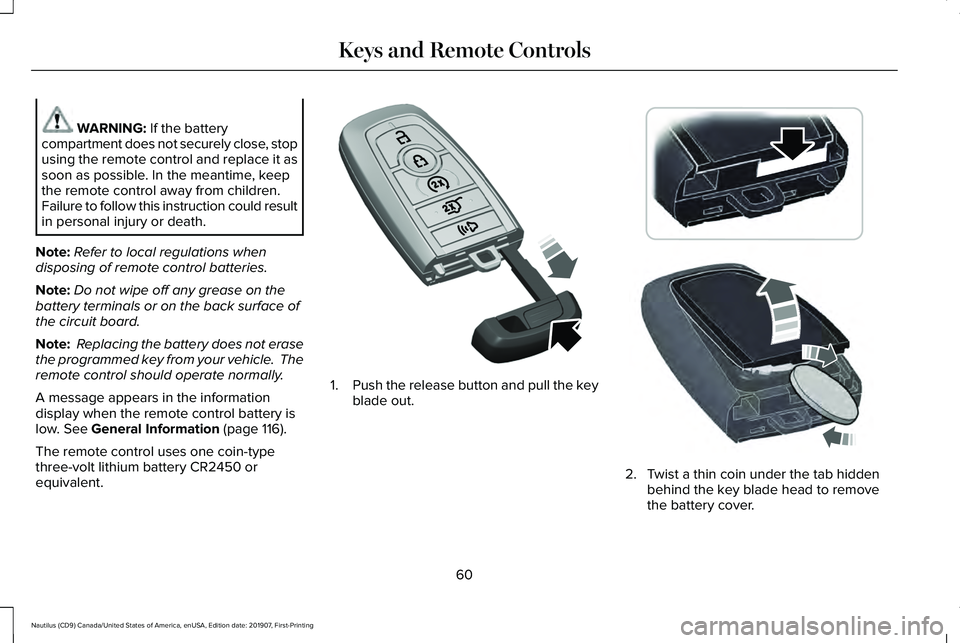
equivalent. 1.
Push the release button and pull the key
blade out. 2. Twist a thin coin under the tab hidden
behind the key blade head to remove
the battery cover.
60
Nautilus (CD9) Canada/United States of America, enUSA, Edition date: 201907, First-Printing Keys and Remote ControlsE305199 E303824
Page 66 of 596
You can disable or enable the remote start
system through the information display. See
General Information (page 116).
Remote Control Feedback (If Equipped)
An LED on the remote control provides status
feedback of remote start or stop commands. Status
LED
Remote startsuccessful
Solid green
Remote stopsuccessful
Solid red
Request failed or
status not received
Blinking red
Status incomplete
Blinking green Memory Feature
You can program your remote control to
recall memory positions. See Memory
Function (page 154).
Remote Control Information Messages Action
Message
Displays when the remote control battery requires replacing.
Key Battery Low Replace Soon
63
Nautilus (CD9) Canada/United States of America, enUSA, Edition date: 201907, First-Printing Keys and Remote Controls
Page 134 of 596
Action
Message
There is a problem with your vehicle ’s starting system. See an authorized dealer for service.
Starting System Fault
During spare key programming, an intelligent access key is programmed to the system.
Key Program Successful
During spare key programming, the maximum number of keys have been programmed.
Max Number of Keys Learned
Displayed during spare key programming, when an intelligent access key has failed to beprogrammed.
Key Program Failure
Displayed during spare key programming when not enough keys have been programmed.
Not Enough Keys Learned
Displays when the key battery is low. Change the battery as soon as possible.
Key Battery Low Replace Soon
Displays when the vehicle is switched off.
Vehicle Switched Off
131
Nautilus (CD9) Canada/United States of America, enUSA, Edition date: 201907, First-Printing Information Displays
Page 165 of 596
UNIVERSAL GARAGE DOOR
OPENER
HomeLink Wireless Control System
WARNING: Do not use the system
with any garage door opener that does not
have the safety stop and reverse feature
as required by U.S. Federal Safety
Standards (this includes any garage door
opener manufactured before April 1, 1982).
A garage door opener which cannot detect
an object, signaling the door to stop and
reverse, does not meet current federal
safety standards. Using a garage door
opener without these features increases
the risk of serious injury or death.
Note: Make sure that the garage door and
security device are free from obstruction
when you are programming. Do not program
the system with the vehicle in the garage.
Note: Make sure you keep the original
remote control transmitter for use in other
vehicles as well as for future system
programming. Note:
We recommend that upon the sale or
lease termination of your vehicle, you erase
the programmed function buttons for security
reasons. See
Erasing the Function Button
Codes later in this section.
Note: You can program a maximum of three
devices. To change or replace any of the
three devices after it has been initially
programmed, you must first erase the current
settings. See
Erasing the Function Button
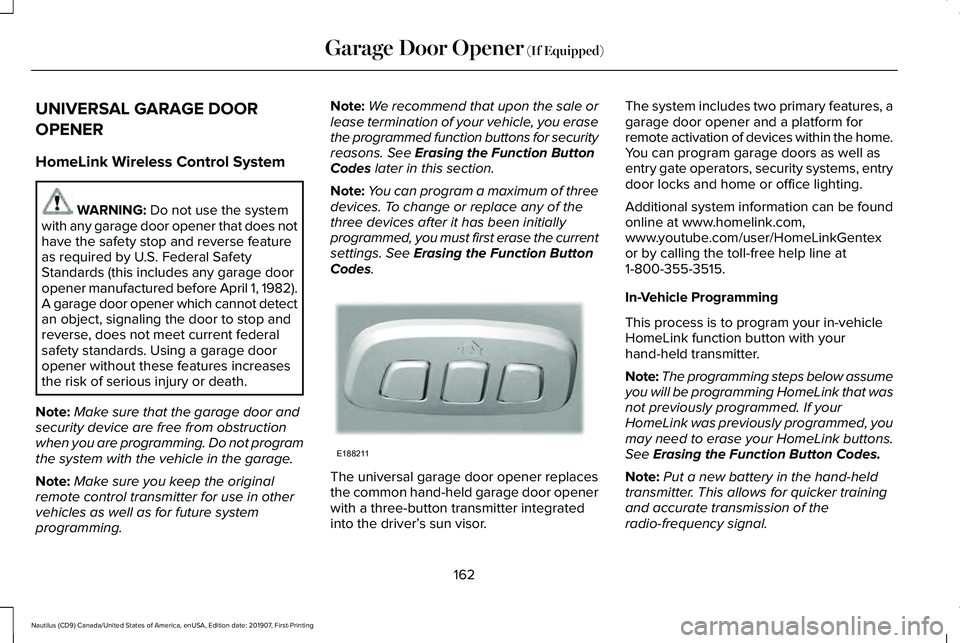
Codes. The universal garage door opener replaces
the common hand-held garage door opener
with a three-button transmitter integrated
into the driver’
s sun visor. The system includes two primary features, a
garage door opener and a platform for
remote activation of devices within the home.
You can program garage doors as well as
entry gate operators, security systems, entry
door locks and home or office lighting.
Additional system information can be found
online at www.homelink.com,
www.youtube.com/user/HomeLinkGentex
or by calling the toll-free help line at
1-800-355-3515.
In-Vehicle Programming
This process is to program your in-vehicle
HomeLink function button with your
hand-held transmitter.
Note:
The programming steps below assume
you will be programming HomeLink that was
not previously programmed. If your
HomeLink was previously programmed, you
may need to erase your HomeLink buttons.
See
Erasing the Function Button Codes.
Note: Put a new battery in the hand-held
transmitter. This allows for quicker training
and accurate transmission of the
radio-frequency signal.
162
Nautilus (CD9) Canada/United States of America, enUSA, Edition date: 201907, First-Printing Garage Door Opener
(If Equipped)E188211
Page 182 of 596
•
The engine coolant is at operating
temperature.
• Elevation is below about 10,000 ft
(3,048 m).
• Ambient temperature is moderate. The green Auto-Start-Stop
indicator light on the instrument
cluster will illuminate to indicate
when the automatic engine stop occurs. If the instrument cluster is
equipped with a grey
Auto-Start-Stop indicator light, it is
illuminated when automatic engine stop is
not available due to one of the above noted
conditions not being met.
Automatic Engine Restart
Any of the following conditions will result in
an automatic restart of the engine:
• You have removed your foot from the
brake pedal in drive (D) unless AutoHold
has been engaged.
• You press the accelerator pedal. •
The driver safety belt becomes
unfastened or the driver door is ajar.
• You have moved the transmission from
drive (D).
• Your vehicle is moving.
• The interior compartment does not meet
customer climate control comfort settings
when air conditioning or heat is on.
• Fogging of the windows could occur and
the air conditioning is on.
• The battery is not within optimal
operating conditions.
• You have exceeded the maximum engine
off time.
• When you press the Auto-Start-Stop
button while the engine is stopped.
• Either the front or rear defroster is turned
on.
Any of the following conditions may result in
an automatic restart of the engine:
• The blower fan speed is increased or the
climate control temperature is changed.
• You have an electrical accessory turned
on or plugged in. Disabling Auto-Start-Stop
Note:
If the system detects a malfunction, it
turns off. If this remains inactive after an
ignition cycle, have your vehicle checked by
an authorized dealer.
Note: For vehicles with Auto-Start-Stop, the
battery requirement is different. Replace it
with one of exactly the same specification
as the original.
179
Nautilus (CD9) Canada/United States of America, enUSA, Edition date: 201907, First-Printing Unique Driving Characteristics E146361 E183186
Page 194 of 596
If the service engine soon indicator remains
on, have your vehicle serviced at the first
available opportunity. Although some
malfunctions detected by the OBD-II may not
have symptoms that are apparent, continued
driving with the service engine soon indicator
on can result in increased emissions, lower
fuel economy, reduced engine and
transmission smoothness and lead to more
costly repairs.
Readiness for Inspection and
Maintenance (I/M) Testing
Some state and provincial and local
governments may have
Inspection/Maintenance (I/M) programs to
inspect the emission control equipment on
your vehicle. Failure to pass this inspection
could prevent you from getting a vehicle
registration.
If the service engine soon indicator
is on or the bulb does not work,
your vehicle may need service.
See On-Board Diagnostics. Your vehicle may not pass the I/M test if the
service engine soon indicator is on or not
working properly (bulb is burned out), or if
the OBD-II system has determined that some
of the emission control systems have not
been properly checked. In this case, the
vehicle is not ready for I/M testing.
If the vehicle
’s engine or transmission has
just been serviced, or the battery has
recently run down or been replaced, the
OBD-II system may indicate that the vehicle
is not ready for I/M testing. To determine if
the vehicle is ready for I/M testing, turn the
ignition key to the on position for 15 seconds
without cranking the engine. If the service
engine soon indicator blinks eight times, it
means that the vehicle is not ready for I/M
testing; if the service engine soon indicator
stays on solid, it means that your vehicle is
ready for I/M testing.
The OBD-II system checks the emission
control system during normal driving. A
complete check may take several days.
If the vehicle is not ready for I/M testing, you
can perform the following driving cycle
consisting of mixed city and highway driving: 1. 15 minutes of steady driving on an
expressway or highway followed by 20
minutes of stop-and-go driving with at
least four 30-second idle periods.
2. Allow your vehicle to sit for at least eight
hours with the ignition off. Then, start the
vehicle and complete the above driving
cycle. The vehicle must warm up to its
normal operating temperature. Once
started, do not turn off the vehicle until
the above driving cycle is complete.
If the vehicle is still not ready for I/M testing,
you need to repeat the above driving cycle.
191
Nautilus (CD9) Canada/United States of America, enUSA, Edition date: 201907, First-Printing Engine Emission Control
Page 200 of 596
5.
Once in driver seat, fully apply the brake
pedal and hold. Do not release. Pull the
orange tether outward towards the driver,
move the tether to the lower right-hand
corner to seat the metal bead in the
pocket, locking it in the override position.
If done correctly, a message on the
instrument cluster displays Park Not
Available, Transmission Not In Park or
Shift System Fault.
Note: Your vehicle is now out of the park (P)
position and is free to roll.
6. With your foot still fully applied on the brake pedal, disengage the parking
brake. See Electric Parking Brake (page
205).
7. Your vehicle remains in neutral (N) for emergency towing purposes.
8. Switch off the ignition.
9. Once safe to do so, and there is no risk that your vehicle will roll, disconnect the
negative (black) battery cable from the
battery. Returning Your Vehicle to Normal Mode
1. Once it is safe to do so, reconnect the
negative (black) battery cable to the
battery.
2. Apply the parking brake.
See Electric
Parking Brake (page 205).
Note: If vehicle battery is dead, for example,
no electrical power available, an external
power may be required to apply the parking
brake.
Note: Do not pull the tether until you are in
the driver seat.
3. Once in the driver seat, fully apply the brake pedal and hold. Do not release.
Pull the orange tether outward towards
the driver seat.
4. Move the tether towards the left and release to return it to the rest position.
5. Stow the manual park release cable tether, install the access cover and
replace the screw. 6.
With your foot fully applied on the brake
pedal, start your vehicle. Confirm that
your vehicle is in the park (P) position and
that the instrument cluster indicates park
(P).
7. If the instrument cluster is not displaying
the park (P) position or there is a
message stating Park Not Available,
Transmission Not In Park or Shift System
Fault, apply the parking brake before
exiting your vehicle. Contact an
authorized dealer for service.
Automatic Transmission Adaptive
Learning
This feature increases durability and provides
consistent shift feel over the life of your
vehicle. A new vehicle or transmission may
have firm or soft shifts. This operation does
not affect function or durability of your
transmission and is normal. Over time, the
adaptive learning process can fully update
transmission operation. Additionally, the
strategy must be relearned whenever the
battery is disconnected or a new battery is
installed.
197
Nautilus (CD9) Canada/United States of America, enUSA, Edition date: 201907, First-Printing Transmission
Page 230 of 596
 or less than 2 ft (0.5 m) away.
The vehicle speed is greater than 22 mph (35 km/h) for parallel parkin\
g or greater than
19 mph (30")
Possible Cause
Symptom
The parking space is more than 5 ft (1.5 m) or less than 2 ft (0.5 m) away.
The vehicle speed is greater than 22 mph (35 km/h) for parallel parkin\
g or greater than
19 mph (30 km/h)
for perpendicular parking.
You recently disconnected or replaced the battery. After you reconnect the battery you
must drive your vehicle on a straight road for a short period of time.
Your vehicle is rolling in the opposite direction of the current transmis\
sion position. For
example, rolling forward when in reverse (R).
The system does not correctly position your vehicle
in a parking space.
An irregular curb along the parking space prevents the system from corre\
ctly aligning
your vehicle.
Vehicles or objects bordering the space may not be correctly parked.
Your vehicle stopped too far past the parking space.
The tires may not be correctly installed or maintained. For example, not inflated correctly,
improper size, or of different sizes.
A repair or alteration changes the detection capabilities.
227
Nautilus (CD9) Canada/United States of America, enUSA, Edition date: 201907, First-Printing Parking Aids
Page 291 of 596
ROADSIDE ASSISTANCE
Vehicles sold in the United States:
Getting Roadside Assistance
To fully assist you should you have a vehicle
concern, Lincoln Motor Company offers a
complimentary roadside assistance program.
This program is separate from the New
Vehicle Limited Warranty.
The service is available:
•
Throughout the life of the vehicle for
original owners.
• For six years or 70,000 mi (110,000 km)
(whichever comes first) for subsequent
owners.
Roadside Assistance covers:
• A flat tire change with a good spare
(except vehicles supplied with a tire
inflation kit).
• Battery jump start.
• Lock-out assistance (key replacement
cost is the client's responsibility). •
Fuel delivery — independent service
contractors, if not prohibited by state,
local or municipal law shall deliver up to
2 gal (8 L)
of gasoline fuel to a disabled
vehicle. Roadside Assistance limits fuel
delivery service to two no-charge
occurrences within a 12-month period.
• Winch out — available within 100 ft (30 m)
of a paved or county maintained road,
no recoveries. •
Towing — independent service
contractors, if not prohibited by state,
local or municipal law shall tow Lincoln
eligible vehicles to the client's selling or
preferred dealer within 100 mi (160 km)
of the disablement location or to the
nearest Lincoln dealer. If a client requests
a tow to a selling or preferred dealer that
is more than
100 mi (160 km) from the
disablement location, the client is
responsible for any mileage costs in
excess of
100 mi (160 km).
• Roadside Assistance includes up to $200
for a towed trailer if the disabled eligible
vehicle requires service at the nearest
authorized dealer. If the towing vehicle
is operational but the trailer is not, then
the trailer does not qualify for any
roadside services.
Vehicles Sold in the United States:
Using Roadside Assistance
United States clients who require roadside
assistance, call 1-800-521-4140 or contact
Roadside Assistance using the Lincoln Way
mobile app.
288
Nautilus (CD9) Canada/United States of America, enUSA, Edition date: 201907, First-Printing Roadside Emergencies
Page 306 of 596
FUSE SPECIFICATION CHART
Power Distribution Box
WARNING: Always disconnect the
battery before servicing high current fuses. WARNING:
To reduce risk of
electrical shock, always replace the cover
to the power distribution box before
reconnecting the battery or refilling fluid
reservoirs. The power distribution box is in the engine
compartment. It has high-current fuses that
protect your vehicle's main electrical systems
from overloads.
If you disconnect or reconnect the battery,
some features need to be reset.
See
Changing the 12V Battery (page 335).
303
Nautilus (CD9) Canada/United States of America, enUSA, Edition date: 201907, First-Printing Fuses