seat memory LINCOLN NAUTILUS 2020 Owners Manual
[x] Cancel search | Manufacturer: LINCOLN, Model Year: 2020, Model line: NAUTILUS, Model: LINCOLN NAUTILUS 2020Pages: 596, PDF Size: 5.88 MB
Page 6 of 596
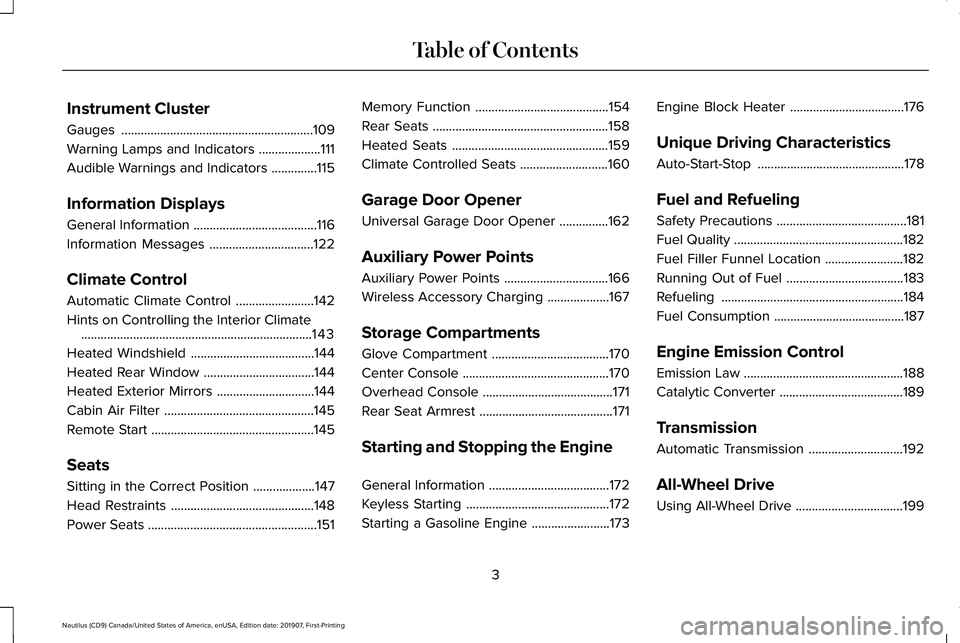
Instrument Cluster
Gauges
...........................................................109
Warning Lamps and Indicators ...................
111
Audible Warnings and Indicators ..............
115
Information Displays
General Information ......................................
116
Information Messages ................................
122
Climate Control
Automatic Climate Control ........................
142
Hints on Controlling the Interior Climate .......................................................................
143
Heated Windshield ......................................
144
Heated Rear Window ..................................
144
Heated Exterior Mirrors ..............................
144
Cabin Air Filter ..............................................
145
Remote Start ..................................................
145
Seats
Sitting in the Correct Position ...................
147
Head Restraints ............................................
148
Power Seats ....................................................
151Memory Function
.........................................
154
Rear Seats ......................................................
158
Heated Seats ................................................
159
Climate Controlled Seats ...........................
160
Garage Door Opener
Universal Garage Door Opener ...............
162
Auxiliary Power Points
Auxiliary Power Points ................................
166
Wireless Accessory Charging ...................
167
Storage Compartments
Glove Compartment ....................................
170
Center Console .............................................
170
Overhead Console ........................................
171
Rear Seat Armrest .........................................
171
Starting and Stopping the Engine
General Information .....................................
172
Keyless Starting ............................................
172
Starting a Gasoline Engine ........................
173Engine Block Heater
...................................
176
Unique Driving Characteristics
Auto-Start-Stop .............................................
178
Fuel and Refueling
Safety Precautions ........................................
181
Fuel Quality ....................................................
182
Fuel Filler Funnel Location ........................
182
Running Out of Fuel ....................................
183
Refueling ........................................................
184
Fuel Consumption ........................................
187
Engine Emission Control
Emission Law .................................................
188
Catalytic Converter ......................................
189
Transmission
Automatic Transmission .............................
192
All-Wheel Drive
Using All-Wheel Drive .................................
199
3
Nautilus (CD9) Canada/United States of America, enUSA, Edition date: 201907, First-Printing Table of Contents
Page 140 of 596
Pre-Collision Assist
Action
Message
You have a blocked sensor due to bad weather, ice, mud or water in front of the radar sensor.
You can typically clean the sensor to resolve.
Pre-Collision Assist Not Available Sensor
Blocked
A fault with the system has occurred. Contact an authorized dealer as so\
on as possible.
Pre-Collision Assist Not Available
Remote Start Action
Message
Displays as a reminder to apply the brake and push the gear shift button to drive the vehicle after a remote start.
To Drive: Press Brake and Gear Shift
Button
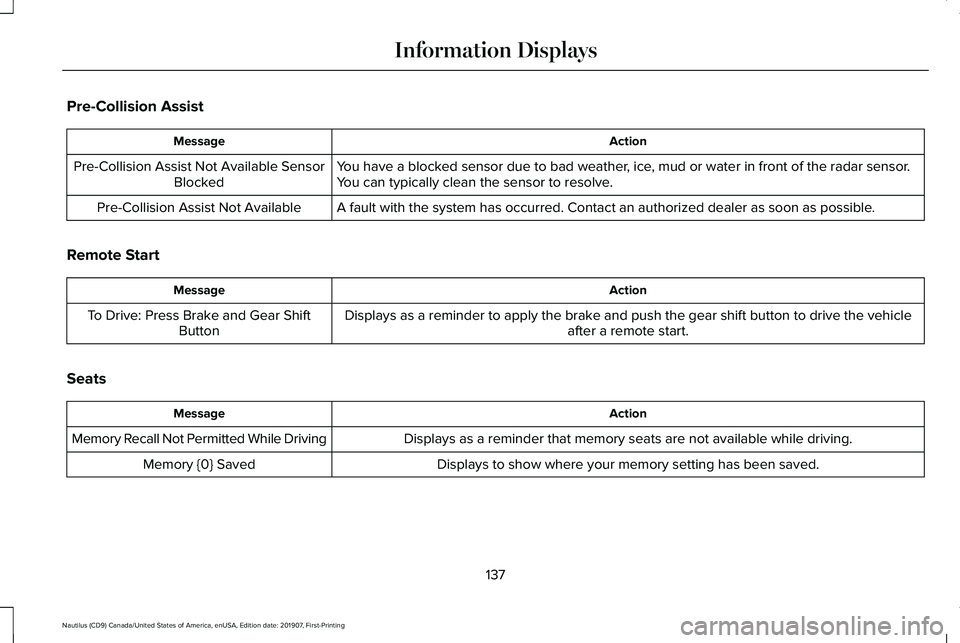
Seats Action
Message
Displays as a reminder that memory seats are not available while driving\
.
Memory Recall Not Permitted While Driving
Displays to show where your memory setting has been saved.
Memory {0} Saved
137
Nautilus (CD9) Canada/United States of America, enUSA, Edition date: 201907, First-Printing Information Displays
Page 157 of 596
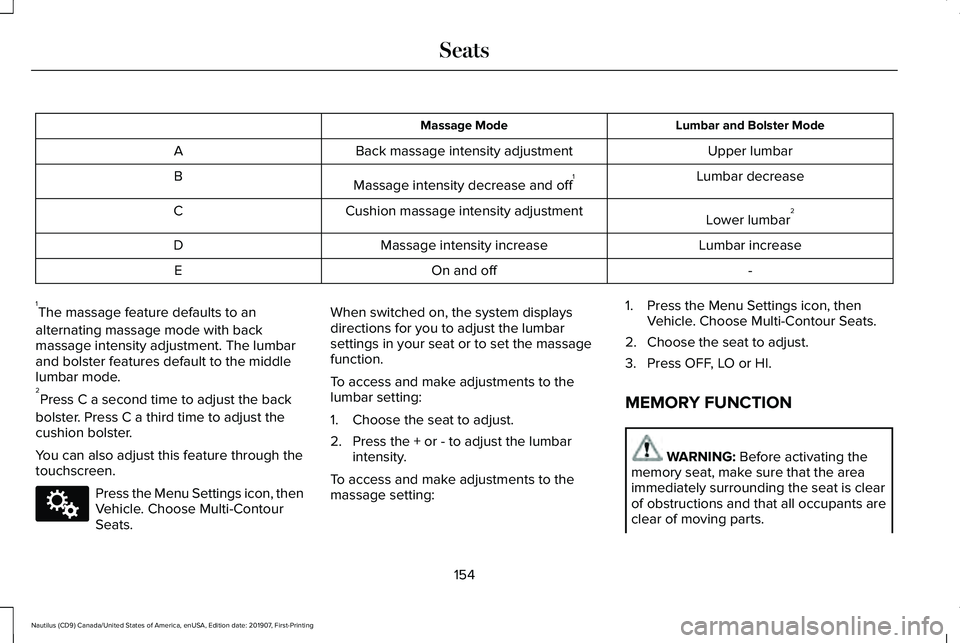
Lumbar and Bolster Mode
Massage Mode
Upper lumbar
Back massage intensity adjustment
A
Lumbar decrease
Massage intensity decrease and off 1
B
Lower lumbar2
Cushion massage intensity adjustment
C
Lumbar increase
Massage intensity increase
D
-
On and off
E
1 The massage feature defaults to an
alternating massage mode with back
massage intensity adjustment. The lumbar
and bolster features default to the middle
lumbar mode.
2 Press C a second time to adjust the back
bolster. Press C a third time to adjust the
cushion bolster.
You can also adjust this feature through the
touchscreen. Press the Menu Settings icon, then
Vehicle. Choose Multi-Contour
Seats. When switched on, the system displays
directions for you to adjust the lumbar
settings in your seat or to set the massage
function.
To access and make adjustments to the
lumbar setting:
1. Choose the seat to adjust.
2. Press the + or - to adjust the lumbar
intensity.
To access and make adjustments to the
massage setting: 1. Press the Menu Settings icon, then
Vehicle. Choose Multi-Contour Seats.
2. Choose the seat to adjust.
3. Press OFF, LO or HI.
MEMORY FUNCTION WARNING: Before activating the
memory seat, make sure that the area
immediately surrounding the seat is clear
of obstructions and that all occupants are
clear of moving parts.
154
Nautilus (CD9) Canada/United States of America, enUSA, Edition date: 201907, First-Printing SeatsE142607
Page 158 of 596
WARNING: Do not use the memory
function when your vehicle is moving.
This feature automatically recalls the position
of the following:
• Driver seat.
• Power mirrors.
• Optional power steering column.
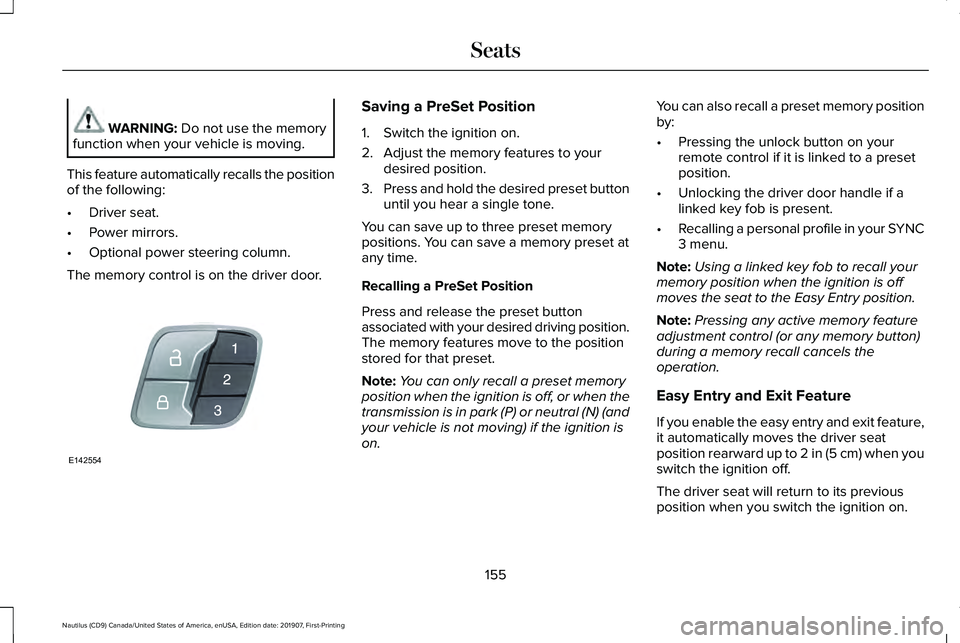
The memory control is on the driver door. Saving a PreSet Position
1. Switch the ignition on.
2. Adjust the memory features to your
desired position.
3. Press and hold the desired preset button
until you hear a single tone.
You can save up to three preset memory
positions. You can save a memory preset at
any time.
Recalling a PreSet Position
Press and release the preset button
associated with your desired driving position.
The memory features move to the position
stored for that preset.
Note: You can only recall a preset memory
position when the ignition is off, or when the
transmission is in park (P) or neutral (N) (and
your vehicle is not moving) if the ignition is
on. You can also recall a preset memory position
by:
•
Pressing the unlock button on your
remote control if it is linked to a preset
position.
• Unlocking the driver door handle if a
linked key fob is present.
• Recalling a personal profile in your SYNC
3 menu.
Note: Using a linked key fob to recall your
memory position when the ignition is off
moves the seat to the Easy Entry position.
Note: Pressing any active memory feature
adjustment control (or any memory button)
during a memory recall cancels the
operation.
Easy Entry and Exit Feature
If you enable the easy entry and exit feature,
it automatically moves the driver seat
position rearward up to
2 in (5 cm) when you
switch the ignition off.
The driver seat will return to its previous
position when you switch the ignition on.
155
Nautilus (CD9) Canada/United States of America, enUSA, Edition date: 201907, First-Printing SeatsE142554
Page 159 of 596
You can enable or disable this feature
through the information display. See
Information Displays (page 116).
Personal Profiles
This feature allows you to create multiple
personal profiles enabling users to
personalize vehicle ’s settings. You can
create one profile for each preset memory
seat button along with a guest profile. You
can recall a profile using SYNC 3 or the
preset button you selected when you created
your profile. You can also link a keyfob to
your profile, which is used to recall it.
Creating a Personal Profile
Use the SYNC display to create a personal
profile.
1. Switch the ignition on and leave the vehicle in park (P).
2. Select the Personal Profiles button under
Settings.
3. Follow the instructions on the display. Linking a Personal Profile to your Remote
Control or Intelligent Access Keyfob
You can save preset memory positions for
up to three remote controls or intelligent
access (IA) keys, by assigning a keyfob to a
personal profile in your SYNC 3.
Use the SYNC display to link a keyfob to a
personal profile.
1. Switch the ignition on and leave the
vehicle in park (P).
2. Select the Personal Profiles button under
Settings.
3. Touch the arrow for the profile you wish to link a keyfob to.
4. Select the Link Keyfob button.
5. Follow the instructions on the display.
Note: If more than one linked remote control
or intelligent access key is in range, the
memory function moves to the settings of
the first key to initiate a memory recall. Note:
The guest profile consists of existing
settings when there is no driver profile
created. After you create a driver profile, the
guest profile serves as an additional driver
profile.
Note: You cannot link a personalized name,
a memory seat button or a keyfob to a guest
profile.
Personal Settings
Personal profiles allow you to personalize
positional settings such as seats and mirrors,
as well as non-positional settings such as
radio, navigation, driver assist and system
settings.
See SYNC™ 3 (page 429). You
cannot change the menu locations and
settings of those personalized features with
personal profiles.
Note: Non-positional settings are saved to
the active driver profile whenever you
change a setting.
Note: You can save positional settings if you
press and hold a memory seat button.
See
Settings (page 471).
156
Nautilus (CD9) Canada/United States of America, enUSA, Edition date: 201907, First-Printing Seats
Page 160 of 596
Recalling and Changing a Profile
You can recall a profile by:
•
Using a keyfob that has been linked to a
driver profile to access the remote start
feature, press an unlock button or open
the door with the exterior door handle.
• Pressing a memory seat button that has
been linked to a driver profile.
• Using the Personal Profiles menu on the
SYNC touchscreen.
Note: The recalled profile replaces the
previously active profile. If the active profile
is not your desired profile, you can change
it using any of the three methods listed. When you switch on the personal profiles
feature:
•
Unlocking a door with a keyfob that is
not linked to a driver profile recalls
non-positional settings from the guest
profile. It will not change the positional
settings.
• Pressing a memory seat button that is
not linked to a driver profile or has not
been saved to a preset setting recalls
non-positional settings from the guest
profile. It will not change the positional
settings.
• Pressing a memory seat button that is
not linked to a driver profile but has been
saved to a preset setting recalls
non-positional settings from the guest
profile. It recalls the positional settings
that you saved to that memory seat
button.
See SYNC™ 3 Troubleshooting (page 473). When you switch off a personal profile
feature:
•
Unlocking a door with a keyfob recalls
non-positional settings from the guest
profile and still recalls positional settings
from the driver profile which the keyfob
had been linked to.
• Pressing a memory seat button that has
not been linked to a driver profile or has
not been saved to a preset setting recalls
non-positional settings from the guest
profile. It will not change the positional
settings.
• Pressing a memory seat button that has
been linked to a driver profile or has
saved to a preset setting recalls
non-positional settings from the guest
profile. It recalls the positional settings
that you saved to that memory seat
button.
157
Nautilus (CD9) Canada/United States of America, enUSA, Edition date: 201907, First-Printing Seats
Page 318 of 596
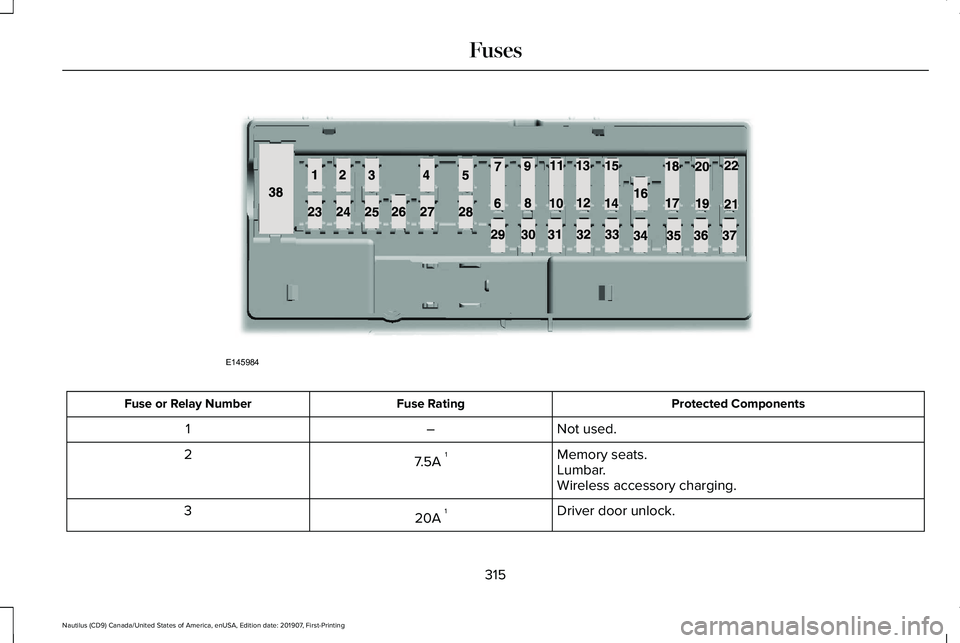
Protected Components
Fuse Rating
Fuse or Relay Number
Not used.
–
1
Memory seats.
7.5A 1
2
Lumbar.
Wireless accessory charging.
Driver door unlock.
20A 1
3
315
Nautilus (CD9) Canada/United States of America, enUSA, Edition date: 201907, First-Printing FusesE145984
Page 475 of 596
Multi Contour Seats (If Equipped)
Select this tile to adjust the position and
massage function of your multi contour seats.
Seats
(If Equipped)
Select this tile to adjust the lumbar function
of your seat. Message Center
(If Equipped)
Select this tile to view vehicle messages.
Personal Profiles
(If Equipped)
Select this tile to adjust recalled memory
features when using personal profiles. Valet Mode
(If Equipped)
Select this tile to enable and disable valet
mode.
Ambient Lighting
(If Equipped)
Select this tile to change the color or
intensity of the interior lighting.
472
Nautilus (CD9) Canada/United States of America, enUSA, Edition date: 201907, First-Printing SYNC™ 3
Page 587 of 596
Bluetooth Stereo or USB..................................453
CD (If equipped)..................................................452
HD Radio
™ Information (If Available)..............448
SiriusXM® Satellite Radio (If Activated).........444
Sources.................................................................443
Supported Media Players, Formats and Metadata Information...................................
455
USB Ports.............................................................455
Environment......................................................18
EPB See: Electric Parking Brake.............................205
Essential Towing Checks.............................281 Before Towing a Trailer.....................................282
Hitches...................................................................281
Launching or Retrieving a Boat or Personal
Watercraft (PWC)............................................282
Safety Chains.......................................................281
Trailer Brakes........................................................281
Trailer Lamps........................................................281
When Towing a Trailer......................................282
Event Data Recording See: Data Recording.............................................10
Export Unique Options...................................17
Exterior Mirrors
..............................................104
Auto-dimming Feature.......................................106
Auto-Folding Mirrors..........................................105
Blind Spot Information System........................106
Fold-Away Exterior Mirrors...............................105 Heated Exterior Mirrors ....................................106
Lincoln Welcome Mat.........................................106
Memory Mirrors ..................................................106
Power Exterior Mirrors.......................................104
Signal Indicator Mirrors ....................................106
F
Fastening the Seatbelts................................37 Seatbelt Locking Modes.....................................38
Using a Sliding Clip...............................................37
Using Seatbelts During Pregnancy..................38
Flat Tire See: Changing a Road Wheel.........................376
Floor Mats
.......................................................287
Fog Lamps - Front See: Front Fog Lamps..........................................97
Front Fog Lamps.............................................97 Front Fog Lamp Indicator...................................97
Switching the Front Fog Lamps On or
Off........................................................................\
.97
Front Parking Aid..........................................216 Object Distance Indicator.................................218
Front Passenger Sensing System..............48
Fuel and Refueling
.........................................181
Fuel Consumption.........................................187
Advertised Capacity............................................187
Fuel Economy.......................................................187 Fuel Filler Funnel Location.........................182
Fuel Filter
........................................................335
Fuel Quality.....................................................182
Choosing the Right Fuel....................................182
Fuel Shutoff
...................................................289
Fuses...............................................................303
Fuse Specification Chart
............................303
Passenger Compartment Fuse Panel............314
Power Distribution Box.....................................303
G
Garage Door Opener...................................162
Garage Door Opener See: Universal Garage Door Opener.............162
Gauges............................................................109 Engine Coolant Temperature Gauge..............
110
Fuel Gauge............................................................110
Left and Right Information Group....................110
Status Bar...............................................................110
Gearbox See: Transmission...............................................192
General Information on Radio Frequencies..................................................58
Intelligent Access.................................................58
General Maintenance Information...........495 Multi-Point Inspection........................................498
Owner Checks and Services...........................497
584
Nautilus (CD9) Canada/United States of America, enUSA, Edition date: 201907, First-Printing Index
Page 591 of 596
Using Your Cell Phone......................................459
Post-Crash Alert System............................292
Power Door Locks See: Locking and Unlocking..............................
70
Power Liftgate..................................................78 Hands-Free Feature..............................................81
Obstacle Detection...............................................81
Opening and Closing the Liftgate....................79
Setting the Liftgate Open Height.....................80
Stopping the Liftgate Movement......................
80
Switching the Power Liftgate On or Off...........81
Power Seats
.....................................................151
Adjusting the Lumbar Support.........................153
Adjusting the Multi-Contour Front Seats With Active Motion ..................................................153
Power Windows
.............................................103
Accessory Delay..................................................104
Bounce-Back........................................................103
One-Touch Down................................................103
One-Touch Up......................................................103
Window Lock........................................................104
Pre-Collision Assist
.......................................261
Adjusting the Pre-Collision Assist
Settings............................................................264
Blocked Sensors................................................264
Distance Indication and Alert..........................262
Evasive Steer Assist..........................................264
Using the Pre-Collision Assist System...........261 Protecting the Environment
..........................18
Puncture See: Changing a Road Wheel.........................376
R
Rear Parking Aid............................................214 Object Distance Indicator.................................216
Rear Seat Armrest..........................................171 Type One ...............................................................171
Type Two ...............................................................171
Rear Seats
.......................................................158
Adjusting the Rear Seats...................................158
Rear Under Floor Storage..........................270 Cargo Management System............................270
In-Floor Storage - Second Row.......................270
Rear View Camera.......................................228 Camera Guidelines............................................229
Manual Zoom........................................................231
Obstacle Distance Indicator............................230
Rear Camera Delay.............................................231
Using the Rear View Camera System...........229
Rear View Camera See: Rear View Camera...................................228
Rear Window Wiper and Washers..............92 Rear Camera Washer...........................................93
Rear Window Washer..........................................93
Rear Window Wiper.............................................92 Recommended Towing Weights...............279
Reduced Engine Performance..................285
Refueling..........................................................184
Refueling System Overview.............................184
Refueling System Warning................................186
Refueling Your Vehicle.......................................185
Remote Control
...............................................58
Global Opening and Closing..............................61
Intelligent Access Key.........................................58
Linking a Preset Position to Your Remote Control.................................................................61
Locating Your Vehicle...........................................61
Memory Feature....................................................63
Remote Control Information Messages..........
63
Remote Start...........................................................61
Replacing the Battery..........................................59
Sounding the Panic Alarm...................................61
Remote Start
...................................................145
Automatic Settings..............................................145
Repairing Minor Paint Damage.................350
Replacement Parts Recommendation........15 Collision Repairs....................................................15
Scheduled Maintenance and Mechanical
Repairs.................................................................15
Warranty on Replacement Parts........................15
Replacing a Lost Key or Remote Control............................................................64
588
Nautilus (CD9) Canada/United States of America, enUSA, Edition date: 201907, First-Printing Index