suspension LINCOLN NAUTILUS 2020 Owners Manual
[x] Cancel search | Manufacturer: LINCOLN, Model Year: 2020, Model line: NAUTILUS, Model: LINCOLN NAUTILUS 2020Pages: 596, PDF Size: 5.88 MB
Page 206 of 596
Your vehicle has anti-lock brakes, therefore
apply the brakes steadily. Do not “pump
” the
brakes.
Driving on Snow and Ice WARNING: If you are driving in
slippery conditions that require tire chains
or cables, then it is critical that you drive
cautiously. Keep speeds down, allow for
longer stopping distances and avoid
aggressive steering to reduce the chances
of a loss of vehicle control which can lead
to serious injury or death. If the rear end
of your vehicle slides while cornering, steer
in the direction of the slide until you regain
control of your vehicle.
Note: Excessive tire slippage can cause
driveline damage.
AWD vehicles have advantages over 2WD
vehicles in snow and ice but can skid like
any other vehicle. Should you start to slide when driving on
snowy or icy roads, turn the steering wheel
in the direction of the slide until you regain
control.
Avoid sudden applications of power and
quick changes of direction on snow and ice.
Apply the accelerator slowly and steadily
when starting from a full stop.
Avoid sudden braking as well. Although an
AWD vehicle may accelerate better than a
two-wheel drive vehicle in snow and ice, it
does not stop any faster, because as in other
vehicles, braking occurs at all four wheels.
Do not become overconfident as to road
conditions.
Make sure you allow sufficient distance
between you and other vehicles for stopping.
Drive slower than usual and consider using
one of the lower gears. In emergency
stopping situations, apply the brake steadily.
Since your vehicle comes with a four wheel
(ABS), do not “pump
” the brakes. See Hints
on Driving With Anti-Lock Brakes (page 205). Maintenance and Modifications
The suspension and steering systems on
your vehicle have been designed and tested
to provide predictable performance whether
loaded or empty and durable load carrying
capability. For this reason, we strongly
recommend that you do not make
modifications, such as, adding or removing
parts, for example, lowering kits or stabilizer
bars, or by using replacement parts not
equivalent to the original factory equipment.
Any modifications to a vehicle that raise the
center of gravity can make it more likely the
vehicle may rollover as a result of a loss of
control. We recommend that you use caution
with any vehicle equipped with a high load
or device, such as ladder or luggage racks.
Failure to maintain your vehicle properly may
void the warranty, increase your repair cost,
reduce vehicle performance and operational
capabilities and adversely affect driver and
passenger safety. Frequent inspection of
vehicle chassis components is recommended
if the vehicle is subjected to off-highway
usage.
203
Nautilus (CD9) Canada/United States of America, enUSA, Edition date: 201907, First-Printing All-Wheel Drive
(If Equipped)
Page 214 of 596
PRINCIPLE OF OPERATION
WARNING: Vehicle modifications
involving braking system, aftermarket roof
racks, suspension, steering system, tire
construction and wheel and tire size may
change the handling characteristics of your
vehicle and may adversely affect the
performance of the electronic stability
control system. In addition, installing any
stereo loudspeakers may interfere with
and adversely affect the electronic stability
control system. Install any aftermarket
stereo loudspeaker as far as possible from
the front center console, the tunnel, and
the front seats in order to minimize the risk
of interfering with the electronic stability
control sensors. Reducing the
effectiveness of the electronic stability
control system could lead to an increased
risk of loss of vehicle control, vehicle
rollover, personal injury and death. WARNING:
Remember that even
advanced technology cannot defy the laws
of physics. It’ s always possible to lose
control of a vehicle due to inappropriate
driver input for the conditions. Aggressive
driving on any road condition can cause
you to lose control of your vehicle
increasing the risk of personal injury or
property damage. Activation of the
electronic stability control system is an
indication that at least some of the tires
have exceeded their ability to grip the
road; this could reduce the operator’ s
ability to control the vehicle potentially
resulting in a loss of vehicle control, vehicle
rollover, personal injury and death. If your
electronic stability control system activates,
SLOW DOWN.
The system automatically turns on each time
you switch the ignition on.
If a fault occurs in either the stability control
or the traction control system, you may
experience the following conditions: •
The stability and traction control light
illuminates steadily.
• The stability control and traction control
systems do not enhance your vehicle's
ability to maintain traction of the wheels.
If a driving condition activates either the
stability control or the traction control system
you may experience the following conditions:
• The stability and traction control light
flashes.
• Your vehicle slows down.
• Reduced engine power.
• A vibration in the brake pedal.
• The brake pedal is stiffer than usual.
• If the driving condition is severe and your
foot is not on the brake, the brake pedal
may move as the system applies higher
brake force.
The stability control system has several
features built into it to help you maintain
control of your vehicle:
211
Nautilus (CD9) Canada/United States of America, enUSA, Edition date: 201907, First-Printing Stability Control
Page 249 of 596
DRIVER ALERT
Principle of Operation
WARNING: You are responsible for
controlling your vehicle at all times. The
system is designed to be an aid and does
not relieve you of your responsibility to
drive with due care and attention. Failure
to follow this instruction could result in the
loss of control of your vehicle, personal
injury or death. WARNING:
The system may not
function if the sensor is blocked. WARNING:
Take regular rest breaks
if you feel tired. Do not wait for the system
to warn you. WARNING: Certain driving styles may
result in the system warning you even if
you are not feeling tired. WARNING:
In cold and severe
weather conditions the system may not
function. Rain, snow and spray can all limit
sensor performance. WARNING:
The system will not
operate if the sensor cannot track the road
lane markings. WARNING:
The system may not
operate properly if the sensor is blocked.
Keep the windshield free from obstruction. WARNING:
If damage occurs in the
immediate area surrounding the sensor,
have your vehicle checked as soon as
possible. WARNING:
The system may not
correctly operate if your vehicle is fitted
with a suspension kit not approved by us.
Note: The system assists you when driving
on fast main roads and freeways. Note:
The system calculates an alertness
level at vehicle speeds above approximately
40 mph (65 km/h)
.
The system monitors your driving behavior.
The system is designed to alert you if it
calculates that you are becoming drowsy or
if your driving deteriorates.
Using Driver Alert
Switching the System On and Off
Switch the system on using the information
display.
See Information Displays (page
116).
Note: The system remains on or off
depending on how it was last set.
The system calculates your alertness level
based upon your driving behavior in relation
to the lane markings and other factors.
System Warnings
Note: The system does not warn you if the
vehicle speed falls below approximately
40 mph (65 km/h)
.
246
Nautilus (CD9) Canada/United States of America, enUSA, Edition date: 201907, First-Printing Driving Aids
Page 250 of 596
The warning system has two stages:
1.
A temporary warning is issued to advise
you to take a rest. This message only
appears for a short time.
2. If you do not rest and the system continues to detect that your driving
deteriorates, it issues a further warning.
This remains in the information display
until you cancel it. See Information
Messages (page 122).
Press
OK on the steering wheel control to
remove the warning.
Resetting the System
You can reset the system by:
• Switching the ignition off and on.
• Stopping your vehicle and then opening
and closing the driver door. LANE KEEPING SYSTEM WARNING:
You are responsible for
controlling your vehicle at all times. The
system is designed to be an aid and does
not relieve you of your responsibility to
drive with due care and attention. Failure
to follow this instruction could result in the
loss of control of your vehicle, personal
injury or death. WARNING:
Always drive with due
care and attention when using and
operating the controls and features on your
vehicle. WARNING:
In cold and severe
weather conditions the system may not
function. Rain, snow and spray can all limit
sensor performance. WARNING: Large contrasts in outside
lighting can limit sensor performance. WARNING:
The system will not
operate if the sensor cannot track the road
lane markings. WARNING:
The sensor may
incorrectly track lane markings as other
structures or objects. This can result in a
false or missed warning. WARNING:
The system may not
operate properly if the sensor is blocked.
Keep the windshield free from obstruction. WARNING:
If damage occurs in the
immediate area surrounding the sensor,
have your vehicle checked as soon as
possible. WARNING:
The system may not
correctly operate if your vehicle is fitted
with a suspension kit not approved by us.
Note: The system works above
40 mph
(64 km/h).
Note: The system works as long as the
camera can detect one lane marking.
247
Nautilus (CD9) Canada/United States of America, enUSA, Edition date: 201907, First-Printing Driving Aids
Page 255 of 596
 when I can s\
ee the lane markings on the road?
Lane width is too narrow or too wide.
The camera has not been calibrated after a windshield re")
Why is the feature not available (line markings are gray) when I can s\
ee the lane markings on the road?
Lane width is too narrow or too wide.
The camera has not been calibrated after a windshield replacement.
Driving on tight roads or on uneven roads. Why does the vehicle not come back toward the middle of the lane, as expected, in the Aid or Aid and Alert mode?
High cross winds are present.
There is a large road crown.
Rough roads, grooves or shoulder drop-offs.
Heavy uneven loading of the vehicle or improper tire inflation pressure.
The tires have been changed, or the suspension has been modified.
252
Nautilus (CD9) Canada/United States of America, enUSA, Edition date: 201907, First-Printing Driving Aids
Page 263 of 596
STEERING
Electric Power Steering
WARNING: The electric power
steering system has diagnostic checks that
continuously monitor the system. If a fault
is detected, a message displays in the
information display. Stop your vehicle as
soon as it is safe to do so. Switch the
ignition off. After at least 10 seconds,
switch the ignition on and watch the
information display for a steering system
warning message. If a steering system
warning message returns, have the system
checked as soon as possible. WARNING:
If the system detects an
error, you may not feel a difference in the
steering, however a serious condition may
exist. Have your vehicle checked as soon
as possible. Failure to do so may result in
loss of steering control.
Your vehicle has an electric power steering
system, there is no fluid reservoir, no
maintenance is required. If your vehicle loses electrical power while
you are driving, electric power steering
assistance is lost. The steering system still
operates and you can steer your vehicle
manually. Manually steering your vehicle
requires more effort.
Extreme continuous steering may increase
the effort required for you to steer your
vehicle, this increased effort prevents
overheating and permanent damage to the
steering system. You do not lose the ability
to steer your vehicle manually. Typical
steering and driving maneuvers allow the
system to cool and return to normal
operation.
Steering Tips
If the steering wanders or pulls, check for:
•
Correct tire pressures.
• Uneven tire wear.
• Loose or worn suspension components.
• Loose or worn steering components.
• Improper vehicle alignment. Note:
A high crown in the road or high
crosswinds may also make the steering
seem to wander or pull.
Adaptive Learning
(If Equipped)
The electronic power steering system
adaptive learning helps correct road
irregularities and improves overall handling
and steering feel. It communicates with the
brake system to help operate advanced
stability control and accident avoidance
systems. Additionally, whenever the battery
is disconnected or a new battery installed,
you must drive your vehicle a short distance
before the system relearns the strategy and
reactivates all systems.
260
Nautilus (CD9) Canada/United States of America, enUSA, Edition date: 201907, First-Printing Driving Aids
Page 270 of 596
DRIVE CONTROL
LINCOLN DRIVE CONTROL
The system delivers a driving experience
through a suite of sophisticated electronic
vehicle systems. These systems continuously
monitor your driving inputs and the road
conditions to optimize ride comfort, steering,
handling, powertrain response and sound.
You can preset your preferences for these
systems within the information display. The
system responds to your preferences based
on what gear position you select. This
provides a single location to control multiple
systems performance settings.
Lincoln Drive Control consists of the
following systems:
•
Continuously controlled damping
dynamically adjusts the shock absorbers
stiffness in real time to match the road
surface and driver inputs. This system
continuously monitors your vehicle ’s
motion, suspension position, load, speed,
road conditions and steering to adjust
the suspension damping for optimal
vehicle control.
• Electronically power-assisted steering
adjusts steering effort and feel based on
your vehicle speed and your inputs.
• Adaptive steering optimizes your
vehicle's steering response based on
your steering wheel input, changes in
vehicle speed and other conditions.
• Active noise control utilizes your vehicle
electronics to enhance the acoustic
experience. •
Electronic stability control and traction
control maintain your vehicle control in
adverse conditions or high performance
driving.
• Electronic throttle control enhances the
powertrain response to your inputs.
Using Lincoln Drive Control
You can configure which of the Drive Control
modes are active when your vehicle is in
drive (D) or in sport (S). The configuration
remains active until modified from the main
menu on the information display.
267
Nautilus (CD9) Canada/United States of America, enUSA, Edition date: 201907, First-Printing Driving Aids
Page 271 of 596
These systems have a range of modes which
you can choose from to customize your ideal
driving experience:
•
Comfort – Provides a more relaxed
driving experience, maximizing comfort.
Your steering effort decreases and the
suspension movement is more fluid.
Comfort mode is ideal when you desire
enhanced traveling comfort.
• Normal
– Delivers a balanced
combination of comfortable, controlled
ride and confident handling. This mode
provides an engaging driving experience
and a direct connection to the road
without sacrificing any of the composure
demanded from a luxury vehicle.
• Sport
– Provides a sportier driving
experience. The suspension stiffens, with
an emphasis on handling and control.
The engine responds more directly to
your inputs and takes on a more powerful
tone. This mode is ideal for use during
more spirited driving.
You can change the drive control settings in
the information display.
See General
Information (page 116). Note:
Not all settings may be available.
Note: Lincoln Drive Control has diagnostic
checks that continuously monitor the system
to ensure proper operation. Certain types of
system errors gray out the mode selections
within the information display, preventing
you from changing states when the gear
position is changed. Other types of errors
produce a temporary message in the
information display. If either condition
persists for multiple key cycles, see an
authorized dealer.
EcoCoach
The system is designed to monitor certain
driving characteristics to help you drive more
efficiently.
See Economical Driving (page
285).
Note: The efficiency levels do not result in a
defined fuel consumption figure.
See Fuel
Consumption (page 187).
Note: The system only indicates the
efficiency level for the current trip. The
system resets each time you switch the
ignition on. EcoCoach System Display
You can view the instantaneous efficiency
level or the trip summary in the information
display.
Instantaneous Efficiency Level
The display ring increases as the
instantaneous efficiency level increases and
illuminates when it reaches maximum
efficiency. The level continuously updates
to indicate the efficiency level for the current
trip.
Use the information display controls to view
the instantaneous efficiency level.
See
General Information (page 116).
Trip Summary
The calculated trip summary is shown as four
colored bars. The bars travel from left to right
as the calculated efficiency levels increase.
The bars indicate the average efficiency level
for acceleration, deceleration, speed and
gear shifting during the total distance
traveled by your vehicle for the current trip.
268
Nautilus (CD9) Canada/United States of America, enUSA, Edition date: 201907, First-Printing Driving Aids
Page 281 of 596
TOWING A TRAILER
WARNING: Do not exceed the
GVWR or the GAWR specified on the
certification label. WARNING:
Towing trailers
beyond the maximum recommended
gross trailer weight exceeds the limit
of your vehicle and could result in
engine damage, transmission damage,
structural damage, loss of vehicle
control, vehicle rollover and personal
injury.
Note: Your vehicle may have electrical
items, such as fuses or relays, related
to towing.
See Fuses (page 303).
Your vehicle's load capacity designation
is by weight, not by volume, so you
cannot necessarily use all available
space when loading a vehicle or trailer. Towing a trailer places an extra load on
your vehicle's engine, transmission, axle,
brakes, tires and suspension. Inspect
these components periodically during,
and after, any towing operation.
Load Placement
To help minimize how trailer movement
affects your vehicle when driving:
•
Load the heaviest items closest to
the trailer floor.
• Load the heaviest items centered
between the left and right side trailer
tires. •
Load the heaviest items above the
trailer axles or just slightly forward
toward the trailer tongue. Do not
allow the final trailer tongue weight
to go above or below 10-15% of the
loaded trailer weight.
• Select a ball mount with the correct
rise or drop. When both the loaded
vehicle and trailer are connected, the
trailer frame should be level, or
slightly angled down toward your
vehicle, when viewed from the side.
When driving with a trailer or payload, a
slight takeoff vibration or shudder may
be present due to the increased payload
weight. Additional information regarding
proper trailer loading and setting your
vehicle up for towing is located in the
Load Carrying chapter. See Load Limit
(page 273).
You can also find information in the
RV
& Trailer Towing Guide available at your
authorized dealer, or online.
278
Nautilus (CD9) Canada/United States of America, enUSA, Edition date: 201907, First-Printing Towing
Page 322 of 596
Protected Components
Fuse Rating
Fuse or Relay Number
Not used (spare).
5A 1
35
Auto-dimming rear view mirror.
15A 1
36
Automatic high beam and lane departure mirror module.
Rear heated seat module.
Suspension module.
Active front steering.
20A 1
37
Heated steering wheel module.
Not used.
-
38
1 Micro 2 fuse.
2 Micro 3 fuse.
CHANGING A FUSE
Fuses WARNING: Always replace a fuse
with one that has the specified amperage
rating. Using a fuse with a higher
amperage rating can cause severe wire
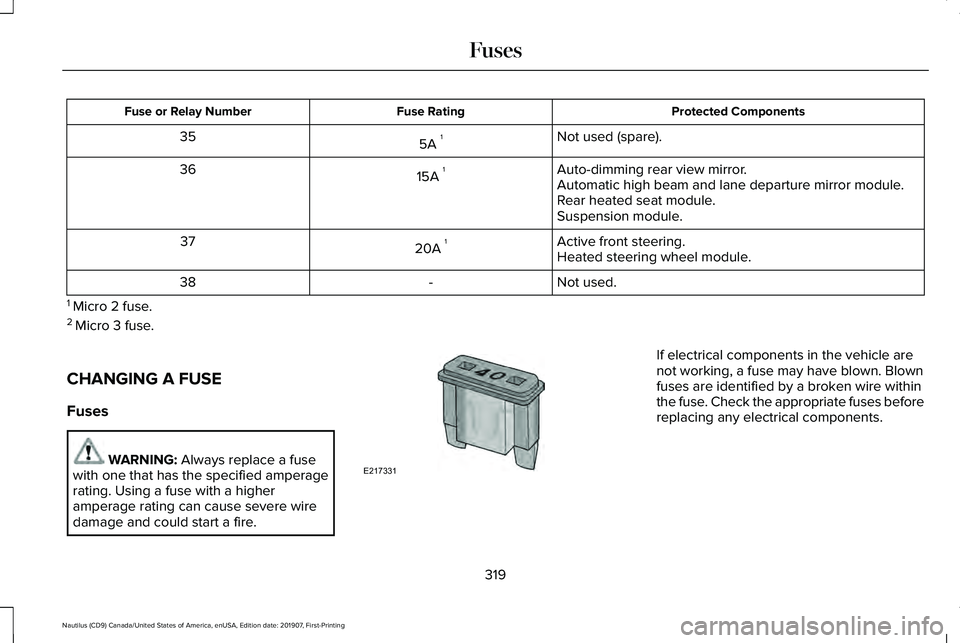
damage and could start a fire. If electrical components in the vehicle are
not working, a fuse may have blown. Blown
fuses are identified by a broken wire within
the fuse. Check the appropriate fuses before
replacing any electrical components.
319
Nautilus (CD9) Canada/United States of America, enUSA, Edition date: 201907, First-Printing FusesE217331