window LINCOLN NAUTILUS 2020 Owners Manual
[x] Cancel search | Manufacturer: LINCOLN, Model Year: 2020, Model line: NAUTILUS, Model: LINCOLN NAUTILUS 2020Pages: 596, PDF Size: 5.88 MB
Page 5 of 596
MyKey – Troubleshooting
...........................68
Doors and Locks
Locking and Unlocking ................................
70
Keyless Entry ...................................................
74
Liftgate
Power Liftgate .................................................
78
Security
Passive Anti-Theft System ...........................
82
Anti-Theft Alarm .............................................
84
Steering Wheel
Adjusting the Steering Wheel - Vehicles With: Manual Adjustable Steering
Column .........................................................
85
Adjusting the Steering Wheel - Vehicles With: Power Adjustable Steering Column
........................................................................\
85
Audio Control .................................................
86
Voice Control ..................................................
87
Cruise Control .................................................
87Cruise Control - Vehicles With: Adaptive
Cruise Control With Lane Centering
........................................................................\
.
88
Information Display Control ........................
88
Heated Steering Wheel ...............................
89
Horn ..................................................................
89
Wipers and Washers
Windshield Wipers ........................................
90
Autowipers .......................................................
91
Windshield Washers .....................................
92
Rear Window Wiper and Washers ............
92
Lighting
General Information ......................................
94
Lighting Control .............................................
94
Autolamps .......................................................
95
Instrument Lighting Dimmer .......................
96
Headlamp Exit Delay ....................................
96
Daytime Running Lamps - Vehicles With: Daytime Running Lamps (DRL) ..............
96
Daytime Running Lamps - Vehicles With: Configurable Daytime Running Lamps
........................................................................\
96 Front Fog Lamps
............................................
97
Adaptive Headlamps ....................................
97
Direction Indicators .......................................
98
Welcome Lighting ..........................................
98
Interior Lamps .................................................
98
Ambient Lighting ...........................................
99
Automatic High Beam Control
What Is Automatic High Beam Control ........................................................................\
101
Switching Automatic High Beam Control On and Off ..................................................
101
Automatic High Beam Control Indicators .......................................................................
102
Overriding Automatic High Beam Control .......................................................................
102
Windows and Mirrors
Power Windows ............................................
103
Global Opening and Closing .....................
104
Exterior Mirrors .............................................
104
Interior Mirror ................................................
106
Sun Visors ......................................................
107
Moonroof ........................................................
107
2
Nautilus (CD9) Canada/United States of America, enUSA, Edition date: 201907, First-Printing Table of Contents
Page 6 of 596
Instrument Cluster
Gauges
...........................................................109
Warning Lamps and Indicators ...................
111
Audible Warnings and Indicators ..............
115
Information Displays
General Information ......................................
116
Information Messages ................................
122
Climate Control
Automatic Climate Control ........................
142
Hints on Controlling the Interior Climate .......................................................................
143
Heated Windshield ......................................
144
Heated Rear Window ..................................
144
Heated Exterior Mirrors ..............................
144
Cabin Air Filter ..............................................
145
Remote Start ..................................................
145
Seats
Sitting in the Correct Position ...................
147
Head Restraints ............................................
148
Power Seats ....................................................
151Memory Function
.........................................
154
Rear Seats ......................................................
158
Heated Seats ................................................
159
Climate Controlled Seats ...........................
160
Garage Door Opener
Universal Garage Door Opener ...............
162
Auxiliary Power Points
Auxiliary Power Points ................................
166
Wireless Accessory Charging ...................
167
Storage Compartments
Glove Compartment ....................................
170
Center Console .............................................
170
Overhead Console ........................................
171
Rear Seat Armrest .........................................
171
Starting and Stopping the Engine
General Information .....................................
172
Keyless Starting ............................................
172
Starting a Gasoline Engine ........................
173Engine Block Heater
...................................
176
Unique Driving Characteristics
Auto-Start-Stop .............................................
178
Fuel and Refueling
Safety Precautions ........................................
181
Fuel Quality ....................................................
182
Fuel Filler Funnel Location ........................
182
Running Out of Fuel ....................................
183
Refueling ........................................................
184
Fuel Consumption ........................................
187
Engine Emission Control
Emission Law .................................................
188
Catalytic Converter ......................................
189
Transmission
Automatic Transmission .............................
192
All-Wheel Drive
Using All-Wheel Drive .................................
199
3
Nautilus (CD9) Canada/United States of America, enUSA, Edition date: 201907, First-Printing Table of Contents
Page 8 of 596
Floor Mats
.....................................................287
Roadside Emergencies
Roadside Assistance ..................................
288
Hazard Flashers ..........................................
289
Fuel Shutoff ..................................................
289
Jump Starting the Vehicle ........................
290
Post-Crash Alert System ...........................
292
Transporting the Vehicle ...........................
293
Customer Assistance
Getting the Services You Need ...............
294
In California (U.S. Only) ..............................
295
The Better Business Bureau (BBB) Auto Line Program (U.S. Only) .......................
296
Utilizing the Mediation/Arbitration Program (Canada Only) ..........................................
297
Getting Assistance Outside the U.S. and Canada ......................................................
298
Ordering Additional Owner's Literature ......................................................................
300
Reporting Safety Defects (U.S. Only) ......
301
Reporting Safety Defects (Canada Only) .......................................................................
301 Fuses
Fuse Specification Chart
...........................
303
Changing a Fuse ..........................................
319
Maintenance
General Information ....................................
322
Opening and Closing the Hood ..............
322
Under Hood Overview - 2.0L ...................
324
Under Hood Overview - 2.7L ...................
325
Engine Oil Dipstick ......................................
327
Engine Oil Check .........................................
327
Oil Change Indicator Reset ......................
328
Engine Coolant Check ...............................
329
Automatic Transmission Fluid Check ......
333
Brake Fluid Check .......................................
334
Washer Fluid Check ...................................
335
Fuel Filter .......................................................
335
Changing the 12V Battery .........................
335
Checking the Wiper Blades ......................
337
Changing the Wiper Blades ......................
337
Adjusting the Headlamps ..........................
338
Changing a Bulb ..........................................
340
Changing the Engine Air Filter - 2.0L .....
340Changing the Engine Air Filter - 2.7L
......
341
Vehicle Care
General Information ....................................
343
Cleaning Products .......................................
343
Cleaning the Exterior ..................................
344
Waxing ...........................................................
345
Cleaning the Engine ...................................
346
Cleaning the Windows and Wiper Blades ......................................................................
346
Cleaning the Interior ...................................
347
Cleaning the Instrument Panel and Instrument Cluster Lens ........................
349
Cleaning Leather Seats .............................
349
Repairing Minor Paint Damage ...............
350
Cleaning the Wheels ..................................
350
Vehicle Storage ............................................
351
Body Styling Kits ..........................................
353
Wheels and Tires
General Information ....................................
354
Tire Care ........................................................
356
Using Snow Chains .....................................
370
5
Nautilus (CD9) Canada/United States of America, enUSA, Edition date: 201907, First-Printing Table of Contents
Page 11 of 596
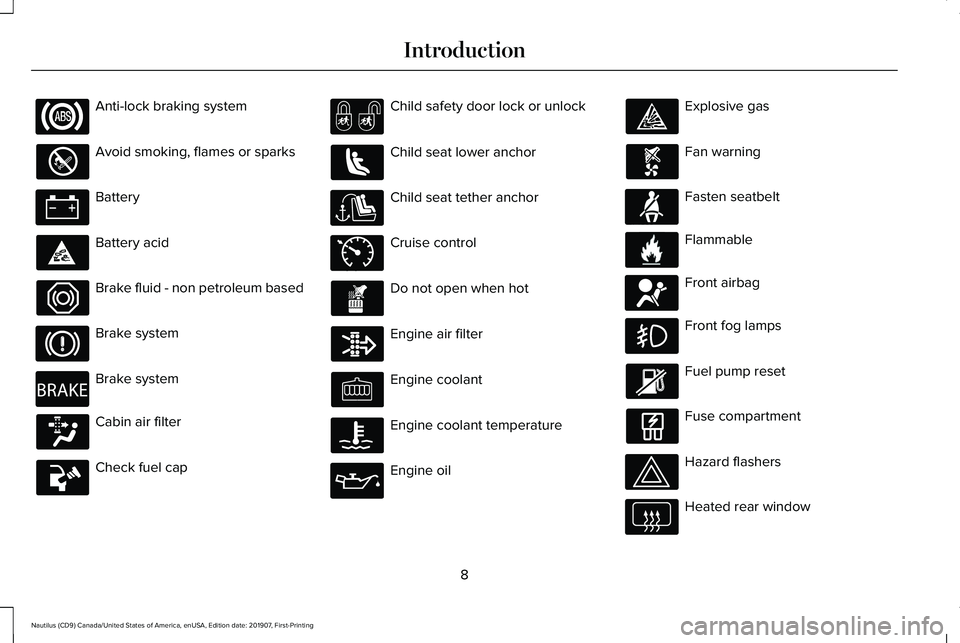
Anti-lock braking system
Avoid smoking, flames or sparks
Battery
Battery acid
Brake fluid - non petroleum based
Brake system
Brake system
Cabin air filter
Check fuel cap Child safety door lock or unlock
Child seat lower anchor
Child seat tether anchor
Cruise control
Do not open when hot
Engine air filter
Engine coolant
Engine coolant temperature
Engine oil Explosive gas
Fan warning
Fasten seatbelt
Flammable
Front airbag
Front fog lamps
Fuel pump reset
Fuse compartment
Hazard flashers
Heated rear window
8
Nautilus (CD9) Canada/United States of America, enUSA, Edition date: 201907, First-Printing Introduction E270480 E71340 E71880 E231160 E67017
Page 12 of 596
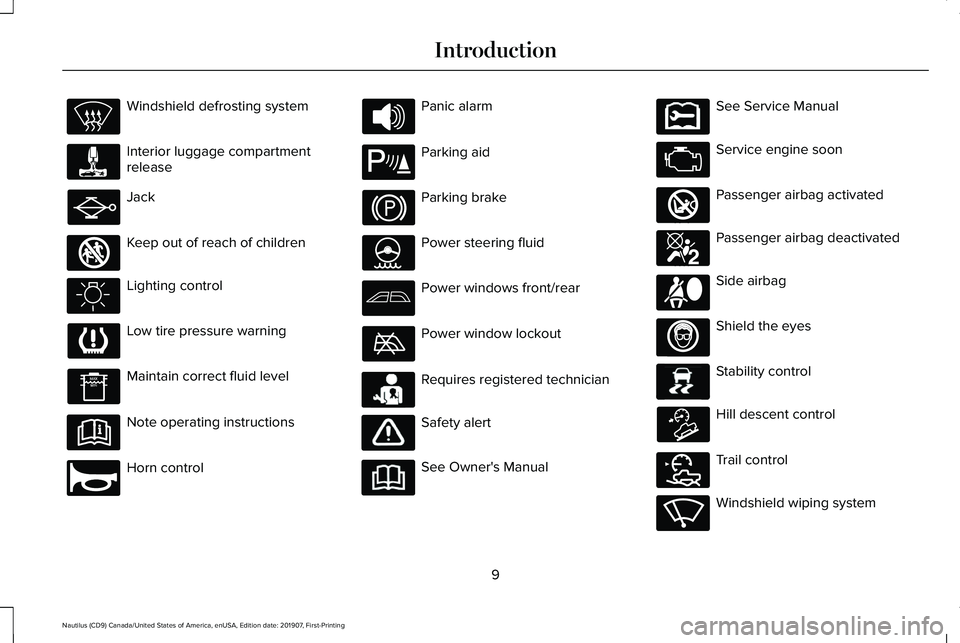
Windshield defrosting system
Interior luggage compartment
release
Jack
Keep out of reach of children
Lighting control
Low tire pressure warning
Maintain correct fluid level
Note operating instructions
Horn control Panic alarm
Parking aid
Parking brake
Power steering fluid
Power windows front/rear
Power window lockout
Requires registered technician
Safety alert
See Owner's Manual See Service Manual
Service engine soon
Passenger airbag activated
Passenger airbag deactivated
Side airbag
Shield the eyes
Stability control
Hill descent control
Trail control
Windshield wiping system
9
Nautilus (CD9) Canada/United States of America, enUSA, Edition date: 201907, First-Printing Introduction E161353 E270945 E139213 E231159 E231158 E270849 E270850 E167012 E138639 E163957 E272858 E270969
Page 56 of 596
WARNING: All occupants of your
vehicle, including the driver, should always
properly wear their seatbelts, even when
an airbag supplemental restraint system is
provided. Failure to properly wear your
seatbelt could seriously increase the risk
of injury or death. WARNING:
To reduce risk of injury,
do not obstruct or place objects in the
deployment path of the airbag. WARNING:
If a supplementary
restraint system component has deployed,
it will not function again. Have the system
and associated components inspected as
soon as possible. Failure to follow this
instruction could result in personal injury
or death.
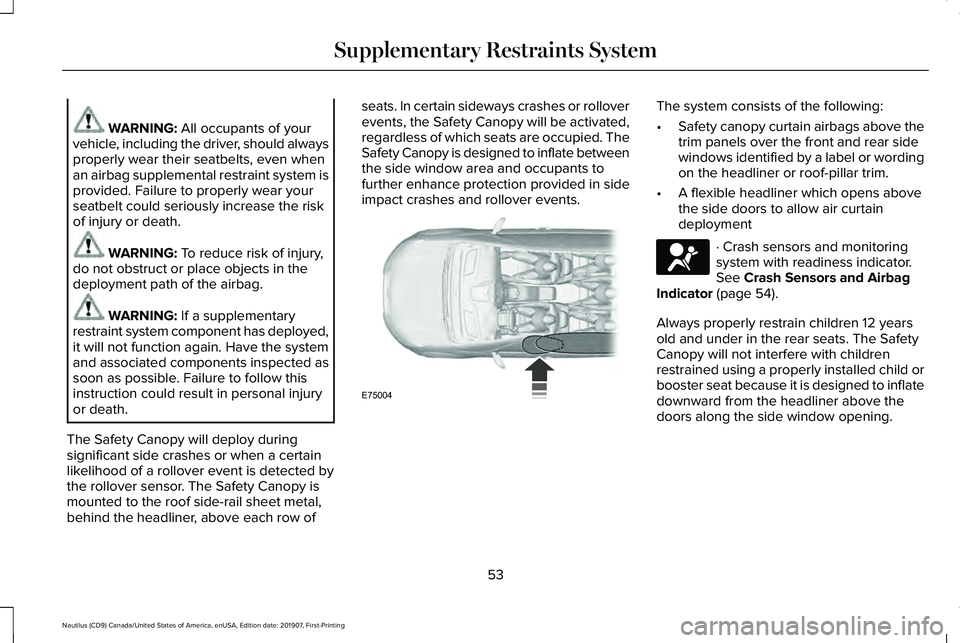
The Safety Canopy will deploy during
significant side crashes or when a certain
likelihood of a rollover event is detected by
the rollover sensor. The Safety Canopy is
mounted to the roof side-rail sheet metal,
behind the headliner, above each row of seats. In certain sideways crashes or rollover
events, the Safety Canopy will be activated,
regardless of which seats are occupied. The
Safety Canopy is designed to inflate between
the side window area and occupants to
further enhance protection provided in side
impact crashes and rollover events. The system consists of the following:
•
Safety canopy curtain airbags above the
trim panels over the front and rear side
windows identified by a label or wording
on the headliner or roof-pillar trim.
• A flexible headliner which opens above
the side doors to allow air curtain
deployment · Crash sensors and monitoring
system with readiness indicator.
See
Crash Sensors and Airbag
Indicator (page 54).
Always properly restrain children 12 years
old and under in the rear seats. The Safety
Canopy will not interfere with children
restrained using a properly installed child or
booster seat because it is designed to inflate
downward from the headliner above the
doors along the side window opening.
53
Nautilus (CD9) Canada/United States of America, enUSA, Edition date: 201907, First-Printing Supplementary Restraints SystemE75004 E67017
Page 59 of 596
WHAT IS 911 ASSIST
911 Assist is a SYNC system feature that can
call for help if you are in an accident. If a
crash deploys an airbag, excluding knee
airbags and rear inflatable seatbelts [if
equipped], or activates the fuel pump
shut-off, your SYNC-equipped vehicle may
be able to contact emergency services by
dialing 911 through a paired and connected
Bluetooth enabled phone. You can learn
more about the 911 Assist feature, by visiting:
Website
www.owner.lincoln.com
www.syncmyride.ca
www.syncmaroute.ca
Not all crashes will deploy an airbag or
activate the fuel pump shut-off, the triggers
for 911 Assist. If a connected cell phone
sustains damage or loses its connection to
SYNC during a crash, SYNC will search for
and try to connect to a previously paired cell
phone. SYNC will then attempt to call the
emergency services. Before making the call:
•
SYNC provides a short window of time,
about 10 seconds, to cancel the call. If
you fail to cancel the call, SYNC attempts
to dial 911.
• SYNC says the following, or a similar
message: SYNC will attempt to call 911,
to cancel the call, press Cancel on your
screen or press and hold the phone
button on your steering wheel.
If you do not cancel the call, and SYNC
makes a successful call, a pre-recorded
message plays for the 911 operator, and then
the occupant(s) in your vehicle is able to talk
with the operator. Be prepared to
immediately provide your name, phone
number and location, because not all 911
systems are capable of receiving this
information electronically.
During an emergency call, the system
transmits vehicle data to the emergency
service. See Data Recording (page 10). EMERGENCY CALL
REQUIREMENTS WARNING:
Do not wait for 911 Assist
to make an emergency call if you can do
it yourself. Dial emergency services
immediately to avoid delayed response
time which could increase the risk of
serious injury or death after a crash. If you
do not hear 911 Assist within five seconds
of the crash, the system or phone may be
damaged or non-functional. WARNING: Always place your phone
in a secure location in your vehicle so it
does not become a projectile or get
damaged in a crash. Failure to do so may
cause serious injury to someone or
damage the phone which could prevent
911 Assist from working properly.
56
Nautilus (CD9) Canada/United States of America, enUSA, Edition date: 201907, First-Printing 911 Assist
Page 64 of 596
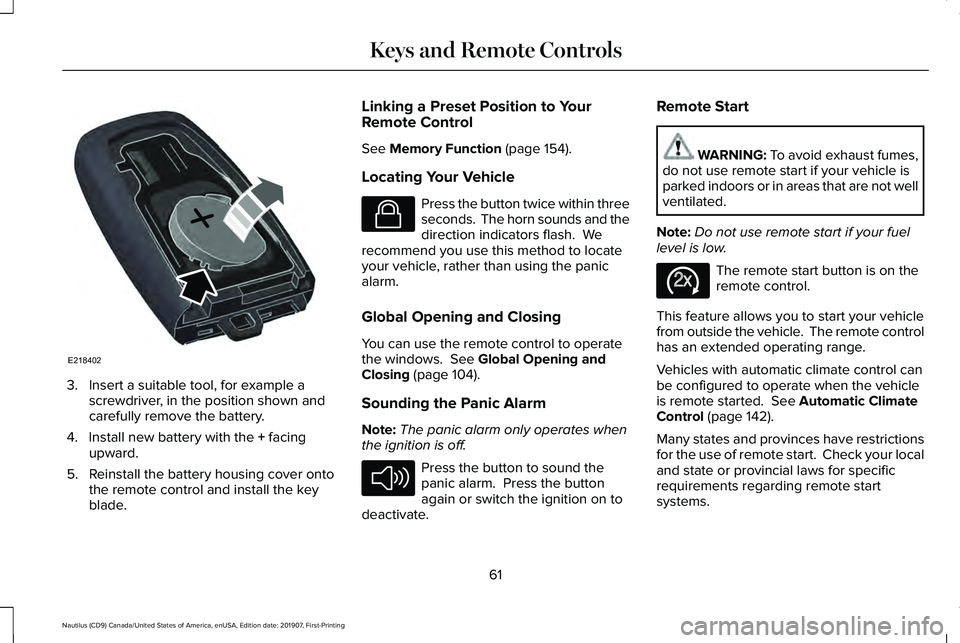
3. Insert a suitable tool, for example a
screwdriver, in the position shown and
carefully remove the battery.
4. Install new battery with the + facing
upward.
5. Reinstall the battery housing cover onto the remote control and install the key
blade. Linking a Preset Position to Your
Remote Control
See
Memory Function (page 154).
Locating Your Vehicle Press the button twice within three
seconds. The horn sounds and the
direction indicators flash. We
recommend you use this method to locate
your vehicle, rather than using the panic
alarm.
Global Opening and Closing
You can use the remote control to operate
the windows.
See Global Opening and
Closing (page 104).
Sounding the Panic Alarm
Note: The panic alarm only operates when
the ignition is off. Press the button to sound the
panic alarm. Press the button
again or switch the ignition on to
deactivate. Remote Start WARNING:
To avoid exhaust fumes,
do not use remote start if your vehicle is
parked indoors or in areas that are not well
ventilated.
Note: Do not use remote start if your fuel
level is low. The remote start button is on the
remote control.
This feature allows you to start your vehicle
from outside the vehicle. The remote control
has an extended operating range.
Vehicles with automatic climate control can
be configured to operate when the vehicle
is remote started.
See Automatic Climate
Control (page 142).
Many states and provinces have restrictions
for the use of remote start. Check your local
and state or provincial laws for specific
requirements regarding remote start
systems.
61
Nautilus (CD9) Canada/United States of America, enUSA, Edition date: 201907, First-Printing Keys and Remote ControlsE218402 E138623 E138624 E138625
Page 65 of 596
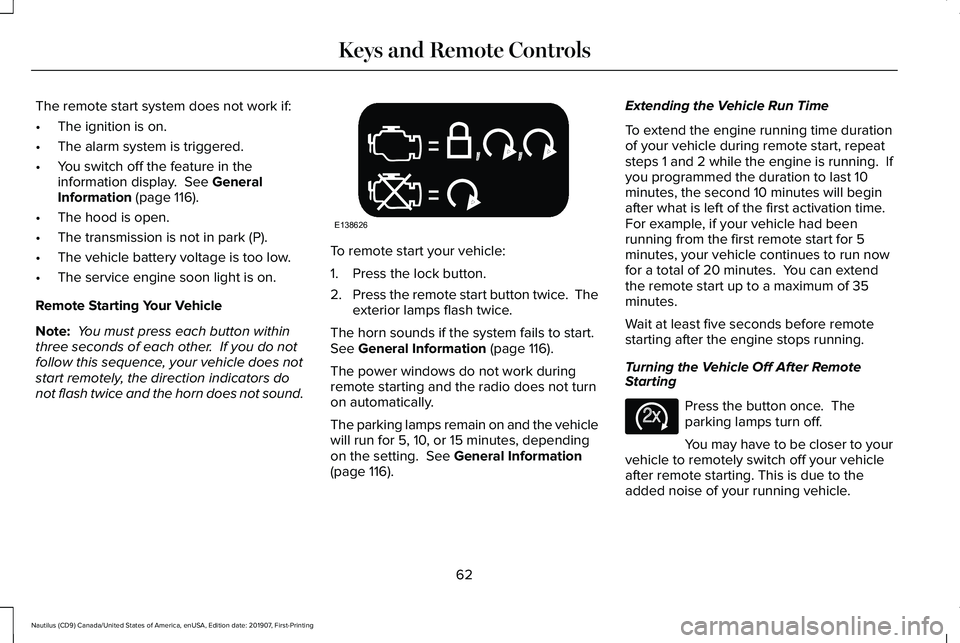
The remote start system does not work if:
•
The ignition is on.
• The alarm system is triggered.
• You switch off the feature in the
information display. See General
Information (page 116).
• The hood is open.
• The transmission is not in park (P).
• The vehicle battery voltage is too low.
• The service engine soon light is on.
Remote Starting Your Vehicle
Note: You must press each button within
three seconds of each other. If you do not
follow this sequence, your vehicle does not
start remotely, the direction indicators do
not flash twice and the horn does not sound. To remote start your vehicle:
1. Press the lock button.
2.
Press the remote start button twice. The
exterior lamps flash twice.
The horn sounds if the system fails to start.
See
General Information (page 116).
The power windows do not work during
remote starting and the radio does not turn
on automatically.
The parking lamps remain on and the vehicle
will run for 5, 10, or 15 minutes, depending
on the setting.
See General Information
(page 116). Extending the Vehicle Run Time
To extend the engine running time duration
of your vehicle during remote start, repeat
steps 1 and 2 while the engine is running. If
you programmed the duration to last 10
minutes, the second 10 minutes will begin
after what is left of the first activation time.
For example, if your vehicle had been
running from the first remote start for 5
minutes, your vehicle continues to run now
for a total of 20 minutes. You can extend
the remote start up to a maximum of 35
minutes.
Wait at least five seconds before remote
starting after the engine stops running.
Turning the Vehicle Off After Remote
Starting
Press the button once. The
parking lamps turn off.
You may have to be closer to your
vehicle to remotely switch off your vehicle
after remote starting. This is due to the
added noise of your running vehicle.
62
Nautilus (CD9) Canada/United States of America, enUSA, Edition date: 201907, First-Printing Keys and Remote ControlsE138626 E138625
Page 73 of 596
LOCKING AND UNLOCKING
You can use the power door lock control or
the remote control to lock and unlock your
vehicle.
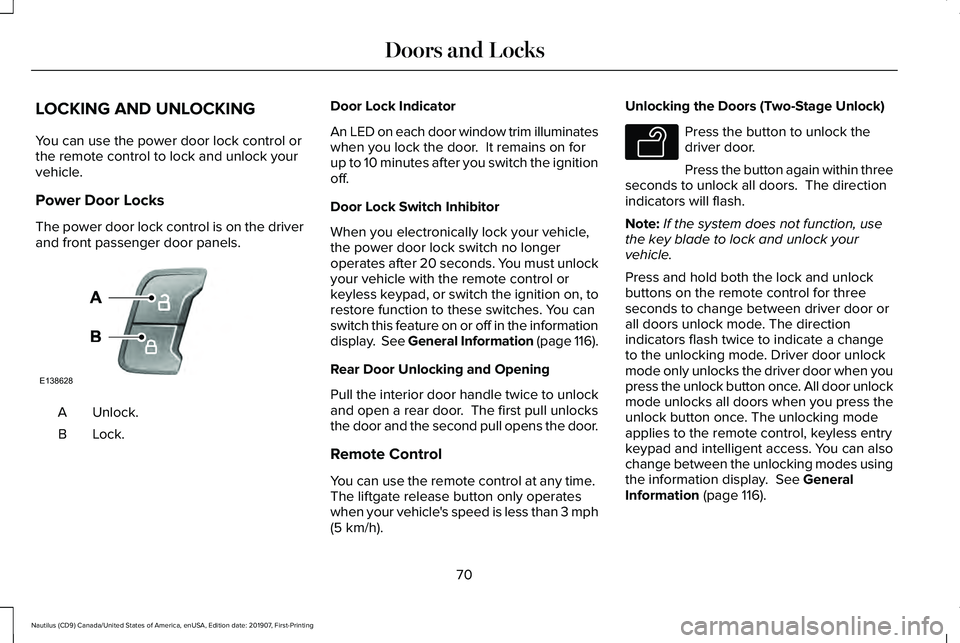
Power Door Locks
The power door lock control is on the driver
and front passenger door panels.
Unlock.
A
Lock.B Door Lock Indicator
An LED on each door window trim illuminates
when you lock the door. It remains on for
up to 10 minutes after you switch the ignition
off.
Door Lock Switch Inhibitor
When you electronically lock your vehicle,
the power door lock switch no longer
operates after 20 seconds. You must unlock
your vehicle with the remote control or
keyless keypad, or switch the ignition on, to
restore function to these switches. You can
switch this feature on or off in the information
display. See General Information (page 116).
Rear Door Unlocking and Opening
Pull the interior door handle twice to unlock
and open a rear door. The first pull unlocks
the door and the second pull opens the door.
Remote Control
You can use the remote control at any time.
The liftgate release button only operates
when your vehicle's speed is less than 3 mph
(5 km/h). Unlocking the Doors (Two-Stage Unlock) Press the button to unlock the
driver door.
Press the button again within three
seconds to unlock all doors. The direction
indicators will flash.
Note: If the system does not function, use
the key blade to lock and unlock your
vehicle.
Press and hold both the lock and unlock
buttons on the remote control for three
seconds to change between driver door or
all doors unlock mode. The direction
indicators flash twice to indicate a change
to the unlocking mode. Driver door unlock
mode only unlocks the driver door when you
press the unlock button once. All door unlock
mode unlocks all doors when you press the
unlock button once. The unlocking mode
applies to the remote control, keyless entry
keypad and intelligent access. You can also
change between the unlocking modes using
the information display.
See General
Information (page 116).
70
Nautilus (CD9) Canada/United States of America, enUSA, Edition date: 201907, First-Printing Doors and LocksE138628 E138629